
The main security risks of cloud computing are data breaches, account hijacking, misconfiguration, insider threats, supply-chain compromise, DDoS attacks, ransomware, encryption failures, unpatched vulnerabilities, and multi-tenancy exposure. The single most important thing you can do right now is enable phishing-resistant multi-factor authentication (MFA) on every account, then verify your backups are isolated from your primary cloud environment.
Act on these three things this week:
- Enable phishing-resistant MFA across Microsoft 365, Google Workspace, or whichever platform your team uses.
- Confirm your backups are stored separately from your cloud provider, not just in the same tenancy.
- Run a permissions audit: check who has admin access and which third-party apps are connected to your core systems.
If you do nothing else after reading this, do those three. Everything below explains why, and what to do next.
Table of Contents
- How secure is cloud computing for Australian businesses?
- Who is responsible for what in the cloud?
- The main cloud security risks, and how to mitigate each one
- Practical controls and an implementation roadmap
- How to assess cloud providers in Australia
- Preparing for incidents: what to expect and what it costs
- What most businesses get wrong: real MSP observations
- What to do this week: your four-priority action list
- IT Start’s perspective on cloud security for Brisbane SMBs
- Sources
- FAQ
How secure is cloud computing for Australian businesses?
Cloud can absolutely be more secure than a poorly managed on-premises server. But that only holds true when you, the tenant, do your part. The provider secures the infrastructure. You are responsible for what sits on top of it: your data, your identities, your configurations, and your backups.
PwC’s Annual Threat Dynamics report identifies identity-driven intrusion, ransomware (including double extortion), cloud misconfiguration, and third-party compromise as the leading threats to Australian organisations right now. These are not theoretical risks. We see them affecting Brisbane SMBs regularly.
For Australian businesses, the regulatory context adds another layer. Privacy Act obligations, the Notifiable Data Breaches scheme, and sector-specific rules (for healthcare, finance, and legal firms) mean a cloud incident is rarely just an IT problem. It becomes a compliance and legal problem quickly.
The honest comparison between cloud and on-premises for a typical SMB with 10 to 50 staff:
| Factor | On-premises | Cloud (well-configured) |
|---|---|---|
| Availability | Depends on your hardware and internet | Generally higher, provider-managed uptime |
| Confidentiality | You control everything, but patching is often neglected | Provider secures infrastructure; tenant must secure data and access |
| Integrity | Easier to air-gap, harder to scale | Strong if logging and access controls are enforced |
| Operational effort | High: hardware, patching, physical security | Lower infrastructure burden, but configuration complexity shifts to tenant |
| Incident response | Fully your responsibility | Shared, but tenant must still detect and respond |
The security benefits of cloud computing are real, but they do not arrive automatically. You have to configure for them.
Who is responsible for what in the cloud?
The answer-first version: you always retain responsibility for your data, your identities, and your configurations. Always. Even when the provider manages every layer of infrastructure beneath you.
The ACSC’s shared responsibility model guidance makes this explicit. Tenants remain responsible for data, configurations, access controls, and backups regardless of which service model they use. This is where most SMBs get into trouble: they assume the provider has covered something that is actually their job.
For SaaS users, the practical items to check are: do you have a separate backup of your Microsoft 365 data, who has global admin rights, and are your conditional access policies actually enforced? For IaaS, add operating system patching, firewall rules, and secrets management to that list.
We manage Microsoft 365 for a lot of SMBs. The most common gap we find is backup ownership. Clients assume Microsoft backs up their email and SharePoint. Microsoft retains data for a limited period for service continuity, not for your disaster recovery. That is your job.
The main cloud security risks, and how to mitigate each one
Australian Institute of Criminology research confirms that data loss, account hijacking, and misconfiguration are the most commonly reported cloud security concerns. Here is a practical breakdown of each major risk, why it matters for Australian SMBs, and what to do about it.
1. Data breaches and leakage
Data breaches in cloud environments usually happen through misconfigured storage, over-permissioned accounts, or stolen credentials. For Australian businesses, a breach that exposes personal information triggers mandatory notification under the Privacy Act’s Notifiable Data Breaches scheme, which carries real reputational and legal consequences.
Mitigations:
- Classify your data before you move it to the cloud. Know what is sensitive and where it lives.
- Apply object-level access controls on storage (S3 buckets, Azure Blob Storage). Public-read should never be the default.
- Enable data loss prevention (DLP) policies in Microsoft 365 or Google Workspace to catch accidental sharing.
2. Account hijacking and identity compromise
Stolen credentials are the most common entry point for cloud attacks. Once an attacker has a valid username and password, they can act as a legitimate user, access files, send emails, and pivot to connected systems. ACSC guidance is clear: phishing-resistant MFA and least-privilege access are the primary defences here.
Mitigations:
- Deploy phishing-resistant MFA (FIDO2 keys or Microsoft Authenticator with number matching) across all accounts.
- Enable conditional access policies that block logins from unexpected locations or devices.
- Monitor sign-in logs for anomalies: logins at 3AM from overseas are not normal for a Brisbane accounting firm.
Pro Tip: Do not just turn on MFA and walk away. Check that legacy authentication protocols (basic auth, SMTP auth) are disabled. Attackers specifically target these to bypass MFA entirely.
3. Misconfiguration and exposed APIs
Misconfiguration is the leading cause of cloud data exposure. A storage bucket set to public, an API endpoint with no authentication, a security group that allows inbound traffic from anywhere: these are all common and all avoidable. Research confirms that misconfiguration and over-permissioned identities are among the top causes of cloud data exposure as adoption accelerates.
Mitigations:
- Use cloud security posture management (CSPM) tools like Microsoft Defender for Cloud or AWS Security Hub to flag misconfigurations automatically.
- Restrict API scopes to the minimum required. An app that only reads calendar data should not have access to your entire mailbox.
- Run a configuration review against the ACSC’s cloud security best practices at least quarterly.
Pro Tip: Treat every API key like a password. Rotate them regularly, store them in a secrets manager (Azure Key Vault, AWS Secrets Manager), and never hard-code them in source code or configuration files.
4. Insider threats and privileged access misuse
Insider threats include both malicious employees and well-meaning staff who make mistakes. Privileged accounts are the highest-risk target: a compromised global admin in Microsoft 365 can delete your entire tenancy. We see this risk underestimated constantly.
Mitigations:
- Apply least-privilege access: give people only the permissions they need for their role, nothing more.
- Use Privileged Identity Management (PIM) in Azure AD to require just-in-time elevation for admin tasks.
- Review and remove stale accounts, especially for former employees and contractors, within 24 hours of offboarding.
5. Supply-chain and third-party risk
Third-party apps, SaaS integrations, and AI tools connected to your core systems are a growing attack surface. PwC’s threat reporting lists third-party compromise as a leading risk to Australian organisations. Foreign ownership or extrajudicial control over a cloud provider can also create foreign-interference risks, which Australian businesses need to assess during procurement, as ASD/ACSC guidance makes clear.
Mitigations:
- Audit every third-party app connected to Microsoft 365 or Google Workspace. Revoke anything that is not actively used or cannot be justified.
- Check the data residency and ownership terms of every SaaS tool your team uses. For Brisbane businesses handling sensitive client data, data sovereignty is not optional.
- Require vendors to provide evidence of security certifications (ISO 27001, SOC 2) and ask where your data is stored.
6. DDoS attacks and availability issues
Distributed denial-of-service attacks target availability. For cloud-hosted applications and websites, a sustained DDoS can take your services offline for hours. For SMBs that rely on cloud-hosted line-of-business applications, that translates directly to lost revenue and productivity.
Mitigations:
- Use your cloud provider’s native DDoS protection (Azure DDoS Protection, AWS Shield) for internet-facing services.
- Implement rate limiting and web application firewall (WAF) rules on public-facing APIs and web apps.
- Test your failover and recovery procedures before you need them.
7. Ransomware and malware affecting cloud files
Ransomware does not stop at your local network. When a user’s device is compromised, ransomware can encrypt files synced to OneDrive, SharePoint, or Google Drive, and spread through connected systems.
Mitigations:
- Maintain an air-gapped or separate backup that ransomware cannot reach through your cloud credentials. This is non-negotiable.
- Enable versioning on cloud storage so you can roll back to a pre-encryption state.
- Use endpoint detection and response (EDR) on every device that connects to cloud services.
Pro Tip: Ransomware operators specifically look for and delete or encrypt backups before triggering the main payload. If your backup is accessible with the same credentials as your production environment, it is not a real backup.
8. Encryption and key management mistakes
Encryption protects data at rest and in transit, but it only works if the keys are managed correctly. Storing encryption keys in the same environment as the encrypted data, or using provider-managed keys without understanding the implications, can undermine the protection entirely.
Mitigations:
- Use customer-managed encryption keys (CMEK) for sensitive workloads so the provider cannot access your data without your key.
- Store keys in a dedicated key management service (Azure Key Vault, AWS KMS), not alongside the data they protect.
- Confirm that data in transit uses TLS 1.2 or higher. Older protocols have known vulnerabilities.
9. Unpatched vulnerabilities and insecure software
In IaaS and PaaS environments, operating system and application patching is your responsibility. We regularly find SMBs running cloud-hosted virtual machines with months of outstanding patches. ACSC guidance lists timely patching as one of the primary mitigations for common cloud risks.
Mitigations:
- Automate patching for cloud-hosted VMs using Azure Update Manager or AWS Systems Manager Patch Manager.
- Apply critical patches within 48 hours of release. Non-critical patches within 30 days is a reasonable baseline.
- Scan for vulnerabilities regularly using tools like Microsoft Defender Vulnerability Management or Tenable.
10. Multi-tenancy and noisy neighbour risks
Public cloud environments host multiple customers on shared infrastructure. While providers use strong isolation controls, vulnerabilities in hypervisors or container runtimes can theoretically allow cross-tenant access. In practice, the bigger risk for SMBs is performance degradation from noisy neighbours rather than a direct security breach.
Mitigations:
- For highly sensitive workloads (financial records, health data), consider dedicated hosting options or private cloud configurations.
- Monitor application performance baselines so you can detect anomalies that might indicate resource contention or something more serious.
- Understand your provider’s isolation architecture and ask specifically about their multi-tenancy controls during procurement.
Practical controls and an implementation roadmap
The single most effective starting point is identity. Get phishing-resistant MFA deployed, enforce least-privilege access, and use managed identities for service accounts before you do anything else. Everything else builds on that foundation.
Here is a realistic roadmap for an SMB with 10 to 50 staff:
| Timeframe | Priority tasks |
|---|---|
| — | Enable phishing-resistant MFA for all users; disable legacy auth protocols; run a permissions audit and remove stale accounts; verify backups are isolated from the primary cloud tenancy; enable sign-in and audit logging |
| — | Implement conditional access policies; deploy CSPM tooling; establish a patch cadence (critical: 48 hours, standard: 30 days); review third-party app permissions; configure DLP policies for sensitive data |
| — | Complete a secure configuration baseline review against ACSC controls; implement privileged identity management; deploy EDR on all endpoints; test backup restoration; establish a basic incident response plan with named roles |
Ongoing controls checklist:
- Encryption at rest and in transit (TLS 1.2 or higher, CMEK for sensitive data)
- Air-gapped or separate backups, tested monthly
- Centralised logging with alerts for anomalous sign-ins and configuration changes
- Patch management with defined SLAs for critical and standard patches
- Secrets management: no hard-coded credentials, rotate API keys regularly
- Quarterly access reviews: remove stale accounts and over-permissioned roles
- Secure software development practices if you build or customise cloud applications
The ACSC small business guide maps these controls to the Essential Eight framework, which is the most practical starting point for Australian SMBs. The SaaS security checklist for B2B teams is also a useful companion document for teams managing multiple SaaS platforms.
For a step-by-step guide to securing data in the cloud, IT Start has published practical guidance tailored to Australian businesses.
How to assess cloud providers in Australia
Look for IRAP-assessed services first. IRAP (Infosec Registered Assessors Program) is the ASD’s framework for assessing whether a cloud service meets Australian government security standards. Even if you are not a government agency, an IRAP-assessed provider has been independently evaluated against a rigorous control set, which is a meaningful signal for any Australian business handling sensitive data.
ASD/ACSC guidance recommends IRAP assessments, continuous monitoring, and personnel security controls when evaluating a cloud provider for Australian workloads. ISO 27001 and SOC 2 certifications are also worth checking, but ask for the scope and the assessment date. A SOC 2 report from three years ago covering only one data centre is not the same as a current, comprehensive assessment.
Vendor assurance checklist:
- IRAP assessment status and scope (which services, which data classifications)
- Data residency: where is your data stored, and can it be accessed from overseas?
- Personnel security: are provider staff subject to background checks?
- Logging access: can you access your own audit logs, and for how long are they retained?
- Incident notification: what is the contractual commitment for notifying you of a breach?
- Backup and restore assistance: will the provider help you recover data, and under what conditions?
- Exit and portability: can you get your data out, in what format, and within what timeframe?
Contract points to negotiate:
- Data ownership clause: your data is yours, full stop. Get it in writing.
- Audit rights: the right to request evidence of controls or commission an independent audit.
- Incident notification window: 72 hours is the standard under the Privacy Act’s Notifiable Data Breaches scheme. Your contract should match or beat that.
- Exit assistance: a defined process for data export and a transition period if you change providers.
Foreign ownership of a CSP is a real consideration for Australian businesses. The ASD flags that extrajudicial control over a provider by a foreign government can create interference risks. This is particularly relevant for businesses in regulated sectors. For Brisbane firms, understanding data sovereignty before signing a cloud contract is worth the time.
Preparing for incidents: what to expect and what it costs
Detection speed and a tested recovery plan drive your cost outcome more than the attack type itself. A business that detects a breach in hours and has a tested playbook will spend significantly less on recovery than one that discovers the same breach weeks later with no plan.
High-level incident timeline for an SMB:
- Detect (hours to days): Anomalous login alerts, user reports unusual activity, or a security tool flags suspicious behaviour. First action: do not shut down affected systems immediately. Preserve logs first.
- Contain (hours): Isolate affected accounts and systems. Revoke compromised credentials. Block known attacker IPs. Notify your IT provider or internal security team.
- Eradicate (hours to days): Identify and remove the root cause. This might mean removing malware, revoking OAuth tokens, or rebuilding compromised VMs from clean images.
- Recover (days to weeks): Restore from clean backups. Validate integrity before bringing systems back online. Communicate with affected staff and, if required, regulators.
- Review (within 30 days): Document what happened, what worked, and what to change. Update your incident response plan.
Cost drivers to plan for:
- Forensic investigation (external specialists if you do not have internal capability)
- Legal advice on notification obligations under the Privacy Act
- Regulatory notifications and potential fines
- Downtime and lost revenue during recovery
- Restoration and re-hosting costs
- Third-party containment services (public relations, credit monitoring for affected customers)
Incident playbook snippet (first 30 minutes):
- Who to call first: your IT provider or internal security lead, then legal counsel.
- What to isolate: affected user accounts (suspend, do not delete), affected devices (network isolation), and any connected third-party apps.
- How to preserve logs: screenshot or export sign-in logs, audit logs, and any relevant alerts before taking remediation actions that might overwrite them.
What most businesses get wrong: real MSP observations
Most of the breaches and outages we fix come from human error and the assumption that the cloud provider handled everything. That is the honest truth. Here are three situations we see repeatedly.
Situation 1: The Microsoft 365 backup assumption
A professional services firm in Brisbane had been using Microsoft 365 for four years. When a staff member’s account was compromised through a phishing email, the attacker accessed SharePoint and deleted several project folders. The client assumed Microsoft would restore the files. Microsoft’s recycle bin had already purged them.
What we did: deployed a third-party backup solution (Veeam Backup for Microsoft 365) with a separate storage destination outside the Microsoft tenancy, and configured retention policies aligned with the firm’s contractual obligations. We also enabled MFA and reviewed conditional access policies. The shared responsibility model is clear: backup is the tenant’s responsibility, not Microsoft’s.
Situation 2: The exposed storage bucket
A small e-commerce business had migrated to AWS and used S3 for storing customer order data. During the migration, a developer set a bucket to public-read to test a feature and forgot to revert it. The bucket sat exposed for several weeks before a routine scan flagged it.

What we did: ran a CSPM scan using AWS Security Hub, identified the misconfigured bucket, restricted access, and reviewed all other S3 bucket policies. We then set up an automated alert for any future public-access configuration change. The data security guidance for Brisbane SMEs covers this type of misconfiguration in detail.
Situation 3: Over-permissioned third-party apps
A financial services client had connected several AI productivity tools and a project management platform to their Microsoft 365 tenancy. When we audited the OAuth permissions, two of the apps had full mailbox read access across the entire organisation. Neither app needed that level of access for its stated function.
What we did: revoked the over-permissioned app registrations, re-authorised the apps with scoped permissions (calendar read only, specific SharePoint sites), and implemented a policy requiring IT review before any new app is connected to the tenancy. Treat every authorised app as a potential backdoor and restrict access to the minimal data set required.
Pro Tip: Run an OAuth app audit in your Microsoft 365 admin centre right now. Go to Azure Active Directory, then Enterprise Applications, then filter by user consent. You will almost certainly find apps with more access than they need.
If any of these situations sound familiar, an IT Start cloud security assessment is a practical starting point. We work with Brisbane SMBs across professional services, healthcare, and finance to find and fix these gaps before they become incidents.
What to do this week: your four-priority action list
The most important cloud security controls are identity protection, backup isolation, configuration hygiene, and vendor assurance. You do not need a six-month project to make meaningful progress. Four focused tasks this week will reduce your risk materially.
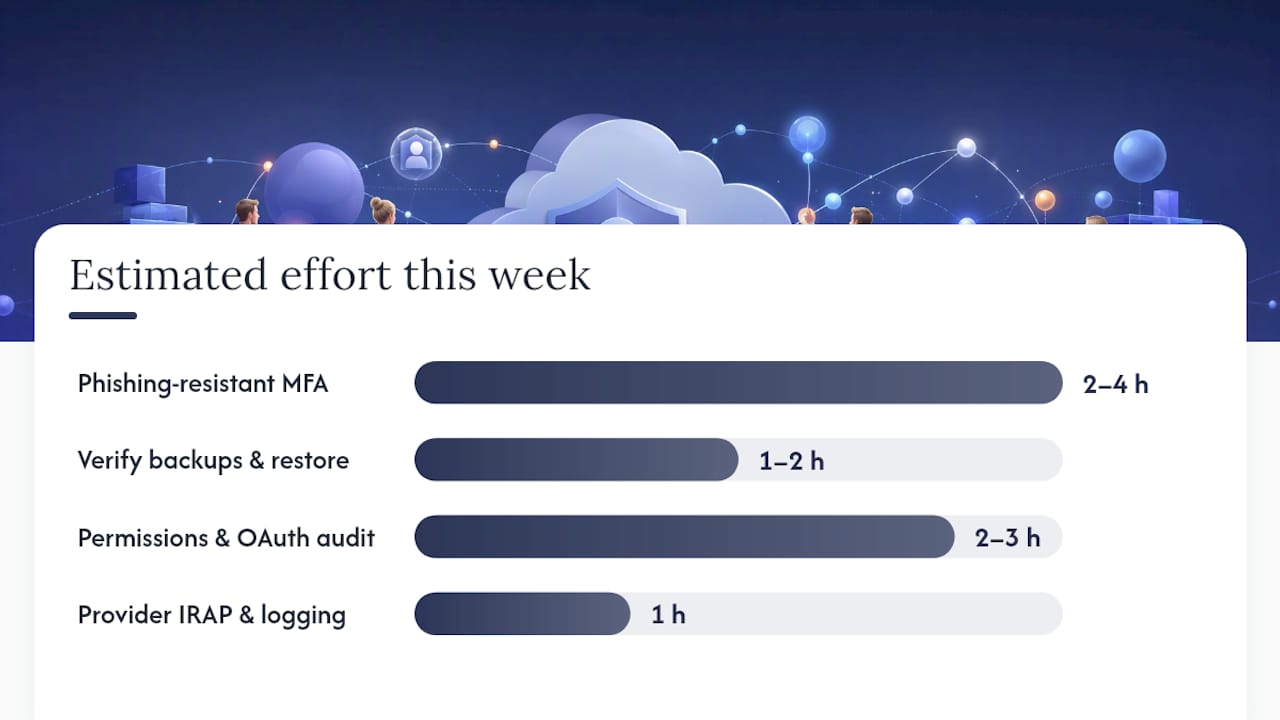
Your one-week plan:
- Day 1 to 2 (Owner: IT lead or MSP): Enable phishing-resistant MFA for all users. Disable legacy authentication protocols. Estimated effort: 2 to 4 hours for a 20-person tenancy.
- Day 2 to 3 (Owner: IT lead or MSP): Verify backups are stored separately from your cloud provider. Test a restore. Estimated effort: 1 to 2 hours to confirm, longer if a new backup solution is needed.
- Day 3 to 4 (Owner: IT lead or MSP): Run a permissions and OAuth app audit. Remove stale accounts and revoke unnecessary app access. Estimated effort: 2 to 3 hours.
- Day 4 to 5 (Owner: Business decision-maker): Check your cloud provider’s IRAP status and confirm you have logging access and a defined incident notification commitment in your contract. Estimated effort: 1 hour.
Quick wins matter more than long projects. Most SMBs that suffer a cloud-related incident had the information they needed to prevent it. The gap was action, not awareness.
| Point | Details |
|---|---|
| MFA is the highest-priority control | Phishing-resistant MFA blocks the most common cloud attack path: stolen credentials. |
| Backup ownership sits with the tenant | Microsoft 365 and most SaaS providers do not back up your data for disaster recovery. |
| Misconfiguration is the leading exposure cause | Public storage buckets and over-permissioned apps are common and avoidable with regular audits. |
| IRAP assurance matters for Australian workloads | IRAP-assessed providers have been independently evaluated against Australian government security standards. |
| Detection speed drives recovery cost | A tested incident response plan reduces recovery time and total cost more than any single technical control. |
IT Start’s perspective on cloud security for Brisbane SMBs
Honestly, the gap we see most often is not technical. It is the assumption that moving to the cloud transferred the security problem to someone else. It did not. What it transferred was the infrastructure burden. The security decisions, the configurations, the backup ownership, the identity controls: those stayed with you.
For Brisbane SMBs, we prioritise identity and backups above everything else because they are the two areas where a single failure causes the most damage in the shortest time. A compromised admin account or a missing backup turns a manageable incident into a crisis. Everything else, the CSPM tools, the DLP policies, the IRAP assessments, matters, but it matters less if those two foundations are not in place.
If you are not sure where you stand, an IT Start cloud security assessment is a practical, low-friction starting point. We work with businesses across professional services, healthcare, finance, and legal in Brisbane and Queensland. We look at your actual configuration, not a theoretical checklist, and we tell you plainly what needs fixing and in what order. You can explore our cloud services or cybersecurity services to see how we work, or get in touch directly for a conversation.
Sources
These are the sources we trust and reference throughout this article. Each one is worth bookmarking if you are making cloud procurement or risk management decisions.
- Cyber
- Annual Threat Dynamics 2026: Cyber threats in motion – Australia in focus
- Tandi456 report — cloud computing security (AIC)
FAQ
What is the biggest threat to cloud computing?
Account hijacking through stolen credentials is the most common and damaging cloud threat for Australian SMBs. Phishing-resistant MFA and least-privilege access are the primary defences, as confirmed by ACSC guidance.
What are the main disadvantages of cloud computing from a security perspective?
The main security disadvantages are shared responsibility confusion (tenants assume the provider covers more than it does), misconfiguration risk, limited visibility into provider-side controls, data residency uncertainty, and dependency on the provider’s availability and incident response.
What is a common security concern with cloud storage?
Misconfigured access controls are the most common concern: storage buckets or containers set to public access, or shared with overly broad permissions, expose data without any active attack required.
What are the top cyber security risks for Australian businesses using cloud?
PwC’s 2026 threat reporting identifies identity-driven intrusion, ransomware (including double extortion), cloud misconfiguration, and third-party compromise as the leading risks for Australian organisations. These align closely with the AIC’s research on the most commonly reported cloud security concerns.
How do I know if my cloud provider meets Australian security standards?
Check whether the provider holds a current IRAP assessment covering the services and data classifications you use. ISO 27001 and SOC 2 certifications are also useful signals, but confirm the scope and assessment date. The ASD’s cloud assessment guidance explains what to look for and what questions to ask during procurement.