
Most small and medium businesses in Australia generally manage fine on public cloud when paired with third party backups set up properly. If you handle sensitive health or financial records, or you have strict contractual obligations, private or hybrid cloud usually makes more sense. The real decision comes down to control versus cost, and we will walk through exactly how to weigh that trade off, plus the questions you need to ask any vendor before signing anything.
TL;DR:
- Most SMBs can safely use public cloud with proper third-party backups, but sensitive or regulated data often requires private or hybrid solutions for better control.
- Businesses should ask vendors about responsibility boundaries, data sovereignty, backup storage location, and SLA guarantees before signing any cloud service agreement.
- Relying solely on Microsoft 365 backups is risky; a third-party, offline, and immutable backup solution is essential for ransomware protection and data recovery.
- Hybrid cloud setups are common among Australian SMBs, combining private infrastructure for sensitive data with public cloud for everyday applications to balance control and cost.
- Proper cloud management includes classifying data, understanding compliance obligations, modeling costs accurately, and ensuring clear exit strategies to avoid costly vendor lock-ins or security gaps.
Table of Contents
- What public, private and hybrid cloud actually mean
- Comparing control, cost, scalability, security and fit
- Benefits, risks and the cost traps nobody warns you about
- How to pick a model and what to ask before you sign
- What we see across Brisbane and Australian SMBs
- Where IT Start fits into your cloud decision
- Sources
- FAQ
What public, private and hybrid cloud actually mean
Honestly, most business owners we talk to use these terms loosely, and that causes real confusion when they are negotiating contracts. Government guidance from Cyber sets out four deployment models: public, private, community and hybrid, with hybrid being a composition of distinct infrastructures tied together.
Public cloud is shared infrastructure you rent from a provider like Microsoft Azure or AWS. You pay for what you use, scaling up or down as needed. Most SMBs already run some form of it, often without thinking of it that way.
- Public cloud: shared, pay-as-you-go infrastructure, common for email, web hosting, file storage and development or testing environments.
- Private cloud: dedicated hardware or a single-tenant hosted environment, chosen when a business needs tighter control over data location, performance or compliance.
- Hybrid cloud: a mix of both, often with sensitive workloads kept on private infrastructure while everyday apps and burst capacity sit in public cloud.
A typical hybrid pattern for an Australian SMB looks like this: client records stay on a private server or a locked down Azure tenancy, while Microsoft 365 and customer facing apps run in public cloud. We see plenty of accounting and legal firms land exactly here, because it lets them satisfy client confidentiality requirements without paying for a full private setup across every system.
Comparing control, cost, scalability, security and fit
This is where the decision gets practical. Every business we work with eventually asks the same question: what am I actually trading off? Here is how the three models stack up against each other.
| Factor | Public cloud | Private cloud | Hybrid cloud |
|---|---|---|---|
| Control and customisation | Low, provider sets most parameters | High, full control over configuration | Mixed, control where it matters most |
| Cost predictability | Variable, usage based billing | Higher fixed cost, more predictable | Mixed, harder to forecast without discipline |
| Scalability and elasticity | High, scales on demand | Limited by owned or leased capacity | High for public portion, limited for private |
| Security and accountability | Shared responsibility with provider | Business retains most responsibility | Shared responsibility split across both |
| Best fit use cases | Email, web apps, general SMB workloads | Regulated data, legacy systems, strict compliance | Sensitive data on private, everyday apps on public |
The shared responsibility model is where we see most SMBs get caught out. Cyber.gov.au’s guidance on cloud computing security for executives stresses that the provider secures the infrastructure, but you still own identity management, data classification and backup strategy. Businesses assume the provider has it covered. They do not, and that gap is where ransomware and data loss incidents happen.
- Demand clear documentation from any provider on exactly where their responsibility ends and yours begins.
- Ask how data sovereignty and cross border storage are handled before signing, not after.
- Budget for management overhead separately. Hybrid environments need someone who understands both sides.
Benefits, risks and the cost traps nobody warns you about
Every model has upside and a catch. Public cloud gives you elasticity and low upfront cost, but it also means your data might sit offshore, which triggers Australian Privacy Principle 8 considerations. The OAIC’s guidance on sending personal information overseas makes clear that overseas cloud storage is not automatically a breach, as long as your organisation retains effective control through binding contracts and appropriate clauses. That is a legal test, not a geography test, and it is exactly why your contract wording matters more than which country the data centre sits in.
The backup myth is one we see all the time. Businesses often assume Microsoft fully backs up their 365 tenancy. It does not provide the level of protection needed for ransomware recovery. The ASD blueprint on regular backups recommends third party, offline and immutable backups covering Exchange, SharePoint, OneDrive and Teams, as Microsoft’s native retention is not a complete backup solution.
- Assume Microsoft 365 is not backed up unless you have configured a separate, third party solution.
- Keep at least one offline or immutable backup copy that a compromised admin account cannot touch.
- Watch for egress charges and auto-scaling costs, both of which blow out public cloud bills fast.
Pro Tip: Test your backup restores at least twice a year. A backup you have never restored is a guess, not a plan.
How to pick a model and what to ask before you sign
Work through this before you talk to any provider or MSP:
- Classify your data. Know what is sensitive, regulated or contractually restricted before you decide where it lives.
- Map compliance obligations, including any APP 8 cross border requirements for client or patient data.
- Assess your internal skills. Hybrid environments need someone who can manage both sides competently.
- Model the cost properly, including egress fees, scaling spikes and backup storage.
- Confirm backup and disaster recovery requirements, including offline and immutable copies.
- Check your exit path. Can you retrieve your data cleanly if you switch providers?
When you get a provider on the phone, ask directly: who is accountable for MFA on our accounts? How are backups handled, and where physically are they stored? Can we get an offline, immutable copy outside your platform? What are your SLAs for restore times after an incident? What contract clauses guarantee we retain effective control for APP 8 purposes?
If a vendor refuses third party backups, gets vague about data export, cannot explain MFA enforcement, or dodges SLA specifics, treat that as a red flag and keep looking.
What we see across Brisbane and Australian SMBs
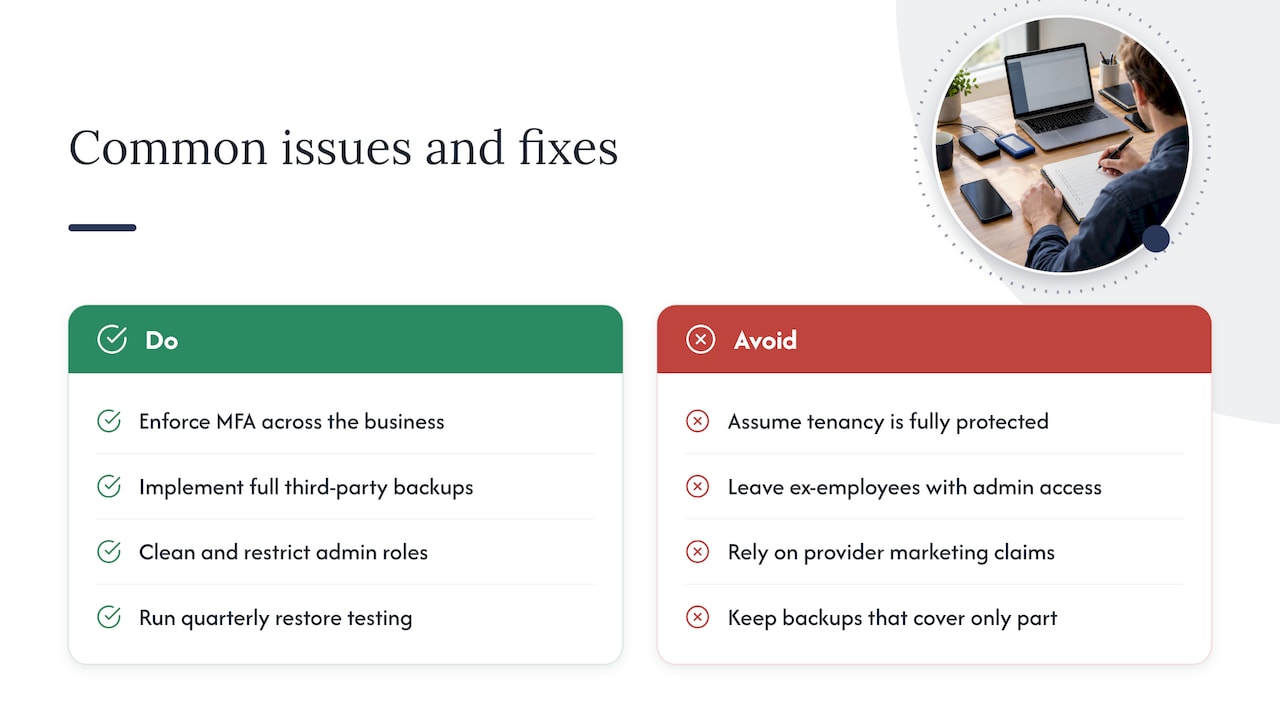
We see the same three problems over and over: no MFA enforced across the business, backups that only cover part of the environment, and admin roles left messy from years of staff turnover. One client came to us assuming their 365 tenancy was fully protected. It was not. We moved them onto managed Azure with a proper third party backup solution and started quarterly restore testing, and that gap closed fast.
The data and the reality on the ground rarely match. Providers talk about resilience. What we find on day one is usually a handful of ex-employees still holding admin access. Some providers hold certifications intended to ensure good standards, and those standards exist precisely because so many SMBs skip these basics.
Honestly, the businesses that get burned are almost never the ones with no cloud strategy. They are the ones who assumed their existing setup was already safe.
— Matt
Where IT Start fits into your cloud decision
We help Brisbane businesses work through exactly this decision: managed cloud, Azure migration, and third party backup solutions that actually get tested, not just installed. Local support means faster recovery testing and someone who understands your compliance obligations, not a generic help desk overseas. If you want a straight answer on your setup, get in touch with IT Start for a free assessment.
Sources
- Technical example: Regular backups | ASD blueprint
- Sending personal information overseas | OAIC
- Cyber
FAQ
What is PaaS with an example?
Platform as a Service gives you a managed environment to build and run applications without managing the underlying servers or operating system. A common example is a development team using Azure App Service to deploy a web application, letting the provider handle infrastructure, patching and scaling.
What is an example of a hybrid cloud?
A typical hybrid setup keeps sensitive client records on a private server or restricted Azure environment while running everyday tools like email and file sharing through public cloud. Many accounting and legal firms in Australia use this pattern to balance confidentiality with cost.
What is the difference between public and private cloud services?
Public cloud is shared infrastructure billed on usage, offering high scalability but less control, as outlined in Cyber.gov.au’s cloud guidance. Private cloud is dedicated to a single organisation, offering more control and customisation but at a higher, more fixed cost.
What are three types of cloud computing?
The commonly used government taxonomy lists public, private and hybrid as the three main deployment models, with community cloud sometimes added as a fourth. Each model differs mainly in who owns the infrastructure and how much control the business retains over configuration and data.