
TL;DR:
- Cloud computing in cybersecurity involves deploying cloud services with dedicated security controls to protect data from cyber threats. It relies on a shared responsibility model where providers secure infrastructure, but SMBs are fully responsible for safeguarding their data and access. Effective cloud security practices include robust IAM, encryption, continuous monitoring, and adopting zero-trust principles to mitigate configuration errors and hybrid environment risks.
Cloud computing in cyber security is the practice of deploying cloud-based infrastructure and services alongside dedicated security controls to protect data, applications, and systems from cyber threats. It operates under a shared responsibility model where providers like AWS, Microsoft Azure, and Google Cloud secure the underlying infrastructure, while customers remain fully responsible for securing their own data and access. Human error causes 80% of breaches in cloud environments, which means the technology itself is rarely the weak point. For Brisbane SMBs managing sensitive client data, understanding this split is the difference between real protection and a false sense of security.
What is cloud computing in cyber security?
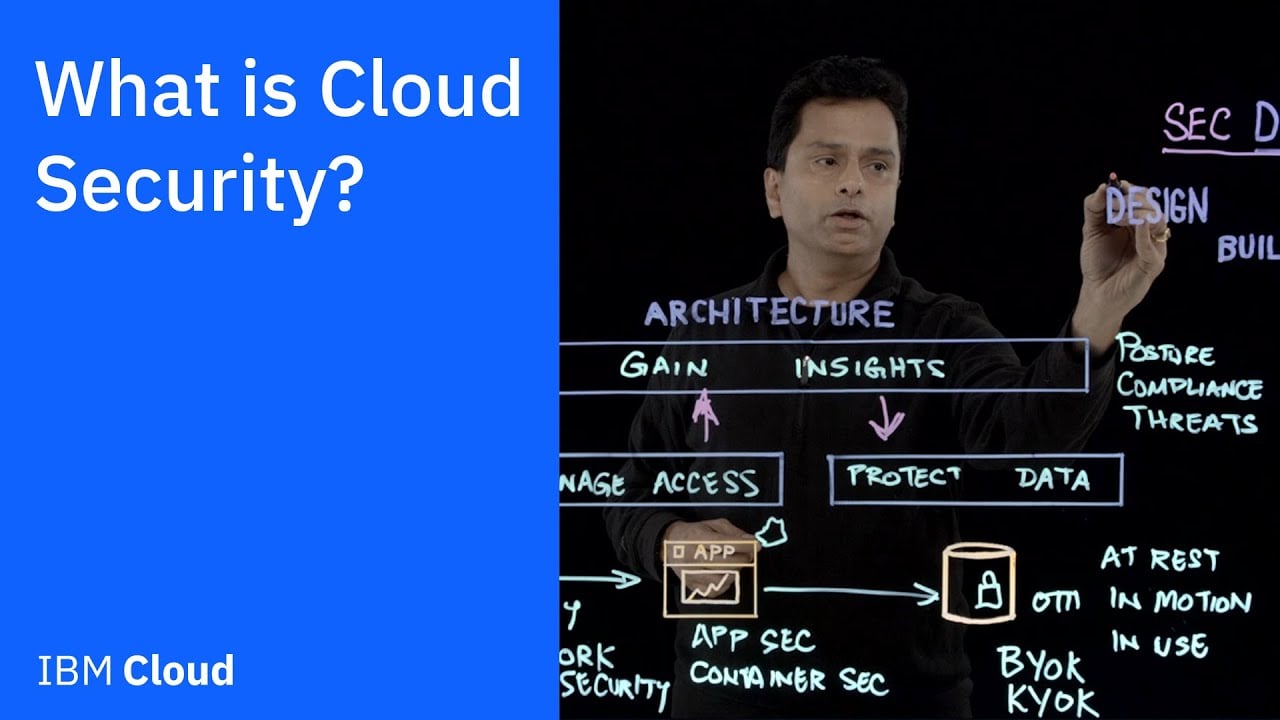
Cloud security, the recognised industry term for this discipline, combines encryption, identity management, threat monitoring, and configuration controls applied to cloud environments. The concept is straightforward: you move workloads to platforms like Microsoft 365, AWS, or Google Workspace, and then you layer security measures on top of what the provider already handles. What most SMB owners miss is that the provider’s responsibility stops at the infrastructure. Your data, your user accounts, your app configurations. Those are yours to protect, entirely.

This matters because the customer’s security responsibility for data and applications is 100%. Not shared. Not negotiable. A misconfigured SharePoint folder or an admin account without multi-factor authentication (MFA) is your problem, not Microsoft’s. The good news is that cloud platforms give you far better tools to manage this than most on-premises setups ever did.
How does cloud computing enhance cybersecurity compared to on-premises?
Traditional on-premises security relies on a perimeter. You build a wall around your office network and assume everything inside is safe. That model collapsed the moment staff started working from home, using personal devices, and accessing systems through browsers. Cloud security is built for exactly that reality.
Here is what cloud computing genuinely improves for SMBs:
- Scalability on demand. Cloud providers can deploy security resources instantly. You are not waiting for a hardware order to add capacity during a threat event.
- Automated patching and updates. Cloud platforms push security updates continuously. On-premises environments depend on someone remembering to run patches, and we see this fail constantly with SMBs running Windows Server versions that are years out of date.
- Identity and access management (IAM). Tools built into Azure Active Directory, AWS IAM, and Google Workspace enforce least-privilege access and MFA across every user and device. This is the single control that stops most breaches before they start.
- Layered protections. Cloud architectures support firewalls, encryption at rest and in transit, and continuous monitoring without requiring dedicated security hardware on-site.
- Physical security. AWS, Microsoft, and Google spend billions on data centre security. No Brisbane SMB is replicating that with a server in a back room.
Pro Tip: If your team is still on a local server with no MFA and manual backups, moving to Microsoft 365 with proper configuration will improve your security posture more than almost any other single change you can make.
The cybersecurity market growth reflects this shift, with the CIBR cybersecurity index surging 20% in mid-2026 as businesses accelerated adoption of cloud-native security services. That is not just investor enthusiasm. It reflects real demand from organisations that have learned the hard way that perimeter security is not enough.
What are the main cloud security methods SMBs should focus on?
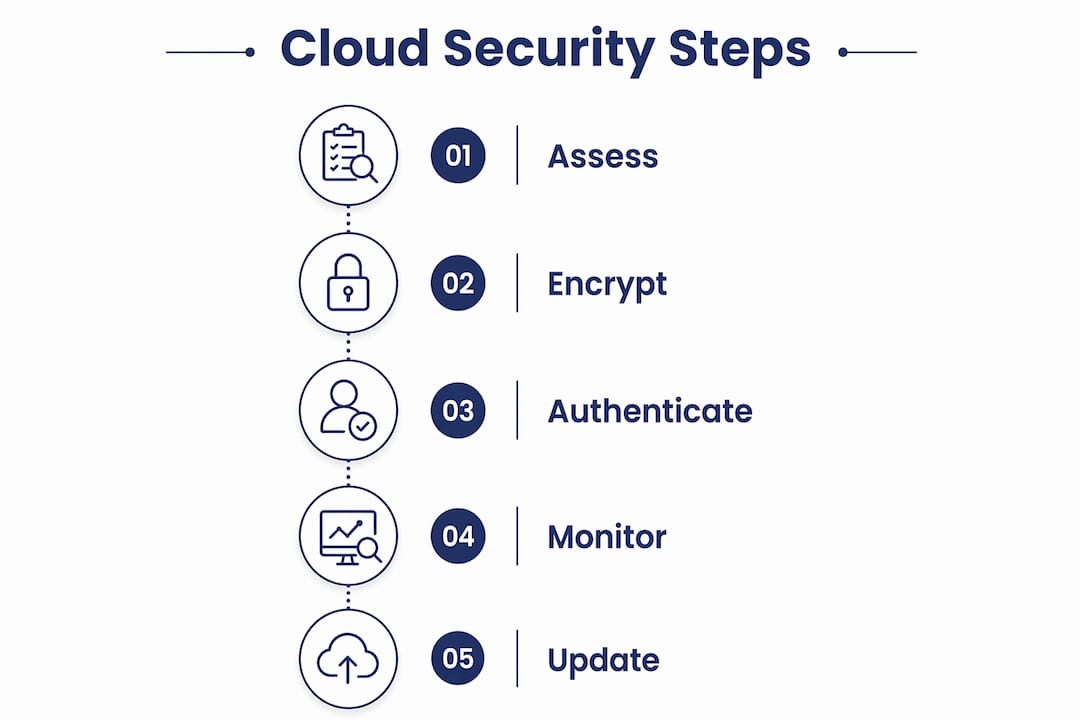
Practical cloud security protection does not require a dedicated security team. It requires doing a small number of things consistently and correctly. Here are the controls that matter most, in order of priority:
-
Identity and access management with MFA. IAM is the most critical control SMBs consistently underestimate. Every account should have MFA enabled. Admin accounts should be separate from daily-use accounts. Access should follow least privilege, meaning users get only what they need for their role, nothing more.
-
Encryption of data at rest and in transit. Most cloud platforms handle this by default, but you need to verify it is actually enabled for your storage, databases, and file shares. Do not assume.
-
Configuration and posture management. Automated configuration audits catch problems like publicly accessible storage buckets, overly broad permissions, and disabled logging before attackers find them. Microsoft Defender for Cloud and AWS Security Hub both do this well.
-
Continuous threat detection. AI-based monitoring watches for unusual behaviour, such as a user logging in from Brisbane and then from Eastern Europe 20 minutes later. This kind of anomaly detection catches compromised accounts that would otherwise go unnoticed for weeks.
-
Zero trust network access (ZTNA). Zero trust principles treat every access request as untrusted until verified, regardless of whether it comes from inside or outside the network. This limits lateral movement if an attacker does get in. For SMBs using Microsoft 365, Conditional Access policies are a practical starting point.
-
Shared responsibility awareness. Understand what your provider covers and what you cover. Then audit your side regularly. A shared fate mindset means actively configuring and monitoring your environment to complement what the provider does, not assuming their controls are enough.
Pro Tip: Run a cloud security assessment every six months at minimum. Tools like Microsoft Secure Score give you a free, prioritised list of what to fix in your Microsoft 365 environment. Most SMBs we work with have scores well below where they should be.
What common pitfalls do SMBs face in cloud security?
Honestly, we see the same mistakes over and over. The technology is not the problem. The assumptions are.
-
Assuming the cloud provider handles everything. This is the most dangerous misconception. AWS, Microsoft, and Google secure their platforms. They do not secure your data, your user accounts, or your app settings. We have seen businesses with years of sensitive client files sitting in a SharePoint folder accessible to anyone with the link.
-
Misconfigured storage and access. Most cloud breaches are caused by customer misconfiguration, not provider failures. An open storage bucket or an admin account with a weak password is not a cloud problem. It is a configuration problem.
-
No MFA on critical accounts. We still find SMBs with global admin accounts in Microsoft 365 that have no MFA. One phished password and the attacker owns everything.
-
Ignoring monitoring until after a breach. Reactive security is expensive. A business that only checks logs after something goes wrong will always be behind. Continuous monitoring catches threats early, when the damage is still containable.
-
Shadow IT and unknown resources. Unclear cloud resource ownership represents real security risk. Staff spin up cloud storage, trial apps, or third-party integrations without IT knowing. Each one is a potential entry point. Regular cloud governance audits with proper tagging and ownership policies prevent this from becoming a serious exposure.
The pattern we see is that SMBs invest in the cloud platform but not in the configuration and monitoring that makes it secure. The platform is only as safe as the settings you apply to it.
How do hybrid and multi-cloud environments affect security?
Most SMBs end up in a hybrid setup without planning for it. They have Microsoft 365 in the cloud, a local server for accounting software, and maybe a separate cloud backup service. That is a hybrid environment, and it creates security complexity that a single-platform setup does not.
Over 80% of organisations use hybrid cloud models, which increases the attack surface and demands unified security policies across every environment. The problem is that each platform has its own security controls, its own logging, and its own configuration options. Without a unified view, gaps appear between systems.
| Environment type | Security challenge | Recommended approach |
|---|---|---|
| Single cloud (e.g. Microsoft 365) | Misconfiguration, weak IAM | Microsoft Secure Score, Conditional Access, MFA |
| Hybrid (cloud + on-premises) | Inconsistent policies, visibility gaps | Unified monitoring platform, consistent IAM across both |
| Multi-cloud (e.g. AWS + Azure) | Dispersed resources, policy conflicts | Cloud Security Posture Management (CSPM) tools, centralised logging |
AI-based anomaly detection improves threat detection rates by nearly 25% and reduces false positives by 13% in hybrid environments. That matters for SMBs because false positives drain time and cause alert fatigue. Fewer false alarms means your team actually responds to the real ones.
Extended zero trust approaches are the right framework for multi-cloud security. Every user and device gets validated continuously, regardless of which platform they are accessing. For SMBs, this does not require enterprise-grade tooling. It requires consistent policies, MFA everywhere, and regular reviews of who has access to what across every system you run.
Key takeaways
Cloud security requires SMBs to actively manage their side of the shared responsibility model, because provider controls alone will never be enough to protect your data.
| Point | Details |
|---|---|
| Shared responsibility is real | Cloud providers secure infrastructure; you are fully responsible for your data, accounts, and configurations. |
| IAM is the top priority | Multi-factor authentication and least-privilege access stop the majority of cloud breaches before they start. |
| Misconfiguration causes most breaches | Regularly audit storage permissions, access policies, and resource ownership to close exposure gaps. |
| Hybrid setups need unified visibility | Use a single monitoring platform across all cloud and on-premises environments to avoid policy gaps. |
| Zero trust replaces perimeter security | Continuous validation of every user and device is the correct model for any cloud or hybrid environment. |
The part most SMBs get wrong about cloud security
The shared responsibility model sounds simple until you are the one who has to explain to a client why their data was exposed even though they were “in the cloud.” We have had that conversation. It is not a comfortable one.
What I keep seeing is that SMBs treat cloud migration as the finish line. They move to Microsoft 365 or AWS, and they feel like the security problem is solved. It is not. It is just moved. The attack surface is now different, and in some ways larger, because cloud environments are accessible from anywhere by anyone with valid credentials.
The businesses that handle this well are the ones that treat cloud security as an ongoing practice, not a one-time project. They run regular cloud security assessments, they review access quarterly, and they have someone accountable for knowing what is running in their cloud environment and why. That last part, knowing what you have, is where most SMBs fall down. Shadow IT is real. Staff sign up for cloud tools without telling anyone, and suddenly you have business data sitting in a free-tier storage account with no monitoring and no backup.
My honest recommendation: start with a proper assessment of your current cloud environment. Find out what is actually running, who has access to what, and whether MFA is enforced everywhere. Fix those three things before worrying about anything more advanced. The security benefits of cloud computing are real, but only if you configure it properly.
— Matt
How IT Start helps Brisbane SMBs secure their cloud environment
IT Start works with Brisbane SMBs to take the guesswork out of cloud security. We conduct cloud security assessments that identify misconfigurations, access gaps, and shadow IT risks before they become incidents. Our team manages identity and access controls, MFA deployment, and continuous monitoring across Microsoft 365, Azure, and hybrid environments. If you are not sure whether your cloud setup is actually secure, or you have grown your cloud environment without a clear security plan, we can help you get on top of it. Explore our cloud services for SMBs or get in touch for a no-obligation conversation about where your biggest risks are right now.
FAQ
What is cloud security in simple terms?
Cloud security is the set of policies, tools, and controls used to protect data, applications, and systems hosted in cloud environments. It covers encryption, identity management, access control, and threat monitoring across platforms like Microsoft 365, AWS, and Google Cloud.
Who is responsible for security in the cloud?
Responsibility is split. Cloud providers like AWS and Microsoft secure the underlying infrastructure, data centres, and platform services. Customers are fully responsible for securing their own data, user accounts, and application configurations.
What causes most cloud security breaches?
Most cloud breaches are caused by customer misconfiguration, not provider failures. Common causes include open storage buckets, accounts without MFA, and overly broad access permissions.
What is zero trust and why does it matter for SMBs?
Zero trust is a security model that validates every user and device continuously, rather than trusting anything inside the network by default. For SMBs, it means enforcing MFA, least-privilege access, and Conditional Access policies across all cloud platforms to limit damage if credentials are compromised.
How often should SMBs conduct a cloud security assessment?
A cloud security assessment should be conducted at least every six months, or after any significant change to your cloud environment such as adding new users, migrating systems, or onboarding new software. Tools like Microsoft Secure Score provide continuous visibility between formal reviews. For a more thorough review, consider working with a small business cybersecurity checklist to cover all bases.