
TL;DR:
- Protecting your business data involves implementing core habits like password management, multi-factor authentication, and automated backups to prevent common breaches. Maintaining ongoing digital hygiene through regular audits and privacy reviews reduces vulnerabilities, while understanding common assumptions and applying encryption enhances security. Building a simple, tested incident response plan and layered defenses helps SMBs mitigate risks effectively without needing dedicated IT staff.
Protecting your data online means securing every piece of client, financial, and operational information your business touches before a breach forces you to act. The good news is that over 80% of common breaches are preventable with three foundational habits: a password manager, multi-factor authentication (MFA), and automated backups. These are not complex or expensive measures. For Australian SMBs managing 10 to 50 staff, getting these basics right is the single most impactful thing you can do. The industry term for this discipline is information security hygiene, and it applies whether you are running a legal firm in Brisbane or a healthcare practice on the Gold Coast.
How to protect your data online: the essential tools and routines
The foundation of any solid security posture is not a fancy product. It is three repeatable habits done consistently.

Password managers solve the most common vulnerability we see in SMBs: reused passwords. When one account gets compromised, every account using the same password is exposed. Tools like Bitwarden and ProtonPass generate and store unique, complex credentials for every account. They cost very little and take an afternoon to set up across a team. The mistake most businesses make is letting staff continue using their own memory or a shared spreadsheet after the tool is deployed. That defeats the purpose entirely.
MFA is non-negotiable. Authenticator apps like Duo are significantly more secure than SMS codes because they are not vulnerable to SIM swap attacks, where a criminal convinces your telco to redirect your number. Enable MFA on Microsoft 365, your accounting software, your banking portal, and your email provider at minimum. If a staff member resists, remind them that a single compromised email account can expose every client file in your inbox.
Backups need to be automated, tested, and stored in at least two locations. One copy in the cloud (Microsoft Azure Backup or similar) and one copy on an air-gapped device that is not connected to your network. Sensitive documents stored offline on air-gapped devices are protected from ransomware because the attacker cannot reach them. We see this a lot: business owners who think they are backed up because OneDrive is syncing. Sync is not a backup. If ransomware encrypts your files, it encrypts the synced copies too.
Pro Tip: Delete any app your team has not used in the past two months and purge sensitive files annually to reduce your attack surface. Every unused app is a potential entry point.
How can SMBs maintain ongoing digital hygiene?
Privacy is a layered behaviour, not a one-time setup. Keeping your digital environment clean requires regular attention, not just an annual IT review.
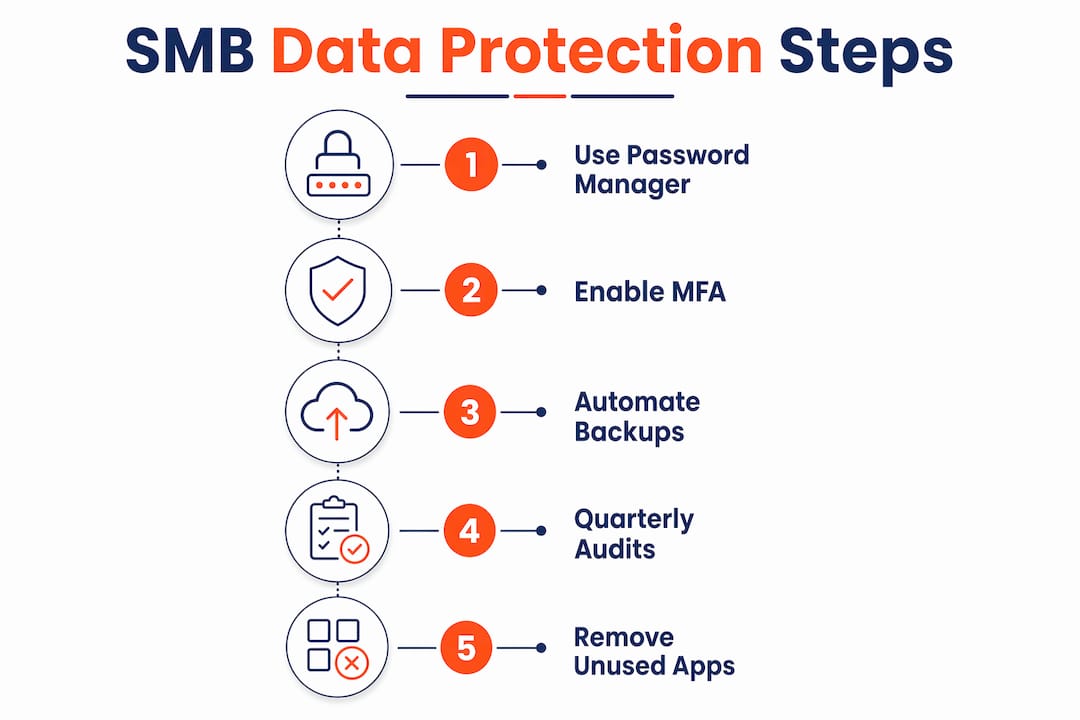
Start with a quarterly audit of installed apps and browser extensions across all business devices. Extensions in particular are a blind spot. A browser extension with access to “all website data” can read everything you type, including passwords and client information. Remove anything that is not actively used or cannot be verified as legitimate.
Privacy settings on platforms like LinkedIn, Meta Business Suite, and Google Workspace reset or change after product updates. Frequent audits are needed to maintain the privacy levels you originally configured. What you set six months ago may no longer reflect current defaults.
Here is a practical hygiene table to schedule across the year:
| Task | Frequency | Why it matters |
|---|---|---|
| Review app permissions on all devices | Quarterly | Removes unnecessary data access |
| Audit browser extensions | Quarterly | Extensions can capture sensitive input |
| Check privacy settings on business platforms | After every major update | Settings often reset post-update |
| Review third-party app integrations | Every 6 months | Reduces data broker exposure |
| Purge unused accounts and services | Annually | Fewer accounts means fewer breach points |
Reducing the number of accounts and avoiding unnecessary service integrations also limits how much data brokers can collect and sell about your business and staff. Use separate email addresses for different categories of activity, such as one for vendor accounts, one for client communications, and one for internal tools. This breaks the profiling chain and limits the damage if one address is compromised.
Pro Tip: Schedule a 30-minute “privacy checkup” in your calendar every quarter. Treat it like a fire drill. It takes less time than recovering from a breach.
What mistakes do SMBs commonly make with data protection?
Honestly, the mistakes we see most often are not technical. They are assumptions.
-
Assuming paid identity protection services are enough. Services that monitor the dark web for your credentials are useful, but total safety is impossible and these services do not prevent breaches. They notify you after the fact. Credit freezes with Equifax and Illion are more practical and free.
-
Ignoring physical device security. Laptops left in cars, no screen lock, no cable lock in shared offices. Most SMB owners think about hackers but forget that a stolen laptop with no encryption is a complete data breach. BitLocker on Windows and FileVault on macOS encrypt the drive so a stolen device is unreadable without the login credentials.
-
Believing VPNs provide complete privacy. VPNs secure untrusted connections but do not make you anonymous. You shift trust from your ISP to your VPN provider. If the VPN provider logs your activity and is subpoenaed or breached, your data is exposed. VPNs are useful for staff working from cafes or hotels. They are not a substitute for proper security controls.
-
Neglecting software updates. Regular patching is one of the most basic and most ignored steps in cybersecurity. We regularly find SMBs running Windows machines that have not been updated in months. Every unpatched vulnerability is an open door.
Reality check: Most breaches we respond to were not sophisticated attacks. They were opportunistic exploits of known vulnerabilities that a patch released weeks earlier would have closed.
Pro Tip: Run a quick team training session using a real phishing example. Social engineering tactics like fake urgency are the most common delivery method for credential theft. Showing staff a real example is more effective than any policy document.
Which advanced security layers are worth adding next?
Once the basics are solid, these next steps meaningfully reduce your risk without requiring a dedicated IT team.
Encryption for sensitive files and communications is the most underused protection in SMBs. BitLocker (Windows) and FileVault (macOS) are built into the operating system and free to use. For email, ProtonMail offers end-to-end encryption for sensitive client communications. If you are sending contracts, financial data, or health records by email, standard Gmail or Outlook without additional encryption is not adequate.
Network segmentation is simpler than it sounds. Set up a separate Wi-Fi network for guests and IoT devices like printers, smart TVs, and security cameras. These devices rarely receive security updates and are common entry points. Keeping them off your main business network limits the blast radius if one is compromised. Use WPA3 encryption on your router if your hardware supports it.
Here is a comparison of common security layers by effort and impact:
| Security layer | Effort to implement | Impact on risk |
|---|---|---|
| Password manager + MFA | Low | Very high |
| Automated cloud + air-gapped backup | Low to medium | Very high |
| BitLocker / FileVault encryption | Low (built-in) | High |
| Network segmentation (guest Wi-Fi) | Medium | Medium to high |
| Endpoint behavioural monitoring | Medium to high | High |
| Incident response plan | Medium | High when needed |
Endpoint protection beyond antivirus means tools that monitor behaviour rather than just matching known malware signatures. Microsoft Defender for Business includes behavioural monitoring and is included in Microsoft 365 Business Premium. It catches threats that traditional antivirus misses because it watches what programs do, not just what they look like.
An incident response plan does not need to be a 40-page document. It needs to answer three questions: who do you call first, what do you isolate immediately, and how do you notify affected clients? Having a data breach response plan documented before you need it saves hours of chaos when something goes wrong.
Key takeaways
Effective data protection for SMBs requires consistent hygiene habits, the right tools deployed correctly, and a clear plan for when something goes wrong.
| Point | Details |
|---|---|
| Start with three core habits | Password manager, MFA via authenticator app, and automated backups prevent most breaches. |
| Hygiene is ongoing, not one-off | Quarterly app audits, privacy setting reviews, and account purges reduce your attack surface over time. |
| Avoid common misconceptions | VPNs, identity protection services, and incognito mode do not replace proper security controls. |
| Encryption is free and underused | BitLocker and FileVault are built into your OS and protect data on stolen or lost devices. |
| Plan for incidents before they happen | A simple breach response plan reduces damage and meets Australian Privacy Act obligations. |
What I actually see working for SMBs
Honestly, the gap between what SMBs think they have in place and what is actually configured is wider than most business owners realise. We do assessments regularly and the pattern is consistent: no MFA on email, backups that have not been tested in over a year, and at least one staff member using the same password across five accounts.
The businesses that improve fastest are not the ones that buy the most expensive tools. They are the ones that pick three things, implement them properly, and then move to the next three. MFA on Microsoft 365 first. Password manager deployed to all staff second. Backup tested and verified third. That sequence alone puts you ahead of the majority of SMBs we see.
What I would push back on is the idea that you need a full-time IT person to get this right. You do not. You need a trusted provider who will tell you the truth about what is actually configured versus what you assume is working. The data protection strategies that hold up under pressure are the ones built on verified fundamentals, not on assumptions.
Start simple. Build the habit. Then layer in the advanced stuff once the basics are locked in.
— Matt
How IT Start can help secure your business data
IT Start works with Brisbane SMBs across professional services, healthcare, and legal to implement exactly the kind of layered security described in this article. That means managed MFA deployment across Microsoft 365, verified backup solutions with regular restore testing, and ongoing monitoring through our cybersecurity services built for businesses with 10 to 50 staff. We also offer cloud backup and protection options suited to businesses that need reliable, tested recovery without managing it themselves. If you are not sure what is actually working in your current setup, we offer a free assessment to find out. No jargon, no pressure. Just an honest look at where you stand and what to fix first.
FAQ
What is the single most effective way to protect business data online?
Enabling MFA on all critical accounts, particularly Microsoft 365 and email, is the single highest-impact step. Combined with a password manager, it prevents the majority of credential-based attacks.
Are VPNs enough to keep my business data safe?
No. VPNs secure your connection on untrusted networks but do not provide anonymity or protect against phishing, malware, or weak passwords. They are one layer in a broader security approach, not a complete solution.
How often should SMBs review their privacy and security settings?
Quarterly reviews are recommended, particularly after software updates, since privacy settings often reset after platform changes. Annual full audits of accounts, apps, and permissions are also worth scheduling.
What is the difference between a backup and cloud sync?
Cloud sync tools like OneDrive mirror your files in real time. If ransomware encrypts your local files, the encrypted versions sync to the cloud too. A true backup stores versioned copies that can be restored to a point before the attack occurred.
Do small businesses need an incident response plan?
Yes. Under the Australian Privacy Act, businesses with a turnover above $3 million have mandatory breach notification obligations. Even smaller businesses benefit from a simple plan that identifies who to contact, what to isolate, and how to notify affected parties.