TL;DR:
- Many small businesses underestimate their IT assets, risking data inaccuracies and operational inefficiencies.
- Implementing real-time asset tracking enhances visibility, financial control, and cybersecurity across the organization.
Most business owners assume they know what they own. They picture a spreadsheet somewhere, maybe a list someone made during the last office move, and feel reasonably confident. Then an audit happens, or a laptop goes missing, or the insurer asks for a hardware register, and suddenly that confidence evaporates. Understanding what is IT asset tracking, and why it is not just a list in a spreadsheet, is one of the most underrated steps an SME can take toward genuine operational and financial control.
Table of Contents
- Key takeaways
- What is IT asset tracking and how it fits within IT asset management
- Common IT asset tracking methods and technologies
- Benefits of IT asset tracking for small to medium businesses
- Common pitfalls SMEs face with IT asset tracking
- Steps to start implementing IT asset tracking
- My honest take on what SMEs get wrong
- How IT Start helps Brisbane SMEs with asset tracking
- FAQ
Key takeaways
| Point | Details |
|---|---|
| Tracking differs from management | IT asset tracking focuses on real-time visibility; IT asset management covers the full lifecycle from purchase to disposal. |
| Spreadsheets create blind spots | Manual tracking methods lead to inaccurate data, hidden costs, and wasted money as your business scales. |
| Compliance is now a driver | Regulatory requirements are pushing businesses to maintain precise, auditable records of their IT assets. |
| Clean data comes first | Before implementing any tracking system, standardise your existing asset data or you will just digitise the mess. |
| Start small, scale deliberately | Begin with your highest-value assets and expand tracking processes incrementally rather than trying to do everything at once. |
What is IT asset tracking and how it fits within IT asset management
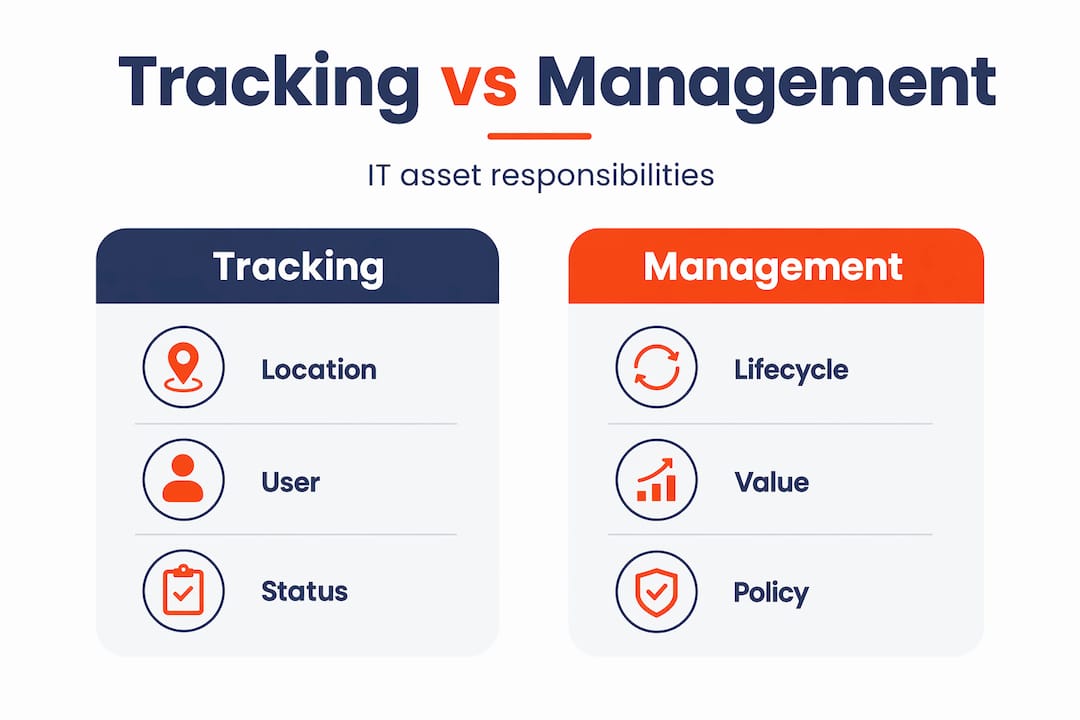
IT asset tracking is the ongoing practice of maintaining real-time visibility over your physical IT assets. That means knowing where each device is, who has it, what condition it is in, and whether it is still in active use. Laptops, servers, switches, monitors, phones. All of it.
This is different from IT asset management, and that distinction matters more than most people realise.
IT asset management (ITAM) is the broader framework. It covers the full lifecycle of every asset your business owns, from the moment you procure it through deployment, maintenance, financial depreciation, and eventual disposal. Tracking sits inside that framework. It is a necessary component, but not the whole picture.
Think of it this way. Asset tracking tells you where your gear is right now. Asset management tells you what that gear is worth, when it needs replacing, what it costs to run, and whether it is compliant with your licensing agreements.
The difference becomes clear when you understand how asset and configuration management each serve a different master. Asset management tracks the what, answering financial and lifecycle questions. Configuration management tracks the how, mapping how assets are set up and interact operationally. A configuration management database (CMDB) connects assets to their operational context, which is why both need to work in parallel for complete IT visibility.
For SMEs, the practical takeaway is this:
- Tracking is your foundation. You cannot manage what you cannot see.
- Management is the strategy built on top of that foundation.
- Running tracking without management means you know where assets are but not what they cost or when they expire.
- Running management without tracking means your financial records are based on assumptions, not reality.
Most small businesses have neither done properly. They have a bit of both, done inconsistently, held together by one person who knows the setup by memory.
Common IT asset tracking methods and technologies
There is a spectrum of approaches businesses use, and each comes with real trade-offs.
Manual methods are where most SMEs start. Spreadsheets. Paper registers. Shared documents that someone updates occasionally. These are low cost and familiar, but they break down fast. Data becomes stale within weeks. Nobody updates the record when a laptop gets swapped between staff. Devices marked as “in use” turn up in storage rooms. The spreadsheet becomes a fiction everyone politely ignores.

Barcode scanning is a step up from pure manual entry. It reduces transcription errors and speeds up audits. But it still requires line-of-sight scanning, which means someone has to physically locate and scan every asset. For a business with fifty devices spread across multiple offices or work-from-home setups, that is a real operational burden.
Technology-driven options change the equation considerably.
| Method | How it works | Pros | Cons | Best for |
|---|---|---|---|---|
| Spreadsheet/manual | Staff manually update records | Low cost, no setup | Inaccurate, outdated quickly | Businesses under 10 devices |
| Barcode scanning | Physical scan of labels on assets | Faster audits, reduces errors | Requires line-of-sight, manual effort | Small warehouses, periodic audits |
| RFID (UHF) | Radio frequency readers detect tags | Reads 400+ tags per second, no line-of-sight needed | Higher upfront cost | High-volume environments |
| BLE tags | Bluetooth beacons detected by nearby devices | Low cost, good for indoor tracking | Limited range, needs receiver network | Office-based asset tracking |
| GPS tracking | Satellite location data | Real-time outdoor location | Ongoing cost, privacy considerations | Mobile or field-based assets |
| Asset tracking software | Centralised platform managing all asset data | Dashboards, alerts, integrations | Requires data input discipline | Any business serious about ITAM |
Pro Tip: Do not buy a technology solution before you have defined your process. The most common mistake we see is a business purchasing RFID tags or a software platform and then discovering they have no agreed naming convention, no ownership fields, and no data to import. Fix the process first, then pick the tool.
Modern asset tracking systems outperform spreadsheets through automated reporting, real-time dashboards, and cross-department visibility. The gap between a well-run system and a neglected spreadsheet grows wider with every passing month.
Benefits of IT asset tracking for small to medium businesses
The honest answer to “why bother tracking IT assets?” is money. Most SMEs are spending more than they realise on IT because they cannot see what they have.
Here is what proper tracking actually delivers:
- Reduced waste and hidden costs. Devices that sit unused still appear in your insurance valuations and software licence counts. Tracking surfaces that dead weight so you can cut it.
- Accurate financial reporting. Depreciation schedules, audit readiness, and capital expenditure planning all depend on knowing what you own. Treating IT assets as financial investments rather than just tools dramatically improves cost control.
- Better maintenance scheduling. When you know the age and condition of every device, you can plan replacements proactively rather than reacting when something breaks at the worst possible moment.
- Faster audits. Instead of scrambling to locate equipment before an insurance review or IT audit, your records are current and verifiable.
- Stronger cybersecurity. You cannot protect what you cannot see. Untracked devices are a security liability. An asset you have forgotten about may still be connecting to your network with outdated firmware and no endpoint protection.
Compliance is increasingly pushing this agenda too. Around 50,000 EU companies must now comply with CSRD requirements that include tracking IT asset energy use and emissions. While Australian businesses are not yet subject to CSRD directly, the trend toward mandatory IT asset reporting is moving in one direction. Businesses that have not built tracking into their operations will face a costly retrofit.
Pro Tip: Connect your asset tracking data to your cybersecurity tooling. If a device appears on your network that is not in your asset register, that is a red flag. IT Start links asset visibility directly to security posture reviews for this reason.
Common pitfalls SMEs face with IT asset tracking
We see the same mistakes repeatedly, and most of them are avoidable.
The biggest one is underestimating the data problem. Moving from spreadsheets to a proper tracking system requires cleaning and standardising your legacy data before you import anything. Businesses that skip this step end up with the same inaccurate information in a more expensive system. Garbage in, garbage out.
The second mistake is treating assets as operational items only. When you see a laptop as “just a tool”, you stop thinking about its financial value, its depreciation, and its lifecycle cost. Without continuous visibility, decentralised assets become hard to track, increasing both risk and cost.
A few more patterns worth knowing:
- Ignoring integrations. Your asset tracking system should talk to your security tools, service desk, and procurement records. Siloed tracking creates the illusion of control without the reality.
- No process for departing staff. Devices regularly walk out the door when employees leave and are never formally returned or written off.
- Skipping compliance planning. Building compliance requirements into tracking workflows from the start is far cheaper than retrofitting them later.
The cultural shift is harder than the technology. Getting staff to update asset records, tag new equipment, and report location changes requires genuine buy-in and clear accountability. A system nobody trusts or uses consistently is worse than no system at all.
This is where IT compliance practices come in. The process side of tracking is often where well-intentioned projects quietly fall apart.
Steps to start implementing IT asset tracking
If you are starting from scratch or trying to fix a broken process, here is a realistic sequence that works for most SMEs.
- Audit what you currently have. Walk the floor. Check storerooms. Pull any existing records. You need a baseline, even if it is messy and incomplete.
- Standardise your data fields before you enter anything. Decide on consistent naming conventions for device types, manufacturers, and ownership. Define which fields are mandatory. Do this before touching any software.
- Choose a tool that fits your current scale. A 15-person business does not need an enterprise ITAM platform. A well-configured asset tracking tool with good reporting is enough to start. Match complexity to need.
- Tag every asset physically and digitally. Apply barcode or asset labels to each device. Link the physical tag to your digital record at the same time.
- Define your update process. Who updates records when a device is reassigned? When a new purchase arrives? When something is retired? Write this down and make it part of your onboarding and offboarding checklists.
- Train your staff. The technology is the easy part. People forgetting to update records is how systems fall apart within six months.
- Build a reporting dashboard. Track assets by status, age, assigned user, and location. Review it monthly. Set alerts for assets that have not checked in or are approaching end-of-life.
- Scale incrementally. Start with your highest-value or highest-risk assets and expand coverage over time. Trying to track everything perfectly from day one usually means tracking nothing well.
For practical guidance on upgrading your IT operations alongside tracking, the IT operational efficiency guide from IT Start covers this territory in detail.
My honest take on what SMEs get wrong
I have worked with a lot of small businesses on their IT setup, and the pattern with asset tracking is frustratingly consistent. The spreadsheet exists, somebody thinks it is reasonably accurate, and then we sit down together and find devices that no longer exist, licences being paid for hardware that was retired two years ago, and laptops assigned to staff members who left the business months back.
The spreadsheet is not a tracking system. It is a historical record that someone stopped updating at some point. The moment you have more than fifteen devices and more than a handful of staff, you are beyond the point where manual tracking stays accurate on its own.
What I have found actually works is not the fanciest software or the most complex tagging system. It is clear ownership. Someone in the business is responsible for the asset register. That responsibility is written into a role, not just assumed. And there is a process that everyone follows when equipment moves, gets purchased, or gets retired.
Honestly, the technology choice matters far less than the process discipline. AI-driven insights are becoming important for extracting value from existing assets, which is worth knowing for future planning. But right now, most SMEs need to get the basics right before they worry about that.
Align your tracking with your business goals, not just your IT department’s preferences. If the CFO cannot get a depreciation report from your asset register, the system is not doing its job. If the security team cannot confirm which devices are active on the network, the tracking has a gap. Think about who needs the data and why, then build toward that.
— Matt
How IT Start helps Brisbane SMEs with asset tracking
If any of this sounds familiar, IT Start works with Brisbane-based SMEs every day to get their IT environments under control. That includes setting up proper asset registers, integrating tracking with security monitoring, and building processes that actually stick. Our managed IT support covers the full picture, from initial audits through to ongoing management so nothing falls through the cracks.
We also help businesses align their IT assets with their cybersecurity posture, because the two are directly connected. An untracked device is an unsecured device. If you want to understand where your business currently stands, get in touch with IT Start for a straightforward assessment. No jargon, no hard sell. Just an honest look at what you have and what needs fixing.
FAQ
What does IT asset tracking mean?
IT asset tracking is the practice of maintaining real-time visibility over physical IT assets, including their location, status, condition, and assigned user. It is a foundational component of broader IT asset management.
How is IT asset tracking different from IT asset management?
IT asset tracking focuses on knowing where assets are and who has them right now. IT asset management is the broader lifecycle framework that includes procurement, financial depreciation, maintenance, and disposal decisions.
What are some examples of IT asset tracking?
Common examples include recording which laptop is assigned to which staff member, scanning barcode labels during an annual audit, using RFID tags to locate devices in a warehouse, or using asset tracking software to generate a real-time inventory report.
What are the main benefits of asset tracking for SMEs?
The main benefits include reduced waste from unused equipment, more accurate financial reporting, faster audits, better maintenance planning, and improved cybersecurity by ensuring all active devices are known and accounted for.
How do I start tracking IT assets in my business?
Start by physically auditing what you have, standardise your data fields, choose a tracking tool suited to your size, tag every asset, assign clear ownership of the register, and build the update process into your standard onboarding and offboarding checklists.