TL;DR:
- Most Brisbane SMEs only consider IT support when issues occur, risking costly downtime and security breaches. Managed IT provides proactive monitoring, security, and scalable services that enhance growth and operational efficiency. Partnering with a reliable MSP ensures continuous risk mitigation, transparency, and tailored strategies for future business resilience.
Most Brisbane business owners only think about IT when something breaks. That assumption is costing them more than they realise. Top-performing small and medium enterprises (SMEs) in Queensland are using managed IT not as a repair service but as a strategic tool for growth, efficiency, and security. Whether you run a legal firm in the CBD, a healthcare practice in the suburbs, or a financial services company anywhere in Greater Brisbane, the way you manage technology directly shapes how fast you can grow and how safe your data stays.
Table of Contents
- What does managed IT really mean for SMEs?
- How managed IT drives operational efficiency
- Managed IT as your SME’s cybersecurity backbone
- Structured risk reduction: How top MSPs protect your business
- Managed IT or in-house? The hybrid and co-managed reality
- A Brisbane SME’s managed IT advantage: What most guides won’t tell you
- Take the next step to secure and empower your business
- Frequently asked questions
Key Takeaways
| Point | Details |
|---|---|
| Proactive IT matters | Managed IT helps SMEs prevent issues and stay competitive, not just fix problems. |
| Cybersecurity is included | Layered protections and incident response are standard when using managed IT. |
| Scaling without hiring delays | Managed IT gives your SME immediate access to expertise and support as you grow. |
| Risk management is a process | The best managed IT providers use structured onboarding and ongoing improvement to reduce risk. |
What does managed IT really mean for SMEs?
There is a big difference between calling someone to fix your server after it crashes and having a dedicated team watching over your systems before anything goes wrong. That difference is the gap between reactive (break-fix) IT and proactive managed IT.
With break-fix IT, you pay for support only when something fails. The problem is that by the time you call, the damage is already done. Staff are idle, clients are frustrated, and recovery takes time and money. Managed IT services for SMEs shift IT from break-fix to an ongoing, proactive model where the managed service provider (MSP) takes responsibility for day-to-day monitoring, maintenance, support, security, and cloud operations under a predictable monthly arrangement.
Here is what quality managed IT typically includes for SMEs:
- 24/7 system monitoring to detect and resolve issues before users notice
- Regular patching and updates to close security vulnerabilities
- Cloud platform management including Microsoft 365, backups, and storage
- Helpdesk and remote support for staff productivity issues
- Cybersecurity management including firewalls, endpoint protection, and access control
- Vendor management so your MSP coordinates with software and hardware suppliers
Managed IT is not a one-off fix. It is a continuous business enabler that keeps your people productive, your data safe, and your costs predictable month after month.
One of the most valuable aspects is cost predictability. You know exactly what your IT investment looks like every month, compared to the unpredictable spikes that come with emergency repairs. The managed IT support benefits for Queensland SMEs are especially significant because local businesses often lack the budget to hire full in-house IT teams.
| IT approach | Cost model | Response type | Risk level |
|---|---|---|---|
| Break-fix (reactive) | Unpredictable, per incident | After failure occurs | High |
| Managed IT (proactive) | Fixed monthly fee | Before and during issues | Low |
| In-house IT team | High fixed salary costs | Varies by staff availability | Medium |
How managed IT drives operational efficiency
Understanding what managed IT includes is one thing. Seeing how it actually improves your daily operations is another. This is where the real value shows up for growing businesses.
For growing SMEs, managed IT provides scalable operations coverage and access to specialist expertise in security, networking, and cloud as the business adds users, devices, or locations, without the delays of hiring. When you take on five new staff or open a second Brisbane office, your IT environment scales with you rather than struggling to keep up.
Consider a practical example. A professional services firm with 20 staff decides to expand to 35. Without managed IT, that growth involves purchasing equipment, configuring systems, setting up user accounts, and troubleshooting problems that inevitably arise. Each of those tasks takes internal time. With a managed IT partner, the onboarding process for new users is handled systematically, often within hours rather than days. The business efficiency examples from SMEs using managed services consistently show time savings across every department.
Here is a summary of typical efficiency improvements SMEs experience:
| Area | Before managed IT | After managed IT |
|---|---|---|
| System downtime | Unplanned, often hours or days | Minimised through proactive monitoring |
| New staff onboarding | Manual setup, 1 to 3 days | Standardised process, same day |
| Software updates | Irregular, often delayed | Scheduled, automated, consistent |
| Security incidents | Reactive, costly recovery | Reduced frequency and faster response |
| IT budget | Unpredictable spikes | Predictable monthly investment |
Here is a practical roadmap for achieving operational efficiency through managed IT:
- Audit your current IT environment to identify gaps, outdated systems, and redundant tools
- Choose an MSP that aligns with your industry whether that is healthcare, legal, finance, or another professional services sector
- Agree on service level expectations including response times, escalation paths, and after-hours coverage
- Implement standardised onboarding and offboarding workflows to save time each time staff join or leave
- Review performance metrics quarterly to identify further efficiency gains
Pro Tip: When evaluating MSPs, ask for specific examples of how they have helped similar Brisbane SMEs scale without service interruptions. A provider who can show real outcomes rather than just a list of capabilities is worth far more than a flashy brochure.
The IT support benefits for Brisbane businesses extend well beyond simply keeping computers running. When IT runs smoothly in the background, your team stays focused on the work that actually grows your business. That focus is what separates competitive SMEs from those constantly fighting operational fires.

Managed IT as your SME’s cybersecurity backbone
Operational efficiency is only part of the story. Cyber threats are real, frequent, and increasingly targeting smaller businesses precisely because they often have weaker defences than large enterprises.
SMEs are attractive targets because they typically hold valuable client data, financial records, and intellectual property, but invest far less in security than larger organisations. Attackers know this. Phishing campaigns, ransomware, and credential theft attacks are designed to exploit exactly the kinds of gaps common in under-resourced IT environments.
Quality managed IT addresses this by functioning as a layered cybersecurity control plane: implementing and operating layered protections including monitoring, patching, backups, and access control, while also running incident response and escalation processes rather than hoping someone will handle it during a real attack.
Standard cybersecurity protections included with quality managed IT should cover:
- Endpoint detection and response (EDR) to identify and contain threats on devices
- Multi-factor authentication (MFA) to block unauthorised account access
- Regular vulnerability patching to close known software weaknesses
- Encrypted and offsite backups with tested restore processes
- Email filtering and anti-phishing tools to stop attacks before they reach staff
- Security awareness training to reduce human error
The biggest cybersecurity risk for SMEs is not the absence of tools. It is unclear ownership. If nobody knows who responds when a threat is detected, the delay itself causes the damage.
The managed IT security approach for Brisbane SMEs should be explicit about who does what during an incident. Your MSP should provide a clear incident response plan, not a vague promise. Ask them specifically: “If ransomware hits at 2am on a Saturday, what happens in the first 30 minutes?”
Understanding IT security best practices also means knowing that no single tool is enough. Layered security, also called defence in depth, ensures that if one control fails, others catch the threat before it spreads.
Pro Tip: Demand a written shared responsibility matrix from your MSP before signing any agreement. This document should clearly state which cybersecurity tasks you own, which they own, and what the escalation path looks like during an active incident.
Structured risk reduction: How top MSPs protect your business
Understanding cybersecurity coverage is valuable, but the real question for Brisbane SME owners is: how quickly does managed IT actually reduce my risk?
The answer lies in structured methodology. Managed IT risk reduction for SMEs typically follows structured discovery and onboarding including inventory and gap analysis, followed by implementation of foundational controls, and then continuous monitoring and maintenance to sustain outcomes over time. The first 90 days are particularly critical because this is when the most significant vulnerabilities get identified and addressed.
Here is what a structured onboarding and risk reduction journey looks like with a quality MSP:
- Discovery and assessment (weeks 1 to 2): Complete inventory of devices, software, users, and existing controls. Identify gaps against a recognised framework such as the Essential Eight.
- Prioritised remediation (weeks 3 to 6): Address the highest-risk findings first. This often includes enabling MFA, patching critical systems, and securing backups.
- Policy and process establishment (weeks 6 to 8): Document acceptable use policies, password standards, and incident response procedures.
- Ongoing monitoring and maintenance (week 9 onwards): Continuous monitoring, monthly patching cycles, quarterly reviews, and annual risk reassessments.
The importance of ongoing maintenance cannot be overstated. Many SMEs make the mistake of treating security as a project rather than a continuous process. Threats evolve, staff change, and new vulnerabilities emerge constantly. A one-off security checklist provides a snapshot; managed IT provides a living, breathing defence posture.
The core IT management services for Brisbane businesses should include this kind of structured improvement roadmap as a standard offering, not an optional add-on.
Pro Tip: Ask your prospective MSP to show you their onboarding documentation and a sample quarterly review report. If they cannot produce these, their process is probably less structured than they claim.
Managed IT or in-house? The hybrid and co-managed reality
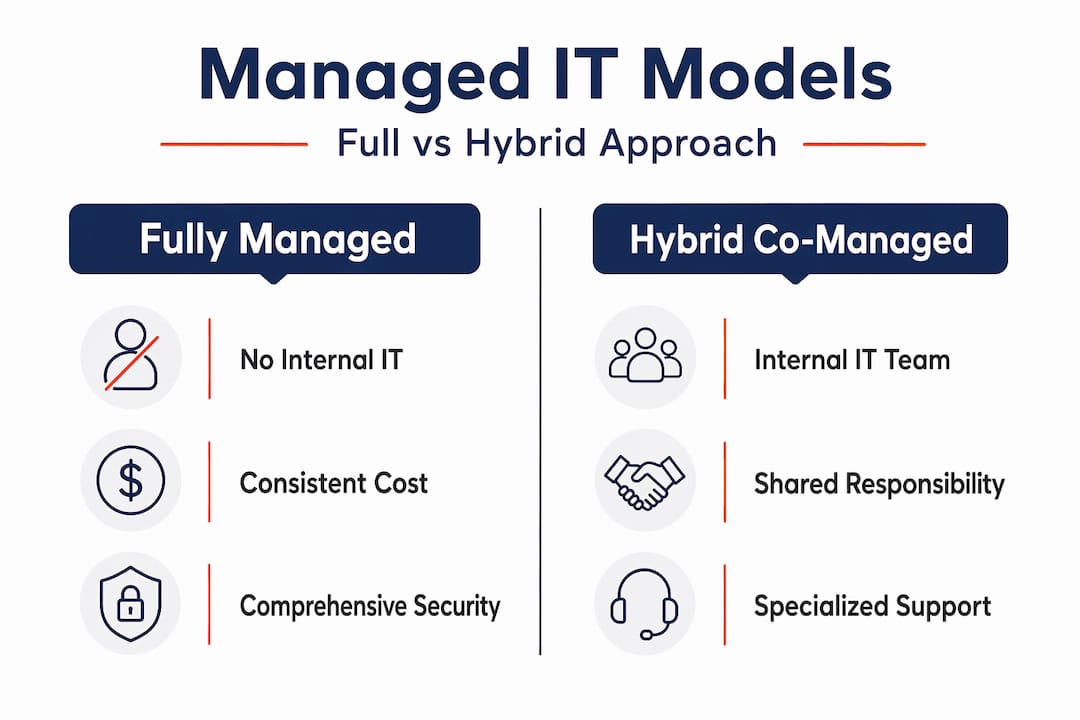
Not every SME is ready to hand all IT responsibility to an external provider. Some businesses already have an internal IT person or a small team. The good news is that you do not have to choose between fully managed IT and fully in-house. A hybrid or co-managed model keeps internal staff focused on strategy and architecture while the managed provider handles operations, monitoring, and security, because internal context can matter while operations discipline is outsourced.
Here is a quick breakdown of the three common models:
Fully managed IT:
- Pros: Full coverage, predictable costs, access to broad expertise
- Cons: Less direct internal control, requires a strong MSP relationship
Fully in-house IT:
- Pros: Deep business context, direct oversight
- Cons: High salary costs, skills gaps, no cover for leave or after-hours
Co-managed (hybrid):
- Pros: Combines internal knowledge with external depth and consistency
- Cons: Requires clearly defined roles to avoid overlap or gaps
| Model | Best suited for | Cost profile | Security depth |
|---|---|---|---|
| Fully managed | SMEs without internal IT | Predictable, moderate | High (with right MSP) |
| Fully in-house | Larger firms with IT budget | High fixed costs | Varies by skills |
| Co-managed | SMEs with 1 to 3 IT staff | Mixed, flexible | High when roles are clear |
One point that many SMEs overlook: managed IT is not automatically a cybersecurity guarantee. Shared responsibility models require explicit ownership and response roles, and documented incident handling. Without clarity, coverage gaps increase risk during real incidents. The managed IT versus in-house comparison should always include a frank conversation about who owns each security function.
Choosing the right model depends on your business size, existing IT capability, budget, and risk appetite. What matters most is that the model you choose has clearly documented roles, especially for cybersecurity.
A Brisbane SME’s managed IT advantage: What most guides won’t tell you
Here is something most managed IT articles will not say directly: the biggest failure point for SMEs engaging managed IT is not picking the wrong tools. It is settling for a provider that treats IT as a maintenance contract rather than a growth partnership.
We have seen Brisbane businesses sign up for managed IT expecting transformation, then receive nothing more than a help desk number and monthly patching. The difference between a basic managed IT contract and a true strategic partnership comes down to documentation, transparency, and accountability. Demand both a service level agreement and a living roadmap that evolves as your business does.
The uncomfortable truth about ROI statistics in IT is that many managed IT support insights are based on large enterprise data, not SME reality. Downtime cost figures quoted in marketing material often reflect businesses with thousands of employees. Your actual risk and recovery profile is different. What matters is knowing your specific risks, your actual recovery time objective, and whether your MSP can meet those benchmarks.
The SMEs that get the most from managed IT are the ones who treat the relationship like a business partnership. They ask hard questions during onboarding. They request documentation on incident response ownership. They review performance data quarterly rather than assuming everything is fine. And when the relationship is not delivering results, they say so.
Brisbane has a growing ecosystem of quality MSPs, but not all are equal. Look for providers with industry-specific experience, transparent reporting, and certifications that demonstrate genuine commitment to security standards. The best results come when your MSP knows your industry well enough to anticipate your IT needs before you do.
Take the next step to secure and empower your business
This guide has covered the full picture of how managed IT drives growth, efficiency, and security for Brisbane SMEs. The next step is putting these strategies to work with an expert who understands your local environment and your industry. IT Start provides Brisbane business IT support designed specifically for SMEs, with proactive monitoring, structured onboarding, and transparent reporting built in from day one. Our SME cyber security services address the layered protections your business needs, and our SME cloud services ensure your team can work securely from anywhere. Reach out today for a no-obligation IT assessment and find out where your greatest risks and opportunities actually sit.
Frequently asked questions
What is the difference between managed IT and traditional IT support for SMEs?
Managed IT offers continuous monitoring and proactive support on an ongoing basis, while traditional IT only reacts to problems after they have already disrupted your business. The key distinction is prevention versus cure.
How does managed IT help SMEs recover from cyberattacks?
Managed IT includes layered protections and incident response plans that enable rapid containment and recovery, including regular tested backups and clearly assigned escalation roles so your business can restore operations quickly.
Can I combine internal IT staff with a managed IT provider?
Yes. Many SMEs benefit from a co-managed hybrid model that keeps internal staff focused on business context and strategy while the managed provider handles operations, monitoring, and security disciplines.
How long does it take for managed IT to reduce my risks?
Significant risk reduction typically begins within the first 90 days after onboarding, once structured discovery, gap analysis, and foundational security controls are in place. Ongoing improvement continues well beyond that initial phase.