
TL;DR:
- An IT security audit is an independent assessment to uncover vulnerabilities, measure risks, and guide improvements.
- Most businesses miss risks due to incomplete asset discovery and lack of ongoing or external audits.
An IT security audit is a structured, independent assessment of your organisation’s IT environment designed to uncover security weaknesses, measure risk exposure, and guide remediation. The industry standard term is an information security audit, though IT security audit is the phrase most business owners and IT managers use in practice. Nearly 50% of small and medium-sized businesses experienced at least one cyberattack in 2025, with almost 20% filing for bankruptcy or closing after an attack. That number alone makes a compelling case for treating audits as a business priority, not a box-ticking exercise.
What does an IT security audit cover?
A security audit covers far more than firewalls and antivirus software. The scope includes your people, your processes, and every device or application touching your network, including the ones you do not know about yet.

Asset discovery: the step most businesses skip
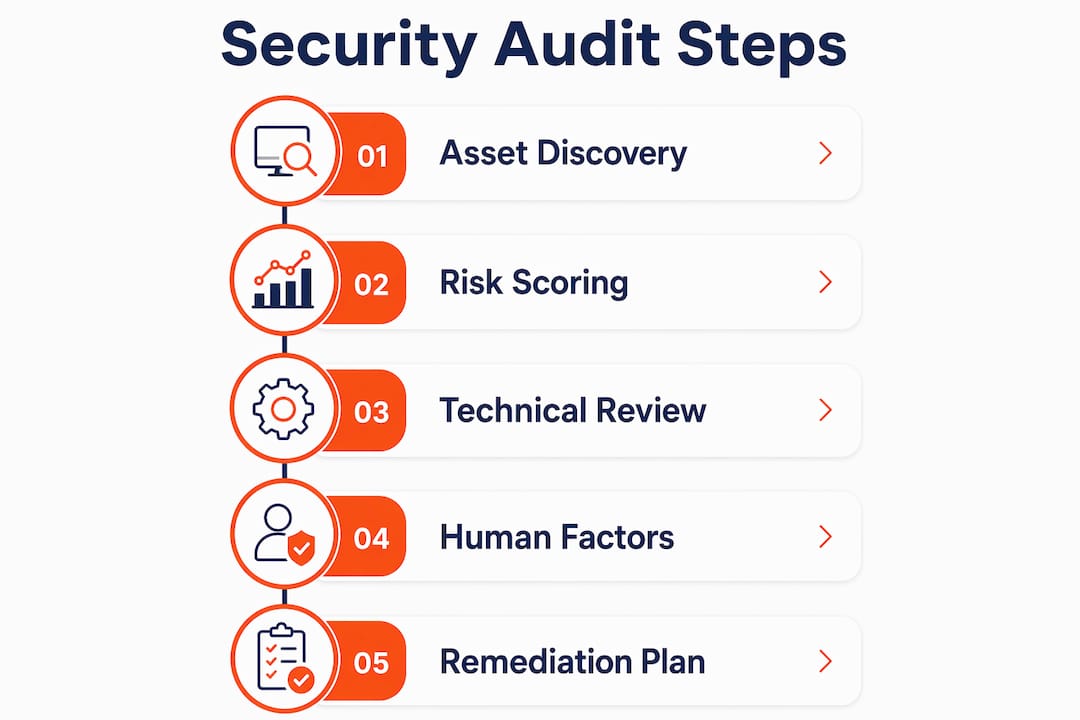
Asset discovery is the foundation of any credible audit. Shadow IT commonly causes audits to miss significant risks, and practitioners consistently recommend active discovery over relying on outdated asset lists. We see this constantly with clients who assume their IT inventory is complete, then find personal mobile phones syncing to Microsoft 365, unsanctioned cloud apps storing client data, and old laptops still connected to the network after staff leave.
Risk scoring and analysis
Once assets are mapped, each risk gets scored for likelihood and impact. A standard 5×5 matrix rates scores of 20–25 as critical, requiring immediate action. Only 26% of organisations have a shared enterprise-wide IT risk view, which means most businesses are making security decisions without a clear picture of what they actually face. That disconnect between IT threats and business risk management is where audits deliver the most value.
Technical and human factors
A thorough cybersecurity assessment evaluates both technical controls and human behaviour. Mature audits cover password hygiene, incident response readiness, and organisational behaviours, not just firewall rules and patch levels. Active Directory reviews are a good example. Neglected password hygiene and legacy accounts pose the highest risks in SME environments, yet they are routinely overlooked because no one has reviewed user permissions since the business was half its current size.
The typical audit runs through five phases: scoping, asset inventory, risk analysis, control assessment, and remediation planning. Each phase builds on the last.
- Scoping: Define what systems, locations, and data types are in scope.
- Inventory: Actively discover all assets, including shadow IT.
- Risk analysis: Score threats by likelihood and business impact.
- Control assessment: Test technical and human controls against frameworks like NIST CSF or ISO 27001.
- Remediation planning: Prioritise findings by risk score and assign owners.
Pro Tip: Do not start an audit with last year’s asset list. Run an active network scan on day one. You will almost always find something that should not be there.
Internal vs external IT security audits: which does your business need?
The honest answer is both. Internal and external audits serve different purposes, and treating them as interchangeable is one of the most common mistakes SMEs make.
| Factor | Internal audit | External (third-party) audit |
|---|---|---|
| Cost | Lower, uses existing staff | Higher, requires specialist engagement |
| Objectivity | Limited by familiarity and bias | Independent, no conflict of interest |
| Depth | Good for routine checks and maintenance | Identifies systemic vulnerabilities and blind spots |
| Frequency | Ongoing or quarterly | Annually or after major changes |
| Best for | Monitoring known risks | Uncovering unknown risks |
Internal audits work well as ongoing maintenance. Your IT team can run regular checks on patch status, user access reviews, and backup verification. The problem is familiarity. When you have managed the same environment for three years, you stop seeing the risks that have quietly accumulated. External third-party audits are essential to identify systemic vulnerabilities often missed by internal teams due to exactly this kind of blind spot.
We had a client in professional services who was confident their internal IT person had things under control. A third-party security audit for Brisbane firms found that their remote desktop protocol was exposed directly to the internet, MFA was disabled on three admin accounts, and their backup had not completed successfully in four months. None of that showed up in their internal checks because no one was looking for it.
Pro Tip: Use internal audits to maintain your baseline between formal reviews. Use external audits to challenge your assumptions. The two are not competing, they are complementary.
How often should you run an IT security audit?
Frequency depends on your risk environment, but there is a clear baseline. Formal IT security risk assessments are recommended at least once every 12 months to maintain a security baseline and meet governance requirements. Annual is the floor, not the ceiling.
Some situations call for more frequent reviews:
- After a significant change. A new cloud migration, a merger, or a major software rollout all change your risk profile. Audit after the change, not before.
- After a security incident. A phishing attack, a ransomware attempt, or a data breach should trigger an immediate review of affected systems and controls.
- When staff numbers change significantly. Rapid growth means new devices, new accounts, and new access rights that can quickly outpace your controls.
- When entering a regulated industry. Healthcare, financial services, and legal practices in Australia face specific compliance obligations. An information security review before you take on regulated work is non-negotiable.
- Quarterly self-assessments. Self-assessment temperature checks take 5–10 minutes and give a preliminary snapshot of cybersecurity maturity between formal audits.
Honestly, most SMEs we work with have never had a formal audit. They have had someone set up their systems, and they assume that means things are secure. The gap between setup and ongoing security is where most breaches happen.
Common pitfalls in IT security audits and how to avoid them
Most audit failures are not technical. They are process failures. Here is where SMEs consistently go wrong.
Treating the audit as a compliance checkbox. Audits should guide a remediation roadmap tied to business impact, not satisfy a requirement and get filed away. If your audit report sits unread after the engagement ends, you have wasted your money.
Incomplete asset discovery. Starting with an outdated spreadsheet instead of active discovery means your audit has gaps before it begins. Shadow IT, personal devices, and forgotten cloud subscriptions are the risks that cause the most damage precisely because no one is watching them.
Shelfware reports. Audit reports without actionable remediation plans and assigned owners result in shelfware, wasting the entire effort. Every finding needs an owner, a priority, and a deadline. Without that, nothing gets fixed.
Ignoring the human element. Password reuse, weak offboarding processes, and staff who have never had security training are as dangerous as an unpatched server. Real security comes from knowing your risks including human behaviour, not just technical controls.
Failing to prioritise by business impact. Not every finding is equal. A critical vulnerability in your client-facing system is more urgent than an outdated policy document. Prioritise by what would hurt your business most if exploited.
Pro Tip: Ask your auditor to rate every finding by business impact, not just technical severity. A medium-severity finding in a system that holds all your client data outranks a high-severity finding in a test environment nobody uses.
What to do after your IT security audit
The audit report is not the finish line. It is the starting point. Most of the value comes from what happens next.
- Build a remediation roadmap. Group findings by priority and assign each one to a named owner. Vague responsibility means nothing gets done. If a finding has no owner, it will not be fixed.
- Estimate effort and schedule maintenance windows. Some fixes take an hour. Others require planned downtime. Know the difference before you start, and schedule accordingly so you do not disrupt operations.
- Brief leadership on the findings. IT managers should not carry risk awareness alone. Business owners need to understand what the audit found, what it means in plain language, and what it will cost to fix. Risk decisions belong at the leadership level.
- Update your policies and training. If the audit found that staff are reusing passwords or sharing credentials, a policy update alone will not fix it. Pair policy changes with practical training and enforcement through tools like Microsoft Entra ID.
- Set a review date. Schedule a follow-up check at 30, 60, and 90 days to confirm that remediation items are being closed. Then schedule your next formal audit before the current one is even complete.
A good IT security assessment process does not end with a PDF. It ends when every finding is resolved or formally accepted as a known risk by someone with the authority to make that call.
Key takeaways
A formal IT security audit, conducted at least annually and followed by an assigned remediation roadmap, is the most direct way for SMEs to reduce their risk of a costly breach.
| Point | Details |
|---|---|
| Audit scope goes beyond technology | Asset discovery, human behaviour, and process gaps all require assessment alongside technical controls. |
| Annual audits are the minimum | Formal risk assessments should run at least once every 12 months, with event-driven reviews after major changes. |
| Internal and external audits serve different roles | Internal audits maintain the baseline; external audits uncover the blind spots your team cannot see. |
| Reports without owners become shelfware | Every finding needs an assigned owner, a priority rating, and a deadline to have any real impact. |
| Shadow IT is the most common missed risk | Active network discovery at the start of every audit catches unsanctioned devices and apps before they cause damage. |
What SMEs really get wrong about IT security audits
Honestly, the biggest mistake I see is businesses treating an audit like a health check they only need when something feels wrong. They wait until after a breach, or until a client or insurer asks for evidence of security controls, and then scramble to get something done quickly. That is the wrong order.
The second thing I see constantly is the gap between what IT teams know and what leadership understands. I have sat in rooms where the IT manager knows the backup has not been tested in six months, but has never told the business owner because they did not want to raise alarm. That silence is a risk in itself. An audit forces that conversation into the open, which is uncomfortable but necessary.
The clients who get the most out of audits are the ones who treat the findings as a prioritised to-do list, not a report to file. Small improvements, fixing MFA gaps, cleaning up legacy accounts, testing backups, can significantly reduce risk exposure without a large budget. You do not need to fix everything at once. You need to fix the right things first.
If you want a deeper look at how the audit process works for Brisbane SMEs, the steps are more straightforward than most business owners expect.
— Matt
IT Start can help you get your security audit right
IT Start works with Brisbane SMEs across financial services, healthcare, legal, and professional services to run thorough IT security audits and turn findings into real improvements. We see the same gaps repeatedly: no MFA, untested backups, forgotten admin accounts, and staff who have never had a security briefing. Our cybersecurity services cover the full audit cycle, from asset discovery and risk scoring through to remediation planning and ongoing monitoring. We also provide business IT support that keeps your environment maintained between formal audits. If you want to know where your business actually stands, contact IT Start for a free consultation.
FAQ
What is an IT security audit?
An IT security audit is a structured assessment of an organisation’s IT systems, processes, and controls designed to identify security weaknesses and guide risk remediation. It covers technical infrastructure, human behaviour, and organisational policies.
How is an IT security audit different from an IT risk assessment?
An IT risk assessment scores threats by likelihood and business impact to prioritise action. An IT security audit is broader, evaluating whether controls are in place and working, and typically uses the risk assessment as one of its inputs.
How often should SMEs conduct a security audit?
Formal audits are recommended at least once every 12 months. Additional reviews should follow major changes such as cloud migrations, staff growth, security incidents, or entry into regulated industries.
What happens if audit findings are not acted on?
Reports without assigned owners and remediation plans become shelfware. The vulnerabilities identified remain open, and the business carries the same risk it had before the audit, having spent money without reducing exposure.
Do small businesses really need external security audits?
External audits identify systemic vulnerabilities that internal teams miss due to familiarity with the environment. For SMEs without dedicated security staff, a third-party review is often the only way to get an objective picture of actual risk.