
TL;DR:
- Managed service provider pricing for Brisbane SMBs mainly uses per-user models costing $100 to $300 per month, depending on scope. The main pricing structures are per-user, per-device, tiered, and hybrid, with scope and contract details significantly influencing costs. Choosing the right model and confirming full service scope in writing help avoid unexpected expenses and ensure value.
Managed service provider pricing is the structured fee system MSPs use to charge businesses for ongoing IT management, typically based on user count, device count, or service tiers. For Brisbane SMBs, the most common model is per-user pricing, with costs ranging from $100 to $300 per user per month depending on service scope. Understanding how these models work, what drives cost differences, and what to watch for in a contract is the difference between a good IT investment and a frustrating one.
What are the common managed service provider pricing models?
The four main managed IT services pricing structures are per-user, per-device, tiered, and hybrid. Each suits a different type of business, and choosing the wrong one costs you money or leaves gaps in your support.
Per-user pricing
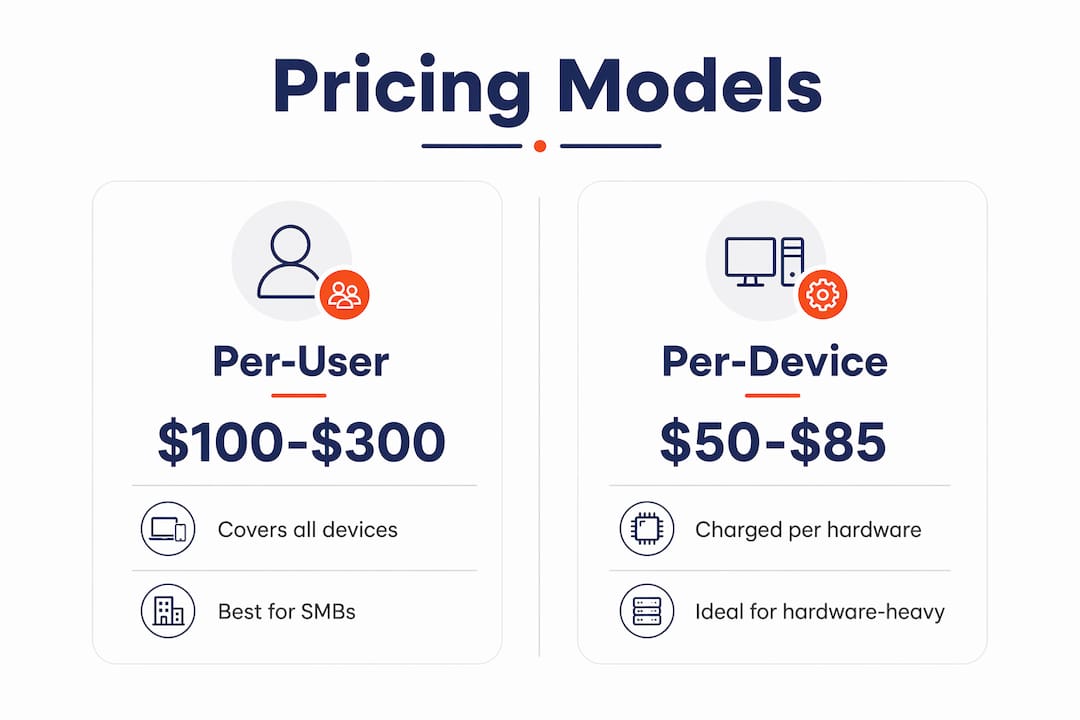
Per-user pricing is the most widely used model. Basic tiers start around $89–$125 per user per month, while comprehensive packages that include 24/7 security operations centre (SOC) coverage and virtual CIO hours can reach $200–$400 per user monthly. This model works well for businesses where staff use multiple devices, since every laptop, phone, and tablet belonging to one person is covered under a single fee.
Per-device pricing
Per-device pricing charges a flat rate per piece of hardware. Workstations typically cost $50–$85 per month, while servers run $200–$450 per month. This model suits businesses with a low device-to-user ratio, such as a warehouse with shared terminals. If your staff each use three or four devices, per-device pricing gets expensive quickly.
Tiered and hybrid models
Tiered pricing bundles services into fixed packages, usually labelled something like Essential, Business, and Premium. Each tier adds more coverage, such as backup monitoring, security patching, or after-hours support. Hybrid pricing combines per-user fees for endpoints with per-device fees for servers. 47% of mid-market contracts in 2026 use this hybrid approach, with averages sitting at $135–$210 per user per month plus $250–$450 per server per month. It balances user-focused support with proper infrastructure management.
| Pricing model | Typical rate | Best for | Watch out for |
|---|---|---|---|
| Per-user | $100–$300/user/month | Multi-device staff, office teams | Minimum user counts |
| Per-device | $50–$85/workstation, $200–$450/server | Low device-per-user businesses | Costs blow out with BYOD |
| Tiered (flat rate) | Varies by tier | Predictable budgets, simple setups | Scope gaps between tiers |
| Hybrid | $135–$210/user + $250–$450/server | Larger SMBs with on-premise servers | Complexity in billing |
What factors influence managed service pricing for Brisbane SMBs?
The price gap between two MSP quotes for the same business is almost always about scope, not markup. A $125/user quote may exclude advanced security, while a $225/user quote may include endpoint detection and response, Microsoft 365 management, and vCIO hours. That difference matters enormously if you are in professional services, healthcare, or legal.
The main cost drivers are:
- Service scope. Helpdesk-only packages cost less than bundles that include security monitoring, backup management, and cloud administration. Know exactly what is and is not covered before you sign.
- Compliance requirements. If your business handles sensitive data, compliance support for HIPAA, SOC 2, or CMMC adds $25–$90 per user per month, plus one-off assessment fees. Brisbane businesses in healthcare and financial services face this regularly.
- Company size and minimums. MSPs often require 5–15 user minimums to cover fixed tooling, licensing, and documentation costs. A business with 6 users is usually billed at the 10-user rate. This surprises a lot of small clients.
- Contract length. Multi-year contracts often come with lower monthly rates. One-year terms give flexibility but typically cost more per month.
- Device complexity. Businesses running on-premise servers, legacy software, or mixed operating systems require more management time, which pushes pricing up.
- After-hours support. Out-of-hours coverage is often an add-on. If your business operates outside 9-to-5, confirm whether after-hours support is included or billed separately.
Pro Tip: Ask every MSP for a full list of exclusions before comparing quotes. What is not in the contract is just as important as what is.
How does managed IT cost affect budgeting and IT management?
Predictable IT costs make financial planning much easier. Per-user pricing, in particular, aligns MSP incentives with your business goals because every support ticket the MSP handles is a cost to them, not revenue. That creates a genuine incentive to keep your systems running well and fix problems before they escalate.

Per-device pricing works in the opposite direction for device-heavy environments. If your team grows or you add hardware, costs increase unpredictably. We see this a lot with businesses that have expanded quickly and suddenly find their IT bill has doubled without any change in service quality.
Small businesses with fewer than 10 users often face flat monthly minimums of $1,000–$1,500 rather than pure per-user pricing. That minimum exists because the MSP’s overhead costs, including remote monitoring tools, documentation platforms, and licensing, do not shrink just because the client is small. Knowing this upfront helps you budget accurately rather than being caught off guard.
The most common pricing pitfall is choosing the cheapest quote without checking what it covers. A $99/user package that excludes security patching, backup monitoring, and Microsoft 365 management is not a bargain. It is an under-scoped contract that will cost you more when something goes wrong.
- Confirm what is included at each tier. Helpdesk hours, security tools, backup frequency, and cloud management should all be listed explicitly.
- Check for volume discounts. Volume discounts typically apply at 25–50 employees, with average rates dropping to $125–$175 per user per month at that scale.
- Ask about onboarding fees. Some MSPs charge a one-off setup fee. Others roll it into the first month. Both are fine, but you need to know upfront.
- Factor in compliance costs. If you are in a regulated industry, budget for compliance surcharges from the start.
Pro Tip: Flat-rate pricing models work best when service boundaries are clearly defined in writing. Vague scope leads to disputes and unexpected charges.
How to evaluate and choose the right managed service pricing plan
Comparing outsourced IT pricing is not like comparing electricity plans. Two quotes at the same price per user can deliver completely different outcomes depending on what is actually included. Comparing only prices without assessing service scope is one of the most common mistakes Brisbane SMBs make.
Before you sign anything, work through this checklist:
- Scope confirmation. Get a written list of every service included: helpdesk response times, security tools, backup frequency, patch management, and Microsoft 365 or Google Workspace administration.
- Minimum user counts. Ask directly whether a minimum applies and what you will be charged if your headcount drops below it.
- Contract terms. Understand the notice period, exit clauses, and what happens if the MSP is acquired or changes ownership.
- Scalability. Confirm how pricing changes as you add or remove users. Some contracts lock in a rate; others adjust monthly.
- After-hours and on-site support. Clarify whether these are included or billed at an hourly rate. For Brisbane businesses with staff working outside standard hours, this matters.
- Security inclusions. Ask specifically whether endpoint detection and response (EDR), multi-factor authentication (MFA) management, and dark web monitoring are included or extra.
Pricing for managed services should also reflect your operational goals, not just your device count. A proactive IT support model that prevents downtime is worth more than a reactive helpdesk that only responds after something breaks. The role of a managed services provider goes well beyond fixing tickets.
Pro Tip: If an MSP cannot give you a clear written scope within the first conversation, that is a red flag. Vague proposals lead to scope creep and billing disputes.
Key takeaways
Managed service provider pricing is most predictable and value-aligned when you choose a model that matches your business size, device environment, and compliance requirements, and confirm the full service scope in writing before signing.
| Point | Details |
|---|---|
| Per-user pricing is the most common | Costs range from $100–$300 per user per month depending on service scope and inclusions. |
| Scope drives price differences | A $125/user quote and a $225/user quote often differ in security, backup, and cloud management coverage. |
| Minimum charges apply to small businesses | Businesses with fewer than 10 users typically face flat monthly minimums of $1,000–$1,500. |
| Compliance adds to the base cost | Regulated industries can expect $25–$90 per user per month in additional compliance surcharges. |
| Compare scope, not just price | Reviewing only the per-user rate without checking inclusions leads to under-scoped contracts and unexpected costs. |
Honestly, most SMBs are buying IT support blind
After working with Brisbane SMBs across professional services, healthcare, and legal, the pattern is consistent. Business owners receive two or three MSP quotes, pick the middle one, and assume the service is roughly equivalent. It rarely is.
The cheapest quote almost always excludes something critical. We have onboarded clients who thought they had backup and security covered, only to find their previous provider was running basic antivirus with no endpoint detection, no offsite backup verification, and no MFA enforcement. The price looked fine. The protection was not.
The $225/user quote that looks expensive often includes tools that the $125/user quote simply does not have. EDR platforms like Microsoft Defender for Business, backup solutions with tested restores, and proper Microsoft 365 security configuration all cost the MSP money. If the price does not reflect those costs, they are not included.
Effective MSP pricing targets a 50–70% gross margin based on actual labour, licensing, and onboarding costs. An MSP pricing below that margin is cutting corners somewhere. That corner is usually proactive support, which is the thing you are actually paying for.
My honest advice: ask every MSP to show you exactly what security tools are included, how backups are tested, and what the response time SLA looks like for a critical outage. If they cannot answer those questions clearly, the price does not matter.
— Matt
IT Start’s managed IT pricing for Brisbane businesses
IT Start offers fixed per-user pricing for Brisbane SMBs, with clear written scopes and no surprise add-ons. Every package includes proactive monitoring, Microsoft 365 management, and security tools appropriate to your risk profile. For businesses in regulated industries, IT Start’s cybersecurity services cover compliance requirements including endpoint protection, MFA enforcement, and security assessments. If you are comparing managed IT costs and want a straight answer on what is included at each price point, IT Start provides a free consultation with no obligation. The team works exclusively with Brisbane businesses, which means local response times and no offshore handoffs. Contact IT Start’s business IT support team to get a tailored quote based on your actual environment.
FAQ
What is the average cost of managed IT services per user in Australia?
Most Australian SMBs pay between $100 and $300 per user per month for managed IT services. Basic packages start around $89–$125, while comprehensive bundles including security and cloud management reach $200–$400 per user monthly.
What is the difference between per-user and per-device MSP pricing?
Per-user pricing covers all devices belonging to one person under a single fee, while per-device pricing charges separately for each workstation, laptop, or server. Per-user pricing suits businesses where staff use multiple devices; per-device suits environments with shared or minimal hardware.
Why do MSPs charge a minimum monthly fee for small businesses?
MSPs set minimum monthly fees of $1,000–$1,500 because their overhead costs, including remote monitoring tools, documentation platforms, and licensing, do not reduce proportionally for small client sizes. A business with 6 users is typically billed at the 10-user minimum rate.
What should I check before signing an MSP contract?
Confirm the full written service scope, minimum user counts, after-hours support terms, exit clauses, and exactly which security tools are included. Comparing price per user without reviewing inclusions leads to under-scoped contracts and unexpected costs.
Does compliance affect managed service pricing?
Yes. Businesses in regulated industries such as healthcare, legal, or financial services can expect compliance surcharges of $25–$90 per user per month on top of the base managed IT rate, plus potential one-off assessment fees.