
If you need one answer: use an executive summary first, then attach a scoped technical assessment behind it. That combination gives decision makers a quick read and gives technical teams a clear list of what to fix. If you suspect a breach right now, stop reading and start an incident log immediately, because the OAIC’s 30-day assessment clock starts the moment you have grounds to suspect something happened.
TL;DR:
- Choose the report for the decision: use vendor assessments for contract reviews, attack surface reports for patching, and incident reports after suspicious activity.
- Define the systems and period covered, then give every finding its severity, business impact, evidence, recommended fix, owner, and deadline.
- Keep executive summaries under one page and rank three to five risks with business impact and specific actions for approval.
- When personal information may be breached, start an incident log immediately; the OAIC assessment period is 30 calendar days from reasonable suspicion.
- If a vendor gap remains, either secure a contractual fix by a set date or record formal risk acceptance with an accountable approver.
Table of Contents
- Common cyber security report types and when to use each
- Core sections every cyber security report needs
- Executive summary: concrete example and copy-ready template
- Vendor risk assessment example: what to include and a sample summary
- Penetration testing and incident report summaries
- Report templates, checklists and ready-to-adapt sections
- How to write and present cyber security reports to non-technical audiences
- How IT Start writes assessment reports for SMBs: practical examples from real engagements
- Incident reporting obligations and timeline references
- ASD, ACSC and ISM guidance on assessment report structure
- Industry-specific reporting requirements for Australian SMEs
- Incorporating compliance audit summaries and evidence
- Integrating continuous monitoring and trend data
- Visualising data effectively in cyber security reports
- Author perspective: practical notes from an MSP who writes these reports
- FAQ
- Sources
Common cyber security report types and when to use each
Honestly, most of the confusion we see with clients comes from using the wrong report for the job. A board summary and a penetration test write-up are not interchangeable documents, and trying to force one into the other usually means the board gets buried in jargon or the technical team gets a document with nothing they can action.
We see five report types come up again and again in SMB work:
- Board or executive summary: built for quick decisions, usually one page, focused on risk and dollars, not technical detail.
- Vendor risk assessment: used when you are deciding whether to onboard or keep a supplier, cloud provider or software vendor.
- Attack surface or security assessment: an inventory-style report covering what you have, what is exposed and where the technical gaps sit.
- Penetration testing summary: validates which vulnerabilities are actually exploitable, not just theoretically risky.
- Incident report: documents a timeline, what was contained, and what needs to be reported under notification obligations.
Each of these serves a different reader. A business owner deciding whether to renew a software contract needs the vendor risk assessment, not a 40-page pen test document full of CVE numbers. A technical lead trying to patch a known gap needs the attack surface assessment with specific hosts and ports listed, not a one-paragraph board summary that says “network security is adequate.”
We see this a lot: a client gets handed a generic security report from a previous provider, it is dense, full of boilerplate language, and nobody in the business actually reads past page two. ASD’s own practitioner guidance on incident response specifically warns against generic, tick-box templates because they create false comfort and miss the risks that actually matter to that business. A hospitality business with weak Wi-Fi segmentation has a completely different risk profile to a professional services firm with client trust accounts, and the report should reflect that.
If your immediate job is to get management approval for a budget, start with the board summary. If you are deciding on a vendor contract renewal, the vendor risk assessment is the right starting point. If you have just had a suspicious login alert, the incident report format is what you need, and the clock on notification obligations is already running.
Core sections every cyber security report needs
Regardless of which report type you are writing, the internal structure barely changes. ASD’s guidelines for cyber security documentation set out that a security assessment report should cover scope, strengths and weaknesses, security risks, control effectiveness and recommended remediation actions. That is a solid skeleton for almost any cyber security report you will write.
Here is the sequence we use across engagements:
- Scope and audience statement: who this report is for, what systems or timeframe it covers, and what is explicitly out of scope.
- Executive summary: the headline risk, in plain language, with the single most important next step.
- Methodology and evidence sources: what was tested, what tools or logs were reviewed, and over what period.
- Findings: each issue listed with severity, the business impact, and the evidence that supports it.
- Risk analysis and remediation: findings mapped to actual business functions, not just technical systems.
- Plan of action and milestones: who owns each fix and by when.
- Appendices: raw logs, control matrices, screenshots and detailed technical evidence.
The scope section matters more than people think. We have seen clients assume a “security assessment” covered their whole network when it was actually scoped to one office location. Spell out the boundary in one sentence so nobody misreads the coverage later.
The findings section is where most reports fall down. A line like “weak password policy identified” tells nobody anything useful. Compare that to “12 staff accounts have no multi-factor authentication enabled, including two accounts with admin rights to the finance system.” One of those gets fixed by Friday. The other gets filed and forgotten.
Pro Tip: Write your findings section with the fix attached to every single issue, never a list of problems with recommendations bundled separately at the end: readers act on what they can see right next to the problem.
For methodology, reference what you actually looked at. If it is an internal audit, say which logs, which Microsoft 365 admin settings, which firewall rules. If it is informed by a broader step-by-step process, our own IT security assessment steps for Brisbane SMEs walks through that workflow in more detail.
Appendices are not filler. Keep the detailed evidence there so the main report stays readable, but make sure the control matrix and logs are complete enough that a second reviewer could reach the same conclusions without re-doing the work.
Executive summary: concrete example and copy-ready template
Executives do not want eight pages. They want to know what is wrong, what it costs if ignored, and what to approve. Here is a usable example:
“Our review of your network and Microsoft 365 environment identified three high-priority risks: no multi-factor authentication on 12 staff accounts, backups that have not been successfully tested in over six months, and an exposed remote desktop port accessible from the internet. These gaps leave the business open to account takeover and ransomware, with potential downtime measured in days rather than hours. We recommend enabling MFA across all accounts this week, running a full backup restore test within 14 days, and closing the exposed port immediately. Budget impact is low and the highest-risk items can be resolved without new hardware.”
That is five sentences, no jargon, and it ends on a decision the reader can approve on the spot.
Build your own with this fillable structure:
- Headline: one sentence, the single biggest risk.
- Scope: what was reviewed and when.
- Top risks: three, maximum five, ranked by impact.
- Business impact: downtime, financial exposure, regulatory exposure in plain terms.
- Recommended next steps: specific actions, not general advice.
- Owner and timeline: who is responsible and by what date.
Keep the whole thing under one page. If an executive has to scroll, you have already lost them.
On the business impact point, it helps to ground the summary in sector-wide data rather than guesswork. The 2026 Verizon Data Breach Investigations Report highlights human factors like phishing and credential theft as major causes of breaches, which is a useful line to drop into an executive summary when you need to justify urgency around MFA and staff training rather than relying on a vague “cyber threats are increasing” statement.
Vendor risk assessment example: what to include and a sample summary
Vendor risk assessments get requested most often when a business is onboarding a new cloud platform, payroll provider or outsourced IT function, or renewing a contract with one. The structure is simpler than an internal security assessment, but the stakes are often just as high because you are trusting someone else’s controls.
A usable vendor scorecard covers:
- Data handled: what type of data the vendor touches, and where it is stored.
- Access controls: whether MFA, role-based access and logging are in place on their end.
- Incident history: any disclosed breaches or notification events.
- Contractual obligations: who is liable, and what the notification timeframe is if something goes wrong on their side.
- Residual risk rating: low, medium or high, based on everything above.
A sample summary paragraph might read: “Vendor X stores client contact data and payment metadata in a cloud environment with MFA enforced for administrative accounts, though standard user accounts do not require it. No disclosed breaches in the past 24 months. Residual risk is rated medium due to the lack of MFA on standard accounts and the absence of a documented incident notification clause in the current contract.”
When the assessment turns up a gap, you have two real options: push for contractual remediation, where the vendor agrees to fix the issue within a set timeframe, or formally accept the risk with sign-off from whoever owns that decision in the business. Either way, document which path was chosen and who approved it. A residual risk that nobody formally accepted is just a risk someone forgot about.
Penetration testing and incident report summaries
Technical teams and executives need different cuts of the same pen test or incident data. Give the technical team the full detail. Give everyone else the condensed version.
For a pen test summary, keep it to:
- Top exploit paths: the two or three chains that actually got an attacker from entry point to sensitive data, not every finding the scanner flagged.
- Business impact: what that access would have meant in practice, such as reaching the finance database or domain admin rights.
- Fix priority: which of those paths gets closed first and why.
For an incident report, the non-negotiable minimums are a chronology of events, the containment steps taken, and a record of what evidence was preserved before systems were touched or rebuilt. A minimal incident summary example: “At 2:14am on a Tuesday, a login from an unrecognised location triggered a Microsoft 365 alert on the finance manager’s account. The account was disabled within 20 minutes. Mailbox rules showed evidence of a forwarding rule set up to an external address, now removed. No evidence of data exfiltration from file storage was found. Password reset and MFA enforcement completed for all finance team accounts within four hours.”
Keep sensitive evidence like screenshots of compromised accounts or raw log exports in a restricted appendix, shared only with whoever needs it for remediation or a formal notification decision, not circulated with the general summary.
Report templates, checklists and ready-to-adapt sections
Templates save time, but only if they are built around your actual business rather than generic boilerplate. A few that work well in practice:
- One-page board checklist: top three risks, dollar impact, recommended decision, deadline for approval.
- Findings table: columns for severity, affected asset, evidence, recommended action, owner, and due date, kept to one row per finding.
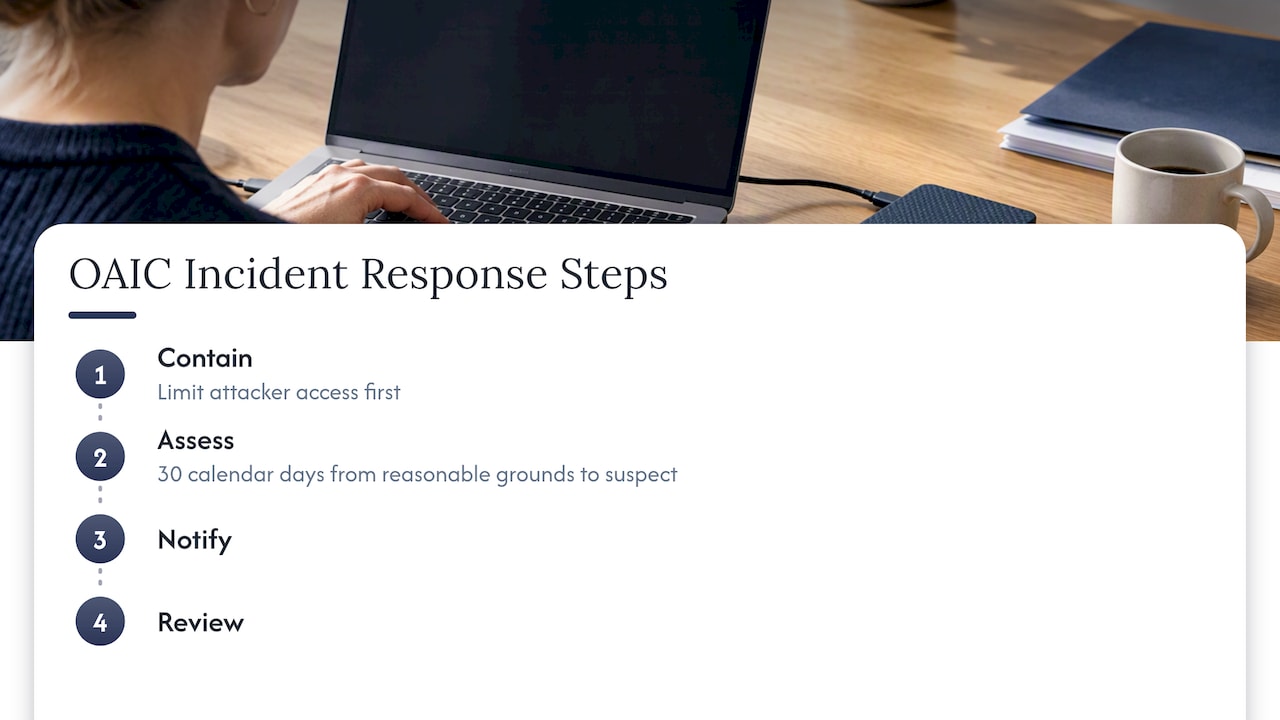
- Incident quick-start checklist: mapped directly to the OAIC’s four steps of contain, assess, notify and review, so nobody has to think about sequence mid-crisis.
A findings table only needs six columns to be useful. Anything more and people stop reading it. If you want a starting point rather than building from scratch, our cyber security risk assessment checklist for Australian SMBs is built around exactly this kind of structure, and our guide to vulnerability assessment in cyber security covers how to document technical findings in a way that slots straight into a findings table like this.
How to write and present cyber security reports to non-technical audiences
Open with the ask, not the background. If you need budget approved or a decision made, say so in the first line, not the last page. Executives respond to business metrics: cost of downtime per hour, regulatory exposure, client trust impact, not CVSS scores or packet capture detail.
Visuals help enormously here. A simple red, amber, green tracker against your top risks tells a board more in five seconds than three paragraphs of prose. A short trend chart showing open findings dropping over 90 days shows progress is real, not just promised.
Before you present, prepare for the five questions every owner asks: how bad is it really, what does it cost to fix, what does it cost if we do nothing, how long will it take, and who is responsible for making sure it happens.
Pro Tip: Rehearse your answer to “what happens if we do nothing” before the meeting: it is the question that gets budgets approved, and the one most reports leave unanswered.
How IT Start writes assessment reports for SMBs: practical examples from real engagements
For businesses with 10 to 50 staff, we build reports around what is actually fixable in the next 30, 90 and 180 days, not a wish list. Most of what we find follows a pattern: no MFA on at least some accounts, backups nobody has actually tested restoring from, and permissions that have been copied from one staff member to the next for years without review; backup verification and recovery test advice is critical to avoid surprises.
What we prioritise first, almost every time:
- MFA enforcement across all accounts, especially admin and finance roles.
- Backup restore testing, because being “backed up” and being able to restore are two different things.
- Permission clean-up, closing access that was never revoked when someone changed roles or left.
We sequence remediation so the business sees wins inside 30 days, tackles the harder infrastructure work by 90, and handles longer-term upgrades by 180, tracked against the plan of action in the report itself. Our work follows the SMB 1001 Gold certification standard, and our team is Brisbane-based, which matters when a client needs someone on-site rather than a call centre overseas. If you want a sense of where your own environment stands, a free assessment is the fastest way to see what a report like this would actually find in your business.
Incident reporting obligations and timeline references
If you suspect a breach involving personal information, the clock starts immediately. The OAIC’s guidance on data breach preparation and response requires entities to complete an assessment of a suspected eligible data breach within 30 calendar days of first becoming aware of grounds to suspect it happened. That is not 30 business days, and it is not 30 days from when you confirm the breach, it is from when you had reasonable grounds to suspect one.
The four steps the OAIC expects are contain, assess, notify and review, laid out clearly in the OAIC quick reference guide. Containment comes first because every hour an attacker has access makes the assessment harder. Assessment is where your incident report earns its keep, because the timeline and evidence you have logged is what determines whether the breach is notifiable.
Start the incident log the moment suspicion arises, not once you have confirmed anything. ASD’s guidance on reporting a cyber security incident makes the same point: regulators expect a reasonable and expeditious assessment, and early documentation is often what gets you there inside the 30-day window. Businesses that wait to “be sure” before writing anything down routinely run out of time to do a proper assessment.
ASD, ACSC and ISM guidance on assessment report structure
If you want a structure that holds up to scrutiny, ASD’s own documentation guidance is the place to start. The ISM guidelines for cyber security documentation set out that a security assessment report should cover scope, strengths and weaknesses, the security risks identified, how effective existing controls are, and recommended remediation actions. That is almost identical to the structure we laid out earlier in this article, which is not a coincidence, it is the standard most Australian assessment reports are measured against.
For businesses that need a more formal assessment, the IRAP common assessment framework lists the minimum deliverables for an IRAP-style assessment, including a formal Security Assessment Report and a controls matrix describing how each control is implemented and what evidence supports it. Most SMBs will never need a full IRAP assessment, but the controls matrix concept is worth borrowing regardless, because it forces you to tie every control claim to actual evidence rather than a tick box.
If you are tracking maturity against the Essential Eight specifically, the Essential Eight Assessment Guidance Package provides a standardised template for recording maturity levels. Record those levels consistently over time, not just as a one-off snapshot, so trend tracking is possible in future reports.
Industry-specific reporting requirements for Australian SMEs
Different industries carry different reporting obligations layered on top of the general NDB scheme. Financial services businesses often have additional obligations tied to their regulator and to contractual requirements from banking partners, on top of the standard notification timeline. Healthcare providers handling patient records face the same 30-day NDB assessment window, but the sensitivity of health information means the business impact section of any report should spell out the reputational and regulatory exposure in more explicit terms than a typical retail business would need.
Legal and professional services firms often have confidentiality obligations to clients that exceed the baseline privacy requirements, which means a vendor risk assessment or incident report for these businesses should explicitly address client confidentiality alongside personal information exposure.
For Brisbane and Queensland SMEs specifically, we find the biggest gap is not awareness of these obligations, it is translating them into a report structure that actually gets used. A compliance-heavy business does not need a different report template, it needs the same scope, findings and remediation structure covered earlier, with an extra line in the executive summary naming the specific regulatory or contractual obligation at stake. Our step-by-step cybersecurity assessment guide for Queensland SMEs walks through how that looks for a local business.
Incorporating compliance audit summaries and evidence
A compliance audit summary should never be bolted onto a security report as a separate, disconnected document. Fold the audit findings into the same findings table structure used for technical issues, with the same severity, evidence and owner columns.
Where an external audit has already rated a control, cite that rating directly rather than re-describing it in your own words, and attach the original evidence or a reference to it in your appendices. If a compliance audit flagged that access reviews were not being performed quarterly, that becomes a finding row, with the audit report itself listed as the evidence source and a remediation owner assigned, exactly the same way a missing MFA finding would be handled.
This matters most when a business is juggling multiple frameworks at once, for example an internal security assessment alongside an external compliance audit for a client contract. Keep one master findings table rather than three separate documents, because remediation tracking falls apart fast when the same underlying issue, like weak access controls, shows up under three different names in three different reports. Our risk identification guide covers how to map these technical and compliance findings back to business impact consistently.
Integrating continuous monitoring and trend data
A report that only captures a single point in time tells you less than one that shows direction. If you run continuous monitoring, whether that is endpoint detection alerts, firewall logs or Microsoft 365 sign-in anomalies, pull a trend summary into the report rather than just the latest snapshot.
A simple approach: track open findings count month over month, mean time to remediate, and repeat incidents by category. If the same type of phishing attempt keeps reaching inboxes despite filtering changes, that trend line is more useful to a decision maker than any single incident write-up, because it points at a root cause rather than a one-off event.
We build this into the plan of action and milestones section rather than as a separate monitoring report, so the same document that lists what needs fixing also shows whether fixes from last quarter actually worked. If a control was marked remediated two months ago and the trend data shows the same issue recurring, that is a finding in itself, and it belongs back in the findings table, not buried in a footnote.
Visualising data effectively in cyber security reports
Charts earn their place only when they make a decision faster, not because a report looks more polished with graphics in it. A red, amber, green heatmap against your top risk categories is the single most useful visual for an executive audience, because it turns a wall of text into something scannable in seconds.
For technical appendices, a simple bar chart showing finding counts by severity over the last three assessment cycles does more work than a dense table of every CVE identified. For trend reporting, a line chart tracking open findings over 90 or 180 days shows progress without anyone needing to read the detail behind it.
Keep dashboards simple. A board does not need a live dashboard with twelve metrics, it needs three to five that map directly to the risks named in the executive summary. If a visual does not directly support a decision someone in the room needs to make, leave it in the appendix or cut it entirely.
Author perspective: practical notes from an MSP who writes these reports
Most businesses read a cyber security report the same way they read terms and conditions: skim it, assume someone technical will handle it, move on. That is the biggest thing we see go wrong. A report with no owner and no deadline attached to each finding is just a document, not a plan.
We had a client assume their backups were fine because a report six months earlier said “backups configured and running.” Configured is not the same as restorable, and nobody had tested a restore in that time. That single gap should be its own demand owners make of any report: show me the last successful restore test, not just the backup schedule.
Three things worth demanding from any report handed to you: a named owner for every finding, a date attached to every fix, and evidence that past fixes actually held up over time.
— Matt
FAQ
How to write a cyber security report?
Start with scope and audience, then an executive summary stating the headline risk and next step, followed by findings with severity and evidence, and a plan of action with owners and dates. ASD’s ISM documentation guidance confirms this structure, covering scope, strengths and weaknesses, risks and recommended remediation.
What is a cyber security report?
A cyber security report is a document that records the state of an organisation’s security controls, the risks identified, and the recommended fixes, written for a specific audience such as executives, technical teams or regulators. The format changes depending on the goal, from a one-page board summary to a detailed technical assessment.
How to write a security report example?
Write the headline finding first in plain business language, then back it with evidence, severity and a specific recommended action for each item. A working example executive summary might state the top three risks, their business impact, and the next step, kept to under one page so it gets read.
What are the 5 C’s of cybersecurity?
Definitions of the “5 C’s” vary across sources and are not a standard set by a government body like ASD or the ACSC. A commonly cited version references change, compliance, cost, continuity and coverage, but treat it as informal shorthand rather than an authoritative framework.
Sources
For structuring a formal assessment report, ASD’s ISM guidelines for cyber security documentation remain the primary reference. For breach notification timing, the OAIC’s data breach guidance and its quick reference guide cover the 30-day assessment window and the four key response steps. For sector-wide threat context when writing executive summaries, the Verizon DBIR provides useful benchmarking data.
- Data breach preparation and response — OAIC
- 2026 Data Breach Investigations Report (DBIR) — Verizon
- Cyber