A cyber security risk assessment checklist produces one thing: a prioritised risk register with evidence, remediation owners, and a clear map to your ASD Essential Eight maturity gaps. Run it right and you finish with scored risks, a remediation register started, and a one-page summary that your board can actually act on.
Here is what you can do today to get traction fast:
- Confirm MFA is on for every Microsoft 365 account — admin accounts first, then all staff.
- Check your backups actually restore. Pull a test file from last week’s backup right now. We see this fail constantly.
- Export your asset list. A spreadsheet of hardware, SaaS apps, and data stores is your starting point.
- Run a free cyber health check using the ACSC small business hub tool.
- Identify who owns each system. No owner means no accountability when something breaks.
- Pull your patch report. How many devices are more than 30 days behind on OS updates?
- Check your incident response plan is accessible offline. A plan saved only on your desktop is useless during ransomware.
Success for an SME looks like this: every risk has a score, an owner, and a planned fix date. Your cyber hygiene quick wins are documented. You know your Essential Eight maturity level and where the gaps are.
Pro Tip: In the field, we start every assessment by asking the client to restore a single file from backup while we watch. About half the time, it fails or takes far longer than expected. That one test tells you more about real security posture than any policy document.
Key takeaways
A cyber security risk assessment checklist is only as useful as the remediation register it produces and the exec sponsor who owns the outcomes.
| Point | Details |
|---|---|
| Start with MFA and backups | Enable MFA on every account including service accounts, then verify backups restore before anything else. |
| Map findings to Essential Eight | Score each gap against the maturity model and target Level Two as a minimum for most SMBs. |
| Evidence quality matters | ACSC expects high-quality evidence; interviews alone do not confirm a control is effective. |
| Vendor risk is often overlooked | Inventory every vendor with system access and check for SOC reports, least-privilege access, and breach notification clauses. |
| IT Start for Queensland SMBs | IT Start runs discovery, scanning, and remediation for 10–50 staff businesses across Brisbane and Queensland. |
Table of Contents
- What is this checklist for, and who should run it?
- Before you start: planning, scope, and alignment to ACSC guidance
- Step-by-step assessment checklist: what to check and what evidence to collect
- How to score and prioritise risks from your assessment
- What testing methods and evidence quality does ACSC expect?
- How to assess your vendors, SaaS apps, and managed services
- What to deliver to your board and how to track remediation
- What does an assessment cost and how long does it take?
- What most businesses get wrong: an MSP perspective
- Why this checklist matters more than most businesses realise
- How IT Start supports Australian SMBs with cyber security assessments
- Sources
- FAQ
What is this checklist for, and who should run it?
This checklist is for IT managers, business owners, and external assessors at Australian SMBs with 10 to 50 staff. It covers the full assessment cycle: planning, scoping, technical testing, scoring, and reporting. The output maps directly to the ACSC Essential Eight Assessment Process Guide, which defines four stages: plan, scope, assess controls, and develop the security assessment report.
Who should lead it?
- An internal IT manager with appropriate hands-on experience in your environment.
- An external assessor or MSP when you need independence or lack internal capacity.
- A combined team where the internal person provides access and context, and the external assessor provides objectivity.
You need an exec sponsor in the room from day one. Without one, findings sit in a report and nothing gets fixed.
When to use this checklist:
- Initial baseline: when you have never formally assessed your environment.
- After a major change: new cloud platform, office move, merger, or significant staff growth.
- Post-incident: after a breach, ransomware event, or near-miss.
- Annually: as a minimum cadence for ongoing governance.
At a high level, this checklist maps to all eight Essential Eight strategies. Asset inventory and patch management align to application control and patching. MFA checks align directly to the MFA strategy. Backup checks map to the restrict administrative privileges and regular backups strategies. Logging and monitoring feed into the detection and response layer that sits above the Eight.
Before you start: planning, scope, and alignment to ACSC guidance
Skipping the planning phase is the single biggest reason assessments produce useless results. You end up with findings that cover the wrong systems, miss the critical data stores, and cannot be compared year-on-year.
Set your objective and scope first. Document which systems, business processes, and data classifications are in scope. For most SMBs, that means: all Microsoft 365 tenants, on-premises servers, network devices, SaaS applications with access to business data, and any cloud storage. Out-of-scope items need a written justification.
Assign roles before you start:
- System owner: accountable for each in-scope system and for accepting or treating risks.
- Assessor: conducts interviews, runs scans, reviews configurations.
- Evidence custodian: collects and stores evidence securely (screenshots, exports, logs).
- Exec sponsor: receives the report and authorises remediation spend.
Select your target maturity level. The Essential Eight Maturity Model runs from Level Zero (not implemented) to Level Three (advanced controls). Many SMBs should target a moderate maturity level as a minimum. Document any exceptions formally — under ACSC assessment rules, an undocumented exception is treated as a control not implemented.
Choose your assessment methods and set a realistic timeline:
| Method | What it covers | Suitable for |
|---|---|---|
| Qualitative interviews | Policies, processes, staff awareness | All SMBs |
| Automated vulnerability scan | Patch gaps, open ports, misconfigs | All SMBs |
| Configuration export review | Hardening baselines, cloud settings | All SMBs |
| Targeted penetration test | Control effectiveness under attack | SMBs with higher risk profile |
Quick timeline for a 10–50 staff SME:
- Days 1–2: planning, scoping, stakeholder briefing, evidence request list sent.
- Days 3–5: evidence collection, interviews, automated scans.
- Days 6–8: analysis, risk scoring, draft report.
- Days 9–10: report review, exec presentation, remediation register handed over.
Gather these up front: asset inventory, Active Directory or Entra ID user export, patch management reports, backup logs, and your current incident response plan.
Step-by-step assessment checklist: what to check and what evidence to collect
This is the core of your IT security assessment checklist. Work through each area in order. For every item, record the finding, the evidence collected, the risk score, and the owner.
Asset inventory and classification
Document every hardware device, software application, SaaS subscription, and data store. Include backups as assets. Classify data by sensitivity: public, internal, confidential, restricted.
Evidence required: asset register export, software licence list, data classification spreadsheet. For deeper guidance on inventorying assets, see risk identification in cyber security.
Identity and access management
- Is MFA enabled for all accounts, including service accounts and admin accounts?
- Are shared accounts documented and justified?
- Are privileged accounts separate from standard user accounts?
- Is conditional access configured to block legacy authentication protocols?
Evidence required: MFA coverage report from Entra ID, privileged account list, conditional access policy export. We see this a lot: MFA may be on for staff but some critical service accounts often lack MFA. That is your biggest exposure.
Patch management and configuration hardening
- What is the patch status of all operating systems and third-party applications?
- Is endpoint detection and response (EDR) deployed on all devices?
- Are configuration baselines documented and enforced?
Evidence required: patch management report (e.g. from Microsoft Intune or your RMM tool), EDR deployment report, configuration baseline snapshot.
Backups and recovery
This is where most SMBs fail. The ACSC Small Business Cyber Security Guide is explicit: Microsoft 365 sync is not a backup. OneDrive and SharePoint sync deleted or encrypted files just as fast as they sync good ones. You need immutable, off-site copies and you need to test restores.
- Are backups running daily for all critical systems?
- Are backups stored off-site or in an air-gapped location?
- When was the last full restore test, and was it documented?
- Are backup logs reviewed regularly for failures?
Evidence required: backup job logs, restore test report with date and result, off-site storage confirmation.
Logging, monitoring, and detection
- Are logs centralised (e.g. Microsoft Sentinel, a SIEM, or a managed SOC)?
- Is log retention set to at least 90 days?
- Are alerts configured for failed logins, privilege escalation, and data exfiltration?
- Who receives and acts on alerts outside business hours?
Evidence required: log forwarding configuration, sample alert rules, incident ticket history.
Vulnerability scanning and penetration testing
- Is a credentialed vulnerability scan scheduled at least quarterly?
- Are scan results tracked and remediated within defined timeframes?
- Has a penetration test been conducted in the past 12 months for higher-risk environments?
Evidence required: scan exports with remediation status, pen test report and remediation confirmation.
Application and cloud controls
- Are cloud storage permissions reviewed and least-privilege enforced?
- Are data exfiltration controls in place (e.g. Microsoft Purview DLP)?
- Are SaaS applications inventoried and approved?
Evidence required: cloud permission export, DLP policy configuration, SaaS app inventory.
Third-party and supplier checks
Covered in detail in the dedicated section below.
Business continuity and incident response
- Is a documented incident response plan in place and accessible offline?
- Does the plan include the ACSC hotline 1300CYBER1 as a contact?
- Has a tabletop exercise been run in the past 12 months?
- Does the disaster recovery plan cover RTO and RPO for critical systems?
Evidence required: incident response plan (version-controlled), tabletop exercise notes, DR plan with RTO/RPO targets.
Remediation register starter
For each finding, record: risk ID, description, system owner, risk score (likelihood x impact), planned fix date, evidence required for verification, and current status. Keep this live. A finding without an owner and a date is just a complaint.
Pro Tip: When you find a control gap, immediately ask the system owner to sign off on the risk in writing. If they will not sign, escalate to the exec sponsor. That conversation alone often gets the fix prioritised faster than any report.
How to score and prioritise risks from your assessment
A simple likelihood-by-impact matrix works for most SMBs. Score each risk on a 1–5 scale for both likelihood and impact, then multiply for a raw score of 1–25.
| Score | Likelihood | Impact |
|---|---|---|
| 1 | Very unlikely | Negligible |
| 2 | Unlikely | Minor disruption |
| 3 | Possible | Moderate disruption |
| 4 | Likely | Significant financial or operational harm |
| 5 | Almost certain | Critical: data loss, regulatory breach, or business stoppage |
Priority translation rules:
| Risk score | Priority | Action |
|---|---|---|
| 20–25 | Critical | Fix promptly or escalate to exec immediately |
| 12 | High | Fix within 30 days, assign named owner |
| 6–11 | Medium | Fix within 90 days, track in remediation register |
| 1–5 | Low | Accept with documented rationale or schedule for next cycle |
Map your Essential Eight maturity gaps directly to this matrix. A Level Zero finding on MFA (not implemented at all) scores a 5 for likelihood and a 5 for impact for most SMBs. That is a critical risk, full stop. A Level One gap on application hardening might score a 3 x 3 depending on your environment.
CPA Australia’s traffic light approach is a practical complement here. Red controls are your critical baseline — the ones you must answer “yes” to before anything else. Use that framing when presenting to a board that finds a 25-point matrix hard to interpret.
Pro Tip: When presenting risk scores to a board, translate the technical severity into dollar terms or operational impact. “MFA not enabled on admin accounts” means nothing to a director. “An attacker who compromises one admin account can encrypt every file in the business and demand a ransom” lands differently.
What testing methods and evidence quality does ACSC expect?
The ACSC Essential Eight Assessment Process Guide expects assessors to favour higher-quality evidence where reasonably practicable, and sample size matters — particularly for workstations and servers. An interview alone is not sufficient evidence that a control is effective.
Testing methods ranked by evidence quality:
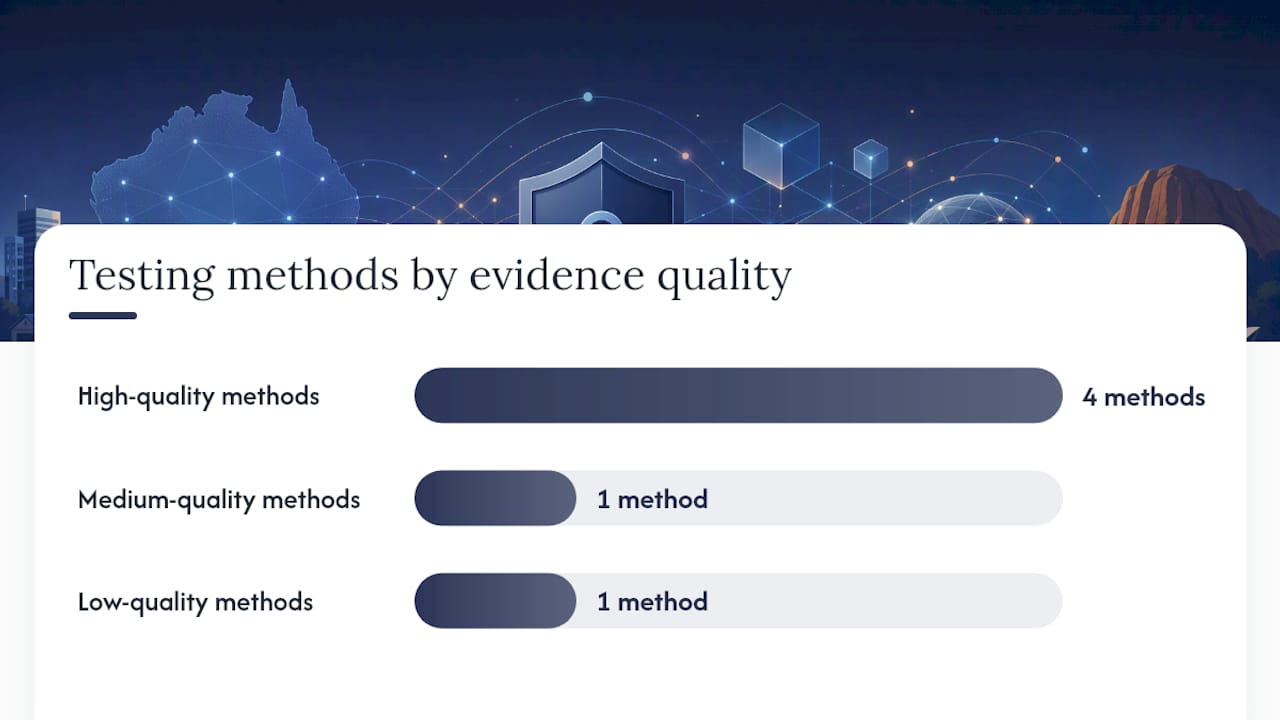
- Credentialed vulnerability scan: authenticated scan of all in-scope systems; produces exportable findings with CVE references and severity ratings. High-quality evidence.
- Authenticated configuration review: direct inspection of system settings against a hardening baseline (e.g. CIS Benchmarks or ASD hardening guides). High-quality evidence.
- Control verification scripts: automated scripts that check specific control states (e.g. MFA status, patch levels, backup job success). High-quality evidence, fast to run.
- Document and log review: review of policy documents, backup logs, patch reports, and incident tickets. Medium-quality evidence; supports but does not replace technical testing.
- Qualitative interviews: discussions with system owners and staff. Low-quality evidence on its own; useful for context and to identify gaps for technical follow-up.
- Targeted penetration test: simulated attack against specific controls to test effectiveness. High-quality evidence for the controls tested; expensive and time-limited.
When to use a full pen test versus a targeted test:
A full pen test is warranted when you handle sensitive client data, operate in a regulated sector (healthcare, financial services, legal), or have had a recent incident. For most 10–50 staff SMBs doing an annual review, a targeted test focused on external perimeter, email security, and MFA bypass is more cost-effective and still produces meaningful evidence.
Document all testing limitations in the report. If you could not test a system because it was in production and the owner refused downtime, say so. An undocumented limitation is a gap in your assessment, not a pass.
For SaaS and cloud environments, the SaaS cybersecurity checklist from Skypher covers cloud-specific blind spots worth reviewing alongside your configuration exports.
Pro Tip: For SMBs on a tight budget, a credentialed vulnerability scan plus an authenticated Microsoft 365 configuration review covers the majority of your Essential Eight evidence requirements at a fraction of the cost of a full pen test. Start there, then add targeted pen testing for your highest-risk systems.
How to assess your vendors, SaaS apps, and managed services
Third-party risk is where assessments get lazy. Most SMBs have 20 to 40 SaaS applications, several managed service providers, and a handful of vendors with direct access to their systems or data. Each one is a potential entry point.
Start with an inventory of vendors that have:
- Direct access to your systems or network (MSPs, IT support providers, remote monitoring tools).
- Access to sensitive data (payroll providers, CRM platforms, cloud storage).
- Privileged connections (firewall management, backup agents, RMM tools).
For each vendor, check:
- Do they have a current SOC 2 Type II report or equivalent (ISO 27001 certification)?
- Have they had a publicly disclosed breach in the past two years?
- Is their access limited to least privilege — do they have more access than they need?
- Can you revoke their access immediately if needed?
- Do they notify you of security incidents within 72 hours (aligned to Australian Notifiable Data Breaches scheme requirements under the Privacy Act 1988)?
- Is there a right-to-audit clause in your contract?
- What happens to your data if you terminate the contract?
Contract clauses to look for:
- Data handling and storage location (Australian data sovereignty matters for regulated sectors).
- Breach notification timeline: 72 hours is the standard to aim for.
- Right to audit or request security attestations annually.
- Termination for cause if the vendor suffers a material security breach.
- Data return and deletion on contract end.
Scoring vendor risk: use the same 1–5 likelihood-by-impact matrix. A vendor with global admin access to your Microsoft 365 tenant and no MFA on their own admin accounts is a critical risk regardless of how good your internal controls are. When a vendor cannot provide a SOC report and will not answer security questions, that is your answer — find an alternative.
What to deliver to your board and how to track remediation
A good assessment is worthless if the output sits in a PDF no one reads. The deliverable that actually drives change is a one-page executive summary backed by a live remediation register.
Your one-page executive summary should contain:
- Top five risks by score, in plain language.
- Current Essential Eight maturity level versus target.
- Trend since last assessment (improving, stable, or declining).
- Residual risk after planned remediation.
- The specific ask: budget, headcount, or policy decision required from the board.
AICD guidance is clear that directors must treat cyber security as a governance issue, not an IT issue. A board that sees a one-page risk summary with a clear ask is far more likely to approve remediation spend than one handed a 40-page technical report. For more on what boards need to see, the cyber security CISO guide for Australian SMBs covers director-level priorities in detail.
Remediation register fields:
| Field | Purpose |
|---|---|
| Risk ID | Unique reference for tracking |
| Description | Plain-language description of the gap |
| System owner | Named person accountable for the fix |
| Risk score | Likelihood x impact (1–25) |
| Priority | Critical / High / Medium / Low |
| Planned fix date | Committed date, not aspirational |
| Verification evidence | What evidence will confirm the fix is done |
| Status | Open / In progress / Closed / Accepted |
Report to the board quarterly at minimum. Between assessments, track the number of open critical and high risks, the percentage closed on time, and any new risks identified through monitoring or incidents.
What does an assessment cost and how long does it take?
Honest answer: it depends on your environment, but here are realistic shapes for a 10–50 staff SME.
Typical assessment timeline:
- Discovery and scoping: 1–2 days.
- Evidence collection and technical testing: 2–4 days.
- Analysis and report writing: 1–2 days.
- Total elapsed time: 1–2 weeks from kick-off to report delivery.
Rough cost bands (descriptive, not quotes):
- Internal assessment with free tools (ACSC health check, basic scans): Low direct cost, but requires 20–40 hours of internal IT time.
- External vulnerability scan and configuration review: Entry-level engagement; suitable for most SMBs as an annual baseline.
- Full assessment with pen testing: Higher investment; appropriate for regulated sectors or post-incident reviews.
- Remediation project delivery: Varies significantly by finding severity and number of systems affected.
Phased approach for cash-constrained SMBs:
- Quick wins (Week 1–2): Enable MFA everywhere, verify backups restore, patch critical vulnerabilities. These cost almost nothing and close your highest-scored risks.
- Medium-term fixes (Month 1–3): Deploy EDR, configure centralised logging, review vendor access, document your incident response plan.
- Long-term controls (Month 3–12): Implement a SIEM or managed SOC, conduct a penetration test, formalise your Essential Eight maturity programme.
Get external help when: you lack internal capacity to run the scans and analyse results objectively, you are in a regulated sector, you have had an incident, or your board needs independent assurance. A downloadable security risk assessment template can help you structure the internal work before engaging an external assessor.
What most businesses get wrong: an MSP perspective
Honestly, the gap between what businesses think their security looks like and what we find when we actually look is significant. Here are the patterns we see constantly.
Blind spot 1: Microsoft 365 sync is not a backup. We walk into businesses every month where the IT manager is confident they are backed up because OneDrive is syncing. When ransomware hits, OneDrive syncs the encrypted files too. The ACSC guidance is explicit on this: you need immutable, off-site backups and you need to test restores. We have seen businesses lose weeks of data because no one had ever actually pulled a restore.
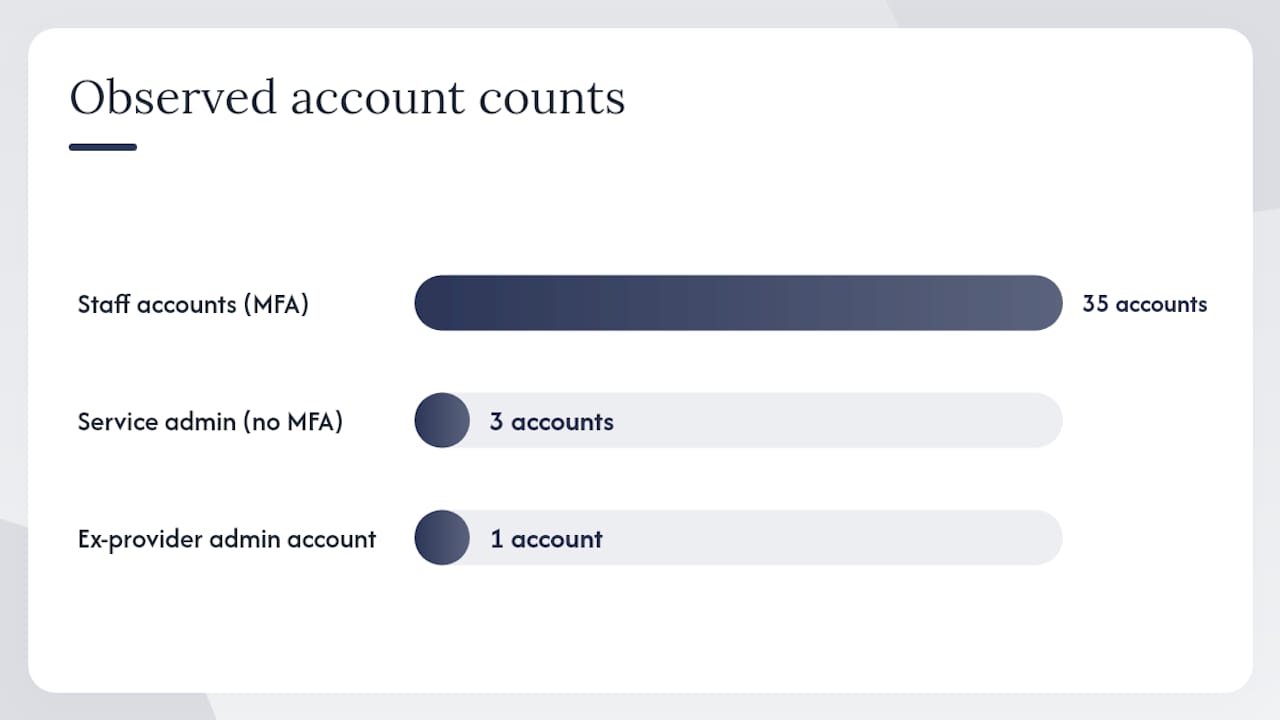
Blind spot 2: MFA on staff accounts but not service accounts. A client had MFA enabled for all 35 staff. Three service accounts with global admin rights had no MFA and passwords that had not changed in four years. One of those accounts was the one used by their old IT provider who had left 18 months earlier. That is a critical risk sitting open with no one watching it.
Blind spot 3: the incident plan on the desktop. We see this constantly. The incident response plan is a Word document saved on the file server. During a ransomware event, the file server is encrypted. The plan is gone. Your plan must be accessible offline, printed, or stored in a location completely separate from your production environment. Include the ACSC hotline 1300CYBER1 as the first contact point for live incidents.
Blind spot 4: jumping maturity levels. Organisations try to implement Level Three Essential Eight controls before Level One is solid. MFA is not fully deployed, patching is inconsistent, but someone has bought a fancy SIEM. The Essential Eight maturity model FAQ is clear: build Level One before moving up. A shaky foundation makes every control above it unreliable.
What to fix this week:
- Run a restore test on your backup right now. Document the result.
- Pull a list of all accounts with admin rights, including service accounts. Revoke any that are not actively needed.
- Check your incident response plan is stored somewhere accessible without your network.
- Run the free ACSC cyber health check at the ACSC small business hub.
Pro Tip: If you are not sure where to start after an incident, call the Small Business Cyber Resilience Service. They provide tailored recovery support and case management at no cost, and they will refer you to the ACSC hotline for live incidents.
Why this checklist matters more than most businesses realise
We run assessments for SMBs regularly, and the honest truth is that most businesses are not in as bad a shape as they fear, but they are also not as safe as they think. The gap is usually in the evidence. They have controls, but they cannot prove the controls work. Backups exist, but no one has tested them. MFA is configured, but three accounts are excluded “temporarily” and that temporary exception is two years old.
A checklist alone does not fix that. What fixes it is ongoing measurement: running the same checks quarterly, tracking the remediation register, and reporting to someone who has the authority to spend money when a critical risk stays open too long. The cyber risk management strategy guide covers how to connect assessment findings to a longer-term risk treatment plan.
IT Start approaches assessments differently from a pure audit firm. We manage the environments we assess, which means we know what “normal” looks like for a 20-person professional services firm in Brisbane, and we know what the common failure points are before we even start. That context changes the quality of the findings.
How IT Start supports Australian SMBs with cyber security assessments
IT Start works with SMBs across Brisbane and Queensland to run practical, evidence-based cyber security assessments that produce findings you can actually act on. The engagement covers discovery and scoping, credentialed vulnerability scanning, Microsoft 365 and cloud configuration reviews, and a prioritised remediation register handed over at the end.
For businesses that need more depth, IT Start coordinates targeted penetration testing and manages remediation projects through to completion. The target client is a 10–50 staff business in Queensland that needs independent assurance without the overhead of a large consulting firm.
If your assessment finds gaps in cloud configuration or backup posture, IT Start’s cloud services and cyber security services cover the remediation work directly. No handoff to a third party, no gap between the finding and the fix.
To book a consultation or discuss what an assessment would cover for your business, contact IT Start through the cyber security services page.
Sources
Authoritative Australian guidance for your assessment:
- Cyber
- Cyber security checklist (CPA Australia) September 2023
- Business
- A cyber security handbook for small business and NFP directors | AICD
FAQ
What does a cyber security risk assessment checklist produce?
It produces a prioritised risk register with scored findings, evidence, named owners, and a remediation register. The output maps to your ASD Essential Eight maturity gaps and gives your board a clear picture of residual risk.
How often should an Australian SMB run a security assessment?
At minimum, annually. Run an additional assessment after a major change (new cloud platform, merger, significant staff growth) or after any security incident.
Is Microsoft 365 sync an adequate backup for my business data?
No. OneDrive and SharePoint sync deleted or encrypted files as fast as they sync good ones. The ACSC recommends immutable, off-site backups with regular restore testing to confirm recoverability.
What is the ASD Essential Eight and why does it matter for my assessment?
The ASD Essential Eight is a set of eight mitigation strategies developed by the Australian Signals Directorate, structured across maturity levels Zero to Three. It is the primary framework Australian businesses use to prioritise cyber controls and demonstrate security posture to regulators and clients.
Where can I get free help if my business has already had a cyber incident?
Contact the Small Business Cyber Resilience Service for tailored recovery support and remediation planning. For a live incident, call the Australian Cyber Security Hotline on 1300CYBER1.