

An IT support SLA (service level agreement) is the part of your contract that says how fast your provider responds, how problems are ranked, who gets called when something is stuck and what happens if the promise is missed. A good one is short, uses numbers you can check and matches the way your business actually works. A bad one is full of words like “promptly” and “reasonable endeavours” that nobody can measure.
We are a Brisbane managed IT team that looks after Microsoft 365, security, backups and networking for businesses of 5 to 100 people. This guide is for the owner or manager who has been handed an SLA and has to decide whether it is any good. It is not for IT staff writing an internal service desk policy.
Key Takeaways
- An SLA is only useful if every promise has a number, a start point and a way to measure it.
- Response time (someone acknowledges the problem) and resolution time (the problem is fixed) are different things. Check which one the contract commits to.
- Service credits as the only remedy are weak. Look for what else you can do if the targets keep being missed.
- The priority levels should describe business impact, so you can tell in advance which of your problems counts as urgent.
- Ask for a monthly report. If a provider cannot show how it performed against the SLA, the SLA is decoration.
Table of Contents
- What an IT support SLA covers
- Response time is not resolution time
- What P1, P2, P3 and P4 mean
- What most businesses get wrong about SLAs
- Where the data and the reality do not match
- Escalation: who gets called when the first person is stuck
- Service credits and what happens when targets are missed
- How to check the SLA is being met
- What not to pay for
- Our view: an SLA should describe how the work is done
- Checklist to take into the conversation
- Next step with IT Start
- FAQ
- Sources
What an IT support SLA covers
According to a guide to IT agreements from Australian law firm NFPL, an SLA sets performance standards such as uptime, response and resolution times and backup or recovery commitments, and it sets out consequences if the supplier falls short. It usually sits inside a managed services contract, although it can also be attached as a schedule.
In plain terms, a working SLA answers six questions:
- What is covered (users, devices, Microsoft 365, the network, backups)?
- When is support available, and what happens on public holidays?
- How are problems ranked by urgency?
- How quickly will someone respond, and how quickly should it be fixed?
- Who does the issue go to if the first person cannot solve it?
- What do you get if the targets are missed?
If your draft cannot answer one of these in a sentence, ask for it to be added before you sign. Sprintlaw’s guide to IT services agreements suggests putting operational detail such as SLAs and escalation contacts in schedules, so they can be updated without redoing the whole contract. We agree. Staff change, contact numbers change and a schedule is far easier to maintain than a signed master agreement.
Response time is not resolution time
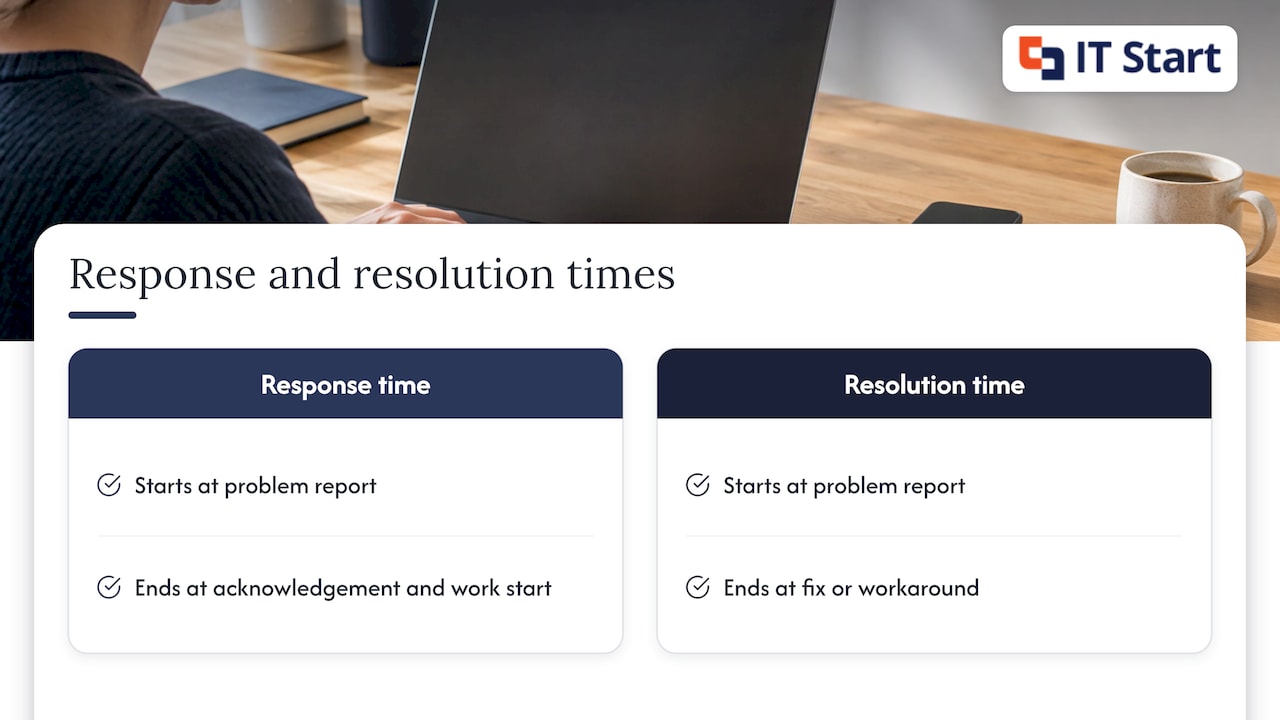
This is the single biggest thing businesses get wrong. A provider promises a response within a set time, the owner reads that as “fixed”, and then the first email back says “we have logged your request”. Both parties kept to the letter of the contract and you are still without email.
Response time is the gap between you reporting a problem and a qualified person acknowledging it and starting work. Resolution time is the gap between the report and the problem being fixed or a workaround being in place. Many contracts commit to the first and only mention the second as an aim.
The Service Desk Institute makes the point in its SLA template: a target service level measures performance and does not guarantee it. That is a fair description of how most SLAs work. A target tells you what the provider is aiming for and what you will compare reports against. It does not make the fix arrive.
So read the verbs. “Will respond” and “will resolve” are commitments. “Aims to” and “endeavours to” are not. Sprintlaw puts it neatly: if a commitment is not measurable, it is not enforceable, and a word like “promptly” is a red flag.
What P1, P2, P3 and P4 mean
Providers rank problems by priority so the worst ones are looked at first. P1 is the most urgent and P4 the least. The names vary (Severity 1 to 4, Critical to Low) but the idea is the same.
Artificer Legal’s guide for Australian businesses describes the four levels like this:
| Level | What it usually means |
|---|---|
| Severity 1 (critical) | Total outage, major security incident or the business cannot operate |
| Severity 2 (high) | A major function is not working or is badly degraded |
| Severity 3 (medium) | A non-critical fault, usually with a workaround |
| Severity 4 (low) | Minor issues and how-to questions |
The Service Desk Institute template lists example call-back targets for the four levels, running from 15 minutes for P1 up to one working day for P4. Treat those as an illustration of the spread, not a number to demand. The right figures depend on the provider, the plan and what you pay.
Check the definitions against your own business
This is where we would spend your time. “Business unable to operate” is vague until you apply it to your own office. Here is a hypothetical to show what we mean.
A physiotherapy clinic with three sites relies on one cloud booking system and shared Microsoft 365 mailboxes. If one receptionist’s laptop will not print, that is a P3 or P4. If the booking system cannot be reached at 8:15 on a Monday, every site is turning patients away. That is a P1 for the clinic, even if the vendor says its service is up. If the SLA only counts “total outage of the provider’s own systems” as P1, the clinic’s worst morning would be ranked as a medium problem.
Walk through your own three or four worst days and ask which level each would get. Then get the answer in writing. This is a ten-minute exercise that saves a long argument later.
What most businesses get wrong about SLAs
They sign a document written around the provider’s tools. The SLA is full of ticketing terms and uptime percentages but says nothing about the things the owner cares about, such as new starters having a working laptop and account on day one.
They chase the biggest uptime number. A figure like 99.9% sounds precise. Sprintlaw’s guide for business owners points out that you need the formula behind it: what counts in the denominator, how incidents are counted and what is excluded. Without that, two providers quoting the same percentage may be promising different things. Uptime also only matters for things the provider actually hosts or controls. It tells you little about whether your staff can get their work done.
They ignore the exclusions. Almost every SLA excludes scheduled maintenance, events outside anyone’s control and faults caused by changes made outside the provider’s process. Those are fair in principle. The question is how they are written. Maintenance windows should be agreed in advance and sit outside your trading hours. If your business trades Saturday mornings, a “weekend maintenance window” is a problem.
They forget about public holidays. Support hours that say “business days” need a stated location. Queensland has its own public holiday calendar and Brisbane has a local one, so a provider working to another state’s calendar can leave you in a gap. Ask which holidays are excluded and whether you can add cover if you trade on them.
Where the data and the reality do not match
SLA documents tend to read as if every ticket is neat: one fault, one category, one owner. Real support does not work that way.
A staff member reports “Outlook is slow”. That could be a damaged profile, a full mailbox, a poor Wi-Fi access point or a Microsoft 365 service issue. It might start as a P4 and become a P2 once the same symptom shows up on six machines. Good providers re-rank tickets as they learn more, and the SLA should say who can do that and how you are told.
Another gap is the clock. Does it run overnight? Does it pause while the provider waits for you to reply? Pausing is reasonable when we need something from you, such as access to a locked-out user’s phone. It is not reasonable if the clock can stop without a note on the ticket. Ask how paused time is recorded.
The third gap is the one in the numbers themselves. Published ranges for SLAs on provider and law-firm blogs vary a lot, and few come from a primary source. That is why we would not tell you what a “normal” response time is. We would tell you to compare the proposed figures to the cost of an hour of downtime in your business and to what the plan costs.
Escalation: who gets called when the first person is stuck
An escalation process is the path a problem follows when the first person cannot fix it or the target is about to be missed. Most providers run it in tiers: a service desk technician first, then a more senior technician and then an account manager or director. Sprintlaw describes escalation through an operational manager to senior leadership plus regular governance reviews.
There are two kinds of escalation, and a good SLA names both.
- Technical escalation: the ticket moves to someone with deeper skills, for example from general support to a person who deals with Azure, networking or security.
- Management escalation: you, or the provider, pull in a manager because the problem is taking too long or affecting the business more than first thought.
What to check: is there a named role or contact for management escalation? Can you trigger it yourself, or only the provider? Does a security incident go straight to a senior person? Our guide on what to do in the first hours of a cyber incident shows why that last point matters, because the early decisions cut down extended downtime.
If you are unsure what an everyday support team should be doing before anything escalates, our post on IT support responsibilities covers it.
Service credits and what happens when targets are missed
Most SLAs include service credits: a discount on a future invoice if the provider misses a target. They are common and they are fine as a courtesy. They are a weak form of protection if that is all you get.
NFPL’s guide says making service credits the exclusive remedy is high risk, especially where they are capped or bear no relation to the real cost of the failure. A credit of a small percentage of a monthly fee does not cover a day of lost sales. Adira’s 2026 guide to maintenance and support agreements adds that credits should work as a genuine remedy and that the contract should say whether they are the only one.
So ask three plain questions before signing. Is the credit the only remedy? If the same target is missed several months in a row, can you end the agreement without penalty? Who decides whether a target was missed, and on what records?
A second point sits on top of the contract. NFPL notes that some IT agreements with small businesses fall under the Australian Consumer Law, which gives extra rights through the consumer guarantees and unfair contract terms provisions. Adira’s guide says the guarantees cannot be excluded for services and that standard-form contracts are caught by the unfair contract terms regime, which has carried civil penalties since late 2023. It also warns that terms letting a supplier change service levels or fees at will are at risk. If your draft lets the provider vary the SLA on notice, that is worth raising. For anything involving legal rights, have your lawyer read the final contract. We can explain the technical side but we are not a substitute for legal advice.
How to check the SLA is being met
An SLA that nobody reads becomes a drawer document. Artificer Legal recommends monthly reports that cover incidents by severity, average response and resolution times, uptime, root-cause analysis for major incidents and planned improvements, with written records when a credit is triggered. Its author also argues that an SLA introduced after a major incident feels defensive, so it is better agreed at onboarding, when everyone is on good terms.
We would add a short routine for the owner:
- Read the monthly report for ten minutes and compare it to your own sense of the month.
- Pick the two slowest tickets and ask what held them up.
- If a major incident occurred, ask for the root cause in writing and what has changed.
- Review the SLA itself once a year, and straight after any significant incident. Artificer Legal suggests a review every six to twelve months for stable operations.
Reporting depends on monitoring. Without it, nobody knows the real number of incidents or when they started. Our practical guide to managed services monitoring explains what gets watched and why.
What not to pay for
A few things are rarely worth the money for a business of 5 to 100 people.
- Extended support hours you will not use. If your staff work 7:30 to 5:30, paying for round-the-clock cover is paying for an empty office. Cover your trading hours and agree a clear after-hours path for real emergencies.
- A dedicated account manager on a small plan. A named contact for escalation is useful. A full-time dedicated role is built for much larger organisations.
- Very tight response targets on low-priority work. A fast acknowledgement of a how-to question has no value. Spend the money on P1 and P2.
- A long list of metrics. Four or five numbers, read every month, beat twenty that nobody opens.
This advice is not for businesses where an outage has a safety or regulatory consequence, such as a clinic with live patient records. Those need tighter terms and a closer look at backup and recovery commitments. Our IT compliance checklist is a good place to start that conversation.
Our view: an SLA should describe how the work is done
We think the best SLA is the one a business owner can read over a coffee and then repeat to their office manager. That means plain language, a short list of priority levels tied to what staff cannot do, a named escalation path and a monthly report that shows what happened.
Our Managed IT plans cover support, devices, Microsoft 365, backup and security, so the SLA can describe the whole environment rather than one slice of it. We would rather agree the priority definitions with you at the start, using your own busiest days as the test, than hand over a template and hope it fits.
We also prefer proactive care to chasing tickets. When monitoring, patching and backup checks are part of the routine, fewer problems reach the stage where an escalation path is needed. That is the real purpose of an SLA: it sets the standard, and good routine care means you rarely need to invoke it.
We are based in Brisbane and look after businesses from the Sunshine Coast to the Gold Coast, so local public holidays and trading hours go into the agreement from the beginning.
IT Start
Checklist to take into the conversation
Bring these questions to any provider, including us.
- Which priority level would our three worst scenarios get?
- Is the target a response or a resolution?
- When does the clock start and when does it pause?
- What is excluded, and when are maintenance windows?
- Which public holidays apply?
- Who is the named escalation contact and can we trigger it?
- What are the remedies if targets are missed repeatedly?
- What does the monthly report contain?
- Can the provider change the SLA without our agreement?
Next step with IT Start
If you already have an SLA and want a second look at it, or you are about to sign one, we can go through it with you and map the priority levels to your real systems. For one-off questions and projects, our Business IT Support starts from $145 an hour ex GST. If Microsoft 365 is where most of your daily work happens, see how we handle Microsoft 365 support and management, and for security terms in an SLA see our cyber security services. You can also start at itstart.com.au and ask for a free consultation.
FAQ
What is an IT support SLA?
It is the part of an IT support contract that sets the standard of service: what is covered, support hours, how problems are ranked, response and resolution targets and the remedy if targets are missed. It turns a general promise of good service into numbers you can check.
What is the difference between an SLA and a KPI?
An SLA is a contractual commitment between you and the provider. A KPI is a measure the provider or your business tracks internally, such as customer satisfaction scores. Sprintlaw lists customer-experience measures such as CSAT and NPS alongside service levels, but they are tracked rather than promised.
What does an IT escalation process look like?
It is the route a problem takes when the first technician cannot solve it or time is running out. It usually goes from the service desk to a more senior technician and then to a manager. Ask who the named management contact is and whether you can trigger the escalation yourself.
How often should we review our SLA?
Once a year at minimum, and straight after any significant incident. Artificer Legal suggests every six to twelve months for stable operations and more often in fast-moving businesses. Changes to staff numbers, sites or key systems are also a good reason to review early.
Are service credits enough protection?
Usually not on their own. NFPL calls credits as an exclusive remedy high risk, particularly when they are capped. Look for the right to end the agreement if targets are repeatedly missed and have your lawyer check the final wording.
Sources
- IT agreements guide, NFPL (October 2025)
- Service Level Agreement Template, Service Desk Institute
- Service level agreements, a practical guide for Australian businesses, Artificer Legal
- IT Services Agreements in 2026, Sprintlaw Australia
- SLAs and Service Levels, Sprintlaw Australia
- Service Level Agreements for business owners, Sprintlaw Australia
- Maintenance and Support Agreement in Australia, Adira