
Outsourced IT support means an outside company looks after your computers, Microsoft 365, backups, security and help desk under an agreed scope and a monthly or hourly fee. For a business of 5 to 100 people, that usually costs less than hiring a full IT team and covers more than one person can. It only works if the contract, the security terms and the handover are right. This article covers those three things.
We are a Brisbane Managed IT team and we serve businesses from the Sunshine Coast to the Gold Coast. What follows comes from the way these arrangements go well, and the way they quietly go wrong.
Key takeaways
- Outsourced IT support comes in two main shapes: pay per job (break-fix) or a monthly subscription. For most businesses with more than a handful of staff, we recommend the subscription.
- Ask what the monthly fee includes before you ask how much it is. Devices, Microsoft 365, backup and security are the items that get left out.
- Your provider will have powerful access to your systems. Put multi-factor sign-in for their accounts and incident notification into the contract.
- Plan the exit on day one. You should be able to get your passwords, documentation and data back without a fight.
- It is not for everyone: a two-person business with a single laptop each rarely needs a contract.
Table of Contents
- What outsourced IT support actually is
- Two ways to buy it
- What most businesses get wrong
- Where the data and reality do not match
- What a good agreement covers
- Security terms to insist on
- What we see in practice
- What it costs
- Who should not outsource, or not yet
- Planning the handover and the exit
- How we approach it
- Talk to us about your setup
- FAQ
- Sources
What outsourced IT support actually is
An external provider takes responsibility for defined IT tasks. That might be answering staff calls when a laptop won’t print, keeping Microsoft 365 users and licences tidy, patching devices, running backups or watching for security problems. TechTarget describes a managed service provider as a third party that remotely manages a customer’s IT infrastructure and end-user systems, commonly for small and medium enterprises.
The word to notice is “defined”. Outsourcing is not a vague promise that someone will look after IT. It is a written scope, and the quality of the scope decides how good the service is. If you want the fuller picture of the model itself, we explain it in Managed IT services explained.
Two ways to buy it
TechTarget describes two core structures: break-fix support billed for technician time and parts, and a subscription billed monthly, commonly per computer or per user, with maintenance, security, monitoring and reporting set out in a service level agreement (SLA). An SLA is the part of the contract that says what service you are owed.
| Break-fix | Monthly subscription | |
|---|---|---|
| How you pay | Hourly, when something breaks | Fixed fee per user each month |
| Who has the incentive to prevent problems | Nobody, really | The provider, because fewer faults cost them time |
| Budget | Lumpy | Predictable |
| Best for | Small offices with simple setups, or one-off projects | Teams of 5 to 100 who rely on email, files and cloud apps every day |
Our own pricing follows the same split. Managed IT plans start from $75 per user per month ex GST and cover support, devices, Microsoft 365, backup and security. Business IT Support for one-off problems and projects starts from $145 an hour ex GST.
Honestly, we think break-fix is a poor deal once you have around ten people. Every outage is a surprise, and nobody is looking at the backup that has been failing quietly for three months.
What most businesses get wrong
We see these four mistakes a lot.
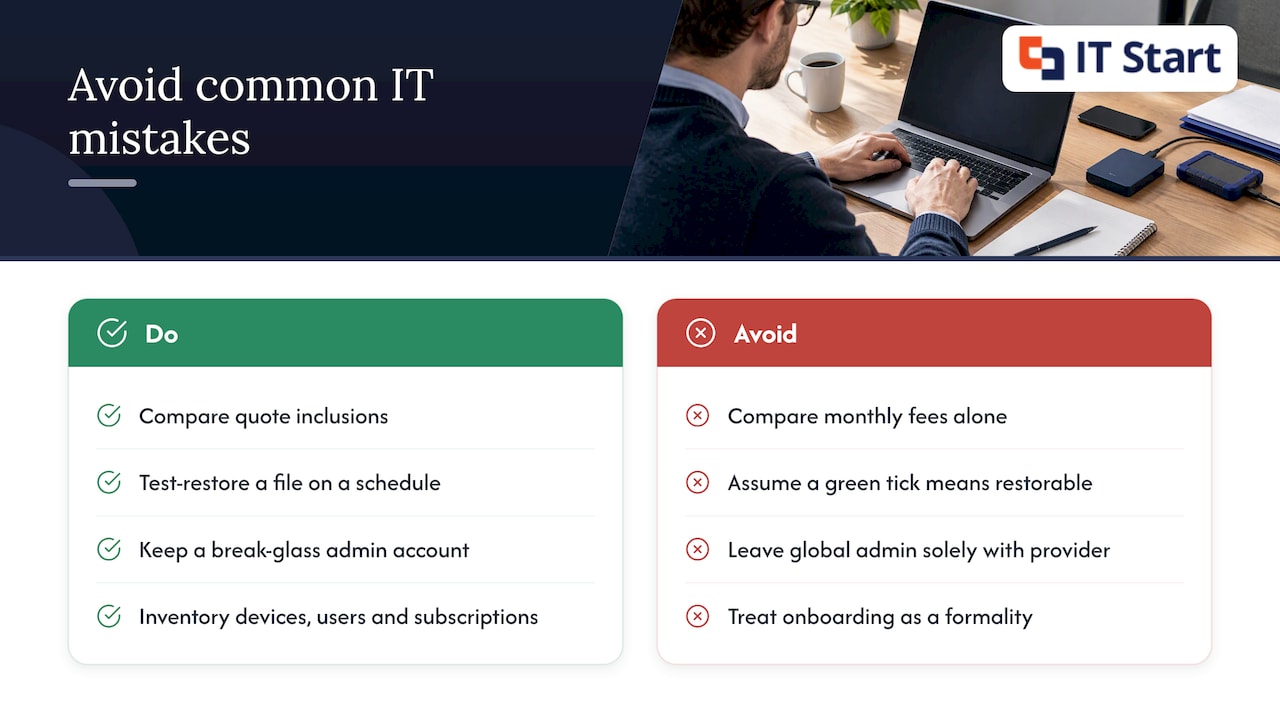
They compare monthly fees without comparing inclusions. One quote looks $30 per user cheaper. Then you read the fine print: no device management, backup billed separately, security tools extra. The cheap quote ends up costing more.
They assume backup means restorable. Plenty of businesses have a backup job showing a green tick. Few have ever restored a file from it. A good provider does a test restore on a schedule and shows you the result. We cover why this matters in our post on MFA and restore tests.
They hand over the keys and keep no copy. The global administrator account for Microsoft 365 sits with the provider alone. Years later, the business owner can’t prove they own their own tenant (the Microsoft setup that holds all your users and data). Insist on at least one break-glass admin account that you hold, with a long password stored safely and multi-factor sign-in turned on.
They treat onboarding as a formality. The first month sets the pattern. If your provider does not inventory every device, every user and every software subscription in the first weeks, they are guessing from then on.
Where the data and reality do not match
The pitch for outsourcing is cost saving. CPA Australia’s guidance on outsourcing is more careful: done well it can improve effectiveness and efficiency, done poorly it can bring distraction, higher costs and poor-quality outcomes. It lists the risks as service quality not meeting expectations, untimely service, and cost benefits that do not match what was expected.
That matches what we see. The saving is real when the scope is clear. It disappears when the business keeps phoning an ex-employee who “knows the server”, or when every small request becomes an extra-cost project because the contract said nothing about it.
The other gap is between what owners think they are buying and what they are using. Many businesses pay for Microsoft 365 licences that include security features, such as Conditional Access (rules that decide who can sign in, from where and on what device), and never switch them on. Part of a good provider’s job is to find what you already own and configure it, before selling you anything new.
What a good agreement covers
A sound agreement is short enough to read. Look for these items in plain words:
- The list of services, with each one named: help desk, device patching, Microsoft 365 administration, backup and recovery, security monitoring.
- What is billed extra, written down. Projects, after-hours work and hardware are the usual ones.
- How requests are raised and prioritised, and how you escalate when something is stuck.
- Monthly or quarterly reporting you can understand without a technical background.
- Who owns the documentation and the admin credentials.
- Notice periods and what happens to your data if you leave.
We are deliberately not quoting any response or resolution times here. They differ between providers and plans, so ask for them in writing and check they are measured, not promised.
Security terms to insist on
This is the part we feel strongest about. A provider that manages your systems has privileged access to them. That is the point of hiring them, and it is also a risk you should manage on purpose.
The Australian Signals Directorate (ASD) says in its guidance on engaging a managed service provider that you should state cybersecurity expectations in the contract, ask for evidence of the provider’s capability and client references, and include incident-notification clauses. It also recommends defining and updating the provider’s access, segmenting networks and combining a secure jump host (a locked-down server used for administration) with multi-factor authentication.
In a joint advisory on threats to managed service providers, ASD and its partners in Canada, the United Kingdom and the United States recommend that contracts require multi-factor authentication for provider accounts that can reach customer environments.
In practice, that turns into a short list of questions for any provider:
- Is multi-factor sign-in on for every account your staff use to reach our systems?
- What happens to our access list when one of your team leaves?
- Will you tell us if you have a security incident that could touch our data, and how?
- Can we see which of your people have admin rights in our Microsoft 365?
If a provider hesitates on any of those, that tells you something. For an angle on why access controls matter to any business that sells online, this overview of why cybersecurity matters for e-commerce is worth a read. Our Cyber Security page sets out how we approach it.
We talk about the Essential Eight (ASD’s set of baseline security strategies) and SMB1001 (a security standard built for smaller businesses) with clients in general terms: they are useful yardsticks for what good looks like. Ask any provider how they use them in your environment and how they would show you progress.
What we see in practice
Here is a hypothetical, drawn from patterns we see rather than from one client. A 25-person professional services office in Brisbane has relied on a part-time contractor for years. A staff member leaves. Nobody removes her from the shared mailbox, her phone still has Outlook signed in, and her licence keeps being billed.
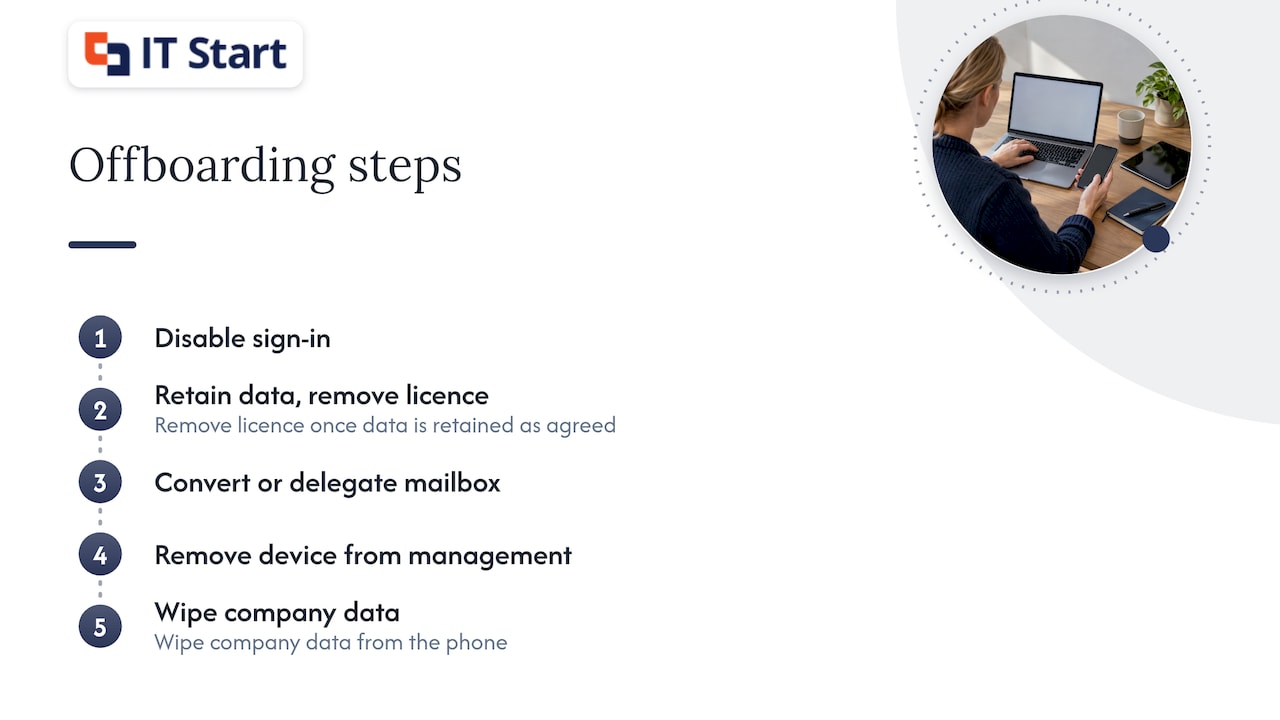
With a managed arrangement, offboarding is a checklist: disable the sign-in, remove the licence once data is retained as agreed, convert or delegate the mailbox, remove the device from management and wipe company data from her phone. It takes minutes when it is routine and it is easy to forget when it is not.
This is what “proactive” means in real life. Nothing dramatic happens. Small jobs get done on time and the large incident never gets a chance to start. Our post on managed services monitoring goes into what gets watched day to day.
What it costs
There is no single Australian price, and we have not found a neutral, current survey we would put our name to. What we can say is what the model looks like and what moves the number:
- Number of users, since most plans charge per person.
- Whether devices, Microsoft 365, backup and security are in the fee or billed on top.
- How many sites you have and how complicated your network is.
- Compliance needs, for example if you handle client financial or health records.
- Your starting point: a tidy environment is cheaper to run than one with ten years of leftovers.
For reference, our Managed IT plans start from $75 per user per month ex GST, and Business IT Support starts from $145 an hour ex GST. Our Managed IT pricing guide for Brisbane SMBs breaks down the line items to compare.
Not worth paying for: a per-user plan that still charges hourly for routine password resets and software installs. If those are not in the monthly fee, you are paying twice.
Who should not outsource, or not yet
A sole trader with one laptop, cloud-only tools and no client data rarely needs a monthly contract. Pay for an hour when you need it. A business with a strong in-house IT person might want co-managed support (the provider covers security, after-hours cover and projects while the internal person handles daily requests) rather than a full handover.
And if your main need is a single project, such as moving to Azure or tidying Microsoft 365, buy the project. You can look at Azure and cloud migration as a standalone engagement.
Planning the handover and the exit
UNSW’s IT contract and vendor management guide is written for a university, but the principle scales down well. It says to keep a formal exit and transition plan covering activities, timeframes, roles and dependencies, and to plan for handover, system access, data transfer, disengagement and data removal. It says exit responsibilities belong in the contract and should be managed actively by a named service owner.
For a small business, that becomes a practical routine.
- Before you sign, ask what you receive on exit: documentation, admin credentials, licence ownership and a copy of your data.
- In the first weeks, expect an inventory of devices, users, licences and backups, and read it. Mistakes are cheaper to fix now.
- Name one person on your side as the owner of the relationship, usually the office manager or a director.
- Hold a short review on a regular schedule and look at tickets, open risks and upcoming renewals.
- Once a year, check you could leave: do you know where the documentation is, and can you open it without calling the provider?
A provider confident in its work does not mind any of this. We would rather you stayed because the service is good than because leaving is hard.
How we approach it
Our view is plain. Pick a local team that knows your business, charges per user with a clear list of inclusions, writes in plain language and shows you the backup test results. Avoid anyone who can’t explain what happens on your last day with them.
We look after Microsoft 365, security, backups and networking for businesses of 5 to 100 people. We like to start with an assessment, because the first job is understanding what you have, and we won’t recommend a plan until we have seen it.
— IT Start
Talk to us about your setup
If you are weighing up outsourced IT support, we offer a free consultation or project assessment for Brisbane, Gold Coast and Sunshine Coast businesses. We look at your devices, Microsoft 365 and backups, then tell you honestly what you need, including when the answer is “not much”. Start on our Managed IT services in Brisbane page or get in touch through itstart.com.au.
FAQ
What is the difference between outsourced IT support and Managed IT?
Outsourced IT support is the broad term for any arrangement where an outside company handles your IT. Managed IT is the subscription version, where a provider takes ongoing responsibility for monitoring, support and security for a monthly fee. Break-fix is the other version, billed when something goes wrong.
Will I lose control of my systems if I outsource?
Only if the contract lets you. Keep a break-glass admin account in your own hands, ask for documentation to be stored where you can open it, and make sure licences are in your company’s name. A good provider will set this up without being asked.
Is outsourcing IT cheaper than hiring someone?
Often, for businesses of 5 to 100 people, because one employee cannot cover help desk, security, backup and projects, and cannot cover leave. CPA Australia notes the cost benefits of outsourcing can fail to match expectations, so compare inclusions, not just fees.
What should I ask a provider about security?
Ask whether multi-factor sign-in is required on every provider account, how access is removed when their staff leave, and how they would tell you about an incident. ASD recommends putting these expectations in the contract.
Can I keep my in-house IT person?
Yes. Many businesses use an outside team for security, after-hours cover and projects while the internal person handles daily requests. It works best when responsibilities are written down.
Sources
- What is a Managed Service Provider (MSP)? (TechTarget)
- Outsourcing: opportunity or threat (CPA Australia)
- How to manage your security when engaging a managed service provider (ASD)
- Protecting against cyber threats to managed service providers and their customers (ASD)
- IT Contract and Vendor Management Guide (UNSW)