Remote IT support resolves 99% of IT support requests within 15 minutes, transforming how Queensland businesses handle technology challenges. This speed advantage eliminates the frustration of waiting hours or days for onsite technicians while reducing costly downtime that disrupts operations. Understanding remote IT support, its operational mechanics, and security protocols helps you make informed decisions about modernising your technology infrastructure.
Remote IT Support Overview: Tools, Benefits & FAQs
- What Is Remote IT Support And How It Works
- How Remote IT Support Operates: Tools And Processes
- Business Efficiency And Cybersecurity Advantages
- Local Benefits Of Choosing Brisbane-Based Remote IT Support
- Common Misconceptions About Remote IT Support
- Comparing Remote IT Support With Onsite Support
- How To Choose A Remote IT Support Provider
- Discover Expert Managed IT Support For Brisbane Businesses
- Frequently Asked Questions
Key takeaways
| Point | Details |
|---|---|
| Remote IT support definition | Professional technicians diagnose and resolve software, network, and security issues remotely using secure access tools and monitoring systems. |
| Operational workflow | Technicians connect securely through encrypted channels, assess problems, implement fixes, and escalate complex hardware issues when necessary. |
| Efficiency benefits | Reduces IT downtime by 25% and malware infections by 40% through proactive monitoring and rapid response protocols. |
| Local advantages | Brisbane-based providers respond twice as fast and understand Queensland compliance requirements for healthcare, legal, and financial sectors. |
| Selection criteria | Prioritise providers offering sub-15-minute response times, SMB 1001 Gold certification, proactive monitoring, and verified cybersecurity measures. |
What is remote IT support and how it works
Remote IT support delivers technology assistance through phone, online portals, and remote access tools without requiring physical presence at your location. This service model fundamentally changes how Queensland businesses maintain their IT infrastructure, enabling faster problem resolution and lower operational costs.
Technicians use specialised remote access software, incident management platforms, and monitoring systems to deliver comprehensive managed IT support services. These tools allow real-time intervention across your entire technology stack.
Typical remote IT support services include:
- Software installation, updates, and configuration adjustments
- Cybersecurity threat detection, virus removal, and patch management
- Network troubleshooting and performance optimisation
- User account management and password resets
- Email system configuration and cloud service integration
- System backups and disaster recovery testing
Response speed defines quality remote IT support. Professional providers achieve 99% of incidents and service requests answered within 15 minutes during business hours, ensuring your team experiences minimal disruption. This rapid response capability transforms IT from a bottleneck into a competitive advantage for your business.
The best providers combine automated monitoring with human expertise. Systems continuously scan your network for anomalies, triggering alerts that allow technicians to address problems before they impact productivity. This proactive approach prevents small issues from escalating into business-critical failures.
How remote IT support operates: tools and processes
Remote access technology forms the backbone of effective IT support delivery. Technicians connect to your computers and servers through secure channels, viewing your screen and controlling systems as if physically present. This capability enables accurate diagnosis and immediate fixes without travel delays.
Security protocols protect every remote session. Professional remote IT support uses encrypted connections and multi-factor authentication to prevent unauthorised access, ensuring your sensitive business data remains protected throughout the support process. These safeguards meet industry standards for financial services, healthcare, and legal sectors operating in Queensland.
The remote support workflow follows a structured process:
- Initial assessment through phone or online ticket submission
- Secure authentication and permission-based system access
- Real-time diagnosis using diagnostic tools and system logs
- Implementation of fixes, updates, or configuration changes
- Verification that solutions resolve the original issue
- Documentation for future reference and pattern analysis
- Escalation to onsite support for hardware-related problems
Service models adapt to your business size and specific requirements. Small businesses might choose pay-per-incident plans, while larger organisations benefit from comprehensive managed service agreements covering unlimited support. Understanding IT support benefits for Brisbane SMEs helps you select the right service level.
Pro Tip: Request a demonstration of your provider’s secure remote access technology before committing to ensure their tools integrate smoothly with your existing security policies and user permissions.
Technicians maintain detailed records of every interaction, creating a knowledge base specific to your infrastructure. This documentation accelerates future problem resolution and reveals patterns that inform strategic technology decisions.
Business efficiency and cybersecurity advantages
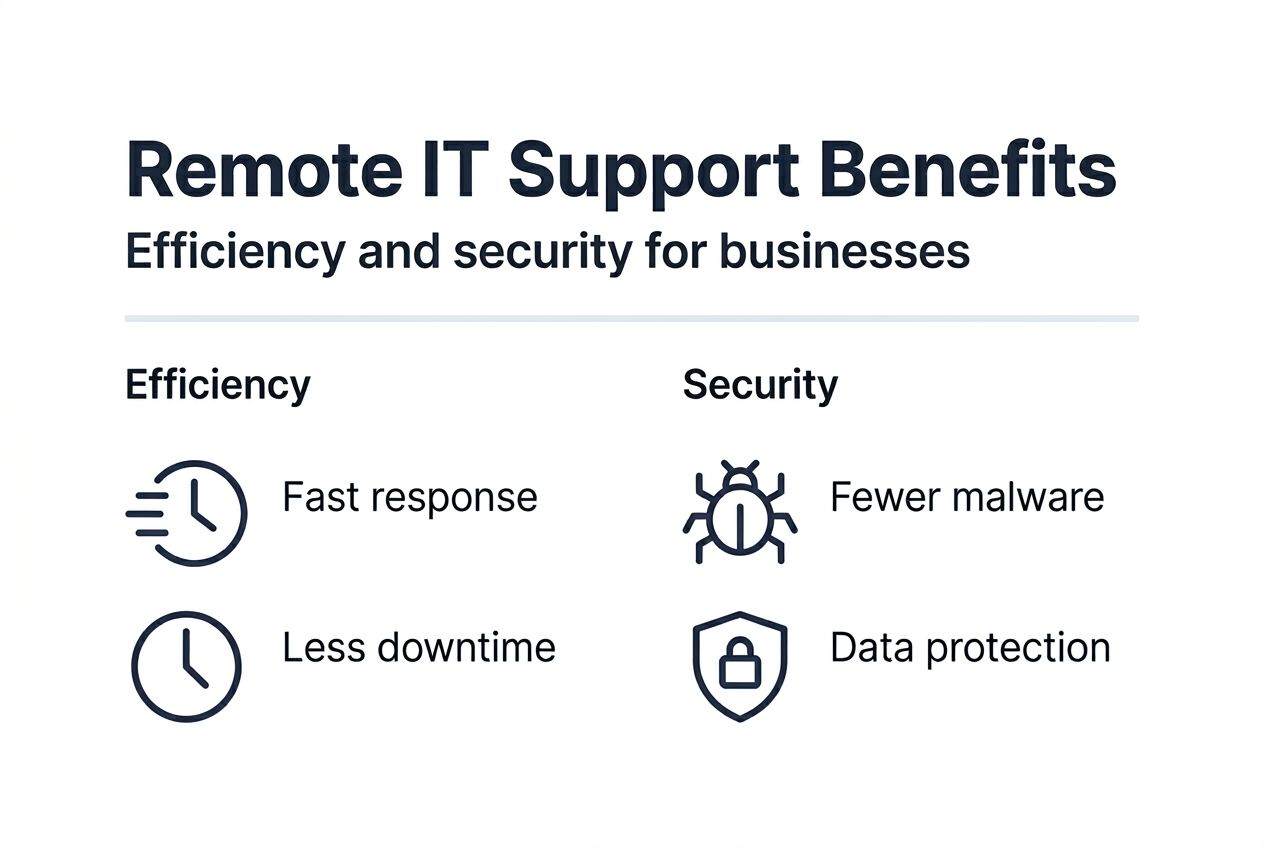
Remote IT support delivers measurable performance improvements that directly impact your bottom line. Adoption of remote IT support reduces IT downtime by 25% and malware infections by up to 40%, translating to thousands of dollars in saved productivity and prevented security incidents annually.

Downtime reduction stems from three factors. First, technicians begin work within minutes rather than hours required for onsite visits. Second, remote tools enable simultaneous support for multiple users across different locations. Third, proactive monitoring catches failing hard drives, outdated software, and security vulnerabilities before they cause outages.
Cybersecurity management becomes continuous rather than reactive. Remote monitoring systems detect unusual network activity, unauthorised access attempts, and malware signatures in real time. Technicians respond immediately to contain threats, preventing the data breaches that cost Queensland businesses an average of $78,000 per incident.
Key efficiency advantages include:
- Instant access to technical expertise without scheduling delays
- Reduced travel costs and faster mean time to resolution
- 24/7 monitoring capabilities for critical business systems
- Consistent service quality regardless of your physical location
- Scalable support that grows with your business needs
Business continuity planning relies heavily on remote capabilities. When unexpected events like floods, power outages, or health emergencies prevent onsite access, your IT infrastructure continues receiving expert support. This resilience proves invaluable for maintaining client service commitments and protecting revenue streams.
Queensland SMEs using remote IT support experience 25% less downtime and 40% fewer malware infections compared to businesses relying solely on reactive, onsite-only support models.
The financial impact extends beyond direct cost savings. Reliable business IT support solutions enable you to pursue growth opportunities confidently, knowing your technology foundation can scale without requiring proportional increases in IT staffing.
Local benefits of choosing Brisbane-based remote IT support
Geography still matters in remote IT support despite the virtual nature of service delivery. Local providers respond up to twice as fast within Brisbane metropolitan area because they operate during your business hours, understand regional connectivity challenges, and can dispatch onsite technicians rapidly when hardware intervention becomes necessary.
Queensland regulatory compliance requires specific expertise. Brisbane-based providers navigate privacy legislation affecting healthcare practices, financial reporting standards for professional services firms, and data sovereignty requirements for government contractors. This specialised knowledge reduces your compliance risk and audit preparation burden.
Cultural alignment and business understanding improve service quality. Local technicians recognise the operational rhythms of Brisbane industries, from accounting firms managing EOFY rushes to legal practices handling court deadlines. This contextual awareness translates to better prioritisation and more relevant technology recommendations.
Tailored service delivery addresses Brisbane market needs:
- Support schedules aligned with Australian Eastern Standard Time
- Familiarity with NBN infrastructure and local ISP performance
- Partnerships with Queensland-based cloud and software vendors
- Understanding of industry clusters in Brisbane CBD, Fortitude Valley, and business parks
“Choosing a Brisbane-based remote IT provider gave us the perfect balance of fast virtual support and the confidence that someone could be onsite within an hour if needed. Their understanding of our industry’s compliance requirements saved us during our last audit.”
Proximity enables relationship building that improves long-term outcomes. Regular business reviews, strategic planning sessions, and technology roadmap development work better when providers understand your local market conditions and can meet face-to-face when strategic decisions require it.
Exploring local IT support advantages reveals how Brisbane-based IT support providers combine virtual efficiency with the trust and accountability of local presence.
Common misconceptions about remote IT support
Many Queensland business owners hesitate to adopt remote IT support based on outdated assumptions about its capabilities and security. Clearing these misconceptions helps you make technology decisions based on current realities rather than outdated perceptions.
The belief that all IT problems require physical presence persists despite evidence showing over 70% of hardware and software issues can be diagnosed and fixed remotely. Modern diagnostic tools identify failing components, network bottlenecks, and configuration errors without opening computer cases or physically inspecting cables.
Security concerns often stem from confusion about how remote access works. Professional remote IT support operates nothing like the scam calls claiming your computer has viruses. Legitimate providers use enterprise-grade encryption, require explicit permission before accessing systems, and maintain SMB 1001 Gold certification demonstrating rigorous security standards.
Addressing common myths:
- Remote support cannot handle complex problems requiring deep technical knowledge or multiple system interactions.
- Remote sessions expose your business to hackers or data theft through unsecured connections.
- Remote IT support only addresses basic software issues like password resets and email configuration.
- You lose control over your systems when granting remote access to technicians.
- Remote support costs more than traditional onsite-only service arrangements.
The reality contradicts each misconception. Remote technicians resolve intricate network architecture problems, implement comprehensive cybersecurity frameworks, and deliver strategic technology consulting. Security protocols exceed most businesses’ internal standards, with session logging, role-based access controls, and automatic disconnection after task completion.
Pro Tip: Ask potential providers to explain their remote access security measures and show you session logs from a demonstration. Legitimate providers welcome transparency and will gladly walk you through their authentication and encryption protocols.
Remote IT support actually enhances your control through better visibility. Monitoring dashboards show system health, security status, and support ticket history in real time. This transparency surpasses traditional models where you only learned about IT activities through invoices or when problems occurred.
Comparing remote IT support with onsite support
Understanding when to use remote versus onsite support optimises your IT investment and minimises disruption. Each approach offers distinct advantages depending on the problem type, urgency, and required intervention level.
Remote support excels at resolving 85% of typical IT issues including software conflicts, security patches, configuration adjustments, and user access problems. The speed advantage proves critical for time-sensitive situations where every minute of downtime costs money. Cost savings reach 60% compared to onsite visits when factoring in travel time, technician availability, and faster resolution.
Onsite support remains essential for specific scenarios. Physical hardware installation, server upgrades, network cable installation, and equipment replacement require hands-on intervention. Complex troubleshooting sometimes benefits from physical inspection, particularly when remote diagnostics yield inconclusive results.
| Factor | Remote IT Support | Onsite IT Support |
|---|---|---|
| Response time | 15 minutes average | 2-4 hours typical |
| Cost per incident | $80-150 average | $150-300 average |
| Ideal use cases | Software, security, configuration | Hardware, installation, complex diagnostics |
| Coverage hours | Often 24/7 available | Business hours standard |
| Travel requirements | None | Technician dispatch needed |
Best practice combines both approaches strategically. Your provider should offer primarily remote support backed by onsite capabilities for situations demanding physical presence. This hybrid model delivers cost efficiency without sacrificing comprehensiveness.
Consider these guidelines for service selection:
- Use remote support for all software, security, and network issues as first response
- Schedule onsite visits for planned hardware upgrades and infrastructure projects
- Request onsite assessment when remote diagnostics cannot isolate hardware failures
- Maintain onsite relationships for strategic planning and technology roadmap development
Learn more about comparing onsite and remote IT support to develop a balanced approach that maximises value while ensuring comprehensive coverage for your Brisbane business.
How to choose a remote IT support provider
Selecting the right remote IT support provider determines whether you experience the efficiency gains and security improvements this service model enables. Queensland businesses should evaluate candidates against specific criteria that predict long-term satisfaction and business alignment.
Response time commitments form the foundation of quality service. Providers should guarantee response within 15 minutes during your business hours, with clear escalation procedures for after-hours emergencies. Ask about their monitoring systems and how they prioritise incoming requests to ensure critical issues receive immediate attention.
Local presence matters even for remote services. Brisbane-based providers understand Queensland regulatory requirements, operate in your timezone, and can dispatch onsite technicians when hardware problems arise. SMB 1001 Gold certification demonstrates commitment to security standards essential for protecting your business data and maintaining client trust.
Evaluation checklist:
- Verified response times under 15 minutes with penalty clauses for failures
- Local Brisbane office and technician team for relationship continuity
- Proactive system monitoring with automated alerting capabilities
- Customisable service level agreements matching your business criticality
- Transparent pricing without hidden fees for common support tasks
- Industry-specific experience in your sector’s compliance requirements
- Client testimonials from similar-sized Queensland businesses
Cybersecurity measures deserve detailed scrutiny. Your provider should explain their encryption methods, multi-factor authentication requirements, session logging practices, and how they prevent unauthorised access. Request documentation of their security certifications and recent third-party audits.
Pro Tip: Test responsiveness before committing by submitting a support request during your evaluation period. The speed and quality of this initial interaction reliably predicts ongoing service levels and should inform your final decision.
Service customisation indicates provider maturity. Your business faces unique technology challenges based on industry, size, and growth trajectory. Providers offering only rigid, one-size-fits-all packages lack the flexibility needed to support your evolving needs. Look for willingness to tailor monitoring priorities, response protocols, and reporting formats to your specific requirements.
Explore comprehensive guidance on choosing IT managed services to develop a thorough provider evaluation framework that protects your technology investment.
Discover expert managed IT support for Brisbane businesses
IT Start delivers comprehensive remote IT support specifically designed for Brisbane businesses seeking reliable technology partnerships. Our local team combines rapid response times with deep expertise in cybersecurity, cloud solutions, and proactive system monitoring tailored to Queensland SMEs across financial services, healthcare, legal, and professional sectors.
We maintain SMB 1001 Gold certification and guarantee response within 15 minutes during business hours, ensuring your team experiences minimal disruption from technology issues. Our flexible service plans scale with your business growth while maintaining the personalised attention that distinguishes local providers from national competitors.
Discover how our managed IT and support services enhance operational efficiency and strengthen cybersecurity posture. Explore our comprehensive business IT support solutions or contact IT Start today to discuss your specific requirements with our Brisbane-based technical team.
Frequently asked questions
How does remote IT support work for business owners?
Remote IT support connects certified technicians to your systems through secure encrypted channels after you grant permission. Technicians view your screen, access necessary applications, and implement fixes exactly as if sitting at your desk. You maintain full visibility throughout the session and can revoke access instantly if needed.
What response times should I expect from remote IT support?
Professional remote IT support providers respond to requests within 15 minutes during business hours for standard service agreements. Critical issues affecting multiple users or business-critical systems typically receive immediate priority response. After-hours support availability depends on your specific service level agreement and business requirements.
How secure are remote IT support sessions?
Remote IT support uses military-grade encryption, multi-factor authentication, and session logging to protect your business data. Legitimate providers maintain security certifications like SMB 1001 Gold and conduct regular third-party audits. Each session requires explicit permission and terminates automatically after completing the support task.
When should I choose onsite support instead of remote support?
Onsite support becomes necessary for physical hardware installation, server upgrades, network cabling projects, and situations where remote diagnostics cannot isolate equipment failures. Most software, security, configuration, and network issues resolve faster and more cost-effectively through remote support.
How can I verify a remote IT support provider’s credentials?
Request documentation of security certifications, particularly SMB 1001 Gold standard compliance. Ask for client references from similar-sized Queensland businesses in your industry. Review their remote access protocols and request a demonstration of their monitoring systems. Legitimate providers welcome transparency and will readily share this information during evaluation.