The three biggest threats to information security are malicious cyber attacks (phishing, ransomware and info-stealer malware), human error and insider exposures, and compromised credentials. Each works differently, but all three can take a small business offline, leak customer data, or cost thousands in recovery. Honestly, most of the SMBs we work with are exposed to at least two of these right now without knowing it.
TL;DR:
- Multi-factor authentication is supported and should be enabled everywhere, especially on email, banking portals, and remote access systems to prevent credential theft.
- Regular patching of operating systems, applications, and firmware is critical, along with testing backup restores to ensure data recovery capabilities.
- Human errors, such as misconfigured sharing settings or attaching incorrect files, are common and can be mitigated by limiting access privileges and automating account provisioning.
- Credential theft using info-stealer malware remains a leading cause of breaches, making password managers, MFA, and prompt credential rotation essential.
- Physical security measures like locked server rooms and encrypted laptops remain vital for safeguarding data from theft or accidental exposure.
Table of Contents
- Threat 1: malicious cyber attacks, from phishing to ransomware
- Threat 2: human error and insider exposures
- Threat 3: compromised credentials and credential theft
- Common impacts and what most people get wrong
- How an MSP would tackle these threats: a practical checklist
- The CIA triad: the framework behind all three threats
- Physical security still matters for information security
- A note from Matt at IT Start
- FAQ
- Sources
Threat 1: malicious cyber attacks, from phishing to ransomware
Malicious cyber attacks cover everything from a fake invoice email to a full ransomware lockout. Phishing is still the front door. ASD’s ACSC found phishing was an initial access technique in 38% of reported incidents during FY2024-25, and when you map that against MITRE ATT&CK, phishing, compromising accounts and gathering victim identity information sit at the top of the techniques attackers actually use.
Ransomware gets the headlines, but info-stealer malware is doing a lot of the quiet damage. These tools grab saved passwords, browser cookies and session tokens straight off a device, often with no obvious symptoms. We also saw a sharp jump in DDoS and denial of service incidents last financial year, partly because botnets and AI tooling have made these attacks cheaper to run.
We see this a lot: a business owner clicks a link that looks like a Xero or Microsoft notification, and three days later their files are encrypted. The pattern rarely changes. It is always an email that looks just real enough.
What actually reduces this risk:
- Turn on multi-factor authentication everywhere it is supported, not just on email.
- Patch operating systems and software on a schedule, not whenever someone remembers.
- Run proper endpoint detection rather than relying on built-in antivirus alone.
- Train staff to check sender addresses and hover over links before clicking.
- Keep immutable, offsite backups that ransomware cannot touch or encrypt.
Most reported data breaches in the January to June 2025 period were caused by malicious or criminal attacks, according to the OAIC. That is the majority of breach notifications in Australia, not a rare event.
If you want a deeper look at how ransomware actually plays out for small businesses, we have written up real examples of ransomware threats and what recovery looked like.
Pro Tip: Session and cookie theft can let an attacker into your account without ever stealing your password, so a strong password alone will not save you. Rotate sessions and log out of old devices regularly.
Threat 2: human error and insider exposures
Not every breach is a hacker in a hoodie. A lot of them start with someone attaching the wrong file to an email, or setting a cloud folder to “anyone with the link” and forgetting about it. Human error made up a substantial share of notifications in the OAIC’s January to June 2025 report, showing it is a major issue rather than a minor side problem.
There is a difference between an honest mistake and a malicious insider deliberately taking data on their way out the door, but the fix for both starts in the same place: limit what people can access in the first place.
What we actually do to cut this down:
- Apply least privilege so staff only see the files and systems their role needs.
- Automate account provisioning and deprovisioning so an ex-employee’s access does not linger for weeks.
- Set up data loss prevention rules to catch sensitive files being sent externally.
- Run short, specific staff training on the two or three mistakes that cause most incidents, not a 40-slide deck nobody reads.
We find misconfigured SharePoint and OneDrive sharing settings in almost every new client audit. It is the most common thing we fix in the first week of onboarding, and it is rarely malicious. Someone just clicked “share with anyone” because it was the fastest option. If you are reviewing your own cloud setup, this guide to securing cloud environments is a solid starting point for permissions and access hygiene.
Pro Tip: If you cannot say exactly who has access to your finance folder right now, you have a permissions problem, not a technology problem.
Threat 3: compromised credentials and credential theft
Stolen credentials remain one of the most reliable ways into a business, and the OAIC’s report on large-scale breaches lists compromised or stolen credentials alongside ransomware and hacking as leading causes of breaches affecting large numbers of Australians.
Info-stealer malware is the main delivery mechanism now. It is sold as Malware-as-a-Service, meaning someone with no coding skill can buy a kit, send it out through phishing, and collect usernames, passwords and browser session tokens from infected devices. ASD case studies describe exactly this: a personal device gets infected, corporate credentials saved in a browser get swept up, and the attacker uses them to move into business systems. MFA and quick credential rotation limited the damage in that case, which tells you those two controls are not optional extras.
What to do about it, in order:
- Use a password manager and stop reusing passwords across personal and work accounts.
- Turn on MFA everywhere, and monitor for failed or unusual login attempts.
- Rotate credentials immediately after any suspected device compromise.
- Keep personal and work devices separated where possible, especially for admin accounts.
Compromised or stolen credentials sit among the top causes of large-scale data breaches reported to the OAIC, which means this is not a theoretical risk, it is a recurring cause of real notifications.
Common impacts and what most people get wrong
The damage from any of these three threats usually lands in the same places: financial loss from downtime or ransom demands, data exposure that triggers notification obligations, operational disruption while systems are rebuilt, and reputational harm with clients who hear about it.
Here is what we see go wrong, repeatedly:
- Businesses think antivirus software is a complete defence, when it is one layer among several needed.
- Owners assume their backups are working because a backup job runs every night, without ever testing a restore.
- MFA gets switched on for email but skipped for banking portals, accounting software and remote access tools.
- Personal phones and laptops connect to company email and files with no management or encryption at all.
If you suspect a breach has already happened, the first moves are to isolate the affected device, reset the credentials involved, and check what data was actually accessible. Our cyber security risk assessment checklist walks through exactly this kind of first response.
How an MSP would tackle these threats: a practical checklist
When we take on a new client, we do not start with software. We start with a baseline assessment.
- Map current controls against the Essential Eight mitigation strategies.
- Patch operating systems, applications and firmware on a fixed schedule.
- Enforce MFA across every system that supports it, not just email.
- Set up backups and actually test a restore, not just confirm the job ran.
- Add ongoing monitoring and a written incident response plan.
One Brisbane client came to us thinking they were backed up. They were not. The backup job had been silently failing for three weeks because of a storage quota issue nobody noticed. We fixed the job, added alerting, and ran a test restore within the first fortnight. SMB 1001 Gold certification and working exclusively with Brisbane based SMBs can help catch this kind of gap early rather than discovering it during an actual outage.
Pro Tip: Ask your current provider to show you a completed test restore, not just a backup report. A green tick on a dashboard proves nothing on its own.
For a full walkthrough of the framework we use, see our Essential Eight guide for Brisbane SMEs.
The CIA triad: the framework behind all three threats
Every one of these threats attacks one of three properties that make information useful and safe: confidentiality, integrity and availability. Together they are known as the CIA triad, and it is the basic lens security professionals use to think about risk.
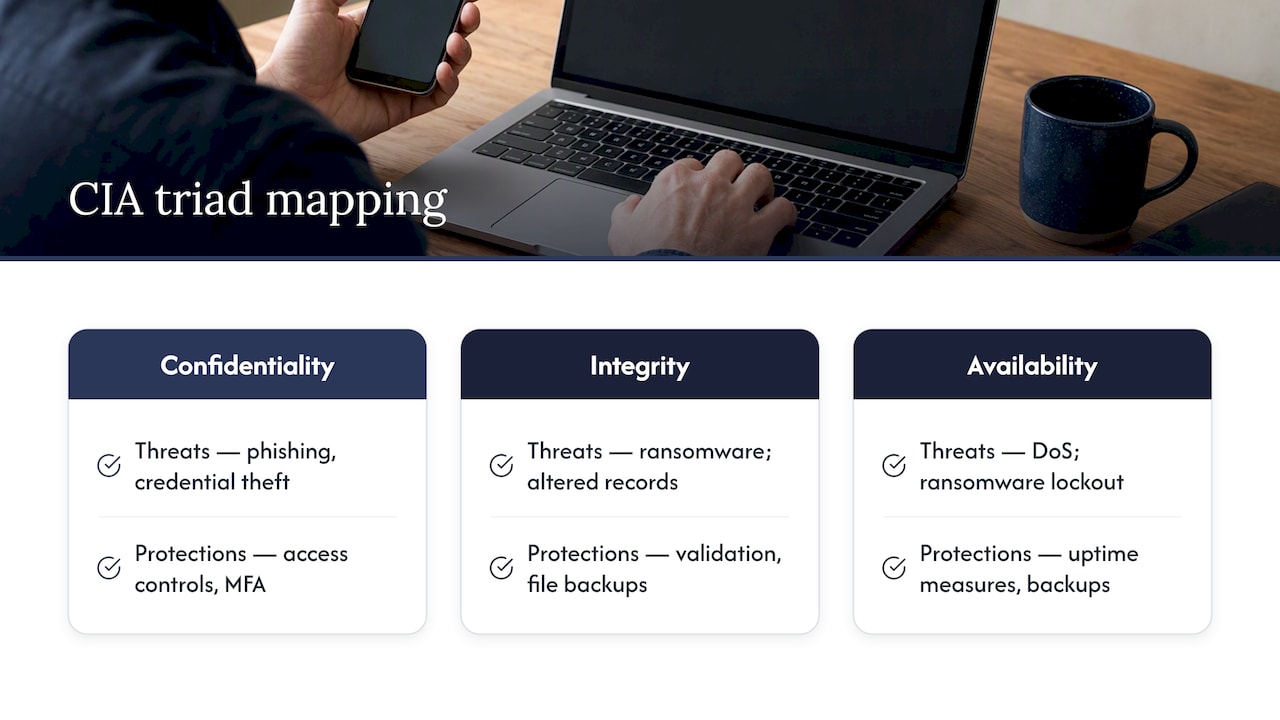
Confidentiality means only the right people can see the data. Phishing and credential theft attack confidentiality directly by handing data or access to someone who should never have had it.
Integrity means the data has not been altered or corrupted. Ransomware attacks integrity when it encrypts files, and a malicious insider editing records before leaving a company does the same thing.
Availability means the data and systems are there when you need them. A denial of service attack, or a ransomware lockout, is a direct hit on availability even if nothing was ever read or changed.
Thinking through which part of the triad a given threat targets helps explain why a single control, like antivirus software, can never cover everything. You need separate protections for access, for data accuracy, and for uptime.
Physical security still matters for information security
It is easy to think of information security as purely digital, but a surprising amount of exposure still comes from the physical world. A stolen laptop with no disk encryption hands over every file on it. An unlocked server room lets anyone plug in a USB drive. A filing cabinet full of printed client records, left unlocked after hours, is a data breach waiting to happen.
Office printers and multifunction devices are an overlooked risk too. Many store scanned documents on internal memory and some ship with default admin passwords that nobody changes. This guide to printer security best practices covers the basics worth checking on any shared office device.
Physical access controls, like locked server racks, visitor sign-in procedures and encrypted laptops, are not old-fashioned extras. They sit alongside MFA and backups as part of the same overall defence, because an attacker who can physically reach a device often does not need to hack anything at all.
A note from Matt at IT Start
We see the same pattern across almost every SMB we onboard: no MFA on half their systems, backups nobody has tested, and at least one laptop that has not been patched in months. None of this is unusual, and none of it is a reflection on the business owner, security just was not the job they signed up for.
If you only do one thing this month, turn on MFA everywhere and test a backup restore. Those two steps stop more incidents than anything else we deploy. If you want help working through the rest, our contact page is the place to start.
— Matt
FAQ
What are the top 3 cybersecurity threats?
The top three are malicious cyber attacks such as phishing and ransomware, human error including misconfigured sharing settings, and compromised credentials stolen through info-stealer malware. Malicious attacks caused 59% of reported breaches in Australia’s January to June 2025 period, while human error accounted for 37%.
What are the three main types of threats?
Security threats are generally grouped into malicious or criminal attacks, human error, and system faults, with credential compromise often treated as its own major category given how often it appears in breach reports. The OAIC’s breach data consistently lists compromised credentials among the top causes of large-scale incidents.
What are the three main types of information security controls?
Information security controls are usually grouped into technical controls like MFA and endpoint detection, administrative controls like policies and staff training, and physical controls like locked server rooms and device encryption. Definitions vary slightly between frameworks, but all three categories work together rather than replacing one another.
What can be a threat to the security of information?
Anything that can expose, alter or block access to data is a threat, including phishing emails, ransomware, stolen passwords, misconfigured cloud sharing, and even an unlocked office or stolen laptop. Both deliberate attacks and honest staff mistakes fall into this category, which is why technical fixes alone rarely solve the whole problem.