A security incident management system must combine reliable logging, practical case management and tested playbooks, otherwise you are just buying alerts. For most SMBs with 10 to 50 staff, the immediate next step is a short gap check across logging, backups and MFA, then either build a tested playbook internally or get an MSP to run one for you.
TL;DR:
- Logging, case management, and tested playbooks are essential components, as alerts alone do not provide a full incident response capability.
- SMBs need a detection system, a structured investigation process, a tested response plan, verified backups, and a post-incident review to be well-prepared.
- Evaluating tools requires examining log quality, detection capabilities, evidence management, escalation procedures, and integration options, with managed services generally outperforming tool-only setups.
- Rapid implementation should prioritize basic logging, MFA enforcement, backup testing, and drafting a cybersecurity response plan within the first two months.
- Regular testing, including tabletop exercises and restore drills, is vital to ensure effective incident response, especially for SMBs lacking internal staffing for continuous monitoring.
Table of Contents
- What a security incident management system actually covers
- Core capabilities to evaluate: an actionable checklist
- How to choose: selection criteria, cost and realistic timelines
- Implementation in practice: our tested rollout plan for SMBs
- Common pitfalls and what most SMBs get wrong
- Quick starter checklist: 30, 60 and 90 day milestones
- MSP perspective: what we actually see working for SMBs
- How we help with incident detection, playbooks and response
- FAQ
- Sources
What a security incident management system actually covers
Honestly, this term gets thrown around loosely. A security incident management system is not one product. It is the full lifecycle: detect, log, investigate, respond, recover and review. Each stage needs a tool and an owner, and in a 20-person business, those owners are often the same two people wearing several hats.
Detection usually comes from a SIEM, EDR or XDR platform watching endpoints, identity and network traffic. Logging and SOAR tools capture and correlate what happened. Case management is where a lot of SMBs fall down: they have alerts firing but nowhere structured to track investigation steps, evidence and decisions. Response and recovery lean on backups, isolation procedures and communication plans. Review is the step everyone skips when they are busy, which is exactly why it matters.
We see this a lot: a business buys an EDR licence, thinks that is their “incident management system,” and has no plan for what happens after the alert fires. EDR tells you something is wrong. It does not tell you who calls the bank, who isolates the laptop, or who talks to the board. A 24/7 security operations centre adds the monitoring layer many SMBs lack internally, but it still needs a response process behind it.
In practice, for a 10 to 50 staff business, you want:
- A detection layer (SIEM, EDR or XDR, or a managed equivalent)
- A case management process, even a simple one, for tracking investigations
- A written, tested response plan with named roles
- A recovery capability built on verified, immutable backups
- A short post-incident review step after every real event
Skip any one of these and you have a partial system that looks fine until the day it matters.
Core capabilities to evaluate: an actionable checklist
When you are comparing tools or MSP offerings, most vendors sound the same on a sales call. The differences show up in the detail. Here is what we actually check before recommending anything to a client.
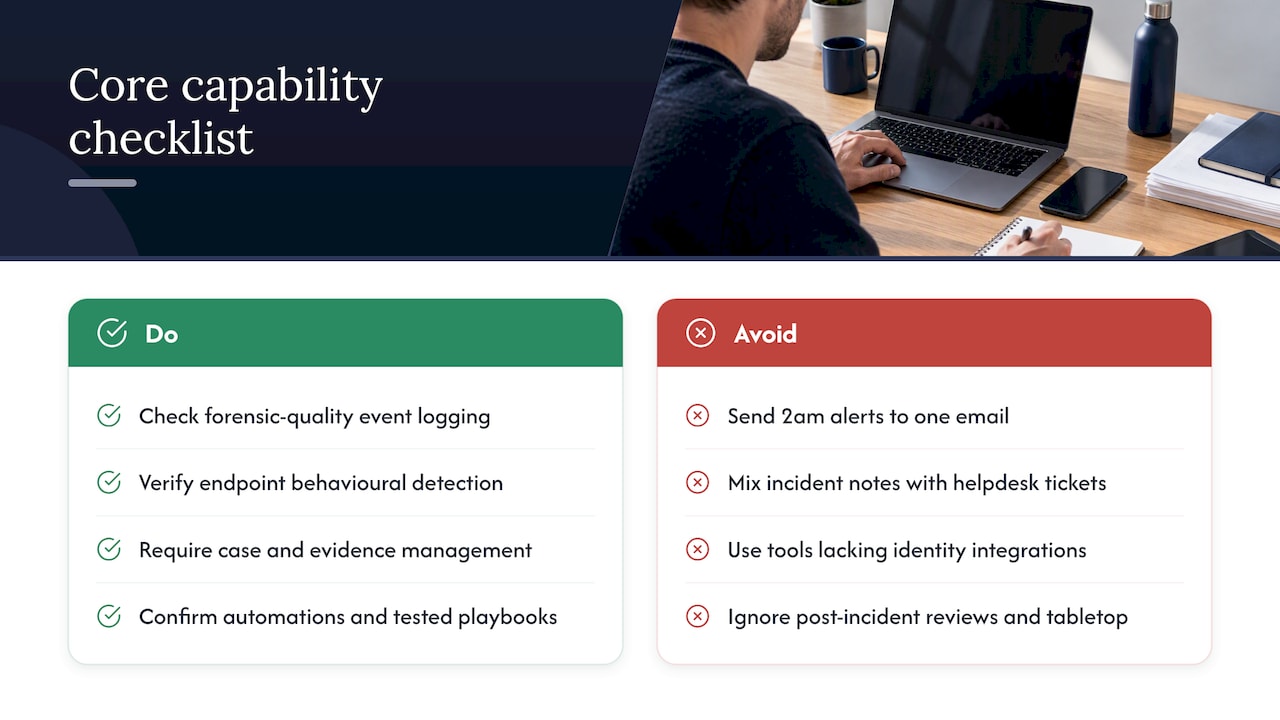
Event logging and telemetry quality. Ask what gets logged, for how long, and at what resolution. The Annual Cyber Threat Report 2024-25 recommends organisations operate with an “assume compromise” mindset and prioritise best-practice event logging, because weak logs mean you cannot reconstruct what happened during an investigation. Forensic-quality logs include authentication events, admin actions and process execution, not just “something connected to the firewall.”
Endpoint telemetry and detection quality. EDR and XDR platforms differ in how much behavioural detection they do versus signature matching. The Essential Eight maturity model treats logging and detection tooling like SIEM, EDR and XDR as part of a mature incident response capability, with maturity levels set according to your risk profile rather than a one-size-fits-all target.
Case and evidence management. You need a place to track timeline, evidence, decisions and communications for each incident, separate from your help desk ticketing system. Mixing the two means critical incident notes get buried under password reset tickets.
Alerting, routing and escalation mechanics. Who gets the 2am alert, and what happens if they do not respond in 15 minutes? If the answer is “it goes to one person’s email,” that is a gap.
Automation and playbooks that save real time. Automated isolation of a compromised endpoint, automatic password resets, and account lockouts tied to specific triggers all cut response time, but only when the playbook behind them has been tested.
Integrations. Your system needs to talk to identity (Entra ID or on-prem AD), Microsoft 365, backup platforms and your ticketing tool. A tool that cannot integrate with your identity provider cannot automate containment.
Compliance outputs. For Australian businesses, this means reporting that supports Notifiable Data Breach obligations: timelines, assessment notes and notification records.
Testing and post-incident review support. Does the platform or provider support tabletop exercises and structured reviews, or does it just sit there generating alerts until something breaks?
How to choose: selection criteria, cost and realistic timelines
Picking between tools, or between a tool-only approach and a managed service, comes down to a handful of practical questions. Here is the checklist we walk clients through.
- What is the deployment model, and does it fit your existing Microsoft 365 or Azure environment without duplicate licensing?
- Where is your data stored, and does that meet any data residency or industry compliance requirement you have?
- What is the log and evidence retention period, and is it long enough to support an investigation months after the fact?
- How many onboarding hours are included, and what does the vendor expect from your internal team during setup?
- What are the SLAs for alert triage and escalation, in writing, not just “fast response” on a slide?
- Who has forensic access during a real incident, and how quickly can you reach a human, not a bot, at 11pm on a Friday?
- Does the provider help write and test your Cyber Incident Response Plan, or just hand you a template and wish you luck?
Pro Tip: Ask every vendor to walk you through their last real incident response, step by step, including what went wrong. If they cannot describe a messy one, they have not done enough of them.
On the managed-versus-tool-only question: for most SMBs in the 10 to 50 staff range, a managed service wins. Tool-only deployments assume you have someone internal watching alerts at 2am and someone else who knows how to write and exercise a CIRP. Most SMBs have neither. The ACSC’s practitioner guidance recommends tailoring your CIRP to your own environment and testing it regularly, which is hard to do well without dedicated time, and dedicated time is what most SMB IT staff do not have.
Cost drivers typically come down to number of endpoints, log retention length, and whether you want 24/7 monitoring or business-hours only. Timelines vary, but a realistic shape looks like this: quick wins (MFA enforcement, basic logging, backup verification) in the first few weeks, core telemetry and a draft playbook within one to two months, and a fully tested, exercised incident response capability within a quarter. Rushing this usually means the playbook gets written but never tested, which brings us to the next problem.
Implementation in practice: our tested rollout plan for SMBs
We run the same phased approach for most clients because it works, and because skipping phases is how businesses end up with a plan nobody has read.
- Discovery. We map current logging coverage, backup configuration, MFA status and admin account sprawl. This is usually where we find the surprises.
- Essential logging. We get core telemetry flowing from endpoints, identity and Microsoft 365 before touching anything fancier.
- Playbook drafting. We write a Cyber Incident Response Plan matched to the business, covering roles, activation criteria and communication steps, similar in structure to the example CIRP we’ve built for SMBs.
- Testing. We run a tabletop exercise with actual decision-makers in the room, not just IT.
- Go-live. Monitoring and escalation paths go live with everyone clear on their role.
- Handover. We document everything and set a review cadence.
What we find in practice, repeatedly: businesses believe their cloud backup is a backup. It is not, if there is no immutable or offline copy and nobody has tested a restore in the last year. We have pulled clients out of ransomware situations where the “backup” was just a synced OneDrive folder that encrypted right alongside the live files. We also find excessive admin rights everywhere: finance staff with domain admin from a project three years ago, nobody remembering why. And alert noise is its own problem; a detection tool throwing 200 alerts a day gets ignored within a week, which defeats the purpose entirely.
Pro Tip: Run a restore test from your backup at least twice a year, not just a backup job success check. A green tick in a backup dashboard tells you the job ran, not that the data is recoverable.
A good approach includes annual or biannual tabletop exercises, a hot debrief within 48 hours of any real incident, and a formal post-incident review within two weeks to capture root cause and an action register. For businesses wanting a Brisbane-specific grounding, our Queensland-focused incident response guidance and our Essential Eight implementation guide cover the groundwork in more detail, and a free assessment is the fastest way to see where your gaps actually sit.
Common pitfalls and what most SMBs get wrong
We see the same mistakes across almost every new client engagement, regardless of industry.
- Assuming backups are fine without testing a restore. A backup job that “completed successfully” tells you nothing about whether the data comes back clean.
- Trusting one detection source or one staff member. If your entire security posture depends on one firewall alert or one person checking a dashboard, you have a single point of failure, not a system.
- Never exercising the playbook. A CIRP sitting in a shared drive, unread since the day it was written, is not a plan. The ACSC’s CIRP guidance is clear that a plan only works when it has been tested and tailored, which means involving executives in the rehearsal, not just IT.
- Weak identity hygiene. Shared logins, no MFA, and admin rights handed out and never revoked. The OAIC’s latest breach statistics show human error accounted for a significant share of breach notifications in the first half of 2025, which tells you identity and process controls matter as much as any tool you buy.
- Insufficient log retention. Short retention windows mean you cannot reconstruct an incident that gets discovered weeks after it started, which is common.
Where data and reality do not line up: plenty of SMBs believe outsourcing their IT automatically fixes these gaps. It helps with some, particularly automated backups, but it can leave others unaddressed if the engagement does not explicitly cover incident response testing and identity hygiene, not just help desk tickets.
Quick starter checklist: 30, 60 and 90 day milestones
If you are starting from close to zero, here is a sequence that actually gets you somewhere, rather than a wish list that never gets actioned.
- Days 1 to 30: Run a gap check across logging coverage, MFA enforcement and backup verification. Assign named incident roles, even if it is just two people.
- Days 31 to 60: Onboard your primary telemetry source (EDR or SIEM), draft your Cyber Incident Response Plan, and run a first restore test on your backups.
- Days 61 to 90: Tune alerting to cut noise, document SLAs with any provider involved, and schedule your first tabletop exercise and post-incident review process.
This is deliberately sequenced so the unglamorous stuff, logging and backups, happens before the playbook gets written. Writing a beautiful response plan around a backup that does not actually restore is wasted effort. A worked CIRP example can give your 60 day draft a structure to follow rather than starting from a blank page.
MSP perspective: what we actually see working for SMBs
Honestly, the businesses that come out of an incident in reasonable shape are not the ones with the fanciest tools. They are the ones who tested their plan before they needed it. We have seen two businesses hit with near-identical phishing-led compromises; the one with a tested playbook and verified backups was back operating within a day, the one without spent two weeks and a lot of money figuring out basic questions like who to call and whether the backups actually worked.
Managed services tend to outperform tool-only setups for this size business, not because the tools are better, but because someone is actually watching and someone has rehearsed the response. Fewer false positives come from tuning over time, not from buying a more expensive licence.
If you have limited budget, prioritise MFA and backup testing before you buy a shinier detection platform. Identity hygiene and recoverable backups prevent and limit more damage than another dashboard nobody looks at consistently.
— Matt
How we help with incident detection, playbooks and response
We build this exact capability for Brisbane SMBs, and we start from where your business actually is, not a generic template. Our cyber security services cover advanced endpoint protection, network security and firewall management, and proactive managed security, paired with risk assessment and compliance work so your reporting holds up under scrutiny.
A starter engagement usually looks like a discovery assessment, a logging and backup gap check, and a drafted Cyber Incident Response Plan within the first month, with testing and tuning following over the next two. We also handle the Microsoft 365 and Azure side through our Azure strategy and migration services, since a lot of the identity and logging gaps we find sit there.
What this covers in practice:
- Managed detection across endpoints, identity and Microsoft 365
- Drafting and testing a Cyber Incident Response Plan matched to your business
- Backup verification and restore testing, not just backup job monitoring
- Ongoing business continuity and help desk support so incident response is not a one-off project
If you want a straight answer on where your current setup actually stands, book a free assessment through our contact page and we will walk you through the gaps in plain terms.
FAQ
What are P1, P2, and P3 incidents?
These are severity tiers used in incident management to prioritise response. P1 typically means a critical incident with major business impact requiring immediate action, P2 is a significant but contained issue, and P3 is a minor incident handled through normal support channels. Exact definitions vary between organisations, so document your own tier criteria in your incident response plan.
What is the best safety management software in Australia?
This question usually refers to workplace health and safety systems, which are a different category to security incident management platforms covered in this article. For cyber security incident management specifically, look for tools that combine logging, case management and tested playbooks rather than a single “best” product, since fit depends on your environment and team size.
What skills are needed for incident management?
Effective incident management needs a mix of technical skills (log analysis, endpoint and network investigation) and coordination skills (clear communication, decision-making under pressure, and documentation). Familiarity with a recognised framework such as AS/NZS ISO/IEC 27035 helps structure roles and processes, especially for SMBs building a program from scratch.
What are the different types of security incidents?
Common categories include phishing and business email compromise, ransomware, unauthorised access or account takeover, data breaches, and denial-of-service attacks. Each type typically requires a different response path, which is why a single generic plan without specific playbooks tends to fall short during a real event.
How quickly do we need to assess and report a data breach?
Under OAIC guidance, the expectation is a reasonable assessment within 30 days for eligible data breaches, following to contain, assess, notify and review process. Containment and initial assessment should start as soon as the incident is detected, not once the 30 day window is already underway.
Sources
- Latest notifiable data breach statistics for January to June 2025 — OAIC
- Cyber
- Responding to data breaches — four key steps — OAIC