
Five controls stop most attacks that hit small businesses: multi-factor authentication, managed endpoint protection, email filtering against business email compromise, tested backups with an offline or immutable copy, and access control based on least privilege. These are company-level controls an owner or IT lead rolls out, not personal habits you hope staff remember. Honestly, the hard part isn’t setting them up. It’s keeping them running, because security decays fast without ongoing maintenance.
TL;DR:
- Multi-factor authentication should be enforced on all email, admin accounts, and remote access to prevent interception and account takeover.
- Regular testing of backups with an offline or immutable copy is critical, and restore tests should be performed quarterly to ensure recovery capability.
- Ongoing maintenance includes weekly patch checks, daily alert triage, and monthly review of email filtering effectiveness to prevent decayed security controls.
- Clear policies and responsibility assignment are essential for enforcement, including role-based access reviews and strict control over shared or unnecessary admin privileges.
- Employee training should be short, frequent, and targeted with monthly phishing simulations, focusing on improving click and report rates over yearly sessions.
Table of Contents
- Which employee-focused controls actually matter (and why)
- Rolling these out step by step
- Making policies stick without becoming the office police
- Building a phishing and awareness program that changes behaviour
- Keeping security working after the initial setup
- What employees need to know when something goes wrong
- Password policies and why password managers beat memory
- Mobile devices and remote work: locking down the edges
- Data classification: not every file needs the same protection
- Encrypting sensitive data, moving and at rest
- What we see, and why it rarely matches what businesses assume
- Getting these controls implemented and actually maintained
- Sources
- FAQ
Which employee-focused controls actually matter (and why)
We’ve walked into more than a few 30-person businesses with zero MFA on their email tenant. Every one of them thought they were fine. Here’s the shortlist that actually moves the needle, ranked by impact.
- Multi-factor authentication. Force it on email, admin accounts, and VPN or remote access first. App-based authenticators (Microsoft Authenticator, Authy) beat SMS codes, which can be intercepted through SIM-swap attacks. The ACSC lists MFA as a starting measure for every small business, and it’s the first thing we push on any new client.
- Managed endpoint protection. Not just antivirus, centrally managed protection with automatic threat containment. If nobody’s watching alerts, a compromised laptop can sit infected for weeks. Check licensing too. We regularly find businesses paying for endpoint tools that were never actually deployed to half the fleet.
- Email filtering and BEC defences. Set up SPF, DKIM, and DMARC to stop spoofed domains, plus rules that flag invoice or payment-detail changes. Business email compromise doesn’t need malware. It just needs a convincing email and a bookkeeper in a hurry.
- Tested backups. A backup nobody has restored isn’t a backup, it’s a guess — check out Dunexora | Software Designed Around Your Business for tailored backup and business continuity solutions. Keep at least one copy offline or immutable so ransomware can’t touch it.
- Access control. Strip admin rights from routine user accounts and review who has access to what, on a schedule, not “whenever we remember.”
Rolling these out step by step
Most owners overthink this. You don’t need a six-month project. You need an hour to find out where you actually stand, then a sequenced rollout.
Start with a quick audit:
- List every account with admin rights. There are usually more than you think.
- Check MFA coverage across email, VPN, and any cloud admin portals.
- Try restoring one file (or one server, if you’re game) from your current backup. If it fails, you’ve found your first fire.
Then work through this order:
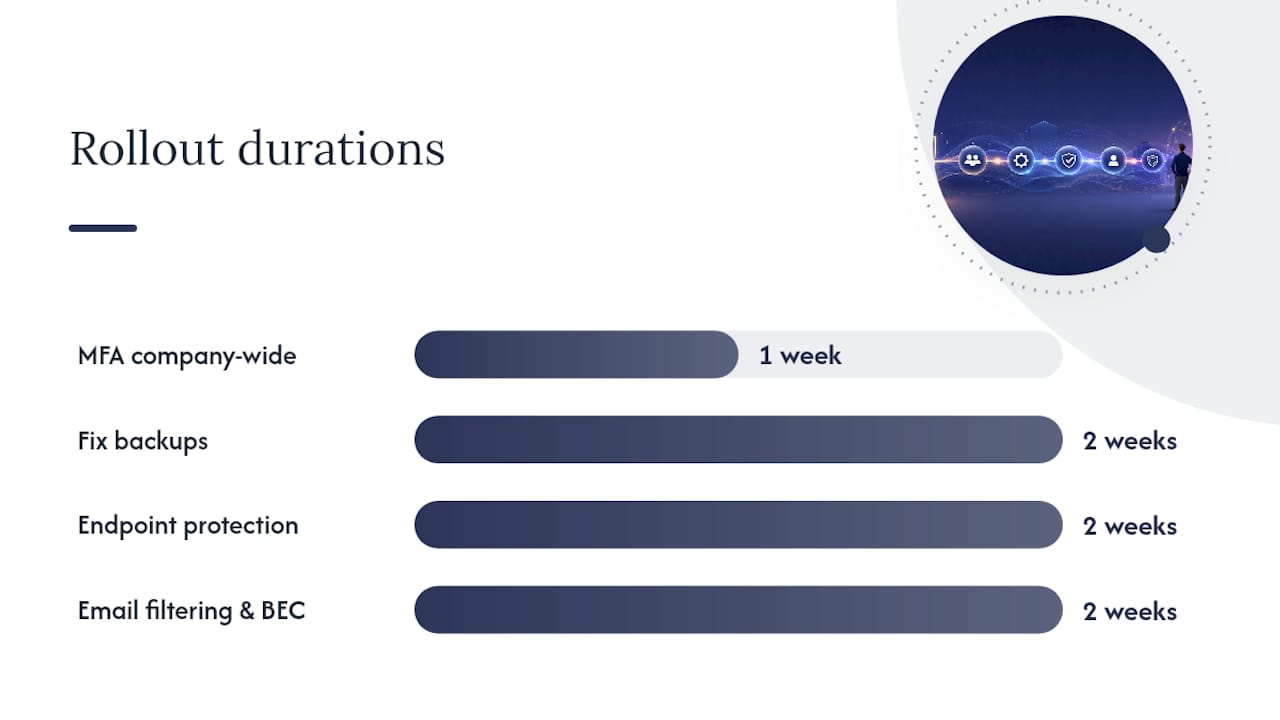
- Week 1: MFA company-wide. One admin can usually push this through Microsoft 365 or Google Workspace in a few days.
- Week 2 to 3: Fix backups. Confirm an offline or immutable copy exists and run a full restore test.
- Week 3 to 4: Deploy managed endpoint protection across every device, including that one laptop in the warehouse nobody mentioned.
- Week 4 to 5: Turn on email filtering rules and BEC alerts.
- Ongoing: Run access reviews quarterly.
Set acceptance criteria before you start, not after. A successful restore test, a phishing simulation click rate under a reasonable target, and good patch compliance across devices are the key metrics worth tracking.
Pro Tip: Don’t take “yes, we’re backed up” at face value from anyone, including your own IT person. Ask for the date and result of the last actual restore test. If there isn’t one, you’re not backed up. You’re hoping.
Making policies stick without becoming the office police
A policy nobody enforces isn’t a policy, it’s a wish. We see plenty of SMBs with a nicely worded IT policy PDF sitting in a shared drive that nobody has opened since onboarding.
Core policies every business needs in writing:
- Acceptable use of company devices and accounts.
- Rules for mobile and remote access, covering personal devices used for work.
- MFA as mandatory, not optional, for every account with access to company data.
- A flat ban on shared logins, especially for admin or finance systems.
Enforcement doesn’t mean surveillance. It means process. Role-based access reviews catch the marketing coordinator who somehow still has finance system access from a project two years ago. A proper joiner-leaver process makes sure accounts get disabled the day someone leaves, not three weeks later when someone notices. Automated alerts for things like impossible travel logins or repeated failed MFA attempts catch problems before they become incidents.
Run an access audit quarterly and keep records. The most common failure we see isn’t a bad policy. It’s no owner. Nobody is actually responsible for checking any of this happens.
Building a phishing and awareness program that changes behaviour
Annual training days don’t work. Staff sit through a video once a year and forget it by lunch. What works better is short, frequent, and measured.
- Run brief training modules quarterly, ten minutes, not ninety.
- Send monthly phishing simulations, low effort, real-world scenarios based on what’s actually landing in your industry’s inboxes.
- Track two numbers: click rate on simulated phishing and report rate (staff who flag it instead of clicking). Cyber.gov.au’s guidance notes that shorter, recurring simulations shift behaviour more reliably than a single annual session.
- Set targets and publish progress. Staff respond better to “we went from 22% clicks to 8%” than to a lecture.
Anyone who clicks repeatedly needs immediate retraining and a supervised repeat test, not a talking-to. And every staff member should know exactly who to call and how fast they’ll get a response if something looks wrong. If that contact chain lives only in someone’s head, fix that this week.
Pro Tip: Publish the phishing simulation results internally, even the bad ones. Teams that see their own numbers improve month to month engage far more than teams that never hear about it again.
Keeping security working after the initial setup
This is where most SMBs fall down. They do the initial push, tick the box, then nothing gets reviewed for eighteen months. By then half the new starters have no MFA and the backup job has been silently failing since March.
Ongoing priorities to budget for:
- Patch status across all devices, checked weekly, not “whenever Windows nags someone.”
- Endpoint alerts triaged daily. An ignored alert is worse than no alert.
- Email filtering performance reviewed monthly, tuning rules as new scam patterns show up.
- Backup success confirmed weekly, restore tested at minimum quarterly.
Split ownership clearly: the owner sets the risk appetite, a manager owns policy enforcement, an IT lead or MSP runs the technical maintenance. Review cadence should be weekly for alerts, monthly for access, and quarterly against a framework like the Essential Eight or NIST CSF 2.0. Once alert volume outpaces what one person can triage, that’s the signal to bring in MDR or a SIEM service rather than letting alerts pile up unread.
What employees need to know when something goes wrong
Most staff freeze during an incident because nobody told them what to actually do. Fix that with a one-page runbook, not a compliance document nobody reads.
- Stop. Disconnect the device from the network. Don’t keep clicking around trying to fix it yourself.
- Isolate. Leave the machine as-is. Don’t reboot, don’t run a “quick scan,” don’t close anything.
- Report immediately to the named contact, whether that’s an internal IT lead or your MSP’s emergency line. No guessing who to call.
- Preserve evidence. Screenshots of suspicious emails, timestamps, anything unusual noticed beforehand.
At the business level, your runbook needs a current contact list, a documented backup restore plan, a communications plan for staff and clients, and clear legal or financial escalation steps for anything involving fraud or data loss. Test this with a tabletop exercise at least twice a year and run an actual restore drill quarterly. IT Start’s incident response templates give managers a starting structure to adapt rather than building one from scratch, and a worked example runbook shows what a completed version actually looks like.
Password policies and why password managers beat memory
Password policies that demand complexity but skip a manager are pointless. Staff will just write “Winter2026!” on a sticky note or reuse it across five systems, which is worse than a simpler password used nowhere else.
A workable policy looks like this: unique passwords for every system, minimum length over complexity rules, and a business password manager (1Password Business, Bitwarden, or similar) rolled out to every staff member, not just IT. Shared logins get banned outright, and any account that currently uses one gets migrated to individual credentials with role-based access instead.
Password managers solve the real problem, which is that humans can’t remember forty unique passwords and shouldn’t be expected to. They also make offboarding faster because you can revoke access centrally instead of chasing down who knows which shared password. Pair this with MFA everywhere and you’ve closed off the two most common credential-based entry points in one move.
We see a lot of businesses that bought password manager licences during a security push and never actually rolled them out past the admin team. If that’s your business, that’s a half-finished project sitting on your books doing nothing.
Mobile devices and remote work: locking down the edges
Remote work blew a hole in a lot of SMB security setups that were built assuming everyone worked from one office on one network. That assumption is gone, and the policies need to catch up.
For company-owned mobile devices, enforce device encryption, screen lock, and remote wipe capability through mobile device management (Microsoft Intune or similar). For personal devices used for work, a clear bring-your-own-device policy should specify minimum security settings before that device touches company email or files, and separate work data from personal data where the platform allows it.
Remote work adds specific risks: staff on home Wi-Fi with default router passwords, or worse, working from public Wi-Fi at a cafe without a VPN. Require a VPN or a properly configured cloud access setup for anything touching sensitive systems, and make sure remote access itself sits behind MFA, which ties straight back to the first control on this list.
The businesses that get burned here are usually the ones that let remote work happen informally during a crisis (a lockdown, a flood, a broadband outage) and never went back to formalise it properly afterwards. If your remote access policy is still “just VPN in like we did in 2020,” it’s overdue for a review.
Data classification: not every file needs the same protection
Most SMBs treat every file the same way, which means either everything gets locked down too hard to be usable, or nothing gets protected and sensitive client data sits in the same folder as lunch menus.
A workable classification scheme needs only three or four tiers: public, internal, confidential, and restricted (financial records, health information, client contracts). Staff need simple rules for each tier, not a compliance manual. Confidential files don’t get emailed as unencrypted attachments. Restricted data doesn’t leave the business’s managed systems at all, full stop.
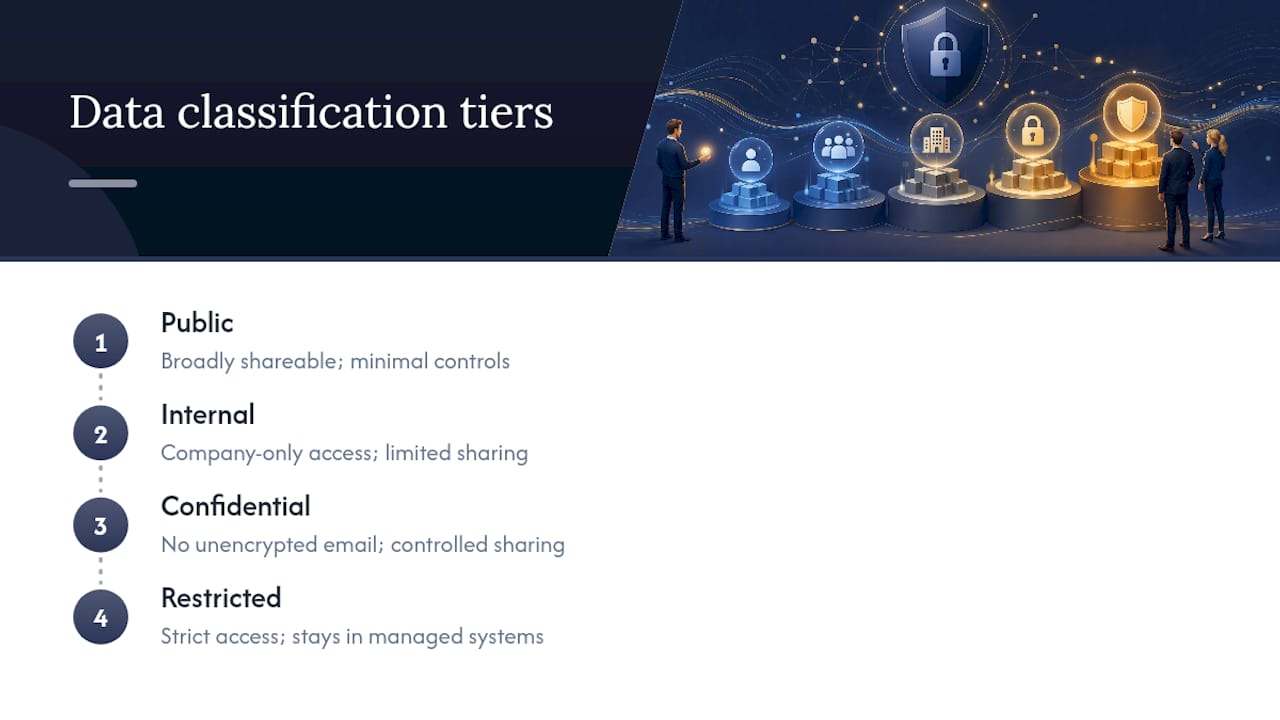
Handling procedures matter more than the labels themselves. Who can access each tier, how it gets shared internally and externally, and how long it’s retained before secure deletion. A legal firm’s client files and a retail business’s sales figures need very different handling, and a one-size policy usually fails both.
The gap we see most often: businesses that have sensitive client data (health records, financial details, ID documents) sitting in a general shared drive with the same access permissions as the staff kitchen roster. That’s not a technology failure. That’s a classification failure, and it’s fixed with policy and folder permissions, not new software.
Encrypting sensitive data, moving and at rest
Data gets exposed in two states: moving between systems, and sitting in storage. Both need encryption, and treating one without the other leaves a gap.
For data in transit, this means enforcing HTTPS/TLS for any web-based system handling sensitive information, and requiring encrypted connections (VPN or a secure cloud gateway) for remote access to internal systems. Email itself is often the weak point. Standard email isn’t encrypted end to end, so sensitive attachments (financial records, health data, ID documents) need a secure file-sharing method instead of a plain attachment.
For data at rest, full-disk encryption should be standard on every laptop and mobile device (BitLocker on Windows, FileVault on Mac), so a stolen device doesn’t hand over its contents along with the hardware. Server and cloud storage need encryption at the storage layer too, which most reputable cloud platforms including Microsoft 365 and Azure handle by default, though it’s worth confirming rather than assuming.
The catch: encryption is only as good as the key management and access controls around it. Encrypting a drive means nothing if the account with access to it has a weak password and no MFA.
What we see, and why it rarely matches what businesses assume
We walk into new client sites expecting a mixed bag, and we still get surprised. No MFA on the finance manager’s email. A backup job that’s been silently failing for four months while the dashboard says “success” because nobody checked the actual restore. Five people sharing one admin login because it was “easier during setup” three years ago and nobody revisited it.
The quick wins we push first are always MFA and a real backup test, because those two prevent the failures that actually end businesses (account takeover leading to fraud, and ransomware with no clean recovery point). Our SMB 1001 Gold certification reflects a structured approach to exactly this kind of gap closing, not a checkbox exercise.
The mismatch between what owners believe and what we find on day one is the whole reason this work exists.
— Matt
Getting these controls implemented and actually maintained
Reading this list is one thing. Getting MFA rolled out across 35 staff accounts, chasing down who still has admin rights, and setting up a genuine restore test schedule is another. That’s the gap between knowing what needs doing and having someone actually do it, week after week, not just during a security scare.
A free security check can map exactly where you stand against the controls covered here: MFA coverage, backup health, endpoint protection, and who’s holding admin rights they shouldn’t have. From there, we prioritise fixes by risk rather than throwing everything at you at once, and move into ongoing managed maintenance so alerts get triaged and backups get tested without you having to chase it. If you’re in Brisbane and want a straight answer on where your setup actually stands, start with our cyber security services page or look at cloud services if backups and email hosting are your biggest gap. Book the audit, get the list, fix what matters first.
Sources
For framework-level detail, see the ACSC Small Business Cyber Security Guide and the NIST CSF 2.0 small business quick-start guide. For practical checklists, Business Victoria’s essential small business cybersecurity guide and IT Start’s cyber hygiene checklist cover the operational side.
- ACSC Small Business Cyber Security Guide
- NIST Cybersecurity Framework 2.0: Small business quick-start guide
- Cyber
FAQ
What are the top cybersecurity best practices for employees at an SMB?
MFA on every account, managed endpoint protection, email filtering against business email compromise, tested backups with an offline copy, and access control based on least privilege are the five highest-impact controls.
How often should employees do phishing training?
Short training modules quarterly paired with monthly phishing simulations work better than a single annual session, according to ACSC guidance.
Do small businesses really need a password manager?
Yes. A business password manager removes the need for staff to reuse or write down passwords, and it makes revoking access during offboarding far faster than chasing shared logins.
How often should we test our backups?
Test restores at least quarterly, and keep at least one backup copy offline or immutable so it survives a ransomware attack that targets connected backups first.
When should an SMB bring in an MSP instead of managing this in-house?
Once alert volume, patch management, and access reviews outpace what internal staff can reliably triage, a managed provider can run ongoing monitoring and maintenance so controls don’t decay between reviews.
What’s the difference between IT security best practices and personal cyber hygiene?
IT security best practices are company-level controls an owner or MSP implements and maintains, like MFA rollout and access reviews, while personal cyber hygiene refers to individual habits, and businesses need the former to function regardless of the latter.