TL;DR:
- IT support responsibilities involve maintaining and troubleshooting business IT systems to ensure reliable operations. Using a structured tier model and essential tools helps SMBs balance proactive maintenance with reactive problem-solving effectively. Regular reviews and proper documentation reduce recurring issues and optimize resource allocation for IT support.
IT support responsibilities are the defined set of tasks required to maintain, troubleshoot, and support all business IT systems and end-users. For small to medium-sized businesses, getting clarity on these duties is not optional. Without a clear picture of what IT support actually covers, you end up with gaps in coverage, burned-out staff, and systems that fail at the worst possible moments. Tools like ServiceNow, Microsoft 365, and Active Directory sit at the centre of most IT support work, and understanding how they fit into daily operations is where this guide starts.
What are IT support responsibilities and how are they organised?
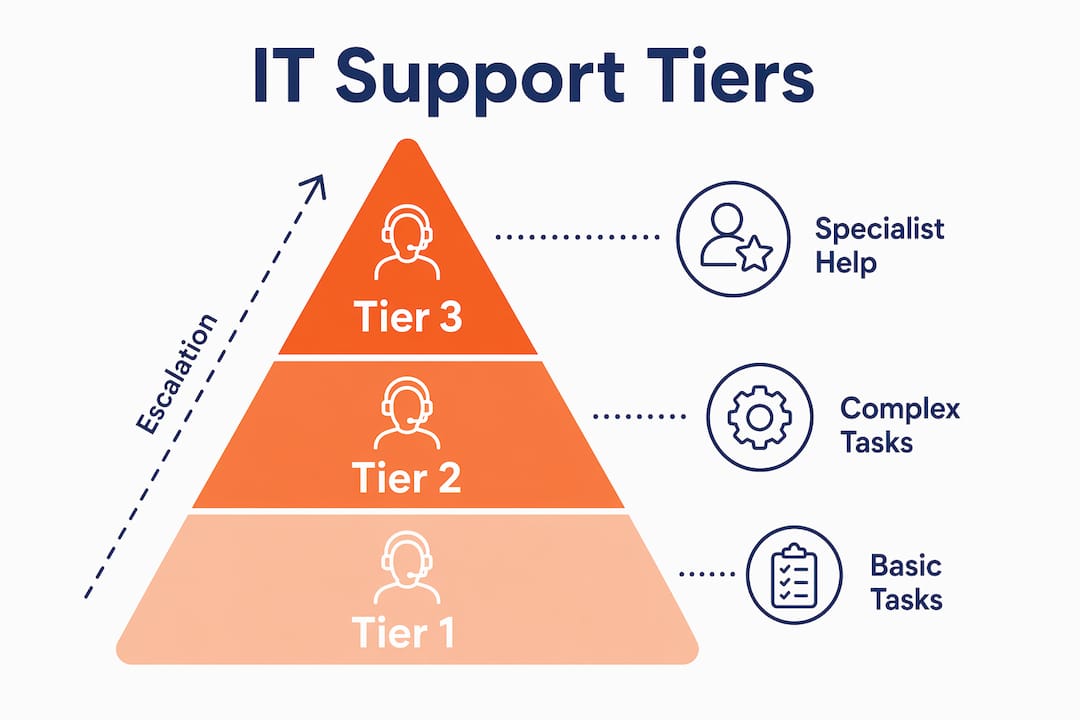
IT support duties and responsibilities are structured around a three-tier model that separates routine tasks from complex infrastructure work. Tier 1 resolves 70–80% of routine issues, covering password resets, software installs, printer problems, and basic connectivity. Tier 2 handles advanced troubleshooting such as network configuration, driver conflicts, and application errors. Tier 3 focuses on infrastructure, server migrations, and disaster recovery.
This structure exists for a reason. Routing every request to your most experienced engineer is expensive and slow. The tier model keeps work flowing to the right skill level.
| Tier | Focus Area | Example Tasks |
|---|---|---|
| Tier 1 | Basic user support | Password resets, software installs, printer setup |
| Tier 2 | Advanced troubleshooting | Network faults, driver issues, application errors |
| Tier 3 | Infrastructure and recovery | Server migrations, disaster recovery, security incidents |
A Tier 1 specialist handles 30–50 tickets per day with a first-contact resolution rate of 70–80%. That volume illustrates just how much of IT support is routine work that does not require senior expertise. Misallocating that work upward is one of the most common and costly mistakes we see in SMBs.
For a detailed breakdown of how these tiers apply in Brisbane businesses, the IT support specialist duties guide from IT Start covers the specifics well.
Which tools and platforms underpin effective IT support duties?
The right tools are what separate a reactive, chaotic support environment from one that actually runs well. Core IT support responsibilities include active network monitoring, hardware lifecycle management, identity management via Active Directory and Azure AD, and incident triage through IT service management (ITSM) platforms.
Here is what a well-equipped SMB IT support setup typically includes:
- Ticketing and ITSM: Jira Service Management or ServiceNow for logging, tracking, and escalating requests
- Asset management: Lansweeper or Snipe-IT for tracking hardware, warranty status, and software licences
- Identity and access: Active Directory or Azure AD for user provisioning, group policies, and access control
- Monitoring: Tools like NinjaRMM or ConnectWise Automate for alert-based monitoring of backups, certificates, and system health
- Documentation: A knowledge base platform such as IT Glue or Confluence for storing SOPs and fix guides
Documentation deserves special mention. Good documentation in plain language is directly linked to operational efficiency. When fixes are written up clearly, users can resolve minor issues themselves and repeat tickets drop.
Pro Tip: Write every fix in your knowledge base as if explaining it to someone who has never touched a computer. If your team can follow it without asking questions, users probably can too.
How do proactive and reactive IT support responsibilities differ?
Proactive IT responsibilities involve maintenance and updates, while reactive responsibilities cover troubleshooting and ticket responses. Both matter. The problem is that most SMBs spend almost all their time reacting and almost none of their time preventing.
Proactive IT support tasks include:
- Applying operating system and application patches on a regular schedule
- Verifying backup jobs are completing and that restores actually work
- Monitoring system alerts for backup failures, certificate expiries, and disk space warnings
- Managing hardware lifecycle to replace ageing equipment before it fails
- Reviewing user access rights and removing accounts for staff who have left
Reactive tasks are what most people picture when they think of IT support: a user calls with a problem, a ticket gets raised, and someone fixes it. That is necessary work. But IT support specialists monitor systems for alerts like backup failures and security certificate expiries precisely because catching problems early is far cheaper than recovering from them.
Honestly, we see this constantly. A client comes to us after a server failure and says their backups were running. We check and find the backup job has been failing silently for three months. Nobody was monitoring it. That is a proactive failure with a very reactive and expensive consequence.
Pro Tip: Set up automated alerts for backup job failures, certificate expiries, and disk usage thresholds. These three alone will catch the majority of preventable outages before they become emergencies.
Proactive IT support in Brisbane is something IT Start covers in depth if you want a practical framework for setting this up.
What common mistakes do smbs make with IT support duties?
SMBs make a predictable set of mistakes with IT support, and most of them come down to either misallocating resources or ignoring process entirely.
Delegating Tier 1 tasks to entry-level staff or automated systems is a standard efficiency benchmark. When SMBs skip this and route every request to their most senior person, they create bottlenecks and burn through expensive time on password resets. We see this in businesses that have one IT person doing everything from helpdesk to server administration. That person is always behind, always stressed, and never has time for the work that actually matters.
Other common mistakes include:
- No asset tracking: Businesses with no hardware inventory cannot budget for replacements or spot warranty gaps. Asset lifecycle management with tools like Snipe-IT or Lansweeper prevents this.
- Outdated or missing documentation: When the person who set everything up leaves, nobody knows how anything works. This is a real risk in small teams.
- Assuming MFA is configured: We regularly audit new clients and find that multi-factor authentication is either not enabled or only partially rolled out across Microsoft 365.
- Assuming backups are working: As mentioned above, a backup job that runs is not the same as a backup job that succeeds and produces a usable restore.
- No ticket triage process: Without a defined process, urgent issues get buried under low-priority requests and nothing gets resolved well.
In small firms, the IT role often combines reactive troubleshooting with proactive maintenance due to limited staffing. That makes prioritisation critical. Without structure, everything feels urgent and nothing gets done properly.
How to manage IT support responsibilities effectively in your SMB
Getting IT support organised in a small business requires practical steps, not theory. Start with what you can see and measure.
The role of professional IT support is most effective when built on clear triage, documented processes, and regular reviews. Here is how to approach it:
Build a triage process first. Define what counts as critical, high, medium, and low priority. A server down is critical. A user who cannot find a file is low. Without this, your team will always be pulled toward whatever is loudest rather than whatever matters most.
Maintain a full asset and user account inventory. Know every device, its age, its warranty status, and who uses it. Know every user account and what access it has. Proper asset lifecycle management ensures smooth replacement cycles and predictable budgeting. This is not glamorous work, but it prevents the kind of surprise failures that cost real money.
Review ticket trends monthly. Look at what types of requests are coming in most often. If the same issue appears repeatedly, that is a signal to fix the root cause rather than keep patching the symptom. Effective IT support uses data-driven pattern analysis to prevent recurring issues, not just resolve them one at a time.

Pro Tip: Run a monthly report on your top five recurring ticket types. If any issue appears more than three times in a month, treat it as a problem to fix permanently, not just a ticket to close.
| Responsibility | Recommended Tool | Expected Outcome |
|---|---|---|
| Ticket management | Jira Service Management, ServiceNow | Faster resolution, clear audit trail |
| Asset tracking | Snipe-IT, Lansweeper | Predictable budgeting, fewer surprises |
| Identity management | Active Directory, Azure AD | Controlled access, reduced security risk |
| Monitoring and alerts | NinjaRMM, ConnectWise Automate | Early detection of failures |
| Documentation | IT Glue, Confluence | Consistent service, reduced repeat tickets |
Train your users too. A short session on how to raise a ticket properly, what information to include, and what counts as urgent saves your IT team significant time every week.
Key takeaways
Effective IT support responsibilities require a structured tier model, the right tools, and a consistent balance of proactive maintenance and reactive troubleshooting to keep SMB systems running reliably.
| Point | Details |
|---|---|
| Tier model is non-negotiable | Routing all requests to senior staff creates bottlenecks and wastes budget on routine tasks. |
| Proactive work prevents outages | Patching, backup verification, and monitoring catch failures before they become emergencies. |
| Documentation reduces repeat tickets | Writing fixes in plain language lets users self-serve and cuts ticket volume over time. |
| Asset tracking enables budgeting | Knowing your hardware lifecycle prevents surprise failures and supports predictable spending. |
| Triage defines priorities | Without a clear priority system, urgent issues get buried and nothing gets resolved properly. |
What i have learned from years of SMB IT support
Honestly, the biggest gap I see between what business owners think IT support covers and what it actually involves is the proactive side. Most owners assume that if nothing is broken, IT is fine. That is not how it works.
We take on new clients regularly who have been running without a proper backup verification process, without MFA across their Microsoft 365 tenancy, and without any hardware asset register. They are not negligent people. They just did not know what they did not know. Their previous IT setup was reactive by default, not by design.
The tier model is not just an organisational chart concept. It is a practical tool for making sure the right person handles the right problem. When a senior engineer spends their morning resetting passwords and fixing printer drivers, that is time not spent on the infrastructure work that actually protects the business. I have seen this pattern in firms with 15 staff and firms with 80 staff. The size does not matter as much as the discipline.
What actually works is boring: document everything, monitor everything, review your ticket data regularly, and fix root causes instead of symptoms. The businesses that do this well have fewer emergencies, lower IT costs over time, and staff who are not constantly frustrated by technology that does not work.
The role of IT support in business success is not just keeping the lights on. It is building a foundation that lets the business grow without technology becoming the bottleneck.
— Matt
How IT start supports your business IT responsibilities
IT Start works with Brisbane SMBs to take the complexity out of managing IT support responsibilities. From help desk and ticket triage to proactive monitoring, patch management, and asset lifecycle tracking, IT Start covers the full scope of business IT support so your team can focus on running the business. IT Start also integrates cyber security services to make sure your IT support function includes the protection your data and systems need. If you are not sure whether your current IT setup is covering the basics, contact IT Start for a straightforward assessment with no obligation.
FAQ
What are the main IT support responsibilities in a small business?
IT support responsibilities in a small business include help desk support, patch management, backup verification, hardware asset tracking, identity and access management, and network monitoring. In smaller teams, one person or a managed service provider often handles all tiers.
What is the difference between tier 1 and tier 2 IT support?
Tier 1 handles routine requests like password resets, software installs, and basic connectivity issues, resolving 70–80% of tickets at first contact. Tier 2 addresses more complex problems such as network faults, driver conflicts, and application errors that require deeper technical knowledge.
Why do smbs struggle with IT support duties?
SMBs typically lack the staffing to separate proactive and reactive work, which means maintenance tasks get skipped in favour of urgent requests. This creates a cycle where preventable failures keep occurring because root causes are never addressed.
What tools are used for IT support tasks?
Common IT support tools include Jira Service Management and ServiceNow for ticketing, Lansweeper and Snipe-IT for asset management, Active Directory and Azure AD for identity management, and NinjaRMM or ConnectWise Automate for monitoring and alerts.
How often should IT support responsibilities be reviewed?
Ticket trends and IT support processes should be reviewed at least monthly. Monthly reviews help identify recurring issues, highlight gaps in documentation, and flag hardware nearing end of life before it causes unplanned downtime.