
TL;DR:
- Brisbane SMBs often struggle with basic IT issues like outdated hardware, poor backup testing, and lack of multi-factor authentication. Implementing the ACSC Essential Eight controls progressively improves cybersecurity maturity and reduces vulnerability risks. Reactive break-fix support is ineffective; proactive managed or strategic IT services better support business growth and security.
An IT support blog is a practical resource where managed service providers publish troubleshooting guides, security frameworks, and real-world IT services advice to help business owners make better technology decisions. For Brisbane SMBs managing between 10 and 50 staff, this kind of technology support content is often the difference between catching a problem early and dealing with a full-scale outage. The ACSC Essential Eight remains the baseline cybersecurity framework every Australian business should understand in 2026. This article covers the core IT challenges local businesses face, how to apply that framework, Windows 11 troubleshooting tips, and how to assess which IT support model actually fits your business.
What are the core IT support challenges Brisbane SMBs face?
The most common IT problems in Brisbane SMBs are not exotic. They are the basics done badly. No multi-factor authentication, backups that have not been tested in months, hardware running Windows 10 past its October 2025 end-of-support date, and Microsoft 365 tenants set up years ago by someone who has since left the business.
Honestly, we see this constantly. A business owner will tell us they are backed up, and when we look, the backup agent stopped working six weeks ago and nobody noticed. Poor backup configurations lead directly to data loss risk and operational downtime. The perception of being protected and the reality of being protected are two very different things for most SMBs.
Here are the most common gaps we find when we first engage with a Brisbane SMB:
- No MFA on Microsoft 365 or email accounts, leaving credentials exposed to phishing attacks
- Backups configured but never tested, with failed jobs sitting unnoticed in a dashboard nobody checks
- Outdated hardware running unsupported operating systems, creating unpatched security vulnerabilities
- Admin accounts used for daily work, meaning a single compromised login can give an attacker full system access
- No documented IT asset register, so nobody knows what is on the network
The break-fix model makes all of this worse. When you only call someone when something breaks, you never get ahead of these problems. A technician fixes the immediate issue, leaves, and the underlying risk stays in place. That is not IT support. That is IT triage.
Pro Tip: Ask your current IT provider to show you the last successful backup restore test. If they cannot produce one within the last 30 days, your backup is not reliable.
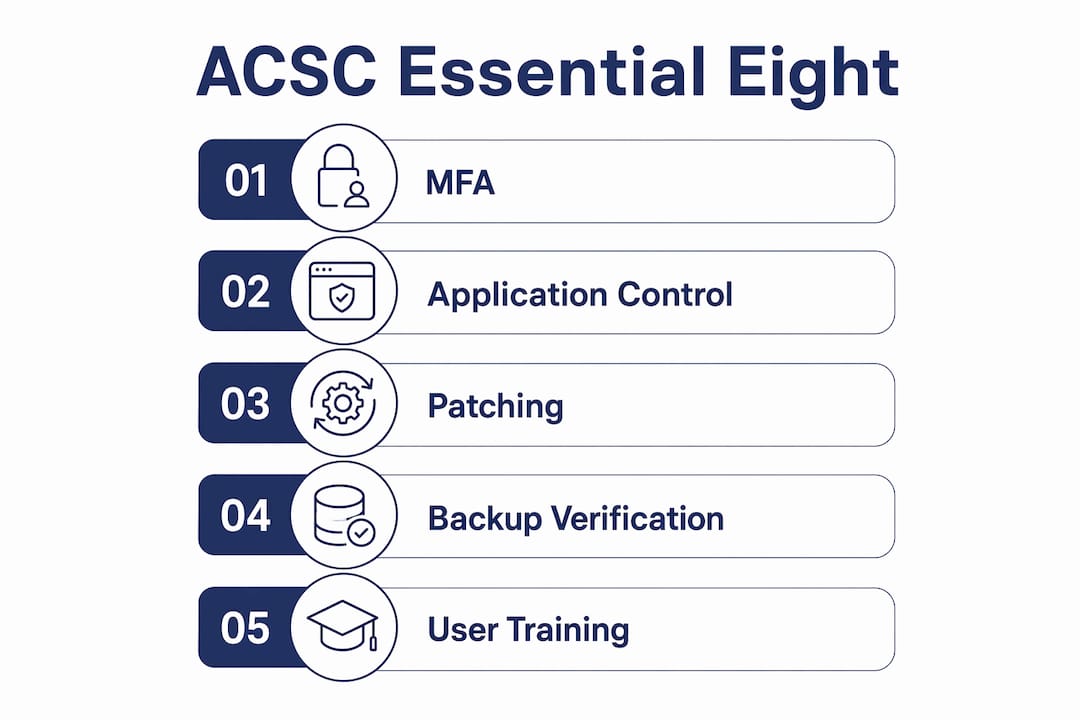
How to apply the ACSC Essential Eight framework in a Brisbane SMB
The ACSC Essential Eight is the Australian Signals Directorate’s set of eight prioritised cybersecurity mitigations designed to protect organisations against the most common attack vectors. For Brisbane SMBs in 2026, these are not optional extras. They are the minimum viable security posture.
The eight controls are:
| Control | What it means in practice |
|---|---|
| Application control | Only approved software can run on business devices |
| Patch applications | Software like browsers and Office updated within defined timeframes |
| Configure Office macro settings | Macros blocked or restricted to prevent malicious code execution |
| User application hardening | Browsers and PDF readers locked down to reduce attack surface |
| Restrict admin privileges | Staff only have admin rights when genuinely required |
| Patch operating systems | OS updates applied within defined timeframes based on risk |
| Multi-factor authentication | MFA required for all remote access and privileged accounts |
| Regular backups | Critical data backed up, tested, and stored offline or offsite |
Most Brisbane SMBs we assess are sitting at Maturity Level Zero for at least three or four of these controls. That means the control is not implemented at all, not that it is partially done. The gap between where businesses think they are and where they actually are is significant.
Practical implementation does not have to happen all at once. Start with MFA on Microsoft 365 because it is free, fast to deploy, and reduces credential theft risk significantly. Then move to patching, because unpatched software is the entry point for the majority of ransomware attacks. Admin privilege restriction comes next, because it limits the blast radius if an account is compromised.

For a deeper breakdown of how to implement each control in a Brisbane context, the Essential Eight guide for Brisbane SMEs walks through each one with practical steps. The cybersecurity best practices guide also covers complementary controls worth layering on top.
Pro Tip: The ASD Essential Eight Maturity Model self-assessment tool is free to download. Run through it with your IT provider and document your current maturity level for each control. It takes about an hour and gives you a clear starting point.
What are effective Windows 11 troubleshooting tips for SMBs?
Windows 11 provides multiple ways to run built-in troubleshooters, and knowing which path to use saves time before escalating to your IT team. The old Microsoft Support Diagnostic Tool (MSDT) has been deprecated due to security vulnerabilities and replaced by the Get Help app and a new command-line utility called GetHelpCmdLine. This matters because some older guides still reference MSDT, and following them on a Windows 11 machine will not work.
Here is a practical sequence for common troubleshooting scenarios:
- Open Settings and navigate to System, then Troubleshoot. This gives you access to recommended troubleshooters for the most common issues including internet connections, audio, printers, and Windows Update. Run the relevant one first before doing anything else.
- Open the Get Help app by searching for it in the Start menu. This replaces the legacy MSDT platform and handles a broader range of issues. It also connects to Microsoft’s support resources if the automated fix does not resolve the problem.
- Use Control Panel troubleshooters for older hardware and legacy device issues. Go to Control Panel, then Troubleshooting. Some hardware-specific troubleshooters still live here and are not yet replicated in Settings.
- Run GetHelpCmdLine from the command prompt for advanced users or IT staff who need to automate troubleshooting across multiple machines. This supports scripting and is useful in managed environments where you need process standardisation across a fleet of devices.
- Check driver status using Dell SupportAssist if you are running Dell hardware. Dell SupportAssist scans and installs driver updates automatically, which resolves a significant proportion of hardware-related issues before they need escalation.
Windows 10 reached end of support in October 2025, which means any machine still running it is no longer receiving security patches. If your staff are troubleshooting issues on Windows 10 devices, the real fix is upgrading the operating system, not running a troubleshooter.
Experienced IT teams treat built-in troubleshooters as first-pass diagnostics to gather evidence before escalation, not as definitive fixes. If the troubleshooter identifies a problem but cannot resolve it, that output is useful information for your IT provider. Screenshot it or note the error code before calling.
Break-fix, managed services, or strategic IT support: which phase is your Brisbane SMB in?
Reactive break-fix IT support conflicts directly with business productivity. You pay when something breaks, the technician fixes it, and you go back to hoping nothing else breaks. There is no visibility, no planning, and no one accountable for the overall health of your environment.
| Support model | How it works | The real cost |
|---|---|---|
| Break-fix | Pay per incident when something fails | Unpredictable bills, no prevention, downtime accumulates |
| Managed services | Fixed monthly fee, remote monitoring and management | Predictable cost, proactive patching, faster response times |
| Strategic IT support | Aligns technology to business goals and user productivity | Higher value, fewer surprises, technology that actually serves the business |
Most Brisbane SMBs start in break-fix, move to managed services when the pain gets bad enough, and then discover that managed services alone does not answer the bigger question: is your technology actually helping your business grow?
Aligning IT services with user productivity rather than just system uptime is what separates a strategic IT partner from a helpdesk. A managed service provider that only measures uptime is still thinking like a break-fix shop, just with a monthly retainer attached.
Signs your business is ready to move to strategic IT support:
- You are spending more time managing IT problems than using technology to do actual work
- Your IT provider has never asked you about your business goals or growth plans
- You have no IT roadmap and no budget forecast for technology over the next 12 months
- Staff are working around technology limitations rather than being supported by them
The SMB IT strategy guide for Brisbane businesses covers how to build a technology roadmap that connects your IT investment to actual business outcomes.
Key takeaways
A reliable IT support blog delivers the ACSC Essential Eight, Windows 11 troubleshooting guidance, and honest comparisons of IT support models to help Brisbane SMBs close the gap between perceived and actual security.
| Point | Details |
|---|---|
| Backup verification is critical | Test restores monthly. A backup that has not been tested is not a backup. |
| MFA is non-negotiable | Deploy MFA on Microsoft 365 first. It is free and reduces credential theft risk significantly. |
| Windows 10 is end of life | Machines still on Windows 10 after October 2025 are unpatched and a security liability. |
| Break-fix is not a strategy | Reactive support does not prevent downtime. Move to managed or strategic IT support. |
| Essential Eight is the baseline | Assess your maturity level for all eight controls and prioritise the gaps. |
What most Brisbane SMBs actually get wrong about IT support
Honestly, the biggest misconception I see is that IT support is about fixing computers. Business owners think they need someone to call when something breaks. What they actually need is someone who stops things from breaking in the first place, and who can tell them whether their technology is holding their business back.
The backup problem is the one that keeps me up at night. We have walked into businesses where the backup software was showing green lights on a dashboard, but the actual backup jobs had been silently failing for weeks because a storage volume filled up. Nobody checked. Nobody got an alert. The business thought it was protected. It was not. This is not a rare edge case. We see it regularly.
The MFA gap is just as common. A business will have Microsoft 365 with 15 users, and not a single one has MFA enabled. That means one phishing email to one staff member can hand an attacker full access to the entire email environment, including finance communications, client data, and anything stored in SharePoint. The fix takes about 20 minutes to deploy. The risk of not doing it is enormous.
What I find most frustrating is the disconnect between what businesses spend on technology and how much of it staff actually use. A company will pay for Microsoft 365 Business Premium, which includes Defender for Business, Intune, and Azure AD Premium, and then use it like a basic email licence. The tools are there. Nobody has configured them. That is where a good IT partner earns its fee, not by fixing printers.
— Matt
How IT Start supports Brisbane SMBs with IT and cybersecurity
IT Start works with Brisbane SMBs to move them from reactive IT management to a position where technology actively supports their business. That means deploying the ACSC Essential Eight controls, managing Microsoft 365 environments properly, and making sure backups are actually working. For businesses that need managed IT support with real accountability, IT Start provides proactive monitoring, security management, and strategic planning under one fixed monthly arrangement. The cybersecurity services cover everything from MFA deployment to endpoint protection and compliance with Australian security standards. If you want to know where your business actually sits on the security and IT maturity scale, start with a free assessment.
FAQ
What is an IT support blog used for?
An IT support blog publishes practical guides, security advice, and troubleshooting tips to help business owners and staff manage technology more effectively. For Brisbane SMBs, it is a resource for staying current on threats like phishing and ransomware, and for understanding frameworks like the ACSC Essential Eight.
How does MFA protect a small business?
MFA requires a second verification step beyond a password, which reduces unauthorised access even when credentials are stolen. For Microsoft 365 users, enabling MFA through the admin centre takes under 30 minutes and costs nothing on most licence tiers.
What replaced MSDT in Windows 11?
Microsoft deprecated MSDT due to security vulnerabilities and replaced it with the Get Help app and the GetHelpCmdLine command-line utility. Both are available natively in Windows 11 and support the same troubleshooting scenarios as the legacy tool.
What is the difference between break-fix and managed IT support?
Break-fix support is reactive. You pay per incident when something fails. Managed IT support is a fixed monthly arrangement where your provider monitors your environment, applies patches, and resolves issues before they cause downtime. Managed services are more predictable in cost and more effective at preventing problems.
How do I know if my business backups are working?
The only way to confirm a backup is working is to restore from it. Ask your IT provider to perform a test restore of critical data and document the result. If they cannot do this or have not done it recently, your backup configuration needs immediate review.