TL;DR:
- Network hardening involves securing all network devices and configurations to reduce attack surfaces and prevent lateral movement. Implementing MFA, patching internet-facing devices, and network segmentation are crucial steps recommended for SMBs to mitigate active threats. Ongoing monitoring, testing, and adherence to frameworks like the ACSC Essential Eight ensure lasting security improvements.
Network hardening means locking down your network infrastructure so attackers have fewer ways in and less room to move around once they are in. The Australian Cyber Security Centre (ACSC) defines it as securing routers, switches, firewalls and VPNs by reducing attack surface, applying secure configurations and monitoring traffic to prevent unauthorised access and lateral movement. If you run a business with 10 to 50 staff and you have not done this work, your network is almost certainly more exposed than you think.
Three things to do right now, before you read another word:
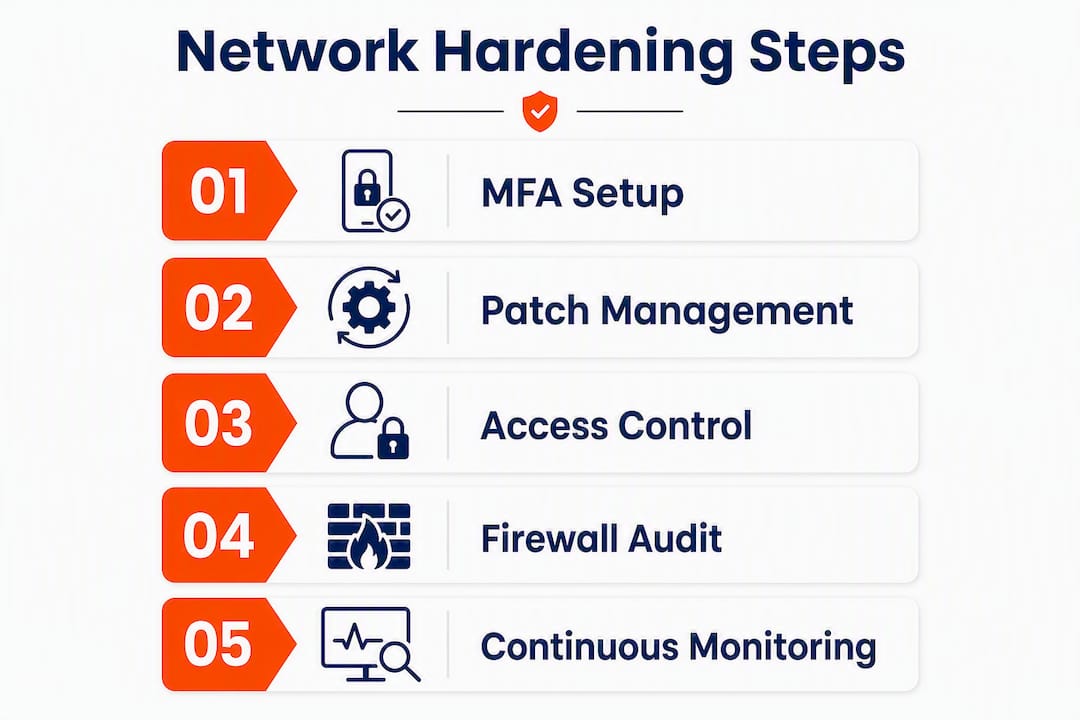
- Run an asset inventory. List every device that touches your network, including printers, IP cameras and anything cloud-connected. You cannot protect what you do not know about.
- Patch everything internet-facing. Your firewall, VPN gateway and router firmware first. Unpatched edge devices are the most common entry point for attackers targeting Australian SMBs.
- Enforce MFA on every remote access method. VPN, Remote Desktop, Microsoft 365. No exceptions.
The ACSC’s Essential Eight framework maps directly to these actions. Patching and MFA are two of the eight controls, and they are the ones that give you the most risk reduction per hour spent. Getting those two right shrinks your attack surface fast and cuts off the most common lateral-movement paths attackers use after they get a foothold.
Table of Contents
- What does network hardening actually cover?
- What threats make network hardening urgent?
- Which components do you actually need to harden?
- How to harden your network: a practical step-by-step process
- How the ACSC Essential Eight maps to network hardening
- Logging, monitoring and staying on top of it all
- What most businesses get wrong (and what we fix first)
- What does a hardening project cost and how long does it take?
- Quick hardening checklist for SMBs
- Key takeaways
- An honest perspective on where most SMBs actually stand
- How IT Start helps Brisbane SMBs harden their networks
- Useful sources to read next
- FAQ
What does network hardening actually cover?
Network hardening is not the same as buying a firewall and calling it done. It covers the full set of configuration, access control and monitoring decisions across your network infrastructure.

In scope for this guide: edge devices (routers, firewalls, VPN gateways), core switches, wireless access points and controllers, DNS resolvers, Active Directory and domain services, networked storage and servers, IoT and operational technology devices, and cloud networking interfaces.
Out of scope: application development security (secure coding, SAST/DAST), physical building access controls, and HR policy. Those are real security concerns, but they are separate disciplines.
Why does scope matter for an SMB? Because without clear boundaries, hardening projects sprawl and stall. When you work with an MSP, a scoped engagement means you get a prioritised plan with a defined end point, not an open-ended project that never finishes. Use this guide to frame a conversation with your IT team or provider about what is actually covered in your current setup.

What threats make network hardening urgent?
The short answer: attackers are actively targeting the devices sitting on the edge of your network right now. The ACSC notes that malicious actors continue to target internet-facing network devices as entry points, then use internal devices to move laterally or exfiltrate data. This is not theoretical.
The most common threats an un-hardened SMB network faces:
- Compromised edge devices. Attackers exploit unpatched VPN gateways and firewalls to gain persistent access. ACSC, CISA and international CERTs have all observed active weaponisation of zero-day vulnerabilities in popular VPN and firewall products.
- VPN and authentication bypass. Standard user VPN accounts without MFA are a common initial foothold. Attackers do not need admin credentials to get in.
- Lateral movement. Once inside, attackers pivot from a compromised workstation or server to domain controllers, file shares and backups. Poor segmentation makes this trivially easy.
- Credential theft. Exposed management interfaces (think: a switch admin panel reachable from the internet) let attackers brute-force or harvest credentials.
- Misconfigured firewall rules. Decade-old allow-any rules are more common than you would expect. We see them regularly on first-day audits.
- Ransomware pivoting from public-facing services. A web server or RDP port exposed directly to the internet gives ransomware operators a direct path to your internal network.
A realistic Australian SMB scenario: a 20-person professional services firm in Brisbane runs a VPN appliance that has not been patched in 18 months. An attacker exploits a known auth-bypass vulnerability, creates a persistent backdoor, and spends significant time mapping the internal network before deploying ransomware. The firm had backups, but nobody had tested a restore. Recovery took an extended period.
Which components do you actually need to harden?
Here is a priority-flagged breakdown of the network components that matter most for an SMB, with one or two practical actions per component.
-
Edge devices: routers, firewalls, VPN gateways (Priority: HIGH)
Change all default credentials immediately. Apply vendor firmware updates on a defined schedule. Restrict management access to a dedicated admin VLAN, not the general LAN. Disable remote management from the internet unless you are using a jump host. -
Core switches (Priority: HIGH)
Disable unused ports. Enable port security or 802.1X where feasible. Restrict VLAN trunking to only the ports that need it. -
Wireless access points and controllers (Priority: HIGH)
Separate guest Wi-Fi from the corporate network at the VLAN level. Disable WPS. Use WPA3 or WPA2-Enterprise with certificate-based auth where possible. -
DNS resolvers (Priority: MEDIUM)
Use a filtering DNS service (such as Cisco Umbrella or Cloudflare Gateway) to block known malicious domains. Restrict recursive DNS queries to internal clients only. -
Active Directory and domain services (Priority: HIGH)
Remove stale admin accounts. Enforce tiered admin model: separate accounts for workstation admin, server admin and domain admin. Enable audit logging on privileged account activity. -
Networked storage and servers (Priority: HIGH)
Patch OS and applications on a defined cycle. Restrict SMB access to only the hosts that need it. Disable legacy protocols like SMBv1 and NTLMv1. -
IoT and OT devices (Priority: MEDIUM)
Segment IoT onto a separate VLAN with no route to the corporate LAN. Change default credentials. Where firmware updates are unavailable, consider whether the device should be on the network at all. -
Cloud networking and workload interfaces (Priority: MEDIUM)
Review security group and firewall rules in AWS, Azure or Microsoft 365. Ensure no storage buckets or admin portals are publicly accessible without MFA.
How to harden your network: a practical step-by-step process
This is the order we follow when we start a hardening engagement with a new SMB client. You can hand this directly to your MSP or work through it yourself.
-
Asset inventory and internet exposure audit. List every device, map every public IP, and identify every service reachable from the internet. Tools like Shodan (for external exposure) and Nmap (for internal discovery) give you a starting picture fast. Effort: half a day for a 20-person network.
-
Patch and firmware management. Prioritise internet-facing devices first: firewall, VPN, router. Then servers, then workstations. Set a patching cadence: critical patches within 48 hours, others within two weeks. Microsoft’s security update guidance and Cisco’s published advisories are the references to follow for vendor-specific firmware.
-
Enforce MFA for all remote access. Every VPN connection, not just admin accounts. Every Microsoft 365 login. Every remote desktop session. Standard user accounts are the most common initial foothold, so securing your VPN configuration matters as much as locking down admin access.
-
Restrict administrative privileges. Remove local admin rights from standard user accounts. Create separate admin accounts used only for admin tasks. This is one of the Essential Eight controls and one of the highest-impact changes you can make.
-
Segment the network and build a DMZ. Put public-facing services (web servers, mail relays) in a DMZ with no inbound route back to internal domain-joined servers. Separate IoT, guest Wi-Fi and corporate traffic into distinct VLANs. ACSC guidance on network defence specifically recommends segmentation to inhibit lateral movement.
-
Close unused ports and services. Run a port scan against your own perimeter. Anything open that should not be open, close it. Disable services on servers that are not needed (FTP, Telnet, legacy RPC).
-
Secure DNS and enforce TLS. Switch to a filtering DNS resolver. Enforce HTTPS on any internal web services. Disable TLS 1.0 and 1.1 on all servers.
-
Back up and verify restores. Backups that have not been tested are not backups. Run a restore drill quarterly. Store at least one backup copy offsite or in immutable cloud storage.
Pro Tip: Firewall rule audits, MFA for VPN and killing split tunnelling are the three areas where an MSP consistently beats a DIY approach. Firewall rulesets accumulate years of cruft that is hard to audit without a fresh set of eyes. An MSP will spot allow-any rules and expired exceptions in an hour that an internal team has been living with for years.
How the ACSC Essential Eight maps to network hardening
The Essential Eight is the ACSC’s baseline mitigation framework for Australian organisations. It is not a complete security programme, but it covers the highest-impact controls for most SMBs. Here is how each item maps to network hardening tasks.
| Essential Eight control | Corresponding network hardening tasks |
|---|---|
| Patch applications | Update firmware on firewalls, VPN gateways, routers; patch server applications |
| Patch operating systems | Patch server and workstation OS; update network device OS (IOS, FortiOS, etc.) |
| Multi-factor authentication | Enforce MFA on VPN, RDP, Microsoft 365, and all admin interfaces |
| Restrict administrative privileges | Tiered admin accounts on AD; remove admin rights from standard users; restrict device management access |
| Application control | Block unauthorised executables on servers; restrict scripts on endpoints |
| User application hardening | Disable macros, block legacy browser plugins, restrict PowerShell |
| Configure Microsoft Office macro settings | Restrict macro execution to signed macros from trusted locations |
| Regular backups | Immutable or offsite backups; tested restore procedures; backup of network device configs |
For an SMB starting from scratch, the priority order is: MFA first, then patching, then restricting admin privileges, then backups. Those four controls address the most common attack paths. Segmentation and application control come next as your maturity grows.
A practical note: the ACSC Essential Eight guide for Brisbane SMEs walks through each control with local context if you want a deeper breakdown.
Logging, monitoring and staying on top of it all
Hardening is not a one-time project. Configurations drift, new devices get added, and attackers find new vulnerabilities. You need ongoing visibility.
A practical monitoring checklist for SMBs:
- Centralised logging. Collect logs from firewalls, VPN, Active Directory and servers in one place. Microsoft Sentinel, Graylog or a managed SIEM service all work. The key is that someone actually reviews the logs.
- Regular vulnerability scans. Run an authenticated scan of your internal network monthly. Tools like Tenable Nessus Essentials (free for up to 16 IPs) or OpenVAS give you a starting point.
- Network detection and response (NDR). For SMBs, a managed detection service is usually more practical than running your own NDR platform. It gives you alerting on anomalous traffic without the overhead.
- Baseline network activity. Know what normal looks like. Unusual outbound connections to unfamiliar IPs at 2 AM are worth investigating.
- Scheduled patch validation. After each patching cycle, verify that patches actually applied. We see this fail more often than you would expect, especially on network devices.
- Tabletop incident response drills. Walk through a ransomware scenario with your team twice a year. Who calls whom? What gets isolated first?
- Restore drills. Test a full restore from backup quarterly. Not just “check that the backup job completed.”
Pro Tip: If you do not have someone whose job it is to review logs and act on alerts, a managed logging or SOC service is worth the cost. An alert that nobody sees is the same as no alert at all.
What most businesses get wrong (and what we fix first)
Honestly, the gap between what SMBs think their security looks like and what it actually looks like is significant. We see this constantly.
- Firewalls with allow-any rules from years ago. Someone opened a port for a contractor in 2019, the contractor left, the rule stayed. We find these on almost every first-day audit.
- VPN without MFA. The most common initial access vector we see. Standard user credentials get phished or leaked, and the attacker walks straight in over VPN.
- Untested backups. Clients are often confident they are backed up. Then we ask when they last tested a restore. Silence. One client had a backup job that had been failing silently for four months.
- Domain controllers reachable from the DMZ. A correctly designed DMZ prevents inbound connections back to internal domain-joined servers. We regularly find port forwarding rules that violate this completely.
- Stale admin accounts. Former employees, old service accounts, test accounts with domain admin rights. These are sitting targets for credential-based attacks.
The network security checklist we use covers these red flags in a first-week perimeter audit. Quick fixes: revoke stale accounts the same day, kill the allow-any rules, and get MFA on VPN within 48 hours. Those three actions alone close the most common attack paths.
What does a hardening project cost and how long does it take?
Realistic expectations matter here. Hardening is not a single project with a single invoice.
- Day one: perimeter audit. A qualified MSP can complete an external exposure check, firewall rule review and credential audit for a small business network within a day. Typical cost in Australia varies depending on complexity.
- Weeks one to two: critical remediation sprint. Patch internet-facing devices, enforce MFA, remove stale accounts, fix the worst firewall rules. This is where most of the risk reduction happens. Budget varies for a managed remediation engagement, depending on how much needs fixing.
- Ongoing: monthly and quarterly maintenance. Patch management, log review, quarterly vulnerability scans and annual firewall rule audits. A managed service covering these typically runs a varying monthly fee for an SMB, depending on scope.
The phasing advice: spend your first dollar on MFA and patching. Those two controls give you the most risk reduction per dollar spent. Segmentation and monitoring come next. Do not let perfect be the enemy of good. A network with MFA enforced and firmware patched is dramatically safer than one where neither is done.
Quick hardening checklist for SMBs
Use this as your first-week plan. Hand it to your MSP or work through it yourself.
- [URGENT] Audit internet-facing services. Identify every port and service exposed to the internet. Close anything that should not be there. Who: MSP or senior IT staff.
- [URGENT] Enforce MFA on all remote access. VPN, RDP, Microsoft 365. Every user, not just admins. Who: MSP or IT admin.
- [URGENT] Test backup restores. Pick a server or critical dataset and restore it. Confirm it works. Who: IT admin or MSP.
- [IMPORTANT] Patch all internet-facing devices. Firewall, VPN gateway, router firmware. Then servers. Who: MSP or IT admin.
- [IMPORTANT] Clean up firewall rules. Remove allow-any rules, expired exceptions and unused port forwards. Who: MSP.
- [IMPORTANT] Segment the network. Separate IoT, guest Wi-Fi and corporate traffic into VLANs. Put public-facing services in a DMZ. Who: MSP.
- [IMPORTANT] Remove stale admin accounts. Audit AD for former employees and unused service accounts. Who: IT admin or MSP.
- [ROUTINE] Set up centralised logging. Collect firewall, VPN and AD logs in one place. Who: MSP.
- [ROUTINE] Schedule monthly vulnerability scans. Use Nessus Essentials or a managed scan service. Who: MSP.
- [ROUTINE] Run a quarterly restore drill. Confirm backups are working and recoverable. Who: IT admin or MSP.
Key takeaways
Network hardening works when you prioritise MFA, patching and segmentation in that order, then maintain visibility through centralised logging and tested backups.
| Point | Details |
|---|---|
| Start with MFA and patching | These two controls close the most common attack paths and give the highest risk reduction per hour spent. |
| Segment and remove exposure | Put public-facing services in a DMZ and separate IoT and guest traffic from your corporate network. |
| Monitor and test backups | Centralised logging and quarterly restore drills are the difference between knowing you are protected and assuming you are. |
| Map to Essential Eight | The ACSC Essential Eight gives Australian SMBs a prioritised baseline; start with MFA, patching and restricting admin privileges. |
| Work with IT Start | IT Start runs perimeter audits and managed hardening engagements for Brisbane and Queensland SMBs, with fixed-fee quotes for immediate fixes. |
An honest perspective on where most SMBs actually stand
Most SMBs are not starting from zero. They have a firewall, they have some form of backup, and they have probably heard of MFA. The problem is the gap between having these things and having them configured correctly.
A firewall with allow-any rules is not a firewall. A backup that has never been tested is not a backup. MFA rolled out to three of your twelve staff is not MFA. We see this pattern repeatedly, and it is not a criticism of the businesses involved. It is a reflection of how IT tends to grow in small organisations: one decision at a time, without a plan, until the accumulated decisions create a setup that looks secure from the outside but has significant gaps underneath.
The ACSC’s Essential Eight is genuinely useful here because it encourages a conversation about maturity levels rather than just checkbox compliance. Reaching Maturity Level One on all eight controls is a meaningful milestone for an SMB. It does not mean you are immune to attack, but it means you have closed the gaps that most attackers rely on.
What we would push back on is the idea that hardening is a one-time project. The organisations that stay secure are the ones that treat it as an ongoing practice: regular patching, periodic rule reviews, tested backups, and someone who actually looks at the logs. That is not glamorous. But it is what works.
How IT Start helps Brisbane SMBs harden their networks
Skipping a perimeter audit because you are not sure where to start is the most expensive decision most SMBs make. IT Start offers a one-day perimeter assessment for Brisbane and Queensland businesses that covers external exposure, firewall rule review, credential and account audit, and a prioritised remediation plan with fixed-fee quotes for immediate fixes. You get a clear picture of where you stand and exactly what needs to happen next, without an open-ended engagement.
For businesses that want ongoing protection, IT Start’s managed cyber security service covers patch management, MFA deployment, centralised logging and quarterly vulnerability scans. Everything is scoped, priced transparently and delivered by a local team that knows the Queensland market.
Book a free initial consultation at itstart.com.au/cyber-security to get your perimeter assessment scheduled.
Useful sources to read next
These are the authoritative references behind this guide. They are worth bookmarking if you are working through a hardening project.
| Source | What it covers | Why it is useful |
|---|---|---|
| ACSC network hardening guidance | Routers, switches, firewalls, VPNs | The primary Australian government reference for network hardening |
| ACSC mitigations for network defence | Segmentation, outbound filtering, lateral movement | Specific controls for reducing blast radius |
| ACSC securing edge devices | Routers, firewalls, VPN gateways | Detailed guidance on the highest-risk perimeter components |
| Essential Eight explained (November 2023) | All eight controls with rationale | The definitive ACSC explanation of the baseline framework |
| Essential Eight maturity model | Maturity levels 1 to 3 | Use this to assess where your organisation sits and what to target next |
| ACSC ISM networking guidelines | Network documentation, segmentation, device settings | Detailed technical controls from the Information Security Manual |
For vendor-specific hardening, Microsoft publishes security baselines for Windows Server and Microsoft 365 through the Microsoft Security Compliance Toolkit. Cisco publishes hardening guides for IOS and ASA through their security advisories portal. Both are worth reviewing alongside the ACSC guidance for device-specific configuration steps.
FAQ
What is network hardening in simple terms?
Network hardening means configuring your network devices and services to reduce the number of ways an attacker can get in or move around. It covers patching, access controls, disabling unused services and monitoring traffic.
What is the difference between patching and hardening?
Patching fixes known vulnerabilities in software and firmware. Hardening goes further: it includes limiting access, disabling unnecessary features, enforcing least privilege and setting configuration baselines. You need both.
How do I harden my network at home or in a small office?
Change default credentials on your router, enable WPA3 or WPA2 on Wi-Fi, keep firmware updated, separate IoT devices onto a guest network, and enable MFA on any remote access. These steps address the most common home and small office exposures.
What is an example of system hardening?
Removing unnecessary admin rights from standard user accounts and placing public-facing web services in a DMZ with no inbound route to internal servers are both classic examples. The ACSC Essential Eight provides a structured set of controls that covers the most impactful hardening actions for Australian organisations.
Why is network hardening important for Australian SMBs?
The ACSC consistently identifies internet-facing network devices as the primary entry point for attackers targeting Australian organisations. SMBs are not exempt from this targeting. The Essential Eight framework gives Australian businesses a prioritised, government-backed baseline to work from.