
TL;DR:
- Secure cloud storage for Queensland SMEs requires active encryption, detailed access controls, and continuous monitoring to prevent data breaches. Relying on provider security alone is insufficient; proper configuration, key management, and ongoing review are essential for legal and reputational protection. IT Start offers comprehensive support to design, implement, and manage secure cloud solutions tailored to business needs.
Storing your business data in the cloud feels safe. You hand it off to a major provider, and somehow it just becomes their problem. But that assumption leaves Queensland SMEs dangerously exposed every single day. The reality is that cloud storage security is only as strong as the controls you actively put in place. Encryption needs to be configured. Access permissions need to be set. And someone needs to be watching what happens to your data around the clock. This guide cuts through the confusion and gives you a practical understanding of what secure cloud storage actually means for your business.
Table of Contents
- What is secure cloud storage?
- Encryption: Turning data unreadable
- Comparing encryption methods: Server-side vs client-side
- Key management and access control: Who holds the keys?
- Layered security and ongoing monitoring
- Why basic cloud setups are a false sense of security
- How IT Start supports secure cloud storage for Queensland SMEs
- Frequently asked questions
Key Takeaways
| Point | Details |
|---|---|
| Security is layered | True protection combines encryption, access control, and monitoring for resilience. |
| Key management matters | Proper handling of encryption keys prevents accidental data exposure. |
| Control versus convenience | Client-side encryption boosts security but may limit user features. |
| Active configuration is vital | SMEs must enable and regularly maintain security controls, not just rely on provider defaults. |
| Expert help available | Specialist services like IT Start can ensure cloud storage is configured securely for Queensland businesses. |
What is secure cloud storage?
Most business owners think of cloud storage as simply uploading files to a remote server and accessing them from anywhere. That part is correct. But the “secure” part of that equation is where things get complicated.
Secure cloud storage means storing data on remote cloud servers while protecting it with controls such as encryption and access control so only authorised users can access it. That definition sounds simple, but it has a lot of moving parts. It is not enough to upload your files and assume the provider has handled everything.
According to the Cloud Security Alliance, cloud storage security is typically layered: encryption combined with access control combined with monitoring and logging, where each control compensates for weaknesses in the others. Think of it like a physical office. A lock on the front door is great. But you also need security cameras, a sign-in register, and staff who know not to let strangers tailgate through the entrance.
For Queensland SMEs, this matters more than ever. Industries like healthcare, legal services, and financial services handle sensitive client data that is subject to Australian privacy legislation. A single breach does not just cost money. It costs client trust, potentially triggers regulatory penalties, and can permanently damage your reputation.
Here is what a genuinely secure cloud storage setup must include:
- Encryption at rest and in transit: Data must be scrambled both when it is sitting on servers and when it is moving between locations.
- Granular access controls: Not everyone on your team needs access to every file. Permissions should reflect actual job roles.
- Audit logs and monitoring: You need a clear record of who accessed what and when.
- Regular reviews and updates: Security settings are not a one-time task. They need to be revisited as your team and business grow.
“Security is not a product you buy. It is a practice you maintain.” This is especially true in cloud environments, where misconfigurations are one of the leading causes of data breaches across Australian businesses.
Understanding how to secure data in the cloud starts with recognising that the responsibility is shared between you and your provider. Your provider secures the infrastructure. You secure what you put on it.
Encryption: Turning data unreadable
Encryption is the backbone of cloud data security. At its core, encryption transforms your data into a scrambled, unreadable format. Without the correct decryption key, that data is completely useless to anyone who intercepts it.
Mechanically, encryption makes stored data unreadable without the correct key, and access-control policies determine who can view, edit, copy, delete, or share data. These two things work together. Encryption protects the data itself. Access control protects who gets to use the key.
But here is the critical nuance that many SME owners miss: encryption strength depends on key management. Secure cloud storage should include key lifecycle practices covering creation, storage, rotation, revocation, recovery, and audit. If your encryption keys are poorly stored, shared carelessly, or never rotated, even the strongest encryption algorithm provides weak protection. It is like having an excellent lock on your door but leaving the key under the doormat.
Common encryption mistakes SMEs make:
- Using the same encryption key for years without rotation
- Storing keys alongside the data they protect
- Giving multiple staff members access to master keys
- Not encrypting data in transit, only at rest
Pro Tip: Ask your cloud provider whether they support customer-managed encryption keys. This gives your business direct control over the keys that protect your data, rather than relying entirely on provider-managed keys.
| Encryption type | When it applies | What it protects |
|---|---|---|
| At rest | Data sitting on servers | Stored files, databases |
| In transit | Data moving between systems | File uploads, API calls |
| End-to-end | Both directions, client-side | Maximum confidentiality |
Strong cloud encryption practices are non-negotiable for any Queensland business handling personal or financial information. The Australian Privacy Act 1988 and the Notifiable Data Breaches scheme mean that weak encryption is not just a technical problem. It is a legal liability.

Comparing encryption methods: Server-side vs client-side
There are two main approaches to encryption in cloud storage, and each comes with meaningful trade-offs. Understanding the difference helps you make an informed decision for your business.
Secure cloud storage can be implemented with server-side encryption or client-side encryption. Client-side encryption places encryption before upload and can increase customer control but adds operational complexity.
Server-side encryption is the most common approach. Your cloud provider encrypts your data after it arrives on their servers. You do not have to do anything extra. It is convenient, and it protects against many common threats. The trade-off is that the provider holds the encryption keys, which means they technically have access to your plaintext data if required.
Client-side encryption means your data is encrypted on your own systems before it is ever uploaded. The provider receives only scrambled data. They cannot read it, ever. This is a stronger privacy posture, especially for secure cloud storage for financial firms and healthcare practices where regulatory requirements are strict.
Here is how they compare in practice:
| Feature | Server-side encryption | Client-side encryption |
|---|---|---|
| Who manages keys | Cloud provider | Your business |
| Ease of setup | Simple | More complex |
| Provider data access | Possible | Not possible |
| Search and indexing | Fully supported | Often limited |
| Collaboration features | Full | May be restricted |
| Recovery if key lost | Provider can assist | Risk of permanent loss |
Key insight: In 2024, misconfigured cloud storage settings accounted for a significant proportion of reported data breaches across the Asia-Pacific region. Choosing the right encryption model is only half the battle. Configuration is where most businesses fall short.
How to choose the right approach for your business:
- Assess your regulatory requirements. If your industry requires strict data sovereignty or privacy controls, client-side encryption provides stronger protection.
- Evaluate your team’s capacity. Client-side encryption requires careful key management. If your team lacks the expertise, server-side with customer-managed keys is a strong middle ground.
- Consider your collaboration needs. If your team relies heavily on search, shared editing, or real-time collaboration, pure client-side encryption may create friction.
- Review your recovery plan. Losing client-side encryption keys means losing your data permanently. Build a documented, tested key recovery process before going live.
Key management and access control: Who holds the keys?
Encryption without disciplined key management is like a padlock where everyone has a copy of the key. It provides the appearance of security without the substance.
Operational key handling through separation of duties, rotation, recovery, and audit is critical. When you choose customer-managed keys, you should design your identity and access management so that administrators who manage keys are separated from users who access encrypted objects, using least privilege and appropriate service-agent permissions.
This principle, called separation of duties, is fundamental to reducing your attack surface. If the same person who manages encryption keys also has unrestricted access to the data those keys protect, you have created a single point of failure. One compromised account could expose everything.
Here is how to structure key management and access control for a Queensland SME:
- Assign key management to a dedicated administrator. This person manages creation, rotation, and revocation of keys, and does not have broad access to sensitive data themselves.
- Apply the principle of least privilege. Every staff member and system should have access only to what they need for their specific role. No more.
- Rotate keys on a regular schedule. Most security frameworks recommend rotating encryption keys at least annually, or immediately if a staff member with key access leaves the business.
- Log every key usage event. Your audit trail should show exactly when a key was used, by whom, and for what purpose.
- Test your key recovery process. Theoretical recovery procedures mean nothing if they have never been tested. Run a recovery drill at least once a year.
Pro Tip: Implement multi-factor authentication (MFA) for any account that has access to encryption keys or cloud storage administration. This single step dramatically reduces the risk of unauthorised access even if a password is compromised.
“Access control should be as specific as a job description, not as broad as a department.” Generic permissions create unnecessary risk. Specificity is a feature, not an inconvenience.
For Queensland SMEs trying to navigate cloud data security, access control reviews should happen at least quarterly. When staff change roles, leave the business, or a new system is added, permissions need to be updated promptly.
Layered security and ongoing monitoring
Even the best encryption and the tightest access controls are not enough on their own. Security works because multiple layers catch what individual controls miss.
Cloud storage security is typically layered: encryption combined with access control combined with monitoring and logging, where each control compensates for weaknesses in the others. This is the foundation of a mature security posture for any SME.
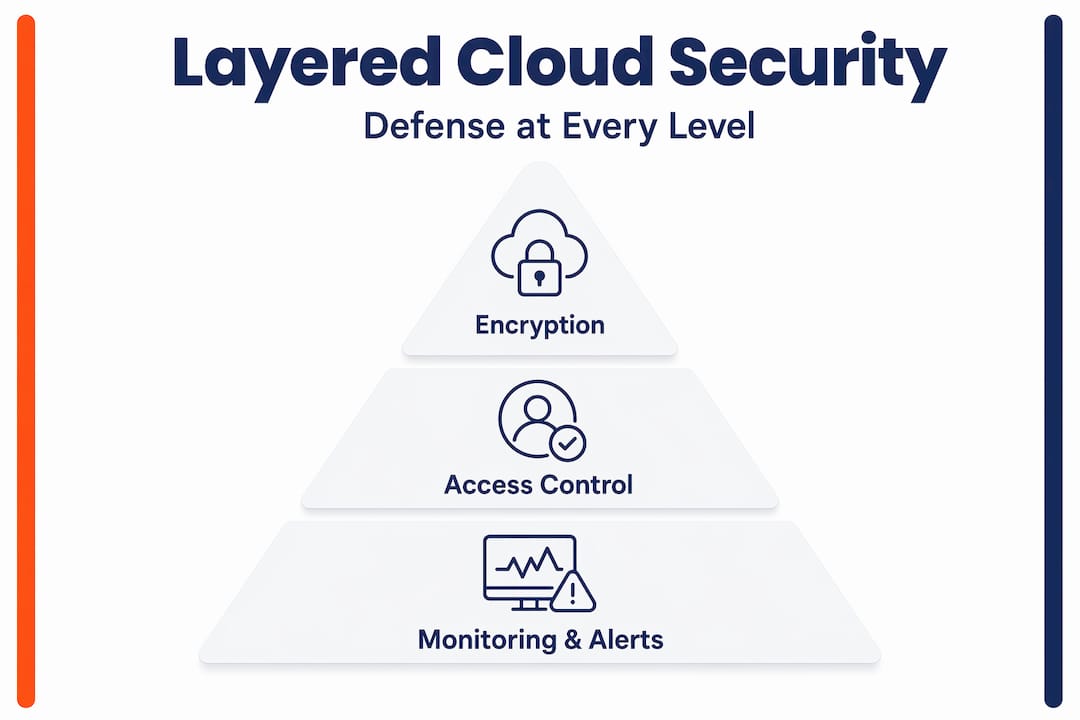
Security controls must be configured rather than assumed. Providers may offer robust security features, yet customers still need to enable and maintain them actively. Simply subscribing to a cloud storage platform with strong security marketing does not mean those protections are turned on and properly tuned for your specific environment.
What layered cloud security looks like in practice:
- Encryption at rest and in transit, actively configured and verified
- Role-based access controls, reviewed and updated regularly
- Automated monitoring that flags unusual login attempts or large data downloads
- Alerting systems that notify your IT administrator immediately when anomalies occur
- Scheduled penetration testing to find gaps before attackers do
- Staff security training so your team recognises phishing attempts and social engineering
| Security layer | What it does | Risk if missing |
|---|---|---|
| Encryption | Scrambles data | Readable if intercepted |
| Access control | Restricts who can view/edit | Insider threat or compromised accounts |
| Monitoring | Detects unusual activity | Breaches go unnoticed for months |
| Audit logging | Records all actions | No accountability or forensic trail |
| Staff training | Reduces human error | Phishing and credential theft |
Pro Tip: Set up automated alerts for after-hours access to sensitive cloud storage folders. Legitimate staff rarely need to access critical data at 2am. Anomalous access patterns are often the earliest warning sign of a breach.
Proactive IT monitoring is what separates businesses that catch problems early from those that discover a breach months after the fact. For Queensland SMEs, working through a structured cloud solutions checklist before and after deployment helps ensure nothing critical is left unconfigured.
Why basic cloud setups are a false sense of security
Here is an uncomfortable truth we see regularly working with Queensland businesses: the most dangerous moment for your cloud data security is right after you sign up for a cloud storage plan. That is when confidence is highest and vigilance is lowest.
Business owners see “bank-grade encryption” in a product brochure and assume the work is done. It is not. What the brochure describes is the maximum possible protection available within that platform. What your business actually receives depends entirely on how you configure it, who manages it, and whether anyone is paying attention to it month after month.
We have worked with SMEs in Brisbane that had enterprise-grade cloud storage subscriptions but were running with default permission settings that gave every employee access to every file. The encryption was in place. The access controls were not. That is not security. That is a legal liability waiting to be triggered.
The companies that get cloud security right do not necessarily have the biggest IT budgets. They have consistent habits: regular permission reviews, documented key management procedures, and staff who actually understand what phishing looks like. Effective monitoring tools are part of this picture, but tools alone achieve nothing without a human process behind them.
Our perspective is this: stop treating cloud security as a one-time purchase and start treating it as an ongoing operational discipline. The threat landscape changes. Your team changes. Your data changes. Your security controls need to change with them.
How IT Start supports secure cloud storage for Queensland SMEs
Putting all of this into practice takes time, expertise, and consistent attention. That is exactly what IT Start provides for Brisbane and Queensland businesses. Our team helps SMEs design and implement cloud services setups with encryption, access controls, and monitoring configured correctly from day one. We do not just hand you a platform and walk away. We manage it, review it, and keep it aligned with your business as it grows.
Our cyber security specialists work with industries including financial services, healthcare, and legal practices where data protection is both a regulatory and a reputational obligation. If you are unsure whether your current cloud setup is truly secure, reach out to IT Start for a practical assessment tailored to your Queensland business.
Frequently asked questions
Is cloud storage automatically secure for my business?
No. Security controls must be configured rather than assumed. Providers may offer robust security features, but your business must enable and maintain them actively.
Who should manage encryption keys in cloud storage?
Separation of duties in key management is critical. The person who manages encryption keys should be separate from those who access the data those keys protect, reducing the risk of a single compromised account exposing everything.
Can client-side encryption affect cloud storage functionality?
Yes. Client-side encryption better protects against provider access to plaintext, but it can complicate features like search and indexing, and introduces complexity around key recovery workflows.
What is the most important security layer for SMEs?
No single layer is sufficient on its own. Cloud storage security works because encryption, access control, and monitoring together compensate for each other’s weaknesses. Removing any one of them creates real gaps in your protection.