
TL;DR:
- Many Queensland SMBs underestimate their risk of cyberattacks, often neglecting basic controls like tested backups and multi-factor authentication. Implementing prioritized measures such as mapping assets, updating default passwords, enabling MFA, and applying timely patches significantly reduces vulnerability to threats. Regular testing, staff training, and compliance with legal obligations are crucial for maintaining a strong cybersecurity posture.
Queensland small and medium-sized businesses are increasingly targeted by cybercriminals, yet many still operate on the assumption that attackers only go after large corporations. That assumption is expensive. Cyber attack prevention is not a luxury reserved for enterprise IT teams; it is a baseline requirement for any business handling customer data, processing payments, or relying on digital systems. This guide cuts through the noise and gives you a practical, priority-ordered roadmap built around the controls that actually stop attacks, written specifically for Queensland SMBs who need to get this right without burning through their IT budget.
Table of Contents
- Common cybersecurity mistakes in Queensland SMBs
- Preparing your business for cyber attack prevention
- Executing advanced cyber attack prevention controls
- Verifying and maintaining your cybersecurity posture
- The uncomfortable truths about cyber attack prevention for Queensland SMBs
- Protect your Queensland SMB with expert cyber security services
- Frequently asked questions
Key Takeaways
| Point | Details |
|---|---|
| Start with basics | Change default passwords, enable multi-factor authentication, and patch promptly to stop most attacks early. |
| Follow Essential Eight | Implement the ASD Essential Eight controls consistently to block common attack methods used against SMBs. |
| Test your defences | Regularly review and test backups, incident plans, and vulnerability patching to know you’re protected. |
| Act fast on breaches | Begin assessing suspected data breaches immediately and notify authorities within legal timeframes to avoid penalties. |
| Seek expert help | Engage professional support familiar with Queensland SMB needs to implement and maintain cybersecurity effectively. |
Common cybersecurity mistakes in Queensland SMBs
Most Queensland SMBs do not have a cybersecurity problem because they lack technology. They have one because the technology they already own is misconfigured, untested, or ignored. Understanding where the gaps typically sit is the fastest way to fix them.
The most common mistakes we see across Brisbane and regional Queensland businesses include:
- Untested backups. Businesses assume they have a working backup because a light flashes green on a device. Until you restore from that backup, you do not know if it works. Many SMBs discover their backups are corrupted or incomplete only after a ransomware attack.
- No multi-factor authentication (MFA). MFA requires a second form of verification beyond a password. Skipping it means a stolen or guessed password gives an attacker full access, instantly.
- Delayed patching. Software vulnerabilities are publicly disclosed, which means attackers know about them the same day you do. Leaving patches unapplied for weeks is an open invitation.
- Default passwords left unchanged. Routers, firewalls, printers, and software platforms often ship with factory credentials. Changing default passwords before network connection prevents initial access in 70% of observed cases, yet many businesses skip this step entirely.
- No incident response plan. When an attack happens, confusion costs time. Time costs money, data, and in some cases, your legal standing under Australian privacy law.
The good news is that none of these gaps require a large budget to fix. They require discipline and a clear starting point. For a broader look at best practices for Queensland SMBs, the fundamentals are well within reach for any business willing to prioritise them.
Preparing your business for cyber attack prevention
Before you can execute advanced controls, you need a clear picture of what you are protecting and where your exposure sits. Skipping this step is like putting a deadbolt on a door with no frame.
Step 1: Map your IT assets
List every device, account, application, and service connected to your network. Include personal devices used for work. You cannot protect what you cannot see.
Step 2: Audit credentials and default passwords
Go through every internet-connected device and software platform. Factory credentials are publicly catalogued by attackers. Changing default passwords before devices connect is one of the highest-impact steps you can take with zero cost. Do it before anything else.
Step 3: Enable MFA across key accounts
Start with email, accounting software, cloud storage, and remote access tools. Implementing MFA for privileged and remote access is among the highest-return controls available and one of the fastest to deploy. Most platforms have it built in; it simply needs to be turned on and enforced.
Step 4: Start a patching programme
Establish a schedule. Critical patches should be applied within two weeks of release. Assign someone in your team ownership of this task. If your software vendor no longer releases updates, that application is a liability and should be replaced.
Step 5: Train your team
Phishing is the entry point for the majority of breaches. A 30-minute session on recognising suspicious emails, verifying unexpected requests, and reporting incidents costs nothing and reduces your human risk dramatically. Repeat it every six months.

Pro Tip: Do not treat cybersecurity training as a once-a-year compliance tick. Send your team a real phishing simulation and debrief on the results. The conversation that follows is more valuable than any slide deck.
Your obligations go beyond internal controls. Reviewing Queensland IT compliance basics gives you a clear baseline for what is expected under Australian law. You can also cross-reference a cybersecurity essentials overview for additional context on foundational controls.
Executing advanced cyber attack prevention controls
Once your basics are covered, you move into the territory where most SMBs either stall or get the order wrong. The Australian Signals Directorate’s Essential Eight framework gives you a proven sequence. Here is how to apply it practically.
1. Implement application control
Application control means only approved software can run on your systems. Everything else, including unknown executables and malware payloads, is blocked before it can cause damage. Application control is the top-ranked measure for blocking malware execution at the earliest stage, more effective than patching alone for preventing zero-day attacks. Start with your highest-risk endpoints: reception computers, finance workstations, and any machine with internet access.
2. Patch applications and operating systems rapidly
The Essential Eight sets clear timelines: critical vulnerabilities patched within 48 hours, all others within two weeks. This is tighter than most SMBs are used to, but it reflects how fast attackers move after a vulnerability is disclosed.
3. Harden user applications
Disable Microsoft Office macros for users who do not need them. Remove browser plugins that are unused. Turn off features in PDF readers that allow scripts to execute. Each of these is a door you are closing permanently.
4. Restrict admin privileges
Only give users the access level their role requires. A receptionist does not need administrator access to the server. When an attacker compromises a standard user account with no admin rights, the damage they can do is sharply limited.
Pro Tip: SMBs that implement Essential Eight at Maturity Level 1 can block up to 95% of malicious traffic. You do not need to reach Level 3 to make a meaningful difference. Level 1 is where the largest risk reduction happens.
Patch timing comparison
| Approach | Time to patch | Risk level | Practical for SMBs? |
|---|---|---|---|
| Immediate (within 48 hrs) | Critical vulnerabilities | Very low | Yes, with automation |
| Standard (within 2 weeks) | All other vulnerabilities | Low to medium | Yes |
| Ad hoc (when remembered) | Varies, often months | High | Common but dangerous |
| Never | Legacy systems | Extreme | Unfortunately common |
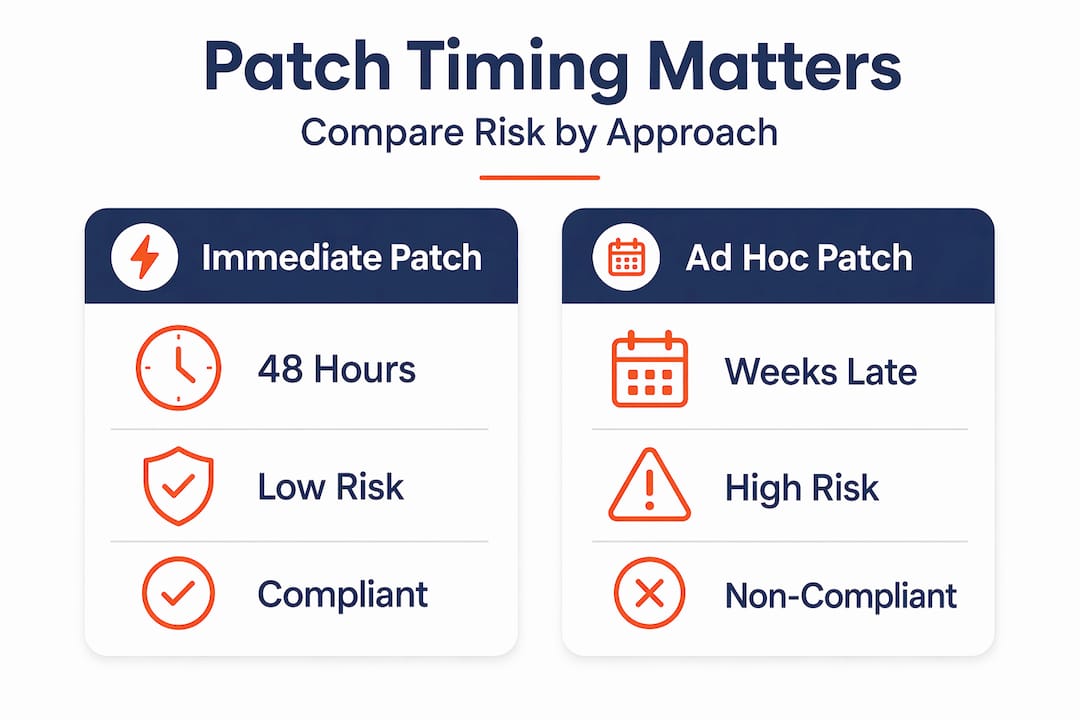
The table above makes the tradeoff obvious. Ad hoc patching is not a cost-saving measure; it is a deferred cost that arrives as a breach.
Verifying and maintaining your cybersecurity posture
Controls that are never tested are controls you cannot rely on. Verification is not a one-off audit; it is an ongoing practice.
Key actions to build into your annual cycle:
- Run incident response drills. Write a simple plan that covers who does what if ransomware hits at 9am on a Monday. Then rehearse it. Regular drills and vulnerability assessments reduce gaps and build genuine team confidence.
- Engage external testers. A vulnerability assessment from an independent party finds things your internal team will miss, simply because they are too close to the environment. Penetration testing takes this further by actively attempting to exploit weaknesses.
- Test your backups monthly. Restore a file. Restore a system. If you cannot complete a restore, your backup is not a backup; it is a false sense of security.
- Understand your NDB obligations. Under the Notifiable Data Breaches (NDB) scheme, breach assessments must begin immediately upon suspicion and be completed within 30 days. Missing this window carries serious penalties.
Pro Tip: Build your NDB response steps into your incident response plan now, before you need them. Knowing the exact sequence when you are calm makes execution far faster when you are not.
Verification activity schedule
| Activity | Frequency | Owner | Compliance link |
|---|---|---|---|
| Backup restoration test | Monthly | IT lead or MSP | NDB scheme readiness |
| Patch compliance review | Fortnightly | IT lead | Essential Eight |
| Phishing simulation | Every 6 months | HR or IT | Staff awareness |
| Incident response drill | Annually | Management | NDB, Privacy Act |
| Penetration test | Annually | External provider | Essential Eight |
Your incident response plans for Queensland SMBs and Privacy Act compliance obligations are closely connected. Getting one right generally helps you get the other right too.
The uncomfortable truths about cyber attack prevention for Queensland SMBs
After working with dozens of Queensland businesses across industries from professional services to healthcare, we have seen the same patterns repeat. Most of them are uncomfortable to say out loud, which is exactly why they need to be said.
Backups are the most overestimated control in an SMB’s toolkit. Nearly every business we assess claims to have backups. Far fewer have backups that have ever been successfully restored from, kept offline, or stored in a genuinely separate location. Untested or poorly configured backups are ineffective against ransomware, which specifically targets connected backup systems. If your backup drive is permanently plugged into your server, ransomware will encrypt it alongside everything else. Reviewing common data backup myths for Queensland SMBs is one of the fastest ways to find out if your recovery plan holds up.
The “we’re too small to be a target” belief is still widespread, and it is wrong. Attackers use automated tools that scan thousands of IP addresses per minute looking for default passwords, open ports, and unpatched systems. Your size is irrelevant to that process.
Compliance is not a burden; it is a competitive advantage. SMBs that treat the NDB scheme and the Essential Eight as administrative overhead miss the point entirely. Meeting these standards means you have systematically addressed the most common attack vectors. That is not just a legal protection; it is something you can demonstrate to clients, insurers, and partners.
MFA is still being skipped because it feels inconvenient. We understand the friction. We also know that credential-based attacks account for the majority of breaches. MFA is the single fastest control to deploy and the one with the clearest payoff. The inconvenience of an extra tap is orders of magnitude smaller than the cost of a breach.
The businesses that get cybersecurity right are not the ones with the biggest budgets. They are the ones that are honest about where their gaps are and methodical about closing them.
Protect your Queensland SMB with expert cyber security services
If working through the Essential Eight, managing patches, and building incident response plans feels like a lot to carry alongside running your business, that is because it is. IT Start works with Queensland SMBs to take that weight off your team. Our comprehensive cyber security services cover everything from Essential Eight assessments and MFA implementation to ongoing patch management and NDB compliance support. We also help businesses move to secure cloud services for SMBs that reduce your on-premises risk footprint. If you want a clear picture of where your business stands and what to fix first, start with a free security assessment.
Frequently asked questions
What are the most critical first steps for an SMB to prevent cyber attacks?
Start by changing all default passwords, which prevents initial access in 70% of cases, then enable MFA across key systems and apply outstanding patches. These three steps address the most common attack entry points immediately.
How quickly must Queensland SMBs assess and report a suspected data breach?
Once you have reasonable grounds to suspect a breach, assessment must begin immediately and be completed within 30 days, after which you notify the Office of the Australian Information Commissioner and affected individuals as soon as practicable.
Why is application control considered more effective than patching alone?
Application control blocks any unapproved software from running, including entirely unknown malware, whereas patching only covers known vulnerabilities. That distinction matters most when a zero-day attack arrives before a patch exists.
What should SMBs do if they pay a ransomware demand?
Any ransomware payment must be reported to the ASD within 72 hours of payment under the Cyber Security Act 2024. Paying without reporting creates a separate legal liability on top of the original incident.