TL;DR:
- Australian SMEs in 2026 must prioritize funding for foundational cybersecurity controls like MFA and backups. Proper budgeting should be based on achieving Essential Eight maturity level 1 and include ongoing costs such as licenses and training. Spending early on these controls significantly reduces the risk and cost of a potential cyber incident.
A cybersecurity budget is a planned allocation of funds to protect your business from digital threats, and for Australian SMEs in 2026, getting this right is no longer optional. The Australian Cyber Security Centre’s Essential Eight framework gives you a practical, prioritised list of controls to build your spending around. Cyber insurance premiums, government procurement requirements, and enterprise client contracts are all starting to ask whether you meet at least Essential Eight Maturity Level 1. If you want to prepare your cyber security budget for 2026 without wasting money or leaving gaps, this guide walks you through exactly what to spend on, what it costs, and what most small businesses get wrong.
What foundational cybersecurity controls must every Australian SME budget for in 2026?
The Essential Eight framework, published by the Australian Cyber Security Centre, defines the baseline controls every SME should fund first. These are not theoretical best practices. They are the controls that stop the attacks actually hitting Australian businesses right now.
Multi-factor authentication (MFA) is the single highest-impact control you can implement. MFA stops the majority of credential-based attacks targeting Australian SMEs. Most of your staff are reusing passwords or clicking phishing links at some point. MFA means a stolen password alone is not enough to get in.
Automated, tested backups following the 3-2-1 rule are non-negotiable. The 3-2-1 rule means three copies of your data, on two different media types, with one stored offsite or in the cloud. Backups following this rule typically cost $100–$300 per month for an Australian SME. That is a fraction of what a ransomware recovery costs.
Patch management covers the regular, prompt application of updates to your operating system and third-party software. Unpatched software is one of the most common entry points attackers use. This is not glamorous work, but skipping it is how most breaches start.
The remaining foundational controls to budget for include:
- User security awareness training. Staff need to know how to spot phishing emails, handle suspicious links, and manage passwords properly. Budget for at least one formal training session per year, plus a password manager for every user.
- Restricting administrative privileges. Using admin accounts for routine tasks dramatically increases your risk. Restricting who has admin rights costs almost nothing to implement but requires planning and time.
- Application control basics. Preventing unapproved software from running on your machines reduces your attack surface. This is more complex to implement but worth including in your 2026 planning.
Pro Tip: Start with MFA and backups. If your budget is tight, these two controls alone will prevent the majority of incidents we see affecting Australian SMEs.
How do you estimate and justify cybersecurity costs for an SME budget?
The honest answer is that there is no magic number. Maturity-based budgeting is more effective than chasing an arbitrary dollar figure. The goal for 2026 is to achieve breadth across all Essential Eight controls at Maturity Level 1 before you worry about going deeper on any single one.

That said, you still need real numbers to take to your accountant or board. Here is a realistic breakdown of what Australian SMEs typically spend:
| Budget area | Typical annual cost (AUD) |
|---|---|
| MFA setup and licensing | $300–$1,200 |
| Automated cloud backups | $1,200–$3,600 |
| Patch management (internal time or MSP) | $1,500–$4,800 |
| Security awareness training | $500–$2,000 |
| Password manager (per user) | $200–$600 |
| Essential Eight self-assessment | $0 (internal, 1–2 weeks) |
| Third-party Essential Eight assessment | $3,000–$8,000 |
A formal third-party assessment costs $3,000–$8,000 for a small business. That is a one-off cost worth considering if you are pursuing government contracts or need to demonstrate compliance to a major client.
Compare those numbers to the alternative. A ransomware incident costs an Australian SME $50,000–$500,000 when you include downtime, recovery, and reputational damage. Spending $5,000–$10,000 per year on prevention is not a cost. It is risk management.
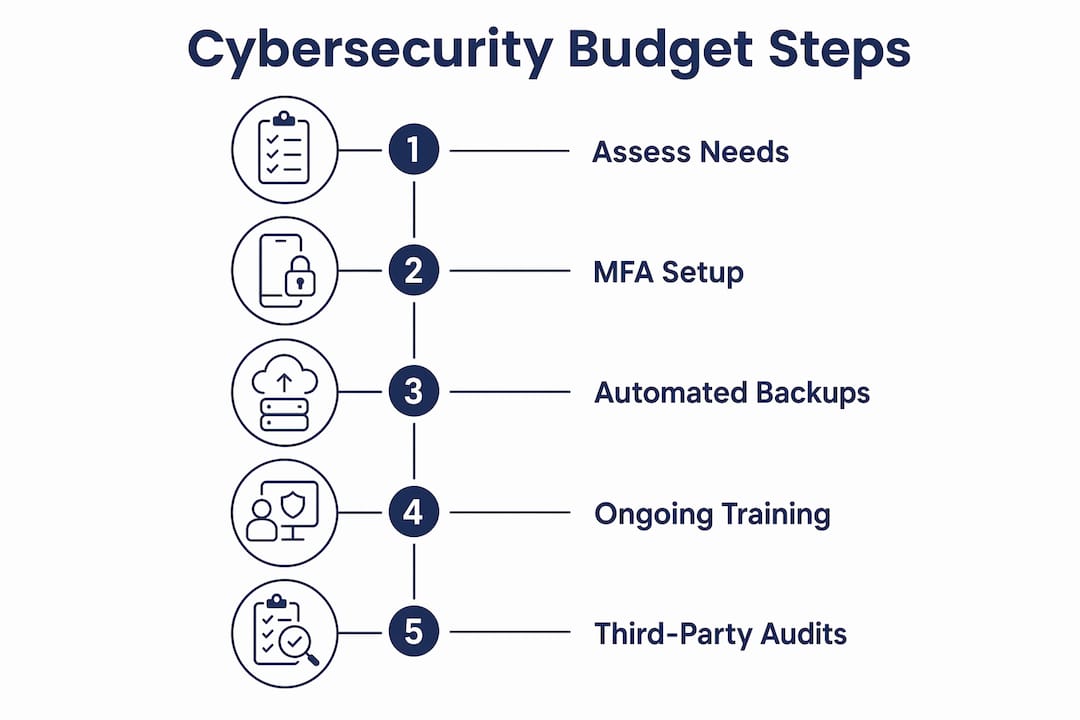
Staged implementation is a legitimate approach. If your full budget is not available in january, prioritise MFA and backups in the first quarter, then add patch management and training in the second half of the year. A maturity-based approach to cybersecurity means you build systematically rather than spending reactively after an incident.
Pro Tip: When presenting your cybersecurity budget internally, frame it against the cost of a breach, not against last year’s IT spend. The comparison changes the conversation immediately.
What tools and licences should you include in your 2026 cybersecurity budget?
Most Australian SMEs are already paying for Microsoft 365. The question is whether they are on the right plan. Microsoft 365 Business Premium covers most Essential Eight baseline controls, including Microsoft Intune for device management, Entra ID Plan 1 for identity and MFA, and Defender for Business for endpoint protection. If you are on a cheaper Microsoft 365 plan, upgrading to Business Premium is often the most cost-effective single move you can make.
Beyond Microsoft 365, your budget should account for these categories:
Backup solutions. Microsoft 365 does not back up your data the way most business owners assume. You need a dedicated third-party backup tool covering email, SharePoint, and OneDrive. Cloud-based options are the most practical for SMEs and fit within the $100–$300 per month range noted above.
Email security. Defender for Business includes solid email filtering, but some businesses add a dedicated email security layer on top for higher-risk environments like legal, financial services, or healthcare. Budget for this if your industry handles sensitive client data regularly.
Password managers. Tools like 1Password or Bitwarden give every staff member a secure way to manage credentials without reusing passwords. Per-user costs are low and the security gain is significant.
Security awareness training platforms. Purpose-built training platforms deliver phishing simulations and short modules that staff actually complete. Budget for a platform subscription rather than a one-off workshop if you want ongoing behaviour change.
When to consider managed services is a real question for SMEs under 30 staff. Honestly, most small businesses do not have the internal capacity to manage patching, monitoring, and incident response properly. An IT security assessment from a qualified MSP can tell you exactly where your gaps are before you commit your budget. That is a better starting point than guessing.
What mistakes should you avoid when budgeting for cybersecurity in 2026?
We see the same errors repeatedly when SMEs put together their first serious cybersecurity budget. Avoiding these will save you money and prevent the gaps that lead to incidents.
- Skipping MFA because it feels complicated. MFA is the highest-impact control available and it is not expensive. The businesses that skip it usually do so because no one has taken ownership of the rollout. Assign someone responsible and get it done in the first quarter.
- Assuming your Microsoft 365 backup is sufficient. Microsoft’s retention policies are not a backup. We have seen businesses lose months of email and file data because they believed the cloud meant they were protected. Budget for a dedicated backup tool.
- Underbudgeting user training. User training is consistently underbudgeted despite being one of the most effective controls against phishing. A $500 annual training investment can prevent a $50,000 incident.
- Treating patch management as optional. Patches exist because vulnerabilities exist. Leaving systems unpatched for weeks or months is one of the most avoidable risks in any SME environment. Build patching into your regular IT maintenance schedule and budget for the time it takes.
- Setting an arbitrary budget number without a framework. Saying “we’ll spend $5,000 on security this year” without knowing what that covers is not a plan. Use the Essential Eight as your framework and map your spending to specific controls. The Essential Eight compliance checklist is a practical place to start.
- Forgetting ongoing maintenance costs. Cybersecurity is not a one-time project. Licences renew, staff change, new vulnerabilities emerge. Budget for annual reviews and ongoing management, not just initial setup.
The businesses that get this right treat cybersecurity spending the same way they treat insurance. You do not buy insurance once and forget it. You review it annually and adjust as your risk profile changes.
Key takeaways
Effective cybersecurity budgeting for Australian SMEs in 2026 means funding Essential Eight controls in priority order, starting with MFA and backups, before spending on anything else.
| Point | Details |
|---|---|
| Start with MFA and backups | These two controls prevent the majority of incidents and cost far less than a breach. |
| Use the Essential Eight as your framework | Maturity Level 1 breadth across all controls beats depth on one area. |
| Budget for ongoing costs, not just setup | Licences, training, and patching are recurring expenses that need annual planning. |
| Compare prevention costs to breach costs | A ransomware incident costs $50,000–$500,000; prevention costs a fraction of that. |
| Get a formal assessment if contracts require it | Third-party Essential Eight assessments cost $3,000–$8,000 and open doors to government work. |
What I actually see when SMEs try to budget for cybersecurity
Honestly, the most common thing I see is businesses that have spent money on security but have no idea what they actually have. They bought an antivirus subscription three years ago, maybe have Microsoft 365 on the basic plan, and assume that covers them. It does not.
The second most common thing is the opposite: a business owner who has been scared into a quote for a full security overhaul costing tens of thousands, when what they actually need is MFA, a proper backup, and some staff training. Essential Eight Maturity Level 1 is genuinely achievable for most SMEs without a massive budget. The Essential Eight framework for Brisbane SMEs is not designed for enterprise. It is designed for businesses like yours.
The balance I recommend is this: spend on controls that stop the most common attacks first, get an assessment to know where you actually stand, and build from there. Do not let perfect be the enemy of good. A business with solid MFA, working backups, and patched systems is dramatically safer than one waiting for the budget to be perfect before starting.
One more thing. Cyber insurance requirements now include MFA, patching, and working backups as baseline conditions for reasonable premiums. If you are renewing your policy in 2026 without these in place, expect either a declined application or a premium that hurts. Your cybersecurity budget and your insurance renewal are now the same conversation.
— Matt
How IT Start helps you build a practical 2026 cybersecurity budget
IT Start works with Brisbane SMEs every day on exactly this kind of planning. We assess where you currently sit against the Essential Eight, identify the gaps that matter most, and help you build a cost-effective roadmap that fits your actual budget. We manage Microsoft 365 Business Premium deployments, backup solutions, patch management, and user training as part of our managed services. If you are not sure where to start, our cybersecurity services for SMEs include a practical assessment that gives you a clear picture of your current state and what it will cost to fix it. We also help with cloud-based backup and security for businesses that need reliable offsite protection without the complexity of managing it themselves.
FAQ
What is the Essential Eight and why does it matter for my budget?
The Essential Eight is a set of cybersecurity controls published by the Australian Cyber Security Centre. It defines the baseline protections every Australian business should have, and Maturity Level 1 is now expected by insurers, government agencies, and enterprise clients.
How much should an Australian SME spend on cybersecurity in 2026?
There is no fixed number, but a realistic annual budget covering MFA, backups, patching, and training typically falls between $5,000 and $15,000 for a business with 10–30 staff. The right figure depends on your current maturity level and risk profile.
Do I need a formal Essential Eight assessment?
A self-assessment using ACSC documentation costs nothing and takes one to two weeks. A formal third-party assessment costs $3,000–$8,000 and is worth it if you are pursuing government contracts or need to demonstrate compliance to a major client.
Does Microsoft 365 cover my cybersecurity needs?
Microsoft 365 Business Premium covers most Essential Eight baseline controls, including MFA, endpoint protection, and device management. However, it does not replace a dedicated backup solution, and the standard Microsoft 365 plans below Business Premium leave significant gaps.
What is the biggest cybersecurity mistake SMEs make when budgeting?
The most common mistake is skipping MFA and assuming existing tools provide adequate protection. The second most common is not budgeting for user training, which remains one of the most cost-effective controls against phishing and credential theft.