

An immutable backup is a copy of your data that nobody can change or delete until a set date, including your own administrators and anyone who has stolen their passwords. The lock sits in the storage itself, not in the backup software. That is why it still holds when an attacker gets into your network and goes looking for your backups first.
We set up and look after backups for Brisbane businesses of 5 to 100 people, from the Sunshine Coast down to the Gold Coast. This guide covers how the lock works, what to switch on, what it will not fix, and the mistakes we see most often.
Key Takeaways
- Immutable means the storage refuses any change or delete request until the retention date passes, whoever is asking.
- Keep one immutable copy as part of a normal backup plan. It does not replace regular backups.
- Pick a retention period that matches how long you might take to notice a problem, then test a restore from that copy.
- Separate the backup logins from your everyday admin logins, or the lock will not help much.
- A locked copy of corrupted data is still corrupted, so restore tests matter as much as the lock.
Table of Contents
- What an immutable backup actually is
- How the lock works under the hood
- Immutable versus a regular backup
- What most businesses get wrong
- Where the data and reality do not match
- Where immutable cloud backup fits for Australian businesses
- How to set one up: the steps we follow
- What a retention period should look like
- Who this is not for
- Our perspective
- Next steps with our team
- FAQ
- Sources
What an immutable backup actually is
Most backups are just files in a folder, on a disk or in a cloud bucket. Anyone with enough access can rename them, overwrite them or wipe them. That includes you, your IT provider and, unfortunately, a criminal who has taken over an admin account.
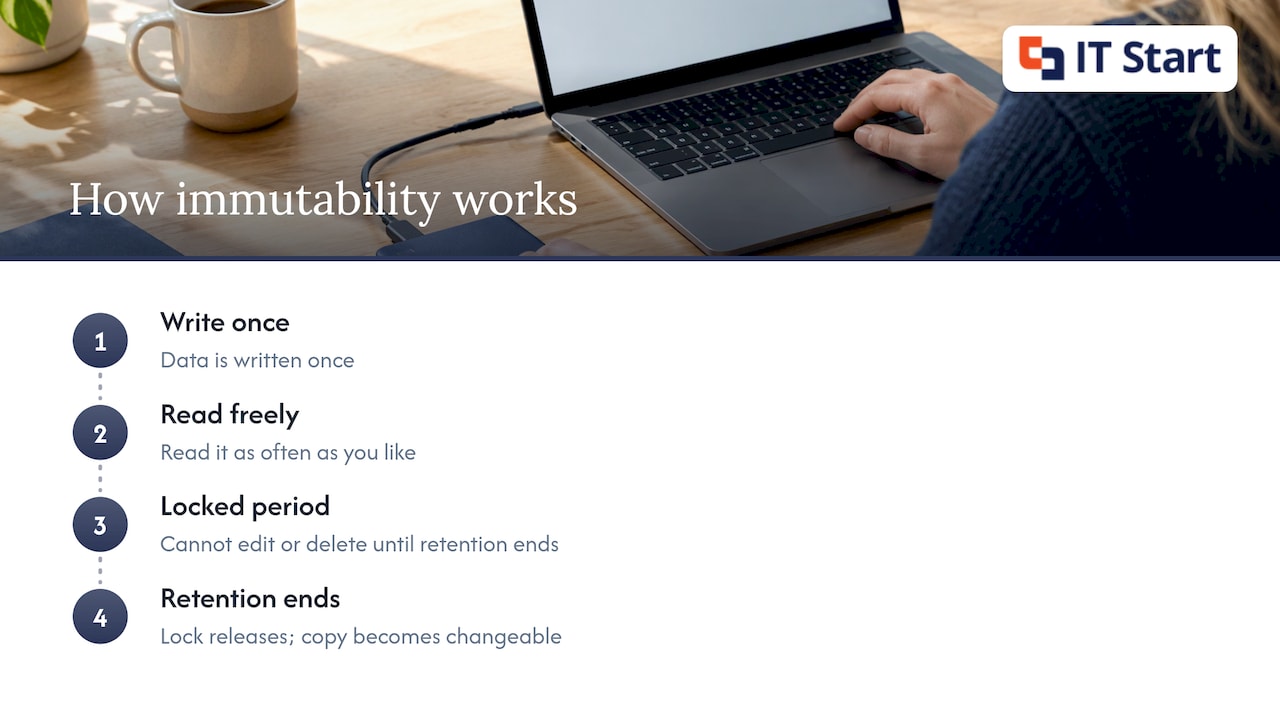
An immutable backup uses a feature often called WORM, short for write once, read many. You write the data once. You can read it as often as you like. You cannot edit or delete it until the retention period ends. IBM describes it as a read-only copy that stays unaltered for a defined period, with IBM Cloud Object Storage and AWS S3 Object Lock as examples of the technology.
A plain example: a Brisbane accounting firm backs up its file server every night to a cloud storage bucket with Object Lock turned on and a 30 day retention. On day 10 someone tries to delete the last fortnight of backups. The storage returns an error. Nothing is lost. (That is a hypothetical example, not a client story.)
When the retention period ends, the lock releases and the copy becomes a normal, changeable file again. So the period you choose is a real decision, not a tick box.
How the lock works under the hood
The key point is where the lock lives. HPE explains that immutability is enforced at the storage layer, not the application layer, so even a compromised backup application cannot override it. Once the lock is set, delete, overwrite and change requests are rejected and logged.
That matters because ransomware crews know what backup software looks like. If they get a domain admin login, they log into the backup console and delete the restore points. With a locked storage target, the console can send the delete request all it likes. The storage says no.
Veeam, a common backup product, documents the same idea: once immutability is on, it prohibits deleting data from object storage until the expiry date, and each restore point gets an immutability period.
Compliance mode and governance mode
Most cloud object storage offers two lock types, and the difference is worth understanding before you buy anything.
- Compliance mode: no one can delete or shorten the lock, not even the account owner. A Sydney-focused guide confirms this applies to AWS S3 in the Sydney region, where protected object versions cannot be deleted or overwritten during retention, even by the root user.
- Governance mode: the lock can be lifted, but only by someone with special permissions. It suits testing and gives you a way out if you set the wrong period.
Our view: start in governance mode while you prove the setup works, then move your production copy to compliance mode. Governance mode alone is only as strong as the accounts that can override it. If those accounts are the same ones an attacker would steal, you have a speed bump, not a lock.
Immutable versus a regular backup
A regular (mutable) backup can be modified, deleted or encrypted by administrators, backup software or attackers with enough access. An immutable one is locked at the storage level for a set time, whatever the user permissions. AvePoint makes the point that immutability upgrades one copy of your backups. It does not replace the rest.
Here is how that looks side by side.
| Regular backup | Immutable backup | |
|---|---|---|
| Can an admin delete it? | Yes | No, until retention ends |
| Can ransomware encrypt it? | If it reaches the storage | Not while locked |
| Where is the protection enforced? | Often in the backup software | In the storage |
| Cost to run | Lower | Usually a little higher, as old copies are kept for the full period |
| Good for | Fast, frequent restores | A last copy you can trust |
We still run regular backups with short restore times for everyday mishaps, like someone saving over a quote. The immutable copy is the one we hope never to touch.
What most businesses get wrong
We see this a lot, and it is rarely a technology failure. It is a set-up decision.
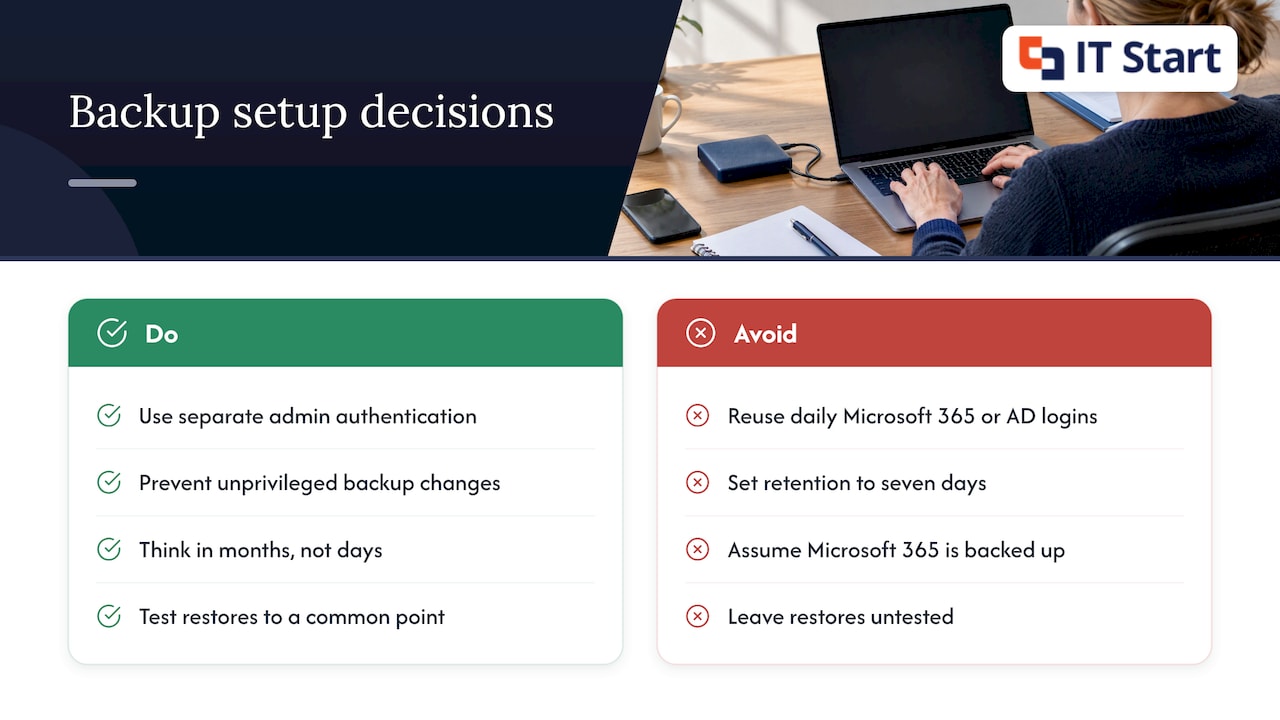
Locking the copy but not the logins. If your backup storage is controlled by the same Microsoft 365 or Active Directory admin account you use daily, an attacker with that account can often reach the storage settings. The Australian Cyber Security Centre’s Information Security Manual says backup infrastructure should be segregated from production with separate authentication for administrative access, because attackers routinely use credentials harvested from production. It also says unprivileged accounts must be prevented from modifying or deleting backups.
Setting the retention too short. A 7 day lock sounds fine until you realise a slow problem, like a mailbox quietly being emptied or a file server with damaged files, went unnoticed for three weeks. Every restore point is already gone. We usually suggest thinking in months, not days. The same ISM page includes a control that backups use a technically enforced immutability mechanism for their whole retention period.
Assuming Microsoft 365 is already backed up. Microsoft keeps your service running, but that is not the same as holding an independent, locked copy of your mailboxes, SharePoint and OneDrive. The ACSC’s cloud shared responsibility guidance tells businesses to check whether backups are protected from being accessed, changed or deleted without approval, whether a copy is stored elsewhere and whether earlier versions can be restored. Ask those questions about your cloud data too.
Never testing a restore. A backup you have not restored is a hope. The ISM requires that restoring data, applications and settings to a common point in time is tested as part of disaster recovery exercises.
Where the data and reality do not match
Vendor pages often present immutability as the last line of defence against ransomware, and it is a strong one. Reality in a small business is messier.
The lock protects the backup from change. It does not tell you whether what you backed up was good. If a file server is quietly corrupted on Monday and backed up every night, you have a perfectly locked collection of corrupted files. The fix is keeping several restore points across a sensible period and testing restores from different dates.
The second gap is speed. A locked copy in cloud storage can be safe and still slow to bring back if you have a lot of data and a modest internet link. We work out the realistic restore time for a business before it matters, not during an incident. That is a conversation worth having for any office, whether it is in the Brisbane CBD or out at Maroochydore.
The third gap is scope. Many owners tell us the server is backed up, but laptops, Microsoft 365 data and line-of-business cloud apps sit outside it. Immutability on one system leaves the others untouched.
Where immutable cloud backup fits for Australian businesses
Immutable cloud backup means your copy goes to cloud object storage with a lock applied. Large cloud providers support this, and some have Australian regions, so data can stay onshore. The Sydney guide above notes AWS S3 in Sydney supports Object Lock, and that Backblaze B2 and Wasabi are two S3-compatible options that support Object Lock in both modes for small NAS setups. Prices change, so check the provider’s current page.
Before you commit, check these points with whoever manages your IT:
- Where the data is stored, and whether that location suits your clients and your contracts.
- Which lock mode is used, and who holds the credentials that could change it.
- Whether the backup account sits separately from your day-to-day cloud accounts. The ASD’s Essentials for Cloud guidance, as summarised on a controls reference site, points to isolating backup repositories through separate accounts, subscriptions or tenants with independent access controls.
- How restores are tested and how often.
- What recovery arrangements exist if data is deleted maliciously or a tenant is misconfigured.
If you also run an online store, the same questions apply to its data, and backup tools for online stores are worth reading about alongside your server and cloud plan.
For a wider look at keeping cloud data safe, our guide to secure cloud storage for SMEs covers the basics, and how to secure data in the cloud goes further.
How to set one up: the steps we follow
The order matters. Here is the sequence we use for a typical office with a file server, Microsoft 365 and a handful of laptops.
- List what must be recoverable: file shares, mailboxes, SharePoint sites, accounting data and any cloud app that holds client records.
- Decide how much data loss is tolerable. If losing a day of work would hurt, back up more than once a day.
- Create a storage bucket or vault dedicated to backups, in its own account, with its own sign-in protected by multi-factor authentication.
- Turn on versioning and Object Lock, in governance mode first.
- Set the retention period. We aim to cover the time it would realistically take to notice a problem, plus margin.
- Point the backup software at the bucket using a key that can write but not delete or change lock settings.
- Run a full restore to a spare machine, then a single-file restore from an older date. Record how long each took.
- Move to compliance mode once you are confident, and put a yearly restore test in the calendar.
Step 6 is the one most often skipped. A write-only key means even if that key leaks, the attacker cannot wipe anything.
What a retention period should look like
There is no single right number. The ISM and the Essential Eight, the ASD’s baseline set of security controls, focus on keeping backups for a period based on business criticality and on keeping them protected. The ASD’s Blueprint for Secure Cloud says backups should be retained in line with business criticality and continuity requirements, kept synchronised so you can restore to a common point in time, and tested through disaster recovery exercises.
Practically, we think about it like this:
- A small professional services firm with one file server: keep a few months of locked restore points.
- A business with legal or regulatory record duties: follow the longer period that applies to you, and ask your adviser which one that is.
- Anything you would only ever need for a week: it does not need a long lock, and paying to hold it for years is not worth it.
If you are in a regulated sector, APRA has written to regulated entities expecting backups to be isolated enough from production that a compromise of production does not compromise the backups. Most of our clients are not APRA regulated, but the idea is a good one for any size of business.
We also compare notes with owners on SMB data protection practices for Queensland businesses when retention and privacy overlap.
Who this is not for
If you have one laptop, no staff and everything you do lives in a cloud app with built-in version history, a managed immutable backup is likely more than you need. A simple, tested copy of your files is a better use of money.
If your backups have never been tested, fix that before paying for immutability. A locked backup that cannot be restored is the most expensive way to find out.
And if someone offers you immutable storage for data you can easily recreate, like installers or old test files, skip it.
Our perspective
We think an immutable copy belongs in every backup plan for a business with staff, client data and a Microsoft 365 tenant. The reason is simple. When someone gets hold of an administrator login, the first thing they want is your backups. A copy that no login can change takes that option away.
We also think the lock is the easy part. In our work, the weak points are shared admin accounts, retention periods that are too short and restores nobody has tried. So we build the backup as part of the whole setup: Microsoft 365, devices, network and security, with separate backup credentials, restore tests on a schedule and a plain-English record of what is covered and what is not.
Our approach is proactive. We would rather spend an hour confirming a restore works on a quiet Tuesday than learn it does not on a bad one. That routine care is what keeps a backup from ever being a story.
IT Start
Next steps with our team
If you want a second pair of eyes on your backups, we can review what you have, check where the data lives and who can delete it, and show you what an immutable copy would add. Our cyber security service covers backup and recovery planning alongside the rest of your protection, and our Microsoft 365 support and management team can look at your mailbox and SharePoint data. If you have already had a scare, our piece on examples of ransomware threats shows what to expect.
FAQ
What is an example of an immutable backup?
A nightly backup sent to cloud storage with AWS S3 Object Lock in compliance mode and a 90 day retention is a common example. For that period, nobody can delete or overwrite those files, not even the account owner. After the period, the lock releases.
Are immutable backups safe from ransomware?
They are safe from being encrypted or deleted while the lock holds, which is why they are so useful in recovery. They do not stop ransomware reaching your computers, and they will not fix data that was already damaged when it was backed up. Keep regular backups, restore tests and good account security around them.
Can I delete an immutable backup if I make a mistake?
It depends on the mode. In governance mode, someone with special permissions can lift the lock. In compliance mode, no one can until the retention period ends, so set the period carefully and test in governance mode first.
Do immutable backups replace my normal backups?
No. They protect one copy. You still want quick, frequent backups for everyday restores, and at least one immutable copy for the worst day. Keep them in separate places with separate logins.
How often should we test a restore?
The ISM expects restores to be tested as part of disaster recovery exercises. We suggest at least once a year for the full process, and a quick single-file restore more often, so you know what a restore looks like before you need one.
Sources
- What Are Immutable Backups? | IBM
- What are immutable backups? | HPE
- How Immutability Works | Veeam Help Center
- Immutable Backups: Ransomware-Proof Storage for Home and Small Business NAS
- What Is an Immutable Backup? | AvePoint
- Guidelines for system management | ACSC Information Security Manual
- Cloud shared responsibility model guidance | ACSC
- PRO-10 Regular and proven backups: Essentials for cloud
- Regular backups | ASD’s Blueprint for Secure Cloud
- Letter to all entities: Security and adequacy of backups | APRA