

IT strategy consulting is a short, focused piece of advisory work. Someone reviews the technology you already run, matches it to where the business is heading, and hands you a costed, ordered plan for the next 12 to 36 months. It is different from IT support, which keeps today’s systems working. For a business of 5 to 100 people, it is worth paying for when you are about to make a big technology decision, or when you suspect you are spending money on the wrong things.
We are a Brisbane managed IT team, and we look after Microsoft 365, security, backups and networks for businesses from the Sunshine Coast to the Gold Coast. This guide is based on what we see in that work, not on what a large-firm brochure says.
Key Takeaways
- IT strategy consulting produces a plan and a budget. Support tickets and monitoring are a separate job.
- A good engagement starts with an inventory of what you own and who uses it, not with a sales pitch for new software.
- Cyber security belongs inside the strategy from day one. It should not be a separate project added at the end.
- You should finish with a short roadmap, a rough cost for each item and a clear owner for each decision.
- If your systems are stable and nothing big is changing, you probably do not need a standalone strategy project.
Table of Contents
- What IT strategy consulting is, and how it differs from IT support
- What most businesses get wrong
- Where the data and reality do not match
- What an engagement looks like
- What you should get at the end
- Connecting technology to business goals
- Where cyber security fits in the strategy
- Our view: strategy works best when the same team runs it
- When it is not worth paying for
- How to prepare before you talk to anyone
- How we can help
- FAQ
- Sources
What IT strategy consulting is, and how it differs from IT support
IT support answers the question “why can’t I print?” Strategy answers “should we still be running a server in the back office in three years?”
The terms get mixed up online because the search results blend several things. Some pages describe management consulting for large corporations. Others describe CIO advisory work for enterprises with an IT leadership team. Most Brisbane businesses we work with have no CIO. The owner or an operations manager makes the technology calls, usually between other jobs.
For a business your size, the useful version looks like this:
- A review of your current systems, licences, devices, network and backups.
- A conversation about where the business is going: new staff, a second office, a new client type, a sale in a few years.
- A written plan that ties the two together, with costs and an order of work.
You will also see the same work sold as business technology consulting, technology consulting services or IT advisory services. The names differ. What matters is whether you get a plan you can act on.
Routine support still matters, of course. A strategy is only as good as the day-to-day care that keeps it running. That is why we prefer to do the review as part of a Managed IT relationship, or as a defined one-off project, so the person who writes the plan also knows how your systems behave.
What most businesses get wrong
We see the same handful of mistakes again and again.
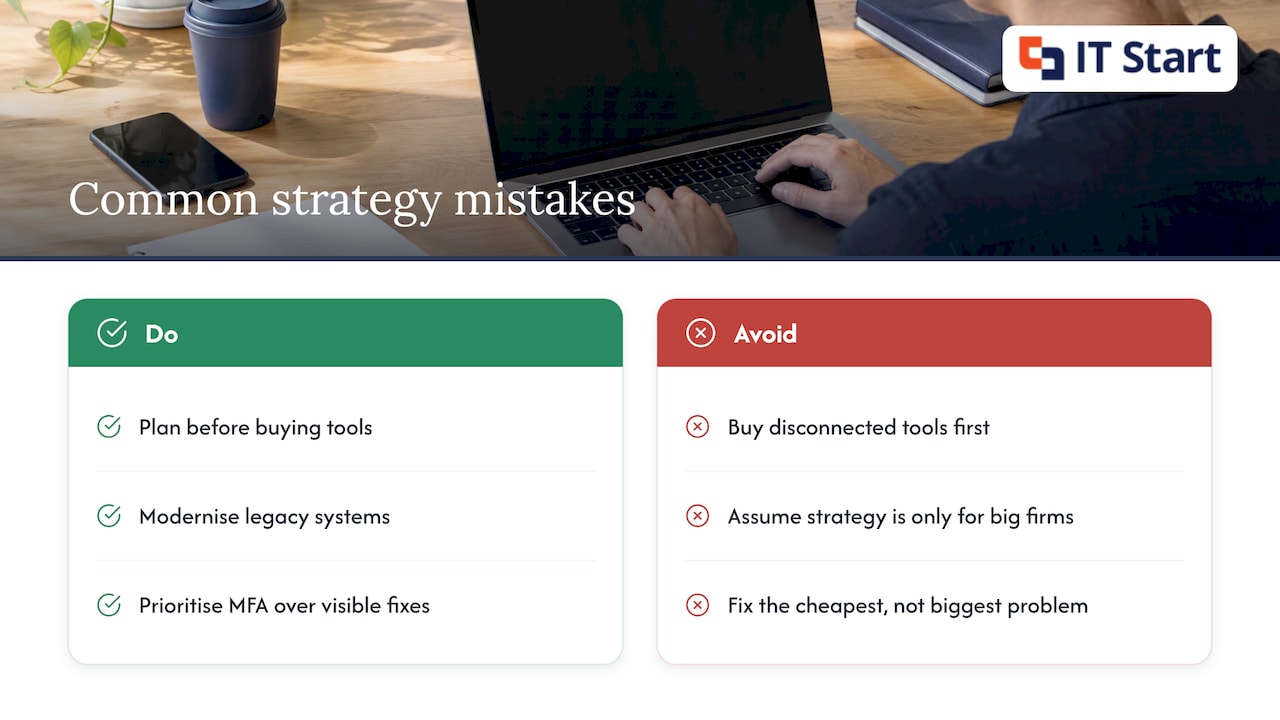
They buy tools before they have a plan. A business signs up for a project management app, a CRM and a file sharing tool in separate years, each chosen by a different person. Three years later nothing talks to anything and staff keep spreadsheets on the side. Often the Microsoft 365 licences they already pay for would have covered half of it.
A quick test: log in to the Microsoft 365 admin centre and look at the licence list. If you are paying for a premium licence tier and nobody can say which features are in use, that is a strategy problem, not a support problem.
They treat strategy as something only big firms need. The Australian Bureau of Statistics says in its 2026–27 corporate plan that legacy technology adds costs and cyber risk, and that modernising lines up systems and processes with what the organisation is trying to achieve. The ABS is a large agency, but the logic holds for a 20-person accounting practice. An ageing server and a patchwork of old software cost money every month, even when nothing visibly breaks.
They fix the cheapest problem, not the biggest one. A business replaces three slow laptops, but leaves staff signing in with a password and nothing else. The laptops were visible. The missing multi-factor authentication (a second check, like a code on your phone, when you sign in) was not.
Where the data and reality do not match
The published numbers are useful, but they sit oddly beside what we see on the ground.
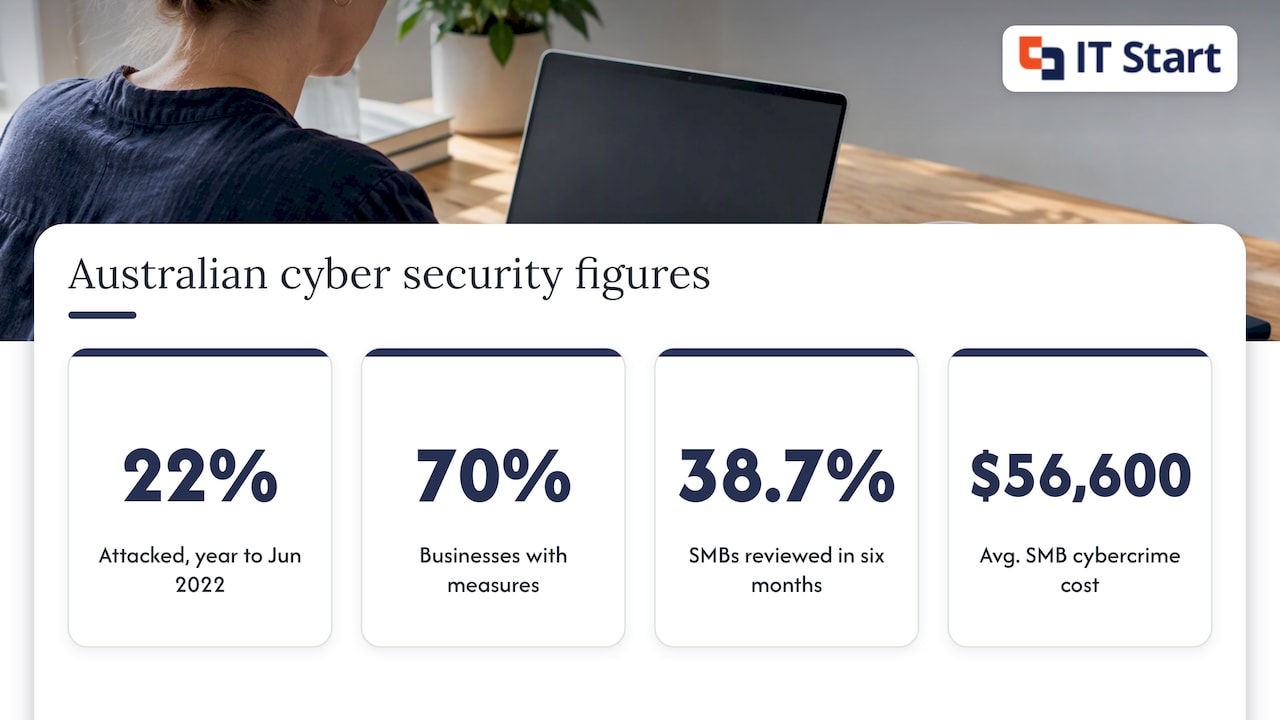
The ABS reported that 22% of Australian businesses experienced a cyber attack in the year ended 30 June 2022, and 70% had prevention measures in place. A figure like “70% have measures” sounds comforting. In practice, “measures” can mean an antivirus licence that expired and a shared password list. Having something is not the same as having it set up, tested and checked.
The 2024–2025 CPA Australia small business survey found that 38.7% of Australian small businesses had reviewed their cyber security protections in the past six months. Put the other way round, most had not. That matches our experience. Owners assume somebody reviewed it when the system was set up, and nobody has looked since.
The OECD makes a similar point across several countries: small firms mostly rely on basic measures such as passwords and two-factor authentication, with limited use of outside assessments and staff training. Basics are a good start. They are not a plan.
And the cost side. Business Queensland puts the average cost of cybercrime to an Australian small business at $56,600. We mention it because it is a useful yardstick for budgeting, not to worry you. A strategy review that costs a fraction of that and gets multi-factor sign-in, tested backups and access controls in place is a sensible trade.
What an engagement looks like
The exact steps vary, but a sound review follows this order.
- Agree the business goals. We ask about hiring plans, new premises, key clients and anything with a deadline. Technology is judged against these, not against a generic best-practice list.
- Build the inventory. Every user, device, licence, cloud service, line-of-business application, network device and backup job goes on one list. This is the step that surprises owners most. Former staff accounts still active and software nobody remembers buying are common finds.
- Check the foundations. Is every account on multi-factor sign-in? Are devices patched? Does a backup exist, and has anyone actually restored from it? We cover the detail in our IT security assessment steps for Brisbane SMEs.
- Score the gaps. Each gap is rated by how likely it is to hurt the business and how much it costs to fix.
- Write the roadmap. Items go in order, with a rough cost and an owner. Quick wins come first.
- Review it on a schedule. A plan that sits in a drawer is worthless. Quarterly or six-monthly check-ins keep it honest.
One detail only shows up in real work: the backup restore test. A green tick in the backup console says the job ran. It does not say a file, a mailbox or a whole server can be brought back. We pick a real file or a real mailbox folder and restore it, then record how long it took. Most strategy documents skip this, and it is often where the biggest finding is.
What you should get at the end
Ask for these before you sign anything.
| Deliverable | What it should contain | Who it is for |
|---|---|---|
| Current-state inventory | Users, devices, licences, services, backups and network equipment | Owner and whoever runs operations |
| Gap and risk list | Each gap, what it could cost the business and the fix | Owner |
| Roadmap | Ordered projects across 12 to 36 months, with owners | Owner and leadership team |
| Budget view | One-off and ongoing costs per item, ex GST | Owner and finance |
| Security baseline | Where you stand against a recognised framework and what to improve first | Owner and insurer or auditor if asked |
If a proposal promises a 100-page report with no budget in it, push back. A 10-page plan you can act on beats a thick document you cannot.
Connecting technology to business goals
The best plans we see start from revenue and risk, not from software. A law firm that wants to take on more clients in regional Queensland needs secure remote access and good document handling. A clinic adding a second site needs a network design and a way to keep patient records consistent across both. Those are different plans, even if both organisations use Microsoft 365.
This also works the other way. Technology that drives growth, such as lead capture, scheduling and online reviews, sits in the same plan as your security and your network. A local business growth platform can cover the marketing side, and your IT plan should make sure it connects safely to your accounts and data.
If you are thinking about moving servers or older systems into the cloud, that is usually the largest single item in a roadmap. Our Azure and cloud migration service covers it. We would rather you plan it properly than rush it before a lease ends.
Where cyber security fits in the strategy
Security is not a separate shelf. It runs through every decision: which cloud service to adopt, how staff sign in, who can see client files, how long backups are kept.
The Australian Signals Directorate’s guidance for boards for 2025–26 recommends replacing legacy IT, managing third-party risk, improving logging and threat detection, keeping incident plans current and continuing basics such as updates and multifactor authentication. It is written for boards, but the list reads like a good small-business roadmap too.
The same agency also advises that organisations should know their cyber security maturity and use qualified assessors where independent validation is needed. The Essential Eight is the usual yardstick in Australia. Its maturity model lets you check how well you have applied the eight strategies, across four maturity levels. Our Essential Eight guide for Brisbane SMEs explains it in plain terms. You do not need to aim for the top level on day one. Pick the level that fits your risk, and plan how to get there.
Privacy sits next to this. The Privacy Act applies to private sector organisations with an annual turnover above $3 million, and to some smaller businesses, and the Australian Privacy Principles require reasonable steps to protect personal information. If you hold client health, financial or identity records, check our Privacy Act guide for Queensland SMBs as you plan.
Our view: strategy works best when the same team runs it
We think a technology plan should be written by people who will still be around to carry it out.
Many businesses pay for a strategy from one firm, then hand the work to another that has never seen their environment. Things get lost in the handover. We prefer to review your Microsoft 365 setup, security, backups and network ourselves, then build the roadmap from what we have seen first-hand.
We also think the plan should be short, in plain language and tied to your budget. You should be able to read it in one sitting and know what happens next quarter.
Our team is based in Brisbane and works with businesses of 5 to 100 people from the Sunshine Coast to the Gold Coast. Proactive care and plain talk are how we work, so the roadmap flows into the monthly routine of patching, monitoring and reviewing, rather than sitting on a shelf.
IT Start
When it is not worth paying for
Honestly, plenty of businesses do not need a standalone strategy engagement.
- If you have five staff, all on Microsoft 365, with multi-factor sign-in on, tested backups and nothing changing, a Managed IT plan with a short annual review is enough.
- If you want a full report just to tick a box, skip it. A smaller security assessment will usually do.
- If you are looking for a consultant to run a large enterprise programme with a dedicated CIO function, this is not that service. We work with owner-managed businesses and their operations leads.
It is worth paying for when you are growing quickly, moving to the cloud, merging with another business, opening a new site or replacing a line-of-business system. It is also worth it when your insurer, a client or a regulator starts asking questions you cannot answer.
How to prepare before you talk to anyone
A little prep makes the first meeting far more useful. Gather these:
- A list of staff, including contractors and who has left in the last year.
- Your main business applications and who pays for them.
- Your Microsoft 365 licence list from the admin centre.
- Where your files and email live, and where the backups go.
- Any upcoming changes: hires, moves, leases ending, client contracts.
- Your insurance policy renewal date and any cyber questionnaire from a client.
You do not need perfect answers. Gaps in the list are useful information.
How we can help
We offer Business IT Support for one-off problems and projects from $145 an hour ex GST, and Managed IT plans that cover support, devices, Microsoft 365, backup and security. If you want a plan before you commit, we can start with a free consultation or project assessment. Our Cyber Security page shows how we handle the security side, and our Microsoft 365 Support and Management page covers the platform most of your plan will sit on.
FAQ
How much does IT strategy consulting cost?
It depends on the size of your environment and how deep the review goes. For one-off project work, our Business IT Support starts from $145 an hour ex GST. We can scope a fixed amount once we see how many users, sites and systems you have.
How long does a review take?
For a business of 5 to 100 people, the main effort is gathering the inventory and checking the foundations. After that, the roadmap is written and talked through with you. The more organised your licence and user lists are, the quicker it goes.
Is IT strategy different from a cyber security assessment?
Yes, but they overlap. A security assessment looks at risk and controls. Strategy looks at the whole technology plan, including cost, growth and replacement dates, with security as one major part. Many businesses start with the assessment, then widen it. Our cyber security risk assessment checklist is a good starting point.
Do I need a strategy if I already have an IT provider?
Not always. A good provider should already be reviewing your systems and giving you a roadmap. If you have never seen one, ask for it. If they cannot produce it, that tells you something.
What should I ask a consultant before hiring?
Ask who will write the plan and who will carry it out. Ask for a sample deliverable, and ask whether the plan includes costs. Ask how they test backups. Avoid anyone who recommends a product before looking at what you already have.
If you want to talk it through, book a free consultation with our Brisbane team and bring the list from the section above.
Sources
- Operating context, ABS Corporate Plan 2026–27
- 10 characteristics of Australian businesses for the year ended 30 June 2022, ABS
- CPA Australia Asia-Pacific Small Business Survey 2024–2025, Australia
- SME digitalisation for competitiveness, OECD
- Keeping your business cyber secure, Business Queensland
- Cyber security priorities for boards of directors 2025-26, Cyber.gov.au
- Ten things to know about data security, Cyber.gov.au
- Essential Eight maturity model, Cyber.gov.au
- AAPT and Melbourne IT own motion investigation report, OAIC