
Vulnerability management is the ongoing cycle of finding, assessing, prioritising, fixing and checking weaknesses in your systems, then watching for new ones. The point is simple: fewer exploitable gaps, and better decisions about which risks to fix first. This guide walks through the lifecycle, the tools, the common traps, and what we actually do for small and medium Brisbane businesses when it goes wrong.
TL;DR:
- Regular vulnerability scans should be conducted weekly to monthly, with full assessments at least every six months for critical systems, and more frequently for internet-facing assets.
- Prioritization must combine CVSS and EPSS scores along with business context, focusing first on vulnerabilities affecting high-value, exposed, or sensitive systems.
- Immediate patching is required within 48 hours for internet-facing systems with known exploits, with mitigation steps used temporarily when patches are unavailable or disruptive.
- Verifying the effectiveness of remediation through rescans or retests is essential, as “fixed” does not guarantee the vulnerability is truly resolved.
- Building proper asset discovery, enforcing MFA, testing backups, and establishing emergency patching procedures are key steps in closing common vulnerabilities in small businesses.
Table of Contents
- Core terms you need before any of this makes sense
- The vulnerability management lifecycle step by step
- How scanning, assessments and pen tests actually work
- Turning scan results into a priority list that makes sense
- Patching timelines, mitigations and what to do when you can’t patch
- Proving it’s working: monitoring, retesting and metrics
- What most businesses get wrong, and what we actually fix
- Where small IT teams should focus first
- Getting hands-on help with vulnerability management
- Where to read the official guidance
- Sources
- FAQ
Core terms you need before any of this makes sense
Honestly, most confusion in this space comes from people mixing up basic terms. Let’s sort them out.
A vulnerability is a weakness in software, hardware or a process that could be misused. An exploit is the actual method or code used to take advantage of that weakness. Not every vulnerability has a working exploit yet, which matters a lot when you’re deciding what to fix first.
A CVE (Common Vulnerabilities and Exposures) is just a reference number given to a publicly known vulnerability, so vendors, scanners and security teams are all talking about the same thing. CVSS (Common Vulnerability Scoring System) rates how severe a vulnerability is in theory, from 0 to 10. EPSS (Exploit Prediction Scoring System) estimates how likely that vulnerability is to actually be exploited in the real world, soon. These two scores often disagree, and that gap is where a lot of businesses waste their patching effort.
Then there’s the difference between the three main ways you test for weaknesses:
- Vulnerability scanning is automated and broad: a tool checks systems against a database of known issues.
- Vulnerability assessments go further, adding manual validation and business context to scan results.
- Penetration testing simulates a real attacker trying to break in, often chaining smaller issues into a serious compromise.
Patch management is one tool inside vulnerability management, not a replacement for it. You can patch everything on schedule and still miss misconfigurations, weak credentials or exposed services that no patch fixes.
The vulnerability management lifecycle step by step
This is the bit most guides skip over or oversimplify. In practice, it’s six stages, and skipping any one of them is how businesses end up “patched” but still exposed.
- Discover. Build and maintain an accurate asset inventory, ideally with automated discovery tools, because you cannot protect what you don’t know exists. We’ve walked into businesses where a forgotten test server, still live on the network, turned out to be the most exposed box in the building.
- Assess and validate. Run scans, then confirm the findings are real. Scanners throw up false positives constantly, and an unvalidated result wastes everyone’s time.
- Prioritise. Combine the CVSS score, EPSS data, and what the asset actually does for the business. A medium-severity bug on your finance server often matters more than a critical one on a printer nobody uses.
- Treat. Patch it, apply a vendor mitigation, isolate the system, or formally accept the risk with compensating controls. Not every vulnerability gets patched immediately, and that’s fine if the decision is documented.
- Verify. Rescan or retest to confirm the fix actually worked. We see “fixed” tickets closed that weren’t fixed at all.
- Monitor continuously. New vulnerabilities appear daily. Cyber recommends scanning at roughly twice the frequency of your patch cycle, so gaps don’t sit open between patch windows.
Pro Tip: Treat verification as a separate step with its own ticket, never just a checkbox on the remediation task. Closed does not always mean fixed.
How scanning, assessments and pen tests actually work
Automated scanners are only as good as their vulnerability database, and that database needs constant updates. A scanner run against an outdated feed will miss recently disclosed issues entirely, which is a problem we see more often than people expect.
There’s also a big practical difference between unauthenticated scans (the tool pokes at your systems from the outside, like an attacker would) and authenticated scans (the tool logs in and checks configuration, missing patches and installed software directly). Authenticated scans find far more, and most businesses running only unauthenticated scans are working with a partial picture.
- Use vulnerability scanning weekly to monthly for routine coverage, more often for internet-facing systems.
- Run a full vulnerability assessment at least every six months for significant systems, or before major deployments, per Cyber.gov.au guidance.
- Bring in penetration testing when you need to know whether findings can actually be chained into a real compromise, not just listed.
- Remember that automated tools rarely catch business logic flaws or layered attack paths. That’s a human job.
If you want a deeper walkthrough of how assessments differ from scans in practice, we’ve covered it in our guide to vulnerability assessment. For an independent view on scoping a proper penetration test, this partner resource explains what to expect from a professional engagement.
Turning scan results into a priority list that makes sense
CVSS alone tells you how bad a vulnerability could be in theory. It says nothing about whether anyone is actually trying to exploit it, or whether the affected system holds your payroll data or your spare monitor’s firmware.
That’s where EPSS and exploit telemetry earn their place. A vulnerability with a modest CVSS score but a sharp rise in real-world exploitation attempts deserves attention before a “critical” one sitting untouched since disclosure. Combining both scores gives you a far more honest priority order than either alone.
Business context closes the loop:
- Is the system internet-facing, or buried behind three layers of internal network?
- Does it hold sensitive data, customer records, or financial information?
- Would downtime on this system actually stop the business operating?
- Is there already a compensating control, like network segmentation, reducing the real exposure?
Where you choose not to fix something immediately, write it down. Document the accepted risk, the compensating control in place, and a review date. AS/NZS ISO/IEC 27001:2023 treats this kind of documented risk acceptance as a normal part of a functioning management system, not a failure. Our risk assessment checklist walks through how to structure that decision properly.
Patching timelines, mitigations and what to do when you can’t patch
ASD and ACSC guidance is specific here, not vague. Internet-facing services with a known exploit should be patched within 48 hours. Other systems get longer windows, but the expectation is still fast action, not “we’ll get to it next quarter.”
48 hours is the patching timeframe ASD and ACSC recommend for internet-facing systems where an exploit already exists. That’s tighter than most SMBs’ current change control process allows, and it’s exactly why change freezes need exceptions built in for emergency patching.
For SMBs, test patches on a non-critical system first where you can, and have a rollback plan before you touch production. When a patch isn’t available yet, or it’s too disruptive to apply immediately, use the vendor’s mitigation advice instead: disable the vulnerable feature, restrict access with firewall rules, or segment the affected system off from the rest of the network. Guidance on cyber security documentation is clear that this is only a temporary measure, and it needs a scheduled permanent fix behind it, not a quiet forget-about-it.
Proving it’s working: monitoring, retesting and metrics
Verification isn’t optional. Rescan or retest after every significant remediation, and schedule routine rescans regardless, because new vulnerabilities turn up constantly, not just after a change.
A handful of metrics tell the real story to both your IT team and the business owners signing off on budget:
| Metric | What it tells you |
|---|---|
| Mean time to discover (MTTD) | How quickly new vulnerabilities are found after disclosure |
| Mean time to remediate (MTTR) | How long it takes from discovery to a verified fix |
| Open critical count | How many unresolved critical issues exist right now |
| Patch coverage | What percentage of assets are running current patches |
For non-technical stakeholders, skip the raw scan output entirely. Show trend lines on these four metrics over time, and tie any spike directly to a business reason, like a new system going live or a major vendor disclosure.
What most businesses get wrong, and what we actually fix
We see the same failures on repeat. Missing assets nobody remembered to add to the inventory. No MFA on admin accounts, which turns one phished password into full network access. Backups that exist on paper but have never been test-restored, so when ransomware hits, the “backup” is unusable. Change control that’s either nonexistent or so rigid that emergency patches sit waiting for a monthly window.
Here’s where the gap between standards and reality shows up most. ISO/IEC 27001 and ASD guidance expect documented, risk-based decisions. Most SMBs we onboard have no documentation at all, just informal “yeah we’ll get to it” calls made in a hallway.
- Run a real asset discovery scan before assuming your inventory is complete.
- Enforce MFA on every admin and remote access account, full stop.
- Test-restore a backup quarterly, not just confirm the backup job ran.
- Build an emergency patching exception into your change control process now, before you need it.
Pro Tip: If you can’t name every internet-facing system in your business off the top of your head, that’s your first vulnerability, and it costs nothing to fix.
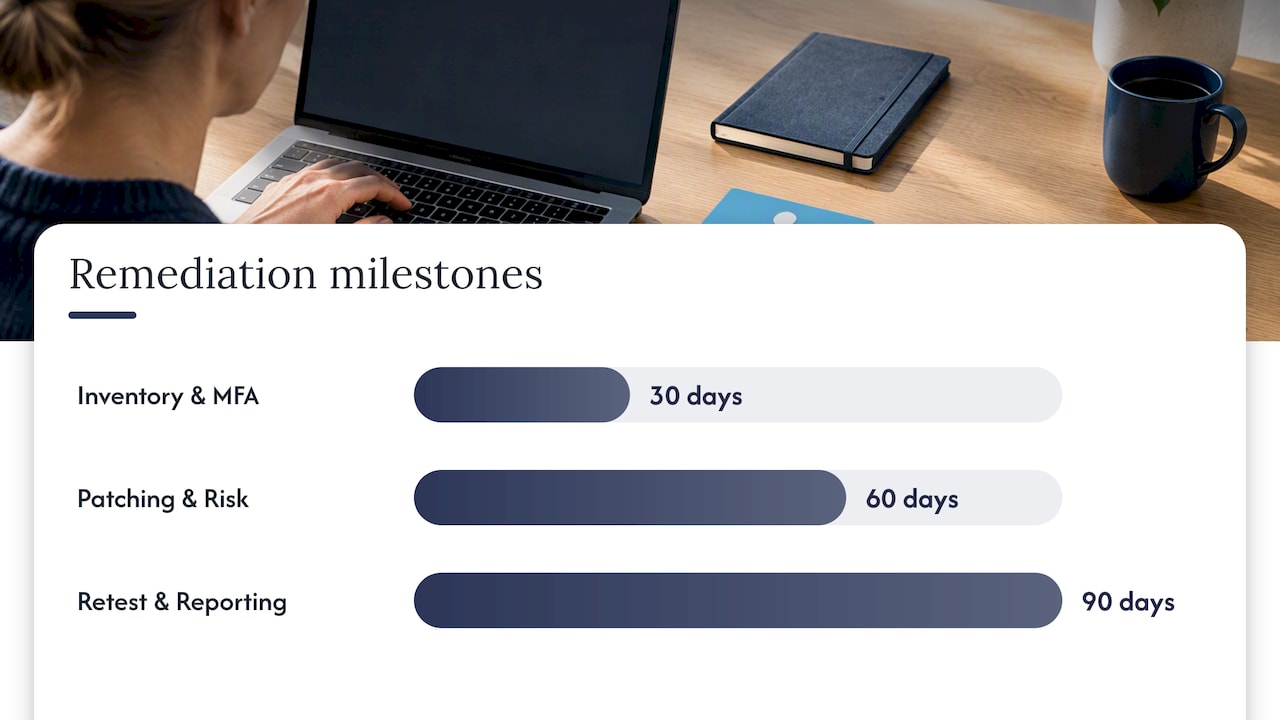
In the first 30 days, get the asset inventory and MFA sorted. By 60 days, have a working patch cadence and a documented risk acceptance process. By 90 days, you should be retesting and reporting on the four metrics above, not just reacting to the next alert.
Where small IT teams should focus first
Most small businesses don’t need every control at once. Start with MFA and backups, because those two fix the failure modes that actually cause the worst outcomes we see. Build an asset inventory next, since prioritisation is meaningless without it.
If your team can keep up with weekly scanning, patch tracking and documentation, keep it in-house. If vulnerabilities are piling up faster than anyone has time to triage them, that’s the signal to bring in outside help before an attacker finds the gap first.
— Matt
Getting hands-on help with vulnerability management
Running the full lifecycle properly takes time most small IT teams don’t have spare, especially the ongoing discovery, prioritisation and verification work that never really stops. IT Start’s cyber security services cover exactly that gap for Brisbane businesses that would rather have it managed than chase it between other jobs.
Our cyber security offering includes:
- Advanced endpoint protection and ongoing threat monitoring across your devices.
- Network security and firewall management to close exposure points.
- Risk assessment and compliance support, including documentation aligned to standards like ISO/IEC 27001.
- Proactive managed security, so remediation happens before an issue becomes an incident.
If you’re not sure whether your current setup needs a full remediation project or just tighter processes, our contact page is the fastest way to get a straight answer from a real person, not a form that disappears into a queue.
Where to read the official guidance
Sources
FAQ
What are the five steps of vulnerability management?
The core cycle is discover, assess, prioritise, remediate and verify, with continuous monitoring running underneath all of it. Each step feeds the next, so skipping discovery or verification leaves gaps even if the other steps are done well.
What is the difference between vulnerability management and patch management?
Patch management is the process of applying software updates on a schedule, while vulnerability management is the broader cycle that includes finding, assessing, prioritising and verifying fixes, patches included. A business can have a solid patching routine and still miss misconfigurations or exposed services that no patch addresses.
What are the four main types of vulnerability in cyber security?
Common categories include software flaws (bugs in code), misconfigurations (incorrectly set up systems), weak or default credentials, and process or human weaknesses like poor access controls. Definitions vary slightly between frameworks, but these four cover most of what shows up in a typical assessment.
How often should a small business run vulnerability scans?
ASD and ACSC guidance recommends scanning at roughly twice the frequency of your patch cycle, with full assessments at least every six months for significant systems. Internet-facing systems generally warrant more frequent scanning than internal, low-risk assets.
What should I do if I can’t patch a vulnerability right away?
Use the vendor’s recommended mitigation instead, such as disabling the vulnerable feature or restricting access through firewall rules or network segmentation. Cyber.gov.au documentation guidance is clear that this is a temporary measure and needs a scheduled permanent fix recorded against it.