TL;DR:
- Most Australian SMEs prefer hybrid cloud to balance data residency requirements and AI workload flexibility. Hybrid models are practical because they accommodate existing systems, compliance needs, and limited IT skills, but they also introduce management complexity. Proper planning, including backup verification and cost modeling, is essential to avoid security risks and unexpected expenses.
For most Australian SMEs, hybrid cloud is the practical default. Keep sensitive or regulated data on a private environment, burst to public cloud for scale and AI workloads, and you get the best of both without betting everything on one model.
Two things drive that recommendation for local businesses. First, data residency rules and Australian regulatory guidance mean you often cannot simply dump everything offshore and call it done. Second, AI and burst compute are genuinely cheaper and faster to spin up in public cloud than to build and maintain yourself. Hybrid lets you split those workloads sensibly.
Quick recommendations by business type:
- Small SMB, low compliance needs (under 20 staff, no regulated data): Public cloud only. Microsoft Azure, AWS or Google Cloud Platform give you managed services, backups and scale without the overhead of running your own infrastructure.
- Regulated firms (finance, healthcare, legal): Private or hybrid. Sensitive client data stays local or in a hosted private environment; less sensitive workloads go public.
- Dev/test and SaaS startups: Public cloud first. The elasticity and platform services for CI/CD, containers and AI/ML are hard to match on private infrastructure at early scale.
- Manufacturing or multi-site businesses: Hybrid. On-site control for operational technology, public cloud for analytics and collaboration.
Hybrid is not always the most elegant answer, but it is usually the most honest one for a business that has existing systems, compliance obligations, and a limited IT team.
Table of Contents
- What are the cloud deployment models?
- What does public cloud actually give you?
- When does private cloud make sense for Australian organisations?
- Why hybrid cloud is the practical default in Australia
- Public vs private vs hybrid: how do they compare?
- How do you choose the right cloud model for your business?
- Security, shared responsibility and Australian compliance
- Three Australian SMB scenarios from MSP practice
- Key takeaways
- The part most cloud guides skip
- IT Start can help you get this right
- FAQ
- Useful sources and further reading
What are the cloud deployment models?
Cloud computing means accessing computing resources — servers, storage, databases, networking, software — over the internet or a private network, rather than running everything on hardware you own and manage yourself. A cloud deployment model describes who owns the infrastructure, who can access it, and where it physically sits.
The four main models are:
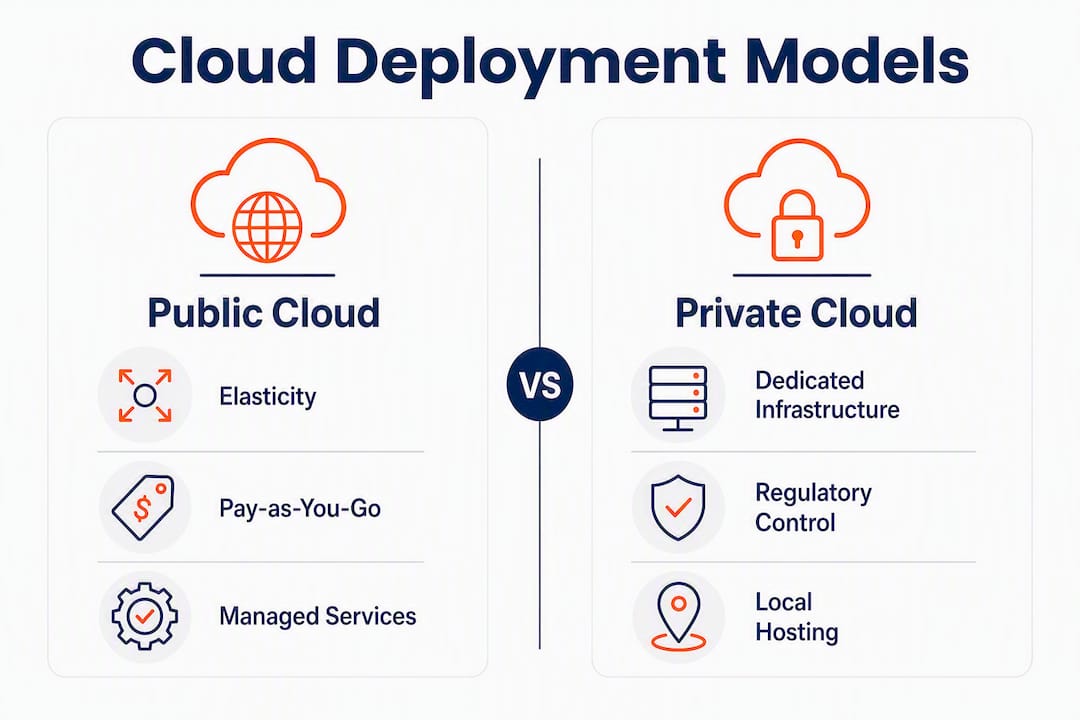
- Public cloud: Infrastructure owned and operated by a third-party provider (Azure, AWS, GCP) and shared across many customers. You access it over the internet.
- Private cloud: Infrastructure dedicated to a single organisation. It can sit on-premises, in a co-location data centre, or be hosted by a managed service provider.
- Hybrid cloud: A combination of public and private environments connected so workloads can move between them based on policy, cost or performance needs.
- Multi-cloud: Using more than one public cloud provider simultaneously (for example, AWS for compute and GCP for AI/ML). Often confused with hybrid, but they are different concepts.
The ASD’s Blueprint for Secure Cloud is the go-to reference for Australian organisations designing cloud environments, particularly those handling government or sensitive data. The Australian Signals Directorate (ASD) and ACSC publish guidance that applies to both government and private sector organisations, and it is worth reading before you commit to any model.
Pro Tip: Multi-cloud and hybrid cloud are not the same thing. Multi-cloud means multiple public providers. Hybrid means mixing public and private environments. Many vendors use the terms interchangeably to sell you more services.
What does public cloud actually give you?

Public cloud is the model most Australian businesses start with, and for good reason. You pay for what you use, the provider handles the physical infrastructure, and you get access to a catalogue of managed services that would take years and millions of dollars to build yourself.
Microsoft Azure, AWS and Google Cloud Platform all operate local Australian regions. Azure has regions in New South Wales and Victoria. AWS has its Asia Pacific (Sydney) region, with a second Australian region in Melbourne. GCP operates out of Sydney. That local presence matters for latency and, to a degree, data residency, though having a local region does not automatically mean your data stays in Australia — you need to check your configuration and the provider’s contractual terms.
The genuine strengths of public cloud are elasticity and managed services. You can spin up a hundred virtual machines for a short project and shut them down when you are done. You get access to AI/ML platforms, managed databases, container orchestration and global content delivery without running a single server yourself. For a 15-person professional services firm, that is genuinely transformative.
Where public cloud bites businesses is cost. Egress fees — what you pay to move data out of the cloud — are not prominently advertised. We see this a lot: a business migrates to AWS or Azure, the first few months look fine, then the bills start climbing because nobody modelled egress costs or accounted for cloud sprawl. Shared responsibility is the other trap. Cloud providers make clear that they secure the platform; you are responsible for your data, your configurations and your access controls. Misconfiguration is one of the leading causes of cloud incidents.
Pro Tip: Before you migrate a workload to public cloud, model the egress costs. Ask your provider for a cost estimate that includes data transfer out, not just compute and storage. The difference can be significant for data-heavy workloads.
When does private cloud make sense for Australian organisations?
Private cloud means the infrastructure is dedicated to your organisation. Nobody else runs workloads on your hardware. That isolation is the point.
Common implementations in Australia include on-premises virtualised stacks (VMware vSphere or Microsoft Hyper-V running on your own servers), hosted private cloud (a managed service provider runs dedicated hardware in a data centre on your behalf), and co-located private racks (you own the hardware, a data centre provides the physical space and connectivity).
VMware has been the dominant tooling choice for on-premises private clouds for over a decade. Microsoft’s Azure Stack family lets organisations run Azure-consistent services on their own hardware, which is useful when you want the same management tools and APIs as Azure public cloud but need the workload to stay on-site or in a specific location.
Private cloud advantages and trade-offs:
- Control: You decide the configuration, patching schedule and security policies. Nothing changes without your approval.
- Data sovereignty: Data physically stays where you put it. For regulated industries, that is often a hard requirement, not a preference.
- Predictable cost: No egress fees, no surprise bills from a misconfigured auto-scaling group. Hardware costs are capital expenditure, which some organisations prefer.
- Performance: Latency-sensitive workloads run faster on local hardware than they do routing through a public cloud region, particularly for high-throughput database operations.
- High upfront cost: Servers, licences, networking gear and the staff to manage it all cost real money before you get any value.
- Limited elasticity: You can only scale to the hardware you own. Burst demand beyond that capacity is a problem.
- Skills burden: Private cloud needs someone who knows what they are doing. VMware administration, storage management and network configuration are not skills every SMB has in-house.
For a Brisbane accounting firm handling sensitive client financial data, a hosted private cloud with a local MSP is often the right call. The data stays in Australia, the firm gets dedicated infrastructure, and the MSP handles the management overhead.
Why hybrid cloud is the practical default in Australia
Hybrid cloud is the default operating model for many Australian organisations because it lets you match each workload to the environment that suits it best, rather than forcing everything into one model.
The common architecture patterns are:
- Cloud bursting: Run baseline workloads on private infrastructure; when demand spikes, overflow to public cloud automatically.
- Data gravity separation: Keep sensitive or regulated data on-premises or in a hosted private environment; run analytics, collaboration and AI workloads in public cloud where the platform services are better.
- Edge and near-edge inference: Run AI model training in public cloud (where GPU capacity is cheap and elastic), then deploy inference workloads on local hardware where latency matters.
IDC and Dell research shows 46.5% of ANZ organisations are actively implementing hybrid cloud, and 89% are planning some degree of cloud repatriation — moving workloads back from public cloud to private environments. That is not a failure of public cloud. It is organisations realising that not every workload belongs there.
Australian use cases where hybrid fits well:
- Finance: Transaction processing and client data on private infrastructure; reporting, analytics and Microsoft 365 in public cloud.
- Healthcare: Patient records in a compliant hosted private environment; telehealth platforms and scheduling in public cloud.
- Manufacturing: Operational technology and SCADA systems on-site; ERP, supply chain analytics and remote monitoring in public cloud.
The honest downside of hybrid is complexity. You are managing two environments, two sets of security controls, and the connection between them. Integration and monitoring take real effort. If your team does not have the skills, hybrid can become a mess faster than either pure model.
Public vs private vs hybrid: how do they compare?
| Dimension | Public cloud | Private cloud | Hybrid cloud |
|---|---|---|---|
| Security and compliance | Shared responsibility; provider secures platform, you secure config and data | Full control; you own all security layers | Split responsibility; strongest when policies are consistent across both environments |
| Cost and pricing model | Pay-as-you-go; low upfront, variable ongoing; egress fees add up | High upfront capex; predictable opex; no egress fees | Mixed; capex for private, opex for public; requires cost governance across both |
| Performance and scalability | Near-unlimited scale; latency depends on region proximity | Consistent, low-latency performance for local workloads; limited by hardware owned | Best of both; local performance for sensitive workloads, elastic scale for burst |
| Control and customisation | Limited; provider controls the platform layer | Full control over hardware, OS, network, patching | Partial; full control on private side, limited on public side |
| Best for / typical use cases | SaaS startups, dev/test, collaboration, AI/ML training | Regulated industries, sensitive data, latency-critical workloads | Most Australian SMEs with mixed compliance and scale needs |
| Management and skills required | Low infrastructure overhead; cloud skills needed for config and cost management | High; requires server, network and virtualisation expertise | Highest; needs skills across both environments plus integration management |
| Data residency and sovereignty | Depends on region selection and contractual terms; check carefully | Strong; data stays where you put it | Strong on private side; public side requires configuration and contract review |
| AI/ML readiness and burst capacity | Excellent; GPU instances, managed AI platforms, elastic scale | Limited by hardware; good for inference on local data | Optimal; train in public cloud, infer on private/edge hardware |
Quick one-line summary per model:
- Public cloud: Best starting point for businesses without regulated data and limited IT staff.
- Private cloud: Right for organisations with strict data sovereignty requirements or latency-critical workloads.
- Hybrid cloud: The practical choice for most Australian SMEs that have existing systems, compliance obligations, and growth plans.
How do you choose the right cloud model for your business?
Start with these questions before you talk to any vendor:
- What data do you handle, and where does it need to live? If you process health records, financial data or government information, check the relevant Australian regulations before choosing a model.
- What are your compliance obligations? APRA CPS 234, the Privacy Act, and sector-specific rules may constrain your options.
- What does your team actually know how to manage? A private cloud with no one to run it is worse than a well-configured public cloud.
- What is your disaster recovery requirement? Recovery time objective (RTO) and recovery point objective (RPO) targets should drive your backup and DR architecture, not the other way around.
- Do you have AI or burst compute plans in the next 12 months? If yes, public or hybrid is almost certainly the right direction.
- What are your real cost constraints? Model total cost of ownership, not just monthly compute bills.
Questions to ask a cloud vendor or hosting partner
- Where exactly will my data be stored, and can that be contractually guaranteed?
- What are the egress fees for moving data out of your platform?
- What does your SLA actually cover, and what are the exclusions?
- Who is responsible for backups, and how do I verify them?
- What access controls and MFA options do you provide?
- What happens to my data if I want to leave?
Red flags in vendor proposals
Watch for vague SLA language (“commercially reasonable efforts”), egress fees buried in pricing schedules, and shared responsibility clauses that push more onto you than you expect. Cyber.gov.au’s PROTECT guidance specifically warns to check where a provider’s data centres are located and what the contractual language says about foreign government access to your data.
What most businesses get wrong
- Assuming the provider backs everything up. They do not. Backup is your responsibility in almost every cloud model. We see this constantly.
- Ignoring egress costs. A workload that moves large volumes of data in and out of public cloud can cost far more than expected. Model it before you migrate.
- No MFA on cloud accounts. This is the single most common gap we find. It takes 20 minutes to fix and stops the majority of account compromise attacks.
- Migrating without architectural changes. Lifting and shifting a legacy application to public cloud without re-architecting it often makes performance worse and costs more.
Rough adoption timelines
A public-cloud-only migration for a 20-person business typically takes 4–8 weeks if the environment is reasonably clean. A private hosted cloud setup runs 6–12 weeks depending on hardware procurement. A hybrid rollout with proper integration and security controls is realistically a 3–6 month project. These are starting points, not guarantees.
Three-step starting plan: First, audit what data you have and where it needs to live. Second, map your compliance obligations to the deployment models that satisfy them. Third, get a cost model that includes egress, licensing and management overhead before you sign anything.
Security, shared responsibility and Australian compliance
The ASD and ACSC are clear: you cannot outsource the risk of a data breach to your cloud provider. The shared responsibility model means the provider secures the physical infrastructure and the platform layer. You are responsible for your data, your configurations, your identities and your access controls. Misconfiguration is a leading cause of cloud incidents, not provider failures.
For Australian organisations, data sovereignty is a real contractual risk, not just a compliance checkbox. Storing sensitive data with a provider whose data centres are offshore, or whose parent company is subject to foreign government data access laws, can create legal exposure you did not plan for. Check the contract, not just the marketing.
Security checklist for SMBs
- Enable MFA on every cloud account, especially admin accounts.
- Classify your data before migration so you know what needs extra protection.
- Encrypt data at rest and in transit; confirm your provider’s defaults and your own configuration.
- Enable logging and alerting for unusual access patterns.
- Verify your backups. Not just that they run, but that they restore. Test this.
- Schedule regular configuration reviews; cloud environments drift over time.
Australian cloud market snapshot
| Metric | Figure | Source |
|---|---|---|
| Australian public cloud spend forecast (2026) | A$33.6 billion | Gartner |
| — | 17.9% | Gartner |
| ANZ organisations actively implementing hybrid cloud | 46.5% | IDC/Dell |
| ANZ organisations planning cloud repatriation | 89% | IDC/Dell |
Pro Tip: Verify your backups before you migrate anything. Not “are backups configured?” but “did we successfully restore from a backup this month?” Most businesses we work with have never tested a restore. That is the gap that costs you when something goes wrong.
Three Australian SMB scenarios from MSP practice
1. Accounting practice with compliance requirements
What we saw: A Brisbane accounting firm with 18 staff had client tax files stored in a mix of local servers and a consumer-grade cloud storage service. No MFA, no formal backup verification, and the principal assumed the cloud storage provider was backing everything up.
Recommended model: Hosted private cloud with Microsoft 365 for collaboration.
Migration approach: Move client files to a hosted private environment with an Australian data centre. Deploy Microsoft 365 for email and collaboration. Enforce MFA across all accounts on day one.
Lessons learned:
- The cloud storage provider’s terms explicitly excluded liability for data loss. The firm had no independent backup.
- MFA was not enabled on any account. We fixed that before touching anything else.
- Data residency was not something the principal had considered. Once explained, it became a non-negotiable requirement.
2. Regional manufacturing firm using on-site control and edge AI
What we saw: A Queensland manufacturer with 45 staff had operational technology (OT) systems that could not go to public cloud for latency and security reasons. They wanted to run AI-assisted quality control on the production line but had no cloud strategy at all.
Recommended model: Hybrid. OT and production systems stay on-site. AI model training and ERP run in public cloud (Azure). Edge inference hardware sits on the factory floor.
Migration approach: Separate OT and IT networks first. Deploy Azure for ERP and AI training. Install edge inference hardware on-site for real-time quality checks.
Lessons learned:
- Honestly, the OT/IT network separation should have happened years earlier. It was a significant security risk.
- Egress costs for sending production data to the cloud for training were higher than expected. We modelled them properly the second time.
- The hybrid setup required skills the internal team did not have. Ongoing MSP support was part of the solution.
3. SaaS startup needing rapid scale and dev/test agility
What we saw: A Brisbane SaaS startup with 12 staff was running dev, test and production on the same Azure subscription with no environment separation, no cost controls and no disaster recovery plan.
Recommended model: Public cloud (Azure), properly architected.
Migration approach: Separate subscriptions for dev/test and production. Implement Azure cost management alerts. Set up automated backups with tested restore procedures. Deploy MFA and conditional access policies.
Lessons learned:
- Environment separation is not optional. A developer testing a script in production caused a four-hour outage.
- The team had never tested a restore. When we ran one, it failed. The backup configuration was wrong.
- Public cloud done properly is not just “put it in Azure.” Configuration, governance and cloud security practices matter as much as the platform choice.
Key takeaways
Hybrid cloud suits most Australian SMEs because it lets you keep regulated data private while using public cloud for scale, AI workloads and collaboration tools.
| Point | Details |
|---|---|
| Hybrid is the practical default | A significant proportion of ANZ organisations actively implement hybrid cloud, driven by compliance and AI needs. |
| Shared responsibility is your problem | ASD/ACSC guidance confirms you cannot outsource data breach risk to a cloud provider; configuration and identity are your responsibility. |
| Verify backups before anything else | Most SMBs have never tested a restore; fix this before migrating any workload to any cloud model. |
| Egress fees are a real cost | Model data transfer costs before committing to public cloud; they are not prominently advertised and can significantly increase your bill. |
| IT Start for local guidance | IT Start helps Brisbane and Queensland SMBs assess data residency, verify backups and choose the right cloud model for their compliance needs. |
The part most cloud guides skip
Most cloud comparison articles treat this as a technical decision. It is not. It is a business risk decision dressed up in technical language.
The businesses that get cloud wrong are not the ones that picked the wrong vendor. They are the ones that migrated without understanding what they were responsible for, assumed their provider was handling backups, and never asked where their data was actually sitting. We see this pattern constantly, and it cuts across every cloud model.
Here is the thing about hybrid cloud that the marketing glosses over: it is genuinely more complex to manage than either pure model. The integration between private and public environments is where things break, where security gaps appear, and where costs blow out. If you do not have the skills in-house to manage both sides and the connection between them, hybrid can become a liability rather than an asset.
The iTnews Cloud Covered Report makes a point worth sitting with: the high failure rate of generative AI projects often comes down to technical debt and legacy architecture, not lack of cloud capacity. Organisations rush to public cloud for AI, hit their own legacy systems as a bottleneck, and blame the cloud. The cloud was not the problem.
Pick the model that matches your actual risk profile, compliance obligations and team capability. Then fix MFA and backups before you do anything else. Those two steps will prevent more incidents than any cloud model decision.
IT Start can help you get this right
Choosing between public, private and hybrid cloud is straightforward when you know your data, your compliance obligations and your real cost constraints. Getting to that clarity is where most businesses need help.
IT Start works with Brisbane and Queensland SMBs to assess their current environment, confirm data residency requirements, verify backups, and recommend a cloud model that fits their actual situation. No vendor bias, no overselling complexity. A free assessment covers a data residency check, a quick risk review, and a realistic timeline and cost estimate for your migration path.
If you are not sure which model fits your business, or you want someone to check whether your current cloud setup is actually secure and compliant, talk to the IT Start team about a no-obligation cloud assessment.
FAQ
What is the difference between public, private and hybrid cloud?
Public cloud is shared infrastructure run by a provider like Azure, AWS or GCP, accessed over the internet. Private cloud is dedicated infrastructure for one organisation, either on-premises or hosted. Hybrid cloud combines both, letting workloads move between environments based on compliance, cost or performance needs.
Is AWS public, private, or hybrid cloud?
AWS is a public cloud provider. It offers shared infrastructure across many customers, though AWS also provides tools like AWS Outposts that let you run AWS-consistent services on your own hardware, which supports hybrid and private cloud patterns.
What is an example of a hybrid cloud setup?
A common Australian example is a financial services firm that keeps client records in a hosted private environment with an Australian data centre, while running Microsoft 365, analytics and AI workloads in Azure public cloud. The two environments are connected and managed under consistent security policies.
Is Azure public, private, or hybrid?
Azure is primarily a public cloud platform, but Microsoft also offers the Azure Stack family of products that let organisations run Azure-consistent services on their own hardware. This makes Azure a platform that supports public, private and hybrid deployment models depending on how it is configured.
Do I need to worry about data residency if I use an Australian cloud region?
Yes. Using an Australian region reduces latency and can help with data residency, but it does not automatically guarantee your data stays in Australia. You need to check your configuration, the provider’s contractual terms, and whether replication or support access could move data offshore. Cyber.gov.au’s cloud security guidance covers what to check before signing with any provider.
Useful sources and further reading
Authoritative references for Australian organisations evaluating cloud deployment models:
- ASD’s Blueprint for Secure Cloud: Better practice guidance and configuration templates for secure cloud and hybrid workspaces, aligned with ASD’s Information Security Manual. Primarily for government but directly useful for regulated private sector organisations.
- Cloud computing security guidance, Cyber.gov.au: The central ASD/ACSC resource for cloud security publications, covering shared responsibility, tenant security and provider assessment frameworks.
- Gartner: Australian public cloud spend forecast 2026: Market sizing and growth forecasts for Australian public cloud spend, including IaaS and PaaS breakdowns. Useful for understanding where the market is heading.
- iTnews 2026 Cloud Covered Report: Industry analysis of hybrid adoption trends, AI infrastructure needs and edge deployment patterns in the Australian market.
- ANZ firms shift to private and hybrid cloud, IT Brief: IDC/Dell research on ANZ hybrid adoption rates and cloud repatriation trends.
- Data sovereignty for Brisbane businesses, IT Start: Practical explanation of data residency risks and compliance considerations for Queensland professional services firms.
- Cloud services selection for Brisbane SMEs, IT Start: Checklist for selecting and negotiating cloud services, with a focus on cost transparency and exit planning.