TL;DR:
- Hybrid cloud links on-premises infrastructure with public cloud services, allowing data and workloads to move under unified policies. It benefits regulated businesses, legacy system users, and those needing cloud scalability during peak periods, but management complexity and costs can increase when run permanently without careful planning.
Hybrid cloud technology is an integrated computing environment that connects your on-premises or private infrastructure with one or more public cloud services, so workloads and data can move between them under a common set of policies. Microsoft Azure defines it as combining on-premises infrastructure with public cloud services into a single, integrated environment. The practical upshot: you keep sensitive or regulated data on your own hardware, and you use the public cloud for everything that benefits from elasticity, geographic reach, or modern services.
Who benefits most:
- Businesses with genuine regulatory or data residency requirements (healthcare, finance, legal)
- Organisations running legacy applications that cannot move to cloud quickly
- SMBs that need cloud scalability for peaks but cannot justify a full migration yet
Who should think twice:
- Businesses without a dedicated IT person or MSP to manage both environments
- Organisations treating hybrid as a permanent destination rather than a transition
A quick example: a Brisbane accounting firm keeps its client records on a local server to satisfy privacy obligations, while running Microsoft 365 and cloud-based backups in Azure’s Australian regions. That is hybrid cloud in practice.
Table of Contents
- How does hybrid cloud actually work?
- What are the critical technical components you need?
- What are the real business benefits, and where are they oversold?
- Concrete hybrid cloud scenarios that actually apply to Australian businesses
- How do you keep a hybrid environment secure and compliant?
- Where does hybrid cloud go wrong?
- How do you plan and roll out hybrid cloud without it becoming a mess?
- Where is hybrid cloud heading, and what should you watch?
- What we actually see in Australian SMBs: the common mistakes
- Key takeaways
- An MSP perspective on hybrid cloud implementation
- How IT Start can help you get hybrid cloud right
- Useful sources for further reading
- FAQ
How does hybrid cloud actually work?
The core mechanic is straightforward: your on-premises systems and your public cloud tenancy talk to each other over a secure network link, share a common identity layer, and exchange data according to policies you define. What makes it complicated is that this interaction happens across three distinct planes simultaneously.

The control plane is where management decisions happen: provisioning, scaling, policy enforcement. The data plane is where actual workloads run and data moves. The identity plane is what ties both sides together, authenticating users and services regardless of where they sit. When any one of these planes is inconsistent between on-prem and cloud, you get gaps.
Common interaction patterns include:
- Burst scaling: workloads run on-prem normally, then overflow to public cloud during peak demand
- Data sync and replication: databases or file stores replicate to cloud for backup or read performance
- Disaster recovery failover: on-prem systems fail over to cloud replicas when hardware fails
- Hybrid identity: users authenticate once (via Active Directory or Entra ID) and access resources on both sides
Connectivity options range from standard encrypted VPN tunnels to dedicated private links. AWS Direct Connect, Azure ExpressRoute, and Google Cloud Interconnect all provide low-latency, private connections between your office or data centre and the respective cloud region. In Australia, both Azure and AWS have local regions (Sydney, Melbourne, Canberra) that reduce round-trip latency significantly compared to routing through Singapore or the US.
Pro Tip: Standard internet links cause real performance problems in hybrid setups. Reliable, low-latency links between on-prem and cloud are not optional. We have seen clients spend months troubleshooting slow application performance, only to find the root cause was a congested NBN connection being used as the hybrid link. Budget for a dedicated link or at minimum a quality-of-service-prioritised connection before you go live.
What are the critical technical components you need?
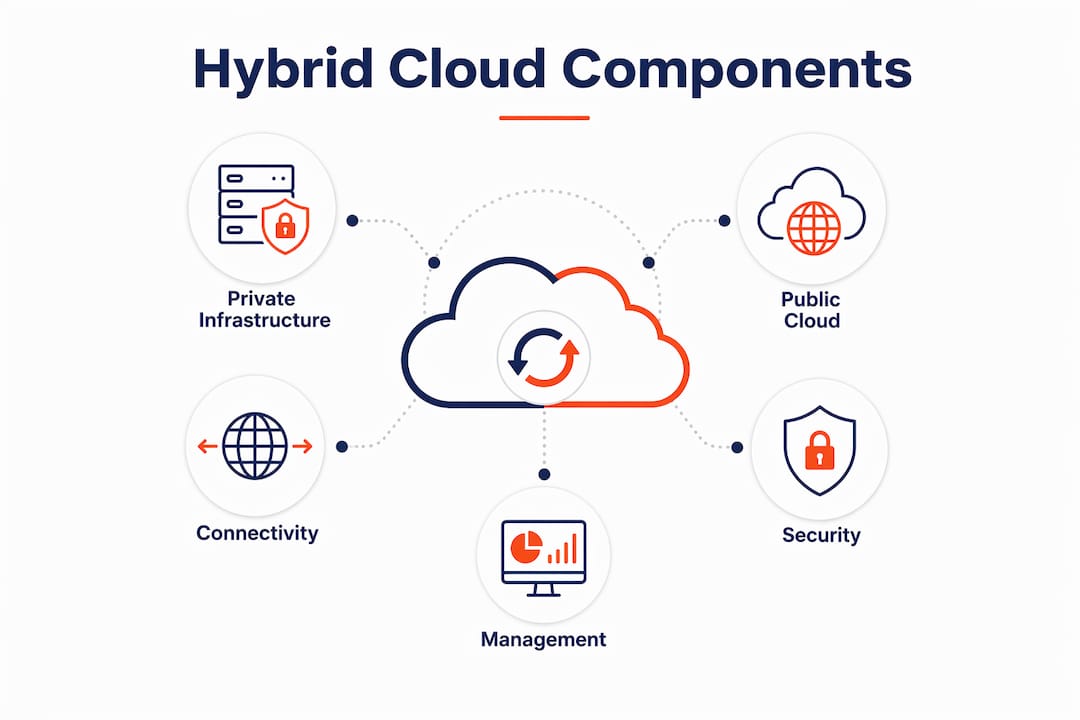
A hybrid cloud is not a single product you buy. It is an architecture assembled from several distinct layers. Each layer has its own failure modes, and skipping any one of them creates problems downstream.
Core components:
- Private/on-premises infrastructure: Physical servers, hypervisors (VMware vSphere is the most common in Australian SMBs), or a private cloud stack. This is where regulated data and legacy apps typically live.
- Public cloud regions/tenancies: Your AWS, Azure, or Google Cloud account and the specific regions you use. For Australian data residency, you need to confirm workloads run in Australian regions, not Singapore.
- Connectivity layer: The network link between on-prem and cloud. Options include site-to-site VPN (lower cost, higher latency) or dedicated private links (Azure ExpressRoute, AWS Direct Connect, Google Cloud Interconnect).
- Identity and access management (IAM): The single source of truth for who can access what. Microsoft Entra ID (formerly Azure AD) synced with on-prem Active Directory is the most common pattern for Australian SMBs already on Microsoft 365.
- Management and orchestration: Tools that let you manage workloads across both environments from one place. Azure Arc, AWS Outposts, and Google Anthos each extend cloud management to on-prem resources.
- Data movement and backup: Replication, backup agents, and data transfer services. Azure Backup, AWS Backup, and Veeam are common choices for covering both sides.
- Security controls: Firewalls, endpoint protection, logging, and monitoring that apply consistently to both environments.
| Component | Common product examples | Typical usage |
|---|---|---|
| Private infrastructure | VMware vSphere, Hyper-V | On-prem virtualisation for legacy apps and regulated data |
| Public cloud platform | Microsoft Azure, AWS, Google Cloud | Scalable compute, storage, modern services |
| Connectivity | Azure ExpressRoute, AWS Direct Connect | Private, low-latency link between on-prem and cloud |
| Identity and access | Microsoft Entra ID, AWS IAM | Unified authentication across both environments |
| Orchestration | Azure Arc, Google Anthos, AWS Outposts | Single management plane across hybrid estate |
| Backup and DR | Azure Backup, Veeam, AWS Backup | Consistent backup coverage across on-prem and cloud |
| Security monitoring | Microsoft Defender for Cloud, IBM QRadar | Centralised threat detection and policy enforcement |
IBM Cloud is worth noting for larger Australian enterprises with existing IBM infrastructure or specific compliance requirements. IBM’s hybrid cloud approach, built around Red Hat OpenShift, is designed for organisations that need consistent container-based workloads across on-prem and cloud without rewriting applications.
What are the real business benefits, and where are they oversold?
The genuine benefits of hybrid cloud are real, but they are often presented without the caveats that matter. Here is an honest breakdown.
Actual benefits:
- Control for sensitive workloads: You keep regulated data on infrastructure you physically control, which satisfies many Australian Privacy Act and industry-specific requirements without complex cloud configuration.
- Cloud elasticity for peaks: Retail businesses, for example, can burst to cloud compute during peak periods (end of financial year, Christmas) without buying hardware that sits idle the rest of the year.
- Staged migration path: Hybrid lets you move workloads incrementally rather than attempting a risky big-bang migration. This is genuinely valuable for businesses with complex legacy systems.
- Disaster recovery options: Cloud-based DR is often cheaper and faster to test than traditional tape or off-site hardware. Azure Site Recovery and AWS Elastic Disaster Recovery are both available in Australian regions.
- Business continuity: If your office loses connectivity or power, cloud-hosted services keep running independently.
Where the benefits are commonly oversold: Hybrid cloud is often more expensive than either pure on-premises or pure cloud when run indefinitely, because you pay for both environments plus the integration layer. Vendors rarely lead with that fact. Cost savings are real during a migration phase, but an organisation that runs hybrid permanently without a clear plan to consolidate will typically spend more, not less.
Concrete hybrid cloud scenarios that actually apply to Australian businesses
Google Cloud identifies burst scaling, data residency, legacy app modernisation, and cloud-based disaster recovery as the use cases where hybrid genuinely delivers. Here is what those look like in practice.
-
Retail burst scaling: A Queensland retailer runs its point-of-sale and inventory systems on-prem year-round. During the Christmas and end-of-financial-year periods, web traffic and order processing spike. Rather than buying servers that sit idle for ten months, the business bursts e-commerce workloads to AWS in Sydney. On-prem handles the core, cloud handles the overflow.
-
Healthcare data residency: A Brisbane allied health practice must keep patient records in Australia under the My Health Records Act and the Privacy Act. Clinical records stay on a local server or private cloud. Appointment scheduling, telehealth video, and staff collaboration run in Microsoft 365 and Azure’s Australian regions. The hybrid boundary is the compliance boundary.
-
Legacy application modernisation: A professional services firm runs a 15-year-old practice management system that cannot move to cloud without a full redevelopment. New client-facing tools (portals, document management) are built cloud-native in Azure. The legacy system stays on-prem and integrates via API. This is the most common hybrid pattern we see in Australian SMBs.
-
Disaster recovery and backup: A financial services firm in Brisbane uses on-prem servers as primary infrastructure but replicates to Azure Site Recovery in the East Australia region. If the primary site fails, workloads fail over to Azure within minutes. Testing the failover costs almost nothing compared to maintaining a secondary physical site.
-
Edge data collection: A manufacturing business collects sensor data from factory equipment locally (low latency, high volume) and sends summarised data to Google Cloud for analytics and reporting. Processing happens at the edge; insights are stored and accessed in the cloud.
How do you keep a hybrid environment secure and compliant?
Security must be consistent across both sides of a hybrid environment. Inconsistent enforcement is the biggest practical risk, and it is exactly what security architecture failures look like in hybrid setups: MFA enabled for cloud access, but not for VPN or Remote Desktop into on-prem systems. That gap is where breaches happen.
Essential controls for hybrid environments:
- Unified identity: One source of truth for user accounts. Microsoft Entra ID synced with on-prem Active Directory is the standard for Microsoft 365 customers. Stale or duplicate accounts are a direct access risk.
- MFA everywhere: Not just for cloud logins. VPN, Remote Desktop, admin consoles, and on-prem management tools all need MFA. No exceptions.
- Centralised logging and monitoring: Logs from both environments must flow to a single platform. Microsoft Defender for Cloud or a SIEM like IBM QRadar lets you correlate events across on-prem and cloud.
- Encryption in transit and at rest: Data moving between on-prem and cloud must be encrypted. Data stored on both sides must be encrypted at rest.
- Consistent backup policies: Backup must cover both environments with tested recovery. Many businesses back up their cloud data but forget on-prem, or vice versa.
- Patching cadence: On-prem systems often fall behind cloud-managed services on patching. A consistent patch schedule covering both sides reduces exposure.
The Australian Cyber Security Centre (ACSC) publishes the Essential Eight framework, which maps directly to hybrid environments. Patching, MFA, and application control are the three controls most commonly missing in the hybrid SMB environments we manage.
Pro Tip: Centralised security policy and monitoring is more effective than juggling separate native consoles for each provider. When you manage AWS, Azure, and on-prem separately, you will miss things. A single monitoring plane, even a basic one, catches drift before it becomes a breach. For most SMBs, Microsoft Defender for Cloud or a managed SOC service is the practical answer.
For practical cloud security controls tailored to Australian SMBs, the checklist approach works well: know what systems you have, who has admin access, whether MFA is on everywhere, and whether backups are actually tested.
Where does hybrid cloud go wrong?
Honestly, this is the section most vendor articles skip. Hybrid cloud has real drawbacks, and they catch organisations off guard.
The chief problems are management overhead, cost drift, data gravity, an expanded attack surface, and skill gaps. Most SMBs underestimate all five.
Management overhead is the most immediate. You now have two environments to patch, monitor, and manage. If you had one IT person before, you now need someone who understands both on-prem infrastructure and cloud operations. That combination is not common and is not cheap.
Cost drift is subtle but serious. Cloud consumption costs are variable and can spike without warning. Data transfer fees between on-prem and cloud (egress costs) are frequently overlooked in initial budgets. Add licensing for management tools, monitoring platforms, and connectivity, and the total cost of ownership often exceeds what was projected.
“Hybrid cloud increases management overhead and can cost more than pure on-premises or pure cloud when run indefinitely, because you pay for both environments and the integration layer.” Vivait, Hybrid Cloud: A Reality Check for Mid-Sized Enterprises
Data gravity is a practical limiter that rarely gets mentioned. Once large datasets live on one side of the hybrid boundary, moving them is slow and expensive. A business that accumulates years of data on-prem and then wants to run cloud analytics faces a significant data transfer problem. Design decisions should place compute near the primary data store rather than assuming data can move freely.
Who should avoid deep hybrid complexity: Mid-market organisations without a stable cloud strategy or dedicated cloud operations staff. If you do not have a clear plan for where hybrid leads, you are likely building technical debt, not infrastructure.
How do you plan and roll out hybrid cloud without it becoming a mess?
The right approach is a phased pilot, not a big-bang rollout. For mid-market organisations, hybrid is often a transitional state, and the pilot phase is where you learn what your environment actually needs before committing to architecture decisions that are hard to reverse.
Phased timeline:
- Discovery and pilot (months 1–3): Audit existing infrastructure, identify pilot workloads (low-risk, high-value), establish connectivity, and test identity integration. Prove backup and restore before anything else.
- Migrate and validate (months 4–9): Move pilot workloads, validate performance and security controls, refine cost monitoring, and document runbooks.
- Optimise and extend (months 10+): Expand to additional workloads based on pilot learnings, implement governance policies, and review cost and performance quarterly.
Migration checklist:
- Audit all existing systems, data stores, and dependencies
- Confirm public cloud regions meet your data residency requirements (Australian regions for most regulated data)
- Establish identity integration (Entra ID sync with on-prem AD)
- Set up and test the connectivity layer (VPN or dedicated link)
- Configure centralised logging and monitoring before migrating workloads
- Verify backup and recovery for both environments, and test restore
- Define a rollback plan for each workload before migration
- Document access controls and review admin accounts
For protecting your data during migration, the key is testing restore, not just backup. We see this constantly: businesses that have been “backing up” for years but have never tested whether the restore actually works.
| Cost factor | Typical shape |
|---|---|
| On-prem hardware refresh | Capital cost upfront; 3–5 year refresh cycle |
| Public cloud consumption | Variable monthly; scales with usage |
| Data egress fees | Per-GB charge for data leaving cloud; often underestimated |
| Connectivity (ExpressRoute/Direct Connect) | Fixed monthly circuit cost |
| Management and monitoring tools | Per-seat or per-resource SaaS licensing |
| Staff or MSP time | Ongoing; increases with environment complexity |
Where is hybrid cloud heading, and what should you watch?
The dominant trends shaping hybrid cloud over the next few years are worth understanding before you lock in architecture decisions.
- Hybrid multi-cloud orchestration: Organisations are moving from managing one cloud plus on-prem to managing multiple clouds plus on-prem from a single control plane. Tools like Azure Arc and Google Anthos are maturing to support this. For SMBs, this means choosing an orchestration layer that is not tightly bound to a single vendor.
- Identity-first security: Zero-trust architecture, where identity is the primary security perimeter, is becoming the standard for hybrid environments. Microsoft’s Entra suite and AWS IAM Identity Centre are both moving in this direction.
- Edge-to-cloud models: Processing at the edge (factory floor, retail store, remote site) feeding into centralised cloud analytics is growing, particularly in manufacturing and logistics.
- Managed hybrid offerings: Cloud providers are packaging hybrid as a managed service. AWS Outposts, Azure Stack HCI, and Google Distributed Cloud reduce the operational burden of running on-prem cloud infrastructure.
- Stronger compliance tooling: Australian regulatory requirements around data sovereignty are tightening. Cloud providers are responding with more granular data residency controls and local compliance certifications.
- AI and analytics workloads driving cloud pull: As organisations adopt AI tools, the compute and data requirements often pull workloads toward cloud, accelerating the transition away from on-prem for non-regulated data.
For future-proofing: avoid tight vendor lock-in at the orchestration layer. The workload can live anywhere; the management plane should not be proprietary if you can help it.
What we actually see in Australian SMBs: the common mistakes
We manage IT for SMBs across Brisbane and Queensland, and the same patterns come up repeatedly. Many businesses already operate hybrid setups without realising it: Microsoft 365 in the cloud, a local file server on-prem, and no deliberate design connecting them. The question is whether it is intentional architecture or accidental accumulation.
Three common MSP scenarios:
-
The backup that was not a backup. A professional services firm had been running a backup agent on their on-prem server for three years. When a drive failed, we discovered the backup job had been failing silently for eight months. The cloud backup for Microsoft 365 had never been configured at all. They lost eight months of file history. The fix: a tested, monitored backup covering both on-prem and cloud, with weekly restore verification.
-
The stale account problem. A healthcare practice had 14 active user accounts for a business with 9 current staff. Former employees still had active credentials, some with admin rights. In a hybrid environment, a stale account on-prem can be the entry point for lateral movement into cloud resources. The fix: a quarterly access review, Entra ID sync cleanup, and MFA enforced on every account.
-
The VPN with no MFA. A financial services client had MFA on their Microsoft 365 logins but not on their VPN. Remote staff connected to on-prem systems through the VPN daily. An attacker with a stolen password could bypass cloud security entirely and land directly on-prem. The fix: MFA on the VPN, conditional access policies, and cloud access security controls applied consistently.
“Security architecture commonly fails because organisations apply MFA and modern controls to cloud systems but forget to apply the same controls to VPNs, remote desktop and on-prem admin paths.” Milnsbridge, Key considerations when adopting a hybrid cloud model
Three-step remediation checklist for SMBs:
- Audit access: List every user account, confirm current staff only, remove stale accounts, and enforce MFA on every login path including VPN and Remote Desktop.
- Verify backup and restore: Check that backup covers both on-prem and cloud data, and test a restore. Not just a backup report. An actual restore.
- Centralise monitoring: Set up a single logging and alerting platform that covers both environments. Even a basic Microsoft Defender for Cloud configuration is better than separate native consoles with no correlation.
For a practical starting point, the ACSC cloud security checklist for Australian SMEs covers the essentials: know your systems, know who has admin access, confirm MFA status, and test your backups.
Key takeaways
Hybrid cloud works best as a deliberate, time-limited architecture that gives you control over regulated data while using public cloud for scalability and modern services. Treating it as a permanent destination without a consolidation plan typically costs more than either alternative.
| Point | Details |
|---|---|
| What hybrid cloud is | An integrated environment combining on-prem infrastructure with public cloud so workloads and data can interoperate. |
| When hybrid is the right fit | Businesses with data residency requirements, legacy apps, or a staged migration need are the strongest candidates. |
| Top operational risk | Inconsistent security controls across environments, particularly MFA gaps on VPN and on-prem admin paths. |
| First technical action | Audit user accounts, enforce MFA everywhere, and verify backup covers both sides before migrating anything. |
| IT Start’s role | IT Start manages hybrid cloud environments for Brisbane SMBs, covering identity, security, backup, and ongoing monitoring. |
An MSP perspective on hybrid cloud implementation
The businesses that get hybrid cloud right are the ones that treat it as a means to an end, not a destination. The goal is usually to move regulated or legacy workloads to a stable, manageable state while using cloud for everything else. The ones that struggle are those that add cloud on top of on-prem without a clear strategy or cleanup.
If we were implementing hybrid cloud for your business, the order of operations would be: identity first, connectivity second, pilot workload third, backup and restore proof fourth. Everything else follows from those four. Skipping identity integration and going straight to migrating workloads is the single most common mistake we see, and it creates a mess that takes months to untangle.
On vendor selection: for most Australian SMBs already using Microsoft 365, Azure is the natural first cloud because identity integration with Entra ID is straightforward and the Australian regions are well-established. AWS is a strong choice for businesses with specific workload requirements or existing AWS investment. Google Cloud is worth considering for analytics and data-heavy workloads. VMware remains the dominant on-prem virtualisation platform in the SMB market, and VMware Cloud on AWS or Azure VMware Solution can simplify migration for businesses running VMware on-prem.
One client outcome worth sharing: a Brisbane professional services firm moved their DR from a secondary physical site to Azure Site Recovery. The annual cost dropped, failover time significantly improved, and they tested it successfully after many years. The hybrid architecture was not the end state; it was the step that made a full cloud migration possible 18 months later.
How IT Start can help you get hybrid cloud right
IT Start works with Brisbane and Queensland SMBs to design, implement, and manage hybrid cloud environments that actually match your business requirements, not a vendor’s preferred architecture. The practical help covers cloud services, cyber security, managed support, and system monitoring across both on-prem and cloud environments.
For businesses in financial services, healthcare, legal, and professional services, local presence and understanding of Australian data requirements matter. IT Start holds SMB 1001 Gold certification and works with clients who have no existing cloud strategy through to those managing complex hybrid estates.
The starting point is a free hybrid readiness assessment: a short, structured review of your current infrastructure, identity setup, backup status, and security posture. You leave with a clear picture of where you are and what the next step looks like. Book your assessment at IT Start’s cloud services page or contact the team directly to get started.
Useful sources for further reading
- Microsoft Azure: What is hybrid cloud computing — Microsoft’s own definition and architecture overview; useful for understanding how Azure positions hybrid and what Azure-specific tools are available in Australian regions.
- Google Cloud: What is a hybrid cloud — Google’s vendor-neutral explainer covering use cases, architecture patterns, and Google Anthos as an orchestration option.
- Microsoft Learn: Azure documentation — Technical reference for Azure services including ExpressRoute, Azure Arc, Azure Site Recovery, and Entra ID; essential for implementation planning.
- ACSC Essential Eight — Australian government prescriptive guidance on the eight mitigation strategies most relevant to Australian businesses; directly applicable to hybrid security controls. Australian-specific and recommended for all SMBs.
- Vivait: Hybrid Cloud Reality Check for Mid-Sized Enterprises — Honest Australian-market assessment of hybrid cloud costs, management overhead, and when hybrid is a transitional state versus a permanent architecture.
- Milnsbridge: Key considerations when adopting a hybrid cloud model — Australian MSP perspective on identity, security, and the accidental hybrid estates common in Australian SMBs.
- Xpansion Technologies: Cloud security controls checklist for Australian SMEs — Practical, one-page cloud security checklist designed for Australian SMEs; covers admin access, MFA, and backup verification.
- Gartner: Top trends shaping the future of cloud — Analyst view on where cloud is heading; useful for understanding multi-cloud orchestration, AI-driven cloud adoption, and hybrid evolution trends.
- CodeHyper: Multi-cloud security challenges — Covers the security drift that comes from managing multiple cloud-native consoles separately; relevant for hybrid security monitoring decisions.
FAQ
What is hybrid cloud in simple terms?
Hybrid cloud combines your own on-premises servers or private infrastructure with a public cloud service (like Microsoft Azure or AWS), so data and workloads can move between them. You keep sensitive data on-site and use the cloud for scalability, backups, or modern applications.
What are the main disadvantages of hybrid cloud?
The biggest drawbacks are management complexity, cost drift, and inconsistent security. Running two environments means paying for both, managing both, and maintaining consistent security controls across both, which most SMBs underestimate.
What is a real-life example of hybrid cloud?
A Brisbane healthcare practice keeping patient records on a local server (for Privacy Act compliance) while running Microsoft 365, telehealth, and cloud backups in Azure’s Australian regions is a typical hybrid cloud setup.
Who would typically use a hybrid cloud?
Businesses with data residency or compliance requirements, organisations running legacy applications that cannot move to cloud quickly, and companies that need cloud scalability for peak periods without a full migration are the most common hybrid cloud users.
How does hybrid cloud differ from public cloud?
Public cloud means all your infrastructure and data run on a provider’s shared platform (AWS, Azure, Google Cloud). Hybrid cloud keeps some workloads or data on your own infrastructure and connects it to public cloud, giving you more control over where specific data lives.