
TL;DR:
- Configuring cloud access security involves implementing identity controls, automated compliance monitoring, and ongoing reviews to meet Australian standards. Most SMBs overlook critical steps like MFA enforcement and continuous assessment, which increases security risks. Regular automation and leadership involvement are essential for maintaining an effective cloud security posture over time.
Configuring cloud access security means enforcing strict controls over who accesses your cloud resources, what they can do, and how that access is governed through policies that protect data and meet compliance standards. The industry term for this discipline is Cloud Access Security, often implemented through Identity and Access Management (IAM) frameworks and Cloud Access Security Brokers (CASBs). For Australian SMBs, the ACSC Essential Eight is the primary framework shaping how these controls are structured and measured. Compliance under the Essential Eight is measured by your lowest-performing strategy, not your average maturity across controls. That single fact changes how you prioritise your cloud security setup.
What do you need before you configure cloud access security?
Getting the prerequisites right saves you weeks of rework. Most SMBs skip this step and end up with a patchwork of controls that look good on paper but fail in practice.
Define your scope first. You need a clear inventory of every cloud workload, identity, and application before you touch a single policy. That means cataloguing your Microsoft 365 tenancy, any AWS or Azure workloads, SaaS applications like Xero or MYOB, and every user account with cloud access. Without this, you will configure controls for assets you know about and leave the rest exposed.
Access privileges matter from day one. You need at minimum a Global Administrator account for your Microsoft 365 environment and equivalent admin roles for any other cloud platforms. Separate these from your day-to-day accounts. We see this a lot: IT managers using their admin account for email, which means one phishing email can compromise everything.
The tools you need fall into three categories:
- IAM consoles: Microsoft Entra ID (formerly Azure AD), AWS IAM, or Google Cloud IAM depending on your platform
- CASB tools: Cloud Access Security Brokers that sit between your users and cloud services to enforce policy
- Compliance mapping tools: Platforms that map your controls against Australian standards like the ACSC Information Security Manual (ISM)
MFA enforcement is a foundational control that must be in place before anything else. Hardware security keys are recommended for privileged and administrative accounts on sensitive systems. Regular testing of MFA recovery procedures prevents lockouts during incidents. This is not optional under the ACSC Essential Eight, and it is not negotiable if you are working toward IRAP certification.
Pro Tip: Before you start any cloud access configuration, run a baseline assessment against the ACSC Essential Eight maturity levels. Achieving the required maturity for IRAP typically takes 3–6 months from that baseline, so knowing where you stand early saves time.
How do you configure cloud access security controls step by step?
This is where most guides go vague. Here is what actually works in practice for SMBs with 10–50 staff.
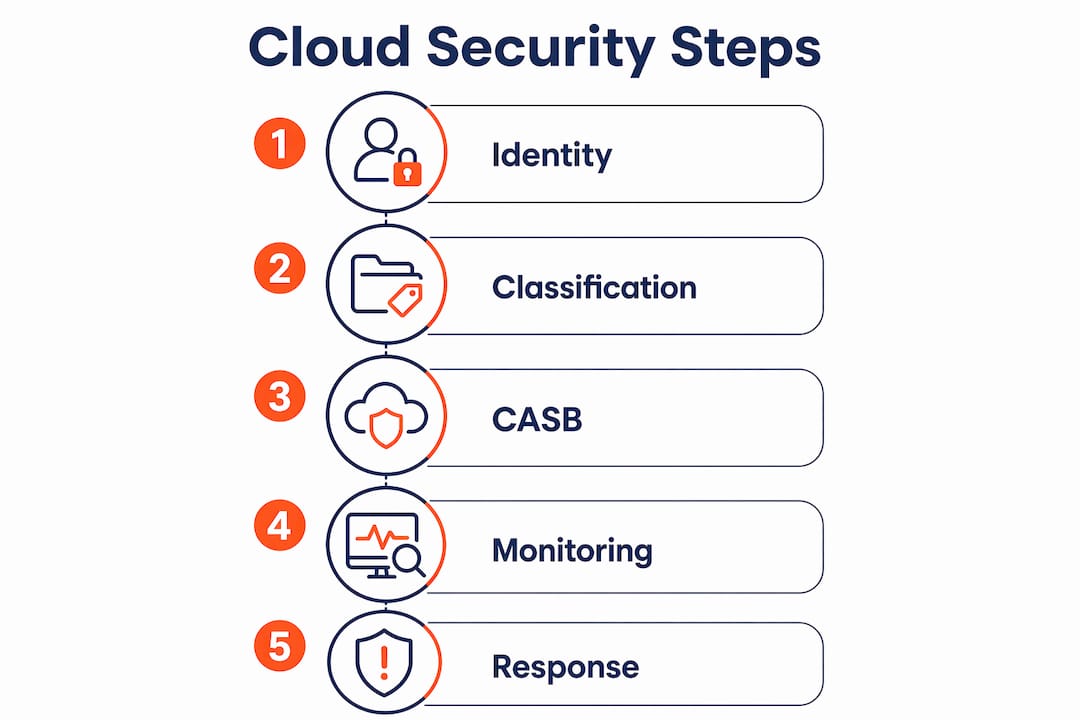
1. Configure identity and access management policies

Apply the principle of least privilege across every account. No user should have more access than their role requires. In Microsoft Entra ID, this means assigning roles at the group level, not individually, and using Privileged Identity Management (PIM) for just-in-time admin access. Set up Conditional Access policies that block sign-ins from untrusted locations or devices that do not meet your compliance baseline.
2. Set up data loss prevention and classification
Microsoft Purview and equivalent tools in AWS and Google Cloud let you classify data by sensitivity and enforce policies that prevent it leaving your environment. Label your data: public, internal, confidential, and highly confidential. Apply policies that block confidential data from being emailed externally or saved to personal cloud storage. This directly supports APRA CPS 234 compliance, which requires encryption at rest and in transit as a mandatory control. Industry benchmarks include using customer-managed keys in AWS KMS and enforcing TLS 1.2+ protocols.
3. Deploy and integrate your CASB
A CASB sits between your users and cloud services. It enforces your access policies in real time, blocks unsanctioned applications, and logs everything. Integrate your CASB with your identity provider so that policy enforcement follows the user, not just the device.
4. Automate compliance monitoring
Manual compliance checks do not scale. Cloud providers offer over 130 technical rules mapped to 56 ACSC ISM objectives. Automated conformance packs enable near real-time compliance posture monitoring. In AWS, this means deploying AWS Config Rules and conformance packs. In Microsoft environments, use Microsoft Defender for Cloud with the regulatory compliance dashboard mapped to the Essential Eight.
5. Configure logging, alerting, and incident response
Continuous monitoring with cloud-native tools and integration with SIEM solutions enables early detection and response to security incidents. AWS CloudWatch, GuardDuty, and Security Hub provide the necessary visibility and alerts. In Microsoft environments, Microsoft Sentinel serves the same purpose. Define your alert thresholds, assign ownership for each alert type, and document your incident response steps before you need them.
Pro Tip: Test your alerting before you go live. Trigger a deliberate policy violation in a test environment and confirm the alert fires, reaches the right person, and the response process works. Most teams skip this and discover the gap during an actual incident.
The table below compares two approaches to cloud access policy management for SMBs:
| Approach | Best for | Key limitation |
|---|---|---|
| Manual policy review | Very small teams, low cloud usage | Does not scale, prone to drift |
| Automated conformance packs | Growing SMBs, multi-cloud environments | Requires initial setup investment |
What are the most common cloud access configuration mistakes?
Honestly, the same problems come up again and again. Knowing them in advance saves you from a painful discovery later.
- Misunderstanding shared responsibility. Cloud providers secure the infrastructure. You are responsible for security within the cloud: your data, your identities, your configurations. Customers are responsible for security ‘in’ the cloud despite the tools the provider offers. Many SMBs assume the provider handles everything and skip critical controls.
- Treating cloud as a single entity. Cloud maturity assessments require testing by specific workload types rather than treating cloud as one uniform environment. Generic controls fail to address cloud-native complexities like managed service identities and cross-account access.
- Configuration drift. Policies set correctly on day one drift over time as staff change, new apps are added, and exceptions accumulate. Without automated monitoring, you will not notice until something goes wrong.
- MFA recovery gaps. Enforcing MFA without a tested recovery process creates a different problem. If an admin loses their authenticator device and there is no recovery path, you are locked out of your own environment.
- Monitoring blind spots. Logging is enabled but nobody reviews the logs. Alerts fire but go to a shared inbox nobody monitors. This is not a technology problem. It is a process problem.
“The biggest risk we see is not a lack of tools. It is a lack of ownership. Every alert needs a named person responsible for responding to it. Without that, your monitoring is theatre.”
Best practices for maintaining cloud access security over time
Getting the initial configuration right is only half the job. Maintaining it is where most SMBs fall short.
- Run automated compliance checks continuously. Manual audits happen quarterly at best. Automated tools like AWS Config, Microsoft Defender for Cloud, and cloud compliance mapping tools that map native cloud services against Australian ISM and ISO 27001 standards give you a live view of your compliance posture. They support control status tracking and export for audit use.
- Review access rights every quarter. Role-based access reviews catch privilege creep before it becomes a liability. A staff member who changed roles six months ago may still have access to systems they no longer need. Automate the review workflow so it actually happens.
- Align your audit cycle with Australian standards. The ACSC Essential Eight and APRA CPS 234 both expect documented evidence of ongoing compliance. Build your audit schedule around these frameworks, not around when you have spare time.
- Integrate cloud security with your broader risk register. Cloud access risks belong in your business risk management process, not just your IT ticketing system. When leadership understands the risk in business terms, budget and prioritisation decisions improve.
- Prepare for IRAP certification checkpoints. If your business handles government data or works toward IRAP certification, your cloud security practices need to be documented, tested, and evidenced. Start building that evidence base from day one, not three weeks before an assessment.
Automation is the difference between a compliance programme that works and one that exists only on paper. Efficient cloud compliance management depends on automation via conformance packs and continuous auditing rather than manual methods. Manual processes do not scale past a team of two.
Pro Tip: Use automation to handle the routine, and reserve human review for the exceptions. Set your automated tools to flag anomalies and spend your team’s time investigating those, not reviewing clean logs.
Key takeaways
Configuring cloud access security requires identity controls, automated compliance monitoring, and ongoing access reviews aligned with the ACSC Essential Eight to protect SMB data and meet Australian compliance standards.
| Point | Details |
|---|---|
| Start with a baseline assessment | Map your cloud assets and measure maturity against the ACSC Essential Eight before configuring any controls. |
| MFA is non-negotiable | Enforce MFA on all privileged accounts and test recovery procedures before an incident forces you to. |
| Automate compliance monitoring | Manual checks miss configuration drift; automated conformance packs give you near real-time visibility. |
| Apply least privilege consistently | Assign roles at the group level and review access rights every quarter to prevent privilege creep. |
| Own your side of shared responsibility | Cloud providers secure the infrastructure; you are responsible for your data, identities, and configurations. |
What I have learned configuring cloud security for Australian SMBs
The honest truth is that most SMBs I work with have bigger gaps than they realise. They have Microsoft 365, they think they are covered, and then we do a baseline assessment and find no MFA on admin accounts, no Conditional Access policies, and logging that has never been reviewed.
The mistake I see most often is treating cloud security as a one-time project. You configure it, tick the box, and move on. Six months later, a new staff member has been given admin rights “temporarily,” three new SaaS apps are connected to your tenancy without review, and your compliance posture has quietly deteriorated. Automation is the only realistic answer for a team without a dedicated security analyst.
The other thing I would push back on is the idea that you need to get everything perfect before you start. Pick the highest-risk gaps first. No MFA? Fix that this week. No logging? Set it up before you do anything else. The cloud security checklist approach works well here: prioritise by impact, not by what is easiest to configure.
Involve your business leadership early. When the IT manager explains a security control in technical terms, it gets deprioritised. When the same control is explained as “this prevents a $50,000 ransomware recovery bill,” it gets approved. Cloud access security is a business risk conversation, not just an IT one.
— Matt
How IT Start helps SMBs with cloud access security
IT Start works with Brisbane-based SMBs to configure and manage cloud security services that meet Australian compliance standards, including the ACSC Essential Eight and APRA CPS 234. The team handles the full setup: IAM configuration, MFA enforcement, Conditional Access policies, CASB integration, and automated compliance monitoring. For businesses that need ongoing management, IT Start’s managed cyber security service provides continuous monitoring, quarterly access reviews, and incident response support. If your cloud environment has grown faster than your security controls, a free assessment is the practical first step to understanding where the gaps are and what to fix first.
FAQ
What does configure cloud access security actually mean?
Configuring cloud access security means setting up policies, identity controls, and monitoring tools that govern who can access your cloud resources and what they can do. It covers IAM, MFA, data loss prevention, and compliance monitoring aligned with frameworks like the ACSC Essential Eight.
How long does it take to set up cloud access security for an SMB?
Achieving the required maturity for IRAP certification typically takes 3–6 months from a baseline assessment. Basic controls like MFA and Conditional Access can be configured within days; full compliance monitoring and policy enforcement takes longer.
What is the shared responsibility model in cloud security?
The shared responsibility model means your cloud provider secures the underlying infrastructure, while you are responsible for securing your data, identities, and configurations within that environment. Many SMBs mistakenly assume the provider handles everything.
Do I need a CASB to secure cloud access?
A CASB is not mandatory for every SMB, but it provides visibility and policy enforcement across multiple cloud services that IAM tools alone cannot deliver. For businesses using multiple SaaS applications, a CASB significantly reduces the risk of unsanctioned access and data leakage.
How often should cloud access policies be reviewed?
Access rights and policies should be reviewed at least quarterly. Automated tools can flag configuration drift between reviews, but a human review of role assignments and access logs every three months is the minimum standard under the ACSC Essential Eight maturity model.