
TL;DR:
- Most Australian SMBs operating multiple cloud services face security risks from misconfigurations and fragmented tools. Consistent policies, clear ownership, and regular audits are essential to manage multi-cloud security effectively. Zero Trust principles and unified management improve visibility, control, and compliance across all cloud platforms.
Multi-cloud security is the practice of maintaining consistent protection for data, workloads, and identities across more than one cloud provider simultaneously. Most Australian SMBs running Microsoft 365 alongside AWS or Google Workspace are already operating in a multi-cloud environment, whether they planned it that way or not. The Australian Signals Directorate (ASD) and ISO 27001 both make clear that cloud adoption does not transfer security responsibility to your provider. Your organisation still owns the outcome. Understanding what multi-cloud security actually means is the first step toward owning that responsibility properly.
What is multi cloud security and why does it matter for SMBs?
Multi-cloud security, sometimes called cloud security posture management across providers, is the discipline of applying consistent policies, controls, and monitoring to every cloud platform your business uses. It covers three core areas: data protection, workload security, and identity governance. The challenge is that each cloud provider ships its own security model, its own tooling, and its own terminology. Running two or three providers without a unified approach creates gaps that attackers exploit.
The importance of multi-cloud security for Australian SMBs comes down to one uncomfortable fact: most cloud incidents stem from tenant misconfiguration, not from the provider being breached. That means the risk sits squarely with your team. A misconfigured storage bucket in AWS or an overly permissive sharing setting in Microsoft 365 can expose sensitive data regardless of how secure the underlying infrastructure is.
APRA CPS 234 reinforces this point directly. It mandates regulated entities maintain information security controls regardless of where systems live, including cloud. For businesses in financial services, healthcare, or legal services, this is not optional guidance. It is a compliance obligation with real consequences.
What challenges make multi-cloud security more complex than single-cloud?
Managing security across a single cloud is hard enough. Spread that across two or three providers and the complexity multiplies fast. Here is what we see most often with SMB clients.
Fragmented tooling. Each provider ships native security tools that do not talk to each other by default. AWS Security Hub, Microsoft Defender for Cloud, and Google Security Command Center each report in their own formats. Without a unified layer, your team is context-switching constantly.

Governance gaps. Fragmented governance across multi-cloud platforms leads to inconsistent identity and access management (IAM) policies, poor visibility, and conflicting alerting thresholds. That inconsistency is where attackers find their footholds.
Increased attack surface. Every additional cloud service is another entry point. SMBs often adopt SaaS tools without IT involvement, which means shadow IT compounds the problem further.
Alert fatigue. When security tools are not tuned properly, they generate noise. Teams stop paying attention. Genuine threats get buried in false positives. We see this constantly with clients who have security tools running but no one actively reviewing the output.
Visibility blind spots. Without centralised logging, you cannot correlate events across providers. An attacker moving laterally from a compromised Microsoft 365 account into an AWS workload will not show up in either platform’s native logs alone.
Pro Tip: Before adding any new cloud service, document which team owns its security configuration and who reviews alerts from it. If you cannot answer both questions, you are not ready to add the service.
How does the shared responsibility model work across multiple clouds?
The shared responsibility model defines what the cloud provider secures versus what your organisation must secure. Every major provider publishes this model, but the split changes depending on the service type.
-
Infrastructure as a Service (IaaS). The provider secures physical infrastructure, hypervisors, and networking hardware. Your team is responsible for the operating system, applications, data, and access controls. AWS EC2 and Azure Virtual Machines sit in this category.
-
Platform as a Service (PaaS). The provider adds the runtime and middleware to their responsibilities. Your team still owns data, identities, and application-level configurations. Azure App Service and Google Cloud Run are examples.
-
Software as a Service (SaaS). The provider manages almost everything except your data and user access. Microsoft 365 and Google Workspace fall here. Many SMBs assume SaaS means fully managed security. It does not.
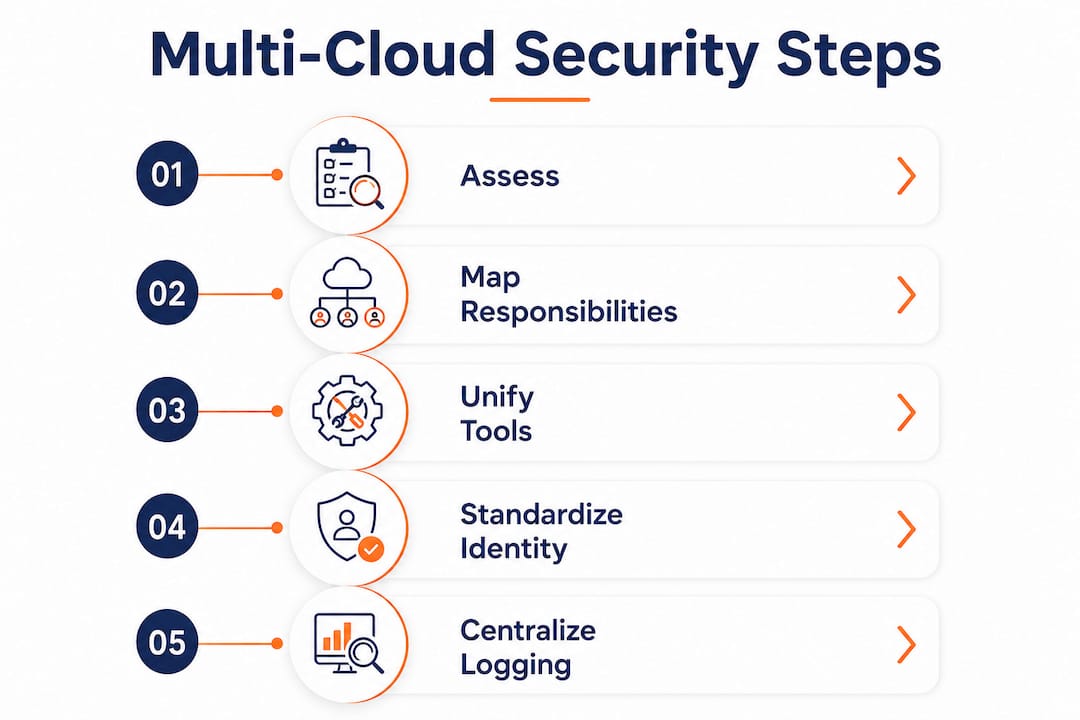
The problem in multi-cloud environments is that most teams never explicitly map these responsibilities per provider per service. Operationalising shared responsibility means defining who detects, who triages, and who responds to failures in each cloud control. Without that mapping, incidents fall through the cracks.
Effective multi-cloud security requires linking responsibilities to named internal teams, specific tools, and defined escalation paths. A spreadsheet is fine to start. The point is that someone’s name is next to every control.
Pro Tip: Run a shared responsibility mapping exercise once per year. For each cloud service, list the provider’s responsibilities and your team’s responsibilities side by side. Gaps in the “our team” column are your risk register.
What practical strategies can SMBs use for multi-cloud security management?
This is where most guides go vague. Here are the approaches that actually work in practice.
Use a unified security management plane
Cloud-Native Application Protection Platforms (CNAPPs) provide consolidated visibility, policy enforcement, and compliance reporting across multi-cloud environments from a single dashboard. They allow security teams to monitor workloads and configurations across AWS, Azure, and Google Cloud Platform without switching consoles. For SMBs without a large security team, this consolidation is the single biggest efficiency gain available.
Standardise identity with federated SSO and Zero Trust
Identity is the new perimeter in multi-cloud environments. Federated single sign-on (SSO) connects your identity provider, such as Microsoft Entra ID or Okta, to every cloud platform your business uses. Users authenticate once and access is governed centrally. Zero Trust principles extend this by requiring continuous verification rather than assuming trust after initial login.
Apply policy-as-code across environments
Policy-as-code frameworks such as Open Policy Agent or Azure Policy enforce consistent security rules across diverse cloud providers automatically. Automated governance via infrastructure-as-code prevents configuration drift and enforces security baselines at the point of deployment, not after the fact.
Centralise logs and tune your alerting
Feed logs from every cloud provider into a centralised SIEM. Then tune it. Poorly configured monitoring causes alert fatigue and missed genuine threats. The goal is actionable alerts, not volume. Set thresholds, suppress known false positives, and review the tuning quarterly.
The table below shows how security responsibilities shift across service models, which helps clarify where your team needs to focus effort.
| Service model | Provider secures | Your team secures |
|---|---|---|
| IaaS | Physical, network, hypervisor | OS, apps, data, IAM |
| PaaS | Physical, network, runtime | Data, app config, IAM |
| SaaS | Physical through application | Data, user access, config |
What compliance requirements apply to multi-cloud security in Australian SMBs?
Australian businesses face a specific set of obligations when running workloads across multiple clouds. The ASD’s cloud security implementation guidance is the most directly applicable framework for most SMBs.
The ASD requires reassessment of cloud configurations every 24 months, with documented authorisation packages and continuous monitoring in place. That 24-month cycle is a minimum, not a target. If your environment changes significantly, reassess sooner. Many SMBs we work with have never done a formal reassessment at all.
APRA CPS 234 applies to any regulated entity and requires that cloud services include explicit processes for acquisition, management, and exit aligned with ISO 27001. That means your contracts with cloud providers need to reflect security obligations, not just commercial terms. Embedding shared responsibility into SLAs is not a legal nicety. It is how you prove compliance during an audit.
For businesses handling government data, the Protective Security Policy Framework (PSPF) and the Information Security Manual (ISM) add further requirements around data classification and access controls. The key is mapping your controls to whichever framework applies, then documenting that mapping. Auditors want evidence, not intentions.
Pro Tip: Build your cloud security posture audit into your annual IT review cycle. Do not wait for a compliance deadline to find out your configurations have drifted.
How do identity and Zero Trust underpin sustainable multi-cloud security?
Zero Trust is the only sustainable security model for multi-cloud environments. Traditional perimeter-based security assumes that anything inside the network is trusted. In a multi-cloud world, there is no single perimeter. Every user, device, and workload must be verified continuously.
Federated identity management applied consistently across cloud providers enables access control that does not depend on which platform a user is accessing. The practical components of a Zero Trust identity approach for SMBs include:
- Multi-factor authentication (MFA) on every account across every cloud platform, without exception.
- Just-in-time privilege escalation, where elevated access is granted for a defined period and then revoked automatically.
- Conditional access policies that evaluate device health, location, and risk score before granting access.
- Regular access reviews, where unused accounts and over-provisioned roles are identified and removed.
Honestly, the number of SMBs we see with no MFA on their cloud admin accounts is still alarming. Identity is where most breaches start. Fixing it costs almost nothing compared to the cost of a breach. The cloud security practices guide for SMBs covers this in more detail if you want a practical starting point.
Key takeaways
Multi-cloud security requires consistent policies, clear ownership, and continuous monitoring across every cloud platform your business uses.
| Point | Details |
|---|---|
| Misconfiguration is the primary risk | Most cloud incidents come from tenant errors, not provider breaches, so map your controls explicitly. |
| Shared responsibility must be documented | Name the team and tool responsible for every control across each cloud service you run. |
| ASD mandates 24-month reassessment | Review and document cloud configurations at least every 24 months, or sooner after major changes. |
| Identity is the real perimeter | Federated SSO, MFA, and Zero Trust principles are non-negotiable for multi-cloud environments. |
| Unified tooling reduces blind spots | CNAPPs and centralised SIEMs give your team visibility across providers without constant console-switching. |
What I actually see when SMBs try to manage multi-cloud security
Honestly, the gap between what businesses think they have in place and what is actually configured is significant. We regularly onboard clients who believe their Microsoft 365 data is fully backed up and their cloud environments are secure. In most cases, neither is true.
The shared responsibility model is the most misunderstood concept in cloud security. Businesses sign up for a SaaS platform and assume the provider handles everything. They do not. Your data, your user accounts, and your configurations are your responsibility. Full stop.
What I have found works best is starting with identity. Get federated SSO and MFA working across every platform before worrying about anything else. Then centralise your logs. Then tune your alerting. Do those three things well and you are ahead of most SMBs in Australia.
The compliance side catches people off guard too. The ASD’s 24-month reassessment requirement is not widely known outside of government-adjacent businesses, but it represents good practice for any organisation. If you have not reviewed your cloud configurations in the last two years, you almost certainly have drift. The cloud computing and cyber security guide is worth reading if you want to understand where the gaps typically sit.
The businesses that get this right are not the ones with the biggest budgets. They are the ones with clear ownership, documented controls, and someone who actually reviews the alerts.
— Matt
How IT Start supports SMBs with multi-cloud security
IT Start works with Brisbane-based SMBs to secure multi-cloud environments from the ground up. That means mapping shared responsibilities across your cloud platforms, identifying configuration gaps, and putting continuous monitoring in place that actually gets reviewed. IT Start’s cloud security services cover everything from initial posture assessments to ongoing managed security, aligned with ASD guidelines and ISO 27001. For businesses with specific compliance obligations under APRA CPS 234 or the PSPF, IT Start’s cyber security team can help you document controls, prepare for audits, and close the gaps before they become incidents. Reach out for a no-obligation assessment.
FAQ
What is the multi cloud security definition in plain terms?
Multi-cloud security is the practice of applying consistent data protection, access controls, and monitoring across two or more cloud providers your business uses simultaneously.
How does multi cloud security work in practice?
It works by centralising identity management, standardising policies across providers using tools like CNAPPs or policy-as-code frameworks, and feeding all cloud logs into a single SIEM for unified monitoring and alerting.
What are the main benefits of multi cloud security?
The main benefits are reduced risk from misconfiguration, consistent compliance posture across providers, and fewer visibility blind spots that attackers could otherwise exploit.
What are the biggest challenges in multi cloud security?
Fragmented tooling, inconsistent IAM policies across providers, alert fatigue from poorly tuned monitoring, and the shared responsibility model being misunderstood or undocumented are the most common challenges.
How often should Australian SMBs reassess their cloud security?
The Australian Signals Directorate requires cloud security configurations to be reassessed at least every 24 months, with documented authorisation packages and continuous monitoring maintained between reviews.