
Many Queensland SME owners assume managed cloud is a luxury reserved for large corporations with deep pockets and dedicated IT departments. That assumption is costing businesses real money. Queensland SMEs that adopt managed cloud report up to 40% less downtime and 30% fewer security breaches compared to those running unmanaged environments, all at a predictable monthly cost of $100 to $200 per user. This article breaks down what managed cloud actually is, what it delivers in practical terms, how to choose the right model for your business, and what to look for in a local provider.
Table of Contents
- What is managed cloud and why does it matter?
- Core benefits for Queensland SMEs: Efficiency, security, and costs
- Managed cloud methods: How it delivers on efficiency and security
- Managed vs self-managed vs hybrid: Which approach works for your SME?
- Choosing the right managed cloud partner: What Queensland SMEs need to check
- Take the next step with managed cloud for your business
- Frequently asked questions
Key Takeaways
| Point | Details |
|---|---|
| Efficiency boost | Managed cloud can cut downtime for Queensland SMEs by up to 40 percent. |
| Stronger cybersecurity | Businesses using managed cloud face 30 percent fewer security breaches. |
| Predictable costs | Expect simplified monthly billing instead of unpredictable big-ticket tech bills. |
| Right-fit approach | Managed works best for fast-growing SMEs, while hybrid or self-managed suits large or highly regulated firms. |
What is managed cloud and why does it matter?
Managed cloud means outsourcing the management of your IT infrastructure, platforms, and applications to a specialist provider. Instead of your team patching servers, monitoring for threats, or scrambling during an outage, a managed service provider (MSP) handles all of that on your behalf. You keep running your business while they keep your systems running.
For Queensland SMEs, this covers a wide range of critical functions. Think email platforms, accounting software, customer relationship management (CRM) tools, file storage, and even enterprise resource planning (ERP) systems. The right cloud services selection strategy means all of these can be hosted, secured, and optimised without you needing an in-house IT team to manage them.
The core components of a managed cloud service typically include:
- 24/7 monitoring to detect and respond to issues before they become outages
- Automated scaling so your systems grow with demand without manual intervention
- Layered security including encryption, firewalls, and access controls
- Shared responsibility model where the provider secures the infrastructure and your business manages data and application access
- Compliance alignment with frameworks like the Essential Eight and SMB1001
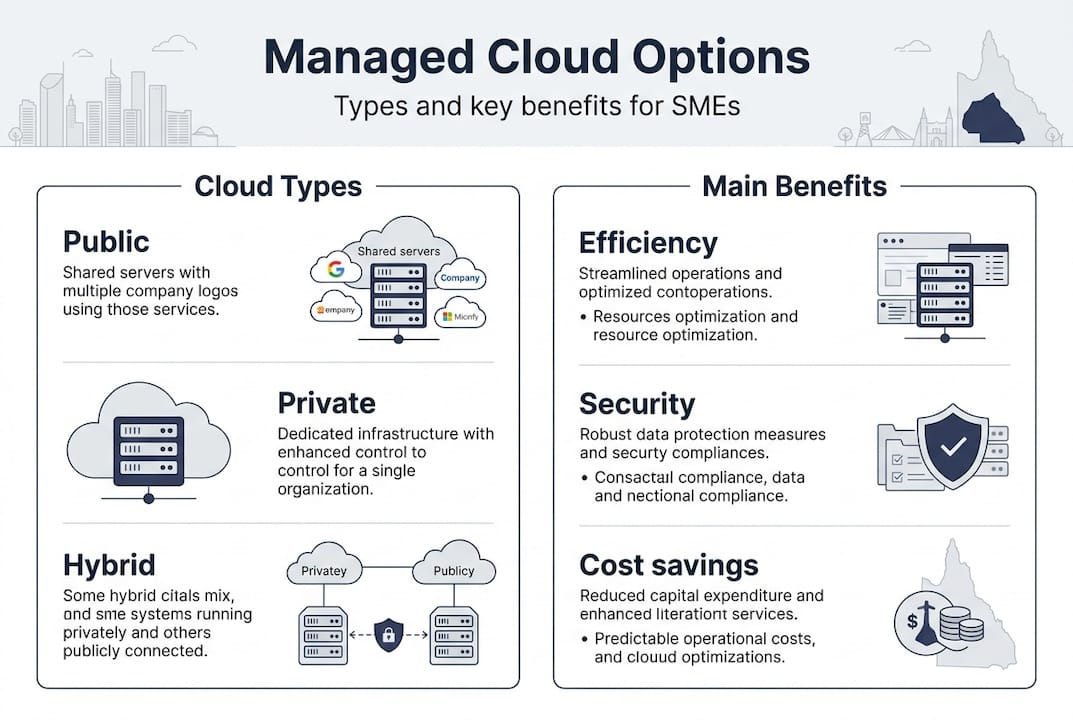
Understanding the types of cloud services available, from public and private to hybrid environments, helps you match the right architecture to your business needs. The AWS Well-Architected Framework underpins many of these methodologies, covering operational excellence, security, reliability, performance, and cost optimisation.
Core benefits for Queensland SMEs: Efficiency, security, and costs
Now that you know what managed cloud is, the next question is simple: what does it actually do for your bottom line? The answer is more concrete than most business owners expect.
Operational efficiency is the most immediate gain. Managed cloud reduces downtime by up to 40% for Queensland SMEs, which matters enormously when you consider that IT downtime can cost local businesses $8,000 to $25,000 per hour. Faster IT service delivery means your team spends less time waiting and more time working.
Security is where managed cloud really earns its keep. Unmanaged environments are far more exposed. With proactive monitoring, encryption, and Essential Eight alignment, managed cloud environments see 30% fewer breaches than their unmanaged counterparts. The average cost of a cybercrime incident for an Australian SMB is $56,600 per incident, a figure that has risen 14% year on year.
“Downtime and cyberattacks are not abstract risks for Queensland SMEs. They are measurable, recurring costs that managed cloud is specifically designed to reduce.”
Cost structure is the third major benefit. Managed cloud shifts your IT spend from large, unpredictable capital expenditure (CapEx) to a steady, budgetable operating expense (OpEx). Here is how the numbers compare:
| Cost category | In-house IT | Managed cloud (MSP) |
|---|---|---|
| Annual staffing | $150,000+ per engineer | Included in service |
| Monthly service cost | Variable | $100 to $200 per user |
| Downtime risk | High without 24/7 cover | Significantly reduced |
| Security compliance | Manual, inconsistent | Automated, audited |
| Scalability | Requires new hires | On-demand |
Pro Tip: When comparing costs, factor in not just the MSP fee but the avoided costs of downtime, breach recovery, and compliance penalties. The cloud benefits for QLD SMEs often outweigh the sticker price within the first year.
Local disaster resilience is another underrated advantage. Queensland’s weather events and infrastructure challenges make offsite, redundant cloud environments a practical necessity, not just a nice-to-have. Managed providers build this resilience in by default.
Managed cloud methods: How it delivers on efficiency and security
Understanding the benefits is one thing. Knowing how managed cloud actually achieves them gives you the confidence to make an informed decision.
Migration to managed cloud typically follows a phased approach. Providers assess your current environment, then move workloads using one of three strategies:
- Lift and shift — moving existing systems to the cloud with minimal changes, fastest to execute
- Replatforming — making targeted optimisations during migration to improve performance
- Refactoring — redesigning applications to be cloud-native, highest long-term efficiency
For most Queensland SMEs, lift and shift is the starting point, with replatforming applied to key systems over time. A phased migration approach reduces disruption and lets your team adapt gradually.
On the security side, managed cloud providers implement a layered defence model. This includes zero trust architecture (where no user or device is trusted by default), continuous security audits, encryption at rest and in transit, and alignment with the Essential Eight and SMB1001 frameworks mandated for Australian businesses.
One critical pitfall to watch for is cloud waste. Without active optimisation, around 35% of cloud spend is wasted on unused or oversized resources. Misconfiguration is the top security risk in cloud environments, and it is entirely preventable through regular audits. A good MSP will flag both issues proactively.
Here is how responsibilities typically split between an MSP and your internal team:
| Responsibility | MSP | Your business |
|---|---|---|
| Infrastructure security | ✓ | |
| 24/7 system monitoring | ✓ | |
| Data classification and access | ✓ | |
| Application user management | ✓ | |
| Compliance reporting | ✓ (framework) | ✓ (data) |
| Cost optimisation reviews | ✓ |
This shared responsibility model is not a gap in coverage. It is a deliberate division that keeps your provider accountable for infrastructure while keeping you in control of your business data.
Managed vs self-managed vs hybrid: Which approach works for your SME?
Not every Queensland SME needs the same model. The right choice depends on your headcount, compliance obligations, internal capability, and risk appetite.
Fully managed suits businesses that want predictable costs, minimal internal IT overhead, and enterprise-grade security without building an in-house team. The trade-off is that managed services can cost 20 to 40% more in direct fees compared to self-managed options.
Self-managed can work if your cloud utilisation is consistently above 50% and you have skilled staff to manage it. Below that threshold, you are often paying for capacity you are not using, and your team is exposed to risks they may not have the bandwidth to address.
Hybrid is often the optimal model once a business reaches 50 or more staff, or when compliance requirements become more complex. It combines the control of self-managed with the security and resilience of managed services for critical workloads.
| Factor | Under 50 staff | Over 50 staff |
|---|---|---|
| Recommended model | Fully managed | Hybrid or managed |
| Internal IT needed | Minimal | Moderate |
| Compliance complexity | Low to medium | Medium to high |
| Cyber risk exposure | High if unmanaged | Manageable with MSP |
| Cost efficiency | OpEx predictable | Review cloud migration pros and cons |
Key considerations when assessing your model:
- How many staff rely on cloud systems daily?
- Do you handle sensitive data subject to privacy or industry regulations?
- Can your current team respond to a security incident at 2am on a Sunday?
- Is your IT spend predictable, or does it spike unpredictably?
Pro Tip: Review your cloud usage quarterly. Many SMEs start on a fully managed plan and shift to a hybrid model as their internal capability grows. The key is not to set and forget. Cloud environments need regular optimisation to avoid waste and keep costs aligned with actual usage.
Choosing the right managed cloud partner: What Queensland SMEs need to check
Knowing your options is only half the job. Choosing the right provider is where the real work begins, and where many SMEs make costly mistakes.
Queensland businesses have specific needs that a generic national or offshore provider may not understand. Local MSPs familiar with Queensland industries such as mining, energy, healthcare, and professional services bring context that matters when designing your cloud environment and meeting compliance obligations.
Here is what to check when vetting a managed cloud provider:
- Industry experience — Do they have clients in your sector? Can they demonstrate understanding of your compliance obligations?
- Certifications — Look for Essential Eight alignment and SMB1001 accreditation as a baseline for security credibility.
- Service level agreements (SLAs) — What uptime is guaranteed? What is the response time for critical incidents? Get specifics, not generalities.
- Cost transparency — Are pricing structures clear and predictable? Watch for providers who bury fees in fine print.
- Security audit cadence — How often do they review your environment for misconfigurations and vulnerabilities?
- Local support access — Can you speak to a real person in your time zone when something goes wrong?
When reviewing local cloud providers, ask for case studies from businesses of similar size and industry. A provider who has helped a 30-person professional services firm in Brisbane is far more relevant than one with enterprise clients in Sydney.
Also evaluate their approach to choosing cloud solutions for your specific workloads. Not every business needs the same stack, and a good provider will tailor their recommendation rather than push a one-size-fits-all package.
Pro Tip: Start with a pilot project before committing to a full managed cloud engagement. Migrate one non-critical system first, assess the provider’s responsiveness, reporting quality, and communication style, then scale from there. This approach reduces risk and gives you real data on the partnership before you are fully committed.
Take the next step with managed cloud for your business
If you have been putting off a cloud decision because it felt too complex, too expensive, or too risky, the numbers tell a different story. Queensland SMEs that move to managed cloud gain measurable improvements in uptime, security, and cost predictability. The question is not whether managed cloud makes sense. It is which model fits your business right now. IT Start provides managed cloud services built specifically for Queensland SMEs, from initial IT assessment through to ongoing support and cyber security solutions that align with Essential Eight and SMB1001 standards. We work with businesses across Brisbane and Queensland in financial services, healthcare, legal, and professional services. If you are ready to find your optimal path, speak to an expert at IT Start for a no-obligation assessment tailored to your business.
Frequently asked questions
What is the biggest risk if I don’t use managed cloud as a Queensland SME?
Without specialist management and proactive security, your business faces higher exposure to costly downtime, cyberattacks, and regulatory penalties. Australian SMBs report an average cybercrime cost of $56,600 per incident, with over 84,000 cyber reports filed in the 2024 to 2025 financial year.
How much should Queensland SMEs budget for managed cloud?
Most Queensland SMEs pay around $100 to $200 per user per month, shifting IT spend from unpredictable capital outlay to a steady operating expense that is far easier to plan around.
When is a hybrid or self-managed cloud better than fully managed?
If your business has more than 50 staff and cloud utilisation consistently above 50%, or if you have strict internal governance policies, hybrid or self-managed may offer better cost efficiency than a fully managed arrangement.
What is the shared responsibility model in managed cloud?
Your managed cloud provider secures the underlying infrastructure, while your business remains responsible for protecting your data and managing application access. It is a deliberate division, not a gap in coverage.