

An Essential Eight assessment is an independent check of how well your business has set up eight specific security controls, scored against a maturity level from Zero to Three. For most Brisbane CBD businesses with 5 to 100 people, the best move right now is still to run one, because the evidence it produces carries straight into the new ASD Essentials series. We are a Brisbane managed IT team, and below we explain what gets examined, how the process runs, where businesses trip up and what to do with the results.
Key Takeaways
- The Australian Signals Directorate (ASD) launched ASD Essentials on 15 October 2026 and is replacing the Essential Eight, but it does not recommend slowing or stopping Essential Eight uplift work that is already approved.
- Existing assessment evidence is the starting point for a gap analysis against Essentials, so an assessment done now is not wasted.
- Assessors look at live configuration, not policies. A written policy with nothing behind it scores poorly.
- Level One is the sensible target for most small businesses. Level Two is worth chasing only when a client, insurer or contract asks for it.
- The findings only matter if they become a short, ordered fix list with an owner for each item.
Table of Contents
- Where the Essential Eight stands after October 2026
- What an Essential Eight assessment examines
- How an assessment runs, step by step
- Evidence: what counts and what does not
- What most businesses get wrong
- Where the data and reality do not match
- Turning findings into a fix list
- Who this is not for
- Perspective
- How we can help
- FAQ
- Sources
Where the Essential Eight stands after October 2026
You may have seen the headlines asking whether the Essential Eight is being phased out. The short answer is yes, over time. The Australian Cyber Security Centre (ACSC), part of ASD, says it is replacing the Essential Eight with the Essentials series. Essentials moves from maturity levels to phased priorities, and from prescriptive requirements to principles and actions.
What that means for a business owner today:
- ASD will maintain both frameworks on cyber.gov.au during the transition.
- Every Essential Eight strategy maps to at least one Essentials principle, and existing evidence can be reused where it is current and relevant, according to the ACSC’s transition guidance.
- Maturity ratings do not convert automatically. Your Level One result will not become an Essentials result on its own.
- A business that never started the Essential Eight can adopt Essentials directly.
- A senior ACSC official has said retirement is expected within roughly two years, but that came from an interview reported in the media. No mandatory changeover date has been published in ASD’s guidance.
Our view: don’t wait. The controls themselves, such as patching, multi-factor authentication and tested backups, are not going anywhere. Work you do on them now is the evidence you reuse later.
What an Essential Eight assessment examines
The ACSC lists the eight mitigation strategies in its Essential Eight explainer:
- patch applications
- patch operating systems
- multi-factor authentication (MFA), which means a second proof of identity such as an app prompt on top of a password
- restrict administrative privileges
- application control, which only lets approved software run
- restrict Microsoft Office macros
- user application hardening, such as blocking risky browser features
- regular backups
The maturity model describes Levels One to Three, based on how sophisticated an attacker the controls hold up against. Level Zero means Level One has not been met. The ACSC’s small business guidance names Level One as the recommended starting point, with the focus on regular patching, MFA and limiting admin rights.
For a typical CBD office running Microsoft 365, here is what an assessor actually goes looking for:
- Which devices exist, and whether the list is true. Asset discovery comes first, because you cannot patch a laptop nobody knows about.
- Whether MFA is enforced through a Conditional Access policy (the Microsoft 365 rule set that decides who can sign in and under what conditions) or only switched on for some people.
- How many accounts hold admin rights, whether those admins also read email on the same account, and when each was last reviewed.
- Whether Office macros from the internet are blocked by policy on every device.
- Whether backups are stored where a compromised admin account cannot delete them, and whether anyone has restored from them.
The package matters. The ACSC’s assessment process guide says the eight strategies are assessed together, and Level One must be shown before Level Two. A strong score on backups does not cover for weak patching.
How an assessment runs, step by step
The same guide sets out the stages. Here they are with the places we see them go wrong.
- Planning. You and the assessor agree scope, access to accounts, devices and documents, approval for any scripts or tools, and how evidence is handled. This goes wrong when scope is vague. Say you list the whole business but the sales team’s personal phones and a forgotten file server sit outside what anyone can see.
- Scope and approach. You pick the target maturity level and a representative sample of workstations, servers and network devices. Pick a sample that reflects reality. A sample of only the newest laptops flatters you and tells you nothing.
- Control assessment. The assessor tests each strategy against the level’s requirements. Many businesses are surprised here by how much is checked on the device, not on paper.
- Reporting. You get a rating per strategy and the gaps behind it.
The ACSC has also published a new assessment process guide for the Essentials series. It runs in four stages: planning, plan approval by an appropriate authority, assessment of each domain and aggregation using a weakest-link rule. Each action is rated on coverage, effectiveness, consistency, currency and evidence quality. The weakest-link idea will feel familiar: one weak area drags the overall result.
Evidence: what counts and what does not
This is where most preparation effort should go. The ACSC ranks evidence by quality:
- Excellent: simulated testing, where someone actually tries the thing.
- Good: a live review of the configuration.
- Fair: reports or screenshots.
- Poor: policy documents or someone telling the assessor it is done.
A hypothetical example. A 30-person professional services firm has a patching policy that says critical updates go on promptly. The policy is real and well written. But Intune, Microsoft’s device management tool, shows eleven laptops that have not checked in for a month. The assessor trusts the console, not the policy, so that control is rated down.
The same guide is firm on one more point. An assessor should not accept risk acceptance, without enough compensating controls, as a reason for skipping a strategy such as application control or MFA. In that case the strategy counts as not implemented. If your answer to a gap is that the owner has accepted the risk, expect it to be scored as a gap.
Good habit to build before any assessment: export the evidence monthly. A patch compliance report, the Conditional Access policy list and the admin role list take little time, and they turn an audit from a scramble into a folder you already have.
What most businesses get wrong
The patterns repeat across Brisbane offices, from the CBD through to the Gold Coast and Sunshine Coast.
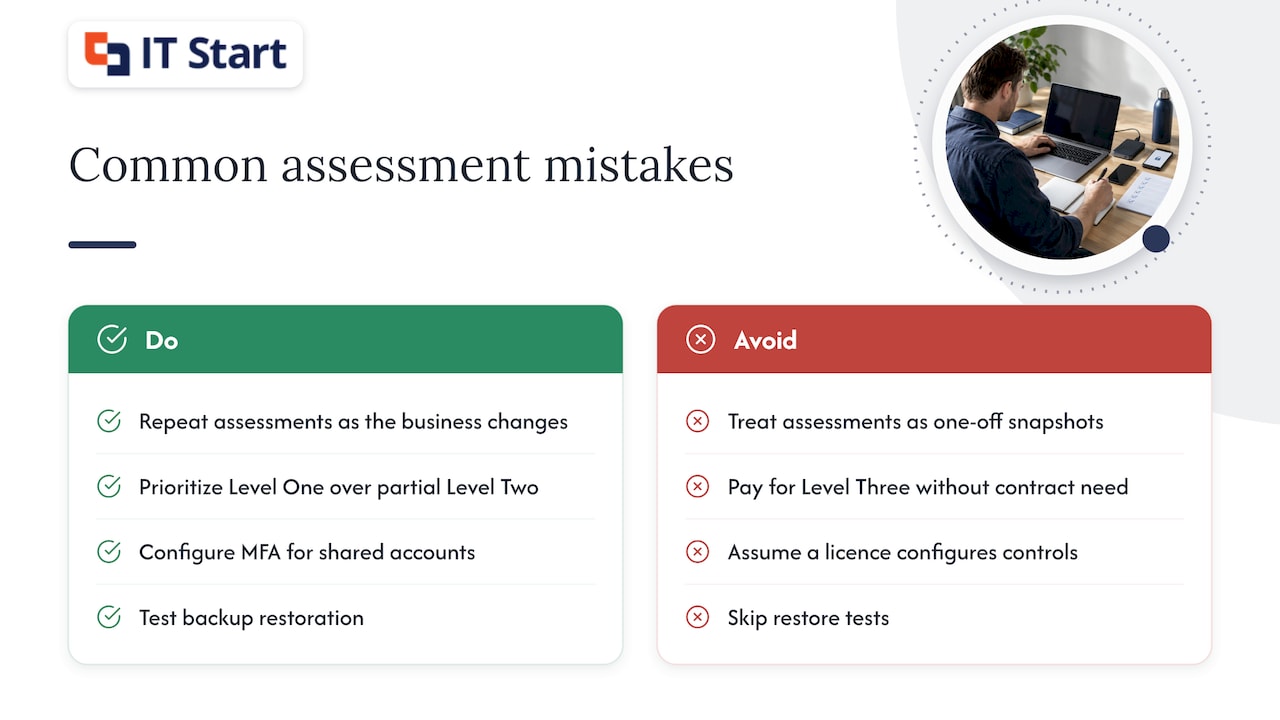
Treating it as a one-off. An assessment is a snapshot. Staff join, laptops get replaced and a contractor gets an admin account for a weekend and keeps it. Three months later the result no longer describes the business.
Aiming too high. Owners hear Level Three and assume that is the goal. Honestly, for a 20-person office, it is not worth paying for unless a contract demands it. Reaching Level One properly beats a half-built Level Two.
Confusing a licence with a control. Having Microsoft 365 Business Premium means the tools are available. It does not mean they are configured. We often find MFA enabled per user for most staff while a shared mailbox or an old service account still signs in with a password alone.
Skipping the restore test. Backups that have never been restored are a hope. At Level Two, the maturity model expects restoration to be tested in disaster recovery exercises, and it is a good habit at any level.
Letting admin rights drift. At Level Two, privileged access is disabled after 12 months unless revalidated and after 45 days of inactivity, per the same model. Few small businesses have anyone whose job is to check.
Where the data and reality do not match
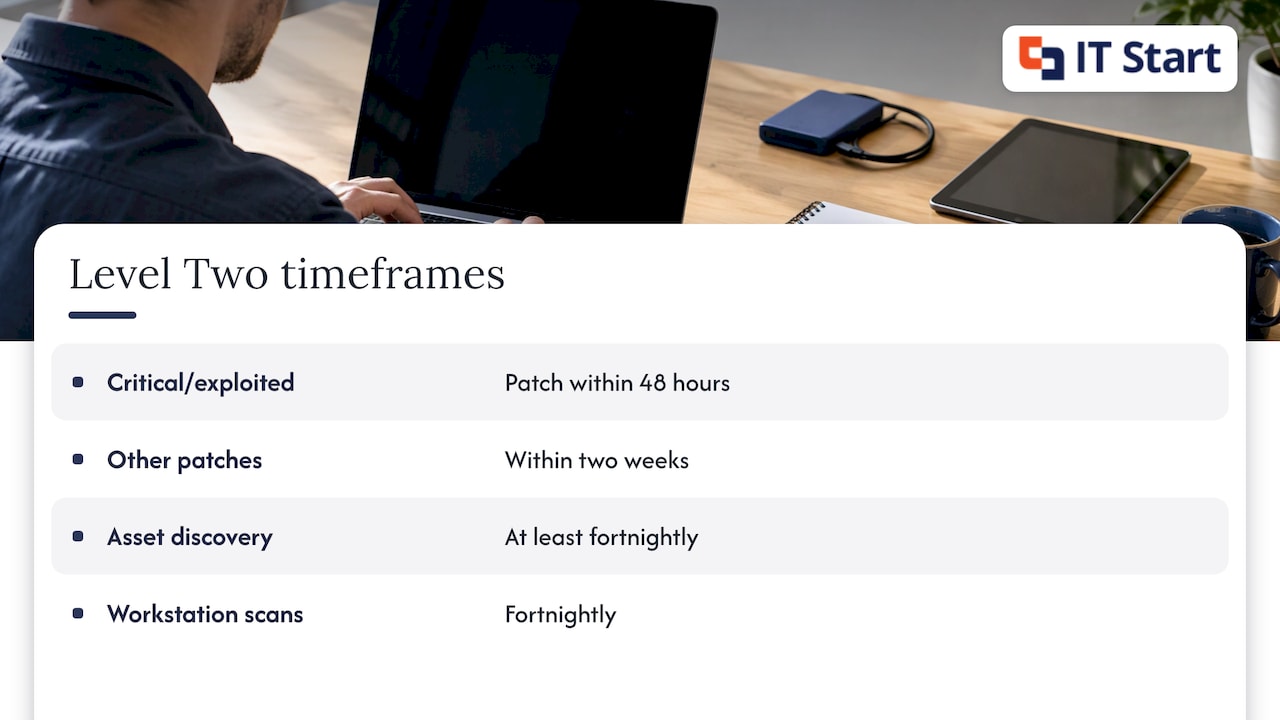
On paper, the Level Two patching requirement is clear. Internet-facing vulnerabilities rated critical by the vendor, or with a working exploit, are patched within 48 hours. Other patches follow within two weeks when no working exploit exists. Asset discovery runs at least fortnightly and workstation scans are fortnightly.
In a small business, the gap is rarely the patch itself. Microsoft pushes it fine. The gap is the laptop that sits in a drawer, the director who postpones restarts for weeks or the router at the back of the office that has not had firmware applied since it was installed. The requirement assumes you know every device. Most small offices have an unmanaged device or two that nobody has listed.
The other mismatch is time. The framework talks about uplift programs. A business owner has a client deadline and 40 other things on the list. That is why we prefer a short, ordered plan over a long report.
Turning findings into a fix list
A report with 60 findings gets filed. Here is how we would turn it into something that gets done:
- Fix anything that weakens several controls at once, such as admin accounts without MFA. One change closes more than one finding.
- Group the rest by who can do it. Some items are Microsoft 365 settings, some are device configuration and some need a staff decision, such as who truly needs admin rights.
- Give every item one owner and a month, not a date range. Smaller steps stick.
- Re-check the controls after each batch with a fresh export, so the evidence folder grows as you go.
- Once Level One holds, run a gap analysis against Essentials using that evidence, as the ACSC recommends.
If you are weighing security spend against other priorities, a broader business advisory guide can help frame the budget conversation.
Our Essential 8 page and the Brisbane SME guide to the ACSC Essential 8 go further on the individual controls. If you want a plain risk checklist first, our cyber security risk assessment checklist is a good start.
Who this is not for
If you are a sole trader with no staff and one laptop, a full assessment is more than you need. Turn on MFA everywhere, keep the device updated and back up your files. If you are a larger organisation with government contracts, you will need a formal assessment against the exact level your contract names, and you should read that contract before choosing a scope.
Perspective
We think the Essential Eight to Essentials change is good news for small businesses, provided you do not freeze. The controls are the same sort of everyday work: updates applied, MFA enforced, admin rights kept tight, backups restored on a schedule. Businesses that do this as routine care have little to fix when the framework changes.
Our team looks after Microsoft 365, security, backups and networking for businesses of 5 to 100 people, from our Brisbane CBD office out to the Sunshine Coast and Gold Coast. What we recommend is simple. Get an honest picture of where you stand, fix the items that close several gaps at once, keep the evidence as you go and write the report in plain language you can actually act on.
We also think you should not buy a bigger framework than your clients ask for. Level One done properly, and kept done, beats an ambitious plan that stalls.
IT Start
How we can help
Our team offers cyber security services, network security audits and compliance consulting for Brisbane businesses. Our cyber security service covers the controls above, and our Microsoft 365 support and management looks after the settings an assessor checks, such as sign-in policies and device compliance. Managed IT plans are published from $75 per user per month ex GST, and Business IT Support for one-off projects starts from $145 an hour ex GST.
We are happy to start with a free consultation or project assessment so you know where you stand before committing to anything. You can reach us through itstart.com.au.
FAQ
Is the Essential Eight being phased out?
Yes, over time. ASD announced the Essentials series on 15 October 2026 and says it is replacing the Essential Eight. Both are being maintained during the transition, and ASD has not published a mandatory changeover date.
Does my existing Essential Eight work still count?
Yes. The ACSC says existing implementation and assessment evidence can be reused where it is current and relevant, and should be the starting point for a gap analysis. Ratings do not convert automatically, so expect a review of scope and evidence.
What does Maturity Level Two require?
It builds on Level One with tighter timeframes and more checks. Examples include asset discovery at least fortnightly, 48-hour patching for critical internet-facing issues, privileged access revalidated after 12 months and disabled after 45 days of inactivity, and tested backup restoration.
Which maturity level should a small business aim for?
For most small businesses, Level One. The ACSC’s small business guidance recommends it as the starting point. Move to Level Two when a client, insurer or contract asks for it.
Do I need an assessment if I am only using Microsoft 365?
Usually yes, because the controls live in how Microsoft 365 and your devices are configured. Having the licence does not mean MFA, macro blocking or admin restrictions are set the way an assessor expects.
Sources
- Frequently asked questions, cyber.gov.au
- ASD Essentials: evolving our approach to cyber security resilience, cyber.gov.au
- Transitioning from the Essential Eight, cyber.gov.au
- ASD says it will retire the Essential Eight within next 2 years, Cyber Daily
- Essential Eight explained, cyber.gov.au
- Essential Eight maturity model, cyber.gov.au
- Cybersecurity: essentials to strengthen your small business
- Essential Eight assessment process guide, January 2023
- Assessment process guide, cyber.gov.au