
A cyber security breach happens when someone gets unauthorised access to your systems, data or accounts, or when your data is disclosed or lost without permission. If this is happening to you right now, you need to contain it fast and figure out what was accessed. Below you’ll find a plain checklist for detection, response and prevention, so you know exactly what to do next.
TL;DR:
- Most breaches are caused by weak or reused passwords, unpatched software, misconfigured cloud storage, or social engineering, making MFA and patching crucial defenses.
- Ransomware and business email compromise cause the most financial and operational damage, with faster detection significantly reducing costs.
- Small businesses should focus on implementing basic controls like offline backups, MFA, patch management, and staff training to prevent most attacks.
- Regular log reviews, breach checks, and having a tested incident response plan help identify and contain breaches before they escalate.
- Recovery requires root cause analysis and transparent communication, with lessons learned used to strengthen overall security posture.
Table of Contents
- What counts as a breach: data breach versus security breach
- Common breach types you’re likely to encounter
- How breaches usually happen: the weak points attackers exploit
- What a breach actually costs a small business
- How to check if your data or systems have been breached
- What to do the moment you suspect a breach
- Prevention basics that actually move the needle
- What we see in the field: common mistakes and quick wins
- Recovering and rebuilding trust after a breach
- Why staff training makes or breaks your defences
- Why you need a plan before you need it
- Where MSPs think priorities should sit
- How IT Start can help if you’d rather not do this alone
- Sources
- FAQ
What counts as a breach: data breach versus security breach
Honestly, most business owners use “breach” as one big scary word, but there are actually two separate ideas here, and knowing the difference matters when it’s time to report.
According to the Cyber, a data breach is when data is lost or subjected to unauthorised access, modification, disclosure or other misuse. A security breach, on the other hand, is unauthorised access to data, applications, services, networks or devices. So a security breach is the “how”, and a data breach is often the “what happened as a result”.
In practice, we see both play out in ordinary ways:
- An accounts staff member sends an invoice with client bank details to the wrong email address (a data breach, no hacking required).
- A former employee’s login still works and they poke around a shared drive after leaving (a security breach that may or may not become a data breach).
- A misconfigured cloud folder gets indexed by search engines, and anyone with the link can see customer files.
The distinction matters because it drives whether you have a notification obligation. A security breach with no data exposed might just need a password reset. A data breach involving personal information can trigger reporting duties under Australian privacy law, which we’ll get into further down.
Common breach types you’re likely to encounter
We manage networks for a lot of SMBs, and the same handful of attack types keep showing up. Here’s what to watch for:
- Phishing and credential theft: scammers send a fake login page or urgent email, and staff hand over passwords without realising it.
- Ransomware and info stealer malware: ransomware locks up your files and demands payment, while info stealers quietly copy saved passwords, browser sessions and files in the background.
- Business email compromise (BEC): an attacker impersonates your CEO or a supplier and asks for an urgent bank transfer or a change to payment details.
- Insider or accidental data spills: someone on your own team sends the wrong file, misconfigures a shared drive, or takes data with them when they leave.
- Availability attacks (DDoS): attackers flood your website or online services with traffic until legitimate customers can’t get through.
The ASD’s Annual Cyber Threat Report 2024-25 reported increasing ransomware incidents through FY2024-25, and it remained one of the most disruptive threats facing Australian organisations. The ACSC also grades incidents from C1 (most severe) to C6 (least severe), which is worth knowing if you ever end up on the phone with them describing what happened.
Ransomware and BEC tend to cause the most financial pain because they hit cash flow directly. Phishing is the one we see most often simply because it’s the easiest for attackers to scale.
How breaches usually happen: the weak points attackers exploit
Almost every breach we’ve cleaned up traces back to one of four things, and none of them are exotic.
- Weak or reused passwords with no multi-factor authentication (MFA): if a password gets leaked somewhere else and reused on your systems, that’s the door wide open.
- Unpatched or end-of-life software: old versions of Windows Server, unpatched VPN appliances and forgotten plugins are exactly what attackers scan the internet for.
- Misconfigured cloud storage and over-permissive access: a SharePoint or Google Drive folder shared “with anyone who has the link” is a breach waiting to happen.
- Social engineering with no staff training: a convincing phone call or email is often all it takes when nobody has been shown what a scam looks like.
We see this a lot: a business has a firewall, antivirus, the works, and still gets breached because one admin account had a password from 2019 and no MFA on it. The technology wasn’t the problem. The gap between “we have security tools” and “we actually use them properly” is where most breaches live.
Pro Tip: If you only fix one thing this month, turn on MFA for every admin and email account. It’s the single highest-return move for the least effort.
What a breach actually costs a small business
The damage from a breach is rarely just the ransom note or the stolen file. It’s the business grinding to a halt while nobody can process orders, invoice clients or access email.
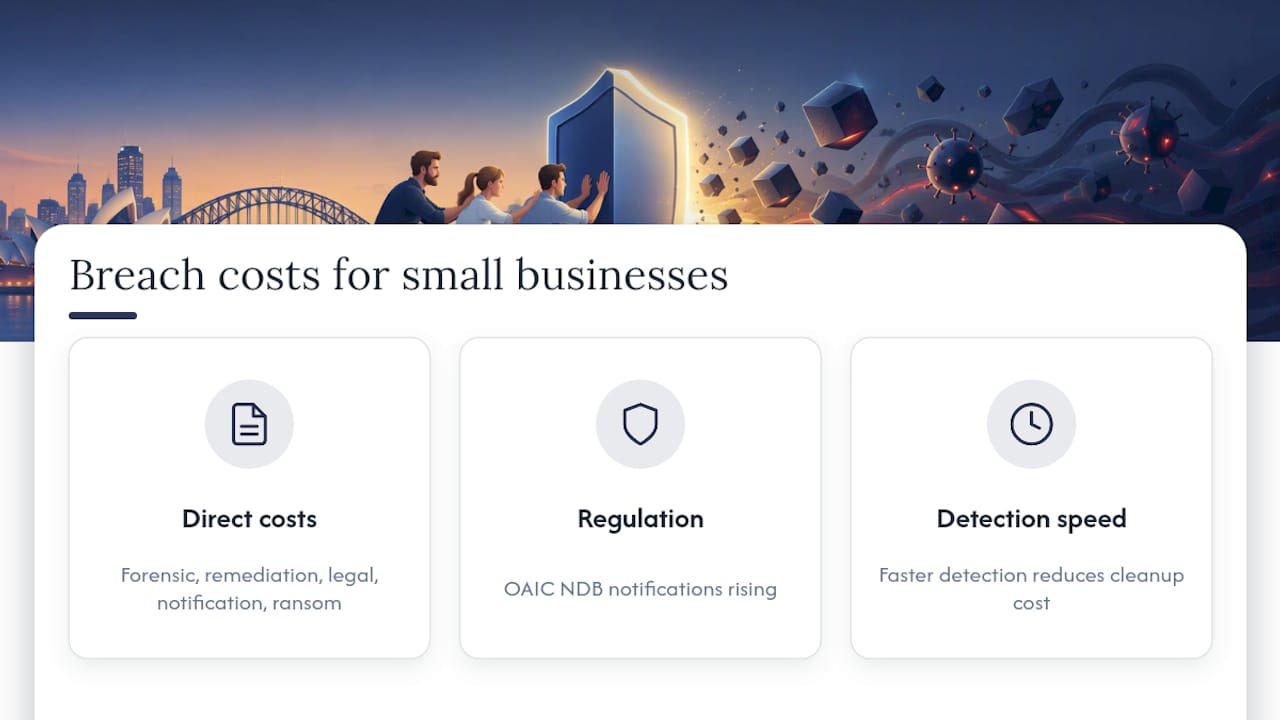
Direct costs stack up fast: forensic investigation, IT remediation, legal advice, potential notification costs and, if ransomware is involved, the ransom itself (which we never recommend paying without proper advice). Then there’s the regulatory side. Under Australia’s Notifiable Data Breaches scheme, entities may need to notify affected individuals and the Office of the Australian Information Commissioner when a breach is likely to result in serious harm.
Data breach notifications have been increasing steadily in recent years, reflecting a rising trend that affects organisations of all sizes, as reported by the OAIC’s latest NDB statistics. That’s not a small business problem or a big business problem, it’s an everyone problem, and it tells you notification volumes are only trending up.
The other cost that doesn’t show up on an invoice: time. The longer a breach goes undetected, the more it usually costs to clean up, because attackers have longer to move sideways through your network, find more data and cause more disruption before anyone notices. Detection speed is one of the few variables you actually have some control over.
How to check if your data or systems have been breached
You don’t need to be an IT expert to run a basic check. Here’s where to start:
- Review login and admin logs for sign-ins at odd hours, from unfamiliar countries, or repeated failed attempts.
- Check email forwarding rules and inbox settings because attackers often quietly set up auto-forwarding to steal ongoing correspondence.
- Look for unusual outbound traffic or software you didn’t install, especially on servers and admin machines.
- Use a breach-check service for your business or personal email addresses to see if credentials have shown up in known leaks.
- Escalate immediately to your IT provider or report the incident through ReportCyber if you find anything suspicious you can’t explain.
Honestly, most businesses only do this checking after something’s gone wrong, when it should be a five-minute habit for whoever manages your IT. If you don’t have anyone checking logs regularly, that’s a gap worth closing before it becomes a bigger problem.
What to do the moment you suspect a breach
Once you think something’s wrong, the next hour matters more than the next week. Move through this in order:
- Isolate affected devices and accounts by disconnecting them from the network, not necessarily shutting them down (you may need what’s in memory).
- Preserve logs and avoid unnecessary changes so whoever investigates can actually work out what happened.
- Force password resets and turn on MFA on every account that might be affected, starting with admin and finance accounts.
- Contact your IT provider or an incident responder, and keep a written record of every action taken and when.
- Start the notification process if personal information is likely involved, because delaying doesn’t reduce your obligations, it just adds risk.
Pro Tip: Don’t wipe or reinstall a compromised machine straight away. If forensic evidence is needed later, a hasty reformat can destroy exactly what an investigator needs.
We’ve had clients call us in a panic wanting to nuke everything and start fresh within the hour. Sometimes that’s right. Often it isn’t, because you lose the ability to work out how the attacker got in, which means you can’t be sure you’ve actually closed the door. For a fuller walkthrough, our incident response plan for SMBs covers this step by step.
Prevention basics that actually move the needle
You don’t need an enterprise security budget to make a real difference. The Essential Eight from the ASD is still the best baseline for small businesses, and you can implement most of it without hiring a dedicated security team.
- Patch management: prioritise internet-facing systems (firewalls, VPNs, remote access tools) first, since they’re what attackers scan for.
- Phishing-resistant MFA: move away from SMS-only codes toward app-based authenticators or FIDO2 hardware keys where you can.
- Lock down admin accounts: apply least privilege so staff only have access to what their job actually needs.
- Application control and macro restrictions: block unapproved software and risky Office macros, a common ransomware entry point.
- Offline, tested backups: backups that can be reached from your main network can be encrypted along with everything else.
Small businesses remain a common target because basic controls are frequently missing, and the ACSC’s small business cyber security guide recommends starting with patching, backups and staff awareness as the practical first steps. None of this is exotic. It’s the boring stuff, done consistently, that stops most attacks before they start. We’ve written a full breakdown of each control in our Essential Eight guide for Brisbane SMEs if you want to go deeper.
What we see in the field: common mistakes and quick wins
Working inside real SMB environments week to week teaches you things a framework document never will.
- Cloud sync is not backup. We can’t say this enough. OneDrive or Google Drive syncing your files means a ransomware attack encrypts the synced copy too. You need a separate, immutable, offsite backup that ransomware can’t reach or overwrite.
- SMS MFA gets bypassed more than people think. SIM swapping and interception attacks exist, so app-based authenticators or FIDO2 keys are worth the small hassle of setup.
- Restore tests get skipped. Plenty of businesses “have backups” that have never actually been restored, and that’s usually when they find out something’s been broken for months.
Our practical fix is usually a 30 day remediation plan: verify backups actually restore, roll out MFA everywhere, tighten admin access, and patch the internet-facing stuff first. It’s not glamorous work, but it closes the gaps that cause most of the incidents we get called in for.
Pro Tip: Ask whoever manages your backups to run a full test restore this month, not just check that the backup job says “successful”.
Recovering and rebuilding trust after a breach
Getting systems back online is only half the job. The other half is what you tell people, and how honestly you tell them.
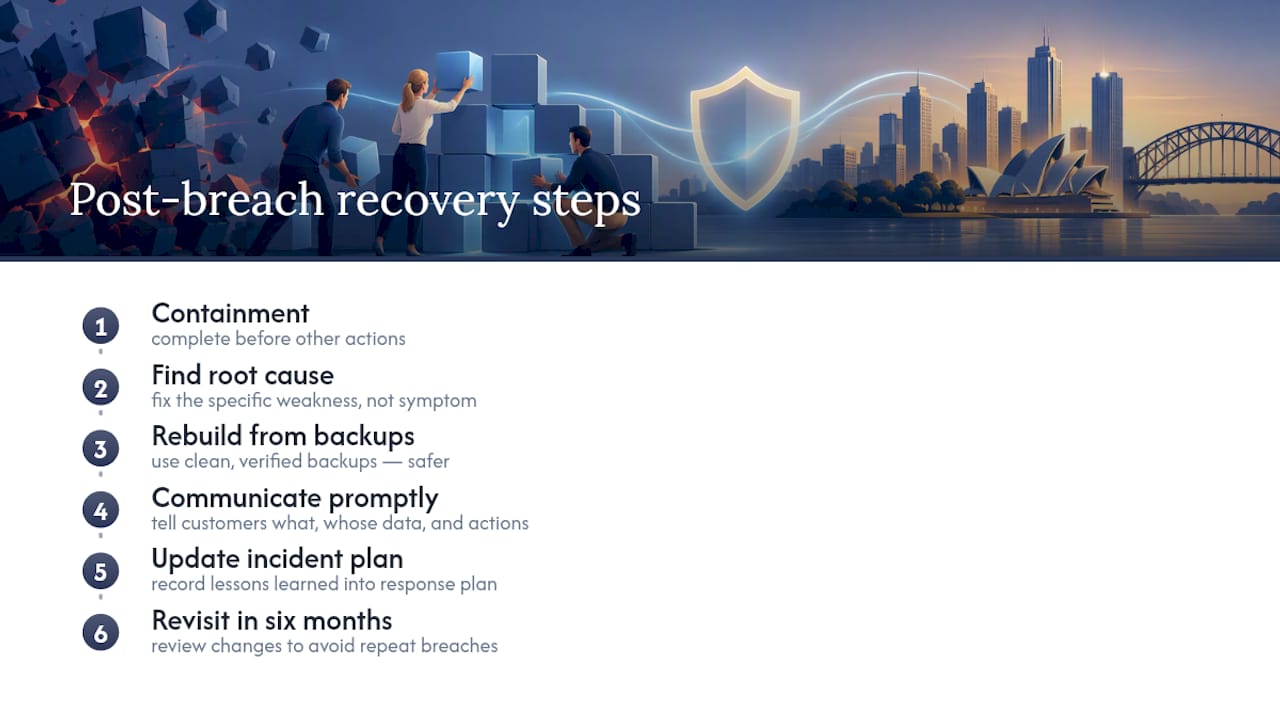
Once containment is done, focus on root cause: work out exactly how the attacker got in, and fix that specific weakness, not just the symptom. Rebuilding from clean, verified backups is safer than trusting a system you’ve simply disinfected in place, because you can never be entirely sure nothing was left behind.
Communication matters just as much as the technical fix. Customers and stakeholders who find out about a breach from someone other than you tend to lose a lot more trust than those you tell directly and promptly. Be specific about what happened, what data was involved, and what you’re doing about it. Vague statements read as evasive, even when that’s not the intent, and poor incident communication can do lasting damage to your reputation, as covered in this guide to managing online reputation for small businesses.
Long term, treat the breach as a prompt to review your whole security setup, not just patch the one hole. Update your incident response plan with what you learned, and revisit it again in six months. Businesses that treat a breach as a one-off crisis to survive, rather than a lesson to build from, tend to get hit again.
Why staff training makes or breaks your defences
You can spend a fortune on security tools and still get breached because someone clicked a link they shouldn’t have. That’s not a criticism, it’s just reality: people are the entry point attackers prefer because it’s usually easier than breaking software.
OAIC’s notifiable data breach statistics note that social engineering has been a significant and growing cause of reported breaches. That tells you technical controls alone aren’t enough. Staff need to know what a phishing email looks like, why urgent payment requests need a second check, and what to do the moment something feels off.
The training that actually works isn’t a once-a-year slideshow nobody remembers. It’s short, regular reminders, simulated phishing tests that show people what a real attempt looks like, and a culture where reporting a suspicious email doesn’t get you mocked for falling for it. We see the businesses with the fewest incidents are usually the ones where staff feel comfortable saying “this looks weird, can someone check it” without hesitation.
Pair that awareness with the technical basics like MFA and you close off both the human and the technical paths attackers rely on. Neither one alone is enough.
Why you need a plan before you need it
Having an incident response plan sitting in a folder somewhere isn’t the same as being prepared. The businesses that recover fastest are the ones that have actually walked through the steps before a real incident forces them to.
The ASD’s own guidance for businesses recommends adopting an “assume compromise” mindset, prioritising logging, event collection and having a tested incident response process ready to go, as outlined in its Annual Cyber Threat Report factsheet. That’s not paranoia, it’s just realistic planning for a threat that isn’t going away.
A drill doesn’t need to be elaborate. Even a tabletop exercise, where key staff talk through “what do we do if our email is compromised right now”, surfaces gaps you didn’t know existed, like nobody actually knowing who the IT provider’s after hours contact is. Run it once a year and update the plan based on what breaks.
Queensland businesses in particular can find a practical, localised starting template in our guide to incident response plans for Queensland businesses, built around the roles and decisions an SMB actually needs to assign.
Where MSPs think priorities should sit
If I had to boil this down: assume you’ll be targeted at some point, and spend your limited budget on the things that make recovery fast rather than chasing the illusion of total prevention. Backups that actually restore and MFA on every account beat almost any other single investment.
Small budgets mean trade-offs, so skip the fancy dashboards before you’ve nailed the basics. A tested backup and a short written response plan will save you more grief than most paid tools. Pick three things from this article and fix them this week.
— Matt
How IT Start can help if you’d rather not do this alone
Reading a checklist is one thing. Actually verifying your backups restore properly, rolling out MFA across every account, and tightening admin access takes time most business owners don’t have spare.
We work with small and medium businesses on exactly this kind of work, day to day.
- Managed IT support covering networks, help desk and vendor management to catch problems early.
- Cyber security services including endpoint protection, firewall management and risk assessment.
- Cloud solutions and business continuity to ensure backups are proper backups, not just synced folders.
A common starting engagement is a straightforward backup verification and MFA rollout, often wrapped into a 30 day remediation plan similar to what we described above. If you want a second set of eyes on where your business actually stands, get in touch through our cyber security services page or contact IT Start for a assessment of your current setup.
Sources
FAQ
How do I find out if my data was breached?
Check for unusual account activity in your login and email logs, and run your email address through a reputable breach-check service to see if your credentials appear in known leaks. If you suspect business systems are affected, ask your IT provider to review admin logs and outbound traffic for anything unfamiliar.
What are the top types of cyber attacks?
The most common types small businesses face are phishing and credential theft, ransomware, and business email compromise, where an attacker impersonates a trusted contact to request a payment. Insider mistakes and denial of service attacks on websites are also common, though usually less damaging financially.
Has my data been breached in Australia?
You can check by reviewing account activity, using a breach-check service, or watching for official notifications from businesses you deal with, since entities must notify affected individuals under certain conditions. The OAIC reported data breach notifications reaching an all-time high in 2025, so it’s worth checking regularly rather than assuming you’re unaffected.
Should I be worried about a data breach?
You should take the risk seriously without panicking, since breaches are increasingly common and can affect any business regardless of size. The practical response is preparation: working MFA, tested backups and a basic incident response plan reduce both the likelihood and the damage of a breach far more than worry does.