
For most small businesses, aim for Essential Eight Maturity Level One and fix these three things first: turn on MFA everywhere, manage patching properly, and actually test your backups by restoring something. That’s the baseline. Everything else on a decent cyber security controls checklist builds off those three fixes, and honestly, most of the SMBs we walk into are missing at least one of them.
TL;DR:
- Turning on MFA for all admin and email accounts is critical, but many businesses overlook enforcing it across shared, less obvious logins.
- Regular patching of operating systems and applications must be done within defined windows, not just relying on automatic updates.
- Backup tests must include actual restore procedures, as a green dashboard indicator does not confirm data recoverability in real incidents.
- Admin rights should be limited to necessary personnel, with stale accounts and shared credentials eliminated to reduce blast radius.
- Exposed remote desktop ports, default router passwords, and outdated website plugins are common vulnerabilities that should be fixed immediately.
Table of Contents
- The cyber security controls checklist: what to check first
- The Essential Eight explained for small businesses
- MFA, patching, endpoints, and backups: the actual steps
- Access control and cutting back admin rights
- Network and website basics SMBs consistently get wrong
- What most businesses get wrong on training and phishing
- Incident response and emergency management plan checklist
- Scoring your own maturity in twenty minutes
- What we see as an MSP: the gap between the checklist and reality
- Editorial take: what the checklist gets wrong if you follow it blindly
- Get your checklist gaps fixed properly
- Sources
- FAQ
The cyber security controls checklist: what to check first
We’ve walked into more than a few businesses that swore they had “good IT security” and turned out to have none of the basics locked down. So here’s the working checklist we actually use on client sites, ordered by impact versus effort. Do the top of this list before anything else.
High impact, low effort (do these this week):
- MFA on email and admin accounts. Check: log into the Microsoft 365 admin centre and pull the MFA status report. If it’s not enforced through Conditional Access, it’s not really “on”.
- Managed patching for OS and applications. Check: patch compliance report showing when devices last checked in and installed updates. Not “Windows Update is on” but an actual report.
- Backups with a tested restore. Check: a restore log or ticket showing a file, folder, or full server was actually recovered, not just a green tick in the backup dashboard.
High impact, moderate effort:
- Restrict local admin rights. Check: a list of who has admin on their laptop. If it’s “most of the sales team,” that’s a problem.
- Endpoint protection on every device. Check: the security console shows 100% of devices reporting in, not 80% with the rest “probably fine.”
- Application control / allowlisting where practical. Check: a policy blocking unapproved executables, even a basic one.
Medium impact, ongoing:
- Macro restrictions on Office files downloaded from the internet.
- Router and firewall settings reviewed, defaults changed.
- Staff phishing training with a real reporting process, not a once-a-year video.
- A written incident response plan that names who does what.
Prioritise by what stops the most common attacks first. ACSC guidance for small businesses lines up with what we see on the ground: MFA, patching, and backups stop the majority of opportunistic attacks before they get anywhere near your data. Everything past that point is about resilience and reducing the blast radius when something does get through, because something eventually will.
The Essential Eight explained for small businesses
The Essential Eight is the Australian Signals Directorate’s prioritised list of mitigation strategies, and it’s genuinely the best baseline we point clients to. It’s not a compliance box-tick exercise designed for banks. It scales down to a 15-person accounting firm just as well as it scales up to an enterprise, provided you aim at the right maturity level.
For SMBs with 10 to 50 staff, Maturity Level One is the realistic target. Here’s what each control actually looks like at that level, in plain English.
- Application control: only approved software runs. At Level 1, this means basic allowlisting on workstations, not a full enterprise rollout.
- Patch applications: known vulnerabilities in things like browsers, PDF readers, and Office get patched within a defined window, usually two weeks for non-critical and much faster for anything actively exploited.
- Configure Microsoft Office macro settings: macros from the internet are blocked by default. This one gets ignored constantly because someone in accounts “needs” macros for a spreadsheet.
- User application hardening: browsers block flash, ads, and Java where not needed. Simple, but almost nobody does it.
- Restrict administrative privileges: admin accounts are separate from day-to-day accounts and kept to a small list.
- Patch operating systems: same idea as application patching, but for Windows, Mac and server OS.
- Multi-factor authentication: MFA on everything that matters, ideally phishing-resistant where the account has real privilege.
- Regular backups: backups are taken, stored separately from the live environment, and restore-tested.
Here’s the part most guides skip: your overall maturity is set by your weakest control, not your average. You can have brilliant patching and MFA and still sit at Level 0 because nobody’s tested a backup restore in two years. That’s not a technicality. It’s the whole point of the model, straight from the Essential Eight maturity model documentation itself.
The most common misconfiguration we see? Businesses think they’ve “done” MFA because it’s turned on for a handful of accounts, usually the owner’s. Meanwhile the shared reception inbox and the accounts payable login sit wide open, because those got set up years ago and nobody circled back.
Pro Tip: Run a Conditional Access report in Microsoft 365 and sort by “MFA not registered.” That list is usually longer, and scarier, than the business owner expects.
MFA, patching, endpoints, and backups: the actual steps
Talking about controls in the abstract doesn’t help anyone. Here’s what we actually do on client sites, step by step.
- Identify your privileged accounts first. Global admins, finance system logins, anything with access to money or client data. Secure these before touching general staff accounts.
- Turn on MFA via Conditional Access, not per-user settings. Per-user MFA is inconsistent and easy to accidentally disable. A Conditional Access policy applies it properly and logs exceptions.
- Use an authenticator app or hardware key for admin accounts. SMS-based MFA is better than nothing, but it’s the weakest option available, and ASD guidance flags it as vulnerable to interception compared to app-based or hardware options.
- Set a patch window and stick to it. Critical vulnerabilities get patched within days, not the next scheduled Tuesday. Everything else follows a fortnightly cycle.
- Deploy endpoint protection to every device on the network, no exceptions. That includes the laptop the bookkeeper only uses “occasionally” and the old machine in the corner running the label printer.
- Confirm backups are offsite or immutable, not just a second copy on the same server, by using one of the top backup plugins for BigCommerce to ensure reliable data protection. Ransomware goes after backups specifically now. If your backup lives on the same network as your production data, it’s a target, not a safety net.
- Schedule a restore test, not just a backup check. We recommend scheduling restore tests regularly; many businesses do at least annually, but more frequent tests improve confidence
Here’s the bit that catches people out every time: a green tick in a backup dashboard tells you a job completed. It does not tell you the data is recoverable. Some restores have failed due to corrupted data, missing permissions, or long recovery times during real outages. The ACSC’s own guidance is blunt about this: a backup that hasn’t been tested is not a backup you can rely on.
One number worth sitting with: the Essential Eight maturity model treats an untested control as no control at all when assessing evidence. If you can’t produce a restore log, a patch report, or an MFA enforcement screenshot, an assessor scores it as deficient, full stop. Self-declared “yeah we do that” doesn’t count.
Access control and cutting back admin rights
Admin sprawl is one of the most common things we find and fix. Give too many people standing admin access and you’ve built a bigger blast radius for every phishing email that lands. One compromised account with domain admin rights can take down a whole business in an afternoon. We’ve seen it happen.
Auditing this is simpler than most business owners expect:
- Pull a list of every account with local or domain admin rights and ask, for each one, “does this person need this every day?”
- Check for shared admin logins. If more than one person knows the password to “Admin01”, that’s a shared credential and it needs to go.
- Look for stale accounts, especially ex-staff. We regularly find admin-level logins for people who left the business a year ago.
- Cross-check admin access against your Microsoft 365 tenant, your firewall, and any line-of-business applications separately. Admin rights sprawl across systems, not just one.
The fix isn’t complicated, just often skipped. Separate day-to-day accounts from admin accounts entirely, so nobody does their normal email and browsing from an account that also has domain admin. Use just-in-time elevation where your tools support it, so admin rights are granted for a task and expire afterwards. Keep a break-glass account for emergencies, documented and monitored, not shared around on a sticky note.
Pro Tip: If your IT provider can’t produce a current list of who has admin rights within five minutes of you asking, that’s a red flag worth acting on.
Network and website basics SMBs consistently get wrong
Most breaches we see don’t involve anything sophisticated. They involve a router still running its factory default password, or a remote desktop port left open to the internet because someone needed to work from home once in 2021 and never closed it.
Fix the basics first:
- Change every default password on routers, switches, and firewalls. Factory credentials for common models are published online and get scanned for constantly.
- Separate guest Wi Fi from your business network entirely, on a different VLAN or subnet, not just a different SSID.
- Use WPA3 where your hardware supports it, WPA2 as a minimum otherwise.
- Find and close exposed RDP or other remote access ports. If staff need remote access, use a proper VPN or a managed remote access tool instead of opening ports directly to the internet.
- Keep your website’s CMS, plugins, and themes updated, the same way you’d patch a server. WordPress sites in particular get compromised through outdated plugins constantly.
- Force HTTPS everywhere and keep certificates current, and back up your website’s files and database separately from your general business backups.
We see the exposed RDP problem more than almost anything else. It’s a five-minute fix with a real payoff, and it sits open on far too many small business networks right now.
What most businesses get wrong on training and phishing
Honestly, the annual “cyber security awareness” video everyone clicks through in the background while eating lunch does almost nothing. Training only works when it’s paired with real phishing simulations and a clear place to report a suspicious email, and most businesses have neither.
A few things we push clients on:
- Run phishing simulations regularly, track participation, and use trends over time to measure improvement.
- Set an acceptance criteria, for example, click rates under a defined threshold within two simulation cycles, so training has a measurable goal.
- Give business leaders and finance staff extra attention. ACSC guidance is direct about this: leaders are high-value targets for business email compromise because they can authorise payments and access sensitive data.
- Use phishing-resistant MFA, not SMS, for anyone with financial authority or admin access.
The failings we see repeat themselves across almost every SMB. SMS MFA everywhere because it’s easiest to set up. Shared logins for finance software because buying extra licences felt like an unnecessary cost. No clear reporting path, so staff who suspect a phishing email either ignore it or forward it to a colleague instead of IT.
Pro Tip: Put a “Report Phishing” button directly in Outlook. It sounds small, but it turns reporting from “find someone to email” into a one-click habit.
Incident response and emergency management plan checklist
Every SMB should have a written incident response plan, and most don’t, or they have one buried in a folder nobody’s opened since it was written. Here’s the minimum it needs to cover:
- Contact list: who to call first, including your MSP, insurer, and a legal contact if you have one, with after-hours numbers.
- Isolation steps: how to disconnect an affected device or segment from the network fast, without waiting for approval chains.
- Recovery priorities: which systems come back online first. Email and finance systems usually rank above less critical line-of-business tools.
- Communications templates: a pre-written holding statement for staff, and a separate one for clients, so nobody’s drafting under pressure.
- Evidence collection: what to preserve before you start remediating, since wiping a compromised machine too early destroys the evidence trail insurers and investigators need.
Exercise this plan at least once a year through a tabletop run-through, and pair it with quarterly backup restore tests so the plan and the recovery capability get checked together. Know your notification triggers in advance too. Most cyber insurance policies have strict reporting windows, and some regulatory obligations do as well, so document what happened, when, and what you did about it as you go, not after the fact. Our incident response plan guide walks through a full template if you’re starting from scratch.
Scoring your own maturity in twenty minutes
You don’t need a consultant to get a rough read on where you sit. Score each Essential Eight control 0, 1, or 2, based on evidence, not gut feel.
- 0: no control in place, or you can’t produce any evidence it’s working.
- 1: control is partially in place, inconsistent, or unverified across the business.
- 2: control is fully in place with evidence you can show someone on request.
| Control | Evidence to collect |
|---|---|
| MFA | Conditional Access report, list of accounts without MFA |
| Patch management (apps and OS) | Patch compliance report, last update timestamps |
| Backups | Restore test logs, backup job history |
| Admin restriction | List of accounts with admin rights, last review date |
| Application control | Allowlist policy screenshot |
| Macro settings | Group Policy or Intune macro block setting |
| User application hardening | Browser policy configuration |
Your overall maturity is your lowest score, not your average, in line with ASD’s own scoring principle. Once you’ve scored everything, order your fixes by whichever 0s or 1s are cheapest and fastest to move to a 2. That’s usually MFA and backup testing. Application control and macro hardening tend to take longer because they need proper testing before rollout.
What we see as an MSP: the gap between the checklist and reality
We’ve lost count of how many times we’ve asked a client “when did you last test a restore?” and got a blank look back. Backups running, sure. Tested? Almost never, until something breaks and they find out the hard way.
One real pattern: a client had two people sharing a single “IT Admin” login for their finance platform because buying a second licence felt like an unnecessary expense. When one of them left on bad terms, nobody thought to change the password for months. That’s not a hypothetical risk. That’s a Tuesday for a lot of small businesses.
The fix is rarely exotic. It’s usually a Conditional Access policy, a patch schedule someone actually owns, and a restore test booked into the calendar instead of left to “whenever.” We deliver clients a written report after every assessment showing exactly where the gaps are, with evidence, not a vague “you’re mostly okay” verdict. IT Start holds SMB 1001 Gold certification, and we run these same evidence-based checks on client environments across Brisbane every week.
Editorial take: what the checklist gets wrong if you follow it blindly
Most cyber security checklists treat every item as equally urgent, and that’s the mistake. It isn’t. MFA, patching, and tested backups stop the overwhelming majority of what actually lands on SMBs, and everything else on the Essential Eight matters far less if those three aren’t solid.
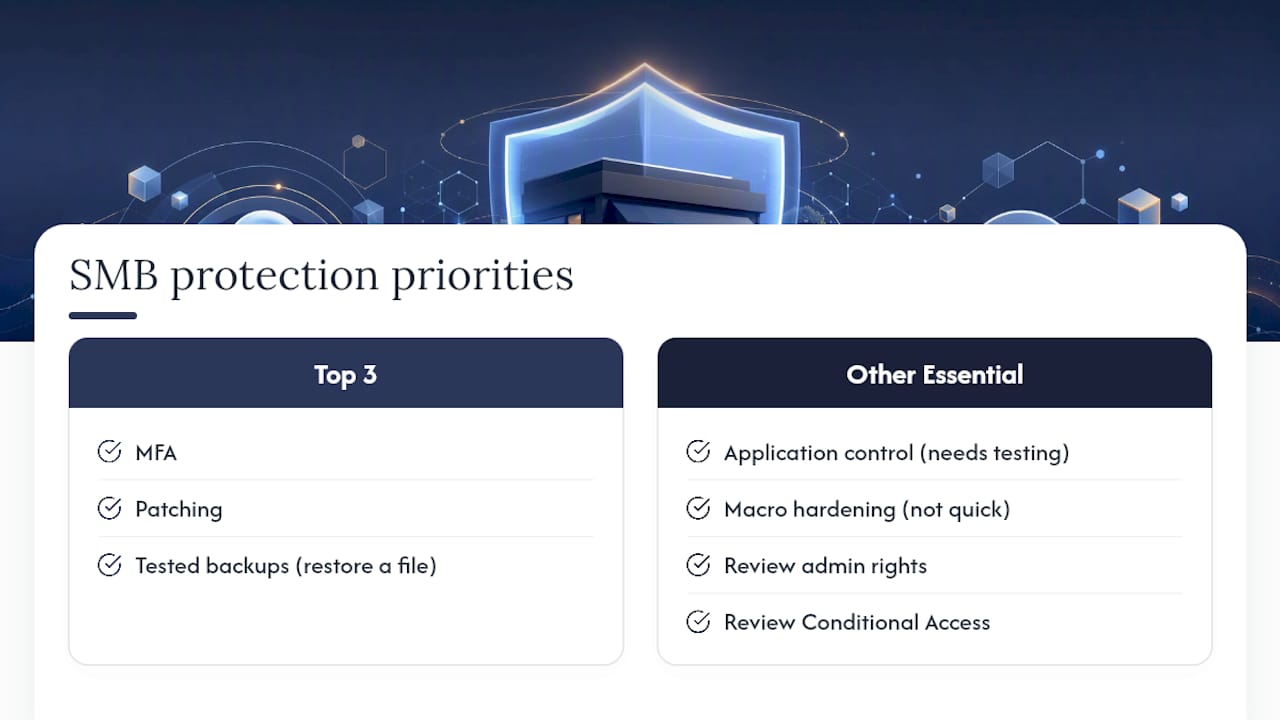
The conventional advice oversells application control and macro hardening as quick wins. They’re not quick. They need proper testing before rollout or you’ll break line-of-business software the week you deploy them, and we’ve had to walk that back for clients before. What gets undersold is the boring stuff: reviewing who has admin rights, actually opening a backup and restoring a file from it, checking Conditional Access instead of trusting a setting you turned on two years ago and never revisited.
If you take one thing from this, it’s that a checklist item without evidence isn’t done. It’s a guess with a tick next to it.
— Matt
Get your checklist gaps fixed properly
Reading a checklist is one thing. Knowing which of your own accounts don’t have MFA, whether your last backup would actually restore, and who still has admin rights they shouldn’t, is another. We run security assessments that produce a scored, evidence-based report against the Essential Eight, not a generic PDF.
Our Cyber Security services cover vulnerability assessments, MFA rollout through Conditional Access, patch management, and Microsoft 365 hardening. If your backups need a proper offsite or immutable setup and an actual restore test schedule, our Cloud Services team handles that too. Book a security assessment and we’ll hand you the same kind of scored checklist covered above, filled in for your business, with the evidence attached. Get in touch and we’ll tell you straight where you stand.
Sources
The core recommendations here come from the Essential Eight maturity model, which sets out the four maturity levels and the evidence expected at each. The ACSC Small Business Cyber Security Guide covers MFA, patching, and backup basics in plain language, and Practical Cyber Security Tips for Business Leaders is worth a read for anyone in a leadership role who handles payments or sensitive data directly. For risk-based prioritisation across all these controls, our risk assessment checklist breaks it down further.
- ACSC small business cyber security guide (PDF)
FAQ
What are the Essential Eight cyber security controls?
The Essential Eight are application control, patching applications, configuring Microsoft Office macro settings, user application hardening, restricting administrative privileges, patching operating systems, multi-factor authentication, and regular backups, as defined by the Australian Signals Directorate.
What is the ISO 27001 checklist?
ISO 27001 is a globally recognised framework for information security management, covering risk assessment, security policies, asset management, access control, and continual improvement processes. It’s a broader governance framework than the Essential Eight, which is a more prescriptive set of technical mitigation strategies suited to SMBs starting from scratch.
What is a cyber security checklist?
A cyber security checklist is a structured list of controls and checks a business uses to verify its protections are actually working, covering things like MFA, patching, backups, and access control, backed by evidence rather than assumption.
How do I know if my business meets Essential Eight Maturity Level One?
Score each of the eight controls against documented evidence, such as patch reports, MFA enforcement screenshots, and backup restore logs. Your overall maturity level is set by your weakest-scoring control, not the average across all eight.
Can IT Start help implement an Essential Eight baseline?
Yes. IT Start runs security assessments for Brisbane businesses that score current maturity against the Essential Eight and deliver a scoped remediation plan through its Cyber Security services.