
Six things matter more than anything else this October: enable MFA everywhere, install every pending update, verify your backups actually restore, switch to passphrases instead of passwords, run a basic phishing test, and appoint one person to own the whole campaign. That’s it. Everything else is decoration.
Honestly, we see businesses spend weeks planning trivia nights and poster competitions while their backup jobs have been silently failing for three months. Get the six things above sorted first, then have fun with the rest.
A one-paragraph campaign plan that works for most SMBs: Week 1 is technical triage (MFA, patching, backup verification), Week 2 is a phishing simulation plus a short staff briefing, Week 3 is a passphrase and device hygiene push, and Week 4 wraps up with results, a leaderboard, and a plan for next year. That’s the whole skeleton. You can hang creative activities off it, but the bones don’t change.
Starter tasks your whole team can knock out in a day:
- Turn on MFA for email and any cloud apps that support it
- Check when your device last installed updates and force it if overdue
- Ask IT to confirm the last successful backup restore test and its date
- Swap one shared or weak password for a four-word passphrase
- Report one suspicious email you’ve seen recently, even an old one
Pro Tip: The biggest stumbling block we see in SMBs isn’t lack of awareness, it’s assuming someone else already did the boring technical stuff. We’ve walked into businesses where every staff member believed IT had “sorted MFA months ago” and nobody had. Assign an owner to each task above, not just a team.
Key Takeaways
The most effective Cybersecurity Awareness Month campaigns pair three technical fixes, MFA, patching, and tested backups, with short weekly engagement activities and a named campaign owner.
| Point | Details |
|---|---|
| Fix the big three first | Enforce MFA tenant-wide, clear the patch backlog, and test a real backup restore before anything else. |
| Assign one campaign owner | A named champion keeps weekly themes, templates, and results tracking from stalling. |
| Sequence, don’t stack | Roll out MFA before restricting admin access, and space technical changes apart from phishing tests. |
| Track five simple KPIs | MFA enrolment, patch rate, backup test success, phishing click rate, and participation are enough. |
| Get MSP support if stretched | IT Start runs MFA rollouts, patch management, backup verification, and phishing simulations for SMBs. |
Table of Contents
- Cyber security month tips: how to plan your campaign
- Core technical actions: the three that actually matter
- Engagement ideas: activities you can actually run
- Templates you can copy and where to publish them
- Measuring your campaign: what to actually track
- Who needs to say yes: leadership and roles
- Two checklists you can print today
- What we see when SMBs run this without a plan
- Thirty ideas your staff will actually engage with
- What we’d actually run if it were our business
- How IT Start supports your cyber security month
- Where to read more
- Sources
- FAQ
Cyber security month tips: how to plan your campaign
Picking a goal before you pick activities saves you from running a fun but pointless month. The Australian Signals Directorate’s prioritised mitigation strategies give a useful frame here: patching, MFA, admin restriction and backups sit at the top for a reason, so your goal should tie back to one of those.
Good goals are measurable. Increasing MFA enrolment significantly beats general goals like “improve awareness”. Other solid options include reducing phishing simulation click rates substantially, patching laptops promptly, or confirming successful backup restore tests for critical systems.
Your messaging needs to differ by audience. Staff need practical, personal-stakes messaging. Contractors need scoped access reminders and a quick refresher on reporting lost devices. Customers, if you message them at all, need a short reassurance note about what you’re doing to protect their data, not a technical lecture.
A four-week structure with weekly themes keeps momentum without overwhelming anyone. National campaigns use a similar approach, rotating themes like legacy technology and supply chain risk to keep messaging fresh.
| Week | Theme | Main activity |
|---|---|---|
| 1 | Lock the front door | MFA rollout push, patch sweep |
| 2 | Spot the fake | Phishing simulation, reporting drill |
| 3 | Clean house | Passphrase swap, device and app audit |
| 4 | Prove it works | Backup restore test, results wrap-up |
For a business with 10 to 50 staff, this doesn’t need a budget line. A phishing simulation tool, if you don’t already have one through your Microsoft 365 tenant, is often the only real cost, and even that can be run manually with a test email and a spreadsheet.
Pro Tip: Don’t launch MFA and a phishing test in the same week. We’ve done this and it backfires. Staff get confused about what’s real, what’s a drill, and what’s just IT rolling out new logins. Space the technical changes and the tests apart by at least a week.
Core technical actions: the three that actually matter
Everything else in a cybersecurity month is engagement dressing. The controls that stop real incidents are patching, MFA, and backups that you’ve actually tested. This isn’t opinion, it’s what ASD’s mitigation strategies rank at the top, and it lines up with what ACSC’s small business guide tells businesses to fix first.
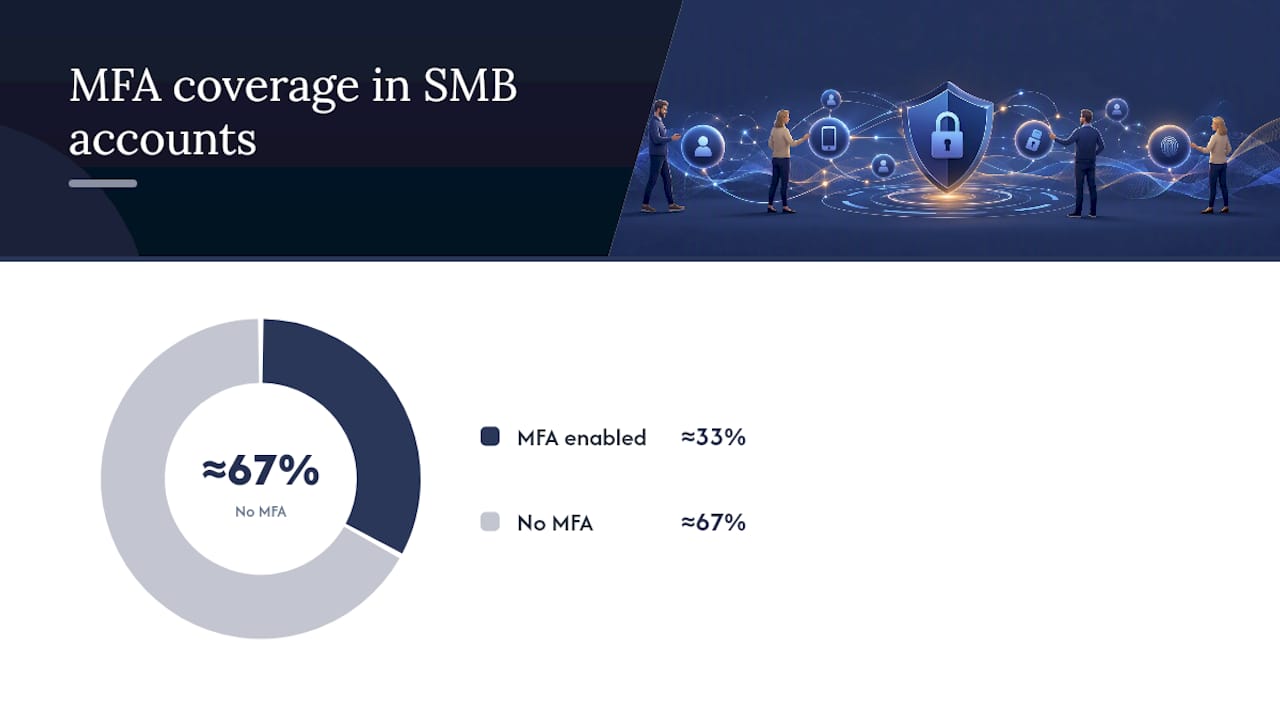
MFA everywhere possible is the single highest-value fix we make in a new client’s environment. Most SMBs we onboard have MFA enabled for maybe a third of accounts, usually just the ones IT set up personally. The rest, especially older staff accounts and shared mailboxes, are wide open. In Microsoft 365, this means enforcing Conditional Access or Security Defaults tenant-wide, not just nudging people to turn it on individually.
Updates are the second lever, and the one businesses are laziest about. Deferred Windows updates and unpatched line-of-business apps are still a common way in. We push a prompt patch cadence for workstations and as quickly as possible for anything internet-facing. It’s not glamorous work but it closes real gaps.
Backups are where the gap between belief and reality is widest, so legal teams can refer to our cybersecurity guide for legal professionals to better protect client data. We ask new clients “are you backed up?” and almost everyone says yes. Then we check, and the backup job has been failing quietly for weeks, or it’s backing up the wrong folder, or nobody has ever tested a restore. ASD recommends keeping backups offline for at least three months and testing restores at defined intervals, not just trusting the green tick in a dashboard.
A short checklist with owners assigned:
- IT owner: enforce MFA tenant-wide, confirm no exceptions for legacy accounts
- IT owner: check patch compliance report, chase any overdue devices
- Campaign champion: schedule a real restore test, not just a backup status check
- Everyone: swap any weak password for a passphrase
Pro Tip: Sequence matters more than people think. Roll out MFA before you tighten admin restrictions, otherwise you lock yourself out of your own tenant. We’ve fixed this exact mess for a client at 7pm on a Friday. Do MFA first, test it, then move to the next control.
Engagement ideas: activities you can actually run
Pick activities based on how much time and energy you’ve got that week, not on what looks impressive. Group them by effort and you’ll never run out of ideas.
Five-minute tips work well dropped into a Monday morning Teams channel or standup:
- Share one Yale-style monthly tip each morning, read aloud in standup
- Post a “spot the fake” screenshot of a real phishing email in a team channel
- Ask one person each day to show their passphrase strength (not the actual passphrase)
- Run a 60-second quiz question in a team chat with a small prize
- Share a “this week in cyber incidents” headline with one takeaway line
Thirty-minute workshops suit a lunch-and-learn format:
- Walk through setting up MFA together on personal devices, not just work accounts
- Run a live “build a passphrase” session using the four-random-words method
- Have IT demonstrate what a real phishing email looks like in your actual inbox
- Do a group review of everyone’s home Wi-Fi security settings
Half-day events need more planning but pay off in engagement:
- Run an internal “capture the flag” style quiz with cyber trivia and prizes
- Host a guest talk from your MSP or a local cyber security specialist
- Set up a “security clinic” desk where staff can get personal device help
- Run a department-versus-department phishing click rate competition
Month-long challenges build habit rather than a one-off spike:
- A leaderboard tracking who reports the most suspicious emails (real ones, correctly flagged)
- A “streak” tracker for consecutive days of MFA prompts completed without skipping
- A badge system: bronze for MFA enabled, silver for passphrase swapped, gold for reporting a phish
Gamification doesn’t need a fancy platform. A shared spreadsheet with a leaderboard tab and a $50 gift card at month’s end works fine for a 30-person business. We’ve seen this beat expensive platforms because people actually check a spreadsheet their manager updates personally.
Phishing simulations don’t need enterprise tooling either. If your Microsoft 365 tenant includes Defender for Office 365 Plan 2, you likely already have Attack Simulator built in. If not, a manually sent test email from a lookalike domain, tracked in a spreadsheet, tells you almost as much. The point isn’t catching people out, it’s giving them a safe example to recognise next time.
Templates you can copy and where to publish them
Consistent messaging beats clever messaging. Reuse the same voice across email, intranet and social so staff recognise campaign content immediately.
Launch email: “This October we’re running Cyber Security Awareness Month. Over four weeks you’ll get short tips, one phishing test, and one prize draw for participation. First up: check you have MFA enabled, here’s how.” Keep it under 100 words.
Weekly reminder email: “Week 2 focus: spotting phishing. Watch for a test email this week, report anything suspicious to [IT contact], and check the leaderboard for this week’s top reporters.”
Wrap-up email: “Cyber Security Awareness Month is done. MFA enrolment went from X% to Y%. Thanks to everyone who reported a phishing test. Here’s what happens next.”
Social post template (for internal Yammer, Slack, or Teams): “🔒 Quick one: is your MFA turned on? Takes 2 minutes, stops most account takeovers cold. Check now: [link].”
Poster text, sized for A4 or a digital screen: “FOUR WORDS. FIFTEEN CHARACTERS. ZERO GUESSING. Your new passphrase beats your old password every time.”
A simple 10-minute all-staff slide outline:
- Slide 1: why this month matters (one real, anonymised local incident stat)
- Slide 2: the three things we’re asking everyone to do
- Slide 3: what a real phishing email looks like in our inbox
- Slide 4: how to report something suspicious
- Slide 5: what’s happening each week and where the leaderboard lives
Send weekly reminders on the same day and time each week. Track open rates if your email platform supports it. A drop-off after week one usually means the content got too technical too fast. Pull it back to plain language.
Measuring your campaign: what to actually track
You don’t need a dashboard tool for this. A shared spreadsheet with five rows will tell you everything that matters.
| KPI | How to measure | Good result after 4 weeks |
|---|---|---|
| MFA enrolment | M365 admin centre report | most accounts |
| Patch completion | Endpoint management report | prompt patch cadence |
| Backup restore test | Manual log, date and outcome | At least one successful full test |
| Phishing click rate | Simulation tool or manual tracking | Drop from baseline, even 10% |
| Event participation | Attendance or spreadsheet sign-in | Majority of staff touched one activity |
Collect this manually if you have to. A spreadsheet updated weekly by the campaign champion beats a fancy dashboard nobody checks.
Pro Tip: With small headcounts, one bad week skews your numbers hard. If 12 out of 15 staff click a phishing test link, don’t panic and don’t read it as a training failure. Small sample sizes are noisy. Look at the trend over the month, not one data point.
Who needs to say yes: leadership and roles
Nothing kills a campaign faster than IT running it alone with no exec visibility. You need four roles covered, even in a 15-person business.
| Role | Responsibility |
|---|---|
| Campaign lead | Owns the timeline, chases activity completion |
| Comms | Sends templated emails, posts, manages the leaderboard |
| IT owner | Handles MFA, patching, backup verification, phishing test setup |
| Incident contact | Named person staff report suspicious activity to |
A short email to a manager works better than a meeting: “We’re running a four-week cyber awareness push in October. It needs about an hour a week from staff and a small prize budget, maybe $100 total. Can I get your sign-off?” Most managers say yes when the ask is that specific.
Common pushback is “we don’t have time.” The rebuttal that lands: a phishing test costs nothing but sending one email, and MFA rollout is a one-time setup, not an ongoing time cost.
Two checklists you can print today
Two-week sprint (low capacity teams):
- Day 1: Enable MFA tenant-wide, notify staff
- Day 3: Confirm patch compliance report, chase overdue devices
- Day 5: Verify one backup restore test
- Week 2, Day 1: Send phishing test
- Week 2, Day 5: Share results, thank participants
Four-week campaign milestones:
- Week 1: MFA and patching complete, notify IT and execs of baseline numbers
- Week 2: Phishing test sent and results logged, notify managers of team-level click rates
- Week 3: Passphrase and device audit complete, HR notified if policy updates are needed
- Week 4: Backup restore confirmed, results shared with execs, plan logged for next year
Notify IT before any technical change goes out, notify HR if you’re updating password policy, and notify execs at the start and the end, not every week in between.
What we see when SMBs run this without a plan
The businesses we onboard mid-year almost always have the same three gaps: inconsistent MFA, unmanaged devices, and nobody who’s actually tested a backup restore. This tracks with what other MSPs report seeing across mid-size Australian businesses too. It’s not a coincidence, it’s the pattern.
One recent example: a 22-person business believed they were fully backed up because a green tick appeared in their backup software dashboard every night. When we tested the restore, half the files came back corrupted. The job had been backing up a folder that hadn’t been the active file location for eight months. Nobody had checked in over a year.
What most businesses get wrong, in order:
- Assuming a backup exists because a tool says it ran
- Rolling out MFA for new hires but never going back to fix legacy accounts
- Letting personal devices connect to company email with zero management
- Treating a cyber awareness month as a poster campaign instead of a technical audit
Our typical run sheet with a new SMB client looks like this: week one is a risk assessment to find the gaps, week two is MFA and patching remediation, week three is backup verification with an actual restore test, and week four is staff training tied to whatever we found. It’s the same skeleton as the campaign plan above because, honestly, it works whether you’re running an awareness month or just fixing a mess.
Pro Tip: Don’t try to fix everything in one sprint. We’ve seen internal IT teams attempt MFA, a full device audit and a policy rewrite in the same fortnight, and something always breaks. Sequence it: identity first, then devices, then policy.
Thirty ideas your staff will actually engage with
Grouped roughly by format so you can pick fast: quizzes (trivia on real incidents, “spot the phish” screenshots, password strength guessing games), challenges (reporting streaks, department leaderboards, MFA enrolment races), workshops (home network security, passphrase building, social media privacy checkups), visual campaigns (posters in kitchens and bathrooms, screensaver rotations with tips, digital signage on office TVs), and low-effort daily nudges (a tip in the morning standup, a “this happened to a real business” story, a one-question Slack poll).
The common thread across ones that actually work: they take under 10 minutes, tie to something staff already do daily, and have a visible result (a leaderboard, a badge, a shared win). Activities that fail tend to be the opposite: hour-long mandatory training sessions, generic slide decks with no local relevance, or anything that feels like a compliance tick-box.
What we’d actually run if it were our business
If you’re short on time, skip the elaborate campaign and run the two-week sprint. MFA, patching, one phishing test, one backup restore check. That covers most of the risk that actually matters for a 10 to 50 person business.

Our first-two-weeks priority list: enforce MFA tenant-wide, clear the patch backlog, test one backup restore, send one phishing test email. In that order.
We recommend this sequence because it mirrors what actually causes incidents in the businesses we support. Nobody gets breached because they skipped a trivia night. They get breached because of a legacy account with no MFA, or a backup that was never real.
How IT Start supports your cyber security month
Running the technical side of a campaign alone is where most SMBs stall. IT Start handles the parts that actually reduce risk: tenant-wide MFA rollouts, patch management so devices don’t sit exposed for months, backup verification with real restore testing, and phishing simulations you don’t have to build from scratch. We also help small teams plan and sequence the whole month so nothing breaks a live workflow halfway through.
If you want a hand running this October’s campaign, or you’re not sure whether your backups would actually restore if you needed them, get a cyber security health check with our team. It’s a practical, no-jargon look at where your gaps sit, and what order to fix them in.
Where to read more
- Cyber for official campaign priorities and passphrase standards
- ASD’s mitigation strategies for the full prioritised control list
- ACSC’s small business guide for starter checklists and Essential Eight maturity levels
- CISA’s awareness month toolkit for downloadable campaign templates
- Yale Cybersecurity’s tip library for bite-sized microlearning content
Sources
- Cyber
- Cyber
- Cyber
- Cybersecurity Awareness Month toolkit | CISA
- Monthly tip library | Yale Cybersecurity
FAQ
What are some tips for Cybersecurity Awareness Month?
Enable MFA everywhere, install pending updates, verify your backups with a real restore test, switch to passphrases, run a phishing simulation, and appoint one campaign owner to keep it all on track.
What are the 5 C’s of cyber security?
Definitions vary across sources and no single canonical version dominates, so it’s more useful to focus on proven priorities like MFA, patching, and tested backups than to chase a specific acronym.
What are the 10 recommended tips for cyber security?
There’s no single official “top 10” list, but ASD’s prioritised mitigation strategies and ACSC’s small business guide both centre on the same core actions: MFA, patching, restricted admin access, and tested backups, expanded with staff training and phishing awareness.
Can I make $200,000 a year in cyber security?
Senior cyber security roles in Australia can reach that range with the right experience and specialisation, though salaries vary widely by role, seniority, and location, and this isn’t something the article’s research covers in detail.
How long should a Cybersecurity Awareness Month campaign run?
A tight two-week sprint covers the highest-risk technical fixes, while a full four-week campaign adds weekly themes, a phishing simulation, and measurable engagement activities for teams with more capacity.