
The single most important thing you can do right now is turn on multi-factor authentication (MFA) for every account that touches your business data. After that, follow the Australian Signals Directorate’s Essential Eight as your baseline. Everything else in this guide builds on those two starting points.
Do these three things in the next 24-72 hours:
- Enable MFA on Microsoft 365, email, and any cloud accounting or banking platform
- Verify your backups actually exist and can be restored (not just that the backup software is running)
- Stop using shared admin accounts — every administrator needs their own named account
Pro Tip: If a supplier emails you with new bank details or an updated invoice, never pay it without calling them back on a number you already have saved. Do not use the number in the email. This one step stops most business email compromise (BEC) losses.
Key takeaways
The most effective cyber risk mitigation strategy for an Australian SMB is to implement the ASD Essential Eight controls in priority order, starting with MFA, patching, and verified backups.
| Point | Details |
|---|---|
| Start with MFA | Enable multi-factor authentication on all cloud accounts and email before any other control. |
| Follow the Essential Eight | ASD’s Essential Eight is the accepted Australian baseline for internet-connected IT networks. |
| Test your backups | Confirm restores work at least annually and after any infrastructure change; sync is not a backup. |
| Assign ownership | Each Essential Eight control needs a named owner and a review date or it will not get done. |
| IT Start assessment | IT Start offers Essential Eight assessments and 90-day remediation plans for Brisbane SMBs. |
Table of Contents
- What cyber risk mitigation actually means for an Australian SMB
- The Essential Eight explained: what each control does
- How to prioritise and sequence the controls
- Low-cost, high-impact steps you can implement now
- How to check where you are now
- Practical incident response and recovery
- What we see in the field: common mistakes and how to fix them
- Cyber insurance as part of your risk strategy
- Australian regulatory compliance beyond the Essential Eight
- Network segmentation: limiting how far a breach can spread
- What I think most SMBs are getting wrong
- How IT Start helps Brisbane SMBs get their security sorted
- Sources
- FAQ
What cyber risk mitigation actually means for an Australian SMB
Cyber risk mitigation is the set of actions you take to reduce the chance of a cyber incident happening and to limit the damage if it does. For a business with 10 to 50 staff, that is not about buying a $50,000 security platform. It is about closing the gaps that attackers actually exploit: weak passwords, unpatched software, no MFA, and backups that nobody has ever tested.
In Australia, the ACSC recommends three starter actions for small businesses: enable MFA, update your software, and back up your information. Simple. But most SMBs we work with have not done all three consistently.
The authoritative baseline for Australian organisations is the ASD Essential Eight. It applies to internet-connected IT networks and is the framework the Australian government uses to assess its own agencies. It is not mandatory for private SMBs, but it is the most practical, well-supported starting point available.
One important scope note: the Essential Eight is designed for standard IT networks. It does not directly address operational technology (OT) environments or industrial control systems, which have their own guidance.
The Essential Eight explained: what each control does
The Essential Eight Maturity Model gives you objective criteria to measure where you are and what to fix next. Here is what each control does in plain terms.
- Patch applications. Keep office software, browsers, and third-party apps updated. ASD guidance calls for patching extreme-risk vulnerabilities within 48 hours of a patch being available. For everything else, two weeks is the target.
- Patch operating systems. Same principle, applied to Windows, macOS, or Linux. Unsupported operating systems should be replaced or isolated from the network.
- Multi-factor authentication. Require a second verification step for all remote access, admin accounts, and cloud services. This is the single highest-return control for most SMBs.
- Restrict administrative privileges. Admin accounts should only be used for admin tasks. Standard users should not have local admin rights on their own machines.
- Application control. Only allow approved applications to run. This stops most malware cold, but it requires upfront effort to build and maintain an approved list.
- Restrict Microsoft Office macros. Macros in Office documents are a common malware delivery method. Block macros from the internet and only allow signed macros from trusted sources.
- User application hardening. Disable web browser features like Flash and Java that are rarely needed and frequently exploited. Configure browsers to block ads and malicious scripts.
- Regular backups. Back up important data, software, and configuration settings. Store at least one copy offline or disconnected. ASD recommends at least three months’ retention for important data and testing restores initially, annually, and whenever infrastructure changes.
Pro Tip: Do not roll out application control to your whole business in one go. Start with your highest-risk users (finance, HR, directors) and run in audit mode for two weeks before enforcing. This catches legitimate software you forgot about and avoids a flood of helpdesk calls on day one.
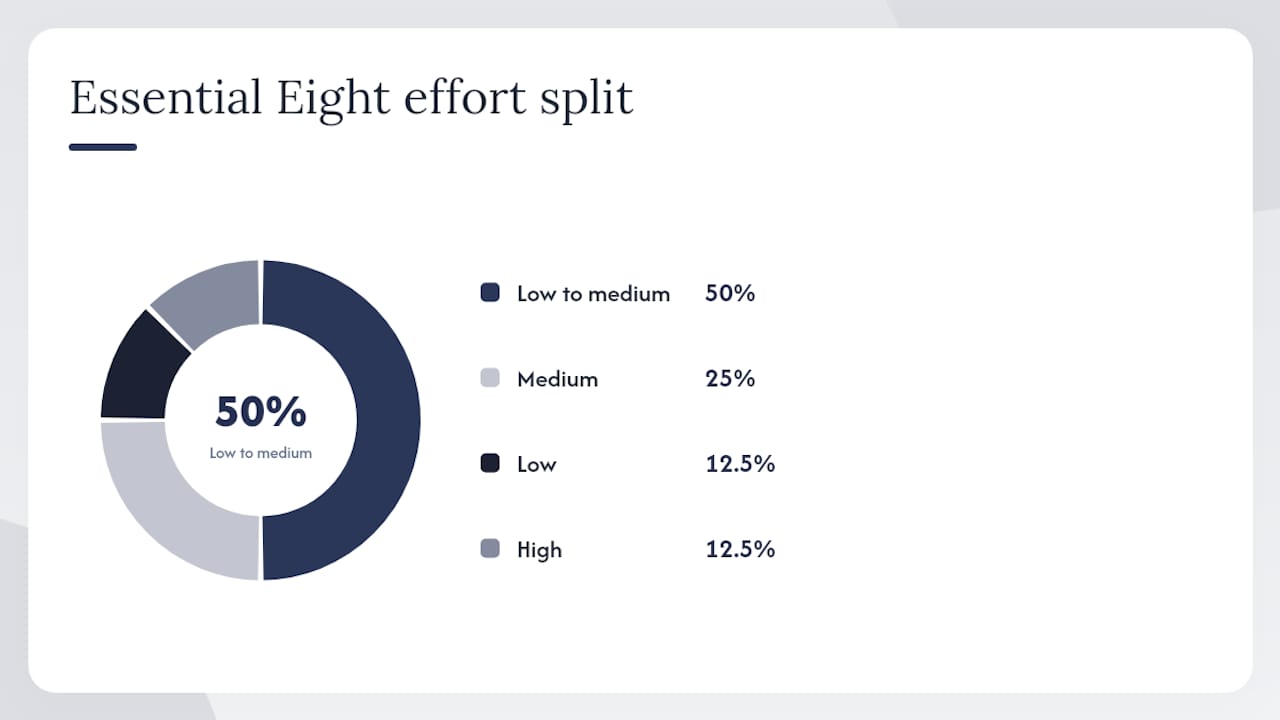
| Essential Eight control | Primary threat mitigated | SMB effort to implement |
|---|---|---|
| Patch applications | Exploitation of known vulnerabilities | Low to medium |
| Patch operating systems | Exploitation of OS vulnerabilities | Low to medium |
| Multi-factor authentication | Credential theft, account takeover | Low |
| Restrict admin privileges | Privilege escalation, lateral movement | Medium |
| Application control | Malware execution | High |
| Restrict macros | Macro-based malware | Low to medium |
| User application hardening | Browser and plugin exploits | Medium |
| Regular backups | Ransomware, data loss | Low to medium |
How to prioritise and sequence the controls
ASD’s mitigation strategies guidance categorises controls by their effectiveness against different threat types: targeted intrusions, ransomware, and malicious insiders. For most SMBs, the practical sequence below reflects that priority order while accounting for the reality that you have limited time and budget.
Three timeline bands for implementation:
- Immediate (0-7 days): Enable MFA on all cloud services and email. Audit who has admin rights and remove any that are not needed. Verify backups are running and test one restore.
- Short term (2-8 weeks): Set up automated patching for applications and operating systems. Enforce a policy that blocks macros from internet-sourced documents. Start a software inventory so you know what is installed.
- Medium term (3-6 months): Deploy application control starting with high-risk users. Harden browser configurations. Document your incident response plan and run a tabletop exercise.
The Essential Eight Maturity Model uses four levels: Maturity Level Zero (not implemented), Maturity Level One (partially implemented), Maturity Level Two (substantially implemented), and Maturity Level Three (fully implemented). Most SMBs we assess sit at Level Zero or Level One across most controls. Getting to Level Two across MFA, patching, and backups is a realistic 90-day goal for a business with 20 staff.
First 90-day checklist:
- Enable MFA for all Microsoft 365 and cloud accounts
- Remove unnecessary admin rights from standard user accounts
- Confirm automated patching is active for Windows and Office
- Block internet-sourced macros via Microsoft 365 policy
- Verify backup coverage and test a restore
- Document who is responsible for each control
- Brief staff on phishing and BEC risks
Escalate to an MSP or MSSP when: you cannot identify who owns each control, your critical systems are directly internet-facing with no monitoring, or you have had a security incident and do not have a tested response plan.
Low-cost, high-impact steps you can implement now
MFA rollout
Start with your highest-risk accounts: Microsoft 365 admin, email, accounting software, and any remote access tool. Use the Microsoft Authenticator app as the default method. Avoid SMS codes where possible because SIM-swapping attacks can intercept them.
For staff who lose their phone or travel frequently, set up a backup authentication method (a hardware token or a secondary email address) before you enforce MFA, not after. We see this a lot: businesses turn on MFA and then get locked out of their own admin account on a Friday afternoon.
Patching routine
Set Windows Update to download and install automatically. For third-party software, use a patch management tool or check manually on a weekly schedule. When a vendor stops supporting software, you have two options: replace it or isolate it from the rest of your network. Leaving an unsupported application connected to the internet is not a valid third option.
Backup checklist
- At least one copy stored offline or in a separate cloud tenant the primary account cannot access
- Retention of at least three months for critical data
- Test restores at least once per year and after any major infrastructure change
- Confirm that cloud-synced folders (OneDrive, SharePoint) are not your only backup — sync deletes files in both directions
Payment verification script
When you receive an email requesting a change to bank details or payment instructions, call the supplier back using a number from your existing records or their official website. Say: “We received an email about a change to your payment details. Before we update anything, I am calling to confirm this is legitimate.” That is it. Business Victoria recommends this out-of-band verification as the primary defence against BEC losses.
Budget expectations
For a 20-person business, expect to spend roughly $50-$150 per user per month for a managed security service that covers MFA, patching, endpoint protection, and backup monitoring. Doing it yourself with Microsoft 365 Business Premium plus a backup tool is cheaper but requires someone to own it internally. Neither option is free, and the cost of a ransomware incident is always higher.
Pro Tip: Microsoft 365 Business Premium includes Defender for Business, Intune, and Azure AD Premium at no extra cost. If your business is already paying for Business Standard, upgrading to Premium is often the highest-return security spend available.
How to check where you are now
A self-audit does not need to be complicated. Work through these questions mapped to the Essential Eight controls:
- Do all staff use MFA for email and cloud services? (MFA)
- Are Windows and Office set to update automatically? (Patching)
- Does anyone other than IT staff have local admin rights? (Admin privileges)
- Can you name every application installed on your network? (Application control)
- Are macros blocked for documents downloaded from the internet? (Macro restriction)
- Do you have a backup that is stored separately from your main systems? (Backups)
- When did you last test a restore? (Backups)
If you answered “no” or “I don’t know” to more than two of these, you have immediate gaps to close.
Business Queensland’s cyber security guidance points to two free resources worth using: the Cyber Wardens programme (free online training for small business staff) and the ACSC alert service (email alerts when new threats emerge). Both are free and take less than an hour to set up.
For a more formal picture, an Essential Eight maturity assessment gives you a scored baseline against each control and maturity level. Expect this to take half a day with an MSP and to produce a prioritised remediation list. The assessment process involves interviews, configuration reviews, and evidence collection — it is not just a questionnaire.
| Assessment type | Cost | What you get | When to use it |
|---|---|---|---|
| Self-audit checklist | Free | Gap list, no scoring | Starting point, any time |
| ACSC Cyber Health Check | Free | Basic posture snapshot | Before engaging an MSP |
| Essential Eight maturity assessment | Paid (MSP) | Scored maturity level per control | Before a compliance requirement or after an incident |
Engage an MSP when you cannot answer basic questions about your own environment, when the same security issues keep recurring, or when a key staff member who managed IT has left.
Practical incident response and recovery
Every SMB needs at least a one-page incident response plan. Here is the minimum viable version.
Immediate containment (first 30 minutes):
- Isolate the affected machine from the network — unplug the network cable or disable Wi-Fi
- Do not turn it off (this can destroy forensic evidence)
- Change passwords for any accounts that may have been accessed, starting with admin accounts
- Preserve logs: take screenshots and note what you observed and when
Communication and escalation:
- Call your bank immediately if financial accounts may be compromised
- Report to the ACSC via ReportCyber (reportcyber.gov.au) — this is free and confidential
- Notify affected customers if personal data was accessed (see Privacy Act obligations below)
- Assign one person to manage internal communications so staff get consistent information
Backup restore and recovery:
- Confirm the backup is clean (pre-dates the incident) before restoring
- Test the restore in an isolated environment first if possible
- Document what was restored, when, and by whom
MITRE’s cybersecurity frameworks support threat-informed detection and hunting, which helps you understand what the attacker may have done before you detected them. This matters for recovery because you need to know whether the attacker established persistence before you restore.
Cyber insurance fits here as a financial backstop, not a prevention strategy. Your insurer may also provide incident response support as part of the policy. Keep your policy number and the insurer’s incident hotline in your response plan.
For a full business continuity plan that covers cyber incidents alongside other disruptions, document your recovery time objectives (how long you can be down) and recovery point objectives (how much data you can afford to lose) before an incident, not during one.
What we see in the field: common mistakes and how to fix them
Honestly, the gap between what businesses think their security looks like and what it actually looks like is significant. CommBank’s 2024 research found that 78% of small business owners observed bad habits among their staff that create security vulnerabilities. Nearly 7 in 10 SMB owners saw team members create documents that are never backed up.
The most common mistakes we see:
- No MFA on email. Staff use the same password for their work email and personal accounts. One breach of a third-party site exposes the business email.
- Shared admin accounts. Three people know the password to “admin@company” and nobody knows who last changed it or what they did with it.
- Sleep mode instead of restart. Many staff believe sleep mode applies updates. It does not. Patches require a full restart, and staff who avoid restarting leave machines exposed for weeks.
- Out-of-office replies that overshare. “I am away until 15 March, contact my colleague Jane Smith at jane@company.com for urgent matters” tells an attacker exactly who to impersonate and who to target.
- OneDrive as the only backup. Sync is not a backup. If ransomware encrypts your files, OneDrive syncs the encrypted versions.
Remediation templates you can copy:
Admin account revalidation checklist: List every account with admin rights. For each one, confirm the person still works there, still needs admin access, and has a separate standard account for daily tasks. Remove access for anyone who fails any of those checks.
Out-of-office policy snippet: “I am currently out of the office. For urgent matters, please contact [team inbox or main phone number].” No names, no direct email addresses for colleagues.
| Common mistake | What goes wrong | Fix |
|---|---|---|
| No MFA on email | Credential stuffing gives attacker full email access | Enable MFA in Microsoft 365 admin centre |
| Shared admin accounts | No audit trail, no accountability | Create individual named admin accounts, disable shared ones |
| Sleep mode only | Patches never install | Set Windows Update to install on restart; enforce weekly restart policy |
| OneDrive as sole backup | Ransomware encrypts and syncs | Add a separate backup tool with offline or immutable storage |
| Overshared out-of-office | Attacker knows who to impersonate | Use generic contact details only |
For staff training on cybersecurity habits, the Cyber Wardens programme is a practical free starting point, but it needs to be reinforced with internal policy and regular reminders. Training alone does not change behaviour without enforced process.
Cyber insurance as part of your risk strategy
Cyber insurance does not prevent attacks. What it does is transfer some of the financial risk of an incident to an insurer, which matters when a ransomware event or BEC loss could otherwise threaten the business’s survival.
For Australian SMBs, a cyber insurance policy typically covers incident response costs, legal fees, notification costs (required under the Privacy Act when a data breach occurs), business interruption losses, and sometimes ransom payments. Premiums vary significantly based on your industry, revenue, and security posture. Insurers increasingly require evidence of MFA and patching before offering coverage or competitive pricing.
The practical implication: implementing the Essential Eight controls is not just good security practice. It directly affects your insurability and your premium. Businesses with no MFA and no documented patching process are either declined or quoted at much higher rates.
Cyber insurance works best as the last layer of a risk strategy, not the first. Get your controls in place, then use insurance to cover the residual risk you cannot eliminate. Keep your policy documents and the insurer’s incident hotline accessible offline, because if ransomware hits, you may not be able to access your email.
Australian regulatory compliance beyond the Essential Eight
The Essential Eight is a security framework, not a legal compliance requirement for most private SMBs. But several Australian laws create obligations that directly affect your cyber security measures.
Privacy Act 1988 and the Notifiable Data Breaches scheme. If your business has an annual turnover above $3 million, or handles health information, credit information, or certain other sensitive data, you are covered by the Privacy Act. Under the Notifiable Data Breaches (NDB) scheme, you must notify the Office of the Australian Information Commissioner (OAIC) and affected individuals when a data breach is likely to cause serious harm. Failing to notify can attract significant penalties.
Security of Critical Infrastructure Act 2018. If your business operates or supports critical infrastructure (energy, water, communications, financial services, and others), you have additional obligations under this Act, including incident reporting to the ASD.
Industry-specific requirements. Healthcare providers must comply with the My Health Records Act. Financial services businesses face APRA’s CPS 234 standard, which sets information security requirements for regulated entities. Legal practices handling sensitive client data have professional obligations that align closely with the Privacy Act. For legal practices specifically, a website security checklist tailored to the sector covers the specific data protection considerations that apply.
The practical starting point for most SMBs is to map what personal data you hold, where it is stored, who can access it, and what you would do if it was breached. That exercise alone surfaces most of the compliance gaps and feeds directly into your cyber risk mitigation plan.
Network segmentation: limiting how far a breach can spread
Network segmentation means dividing your network into separate zones so that if one part is compromised, the attacker cannot freely move to everything else. For a 20-person business, this does not require enterprise-grade hardware. A basic segmented setup separates your staff network, your guest Wi-Fi, and any servers or network-attached storage into different VLANs (virtual local area networks).

The practical benefit: if ransomware infects a staff laptop on the main network, segmentation stops it from immediately reaching your file server or backup storage. Without segmentation, a single compromised machine can encrypt every file the business owns within minutes.
For SMBs, the highest-value segmentation steps are:
- Separate guest Wi-Fi from the staff network (most modern routers support this)
- Put servers and NAS devices on a separate VLAN with firewall rules controlling what can reach them
- Isolate any older or unsupported devices (legacy printers, old point-of-sale terminals) on their own segment
- Restrict which staff accounts can access file shares, rather than giving everyone access to everything
This connects directly to the cybersecurity risks that Brisbane SMEs face most often, where lateral movement after an initial compromise is one of the primary ways a minor incident becomes a major one. Segmentation is one of the most cost-effective ways to limit that spread, and it is often overlooked because it requires network configuration rather than just software installation.
What I think most SMBs are getting wrong
Most of the businesses I work with at IT Start are not failing because they chose the wrong security product. They are failing because nobody owns the problem. The IT person (if there is one) is focused on keeping things running. The owner assumes the IT person has security covered. The IT person assumes the owner has approved a budget for it. Nobody has.
The Essential Eight is genuinely useful precisely because it gives you a named list of controls with a named owner for each. Once you assign a person to each control and set a review date, the accountability gap closes fast. That is the fix I would prioritise before any tool purchase.
The other thing I see consistently: businesses that have been through a phishing incident or a BEC attempt treat it as a one-off bad luck event rather than evidence of a systemic gap. It is not bad luck. It is a gap in MFA, training, or process. The ACSC’s Essential Eight assessment guidance exists precisely to help you find those gaps before an attacker does.
If you are in Brisbane and you want a straight answer about where your business sits against the Essential Eight, that is exactly what IT Start does. No sales pitch on the first call. Just a clear picture of what you have, what you are missing, and what to fix first.
How IT Start helps Brisbane SMBs get their security sorted
IT Start works with Brisbane SMBs across professional services, healthcare, legal, and financial services. Our managed cyber security services cover Essential Eight assessments, Microsoft 365 security configuration, endpoint protection, and backup and disaster recovery. We also manage ongoing patching and monitoring so the controls you put in place stay in place.
A first engagement typically starts with a discovery session to map your current environment, followed by a prioritised list of quick wins we can implement within the first two weeks. From there, we build a 90-day plan with fixed-cost options so you know what you are spending before you commit. Our cloud services include secure backup and patch orchestration that integrates directly with the Essential Eight controls.
If you want to know where your business stands, contact IT Start for a no-obligation security assessment.
Sources
- Bad Habits Research Report (CommBank, 2024)
- Keeping your business cyber secure | Business Queensland
- The essential small business guide to cybersecurity
- Cyber
- MITRE – Cybersecurity focus areas
FAQ
What are the main cyber risk mitigation strategies for Australian SMBs?
The ASD Essential Eight are the accepted baseline: patch applications, patch operating systems, enable MFA, restrict admin privileges, apply application control, restrict macros, harden user applications, and maintain regular tested backups. Start with MFA, patching, and backups for the fastest risk reduction.
What does mitigation mean in cyber security?
Mitigation in cyber security means taking specific actions to reduce the likelihood of a cyber incident occurring and to limit the damage if one does occur. It is distinct from prevention (stopping all attacks) and response (reacting after an attack).
What are three ways to reduce cyber security risk quickly?
Enable MFA on all accounts, apply automated patching for operating systems and applications, and verify that your backups are stored separately from your main systems and can actually be restored. The ACSC recommends these three actions as the starting point for small businesses.
How do the four risk mitigation approaches apply to cyber security?
The four standard risk responses are: accept (tolerate the risk), avoid (stop the activity that creates the risk), transfer (use cyber insurance to shift financial exposure), and reduce (implement controls like the Essential Eight to lower likelihood and impact). Most SMBs need a combination of reduce and transfer, with accept reserved only for low-impact residual risks.
When should an SMB engage a managed security service provider?
Engage an MSP or MSSP when you cannot identify who owns each security control, when the same issues keep recurring after you have tried to fix them, or when critical systems are internet-facing with no active monitoring. A formal Essential Eight maturity assessment is a good starting point for that conversation.