Managed IT services are outsourced IT management where a third-party provider, called a managed service provider (MSP), takes ongoing responsibility for your technology environment under a fixed monthly fee, as explained by Managed IT Services – Mavericks Office Solutions. Rather than calling someone only when things break, an MSP monitors, maintains, and secures your systems continuously. Most small to medium businesses (SMBs) that work with an MSP get a package covering some or all of the following:
- Network monitoring and alerting
- Patch management and software updates
- Endpoint protection and antivirus
- Backup management and restore verification
- Helpdesk and user support
- Cloud services, including Microsoft 365 administration
- Cybersecurity, including firewalls, multi-factor authentication (MFA), and security assessments
The shift from reactive to proactive is the core difference. According to the Australian Cyber Security Centre, an MSP remotely manages a customer’s IT infrastructure on a proactive basis under a subscription model. That proactive stance is what separates a genuine managed service from a glorified helpdesk.
Table of Contents
- How managed IT services work day to day
- What does a managed IT agreement typically include?
- What are the real benefits of managed IT services for SMBs?
- Disadvantages and common misconceptions to watch out for
- Real-world MSP insights: what most businesses get wrong
- How is managed IT priced?
- Questions to ask before you outsource your IT
- What should you expect from a service level agreement?
- Which industries and business sizes benefit most?
- IT Start: managed IT support built for Brisbane SMBs
- Key takeaways
- FAQ
How managed IT services work day to day
The practical reality of managed IT support is less glamorous than the brochures suggest, and that is actually a good thing. Most of the work happens quietly in the background: automated monitoring tools watch your servers, endpoints, and network around the clock, generating alerts when something looks wrong. Your MSP’s team reviews those alerts, patches vulnerabilities before they become incidents, and keeps your systems running without you needing to think about it.
When something does go wrong, your staff log a ticket through a helpdesk portal, email, or phone. The MSP triages it, resolves what it can remotely, and escalates to an on-site visit only when necessary. A well-run MSP also has a defined escalation path so you always know who is handling your issue and at what level.
Onboarding is where the real work starts. A good MSP will spend the first few weeks documenting your environment: what hardware you have, what software is licenced, how your network is set up, and where your data lives. That documentation is the foundation for everything else. Without it, you are just paying for someone to react to problems they do not fully understand.
The ongoing service delivery cycle typically looks like this:
- Daily automated monitoring and alerting
- Weekly patch reviews and deployment
- Monthly reporting on backup restores, patch compliance, and security posture
- Quarterly or annual strategic reviews with a virtual CIO (vCIO) or senior consultant
What does a managed IT agreement typically include?
The scope of a managed IT agreement varies, but there is a baseline most reputable providers cover. Managed IT services commonly include network monitoring, patching, endpoint protection, user helpdesk, cloud management, and cybersecurity assessments under a fixed monthly fee.
Core services you should expect in any decent contract:
- Network monitoring: 24/7 alerting on servers, switches, and firewalls
- Patch management: Operating system and third-party application updates on a defined schedule
- Endpoint protection: Antivirus and anti-malware across all devices
- Backup management: Not just running backups, but actually testing that restores work
- Helpdesk support: A real team your staff can contact when something breaks
- Microsoft 365 administration: User provisioning, licence management, and configuration
Security services that should also be included, or at minimum offered:
- Firewall management and review
- MFA enforcement across all accounts
- Security awareness training for staff
- Periodic security assessments aligned with frameworks like the ACSC Essential Eight
At the more strategic end, some MSPs offer a vCIO service where a senior consultant meets with you regularly to plan technology investments, review your IT roadmap, and align your systems with business goals. Not every SMB needs this from day one, but it becomes valuable as you grow.
What are the real benefits of managed IT services for SMBs?
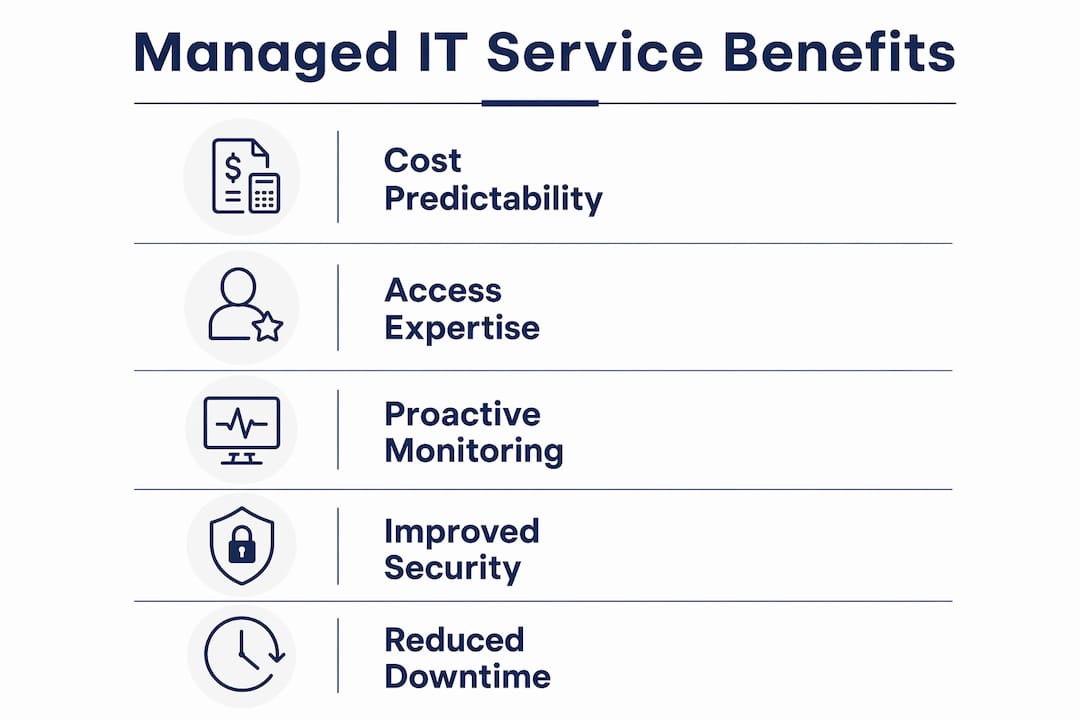
The most practical benefit is cost predictability. Instead of unpredictable repair bills and emergency call-out fees, you pay a fixed monthly amount and budget accordingly. Smaller Australian SMEs typically pay an annual fixed fee for managed IT covering a full security baseline and Microsoft 365 administration, which is often less than the fully loaded cost of a single internal IT hire.
Beyond cost, you get access to a multi-disciplinary team. One internal IT person, no matter how capable, cannot be a network engineer, security analyst, cloud architect, and helpdesk technician simultaneously. An MSP brings all of those skills under one contract. That depth matters when something serious happens, like a ransomware incident or a failed server at 7pm on a Friday.
Proactive monitoring genuinely reduces downtime. Problems caught early, a failing hard drive flagged before it dies, a patch applied before a vulnerability is exploited, cost far less to fix than the same problem discovered after the fact. Businesses that treat their MSP as a strategic partner rather than a cost centre free their staff to focus on revenue-generating work instead of IT firefighting.
Security posture improves too. Most SMBs we work with have no MFA on email accounts, inconsistent patching, and backups they have never tested. An MSP fixes that baseline quickly and keeps it maintained.
Disadvantages and common misconceptions to watch out for
Honestly, “managed IT services” is not a standardised product. Two providers can use the same words and deliver completely different things. The contract SLA is everything. Before you sign anything, read exactly what is included, what triggers an extra charge, and what the response time commitments actually are.
The biggest misconception we see is around backups. Many businesses believe they are backed up because someone set up a backup tool years ago. They are often not. A solid managed IT contract includes backup verification, not just backup software. If your MSP cannot show you a successful restore test from the last 30 days, that is a problem.
MFA is another one. Some MSPs charge extra to enforce MFA or treat it as an optional add-on. It should be baseline. The same goes for security assessments. If your provider has never reviewed your security posture against a recognised framework, you are not getting a managed service. You are getting a helpdesk with a monthly invoice.
Watch out for per-device pricing models too. Per-device pricing can actually incentivise MSPs to ignore sprawling, messy environments because complexity becomes profitable for them. Per-user pricing aligns the MSP’s interests with yours: they want your environment clean and simple because that is easier to manage.
Real-world MSP insights: what most businesses get wrong
We see this a lot. A business signs up with an MSP, pays the monthly fee, and assumes everything is being handled. Six months later, they have a security incident and discover their backups have not been tested, half their staff have no MFA, and the MSP has no documentation of their environment. That is not a managed service. That is a reactive helpdesk dressed up as one.
The quality marker for a genuine MSP is monthly reporting. You should receive a report every month showing patch compliance rates, backup restore results, MFA coverage across your accounts, and any open security gaps. If you are not getting that, ask for it. If your provider cannot produce it, that tells you everything.
MSPs also benefit from pattern recognition across their client base. When a new threat emerges or a common software bug causes problems, a good MSP has already seen it across multiple clients and knows how to respond. That collective experience is something a single internal IT person simply cannot replicate.
Local MSPs with regional knowledge tend to serve SMBs better than large national providers who treat small clients as low-priority accounts. Understanding Australian regulations, local market conditions, and having a team you can actually reach matters when something goes wrong.
Pro Tip: Ask any prospective MSP to show you a sample monthly report before you sign. If they cannot produce one, or if it only shows ticket counts with no security or backup data, keep looking.
How is managed IT priced?
Most Australian MSPs price their services in one of three ways: per user, per device, or as a flat monthly fee for a defined scope of work.

Per-user pricing is the most common model for SMBs and the one that best aligns incentives. You pay a fixed amount per person in your business each month, regardless of how many devices that person uses. This encourages the MSP to keep your environment clean and well-documented.
Per-device pricing charges a set fee for each server, desktop, laptop, or network device under management. It can work for businesses with a very stable, well-defined environment, but it creates perverse incentives in messy setups.
Flat-fee or tiered packages bundle a defined set of services for a fixed monthly total. These are straightforward to budget but require careful SLA review to understand exactly what is and is not included.
Pricing varies significantly based on the services included, the size of your environment, and the provider’s overhead. A 30-employee SME in Australia typically pays an annual fee between $42,000 and $72,000 for managed IT that covers a full security baseline and Microsoft 365 administration. Entry-level packages covering only monitoring and helpdesk cost considerably less, but they also deliver considerably less.
Questions to ask before you outsource your IT
Not all MSPs are equal, and the wrong choice costs you more than staying in-house. These are the questions worth asking before you commit:
- What does your monthly reporting cover? You want patch compliance, backup restore results, and MFA coverage as a minimum.
- Is backup restore testing included, or is it an extra charge? If it is extra, that is a red flag.
- How do you handle after-hours incidents? Get specific: who answers the phone at 9pm, and what is their escalation path?
- What security framework do you align to? Look for references to the ACSC Essential Eight or NIST Cybersecurity Framework.
- Is MFA enforcement included in the base fee? It should be.
- What happens to our data and documentation if we leave? You need a clear offboarding process in writing.
- Do you have experience in our industry? Healthcare, legal, and financial services all have specific compliance requirements that a generalist MSP may not understand.
The answers to these questions will tell you quickly whether you are talking to a genuine managed service provider or a break-fix shop with a subscription model bolted on.
What should you expect from a service level agreement?
A service level agreement (SLA) is the contract that defines what your MSP will deliver and how fast. Most SLAs cover response times, resolution targets, and the scope of included services. Knowing what to look for protects you from vague commitments that sound good but mean nothing.
Typical SLA response time tiers look like this:
| Priority | Description | Response target |
|---|---|---|
| Critical | System down, business cannot operate | — |
| High | Major function impaired, multiple users affected | — |
| Medium | Single user affected, workaround available | — |
| Low | Minor issue, no immediate impact | Next business day |
Beyond response times, your SLA should specify uptime commitments for any hosted services, the frequency of proactive maintenance tasks like patching and backup testing, and what constitutes an out-of-scope request that will attract additional charges. Read the exclusions carefully. Some MSPs exclude security incidents, hardware replacements, or after-hours support from their base SLA entirely.
A good SLA also defines your escalation path clearly. You should know the name and contact details of the person responsible for your account, not just a generic support email address.
Which industries and business sizes benefit most?
Managed IT services suit Australian SMEs up to around 100 staff particularly well, where the cost of a full internal IT team is hard to justify but the complexity of the environment demands more than occasional break-fix support.
Industries with compliance obligations get the most immediate value. Healthcare businesses must protect patient data under the Privacy Act and Australian Privacy Principles. Legal firms handle sensitive client information and face strict confidentiality obligations. Financial services businesses operate under ASIC and APRA requirements that demand documented security controls and audit trails. For all of these, an MSP that understands the regulatory context is not a luxury. It is a practical necessity.
Professional services firms, construction companies, and retail businesses with multiple locations also benefit significantly. These businesses often have distributed teams, cloud-dependent workflows, and limited internal IT capability. A proactive IT support model keeps those environments stable without requiring a dedicated internal hire at each location.
Businesses in the 10–50 staff range are the sweet spot. They are large enough to have real IT complexity but small enough that a single internal IT generalist cannot cover everything adequately.
IT Start: managed IT support built for Brisbane SMBs
IT Start works with Brisbane businesses in the 10–50 staff range, covering managed IT support, cloud services, and cybersecurity under a fixed monthly fee. The focus is on getting your security baseline right first: MFA enforced, backups tested, patching current, and your Microsoft 365 environment properly configured. From there, IT Start acts as your ongoing IT partner, providing monthly reporting, helpdesk support, and strategic input as your business grows.
Unlike large national providers that treat small clients as low-priority accounts, IT Start is local to Brisbane and built specifically for SMBs. If you want to know exactly where your IT environment stands right now, IT Start offers a free assessment to identify gaps before they become problems. Reach out through IT Start’s website to get started.
Key takeaways
Managed IT services deliver the most value when the provider is genuinely proactive, reports monthly on security and backup status, and aligns pricing to per-user models that incentivise a clean, well-maintained environment.
| Point | Details |
|---|---|
| Proactive, not reactive | A genuine MSP monitors and maintains your environment continuously, not just when things break. |
| Backup testing is non-negotiable | Your contract must include verified restore testing, not just backup software running in the background. |
| MFA should be baseline | Any MSP charging extra for MFA enforcement is not offering a true managed service. |
| Per-user pricing aligns incentives | Per-user models encourage MSPs to keep your environment clean; per-device models can reward complexity. |
| IT Start for Brisbane SMBs | IT Start provides fixed-fee managed IT, cloud, and cybersecurity services with monthly reporting for businesses with 10–50 staff. |
FAQ
What are managed services in IT?
Managed IT services are outsourced technology management where a third-party provider monitors, maintains, and secures your IT environment under a subscription model. The provider takes ongoing responsibility for your systems rather than responding only when something breaks.
What are some examples of managed IT services?
Common examples include network monitoring, patch management, endpoint protection, backup management with restore testing, Microsoft 365 administration, helpdesk support, firewall management, and MFA enforcement. Security assessments and vCIO advisory services are also frequently included.
Is managed IT better than in-house IT?
For most SMBs with 10–50 staff, managed IT delivers broader expertise at a lower total cost than a fully staffed internal team. In-house IT makes more sense for larger organisations with complex, specialised environments that justify dedicated headcount.
What is the difference between ITSM and managed services?
IT service management (ITSM) is a framework for how IT services are planned, delivered, and improved internally, covering processes like incident management and change control. Managed services refers to the outsourcing model where an external provider delivers those IT functions on your behalf.