
TL;DR:
- Cybersecurity involves protecting digital assets from threats through layered controls, processes, and people. It is a continuous effort that requires regular review, testing, and employee training to reduce risks effectively.
Cybersecurity is defined by CISA as the practice of protecting networks, devices, and data from unauthorised access while ensuring confidentiality, integrity, and availability. If you have been searching for a “what is cyber security pdf” style explainer to share with your team or use as a reference, this guide covers the same ground in plain language. It explains the core concepts, the real threats, and the practical steps that Brisbane SMBs can act on now. Cybersecurity is not just an IT problem. It is a business imperative that affects your uptime, your reputation, and your ability to keep operating after an incident.
What is cyber security and what does it actually protect?
Cybersecurity is the practice of defending your business’s digital assets from attack, theft, and disruption. CompTIA defines it as covering five core functions: identifying assets, protecting them, detecting anomalies, responding to incidents, and recovering from them. That framework applies whether you run a 10-person accounting firm or a 200-person logistics company.

The assets you are protecting fall into three broad categories. Networks include your internet connection, Wi-Fi, and internal systems. Endpoints include laptops, phones, and servers. Data includes customer records, financial files, and intellectual property. Each category carries its own risks and requires its own controls.
One thing worth understanding early: cybersecurity is not a product you buy once. It is a combination of people, processes, and technology working together. A firewall with no patching policy is not security. Microsoft 365 with no MFA enabled is not security. The tools only work when the processes around them are solid.
What are the core components of cyber security every business should know?
The foundation of cybersecurity sits on three principles: confidentiality, integrity, and availability. Confidentiality means only authorised people can access data. Integrity means data has not been tampered with. Availability means systems are accessible when you need them. These three together are called the CIA triad, and every security decision maps back to at least one of them.
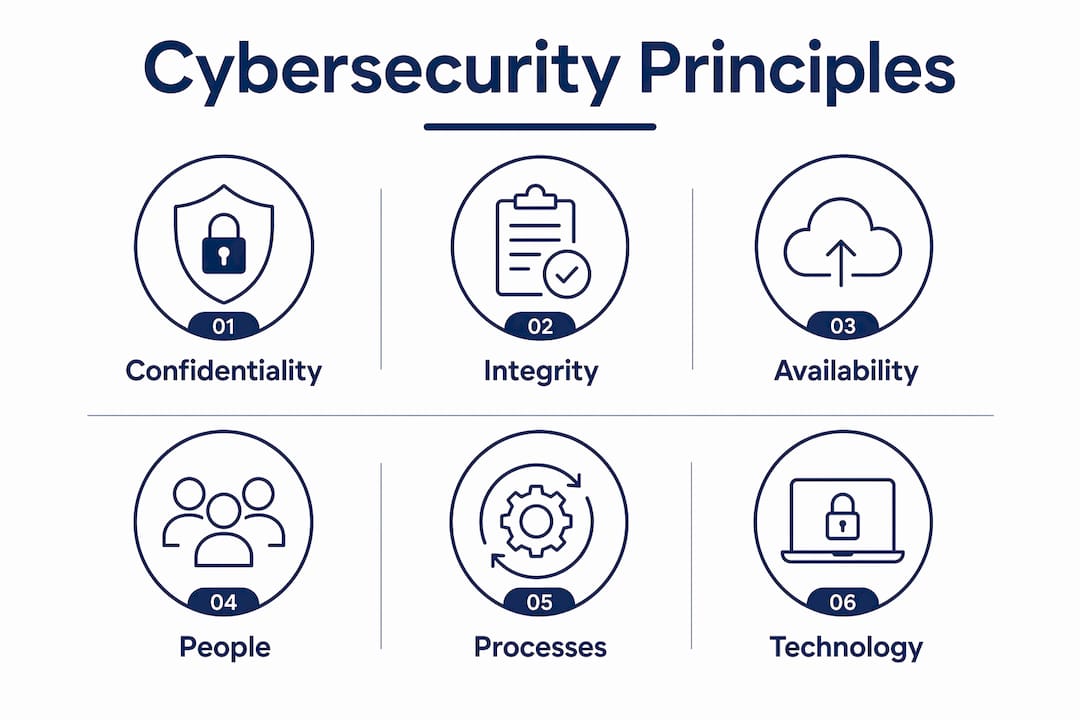
Beyond the CIA triad, defence-in-depth is the approach that actually works in practice. It means layering multiple controls so that if one fails, others still protect you. Think of it like a building with a locked gate, a reception desk, key card access, and CCTV. No single control is perfect. The layers together make it much harder for an attacker to get through.
Three terms come up constantly in cybersecurity conversations, and it helps to know what they mean precisely.
- Threat: anything that could cause harm, such as a phishing email or a ransomware gang
- Vulnerability: a weakness that a threat can exploit, such as an unpatched system or a weak password
- Risk: the combination of how likely a threat is and how much damage it would cause
| Security component | What it does | Example |
|---|---|---|
| Firewall | Filters incoming and outgoing network traffic | Blocking connections from known malicious IPs |
| Endpoint protection | Detects and removes malware on devices | Microsoft Defender or third-party antivirus |
| MFA | Requires a second verification step beyond a password | Authenticator app on a mobile phone |
| Backup | Creates copies of data for recovery | Daily encrypted backups stored offsite or in cloud |
| Security awareness training | Reduces human error through education | Phishing simulation and policy training |
Pro Tip: Map your assets before you buy any security tool. You cannot protect what you have not identified. A simple spreadsheet listing your systems, who accesses them, and what data they hold is a better starting point than any software purchase.
What essential cyber security practices reduce the biggest risks?
CISA identifies four essentials for businesses: employee phishing training, strong passwords of 16 or more characters, multi-factor authentication, and regular software patching. These four controls address the most common entry points attackers use. They are not glamorous, but they stop the majority of real-world attacks.
Human behaviour is the weakest link in most business security setups. Phishing attacks exploit people, not systems. An attacker sends a convincing email, an employee clicks a link, and suddenly credentials are compromised or malware is installed. Technical controls alone cannot stop this. Regular staff security training is the only reliable way to reduce that risk over time.
Password policies matter more than most businesses realise. Short passwords get cracked. Reused passwords mean one breach exposes multiple accounts. Strong, unique passwords combined with MFA make credential theft far less damaging, because even if a password is stolen, the attacker still cannot log in without the second factor.
Software patching is the control that gets skipped most often. Outdated software contains known vulnerabilities. Attackers scan for these constantly. A system that has not been patched in 90 days is a target. Patching is not exciting, but it closes the doors that attackers walk through every day.
A practical weekly security routine for any SMB looks like this:
- Check that automatic updates are enabled on all devices and servers
- Review any failed login alerts or unusual account activity
- Confirm that backups completed successfully the previous night
- Check that no new user accounts were created without approval
- Review any phishing reports from staff
Pro Tip: Turn on MFA for Microsoft 365 before anything else. It is free, it takes 30 minutes to configure, and it blocks the vast majority of account takeover attempts. We have seen clients spend thousands on security tools while leaving MFA disabled. That is the wrong order.
What are the common cyber threats businesses face?
Cyber threats are increasingly automated and affect organisations of all sizes. The idea that small businesses are too small to be targeted is wrong. Automated tools probe millions of systems simultaneously looking for weak passwords, unpatched software, and open ports. Size is not a protection.
The four threats that cause the most damage to Australian SMBs are phishing, ransomware, malware, and insider threats.
- Phishing is a deceptive email or message designed to steal credentials or trick someone into transferring money. Business email compromise, a variant of phishing, has cost Australian businesses millions.
- Ransomware encrypts your files and demands payment for the decryption key. Even if you pay, there is no guarantee you get your data back. Recovery without a tested backup can take weeks.
- Malware is a broad category covering viruses, spyware, and trojans. It can steal data silently or give attackers persistent access to your systems.
- Insider threats come from employees, contractors, or former staff. They may be malicious or simply careless. Either way, the damage is real.
Successful breaches cause financial loss, reputational damage, regulatory fines, and operational disruption. For a small business, a serious incident can be existential.
One distinction that trips up a lot of business owners: a backup is not a recovery plan. A backup is just data. A recovery plan is a documented, tested process that tells you exactly how to restore services after an incident. Many businesses discover their backups are incomplete or untested only after an attack. That is too late.
If a cyber incident does occur, the response steps matter.
- Isolate affected systems immediately to stop the spread
- Notify your IT provider or internal security team
- Preserve evidence before wiping or restoring systems
- Identify the scope: what was accessed, what was changed, what was stolen
- Restore from a clean, verified backup
- Report to the Australian Cyber Security Centre (ACSC) if required
- Review what failed and update your controls
How do you build a cyber security strategy that actually works?
Cybersecurity is an ongoing process, not a one-off project. Buying a product does not make you secure. The businesses that stay secure are the ones that treat security as a continuous cycle of review, improvement, and testing.
A practical strategy covers three areas: people, processes, and technology. People need training and clear policies. Processes need to be documented and tested. Technology needs to be configured correctly and kept up to date. All three have to work together. A layered defence only holds if every layer is maintained.
The principle of least privilege is one of the most effective and most ignored policies in SMB environments. It means employees only have access to the systems and data they need for their specific role. We regularly see businesses where every staff member has admin rights to everything. That is not convenience. That is a massive risk multiplier.
MSPs play a real role here. A good MSP does not just fix problems. They monitor your environment, flag risks before they become incidents, and help you build a business continuity plan that covers both prevention and recovery. The gap between what businesses think their MSP is doing and what is actually configured is often significant.
| Security tools | Security practices |
|---|---|
| Antivirus software | Regular staff phishing training |
| Firewall | Documented incident response plan |
| MFA | Least privilege access policy |
| Backup software | Tested recovery procedures |
| Endpoint detection | Quarterly security reviews |
Key takeaways
Cybersecurity protects business operations through layered controls covering people, processes, and technology, and no single tool or product replaces a maintained, tested security programme.
| Point | Details |
|---|---|
| Start with the four essentials | Phishing training, strong passwords, MFA, and patching stop most real-world attacks. |
| Defence-in-depth is the model | Layer multiple controls so that one failure does not expose everything. |
| Backups are not recovery plans | Test your recovery process before an incident, not during one. |
| Least privilege reduces risk | Limit staff access to only what their role requires to contain damage from breaches. |
| Cybersecurity is ongoing | Review, test, and update your security posture regularly, not just after an incident. |
What most business owners get wrong about cyber security
Honestly, the biggest mistake I see is business owners treating cybersecurity as something they can set and forget. They buy a product, tick a box, and assume they are covered. They are not.
The second most common mistake is assuming backups are working. We have walked into client environments where the backup software showed green lights but the actual restore had never been tested. When ransomware hit, the backups were either incomplete or corrupted. That is a catastrophic position to be in. Testing recovery is not optional. It is the only way to know your backup actually works.
The human factor is where most breaches start. Phishing remains the top cause of security incidents, and no amount of technology fixes a staff member who clicks a malicious link. I have seen businesses with expensive security stacks get compromised because one person responded to a fake invoice email. Training is not a nice-to-have. It is a core control.
My honest advice: stop asking “do we have security tools?” and start asking “do our people know what to do, and have we tested whether our recovery actually works?” Those two questions will tell you more about your real security posture than any product list.
— Matt
How IT Start supports Brisbane businesses with cyber security
IT Start works with Brisbane SMBs to build security that holds up in practice, not just on paper. That means assessing your current environment, identifying gaps in access controls, MFA, backups, and training, and putting a plan in place that fits your business size and risk profile. IT Start’s managed cyber security services cover ongoing monitoring, incident response support, and regular reviews so your security posture keeps pace with the threats your business faces. For businesses moving to the cloud, IT Start also integrates secure cloud solutions that reduce on-premises risk while keeping your data accessible and protected. If you want a straight conversation about where your business stands, get in touch with the IT Start team for a no-obligation assessment.
FAQ
What is cyber security in simple terms?
Cybersecurity is the practice of protecting your business’s networks, devices, and data from unauthorised access and attacks. It covers the tools, policies, and training that keep your systems and information safe.
Why is cyber security important for small businesses?
Automated attacks target businesses of all sizes, not just large enterprises. A successful breach can cause financial loss, reputational damage, and operational disruption that a small business may not recover from.
What is the difference between a backup and a disaster recovery plan?
A backup is a copy of your data. A disaster recovery plan is a documented, tested process for restoring your systems and operations after an incident. Many businesses have backups but no tested recovery process.
What does MFA do and why does every business need it?
MFA requires a second verification step beyond a password, such as a code from an authenticator app. It prevents unauthorised access even when passwords are stolen or guessed.
Where can I find a cyber security guide for my business?
The Australian Cyber Security Centre (ACSC) publishes free guidance for SMBs at cyber.gov.au. CISA also publishes practical cyber security basics covering the four essentials every business should implement first.