TL;DR:
- Proper IT asset management is essential for SMBs to improve security, control costs, and ensure compliance through continuous lifecycle visibility. It involves tracking hardware, software, and cloud assets, establishing ownership, and integrating with IT support processes, rather than relying on static spreadsheets. Working with an MSP can streamline this ongoing management, reducing risks and supporting long-term operational stability.
Most small business owners think IT asset management means keeping a spreadsheet of laptops and software licences. That is a costly misunderstanding, and it is one we see constantly. The real reasons to manage IT assets go much deeper: untracked devices create security blind spots, unused licences drain budgets silently, and outdated hardware gets exploited before anyone notices it is still running. This guide explains exactly why manage IT assets should be a business priority, not a back-burner task, and what it actually looks like in practice for an SMB with 10 to 50 staff.
Table of Contents
- Key takeaways
- Why manage IT assets: more than just tracking devices
- The main reasons SMBs need proper IT asset management
- Common ITAM challenges SMBs face
- How to implement IT asset management in your SMB
- The long-term value of managing your IT assets
- My take: most SMBs are one audit away from a wake-up call
- How IT Start can help you manage your IT assets
- FAQ
Key takeaways
| Point | Details |
|---|---|
| ITAM is more than inventory | Managing IT assets covers hardware, software, cloud, and full lifecycle to give continuous visibility and control. |
| Cybersecurity depends on it | Untracked devices create vulnerabilities that attackers actively target, especially legacy or forgotten endpoints. |
| Cost control is immediate | Visibility into licences and usage lets you cut duplicate purchases and remove shelfware quickly. |
| Compliance gets easier | Accurate ownership and configuration records reduce audit surprises and keep you ready for scrutiny. |
| One-off audits are not enough | Continuous, lifecycle-aligned ITAM reduces risk far better than a spreadsheet you update once a year. |
Why manage IT assets: more than just tracking devices
IT asset management, commonly called ITAM, is the practice of tracking and managing your hardware, software, cloud subscriptions, and their full lifecycle from purchase through to retirement. That definition sounds simple. The reality is far more complex, and far more valuable than most SMB owners realise.
Here is what ITAM actually covers in practice:
- Hardware assets: laptops, desktops, servers, networking gear, printers, mobile devices
- Software assets: Microsoft 365 licences, security tools, accounting software, industry-specific applications
- Cloud and SaaS assets: subscriptions, virtual machines, cloud storage, hosted services
- Asset lifecycle stages: procurement, deployment, usage tracking, maintenance, and disposal
The key difference between simply owning a list of devices and practising proper ITAM is continuity. A one-time inventory tells you what you had on one day. Effective ITAM tells you what you have right now, whether it is patched, who owns it, when it expires, and whether it should still exist on your network at all.
Centralising asset information improves operational efficiency by reducing errors and unexpected issues during changes, incidents, and licence renewals. When your IT support team gets a service ticket, knowing exactly which device the user is on, its age, its OS version, and its patch status cuts troubleshooting time dramatically. Without that context, even simple fixes take longer than they should.
Pro Tip: Do not confuse an asset register with a CMDB (configuration management database). A CMDB captures the relationships between assets and how they affect each other. Both matter, but they serve different purposes. For most SMBs, starting with a clean, accurate asset register is the right first move.
We have worked with businesses that had no idea a former employee’s laptop was still active on their network, months after the person left. That is not an edge case. It is surprisingly common.
The main reasons SMBs need proper IT asset management
There are five practical reasons why managing IT assets matters for your business, and all five have direct financial or security consequences if ignored.
-
Cybersecurity risk reduction. Lifecycle tracking helps eliminate obsolete or unsecured devices that attackers target. Every unmanaged endpoint is a potential entry point. Attackers do not pick the hardest target on your network. They find the one nobody is watching.
-
Controlling IT spend. Removing unused software licences and avoiding duplicate purchases reduces wasted spend on shelfware. Most SMBs are paying for licences that nobody uses. We find this in nearly every new client engagement, without exception.
-
Faster troubleshooting and fewer surprises. SMBs benefit from faster troubleshooting and better resource allocation with accurate ITAM. When every device in your environment is documented, your IT team spends less time diagnosing and more time fixing.
-
Compliance and audit readiness. ITAM keeps organisations audit-ready by maintaining accurate ownership and configuration records. Whether you are dealing with a vendor audit, a cyber insurance renewal, or an internal review, having clean records means you are never scrambling.
-
Smarter technology planning. Accurate ITAM data supports better capacity forecasting, refresh planning, and technology strategy. Instead of replacing hardware reactively when it breaks, you can plan replacements on your terms, on your budget cycle.
“Moving from guesswork to data-driven decisions reduces wasted spend and the shelfware problem that quietly drains IT budgets in SMBs across every industry.” Salesforce ITAM research
The importance of IT asset management is particularly clear when you look at compliance requirements. Queensland SMBs in professional services, healthcare, and financial services face real regulatory expectations around data handling and system controls. Without knowing what you have, you cannot prove you are managing it properly.
Pro Tip: Tie your ITAM process directly to your cyber insurance renewal checklist. Insurers are increasingly asking for documented asset inventories, MFA coverage, and patch records. Having this data ready can reduce your premium and remove coverage exclusions.
Common ITAM challenges SMBs face
Honestly, the challenges are not usually technical. They are behavioural and organisational. Here is what we see most often.
Treating ITAM as a one-off project. SMBs often fail by treating ITAM as a one-time inventory effort rather than ongoing management. They do a big clean-up, then let the data drift for 18 months until it is useless again. Continuous updates aligned with the asset lifecycle are the only way to maintain real value.
Shadow IT and unmanaged devices. Shadow IT and unmanaged endpoints create blind spots that attackers can exploit. Staff using personal devices for work, installing unapproved apps, or connecting unknown equipment to the network creates gaps that no security tool can close if the device is not even visible to your IT team.
Keeping asset data accurate. Data degrades fast. People leave, devices get swapped, licences get reassigned. Without a process to update records, your asset register becomes fiction within months.

Balancing cost and effort. SMBs with small IT teams or no dedicated IT staff struggle to keep up. This is where the right tools and a managed service partner make a real difference.
| Challenge | Common mistake | Better approach |
|---|---|---|
| Asset data accuracy | Annual spreadsheet update | Automated discovery tools with continuous sync |
| Shadow IT | Ignoring personal devices | Defined BYOD policy plus endpoint visibility |
| Licence management | Buying more to be safe | Regular licence reconciliation against active users |
| Lifecycle planning | Replacing hardware reactively | Scheduled refresh cycle tied to asset age data |
| Inventory security | Open access to asset records | Role-based access and audit logging on asset data |
Asset inventory data itself needs to be protected with strong access controls, encryption, and monitoring. If an attacker gets hold of your full inventory, they know exactly which systems to target. We see this treated as a low-priority afterthought, when it should be treated as sensitive infrastructure data.

How to implement IT asset management in your SMB
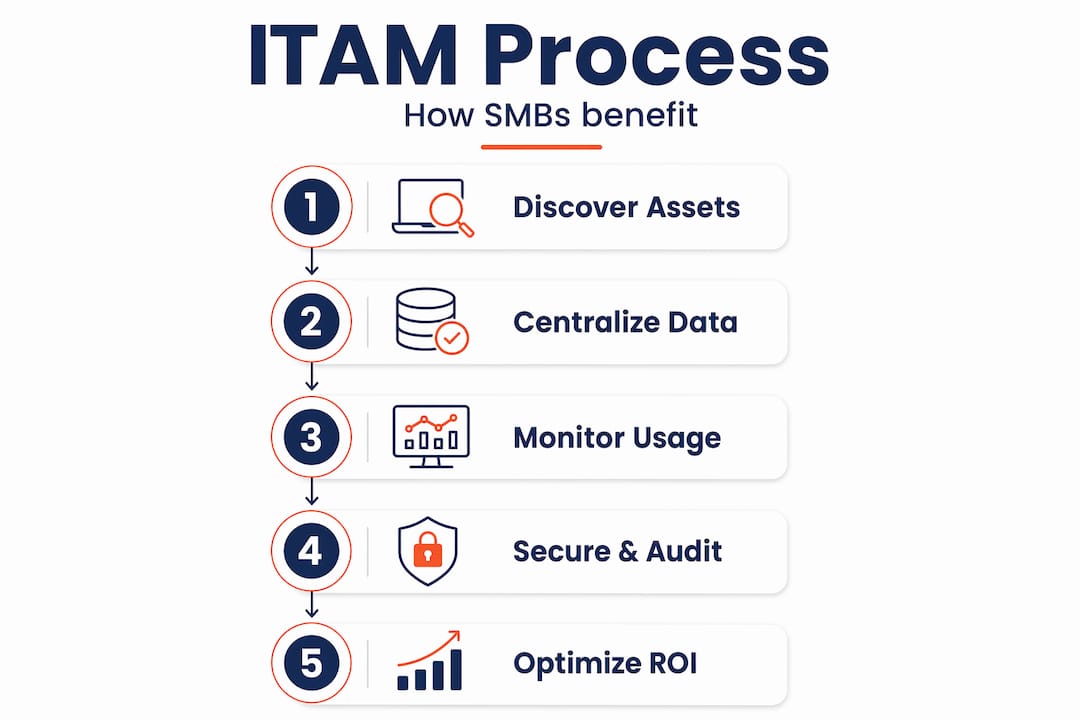
Getting ITAM right does not require a massive budget or a dedicated IT department. It requires a clear process and the discipline to maintain it. Here is a practical starting point.
-
Run a full discovery. Use an automated tool to scan your network and identify every connected device and software installation. Do not rely on manual input at this stage. Automated discovery catches the things people forget to mention, and there are always things people forget to mention.
-
Classify and record each asset. For every asset found, record the owner, location, purchase date, warranty or licence expiry, and current status. Group assets by category (hardware, software, cloud) and by business unit if relevant.
-
Assign ownership and accountability. Every asset should have a named owner responsible for its maintenance and eventual retirement. Without ownership, nothing gets updated.
-
Integrate with your service desk. Linking asset inventories to ITSM tools enables faster incident response with precise asset context, reducing downtime and troubleshooting time. If your IT support tool does not know what device someone is using, it is working with one hand tied behind its back.
-
Schedule regular reviews. Quarterly reviews of licences and semi-annual hardware audits work well for most SMBs. Mark expiry dates in your calendar six weeks ahead so you are never caught short on renewals.
-
Protect the data. Apply role-based access to your asset management platform. Not everyone needs to see the full inventory, and audit logs should record who accessed or changed records.
Pro Tip: If you are using Microsoft 365, Intune gives you significant device visibility at no extra cost depending on your licence tier. Many SMBs are already paying for it and not using it. Start there before spending money on a dedicated ITAM tool.
The IT asset tracking advantages become measurable quickly once this process is running. Fewer emergency hardware replacements, fewer licence surprises, and faster resolution times on support issues all show up within the first quarter.
The long-term value of managing your IT assets
The benefits of managing IT assets do not stop at cost savings and fewer security incidents. Over time, a well-run ITAM programme builds the kind of operational stability that lets your business grow without the IT environment becoming a liability.
Here is what that looks like in practice:
- Cyber resilience. When you know every device on your network, its patch status, and its owner, you can respond to a security incident in hours instead of days. You know what was affected, what was not, and what needs immediate attention.
- Scalable operations. As your business grows and adds remote workers, you need visibility into devices that may never sit in your office. Accurate ITAM makes remote work manageable, not chaotic.
- Reduced downtime. Hardware failures hurt less when you know the age and warranty status of every device in advance. Planned replacements beat emergency purchases every time.
- Better vendor relationships. When you have clear data on licence usage and upcoming renewals, you negotiate from a position of knowledge rather than guessing what you might need.
- Smarter budgeting. Reliable asset information reduces errors and improves budgeting decisions. IT costs become predictable rather than a series of unpleasant surprises.
The IT asset management ROI compounds over time. Year one might recover the cost of wasted licences. Year two delivers a hardware refresh on schedule instead of in a crisis. Year three, your cyber insurer gives you better terms because your records are clean and your controls are documented.
My take: most SMBs are one audit away from a wake-up call
I have sat with a lot of SMB owners who were convinced their IT was “fine.” They had a set-and-forget mentality, a rough idea of what they owned, and no formal process for managing any of it. Then something happened. A staff member left with access still active. A software audit letter arrived. A cyber incident exposed a device nobody knew was still online.
In my experience, the businesses that get ITAM right are not the ones with the biggest budgets. They are the ones that stopped treating IT as something that just runs in the background and started treating it as infrastructure worth managing properly.
What most SMBs miss is that the asset register is not just an admin document. It is a security control. An inaccurate one is worse than useless because it gives false confidence. ISO/IEC 19770-1 frames ITAM as a management system for trustworthy data and continuous lifecycle optimisation, not a filing exercise.
The honest truth is this: if you do not know what is on your network, you cannot secure it, you cannot budget for it, and you cannot make smart decisions about it. Working with an MSP that takes ITAM seriously is one of the fastest ways to close that gap without needing to hire a dedicated IT manager.
— Matt
How IT Start can help you manage your IT assets
IT Start works with SMBs across Brisbane and Queensland to set up and maintain proper IT asset management as part of a broader managed IT service. We do the discovery, classification, and ongoing monitoring so your team does not have to. Our clients stop being surprised by licence renewals, hardware failures, and security gaps, because we track all of it on their behalf.
If cybersecurity is a concern, our cyber security services directly integrate with asset management to identify unpatched devices, monitor for shadow IT, and keep your endpoint exposure as low as possible. For day-to-day IT support that includes asset oversight, our managed IT support team gives you the ongoing visibility your business needs.
Get in touch with IT Start for a free assessment of your current IT asset setup. We will show you exactly what is on your network and where the gaps are.
FAQ
What is IT asset management?
IT asset management is the practice of tracking and managing your hardware, software, cloud subscriptions, and their full lifecycle. It gives businesses continuous visibility into what they own, who owns it, and whether it is being used securely and efficiently.
Why manage IT assets if you are a small business?
Small businesses are frequently targeted precisely because their asset management is weak. Untracked devices, unused licences with active credentials, and outdated hardware all create exploitable gaps. Managing IT assets reduces these risks and controls IT costs at the same time.
How often should SMBs audit their IT assets?
Most SMBs benefit from quarterly licence reviews and semi-annual hardware audits. Automated discovery tools can provide near-continuous visibility between formal audits, which is the preferred approach for businesses with fewer than 50 staff.
What is the biggest mistake SMBs make with IT asset management?
Treating it as a one-time project is the most common and costly mistake. Continuous, lifecycle-aligned ITAM reduces risk far more effectively than an annual spreadsheet update that goes stale within weeks.
Can an MSP handle IT asset management for my business?
Yes, and for most SMBs this is the practical choice. An MSP with IT asset tracking advantages built into their service can maintain your inventory continuously, alert you to risks, and integrate asset data with your IT support workflows without requiring you to hire a dedicated IT manager.