
Enable phishing resistant MFA, get independent offline backups with tested restores, patch fast, run proper endpoint detection and response, and lock down MSP access. These five controls stop most of the incidents we see land on SMB desks. This article walks through each one, plus the checklist and contract questions you should be putting in front of your MSP, based on ACSC and ASD guidance and what IT Start sees day to day.
TL;DR:
- Multi-factor authentication must be enforced on email, admin, and remote access accounts, with logs reviewed regularly to detect failures.
- Backups should be independent, tested with real restores, and stored offline or air-gapped to ensure reliable recovery after attacks.
- Patch internet-facing services promptly, prioritizing known vulnerabilities, and deploy endpoint detection and response with tamper protection.
- MSP contracts must specify security responsibilities, enforce MFA, and require access logs and incident notification protocols to reduce vendor-related risks.
- Regularly review access privileges, disable unused accounts, and enforce encryption on devices and data in transit to minimize common breach vectors.
Table of Contents
- Core technical controls you must confirm are in place
- Backups and recovery: what must be backed up and how to prove it will restore
- Engaging an MSP safely: contract clauses and operational checks to insist on
- Implementation checklist: an 8 to 12 step plan for the next 90 days
- Quick wins you can do today to reduce the biggest risks
- Security awareness training and phishing simulation
- Data encryption protocols
- Access control policies and least privilege enforcement
- Compliance with relevant regulations and standards (e.g., NIST, ISO)
- Third-party risk management
- Mobile device security management
- What we see in practice: common failures and pragmatic advice from IT Start
- Get an assessment before you guess what’s wrong
- Primary guidance: ACSC/ASD pages and industry reports
- Sources
- FAQ
Core technical controls you must confirm are in place
Honestly, most SMBs we meet think they have these covered. Then we run an audit and find gaps everywhere. Here’s what actually needs to be true.
Multi factor authentication needs to sit on email, admin accounts and remote access, not just one of them. Phishing resistant options (like passkeys or certificate based methods) beat SMS codes where your systems support them, and you should be logging MFA events so you know when someone tries and fails.
Backups need to be independent of your cloud provider. ACSC’s guidance on regular backups recommends third party, offline backups for Microsoft 365 with scheduled full restore tests, not just relying on Microsoft’s native retention settings.
Patching has to prioritise anything internet facing and anything with a known exploited vulnerability. This is the boring work that gets skipped when everyone is busy.
Endpoint protection means EDR with detection, response and tamper protection built in. Signature based antivirus alone misses too much.
-
- MFA on email, admin panels and remote access, checked monthly, not assumed
- Offline, third party backups of Microsoft 365 and file servers, tested with real restores
- Patching prioritised for exposed services and known exploited vulnerabilities
- EDR with response and tamper protection, not legacy antivirus
- Minimal internet facing services, MSP access through a jump host
Pro Tip: Ask your MSP to show you the last MFA failure log and the last successful restore test. If they can’t produce either in five minutes, that’s your answer.
ASD’s Essential Eight is a maturity model, not a checklist you tick once. ASD’s Essential Eight recommends small businesses start with the basics, MFA, backups and patching, before chasing the more advanced maturity levels. We see clients try to jump straight to application control before they’ve even got MFA on their admin accounts. Wrong order.
Backups and recovery: what must be backed up and how to prove it will restore
We see this constantly: a business owner tells us “we’re on Microsoft 365, we’re backed up.” No. Microsoft’s retention settings are not a backup, they’re a safety net with limits and time windows, and they don’t protect you if an attacker deletes mailboxes or SharePoint sites during a ransomware event.
- Back up Exchange mail, SharePoint, OneDrive and Teams data separately from native retention.
- Include file servers, plus configuration snapshots for firewalls and key systems.
- Store a copy offline or air gapped, disconnected from your live network.
- Authenticate backup jobs with dedicated credentials, not your everyday admin login.
- Run full restore tests on a schedule, not just a “backup completed successfully” email.
- Restrict who can delete or modify backup jobs, because attackers target backups first.
ACSC’s technical guidance recommends using a dedicated, hardened backup workstation with its own credentials, scheduled exports, and offline removable media that gets disconnected after each run. That last part matters more than people think.
Pro Tip: If your backup admin account has the same password as your email admin account, you don’t have a backup strategy, you have a single point of failure with extra steps.
Engaging an MSP safely: contract clauses and operational checks to insist on
This is the part most SMB owners skip, because they assume “we handle security” in a proposal means something concrete. It often doesn’t.
ACSC’s guidance on managing your MSP relationship is blunt about this: outsourcing to an MSP does not transfer your risk, and MSP admin access makes MSPs a high value target for attackers. That means the contract should spell out exactly who’s responsible for what.
- Defined roles for incident response, with a clear notification timeline if something goes wrong
- MFA enforced on every tool the MSP uses to access your systems, no exceptions
- Job ticketed sessions through a segregated admin jump host, so every access event ties to a reason
- Least privilege accounts for MSP staff, never blanket domain admin
- Periodic evidence on request: log extracts, backup restore reports, patch rollout summaries
A blanket “we handle security” line in a proposal is not evidence. Ask for the extracts and reports listed above at your next quarterly review, and if your provider hesitates, that’s worth a conversation.
Implementation checklist: an 8 to 12 step plan for the next 90 days
Prioritise by risk, not by what’s easiest to schedule. Here’s the order we use with new clients.
- Enable MFA on all admin and email accounts this week. Verify with a login report.
- Confirm an offline backup exists right now for Microsoft 365 and file servers. Request the last restore test report.
- Run a real restore test if one hasn’t happened in the last 90 days.
- Patch all internet facing services and edge devices within 48 hours of a critical advisory, per ASD’s patching guidance.
- Deploy EDR across all endpoints, including remote and BYOD devices where policy allows.
- Reduce your external footprint: close unused ports, disable Remote Desktop Protocol exposure.
- Segment critical assets (finance systems, backups) from general staff network access.
- Set RPO and RTO targets in writing, for example a four hour recovery point and a one business day recovery time.
- Centralise log collection and set retention of at least six months.
- Review MSP contract clauses against the checklist in the previous section.
- Run a phishing simulation to baseline staff awareness.
- Schedule a 90 day review with your MSP covering every item above.
Pro Tip: Put a date next to each item and name who owns it. A checklist with no owner and no date is just a wish list.
Our own cyber security risk assessment checklist covers this in more depth if you want templates to work from.
Quick wins you can do today to reduce the biggest risks
You don’t need a full project plan to start. Some of this takes an afternoon.
- Turn on MFA for your five or ten highest risk accounts right now: finance, admin, email
- Confirm an isolated backup copy exists, not just a sync folder
- Disable or firewall Remote Desktop Protocol and any other exposed remote access service
- Turn on automatic updates for anything where a delay creates more risk than a rare bad patch
- Remove unused accounts, especially former staff and old contractor logins
- Increase event log retention or forward logs to a central point
None of these cost much. All of them close doors that attackers actively look for. Our cyber risk mitigation strategies guide has more detail if you want to go further this week.
Security awareness training and phishing simulation
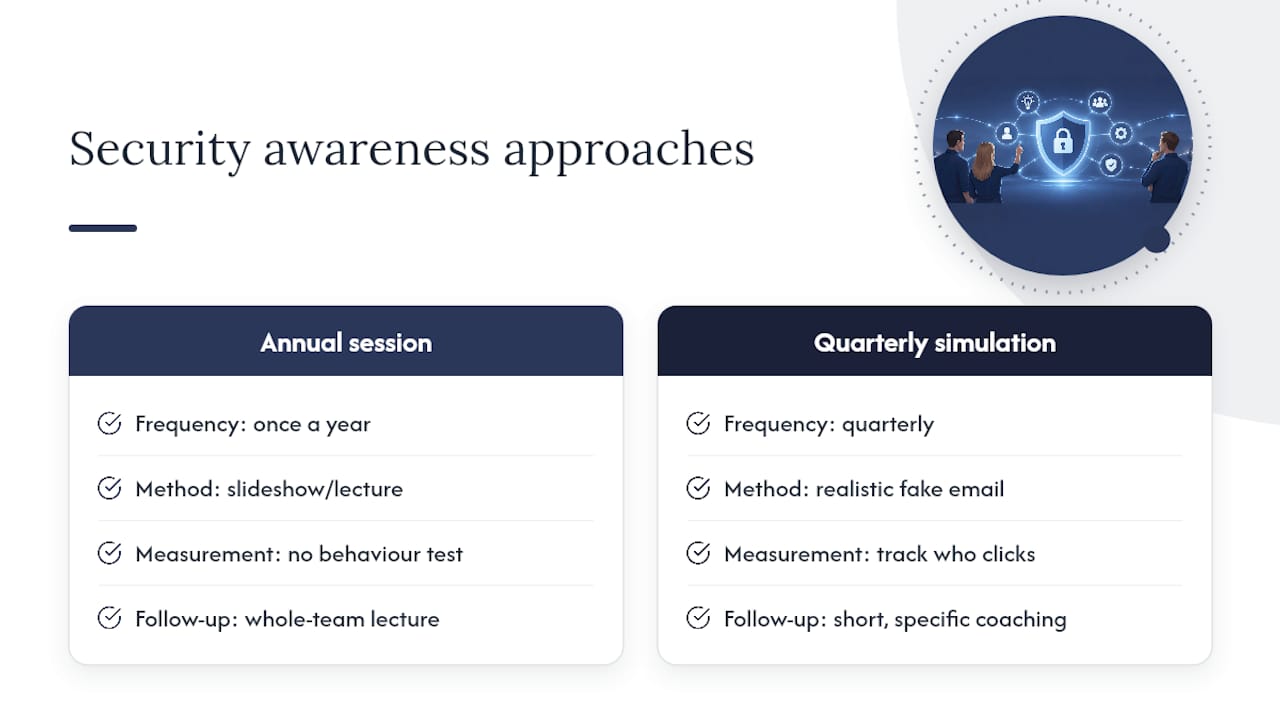
We see the same pattern constantly: a business runs one awareness session a year, ticks the compliance box, and moves on. Then someone clicks a fake invoice email eight months later because nothing reinforced the training.
Phishing simulation works better than a slideshow because it tests behaviour, not memory. Send a realistic fake phishing email quarterly, track who clicks, and follow up with short, specific coaching rather than a lecture to the whole team. The goal isn’t to catch people out, it’s to build a habit of pausing before clicking.
Verizon’s 2025 DBIR SMB snapshot shows credential theft remains a major initial access vector for attackers targeting SMBs, which is exactly what phishing enables. Training that doesn’t get tested is training that doesn’t stick.
Keep it practical: teach staff to check sender domains, hover before clicking, and report suspicious emails through one clear channel rather than guessing. We’ve written more on this in our cyber security awareness tips for Australian SMEs, aimed at exactly this problem.
Data encryption protocols
Encryption is one of those things everyone assumes is switched on. It often isn’t, or it’s only half configured.
At minimum, encrypt data at rest on servers and endpoints, and encrypt data in transit between systems and services. For Microsoft 365 environments, this mostly means confirming BitLocker is enabled on Windows devices and that mail flow uses TLS, which is standard but worth checking rather than assuming.
Where it gets missed is removable media and old file servers. We’ve found unencrypted external drives sitting in filing cabinets with years of client records, and ageing on premises servers running without disk encryption because nobody revisited the build after it went in five years ago.
Encryption doesn’t stop an attacker getting in. It stops stolen data being usable once they’re out the door, which matters a lot if you’re required to report a data breach.
Access control policies and least privilege enforcement
Least privilege means people get access to exactly what their role needs, nothing more. In practice, we walk into businesses where every staff member has local admin rights on their own laptop, and half the team can access the finance share because it was easier to set up that way years ago.
Review access quarterly, not once at onboarding and never again. Remove admin rights from standard user accounts and use separate, monitored admin accounts for anyone who genuinely needs elevated access. Tie access reviews to role changes and departures, because former staff with active logins is one of the most common findings in our audits.
The practical test: if you can’t explain in one sentence why a person has access to a system, they probably shouldn’t have it.
Compliance with relevant regulations and standards (e.g., NIST, ISO)
Frameworks like NIST’s Cybersecurity Framework and ISO 27001 give you structure, but they’re not a substitute for the basics. We’ve seen businesses spend months on an ISO 27001 gap analysis while their admin accounts still don’t have MFA.
If you’re working toward a formal standard, use it to organise your existing controls rather than starting from scratch. ASD’s Essential Eight maps reasonably well onto the technical parts of these frameworks and gives Australian SMBs a more practical starting point, according to ASD’s own guidance, which recommends it as a maturity path aimed squarely at reducing common attacks rather than ticking audit boxes.
Compliance work has its place, particularly if a client or insurer demands it. Just don’t let it replace the fundamentals covered earlier in this article.
Third-party risk management
Your security is only as strong as the weakest vendor with access to your systems. We’ve seen breaches trace back to a bookkeeping firm’s compromised email account, not the client’s own network.
Keep a list of every third party with system or data access: your MSP, accounting software vendors, payroll providers, any contractor with a login. For each one, confirm they use MFA, ask what their incident notification process looks like, and check what data they can actually reach.
ACSC’s advisory on protecting MSPs and their customers recommends event logging and log retention specifically because MSP and third party access is a common path attackers exploit. If a vendor doesn’t answer basic security questions, that’s information too.
Mobile device security management
Phones and tablets get treated like an afterthought in most SMB security plans, right up until someone loses a phone with the company email account logged in and no lock screen.
Enforce a PIN or biometric lock and encryption on every device that touches company email or files, personal or company owned. Use mobile device management where you can, so lost or stolen devices can be remotely wiped. Require MFA on mobile access the same as desktop access, because attackers don’t care which device they compromise.
BYOD policies need to say plainly what happens if a device is lost, what the business can and can’t see on a personal phone, and what gets wiped versus what doesn’t. Most businesses we see don’t have this written down anywhere, which becomes a problem the day it’s actually needed.
What we see in practice: common failures and pragmatic advice from IT Start
We see this constantly: businesses that think a cloud provider’s retained snapshot is a backup, admin accounts with no MFA because “it’s just easier,” and unmanaged NAS devices quietly sitting exposed on the network for years. The data backs this up too. Verizon’s DBIR shows ransomware disproportionately hits SMBs, and credential theft remains a top way in. Spend your money on MFA and tested restores first. Everything else is second.
— Matt
Get an assessment before you guess what’s wrong
Managed IT support, cyber security and backup services can be structured around the controls in this article. Request a cyber security assessment or contact us to find out where your gaps actually are.
Primary guidance: ACSC/ASD pages and industry reports
This article draws on ASD’s Essential Eight, ACSC’s MSP security guidance and ransomware recovery guidance, plus the Verizon 2025 DBIR SMB snapshot for SMB threat context. For backup tooling comparisons outside the Microsoft 365 ecosystem, see this roundup of backup plugins.
FAQ
What is the single most important cybersecurity control for SMBs?
Multi factor authentication on email, admin and remote access accounts stops the largest share of common attacks for the least cost and effort. ASD’s Essential Eight recommends starting here before any other control.
Does Microsoft 365 include proper backup protection?
Microsoft 365’s native retention is not a full backup and has limits on what it recovers and for how long. ACSC’s guidance recommends independent, third party, offline backups with regular restore testing instead.
How often should we test backup restores?
There’s no single universal number, but ACSC’s guidance points to regular, scheduled full restore tests rather than a one off setup check. Test on a cadence you can actually stick to, and treat a successful restore as proof, not the backup completing.
Does using an MSP remove our cybersecurity risk?
No. ACSC’s guidance on engaging MSPs states outsourcing does not transfer risk, and recommends enforcing MFA on MSP access along with contractual clarity on responsibilities.
What should be in an MSP contract to manage security risk?
The contract should define incident notification timelines, log access and retention, backup responsibilities and MFA requirements for MSP tools. IT Start structures its managed IT support and cyber security services around this kind of documented accountability.