
TL;DR:
- IT support specialists handle both reactive troubleshooting and proactive maintenance to ensure SMBs’ IT systems operate smoothly and securely. They work within a tiered support structure, with specific skills tailored to different complexity levels, from basic fixes to infrastructure management. Proper staffing, documentation, and scheduling proactive tasks are essential for reducing outages and enhancing security.
IT support specialist duties are defined as the full range of technical and customer service tasks required to keep a business’s IT systems running, from resolving help desk tickets to managing user accounts and applying security patches. The industry term for this function is IT support or technical support, and it spans a structured tiered model that most Brisbane SMBs either don’t know about or ignore entirely. A well-defined IT support role covers everything from basic troubleshooting on Windows and macOS devices to complex infrastructure work involving Active Directory, Azure AD, and network configuration. Tools like Zendesk, Microsoft 365, and ServiceNow sit at the centre of daily operations. Getting these responsibilities right is the difference between a business that runs smoothly and one that loses hours every week to avoidable IT problems.
What are the daily IT support specialist duties in smbs?
The core daily duties of an IT support specialist include responding to help desk requests, troubleshooting hardware and software errors, managing user accounts, and performing preventive maintenance like updates and patching. In a typical Brisbane SMB with 15 to 40 staff, these tasks arrive in a constant stream and need to be triaged carefully or the day falls apart fast.
Here is what a realistic daily task list looks like for an IT support specialist in an SMB environment:
- Ticket management: Logging, prioritising, and resolving support requests through platforms like Freshservice or ServiceNow, or even a shared inbox tool like SendSync for smaller teams
- Hardware and software troubleshooting: Diagnosing faults on desktops, laptops, printers, and mobile devices running Windows, macOS, or iOS
- User account management: Creating, modifying, and disabling accounts in Active Directory or Azure AD, including access to Microsoft 365 apps
- Onboarding and offboarding: Setting up new staff with the right access and, critically, disabling access and wiping devices securely when someone leaves
- Preventive maintenance: Running Windows Update, applying patches, checking backup logs, and monitoring disk space and system health
- Documentation: Writing up solutions to recurring issues so users can self-serve and the same ticket doesn’t come back next week
The balance between reactive and proactive work is where most SMBs struggle. Reactive work, fixing things after they break, is visible and urgent. Proactive work, patching, auditing, documenting, is invisible until it isn’t done. A good IT support specialist manages both.
Pro Tip: Set aside a fixed block each week, say Friday afternoon, for proactive tasks. If you don’t protect that time, reactive tickets will consume it every single time.

How does the tiered IT support system work?
IT support roles are structured into three tiers, each handling a different level of complexity. Tier 1 covers high-volume, low-complexity tasks. Tier 2 handles deeper technical problems. Tier 3 addresses infrastructure, root cause analysis, and security incidents. This structure exists to match the right skill level to the right problem, which keeps resolution times down and stops senior staff from spending their day resetting passwords.
| Tier | Typical Tasks | Skills Required |
|---|---|---|
| Tier 1 | Password resets, software installs, basic connectivity | Strong communication, patience, basic OS knowledge |
| Tier 2 | Network diagnostics, software conflicts, VPN issues | Networking fundamentals, deeper OS and app knowledge |
| Tier 3 | Infrastructure faults, security incidents, root cause analysis | Advanced networking, security, server and cloud expertise |
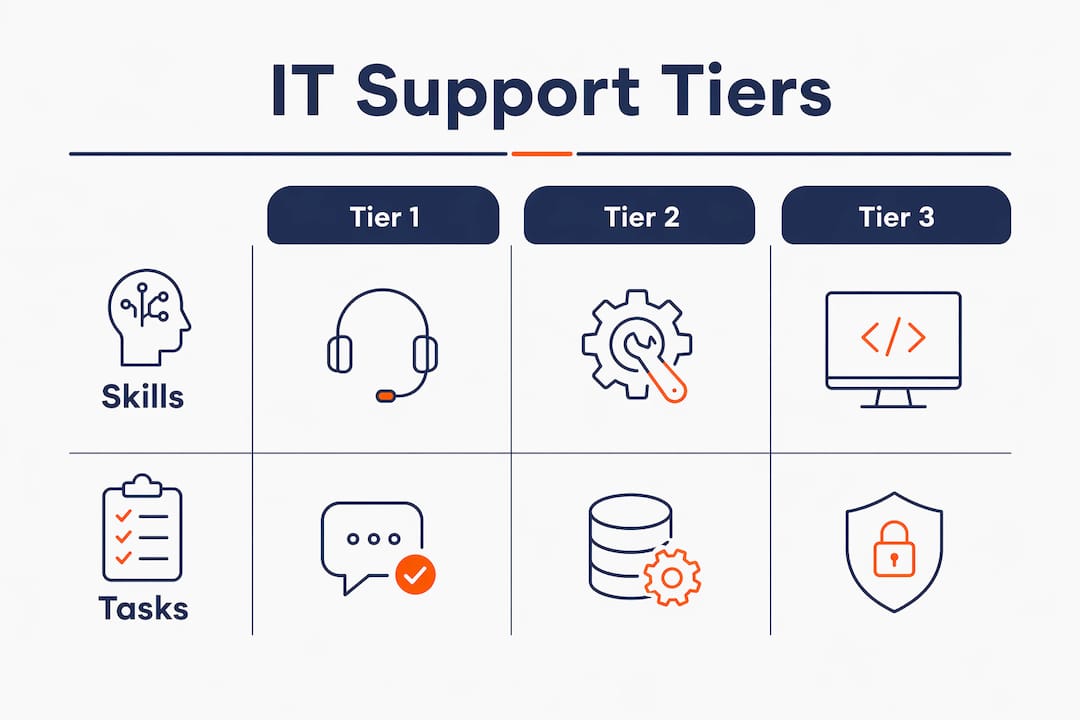
The problem in most Brisbane SMBs is that expecting one person to cover all tiers causes burnout and weakens the business’s security posture. We see this constantly. A single IT person gets hired, they spend 80% of their time on Tier 1 tasks, and the Tier 3 work, patching servers, reviewing firewall rules, auditing access, never gets done. That’s how breaches happen.
Pro Tip: If you only have one IT person, define which Tier 3 tasks need to be outsourced or escalated to a managed service provider. Don’t leave those gaps unaddressed.
Which technical skills do IT support specialists need?
Modern IT support blends technical competence with clear communication and patience, because non-technical staff need to understand what went wrong and trust that it won’t happen again. The technical side covers a broad range of tools and platforms that any competent specialist should be comfortable with.
The core technical skills for an IT support specialist role include:
- Operating systems: Windows 10/11, macOS, and basic Linux command line for server environments
- Networking fundamentals: TCP/IP, DNS, DHCP, and VPN configuration and troubleshooting
- Identity and access management: Active Directory, Azure AD, and Microsoft 365 admin centre
- Collaboration platforms: Microsoft 365 (Exchange Online, Teams, SharePoint) and Google Workspace
- Remote support tools: TeamViewer, AnyDesk, or built-in Microsoft Remote Desktop for off-site assistance
- Ticketing systems: Zendesk, Freshservice, or ServiceNow for structured request management
- Cybersecurity basics: Endpoint protection tools like Microsoft Defender, MFA setup, and phishing awareness
- Documentation: Maintaining a knowledge base in Confluence, SharePoint, or even a well-organised shared drive
The cybersecurity piece is non-negotiable in 2026. The Australian Cyber Security Centre consistently reports that credential theft and phishing are the top entry points for attacks on Australian SMBs. An IT support specialist who can’t configure MFA or recognise a suspicious login is a liability, not an asset.
What are the proactive duties of an IT support specialist?
Proactive IT support shifts the focus from fixing problems to preventing them through regular audits, patch management, and system monitoring. This is the part of the role that most businesses undervalue until something goes wrong.
The key proactive responsibilities for an IT support specialist are:
- Security patching: Applying operating system and application updates on a regular schedule, not just when something breaks. Microsoft releases patches on the second Tuesday of every month. Those need to go out within days, not weeks.
- System and network monitoring: Using tools like PRTG, SolarWinds, or built-in Microsoft Endpoint Manager alerts to catch performance issues before users notice them.
- Backup verification: Checking that backups are actually completing and that data can be restored. We see this a lot. Businesses think they’re backed up, but nobody has tested a restore in two years.
- Knowledge base maintenance: Documenting solutions to common issues so users can self-serve and repeat tickets drop. Printer mapping, VPN setup, password reset instructions. These should all be written up and accessible.
- User education: Running short sessions or sending guides on phishing awareness, safe browsing, and basic troubleshooting. An informed user base reduces ticket volume significantly.
- IT asset audits: Keeping an accurate register of hardware and software licences so nothing falls out of support or gets missed during a security review.
Proactive work is what separates a reactive IT support function from one that actually improves operational efficiency over time. The businesses that invest in it have fewer outages, lower support costs, and better security outcomes.
Pro Tip: Build a monthly IT health checklist covering patches, backups, account reviews, and hardware status. Even a simple spreadsheet beats having no process at all.
How should brisbane smbs staff and manage IT support roles?
Hiring IT support staff without matching their skills to your specific technology environment leads to gaps that cost you later. A professional services firm running Microsoft 365, a legal practice management system, and a cloud phone system needs a very different skill set than a warehouse using on-premises servers and barcode scanners.
Here is what Brisbane SMBs consistently get wrong when staffing IT support:
- Hiring for generic IT skills instead of environment-specific ones. Ask candidates directly about your specific tools. If you run Microsoft 365, they need to know Exchange Online and Teams administration, not just “Office.”
- Overloading one person with all support tiers. This is the single biggest mistake. One person cannot do Tier 1 tickets all day and also manage your firewall, patch your servers, and review your security logs. Something always gets dropped.
- Ignoring the customer service side. IT support professionals need to communicate clearly during outages and build trust with non-technical staff. A technically brilliant person who can’t explain a problem simply will frustrate your team constantly.
- No documented onboarding or offboarding process. When a staff member leaves and their accounts aren’t disabled within hours, you have a real security risk. This needs a checklist, not a memory.
- No escalation path defined. If your IT support person hits a problem they can’t solve, where does it go? Without a clear escalation path to a managed service provider or specialist, complex issues sit unresolved for days.
The help desk function works best when roles are clearly defined, expectations are documented, and there is a structured process for both routine tasks and escalations. Clarity here saves you money and reduces risk.
Key takeaways
IT support specialist duties require a structured, tiered approach covering both reactive troubleshooting and proactive maintenance to protect Brisbane SMBs from downtime and security risk.
| Point | Details |
|---|---|
| Tiered support structure | Assign Tier 1, 2, and 3 tasks appropriately to avoid burnout and security gaps. |
| Proactive over reactive | Schedule regular patching, backup checks, and audits to prevent problems before they occur. |
| Documentation reduces tickets | A maintained knowledge base cuts repeat support requests and empowers users to self-serve. |
| Match skills to your environment | Hire IT support staff based on your specific tools and workflows, not generic IT credentials. |
| Secure onboarding and offboarding | Disabling accounts and wiping devices at staff departure is a critical security control, not an afterthought. |
What brisbane smbs actually get wrong about IT support
Honestly, the biggest issue I see with Brisbane SMBs is the expectation that one IT support person can do everything. They hire someone, give them a vague job description, and then wonder why patches aren’t applied, documentation doesn’t exist, and the same tickets keep coming back. That’s not a people problem. That’s a structure problem.
The second thing businesses consistently underestimate is documentation. I’ve walked into businesses where the only person who knows how the network is set up is the IT person who left six months ago. No diagrams, no passwords documented securely, no runbooks. When something breaks, it becomes a forensic exercise. Documentation is the force multiplier that separates a functional IT operation from a chaotic one, and it costs almost nothing to maintain if you build the habit early.
The third mistake is treating IT support as purely reactive. The businesses I’ve worked with that have the fewest outages and the lowest support costs are the ones that invest in proactive monitoring and maintenance. They’re not special. They just have a process and they stick to it.
If you’re reviewing your IT support function right now, start with three questions. Are all three support tiers covered, either internally or through a partner? Is documentation current and accessible? And is someone actually checking that your backups work? If the answer to any of those is no, that’s where to start.
— Matt
How IT start supports brisbane smbs with expert IT services
IT Start works with Brisbane SMBs across professional services, healthcare, legal, and finance to deliver structured, proactive business IT support that covers all three support tiers. Whether you need help defining IT support roles, filling gaps in your current setup, or building a proactive maintenance programme, IT Start brings real MSP experience to the table. The team holds SMB 1001 Gold certification and focuses on practical outcomes, not generic advice. If your business needs stronger cyber security services or wants to understand where your current IT support has gaps, contact IT Start for a no-obligation assessment tailored to your environment and team size.
FAQ
What are the main duties of an IT support specialist?
The main duties include resolving help desk tickets, troubleshooting hardware and software, managing user accounts, applying security patches, and maintaining documentation. Proactive tasks like system monitoring and backup verification are equally part of the role.
What is the difference between tier 1, tier 2, and tier 3 IT support?
Tier 1 handles basic tasks like password resets and software installs. Tier 2 manages deeper diagnostics like network faults. Tier 3 addresses infrastructure, root cause analysis, and security incidents.
Why is documentation important in IT support?
Documentation reduces repeat tickets by enabling users to self-serve common issues and ensures continuity when staff change. Without it, the same problems recur and institutional knowledge disappears when someone leaves.
How many IT support staff does a brisbane SMB need?
The right number depends on your technology environment, staff count, and complexity. A business with 20 to 40 staff typically needs at least one dedicated IT support person plus a managed service provider relationship to cover Tier 2 and Tier 3 escalations.
What technical skills should i look for when hiring an IT support specialist?
Look for solid knowledge of Windows and Microsoft 365 administration, networking fundamentals including DNS and VPN, Active Directory or Azure AD experience, and familiarity with a ticketing system like Zendesk or Freshservice. Cybersecurity awareness and clear communication skills are equally non-negotiable.