
TL;DR:
- Effective IT security for businesses involves continuous management of technology, people, and processes to protect assets and ensure compliance. Small and medium-sized businesses often neglect ongoing cybersecurity practices, increasing vulnerability to breaches without sufficient monitoring, incident response, or disaster recovery planning. Selecting a managed security service that offers 24/7 monitoring, testing, and tailored response is critical for resilient and compliant operations.
IT security for a business is the ongoing management of technology, people, and processes to protect digital assets, maintain compliance, and keep operations running when things go wrong. Most small and medium-sized businesses (SMBs) in Australia treat it as a product purchase rather than a continuous discipline, and that gap is exactly where breaches happen. Antivirus software and a basic firewall are not an IT security programme. Real protection requires managed cybersecurity services that cover 24/7 monitoring, incident response, access control, employee training, and tested recovery plans. If your business handles client data, financial records, or health information, the stakes are too high for a set-and-forget approach.
What IT security solutions are available for SMBs?
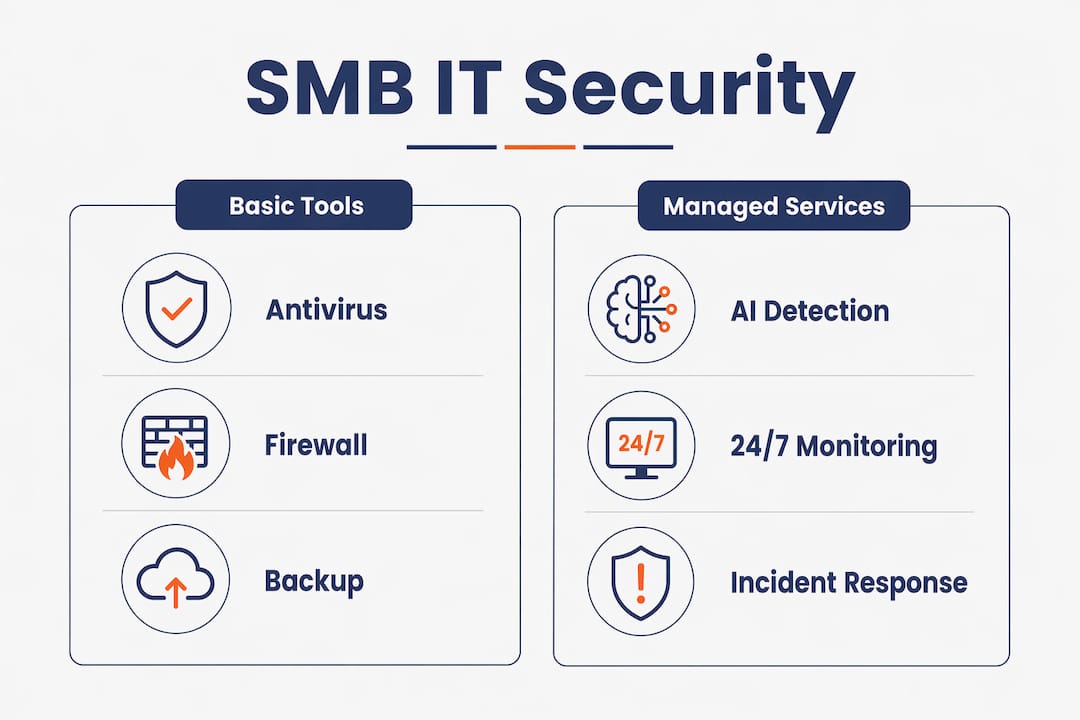
The range of IT security solutions available to small businesses is wider than most owners realise, and the differences between them matter enormously. At the foundational level, you have antivirus software, firewalls, and VPNs. These tools are necessary but not sufficient. They block known threats and filter traffic, but they do not investigate alerts, respond to active incidents, or tell you whether your backups actually work.

The next tier is where managed IT security starts to earn its name. Managed Detection and Response (MDR) and Security Operations Centre (SOC) services provide continuous monitoring and response across endpoints, networks, and applications. These services do not just generate alerts. They investigate them, validate whether a threat is real, and take action. That distinction matters because alert fatigue is a genuine problem. A business receiving hundreds of unreviewed notifications each week is no safer than one with no monitoring at all.
Backup and disaster recovery services sit alongside monitoring as a non-negotiable layer. The purpose is not just to store copies of data. It is to guarantee that data can be restored within a defined timeframe after ransomware, hardware failure, or accidental deletion. Employee security training rounds out the human layer, addressing the reality that phishing and social engineering remain the most common entry points for attackers.
| Layer | Basic tools | Managed services |
|---|---|---|
| Threat detection | Signature-based antivirus | AI-assisted MDR with human analysts |
| Monitoring hours | Business hours only | 24/7 continuous |
| Incident response | Manual, owner-led | Automated plus expert-led response |
| Backup assurance | Scheduled backups | Tested restores with RTO/RPO targets |
| Compliance support | None | Reporting, audits, policy management |
Pro Tip: Beware of vendors selling point products without ongoing management. A firewall that nobody monitors is a false sense of security. Ask any vendor: “Who reviews the alerts, and how fast do you respond?”
How do managed IT security services protect your business around the clock?
Managed security services protect businesses by combining AI-assisted detection with human expertise to investigate and respond to threats before they cause serious damage. The key word is “respond.” Most small businesses have tools that detect. Very few have a defined process for what happens in the thirty minutes after a threat is identified.
The practical value of a managed approach includes:
- Continuous monitoring of endpoints, servers, cloud applications, and network traffic, not just during business hours
- Alert triage and investigation by trained analysts who distinguish real threats from false positives, reducing attacker dwell time to minutes rather than days
- Tailored detection rules that are tuned over time to reflect your specific environment, reducing noise and improving accuracy
- Rapid containment actions such as isolating a compromised device or blocking a malicious IP before the threat spreads
- Regular reporting that gives management visibility into what was detected, investigated, and resolved
The difference between reactive alerts and proactive management is significant. A reactive system tells you something happened. A proactive managed service tells you what happened, whether it was a real threat, what was done about it, and what needs to change to prevent recurrence. Cybersecurity as a partnership shifts the burden of daily security operations away from your internal team and onto specialists who do this work full-time.
Outsourcing security operations also removes the staffing problem. Hiring a qualified security analyst in Brisbane costs well above $100,000 per year, and one person cannot provide 24/7 coverage. A managed service delivers a full team at a fraction of that cost.
Pro Tip: Look for flat-rate, fixed-cost services that bundle monitoring and response together. Predictable pricing means no surprise invoices after an incident. Per-incident billing creates a perverse incentive where your provider only earns when things go wrong.
What role does business continuity planning play in IT security?
Business continuity planning is the part of IT security that most SMBs skip entirely, and it is the part that determines whether your business survives a serious incident. A security programme without a continuity plan is like having a sprinkler system with no evacuation procedure. You might slow the fire, but you still have no plan for getting everyone out safely.
Business continuity planning involves six clear steps that turn a document into real preparedness:
- Prepare by gathering your leadership team and committing resources to the process
- Define objectives including which systems and data are most critical to operations
- Identify risks specific to your business, including ransomware, supplier failure, and physical disruptions
- Develop strategies for maintaining or rapidly restoring critical functions during an incident
- Assign tasks so every person knows their role during a disruption, not just the IT manager
- Test the plan through tabletop exercises and actual restore tests at least once per year
The measurable targets within a continuity plan are called Recovery Time Objective (RTO) and Recovery Point Objective (RPO). RTO defines how long you can afford to be offline. RPO defines how much data loss is acceptable. Defining these targets forces a business to make concrete decisions about backup frequency and recovery infrastructure rather than assuming everything will work out.
We see this constantly with new clients. They have a backup running somewhere, but nobody has tested a restore in two years. When ransomware hits, they discover the backup was misconfigured, the restore takes four days, and the business loses clients as a result. A tested continuity plan connected to your security incident response process is what separates a recoverable incident from a catastrophic one.
How to choose the right IT security business partner
Choosing an IT security provider is not the same as buying software. You are selecting an ongoing operational partner, and the wrong choice leaves you with a false sense of protection. The criteria that matter most are not the ones vendors typically lead with.
Here is what to actually assess when evaluating providers:
- Continuous management approach. Do they monitor your environment 24/7, or do they respond only when you call? Ask for specifics about monitoring hours and escalation procedures.
- Evidence and governance. Do they provide quarterly reviews with evidence of what was detected, tuned, and improved? Mature security programmes treat security as a continuously managed system, not a one-time setup.
- People and process coverage. Technology alone is not enough. Effective IT security requires people and processes alongside tools. Ask whether the provider includes employee training and policy management.
- Transparent reporting. You should receive regular, readable reports that show what threats were detected and how they were handled. If a provider cannot explain their results clearly, that is a red flag.
- Local compliance knowledge. Australian SMBs face obligations under the Privacy Act, the Notifiable Data Breaches scheme, and industry-specific regulations. Your provider should understand these without needing to be educated on them.
- Pricing structure. Flat-rate pricing that includes monitoring and response is far preferable to per-incident billing. Surprise costs after a breach add insult to injury.
Red flags to watch for include limited monitoring hours, vague service level agreements, and providers who focus entirely on selling hardware or software without discussing ongoing management. The best cybersecurity solutions for SMBs integrate people, processes, and technology under a single managed service rather than selling components separately.
Pro Tip: Prefer providers who offer integrated IT support and security under one agreement. When your IT support team and your security team are the same people, response times drop and accountability is clear.
Key takeaways
Effective IT security for a business requires continuous managed protection across technology, people, and processes. A one-time product purchase is not a security programme.
| Point | Details |
|---|---|
| Managed services beat tools alone | 24/7 monitoring and response closes the gaps that antivirus and firewalls leave open. |
| Business continuity is part of security | Tested recovery plans with defined RTO and RPO targets determine whether your business survives an incident. |
| People and process matter as much as technology | Employee training and clear incident roles are as critical as any software deployment. |
| Flat-rate pricing protects your budget | Fixed-cost managed services avoid surprise fees after incidents and align provider incentives with your protection. |
| Provider selection requires specific criteria | Assess monitoring hours, governance evidence, compliance knowledge, and reporting transparency before signing anything. |
What I actually see when SMBs think they are protected
Honestly, the gap between what SMBs think their security looks like and what it actually looks like is striking. We onboard new clients regularly who have antivirus on every machine, a firewall at the edge, and genuine confidence that they are covered. Then we run a basic assessment and find no MFA on Microsoft 365, backups that have not been tested in eighteen months, and admin accounts shared between three staff members.
The backup problem is the one that keeps me up at night. SMBs routinely discover their backups are incomplete or untested only when they need them. By then it is too late. A backup that has never been restored is not a backup. It is a hope.
Human error is the other underestimated risk. Phishing attacks do not need to be sophisticated to work. A staff member clicking a link in a convincing email is the most common way ransomware enters a network, and no firewall stops that. Regular, practical security training is not a nice-to-have. It is the layer that fills the gap technology cannot.
My honest take is that most SMBs do not need more tools. They need someone managing what they already have, plus a tested plan for when something goes wrong. Security is not a purchase. It is a practice. The businesses that recover well from incidents are the ones that treated continuity planning as a real operational exercise, not a document that lives in a shared drive nobody opens.
Start with three things: turn on MFA across all accounts, test your most recent backup restore, and ask your IT provider when they last reviewed your monitoring rules. The answers will tell you everything.
— Matt
How IT Start can protect your Brisbane business
IT Start provides managed cybersecurity services built specifically for Australian SMBs, covering 24/7 monitoring, incident response, Microsoft 365 security management, and compliance support under a predictable flat-rate model. If your business operates in financial services, healthcare, legal, or professional services, the compliance and data protection requirements are significant, and IT Start’s team understands the Australian regulatory context without needing to be briefed on it. For businesses that want integrated IT support alongside security, IT Start’s business IT support service combines infrastructure management, backups, and cybersecurity under one agreement. Contact IT Start for a free security assessment and find out where your current gaps actually are.
FAQ
What does an IT security business actually do?
An IT security business manages the technology, people, and processes that protect a company’s digital assets from threats, breaches, and data loss. Services typically include 24/7 monitoring, threat detection and response, backup management, compliance support, and employee security training.
Is managed IT security worth it for a small business?
Yes. Managed security services provide continuous monitoring and expert response that a small business cannot replicate internally at comparable cost. The alternative, relying on basic tools without active management, leaves significant gaps that attackers routinely exploit.
How does business continuity planning connect to IT security?
Business continuity planning defines how a business recovers from a security incident, including ransomware or data loss. Without tested recovery objectives and assigned roles, even a well-monitored environment can result in days of downtime after a breach.
What should I ask a potential IT security provider?
Ask about their monitoring hours, how they handle alert investigation, what their average response time is, and whether they provide regular governance reports. Also ask specifically how they handle Australian compliance obligations under the Privacy Act and the Notifiable Data Breaches scheme.
How often should a business test its security and continuity plan?
Security configurations should be reviewed quarterly, and continuity plans should be tested through a simulated restore or tabletop exercise at least once per year. Tested processes are the difference between a plan that works and one that fails at the worst possible moment.