
TL;DR:
- Effective cloud security for SMBs hinges on clearly understanding shared responsibility, prioritizing identity controls, and implementing continuous monitoring to prevent breaches. Focusing on strong MFA, least-privilege access, and regular audits significantly reduces risks, while default-deny network policies and encryption safeguard data. Ongoing posture assessment ensures configurations stay secure, supporting compliance and lowering vulnerability to cyber threats.
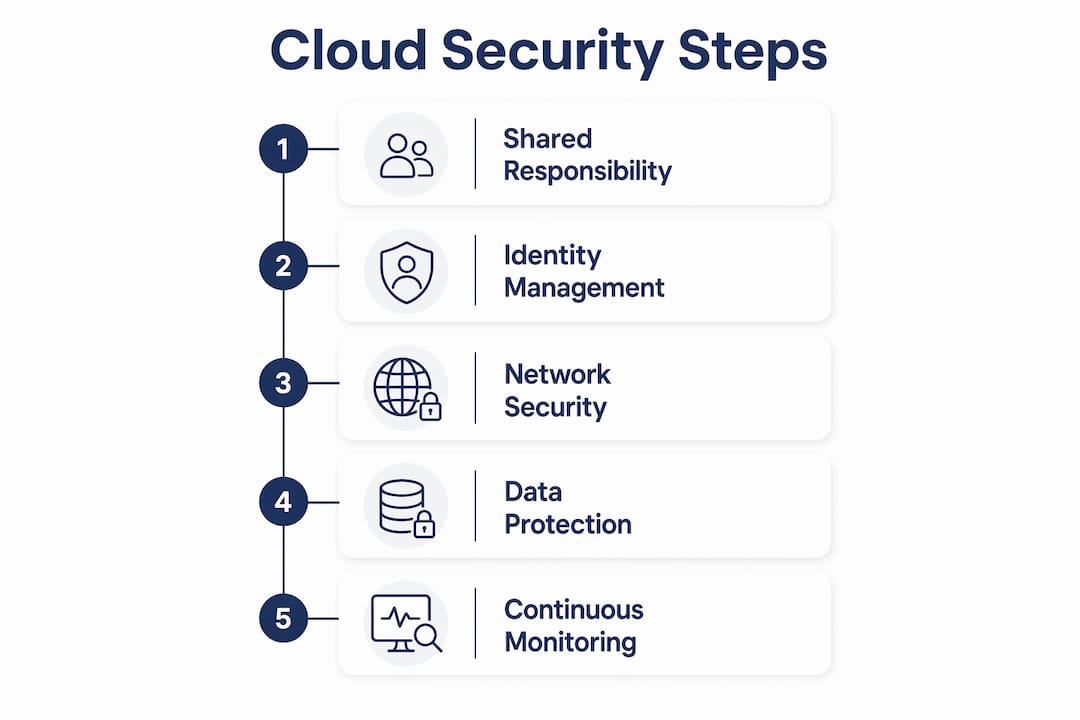
Cloud security practices are the policies, controls, and tools that protect cloud-hosted data, applications, and infrastructure from breaches, misconfigurations, and unauthorised access. For small to medium-sized businesses in Brisbane and across Queensland, getting these practices right is not optional. The Australian Cyber Security Centre consistently lists cloud misconfiguration and weak identity controls among the top causes of breaches affecting SMBs. Tools like Microsoft Defender for Cloud, AWS Security Hub, and phishing-resistant MFA are no longer enterprise-only. They are the baseline. This guide covers what actually matters in 2026, in the order you should tackle it.
What are cloud security practices and why do they matter for SMBs?
Cloud security best practices are built on two foundations: a clear shared responsibility model and repeatable, continuously monitored controls. That definition matters because most SMBs we work with assume their cloud provider handles security end-to-end. They do not. Understanding where provider responsibility ends and yours begins is the single most important thing you can do before worrying about any specific tool or framework.

The shared responsibility model divides security obligations between the cloud provider and the customer. AWS, Microsoft Azure, and Google Cloud protect the physical infrastructure, hypervisors, and core platform services. You are responsible for identity configuration, data classification, access controls, network rules, and application-layer security. Misunderstanding this split is how businesses end up with publicly exposed storage buckets or admin accounts with no MFA.
For SMBs with limited IT staff, an MSP fills the customer side of that model. IT Start manages the controls your team does not have time or expertise to configure and monitor. That includes identity policies, network hardening, encryption settings, and ongoing compliance scanning. Think of it as taking ownership of your half of the shared responsibility contract.
Which identity and access management practices prevent most cloud breaches?
Identity is the perimeter in cloud environments. There is no physical network boundary to fall back on. Identity-focused controls prevent the majority of cloud incidents, which is why we always start here when onboarding a new client.
The most common identity misconfigurations we see in SMB cloud environments:
- No MFA on admin accounts. We see this constantly. One compromised password and an attacker owns the entire Microsoft 365 or AWS environment.
- Long-lived access keys. AWS IAM keys that were created years ago and never rotated, often attached to accounts that no longer exist.
- Overly permissive roles. Users or service accounts with administrator access when they only need read permissions on one storage bucket.
- No conditional access policies. Logins from overseas IP addresses or unfamiliar devices go through without any challenge.
The fix is not complicated, but it does require discipline. Phishing-resistant MFA using FIDO2 hardware keys or passkeys is the gold standard. Standard SMS-based MFA is better than nothing, but it is vulnerable to SIM-swapping attacks. For most SMBs, Microsoft Authenticator with number matching is a practical middle ground that significantly reduces phishing risk.
Just-in-time access is worth implementing for admin roles. Rather than leaving elevated permissions permanently assigned, you grant them on request for a defined window and revoke them automatically. Azure Privileged Identity Management and AWS IAM Identity Center both support this. Federated identity through Azure Active Directory or Okta centralises access management so you are not maintaining separate credentials across a dozen SaaS platforms.
Pro Tip: Audit your cloud IAM policies quarterly. Pull a list of every account with admin or owner permissions and ask whether each one genuinely needs that level of access. You will almost always find accounts to downgrade or remove.
How do you secure cloud networks and avoid common SMB pitfalls?
Cloud network security best practices start with a default-deny mindset. Every inbound rule you add is an intentional decision, not a default. Most SMBs we inherit have security groups or firewall rules that were opened for a specific project and never closed. That is how attack surface grows without anyone noticing.
Here is a practical sequence for hardening cloud network controls:
- Audit all inbound rules. Document every open port and the business reason for it. If no one can explain why port 3389 (RDP) is open to the internet, close it immediately.
- Switch to private endpoints. Default-deny inbound rules combined with AWS VPC endpoints or Azure Private Link keep traffic off the public internet entirely. This removes a significant attack vector for data exfiltration.
- Enable egress filtering. Outbound traffic controls catch malware calling home and prevent data leaving your environment through unexpected channels. DNS monitoring sits alongside this to detect domain generation algorithm activity.
- Set ownership and expiry on any public exposure. Public endpoint creep is a real problem. If you must expose something publicly, assign a named owner and a review date. Without that, public paths accumulate and nobody audits them.
- Enable VPC flow logs. The CIS AWS Foundations Benchmark includes VPC flow log enablement as a concrete control for a reason. You cannot investigate an incident without network traffic records.
Pro Tip: Search your cloud environment for any storage bucket or blob container with public read access enabled. In our experience, at least one exists in most SMB environments that have not had a security review. It takes five minutes to find and thirty seconds to fix.
What data protection methods and compliance frameworks support cloud security?
Data protection in the cloud covers three areas: encryption, key management, and classification. All three interact. If you encrypt data but store the encryption keys in the same account with the same access controls, you have not meaningfully improved your security posture.
Encryption at rest and in transit is the baseline. AWS KMS and Azure Key Vault both provide customer-managed key options, which give you control over key lifecycle and rotation independent of the cloud provider. For most SMBs, provider-managed keys with regular rotation are sufficient. Customer-managed keys add operational complexity that requires dedicated management time.
Data classification determines which controls apply to which data. Personal information under the Privacy Act 1988, financial records, and health data each carry different retention and access requirements. Without a classification scheme, you end up applying maximum controls to everything (expensive and slow) or minimum controls to everything (a compliance risk).
| Framework | What it covers | SMB relevance |
|---|---|---|
| CSA CCM v4.1 | Cloud-specific controls across IAM, logging, supply chain, incident management | Maps provider vs customer obligations, reduces audit duplication |
| CIS Benchmarks | Hardening standards for AWS, Azure, GCP configurations | Concrete, testable controls for configuration audits |
| ISO 27001 | Broad information security management system | Useful for clients in legal, finance, or healthcare requiring certification |
| ACSC Essential Eight | Australian government baseline controls | Directly relevant for Australian SMBs seeking baseline compliance |
The Cloud Security Alliance released CCM v4.1 in January 2026 with updates to logging, incident management, supply chain security, and IAM controls. This matters for SMBs because CCM’s responsibility-aware controls map what the provider handles versus what you handle, which reduces duplicated audit effort significantly. If you are preparing for any kind of compliance audit, CCM is worth mapping against your existing controls before you start.
Why do continuous monitoring and zero trust matter in cloud security?
Continuous monitoring is not a set-and-forget activity. Configuration drift is the gradual divergence of your cloud environment from its intended secure state. Someone opens a port for testing and forgets to close it. A new service account gets created with admin rights. A storage bucket gets misconfigured during a deployment. Without continuous scanning, these changes accumulate invisibly.
Cloud Security Posture Management tools like Microsoft Defender for Cloud, AWS Security Hub, and Orca Security scan your environment continuously and flag deviations from your security baseline. The key is treating findings as a workflow with assigned owners and SLAs, not as a report that gets filed and forgotten. Compliance scanning with assigned owners and remediation deadlines is what separates teams that actually fix issues from teams that just document them.
Zero Trust in cloud environments means access is never assumed based on network location. Zero Trust at the control plane means every access request is verified against identity and policy, continuously, using telemetry from your environment. If someone’s credentials are compromised, Zero Trust limits what they can reach and for how long. For SMBs, the practical starting point is conditional access policies in Azure AD and service control policies in AWS Organizations.
SIEM logging through Microsoft Sentinel or AWS CloudTrail with alerting on anomalous behaviour rounds out the monitoring picture. You need logs to investigate incidents. You need alerts to catch them before they become breaches. And you need an incident response plan so your team knows what to do when an alert fires at 11pm on a Friday.
Pro Tip: Set up a weekly automated report from your CSPM tool that shows new high-severity findings. If that number is growing week on week, something in your deployment or change management process needs attention.
Key takeaways
Strong cloud security practices require clear ownership of the shared responsibility model, identity controls as the first priority, and continuous posture monitoring to catch configuration drift before it becomes a breach.
| Point | Details |
|---|---|
| Shared responsibility is foundational | Know exactly which controls your cloud provider manages and which ones you own. |
| Identity controls prevent most breaches | Phishing-resistant MFA and least-privilege access stop the majority of cloud incidents. |
| Network defaults should deny, not allow | Audit all inbound rules, use private endpoints, and assign expiry dates to any public exposure. |
| Encrypt data and manage keys separately | Use AWS KMS or Azure Key Vault and classify data to apply the right controls to the right assets. |
| Continuous monitoring beats periodic audits | CSPM tools with assigned owners and SLAs catch configuration drift before it becomes a breach. |
What I actually see when SMBs move to the cloud
Honestly, the gap between what cloud security frameworks recommend and what most SMBs actually have in place is significant. We onboard clients regularly who have been using Microsoft 365 or AWS for years with no MFA on admin accounts, no conditional access, and security groups that look like they were configured by someone who was in a hurry and never came back.
The frameworks are not wrong. The cloud security architecture guidance from TechTarget and the CSA CCM are genuinely useful. But a 24-point checklist handed to a business owner with no dedicated IT staff is not a security programme. It is a document that sits in a folder.
What actually works is starting with identity. Fix MFA. Remove stale admin accounts. Set up conditional access. That alone closes the door on a huge proportion of attacks. Then layer in network controls, encryption, and monitoring. Do not try to implement everything at once. The businesses I have seen make real progress are the ones that pick three things, do them properly, and build from there.
The other thing worth saying: policy-as-code and continuous compliance are not just for large enterprises. If you are running any kind of DevOps pipeline, even a simple one, you can add automated security checks that flag misconfigurations before they reach production. That is a much better outcome than finding them six months later during an audit. For SMBs in Brisbane managing cloud data security in regulated industries like finance or healthcare, this is not optional. It is how you stay compliant without drowning in manual review work.
— Matt
How IT Start helps Brisbane SMBs with cloud security
IT Start works with SMBs across Brisbane and Queensland to implement and manage cloud security services that match your actual risk profile, not a generic enterprise checklist. That means setting up phishing-resistant MFA, auditing IAM policies, hardening network configurations, and putting continuous posture monitoring in place with real remediation workflows. We also cover cyber security solutions including identity management, SIEM logging, and incident response planning. If you are not sure where your cloud environment stands right now, a security assessment is the right starting point. Contact IT Start for a no-obligation conversation about what your business actually needs.
FAQ
What is the shared responsibility model in cloud security?
The shared responsibility model defines which security controls the cloud provider manages and which ones the customer must implement. Providers like AWS and Microsoft Azure handle physical infrastructure and platform security; customers are responsible for identity, data, access controls, and application configuration.
What should I look for in cloud security for my SMB?
Prioritise phishing-resistant MFA, least-privilege IAM policies, default-deny network rules, encryption at rest and in transit, and continuous posture monitoring. A cloud security checklist covering these areas gives you a practical starting point.
How does Zero Trust apply to cloud environments?
Zero Trust in the cloud means access is enforced by identity and policy at the control plane, not assumed based on network location. Every access request is continuously validated using telemetry, which limits the blast radius if credentials are compromised.
Which compliance framework is most relevant for Australian SMBs?
The ACSC Essential Eight is the most directly applicable baseline for Australian businesses. The CSA Cloud Controls Matrix v4.1 is useful for cloud-specific compliance mapping, particularly for SMBs in finance, legal, or healthcare that face audit requirements.
How often should SMBs review their cloud security controls?
Critical controls like IAM permissions and public exposure should be reviewed quarterly at minimum. Continuous posture management tools like Microsoft Defender for Cloud or AWS Security Hub provide ongoing visibility between formal reviews.