
ICS cyber security, in the way most small business owners actually need to understand it, means securing the everyday IT estate your business runs on: networks, endpoints, servers, Microsoft 365, and backups, usually managed by an outsourced provider like IT Start rather than an in-house team. It leans on frameworks like the Essential Eight and, where businesses want a broader risk lens, NIST guidance.
What’s in scope for this article:
- Your network perimeter, WiFi, and firewall
- Laptops, phones, and other endpoints staff use daily
- Servers and file storage, including NAS devices
- Microsoft 365 and other cloud apps
- Backup and disaster recovery
One thing this article won’t cover: industrial control systems (ICS) used in manufacturing plants, utilities, or critical infrastructure. That’s a genuinely different discipline with different risks. If you’re running a factory floor with SCADA systems, this isn’t your guide.
Key Takeaways
Cyber security for SMB office IT works when MFA, tested backups, and patching are treated as the non-negotiable baseline, not optional extras.
| Point | Details |
|---|---|
| MFA comes first | Multi factor authentication on email and admin accounts blocks the most common account takeover attempts. |
| Backups need testing | A backup you haven’t restored and documented is not a reliable backup, regardless of how often it runs. |
| Microsoft 365 retention isn’t a backup | Native retention helps with everyday recovery but won’t reliably survive admin compromise or ransomware. |
| Ask for evidence, not assurances | Request documented restore logs and Essential Eight alignment before signing with any MSP. |
| IT Start covers the full stack | IT Start manages Microsoft 365, backups, endpoints, and network security for Brisbane SMBs with 10 to 50 staff. |
Table of Contents
- What is ICS cyber security for an office IT setup?
- What do SMBs get wrong about cyber security?
- What are the essential controls for SMB cyber security?
- Why isn’t Microsoft 365 retention the same as a backup?
- How does an MSP actually deliver this?
- What should you ask an MSP before signing?
- What’s a realistic 30/90/365 day plan?
- What does ICS actually mean, and why is it a different job?
- What ICS risks matter if your SMB does have industrial equipment?
- Why is it hard to integrate ICS security with standard IT practices?
- Why we push MFA and tested backups before anything else
- Get your office IT and backups properly checked
- Sources
- FAQ
What is ICS cyber security for an office IT setup?
Honestly, most owners who search this phrase are not thinking about industrial control systems at all. They’re thinking about whether their business, staff logins, client files, and cloud accounts are protected. That’s the version we deal with every day.
Here’s how the pieces break down and who typically owns what in a managed arrangement:
- Network perimeter (firewall, WiFi): the MSP configures and monitors it; you supply the internet connection and physical premises
- Endpoints (laptops, phones): the MSP patches and secures them; you enforce staff use policy
- Servers and NAS: the MSP manages patching and access; you own the data stored on them
- Microsoft 365 and cloud apps: the MSP configures security settings and licensing; you manage day to day user accounts with MSP support
- Backups: the MSP sets up, monitors, and tests them; you decide what’s critical enough to prioritise
If a business does have factory equipment or building management systems tied to operational technology, that’s a separate engagement with different tooling entirely. We flag it early rather than pretend our office IT stack covers it.
What do SMBs get wrong about cyber security?
We see the same five mistakes on repeat, across almost every new client audit. No multi factor authentication (MFA) on email or admin accounts is probably the biggest one, and it’s still shockingly common. ACSC guidance puts MFA as one of three starting measures for a reason: it stops a huge share of account takeovers cold.
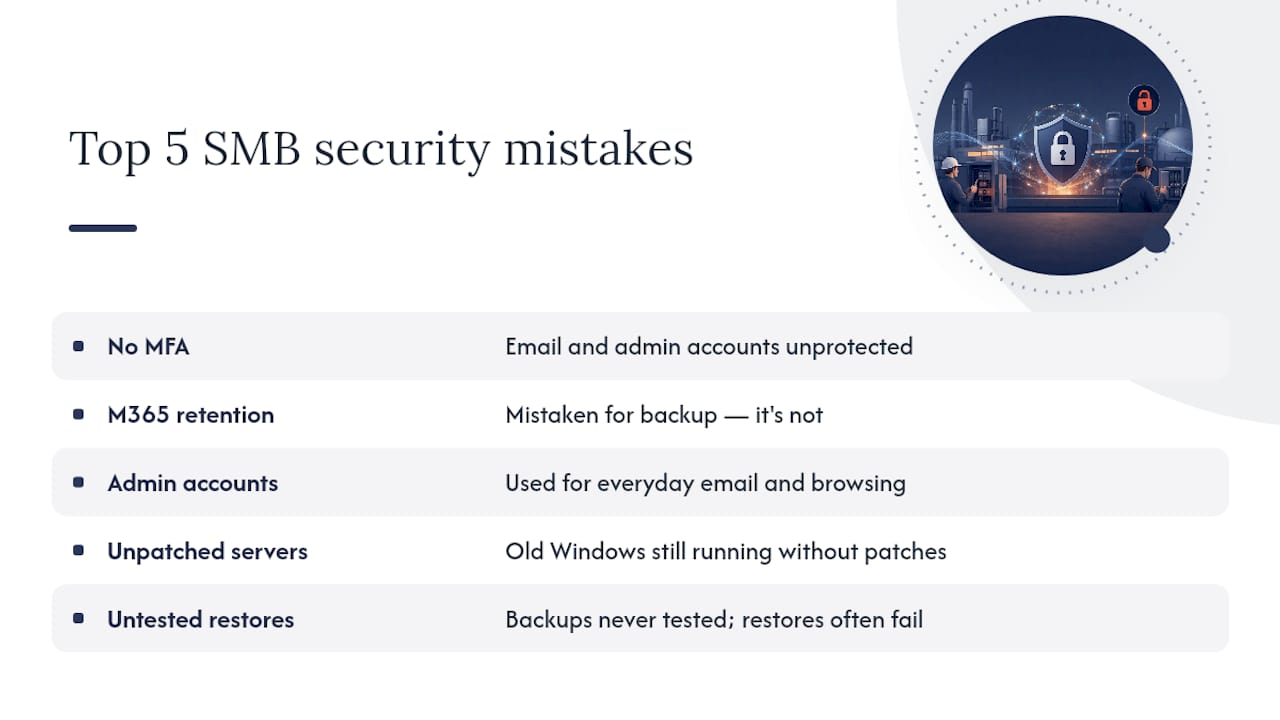
Second: businesses think Microsoft 365’s built in retention is a backup. It isn’t, and we’ll dig into why shortly. Third: staff use their admin account for everyday email and browsing, which means one phishing click can hand an attacker the keys to everything. Fourth: servers running Windows versions that stopped getting security patches years ago, still humming away because “it still works fine.” Fifth: nobody’s actually tested whether a restore works until the day they desperately need one, and then it doesn’t.
These aren’t small issues. Ransomware groups specifically hunt for exposed admin accounts and unpatched systems, and cyber insurers are increasingly refusing claims when basic controls like MFA weren’t in place.
Pro Tip: Ask your IT provider right now: “When did we last successfully restore a full backup, and can you show me the log?” If the answer is vague, you’ve found your first gap.
What are the essential controls for SMB cyber security?
Priority order matters here. We don’t try to fix everything at once, because that’s how projects stall. This is roughly the sequence we push clients through:
- Multi factor authentication on email, admin accounts, and remote access first. It’s the single highest impact, lowest effort control there is, and it’s built into Microsoft 365 licensing already.
- Backups with tested restores. Not backups that exist, backups you’ve proven work. More on this below.
- Patching, on a defined schedule, not “whenever someone remembers.”
- Endpoint detection and response (EDR), which catches malicious behaviour that traditional antivirus misses. This usually needs a third-party tool layered on top of what’s included with most Microsoft 365 plans.
- Restricting admin privileges so day to day accounts can’t make system level changes.
- Network segmentation, keeping guest WiFi and IoT devices away from your core business network.
- Secure WiFi and firewall rules, reviewed periodically rather than set once and forgotten.
- Application hardening, blocking software that has no business reason to run.
The Essential Eight frames the first three of these, MFA, patching, and backups, as the foundation for reaching Maturity Level 1, and that maturity model is a genuinely useful yardstick when you’re briefing an MSP on what “good” looks like. Practitioner write-ups on the Essential Eight for small business consistently rank these same three controls as the fastest path to meaningful risk reduction, and that matches what we see client-side too.
Why isn’t Microsoft 365 retention the same as a backup?
This is the one that catches businesses out the most, and it’s worth slowing down on. Microsoft documents clearly that in-service retention and restore features are genuinely useful, but they don’t replace a proper backup for a lot of disaster and ransomware scenarios. Retention travels with your content and helps in plenty of everyday recovery situations, but it won’t necessarily save you if an admin account gets compromised or a retention policy itself gets removed by an attacker.
A backup that can’t be restored is effectively no backup at all. Government guidance on regular backups recommends offline copies, tight access controls over who can modify or delete backups, and documented restore testing as part of business continuity planning.
What a proper setup looks like:
- Backup scope covers your data, software, and configuration settings, not just email
- At least one copy sits offline or logically separate from your live environment
- Access to modify or delete backups is restricted to a small, controlled group
- Retention periods match your actual business needs, not just the default
A short testing protocol we recommend to clients:
- Schedule a full restore test at least quarterly
- Document what was restored, how long it took, and any issues found
- Compare the result against your recovery time objective
- Fix any gap immediately, don’t wait for the next scheduled test
How does an MSP actually deliver this?
A managed IT provider isn’t just “the people you call when something breaks.” Done properly, the service covers prevention, detection, and recovery as one connected job.
- 24/7 monitoring and alerting on unusual account or network activity
- Scheduled patch management across servers, endpoints, and cloud apps
- EDR deployment and tuning, not just antivirus left on autopilot
- Backup management including the restore testing covered above
- Account and privilege management, so nobody’s running as admin by default
- Incident coaching, walking a business through what to do in the first hour of a suspected breach
We’ve had clients where a staff member clicked a phishing link, MFA blocked the login attempt, and the whole thing became a five minute conversation instead of a weekend crisis. That’s the difference proper controls make in practice. When you’re evaluating an MSP, ask for evidence: documented restore logs, a written statement of where they sit against the Essential Eight, and proof of how Microsoft 365 is actually configured, not just a verbal assurance. A SMB 1001 Gold certification or similar accreditation is worth asking about too.
What should you ask an MSP before signing?
Put these questions directly to any provider, including us, before you sign anything:
- Do you test full restores on a set schedule, and can you show documentation?
- Who holds Global Admin access to our Microsoft 365 tenant, and how is that access controlled?
- How is MFA enforced across our accounts, and can it be disabled without your sign off?
- What EDR platform do you run, and what’s included versus billed extra?
- What’s your typical time to detect and respond to an incident?
On the SLA side, ask for backup restore time objectives in writing, defined patching windows, a named incident response contact, and a commitment to hand over evidence, not just a summary email, when something happens.
Pro Tip: If an MSP can’t answer the restore testing question with a specific date and outcome, that’s a red flag worth walking away from.
What’s a realistic 30/90/365 day plan?
You don’t need to fix everything on day one. Spread it out and it becomes manageable.
- First 30 days: Turn on MFA everywhere it’s missing, patch anything critically overdue, verify your last backup actually restores, and cut down who has admin access.
- Next 90 days: Roll out EDR properly, run your first documented full restore test, lock in a patching policy, and separate guest WiFi from your core network.
- Within 365 days: Benchmark your Essential Eight maturity, run a formal disaster recovery exercise involving key staff, and set a hardware retirement schedule so nothing critical is running unsupported software.
What does ICS actually mean, and why is it a different job?
Since the acronym gets thrown around loosely, it’s worth being precise. Industrial Control Systems (ICS) are the computers and hardware that run physical processes: think SCADA systems controlling a water treatment plant, programmable logic controllers on a factory production line, or building management systems in a large facility. These systems talk to sensors, valves, and machinery in the physical world, not just to files and email.
Office IT, the subject of this entire article, is a different animal. It’s about protecting data, identity, and communication: your Microsoft 365 tenant, your file servers, your staff laptops. Nobody gets physically hurt if a spreadsheet gets corrupted. The stakes with ICS are different because a compromised control system can shut down production, damage equipment, or in serious cases create safety incidents.
The security priorities flip too. In office IT, patching fast is almost always the right call because the risk of an unpatched vulnerability generally outweighs the risk of an update causing a hiccup. In ICS environments, an update to a control system running 24/7 machinery might need weeks of testing before anyone will touch it, because unplanned downtime on a production line can cost more than the vulnerability itself.
For the overwhelming majority of SMBs we work with, in Brisbane and beyond, there is no ICS component at all. The business runs on laptops, cloud apps, and a server or two. If your business does have equipment tied to operational technology, that genuinely needs a specialist who understands both IT and OT, and it sits outside a standard managed IT contract.
What ICS risks matter if your SMB does have industrial equipment?
If you’re one of the smaller number of SMBs that does run ICS components, alongside a manufacturing line, a commercial kitchen with automated systems, or building automation, a few risks come up again and again.
Legacy systems are the big one. Control system hardware is often designed to run unchanged for 15 to 20 years, which means the underlying software can be years past its last security update by the time anyone thinks to check. Replacing it isn’t as simple as swapping a laptop, either, because it’s often tied to specific machinery that can’t just be upgraded on a whim.
OT networks were traditionally built assuming physical isolation, air gapped from the internet entirely. That assumption has eroded as businesses add remote monitoring, cloud dashboards, and vendor remote access for maintenance. Every one of those conveniences is also a new path in for an attacker, and a lot of these systems were never designed with that exposure in mind.
Vendor and default credentials are another common gap. Industrial equipment often ships with default logins that never get changed, because changing them wasn’t part of anyone’s job description. And visibility is generally poor: many businesses genuinely don’t know what’s connected to their OT network, because it was installed by a contractor years ago and nobody’s audited it since.
None of this is the focus of what IT Start delivers day to day, and we say that plainly rather than pretend otherwise. It’s a specialist field with its own standards and vendors.
Why is it hard to integrate ICS security with standard IT practices?
Even for the small number of SMBs juggling both office IT and some operational technology, blending the two security approaches is genuinely awkward, and it’s worth understanding why before you assume your IT provider automatically has it covered.
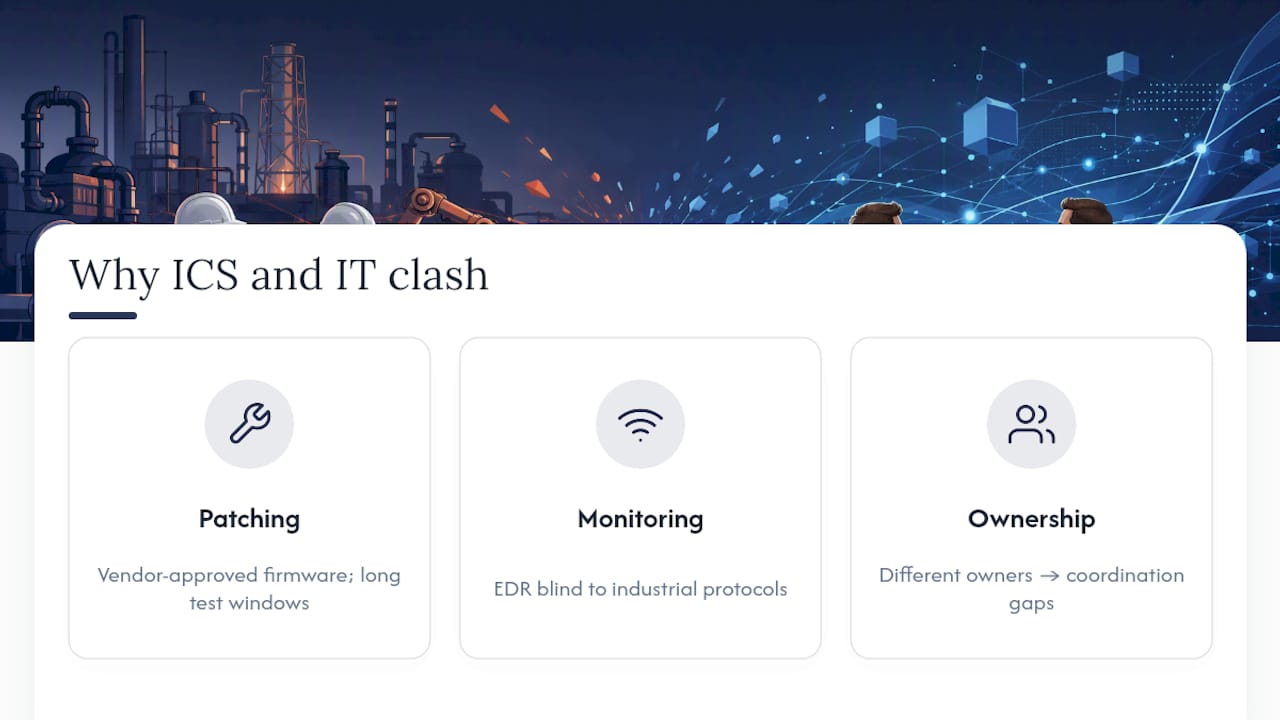
The first friction point is patching philosophy. Office IT security assumes you patch aggressively and often. OT environments often can’t tolerate that: a firmware update on a controller might need vendor sign off, scheduled downtime, and testing that takes weeks, not the automatic overnight patch cycle your laptops get.
The second is monitoring tooling. The EDR and network monitoring platforms built for office IT generally don’t understand industrial protocols, so they can sit blind to activity on an OT network even while looking perfectly healthy on the corporate side. You genuinely need separate tooling built for that environment.
The third is ownership and accountability. In a typical SMB, the IT contact and the person who understands the production equipment are two different people, sometimes in two different companies. Security decisions that touch both sides need coordination that doesn’t happen naturally, and it’s easy for gaps to open up in the handoff between who owns what.
The practical takeaway for a business in this position: don’t assume a standard managed IT contract extends coverage to your industrial equipment. If ICS or OT components exist anywhere in your business, that needs an explicit, separate conversation and likely a specialist provider, not an assumption baked into your general IT agreement.
Why we push MFA and tested backups before anything else
We push MFA and tested backups before anything else because that’s where we consistently see the gap between what clients think they have and what they actually have. New client audits turn up unrestored backups more often than they should, and honestly, most owners are stunned when we show them.
What we prioritise first is always the same: close the account takeover risk, then prove recovery actually works. Everything else builds from there. It’s not flashy, but it’s the difference between a bad week and a bad year. IT Start holds SMB 1001 Gold certification, and we treat that as a floor, not a finish line.
Get your office IT and backups properly checked
There are other ways to patch these gaps yourself, hiring an internal IT hire, cobbling together free tools, or leaving your current setup as is and hoping. For a business with 10 to 50 staff, none of those give you the same coverage as a dedicated provider watching your systems around the clock. IT Start manages Microsoft 365, backups, endpoints, and network security for Brisbane SMBs of exactly that size, and we build every engagement around the same priorities covered in this article: MFA everywhere it matters, backups you can actually restore, and patching that doesn’t get left to chance.
Our cyber security services cover managed security, EDR, and incident response coaching, while our cloud services handle Microsoft 365 management and backup configuration end to end. If you want a straight answer on where your current setup stands, get in touch and we’ll walk through it with you.
Sources
FAQ
What does ICS cyber security mean for a small business?
For most SMB owners, it means securing office IT: networks, endpoints, servers, Microsoft 365, and backups, typically managed by a provider like IT Start rather than covering industrial control systems.
Is Microsoft 365 backup included automatically?
No. Microsoft’s own guidance states that native retention helps with everyday recovery but doesn’t replace a third-party or offline backup for scenarios like admin account compromise or ransomware.
What’s the fastest way to reduce cyber risk?
Turning on MFA, checking your backups actually restore, and patching anything overdue delivers the biggest risk reduction for the least effort, per ACSC guidance.
Does my business need ICS specific security?
Only if you run industrial control systems, SCADA, or building automation tied to physical equipment. Most office based SMBs don’t, and standard managed IT security covers their actual risk.
How often should backup restores be tested?
At least quarterly, with the outcome documented, according to government guidance on regular backups.