
The benefits of cloud security come down to six things: better data protection, faster recovery when something goes wrong, easier compliance with contracts and regulations, more predictable costs, room to grow without buying new servers, and actual visibility into what’s happening across your systems. If you own or run IT for a business with 10 to 50 staff, these aren’t abstract wins. They show up as fewer 3am phone calls, cleaner audits, and customers who don’t ask awkward questions about your security posture before signing a contract.
Here’s the catch nobody tells you upfront: your cloud provider secures the platform, but you still have to configure and run the controls that actually protect your data. That’s the shared responsibility model, and it’s where most of the SMBs we work with get caught out.
The benefits break down like this:
- Data protection through encryption and access controls that limit who can see what
- Reduced downtime because backups and disaster recovery are built for fast restores, not hopeful guessing
- Compliance support with the logs and evidence auditors and insurers now expect
- Predictable costs instead of surprise hardware failures and emergency callouts
- Scalability so you can add staff or open a new site without a six-week hardware order
- Visibility into logins, file access and unusual activity before it becomes a breach
Key Takeaways
Cloud security delivers real, measurable business benefits, including faster recovery, lower incident costs, easier compliance and stronger customer trust, but only when the tenant configures and operates the controls the provider makes available.
| Point | Details |
|---|---|
| Shared responsibility is real | The provider secures the platform; you must configure MFA, access, backups and logging yourself. |
| MFA is the highest-leverage fix | Turning on MFA for every account blocks the most common way attackers gain initial access. |
| Backups need testing, not assuming | Native retention in Microsoft 365 is not a full backup; test a restore before you trust it. |
| Misconfiguration causes most incidents | Open storage, missing MFA and stale permissions cause more breaches than sophisticated attacks. |
| Monthly posture reviews catch problems early | A two to four hour monthly review using Secure Score output catches most common misconfigurations. |
Table of Contents
- What is cloud security and why does the shared responsibility model matter?
- The core benefits of cloud security for growing businesses
- How cloud security actually works, and the tools that deliver these benefits
- What businesses get wrong: common misconfigurations we see constantly
- Turning cloud security benefits into numbers your board understands
- The priority order for actually getting these benefits
- What we actually see walking into Brisbane SMBs
- Why the standard cloud security advice misses the point
- Sources
- FAQ
What is cloud security and why does the shared responsibility model matter?
Cloud security is the set of controls, tools and practices that protect the data, applications and identities you run in someone else’s data centre. NIST’s own definition of cloud computing is useful here because it makes the risk-assessment obligation explicit: moving to the cloud can genuinely improve outcomes, but the tenant still has to assess risk and put mitigations in place. The cloud provider isn’t doing that job for you.
This is the bit that trips up almost every business we onboard. Microsoft, Google and AWS lock down the physical data centres, the hypervisors, the network backbone. What they don’t do is stop you from leaving a SharePoint site open to “anyone with the link,” or letting fifteen staff share one admin login. The Australian Cyber Security Centre’s guidance on cloud computing for tenants draws this line clearly: infrastructure security sits with the provider, configuration and data protection sit with you.
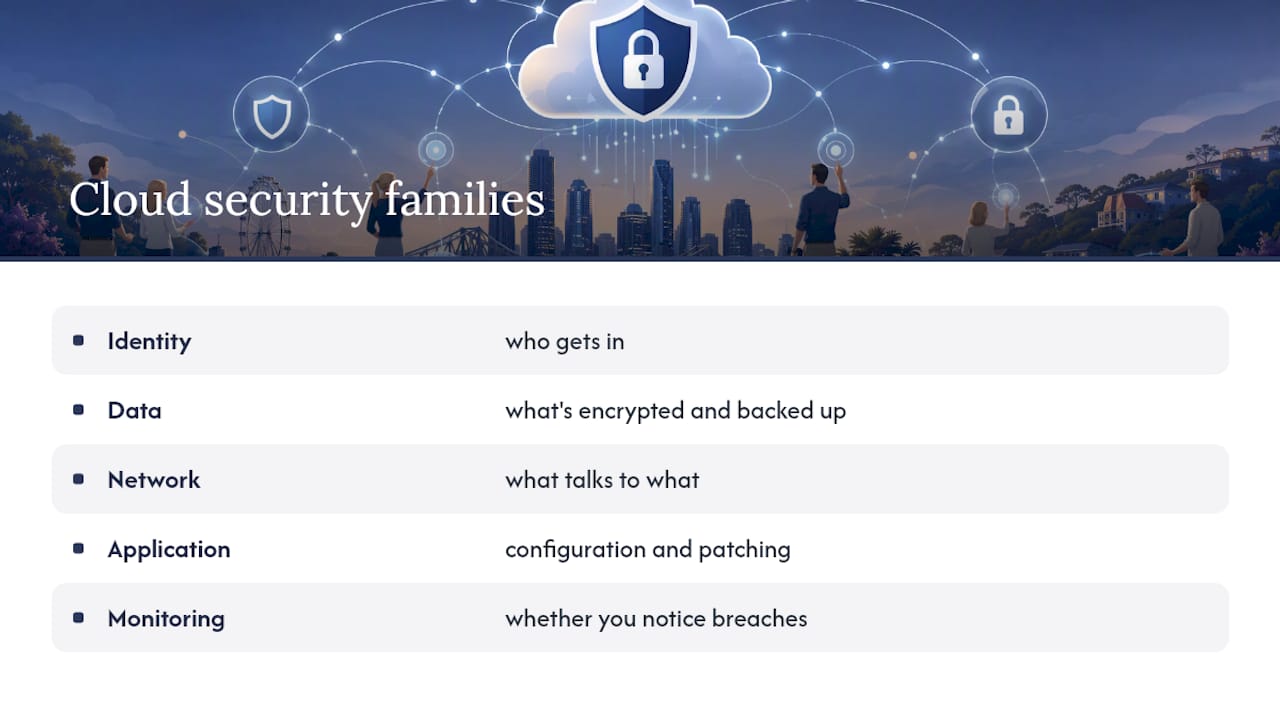
Cloud security controls generally fall into five families: identity (who gets in), data (what’s encrypted and how it’s backed up), network (what talks to what), application (how your software is configured and patched), and monitoring (whether you’d actually notice if something went wrong). Miss one family and the others don’t compensate for it. We’ve seen businesses with excellent encryption and zero MFA. That’s like fitting a bank vault door on a tent.
Done properly, cloud security can beat a typical on-premises setup on nearly every metric that matters to an SMB, mostly because you inherit enterprise-grade infrastructure and tooling you’d never afford to run yourself. But “done properly” is the operative phrase, and that part is on you.
The core benefits of cloud security for growing businesses
Once the shared responsibility model clicks, the benefits stop being theoretical. They map to specific things that keep business owners up at night.
- Data protection and confidentiality. Encryption at rest and in transit, combined with role-based access controls, cuts the blast radius when something goes wrong. If a laptop gets stolen or a password gets phished, proper access controls mean the attacker doesn’t automatically get the finance folder, HR records and client database in one hit.
- Resilience and continuity. Cloud platforms make automated, geographically redundant backups achievable for a business that could never justify a second data centre. We had a client hit by ransomware on a Friday afternoon. Because backups were configured properly and restores had actually been tested, they were back trading by Monday morning instead of negotiating with criminals or rebuilding from scratch.
- Compliance and contract readiness. Cloud platforms generate the audit logs, access records and retention evidence that insurers, regulators and enterprise clients now ask for as standard. When a bigger client’s procurement team sends a security questionnaire, having this evidence ready is the difference between a same-day response and a week of scrambling.
- Cost predictability and operational efficiency. No more $15,000 surprise when the server room air conditioning fails and takes the file server with it. You pay for what you use, and hardware failure stops being a five-figure emergency.
- Scalability and agility. Provisioning a new starter, opening a second office, or spinning up test environments happens in hours instead of weeks, without the security corners getting cut along the way.
- Visibility and faster incident response. Centralised logging and alerting mean you find out about a suspicious login from Kazakhstan at 2am, not three months later when the money’s already gone.
Statistic worth sitting with: the Australian Cyber Security Centre’s small business cloud guidance maps the Essential Eight framework directly onto cloud settings, and names MFA, tested backups, patching and restricting privileged access as the highest-impact controls available to small businesses. None of those four require a big budget. They require someone actually turning them on and checking them.
How cloud security actually works, and the tools that deliver these benefits
Shared responsibility changes shape depending on what you’re buying. With SaaS (Microsoft 365, for example) the provider handles almost everything except your identities, your data and how you configure access. With PaaS you take on more responsibility for the application layer. With IaaS you’re managing operating systems, patching and network configuration on top of that, closer to running your own server but without owning the tin.
The technical building blocks that turn “we use the cloud” into “we’re secure in the cloud” are fairly consistent across providers:
- Identity and access management (IAM): who exists, what they can access, and whether MFA is enforced on every account, not just the obvious ones
- Encryption: data locked down both sitting in storage and moving across networks
- Backups with tested restores: not just “backup enabled,” but a restore that’s actually been run and timed
- Logging and monitoring: a record of logins, file access and admin actions you can actually search
- Configuration management: baseline settings that don’t drift every time someone changes a setting to “make something work”
- Patching and vulnerability management: closing known holes before someone else finds them first
Most major platforms now ship posture dashboards and scoring tools that flag weak settings and suggest fixes, Microsoft’s cloud security guidance is a good example of how these secure-by-default features and posture scores are designed to work. These tools won’t fix anything on their own. Somebody still has to open the dashboard, read the recommendations, and action them. We’ve seen tenants with a Secure Score sitting untouched for two years because nobody was assigned to look at it.
What businesses get wrong: common misconfigurations we see constantly
Honestly, the biggest threat to most SMBs isn’t a sophisticated hacker group. It’s a setting nobody checked. Practitioner data backs this up: analysis from ISMS Lite on SME cloud misconfigurations shows most cloud incidents trace back to misconfiguration, not zero-day exploits. Open storage, missing MFA, permissions nobody ever tightened.
Here’s what we run into on a near weekly basis:
- No MFA on admin accounts. We still onboard businesses where the Global Admin account for their entire Microsoft 365 tenant has a password and nothing else. One phished password, and someone else owns the business.
- SharePoint and OneDrive links set to “anyone with the link.” Convenient for sharing a file with a client. Also means that link works forever, for anyone who finds it, indefinitely.
- Over-permissive IAM. Staff accumulate access over the years because it’s easier to grant permissions than to remove them. We regularly find former employees, contractors from two years ago, and entire departments with admin rights they never needed.
- Disabled or ignored logging. Logging is often switched on by default, but retention windows lapse or alerts get set up once and never tuned, so nobody’s watching.
- Backups that were never tested. This is the one that genuinely worries us. A client assumed their Microsoft 365 data was backed up because Microsoft “does that automatically.” It doesn’t, not the way most people assume. Native retention is not the same as a proper backup, and it has limits on what it can recover and for how long, a gap Datto’s write-up on the shared responsibility model explains clearly.
- Patching left to “whenever.” Critical patches sit unapplied for months because nobody owns the process.
Pro Tip: Don’t ask “are we backed up?” Ask “when did we last restore a file from backup and time how long it took?” If nobody can answer that, you don’t have a backup strategy. You have a hope.
Quick fixes a lean team can knock out this week: turn on MFA everywhere, run an access review and strip permissions nobody’s used in 90 days, and actually test one restore. None of that needs a budget approval.

Turning cloud security benefits into numbers your board understands
Owners rarely care about “encryption” as a concept. They care about downtime, revenue, and whether a big client will still sign the contract. So let’s put the benefits in those terms.
Downtime is the clearest one. A business running properly tested cloud backups and disaster recovery can typically get back online in hours rather than days after ransomware or accidental deletion, and Atlant Security’s guidance on cloud strategies for small business points to exactly this pattern: faster recovery directly reduces the business impact of an incident. Compare that to a business with untested, assumption-based backups. We’ve seen recovery attempts stretch into weeks because nobody realised the backup job had silently failed six months earlier.
Compliance is the second one, and it’s growing fast as a sales lever rather than just a legal obligation.
- More enterprise clients now require a security questionnaire before signing, and cloud platforms generate the audit trail to answer it quickly.
- Cyber insurance renewals increasingly ask specific questions about MFA, backups and logging, and a “no” on any of those can mean a declined policy or a much higher premium.
- Government and finance sector contracts frequently mandate specific controls as a condition of doing business at all.
Customer trust is the third, and it’s the one most owners underrate. A ransomware incident that leaks client data doesn’t just cost recovery time. It costs the relationships that took years to build. We’ve watched a client lose a long-standing contract, not because of the outage itself, but because the client’s own compliance team flagged the incident during a routine vendor review months later. Security failures have a long tail.
None of this means you need an enterprise budget. It means the controls you already have access to through your existing Microsoft 365 or cloud subscription need to actually be switched on and checked, something our guide on Microsoft 365 security best practises for Brisbane SMBs walks through in more detail.
The priority order for actually getting these benefits
We get asked “where do we even start” a lot. Here’s the order that gets the most risk off the table for the least effort, based on what actually causes incidents in the businesses we support.
- Turn on MFA for every account, no exceptions. This is the single highest-impact fix available and it usually takes an afternoon. Identity compromise remains the most common way attackers get in, which is exactly why BizTech Magazine’s coverage of common cloud security challenges puts phishing-resistant MFA at the top of the list for small businesses. Effort: low. Impact: enormous.
- Find and fix open access. Audit shared links, public storage buckets and anything set to “anyone with the link.” Effort: medium, depending on how long the mess has been building.
- Confirm backups exist and actually test a restore. Not “the backup job ran,” but “we recovered a real file and it worked.” Effort: medium, but this is the one that saves the business when everything else fails.
- Apply least privilege and review admin accounts. Strip access nobody’s used in the last 90 days. You will find more than you expect. Effort: medium.
- Turn on logging and set up alerts that someone actually reads. A log nobody checks is decoration, not security. Effort: low once set up, ongoing effort to maintain.
- Patch on a schedule and review your security posture monthly. Set a recurring calendar block, not a “someday” task.
This priority order isn’t ours alone. It lines up closely with what practitioner guides like AusNewTechs’ SMB cloud security guide converge on: identity first, backups second, misconfigurations third, then a routine review cadence.
On tooling: most platforms give you posture dashboards and scoring tools (Microsoft’s Secure Score is the obvious example inside Microsoft 365) at no extra cost. Use them. They flag exactly the misconfigurations covered above, ranked by impact, which saves you guessing where to start.
Pro Tip: Block out two to four hours on the calendar, once a month, specifically to review your Secure Score and run through the checklist above. A routine posture review of this length catches the majority of common misconfigurations before they turn into incidents, and it’s cheap insurance against the exact mistakes covered in the section above.
If you want the deeper, step-by-step version of hardening a Microsoft 365 tenant specifically, our Microsoft 365 hardening guide for Brisbane SMEs covers the settings and sequencing in more depth. And if patching and application control feel like the weak link in your setup, the security insights coverage from Global Security is worth a read for how those controls fit into a broader monitoring strategy.
What we actually see walking into Brisbane SMBs
Almost every new client we onboard has some version of the same three problems: no MFA on at least one critical account, a backup setup nobody has actually tested, and permissions that have accumulated for years without anyone reviewing them. It’s rarely negligence. It’s just that nobody was ever specifically responsible for checking.

We had a professional services client convinced their Microsoft 365 data was fully backed up because “Microsoft handles that.” When we ran a proper assessment, native retention would have covered accidental deletion for a few weeks, not a ransomware event six months back. That gap is common, and it’s exactly the shared responsibility problem covered earlier in this article playing out in real time.
Our approach as a Brisbane-based provider holding SMB 1001 Gold certification is to start with a free assessment, map out exactly where the gaps sit against ACSC-aligned controls, then fix the highest-impact items first: MFA, backups, access reviews, logging. No enterprise contract required to start, just an honest look at where the exposure actually is.
Why the standard cloud security advice misses the point
Most cloud security content treats every control as equally urgent, which is exactly backwards for a business with 15 staff and no dedicated IT person. The research and field evidence both point the same way: identity and backups matter far more than the long tail of “best practice” checklists vendors love to publish.
Where conventional advice falls short is assuming businesses have the resourcing to implement everything at once. They don’t. A 20-person business that turns on MFA and tests one real restore this month has done more for its risk profile than a business that bought three security tools and configured none of them properly.
Prioritise ruthlessly. MFA first, backups tested second, access reviewed third. Everything else, including the tools discussed in our cloud security practices guide, matters, but it matters less than getting those three things genuinely right.
If you’re not sure where your business sits against any of this, IT Start’s cloud services team runs free assessments for Brisbane businesses, mapping your current setup against ACSC-aligned controls and flagging the gaps that matter most. For businesses that need the security side specifically tightened, our cyber security services cover MFA rollout, access reviews and ongoing monitoring without locking you into an enterprise-scale contract.
Sources
The guidance behind this article comes from primary sources worth bookmarking directly. The ACSC’s small business cloud security guides map the Essential Eight to cloud settings. The ACSC’s tenant security guidance explains the shared responsibility split. NIST’s definition of cloud computing sets the formal framing. Microsoft’s cloud security overview explains posture tooling. If you want a deeper dive into securing data specifically, our own guide on how to secure data in the cloud for Aussie businesses covers encryption and backup configuration in more detail.
- Cyber
- The NIST definition of cloud computing | NIST
- Cloud security for SMEs: the most common misconfigurations and how to avoid them | ISMS Lite
FAQ
What are the advantages of cloud security?
The main advantages are stronger data protection through encryption and access controls, faster recovery from incidents, easier compliance evidence for audits and contracts, predictable costs, easier scaling, and better visibility into logins and file access.
What are the main benefits of cloud computing for security?
Cloud computing gives smaller businesses access to enterprise-grade infrastructure, automated backups and centralised monitoring they could never afford to build themselves, provided they configure the identity and access controls that come with it.
What are the disadvantages of cloud storage?
Common downsides include reliance on internet connectivity, the risk of misconfiguration such as open storage or missing MFA, unclear backup responsibilities if retention settings aren’t configured, ongoing subscription costs, and the need for staff to actually manage security settings rather than assume the provider handles everything.
What are the six benefits of cloud computing most businesses care about?
Data protection, reduced downtime, compliance readiness, cost predictability, scalability, and improved visibility into activity across accounts and systems are the six benefits business owners consistently ask about.
Does the cloud provider handle all our security for us?
No. The provider secures the underlying infrastructure, but under the shared responsibility model, your business is responsible for configuring MFA, managing access, protecting data and testing backups.