
The biggest cyber security threats for Australian small and medium businesses right now are email compromise and invoice fraud, stolen or phished logins, ransomware, and weak links through suppliers and unpatched software. Honestly, it is rarely something exotic. We see the same few problems in almost every business we walk into, and most of them come down to basics that were never switched on.
This article covers the threats the Australian government is actually measuring, what they look like in a real 10 to 50 person business, and where the data and reality do not match.
TL;DR
- Business email compromise and identity fraud top the reports the Australian Signals Directorate (ASD) receives, ahead of ransomware.
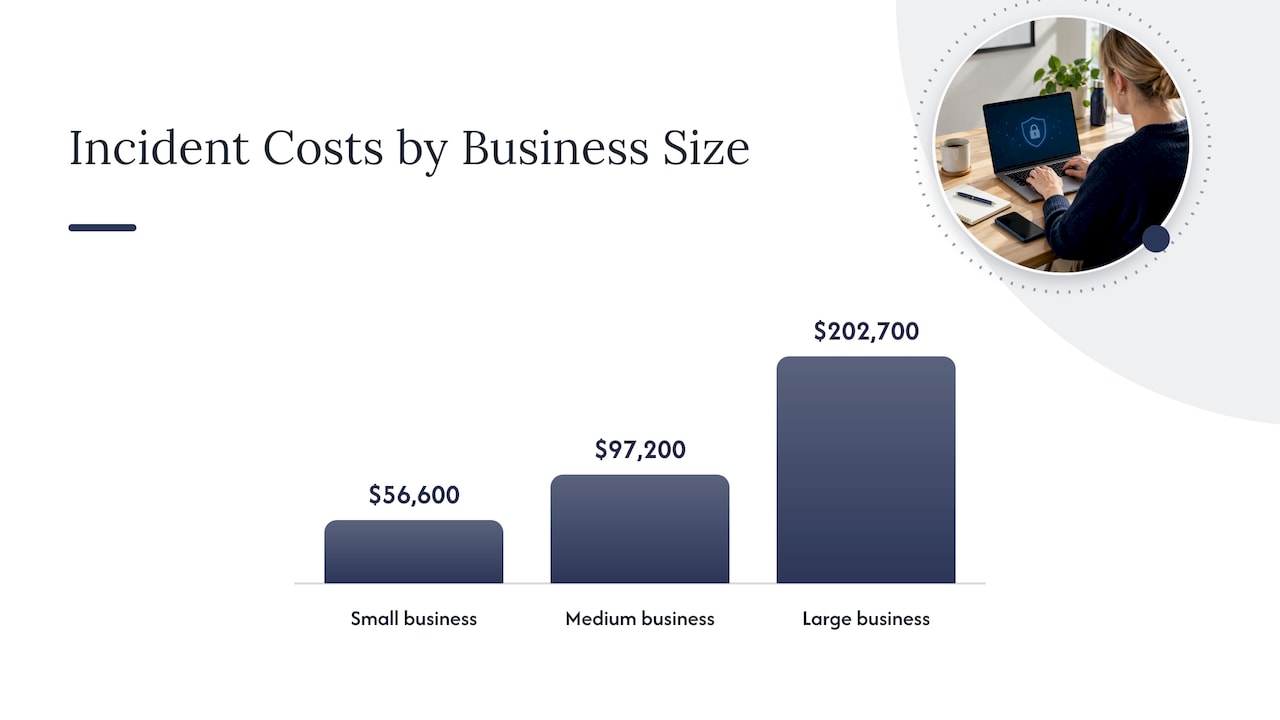
- The average self-reported cost of a cybercrime incident for a small business was $56,600 in 2024-25, up 14%.
- Most successful attacks use easy entry points: no MFA, unpatched software, too many admin accounts, backups nobody has tested.
- OneDrive and SharePoint are not a backup. Ransomware can sync straight into them.
- Fix MFA, patching and backups first. It beats buying another security tool.
Table of Contents
- What the numbers say about threats right now
- The threats, ranked by what we actually see
- Where the data and reality do not match
- What to do first
- What a breach costs beyond the invoice
- Our view
- How IT Start can help
- FAQ
- Sources
What the numbers say about threats right now
The ASD’s Annual Cyber Threat Report for 2024-25 is the best local data set we have. It was released in October 2025, and it is the most recent full-year report. A few figures worth knowing:
- The ASD’s ACSC received over 84,700 cybercrime reports, roughly one every six minutes, and responded to over 1,200 incidents, up 11%.
- The most common reported categories were email compromise with no financial loss (19%), business email compromise (BEC) with financial loss (15%) and identity fraud (11%).
- Average self-reported cost per incident for businesses rose 50% to $80,850. Small business sat at $56,600, medium at $97,200 and large at $202,700.
- Ransomware was involved in 11% of the incidents ASD responded to, the same as the year before.
Notice what is missing from that list: movie-style hacking. The top threats are people being tricked and accounts being taken over.
The OAIC tells a similar story. In the first half of 2025, malicious or criminal attacks made up 59% of notified data breaches, and human error caused another 37%. That human error number is the one we think owners underrate.
The threats, ranked by what we actually see
This is our order, based on client work with businesses of 10 to 50 staff. It lines up fairly well with the ASD data, with one or two exceptions we cover below.
1. Email compromise and invoice fraud
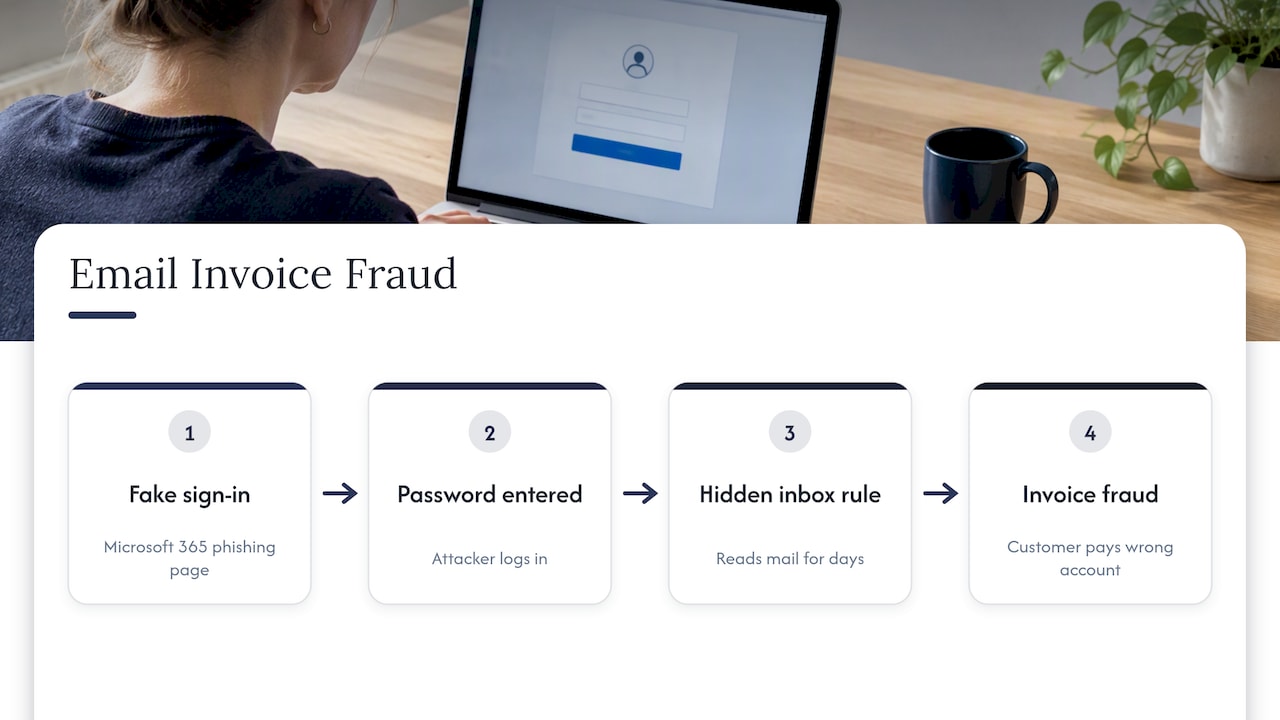
This is the big one. Someone gets a phishing email that looks like a Microsoft 365 sign-in page. They type their password. The attacker logs in, sets up a hidden inbox rule and sits quietly for days reading the mail.
Then they wait for a real invoice. They send a “we’ve changed our bank details” email from the genuine mailbox, and your customer pays the wrong account. A typical case we see: a bookkeeper, a trades supplier, a $14,000 payment, and nobody noticed until the supplier rang to chase it.
The ACSC Small Business Cyber Security Guide lists scams aimed at getting you or your staff to send money or gift cards, click malicious links or give away credentials as a core threat to small business. That matches what lands in our tickets.
What most businesses get wrong: they treat this as a spam filter problem. It is an account problem. If MFA is off, a stolen password is the whole attack.
2. Stolen logins and identity fraud
Identity fraud sits third in the ASD’s reports. In practice this means credentials from an old breach, reused on your Microsoft 365 or accounting login, or customer details used to open accounts.
We still onboard clients where a third of staff have no MFA at all. Sometimes it is “just the director, he found it annoying”. Guess whose mailbox the attacker wants.
MFA is not perfect. Attackers now use fake sign-in pages that capture the session as well as the password. But MFA stops the bulk of automated, opportunistic attempts, and that is most of what hits a small business. Turn it on first, then move to stronger methods like authenticator apps with number matching or passkeys.
3. Ransomware
Ransomware locks or encrypts your files and demands payment, usually in cryptocurrency. It is 11% of ASD’s incident responses, so it is not the most common threat, but it is the one that can close a business for a week.
Where data and reality do not match: owners fear ransomware most, yet the reports are dominated by email compromise. Both are real. Ransomware just gets the headlines because the damage is loud. Email fraud is quiet and often only found when money has gone.
How ransomware usually gets in, from our experience: a phished login, an exposed remote desktop port, or an unpatched VPN or firewall. Then it spreads to file servers and anything the user’s account can reach, including mapped cloud folders.
4. Third-party and supplier risk
Your IT provider, your accountant, your payroll software and your marketing agency all have some access to your data. The OAIC specifically flagged outsourcing personal information handling to third parties as a current risk.
We see businesses give vendors broad, permanent admin access and never review it. Years later, nobody remembers who has what. The ASD’s guidelines for procurement and outsourcing say supply chain risk should be considered when you buy services. For an SMB that means a short list: who has access, to what, and can it be limited or time-boxed?
This includes us. Ask any IT provider, including your current one, what access they hold and how it is logged.
5. Unpatched software and ageing hardware
The ASD noted that publicly reported vulnerabilities rose 28% in the year. More vulnerabilities means more patching. That is bad news for the office with a firewall nobody has updated since it was installed, or the laptops running an operating system that no longer gets security fixes.
We regularly find five-year-old routers on default settings and servers that missed months of updates because “it might break the accounting software”. Fair concern. Still, an unpatched system exposed to the internet is a standing invitation.
6. State-sponsored actors
The ASD says state-sponsored actors continue to target Australian networks, mainly governments and critical infrastructure. If you supply to those sectors, you can be a stepping stone. For most SMBs it is a smaller risk than a fake invoice, and the defences are the same basics anyway.
Where the data and reality do not match
A few gaps we see between the reports and the businesses we meet.
“We’re too small to be a target.” The ASD figures say otherwise. A small business average of $56,600 per incident is enough to wipe out a year’s profit for many 15-person firms. Attackers use automation. They do not pick you; they find you.
“We’re backed up because we use OneDrive.” We see this a lot. Cloud sync is not backup. If a device is infected, the encrypted files can sync to the cloud and overwrite the good copies. Versioning helps a bit, but it is not something you want to bet the business on. You need a separate backup that is isolated or immutable, and you need to test a restore. Many of our new clients have never done one.
“We have antivirus, so we’re covered.” Antivirus is one layer. It does nothing for a staff member who types a password into a fake page.
“The sophisticated hacker is the main danger.” The ASD’s data and our own experience point to simple failures: missing MFA, unpatched software, and poor control of admin privileges. The zero-day attack owners imagine is rare. The unlocked back door is common.
“No incident reported means no incident happened.” Reports are self-reported, so the true cost is probably higher and the true count certainly is. Treat the figures as a floor.
What to do first
The ASD’s Essential Eight is a set of prioritised mitigation strategies, and it covers MFA, patching and backups among others. You do not need to reach full maturity in a month. Here is the order we would use for a typical 25-person office:
- MFA on everything that matters. Microsoft 365, accounting, remote access, banking. No exceptions for directors.
- Backups that are separate from your main systems. Then do a test restore. Put it in the calendar every quarter.
- Patching with a schedule. Operating systems, apps, firewalls, routers. Retire hardware that no longer gets updates.
- Cut admin rights. Most staff do not need to install software. Fewer admins means less damage from one stolen login.
- Payment verification rule. Any change of bank details gets confirmed by phone, on a number you already had. This costs nothing and stops a lot of fraud.
- Supplier access review. List every third party with access. Remove what is not needed.
- Short, regular staff training. Use real examples from your own inbox, not a once-a-year slideshow.
The ASD also pushes an “assume compromise” mindset. Work out your crown jewels, the data or systems that would sink the business if lost, and protect those first rather than spreading effort thin. For most offices that is the email tenant, the finance system and the client files.
Our own guides go deeper on each of these: the Essential 8 guide for Brisbane SMEs, the cyber hygiene checklist and the three controls to fix first. If you want more concrete scenarios, see our cybersecurity risk examples for Brisbane SMEs.
What a breach costs beyond the invoice
The headline dollar figure is only part of it. In our experience the real costs are staff time, downtime and the awkward phone calls. If personal information is involved, you may also have notification duties under the Notifiable Data Breaches scheme. Our plain guide to what a cyber breach actually is explains when that applies.
Insurance is a related question. Insurers increasingly ask about MFA, backups and patching before they cover you, so the basics help twice. For a broader list of risk examples from the insurance side, this overview of common cyber risks is a useful read, though it is written in Dutch for the Netherlands market, so check Australian policy terms with your own broker.
Our view
We think the industry has this backwards. A lot of security marketing sells fear of sophisticated attackers and then sells a new product. Meanwhile the client down the road has no MFA on the managing director’s mailbox and a backup that last ran in March.
Our honest advice is to be a bit boring. Get the Essential Eight basics in place, check them regularly, and keep your setup tidy. Messy environments with old accounts, forgotten admin logins and mystery devices are where incidents start. Tidying is unglamorous work, and it is also the most effective we do.
We would also say: do not trust a green tick on a dashboard. Test the restore. Try to sign in without MFA. Ask a staff member what they would do with a odd invoice. Reality shows up fast when you check.
— Matt
How IT Start can help
If you would rather not do this alone, we manage Microsoft 365, security, backups and networks for Brisbane businesses. Our cyber security services cover advanced endpoint protection, firewall management, risk assessment and compliance, and proactive managed security. We hold SMB 1001 Gold certification. If you are not sure where you stand, start with a risk assessment and we will tell you plainly what is missing. You can also see the full range on our business IT support page.
FAQ
What is the single biggest cyber security threat to a small business?
For Australian businesses, it is email compromise and the fraud that follows. The ASD’s data lists email compromise and BEC as its most reported categories. The usual root cause is a phished password on an account without MFA.
What are some real examples of cyber attacks on small businesses?
A fake Microsoft sign-in page that captures a password, then a changed bank account on a genuine invoice. A ransomware infection that encrypts a file server and synced cloud folders. A supplier’s compromised account sending your staff a malicious link. All three are everyday cases for us.
Is ransomware still a major threat?
Yes. It was involved in 11% of ASD’s incident responses, unchanged from the previous year. It is less frequent than email fraud but more disruptive. Tested, isolated backups are your best protection against the damage.
Does Microsoft 365 or OneDrive back up my data?
Not in the way most people think. Sync copies changes, including bad ones such as encrypted files. You need a separate backup, and a restore you have actually tested.
Where should a small business start?
MFA, tested backups and regular patching. These match the core of the ASD’s Essential Eight and block a large share of common attacks. Everything else sits on top of them.
Sources
- ASD Annual Cyber Threat Report 2024-25 (Cyber.gov.au)
- ASD Annual Cyber Threat Report 2024-2025 publication page
- OAIC: Latest Notifiable Data Breach statistics, January to June 2025
- ACSC Small Business Cyber Security Guide
- Cyber.gov.au: Ransomware
- Cyber.gov.au: Guidelines for procurement and outsourcing
- Cyber.gov.au: Essential Eight explained