IT support means looking after the people, devices, accounts and networks a business runs on, from password resets to patching, backups and security checks. The title on the job ad changes what you get, and so does company size. The official definition sits in ANZSCO Unit Group 3131, while ACSC and OAIC guidance on APP 11 set the security bar.
TL;DR:
- When tickets queue or projects stall, businesses should split frontline support from engineering; servers, complex cloud setups, or multiple sites strengthen the case.
- The ACSC says internet facing services need patches within two weeks, or within 48 hours if exploited; support staff must actively audit MFA.
- Microsoft 365 retention is not a controlled backup; keep offline copies, include cloud data, and schedule full restore tests to prove files can be recovered.
- Businesses with 10 to 50 staff should outsource patching, monitoring, and backup checks first, with a business hours service level and a defined emergency path.
Table of Contents
- What are the core duties of an IT support team?
- How do daily tasks differ by job title and seniority?
- What technical work does IT support do day to day?
- Which security and compliance duties belong to IT support?
- What skills and qualifications actually matter?
- What do most SMBs get wrong about IT support?
- When should an SMB hire, split roles or bring in an MSP?
- What does a practical role checklist look like?
- What we see working for Brisbane SMBs
- FAQ
- Sources
What are the core duties of an IT support team?
Strip away the job titles and every IT support role does the same handful of things. The ABS describes ICT Support Technicians as people who deploy and maintain computer infrastructure and diagnose and resolve technical problems. Daily work includes installing software, implementing networks and repairing peripherals. That is the baseline, and it is a useful yardstick when you read a job ad that promises “general IT duties” and nothing else.
Here is what we expect from anyone doing this work, whether they sit in your office or at an MSP:
- Ticket triage and incident resolution: log every request, set a priority, fix what can be fixed by phone or remote session, and go onsite when it can’t.
- System maintenance: run a regular patching cadence, scheduled health checks and monitoring, so problems show up before users complain.
- Hardware lifecycle: provision new laptops, image them, repair or replace faulty kit and keep an inventory that matches reality.
- Software management: installs, licence tracking and configuration, so you aren’t paying for more seats than people use the product.
- Network upkeep: basic switch and router checks, VPN access and Wi-Fi troubleshooting.
- Documentation and reporting: an asset register, runbooks and SLA reporting that someone other than the author can follow.
Honestly, the last item is the one that gets skipped first. We see this a lot: a tech who fixes everything quickly and writes nothing down. It feels efficient until that person goes on leave.
How do daily tasks differ by job title and seniority?
Titles are messy. CompTIA lists more than 20 IT support and help desk titles that share core duties but differ by specialisation and seniority. The reality in a 10 to 50 person business is that one person often wears several of these hats. Still, the split below is a fair map of who does what.
- Help desk or first line: answers calls and tickets, resets passwords, fixes simple problems and escalates the rest using clear rules. Good first line staff know when to stop troubleshooting and hand over.
- Desktop support: images machines, repairs peripherals and handles onsite troubleshooting. This is the person who gets the new starter productive on their first day.
- Field technician: installs equipment, visits sites and coordinates with vendors such as the internet provider or the printer supplier. Lots of driving, lots of cabling.
- Support engineer or sysadmin: works in Active Directory and Azure, writes automation, owns backups and makes network changes. This is where the real risk sits, because their mistakes hit everyone.
- Team lead or manager: owns the SLA, manages vendor relationships, holds the budget and does the hiring. We cover what this looks like in more detail in our practical guide for IT support team leads.
One thing the job ads blur: a help desk technician and a support engineer are not the same job with a different pay band. The first keeps users working. The second keeps the environment safe and standing. If you hire the first and expect the second, you will be disappointed before long.
For a fuller breakdown of how these roles look in Brisbane businesses, our IT support specialist duties guide goes role by role.
What technical work does IT support do day to day?
This is where the abstract list turns into actual tasks. A decent SMB support function handles the following without drama.
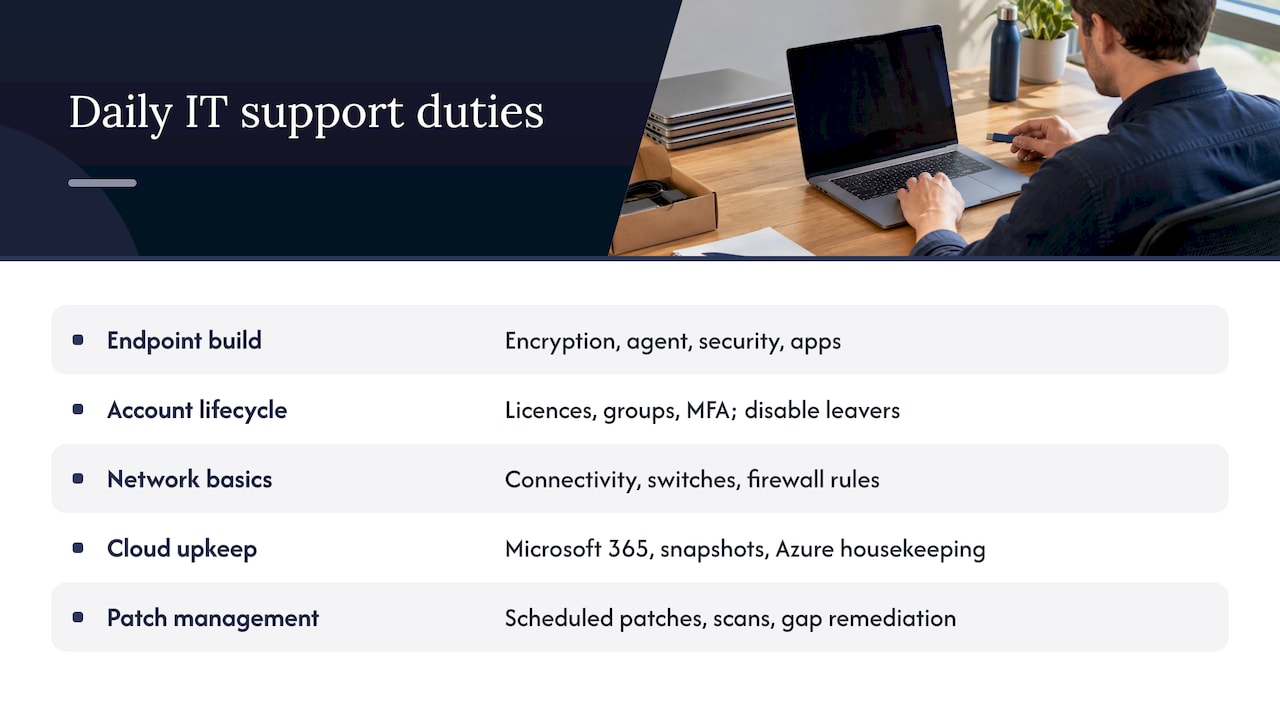
Imaging and provisioning. New Windows and Mac endpoints get a standard build: encryption on, management agent installed, security software running, apps deployed. Doing it by hand, laptop by laptop, is how you end up with machines that are all slightly different.
Account lifecycle. When someone joins, they get an account in Azure AD and Microsoft 365 with the right licence, groups and MFA. When someone leaves, disable the account promptly, hand over mailbox access and reclaim licences. The leaver step is the one we find broken most often.
Network basics. Troubleshooting connectivity, checking switches and managing simple firewall rules. Our network security checklist for Australian SMBs covers the rules worth reviewing.
Cloud upkeep. Supporting Microsoft 365, taking snapshots of tenant configuration so changes can be reversed, and doing basic Azure housekeeping. If you run Microsoft 365, this needs regular attention, not an occasional check. Our Microsoft 365 support page shows what that covers.
Patch management. Patches go out in scheduled windows, vulnerability scans find what was missed and someone remediates the gaps. Patching only counts if a person checks that it actually happened.
Which security and compliance duties belong to IT support?
Security is not a separate team in a small business. It is the support person’s job. The ACSC is blunt about it: automated measures can breed complacency, so IT support must actively monitor and audit features like patching and MFA rather than just switching them on.
Here is what every IT support person should own:
- MFA: enable it for every organisational user. The ACSC suggests Azure AD security defaults as a starting point, with Conditional Access as you mature.
- Admin privileges: keep the number of privileged users small, use separate admin accounts and revalidate access whenever someone changes role or leaves. The ACSC also prefers just-in-time elevation with approval and time limits.
- Backups: include Microsoft 365 data, keep offline copies and test restores on a schedule.
- Patching: the ACSC technical example says internet-facing services should be patched within two weeks, or 48 hours if exploited.
- Breach readiness: keep documentation and a clear response plan consistent with APP 11.
Backups are not a tick box. The ACSC technical example recommends third-party offline backups for Microsoft 365 and regular full restore tests. Microsoft’s own retention is not the same as a backup you control.
On the privacy side, the OAIC says APP 11 requires reasonable steps to protect personal information, which includes documented practices and trained staff. If nobody audits who has access to what, you are already on shaky ground.
What skills and qualifications actually matter?
Start with the technical baseline: troubleshooting Windows and Mac, basic networking, Microsoft 365 familiarity and some experience with backup tooling. The Jobs and Skills Australia profile of the occupation lines up with this: determining software and hardware requirements, responding to inquiries, implementing networks and repairing peripherals.
Certificates help, but we would take someone with plenty of real-world troubleshooting experience over someone with badges and no scars. In an SMB, there is no vendor team to catch your mistakes, so experience counts.
The soft skills decide who lasts. Concise communication, because users do not want a lecture. Prioritisation, because three things are always on fire. And the discipline to document and follow up, which is rarer than it should be. Specialised platforms are learned on the job through mentoring, shadowing and vendor training, so budget for that.
What do most SMBs get wrong about IT support?
Honestly, the gap between what owners believe and what we find is the biggest issue in this job. Here is what we see in practice:
- “We have MFA.” Then we look and find it covers some users, not the admin accounts, or it is switched off for a legacy app.
- “We have backups.” Then we ask when anyone last restored a file. Silence. The job has been failing for months.
- Too many admins. Half the staff have admin rights because it was easier once. Nobody revalidates after people change roles.
- Patching left to users. If your plan is “people will click update eventually”, you do not have a plan.
- Tribal knowledge. One person knows the passwords, the router config and why the printer works. Then they resign.
The data tells you to automate and trust. Reality tells you to automate and then check, because the ACSC warning about complacency is exactly what we see.
Pro Tip: Stop guessing and start verifying. This week, restore one real file from backup and list every account with admin rights. Those two checks find more risk than any policy document.
When should an SMB hire, split roles or bring in an MSP?
There is no magic number, but a few rules of thumb hold. As a business grows, one generalist may stop being enough, because tickets queue and projects stall. That is when you split the front line from the engineering work, or add a second person. A dedicated sysadmin or support engineer makes sense once you run servers, a complex Microsoft 365 tenant or multiple sites.
What to outsource first? The tasks that never stop and nobody enjoys: patching cadence, ongoing monitoring and backup validation. For 10 to 50 person businesses, we find a business-hours SLA with a clear after-hours emergency path works better than expensive on-call rosters. If you are weighing options, our business IT support service is designed for exactly this gap.
What does a practical role checklist look like?
Use this as a starting point for any IT support role, then adjust for the title.
- Job summary: one paragraph on who the person supports and what they own.
- Duties: a concise set of bullets per role, written as outcomes.
- Day one: confirm account access and MFA, review the inventory, verify the backup and receive the documentation handover.
- Early milestones: close tickets within SLA and fix a documentation gap.
- Later milestone: owns a defined area, such as patching or onboarding, with acceptance criteria agreed in writing.
For a manager’s view of the same ground, see our IT support duties guide for SME managers.
What we see working for Brisbane SMBs
We have walked into businesses with no MFA on admin accounts, backups that had silently failed and too many people with admin rights nobody could explain. The fixes were not clever. Turn on MFA, trim the admins, restore a file to prove the backup works. The changes addressed obvious security gaps.
What we push on is ongoing privilege reviews, written runbooks and regular restore testing. Do a quick self-audit: who has admin, when was the last restore, who knows the passwords? If you can’t answer confidently, it is time to call in a managed provider. We are happy to talk it through on our contact page.
— Matt
FAQ
What are the responsibilities of a help desk technician?
A help desk technician logs and triages tickets, resets passwords, fixes common problems by phone or remote session and escalates anything beyond their remit. They also keep tickets updated so users know what is happening. It is the first line of the whole support function.
What are some common job titles in the IT field?
Common titles include help desk technician, desktop support officer, field technician, support engineer, systems administrator and IT support team lead. CompTIA lists more than 20 support and help desk titles, and the names vary by employer. Always read the duties, not just the title.
What is the difference between an IT support specialist and an IT support technician?
The two titles overlap heavily and employers use them differently. A technician usually focuses on hands-on fixes and hardware, while a specialist may own particular systems or handle escalated issues. Compare the duty lists in the ad rather than relying on the label.
What skills are needed for IT support?
You need operating system troubleshooting, basic networking, Microsoft 365 familiarity and an understanding of backups. Clear communication, prioritisation and the habit of documenting your work matter just as much. Experience fixing real problems usually beats a stack of certificates.
Sources
- Unit Group 3131 ICT Support Technicians | Australian Bureau of Statistics
- Cyber
- Cyber
- Cyber
- Guide to securing personal information | OAIC