
The highest-impact OT security controls, in order, are a definitive asset inventory, network segmentation into zones and conduits, secure remote access with jump hosts and multifactor authentication, and tested, ransomware-resistant backups with an isolation plan. ASD and IEC 62443 both support these priorities, and getting them right cuts lateral movement risk and shortens recovery time when something does go wrong.
TL;DR:
- Begin with three critical production assets, recording their function, dependencies, network location, protocols, firmware, and backup status in one controlled inventory with a named owner.
- Use IEC 62443 zones and conduits, deny traffic by default, and place a DMZ between IT and OT; isolate legacy devices at the network layer.
- Require two separate jump hosts, unique accounts, and MFA that resists phishing at both; keep vendor sessions logged and supervised by an employee.
- Keep firmware and configuration backups offline and immutable, then test restores regularly; critical infrastructure guidance calls for isolation plans lasting up to three months.
Table of Contents
- What operational technology is and how it differs from IT
- Building a definitive OT asset inventory and taxonomy
- Designing network segmentation with zones and conduits
- Locking down remote access and vendor connectivity
- Which standards and frameworks actually matter
- Monitoring, logging and detecting OT threats
- Planning incident response, isolation and rebuild
- Patching, maintenance windows and backups that survive ransomware
- Procurement and supply chain: buying secure OT equipment
- What we see MSPs get wrong in OT environments
- How we help SMBs put these OT controls into practice
- FAQ
- Sources
What operational technology is and how it differs from IT
Operational technology covers the programmable logic controllers (PLCs), SCADA systems and distributed control systems (DCS) that run physical processes: pumps, conveyors, chillers, production lines. IT security protects data. OT security protects uptime and physical safety, and that distinction changes everything about how you secure it.
You can patch a laptop at 2am without anyone noticing. You often cannot patch a PLC controlling a production line without stopping the line, and sometimes you cannot patch it at all because the vendor stopped supporting that firmware version a decade ago. OT environments run legacy protocols like Modbus and DNP3 that were never built with authentication in mind, on hardware with lifespans measured in decades, not years.
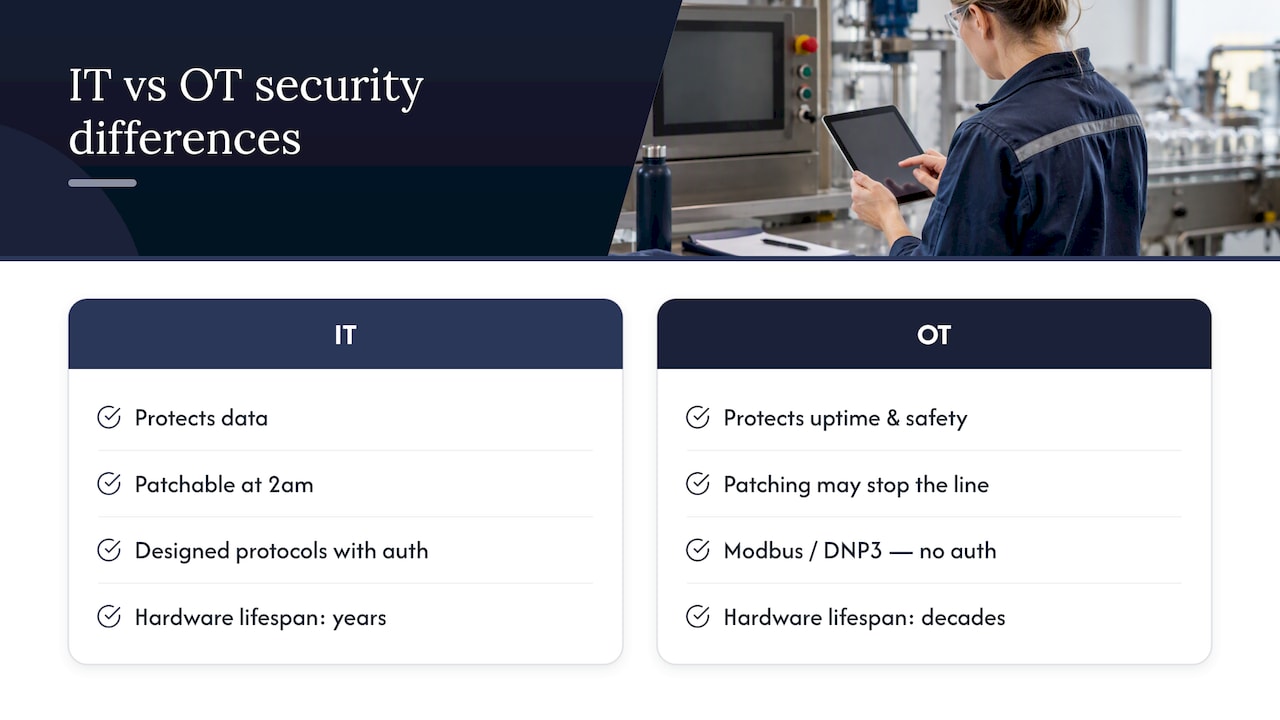
This is why the standard IT playbook (patch fast, reboot often, isolate anything suspicious) does not translate cleanly. A control loop running a water treatment plant cannot be taken offline the same way you’d quarantine an infected laptop. That’s the governance implication most businesses miss: security decisions in OT need a process engineer in the room, not just the IT team. We’ve seen IT staff push a change that looked routine on paper and caused a production stoppage because nobody asked operations what that controller was actually doing.
Building a definitive OT asset inventory and taxonomy
You cannot secure what you cannot see, and in OT environments that’s often most of the fleet. ASD guidance on asset inventory treats a definitive, authoritative inventory as the foundation on which everything else sits. Without it, segmentation decisions are guesswork and incident response starts with “what even is this device.”
A usable inventory needs to capture more than a device name and an IP address.
- Function and criticality: what the asset does and how bad it is if it fails.
- Zone and network location: which segment it sits in and what it talks to.
- Protocols and open ports: Modbus, DNP3, OPC and anything else in use.
- Firmware version and configuration backup status: whether you actually have a known-good copy stored offline.
- Dependencies: upstream and downstream systems that break if this one goes down.
Keep this as a single source of truth with change control attached, not a spreadsheet three people maintain differently. Every new asset, firmware update or network change gets logged against it, with a named owner responsible for keeping it accurate. Once you have that record, cross-reference it against the Known Exploited Vulnerabilities catalogue and MITRE CVE entries to work out which assets actually need urgent attention versus which ones are theoretically vulnerable but low priority.
Pro Tip: Start with your three most critical production assets and build their inventory records properly before trying to cover the whole fleet, a perfect spreadsheet for low-value equipment helps nobody.
Designing network segmentation with zones and conduits
Once you know what you have, the next job is controlling what it can talk to. ASD’s guidance on OT architecture frames this as zones and conduits, a concept lifted straight from IEC 62443: group assets by function and trust level into zones, then tightly control the conduits connecting them.
In practice, this means mapping your inventory onto a network diagram and asking, for every connection, whether it needs to exist at all.
- Deny-all by default: block everything, then add explicit allow rules for traffic that’s actually required.
- DMZ between IT and OT: never let IT systems talk directly into the OT network.
- Ingress and egress filtering: control what comes in and what leaves, not just one direction.
- Micro-segmentation for legacy gear: where a device can’t be patched or hardened, isolate it at the network layer instead.
Host-based controls and route filtering help when a legacy PLC can’t support modern network security features. We’ve worked with sites where a ten-year-old controller sat on the same flat network as the corporate file server, nothing stopping someone’s infected laptop from reaching the production floor. Segmentation on its own stops most of that kind of incident before it starts.
Locking down remote access and vendor connectivity
Vendor remote access is one of the biggest OT risk points we see, and it’s also one of the easiest to fix properly. ASD’s remote access guidance recommends at least two jump hosts for any remote connection into OT, and that’s the model worth mandating.
- First jump, DMZ: an organisation-managed jump host sitting outside the OT network entirely.
- Second jump, OT network: a separate jump host inside OT that the first one connects to, never a direct line.
- Unique accounts per jump: no shared logins, ever, with strong passphrases on each.
- Phishing-resistant MFA: at both jumps, not just the outer one.
- Time-limited, logged sessions: credentials expire quickly and every session is recorded.
Treat vendor remote access as an exceptional event, not a standing door left open. An authorised employee should be present to enter credentials when a vendor needs in, and session recordings need retaining for long-term forensic value, not just a quick glance afterward. Idle session limits and disabling drive redirection and copy-paste into OT reduce the blast radius if a jump host session is compromised.
Pro Tip: If a vendor asks for a permanent VPN tunnel into your OT network “for convenience,” that’s your signal to say no and set up brokered access instead.
Which standards and frameworks actually matter
Decision-makers don’t need to become compliance experts, but mapping your controls to recognised frameworks makes audits, insurance renewals and vendor conversations far easier.
- IEC 62443: the technical backbone for zones, conduits and security levels in industrial control systems.
- NIST Cybersecurity Framework: useful for structuring governance, risk assessment and response planning in a way boards understand.
- ASD CI Fortify and OT principles: Australian-specific guidance aimed squarely at critical infrastructure operators, covering isolation thresholds and resilience planning.
Use these frameworks as a checklist against your actual controls. IEC 62443 supports your segmentation design. NIST CSF supports governance and the overall risk programme. ASD’s guidance, including CI Fortify, supports your isolation and recovery planning directly. They’re also handy in procurement: asking a vendor whether their product supports IEC 62443 zone segmentation, or whether they align with Secure by Demand principles, tells you a lot about how seriously they take security before you’ve signed anything.
Monitoring, logging and detecting OT threats
Logging in OT environments needs a different approach to IT, partly because the volume of “normal” traffic looks unusual to a standard SOC tool trained on office networks.
- Jump host activity: every login, every session, every privileged action attempted.
- Protocol anomalies: unexpected Modbus or DNP3 commands outside normal operating patterns.
- Failed privileged actions: attempts to change configuration or firmware that didn’t succeed.
- Remote session metadata: who connected, from where, for how long.
Full packet capture at key choke points is worth considering where OT traffic is unencrypted, which is common given the age of many industrial protocols. Retaining that capture gives you something to investigate after the fact rather than guessing what happened.
One of the most consistent findings in CISA’s OT ransomware guidance is that ransomware increasingly targets OT-adjacent systems specifically because detection and response capability there lags well behind standard IT environments. Feed OT alerts into your existing SOC tooling, but tune thresholds using context from your asset inventory. A connection attempt from an unrecognised device matters far more than a known engineering workstation running a scheduled poll, and without that context every alert looks equally urgent.
Planning incident response, isolation and rebuild
Honestly, most OT incident response plans we’ve reviewed are written for IT systems and bolted onto OT as an afterthought. That doesn’t work, because isolating a production line has operational consequences an IT isolation plan never considers.
- Map operational impact before an incident, not during one: know what stops if you isolate each zone.
- Build a graduated isolation plan: smallest reasonable isolation first, full shutdown as a last resort.
- Keep offline, immutable backups of firmware and configuration: not just data, the actual device state.
- Define rebuild priorities: which systems come back first to restore vital services.
- Exercise the plan with process engineers present: a tabletop exercise that only involves IT misses the operational reality.
CI Fortify advises critical infrastructure operators to plan for isolating vital OT systems for up to three months if needed, with pre-positioned spare equipment and tested rebuild capability. That’s a confronting number for most SMBs to plan around, but the principle scales down: know how long you could run manual fallbacks if the system went dark tomorrow.
Pro Tip: Run one restore test from your offline backups every quarter, not because you expect to need it this week, but because the first time you test a restore is the worst possible time to discover it doesn’t work.
Patching, maintenance windows and backups that survive ransomware
We see this a lot: a client tells us confidently they’re backed up, and when we check, the backups are either on the same network as the production data (so ransomware takes both out together) or nobody’s tried restoring from them in years.
- Risk-based patching: tie patch urgency to asset criticality, not a blanket schedule.
- Scheduled maintenance windows with rollback plans: never patch live without a way back.
- Test vendor patches in a representative environment first: a patch that’s fine on a test rig can still break production.
- Offline, immutable backups: physically or logically separated from the network they protect.
- Named restore owners and SLAs: someone specific is accountable for getting a system back, with a time target attached.
A backup you haven’t tested restoring is a guess, not a safety net.
Procurement and supply chain: buying secure OT equipment
Security starts before a device is even installed, at the procurement stage, and this is where a lot of businesses have zero process at all.
- Ask for logging and configuration management built in: not bolted on afterward.
- Request a software bill of materials (SBOM): know what’s inside the product you’re buying.
- Confirm patch support windows and vulnerability disclosure processes: a vendor with no disclosure process is a red flag.
- Insist on secure-by-default settings: not security features you have to remember to switch on.
- Negotiate contractual audit rights: the ability to check a vendor’s claims, not just take their word for it.
ASD’s Secure by Demand guidance pushes buyers to favour vendors who build security in from the start rather than retrofitting it. Threat actors increasingly target common, widely-deployed OT products specifically because vendor security maturity varies so much, so a procurement decision made today shapes your risk exposure for the next fifteen years that piece of equipment sits on the floor.
Pro Tip: Put security requirements in the purchase order, not a follow-up email after the contract’s signed, by then you’ve lost all your leverage.
What we see MSPs get wrong in OT environments
Most businesses we work with assume their IT security posture covers OT by default. It doesn’t. We routinely find no MFA on remote access to industrial equipment, inventories that haven’t been updated since a system was installed, and backups nobody’s tested.
The practical first moves are always the same: get one authoritative asset inventory built, lock down vendor remote access with MFA and jump hosts, and test a single critical system restore before worrying about the rest. ASD’s OT security principles are a useful filter here: if a proposed change doesn’t clearly reduce risk against those principles, question it. We pair process engineers with our security team on every OT-adjacent rollout, because skipping that step is how outages happen.
— Matt
How we help SMBs put these OT controls into practice
We offer managed security, backup testing, network segmentation and incident planning work to help implement these controls, with a focus on secure remote access and confidential workflows, so you’re not building this from scratch internally. Our Cyber Security services cover risk assessment, compliance and proactive managed security, and our broader Managed IT Support, Cloud Solutions, Cyber Security offering covers the networking and continuity side too. If you want a straight assessment of where your current setup stands, get in touch and we’ll start with your inventory and remote access controls, the two things most likely to be the gap.
FAQ
What is the single most important OT security control to start with?
A definitive, maintained asset inventory comes first, because ASD’s guidance treats it as foundational to every other decision, from segmentation to incident response. Without knowing what you have, you can’t prioritise what to protect.
How many jump hosts should remote vendor access to OT use?
At least two: an organisation-managed jump host in a DMZ outside OT, then a second jump host inside the OT network, as ASD recommends. Each jump needs unique accounts, strong passphrases and phishing-resistant multi-factor authentication.
How long should businesses plan to isolate OT systems during an incident?
CI Fortify advises critical infrastructure operators to plan for isolation of vital OT systems for up to three months, with offline backups and pre-positioned spares to support rebuild. Smaller businesses should scale the principle down but still test how long they could run on manual fallbacks.
Does IEC 62443 replace the need for ASD or NIST guidance?
No, they work together: IEC 62443 provides the technical detail for zones and conduits, while ASD’s OT principles and NIST CSF structure governance and risk decisions around those technical controls.
Are standard IT backups enough to protect OT systems from ransomware?
No, OT backups need to include firmware and configuration images, not just data, and should be kept offline and tested regularly. CI Fortify highlights that many operators assume they’re protected when backups have never been tested for an actual rebuild.