
An IT asset is anything your business owns, subscribes to, or relies on to get work done digitally: laptops and servers, software licences, cloud subscriptions, and the data sitting inside all of it. If you can’t list what you have, you can’t protect it, back it up, or patch it properly. That gap is where most of the cyber incidents we clean up actually start.
TL;DR:
- Businesses often overlook intangible assets like API keys, encryption certificates, and shared cloud storage links, which pose significant security risks.
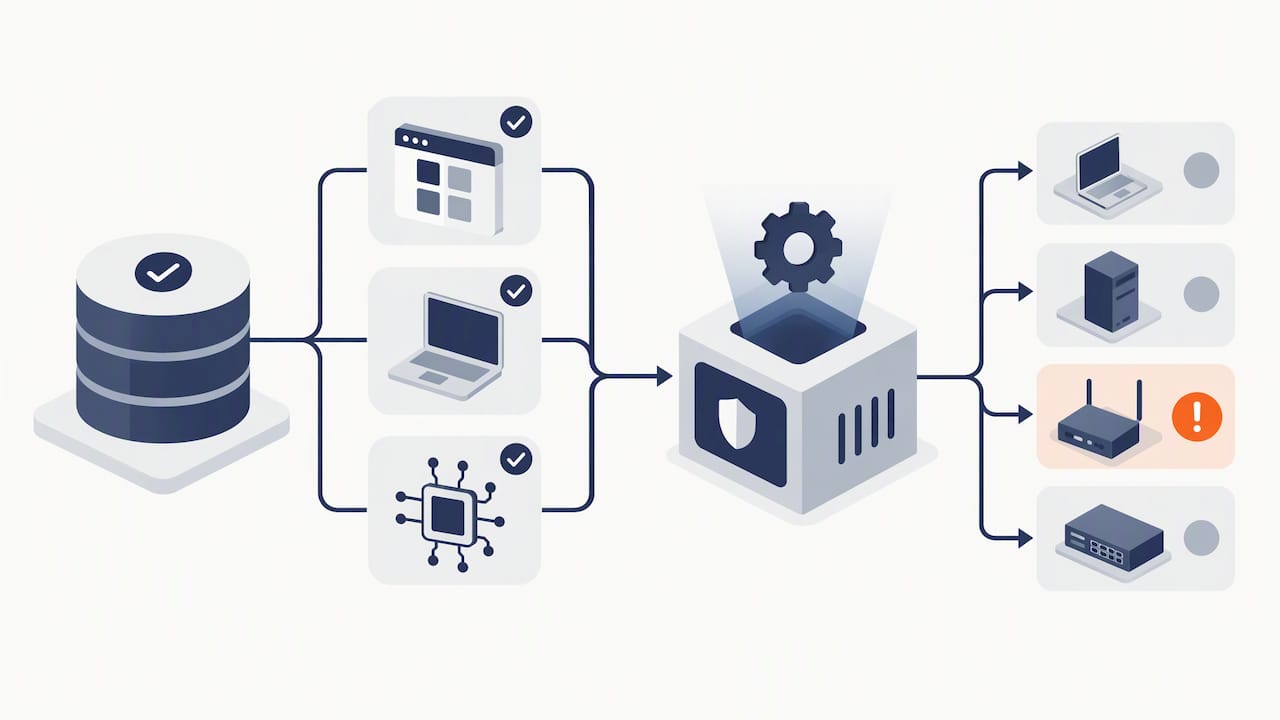
- An effective IT asset inventory should include details such as hostname, owner, operating system, last backup, and communication protocols to enable proper management.
- Most existing asset registers are outdated or incomplete because they are not regularly reconciled or managed by a designated owner.
- Starting an inventory involves network discovery, reviewing cloud billing, and assigning owners, with monthly updates to maintain accuracy.
- Fixing critical security gaps quickly can be achieved by assigning asset owners, enabling multi-factor authentication, and testing backup restores regularly.
Table of Contents
- What counts as an IT asset, and where the line gets blurry
- Hardware, software, data and the stuff nobody thinks to list
- The IT asset lifecycle and what to record at each stage
- Why IT assets matter for security, compliance and continuity
- What a usable asset inventory actually needs to include
- Where businesses get IT asset tracking wrong
- How to start an IT asset inventory this month
- What we see in the field, and what to fix first
- FAQ
- Sources
What counts as an IT asset, and where the line gets blurry
Here’s the test we use with clients: if it has value to your business and you need it to keep operating, it’s an asset. That sounds broad because it is. A laptop is obviously an asset. So is the Microsoft 365 licence that laptop logs into, the API key your accounting software uses to talk to your bank feed, and the spreadsheet your bookkeeper keeps on a shared drive.
IT assets split into two broad types. Tangible assets are physical: desktops, servers, network switches, firewalls, printers. Intangible assets are everything else: software licences, SaaS subscriptions, cloud storage, digital certificates, encryption keys, and the data itself. Honestly, intangible assets are the ones businesses forget to count, and they’re often the riskiest.
Edge cases trip people up constantly. A few rules that help:
- A SaaS account (Xero, HubSpot, Canva) is an asset even though nobody can point at it in a server room.
- A service account used by one system to talk to another is an asset, and it needs an owner just like a person’s login does.
- An API key or encryption certificate is an asset, and it expires, which means it needs a renewal date on record somewhere.
- A third-party cloud service you pay for monthly is your asset for inventory purposes, even though the provider owns the hardware.
If your business couldn’t function without it, or if losing control of it would hurt you, it’s in scope. We see a lot of businesses that only inventory hardware and leave everything else to guesswork.
Hardware, software, data and the stuff nobody thinks to list
Breaking IT assets into categories makes them easier to spot. Four buckets cover most of what you’ll find.
Hardware includes laptops, desktop PCs, servers, network switches, firewalls, Wi-Fi access points, and increasingly, operational technology (OT) devices like building sensors or factory controllers. In SMB environments we often find hardware nobody remembers buying: an old NAS box in a cupboard, a spare router from three office moves ago, still plugged in and still a target.
Software covers on-premises applications (an old practice management system installed on a local server), SaaS subscriptions (Microsoft 365, Xero, Slack), and virtual appliances running inside a cloud environment. Licence sprawl is common: businesses pay for seats nobody uses, or run unsupported versions because nobody tracks renewal dates.
Data is the asset most businesses undervalue. Production databases, backup copies, log files, financial spreadsheets, and old archives sitting in someone’s email all count. If a ransomware attack hit your business tomorrow, your data is what you’d be trying to get back.
Then there’s the category that catches businesses out:
- Digital certificates and encryption keys, which quietly expire and break services when nobody’s watching.
- Service accounts and API credentials that systems use to talk to each other without a human involved.
- Entries in a software bill of materials (SBOM) that tell you what components your applications actually depend on.
- Shared cloud storage links that have been “temporarily” open to the public for two years.
Most asset registers we inspect list hardware fine and miss almost everything in that last group entirely.
The IT asset lifecycle and what to record at each stage
Every IT asset moves through roughly six stages, and each one has its own job. Skip the record-keeping at any stage and you lose visibility exactly when you need it most.
- Procurement. Record the purchase date, vendor, cost, and any licence terms. This is also when you should think about supply chain risk, particularly for cloud services hosted or operated offshore, as the Information Security Manual.pdf) recommends considering jurisdictional exposure before you sign.
- Deployment. Log who the asset was assigned to, where it sits on the network, and what it connects to.
- Configuration. Record security settings, software versions, and baseline configuration so you can spot drift later.
- Maintenance. Track patch status, last update date, and backup success. This is the stage that gets neglected most.
- Monitoring. Log access, usage patterns, and alerts tied to the asset.
- Retirement and disposal. Record decommission date, data wipe confirmation, and physical disposal method.
The lifecycle only works if the metadata moves with the asset. A laptop that’s “retired” but still has a company email account logged in isn’t retired, it’s a liability with a new owner you didn’t choose. We see this constantly: old devices sold on, licences cancelled, but the account itself never deactivated.
Why IT assets matter for security, compliance and continuity
You cannot secure what you don’t know exists. That’s not a slogan, it’s the entire logic behind the IDENTIFY function in frameworks like NIST’s Cybersecurity Framework, and it’s echoed directly in Australian guidance. The Foundations for modern defensible architecture guidance states that a proper asset inventory needs to include endpoints, networks, applications, cryptographic assets and data stores, along with the relationships between them, so risk can actually be assessed.
When asset visibility fails, the consequences are concrete, not abstract:
- Downtime, when a failed server nobody tracked takes a business offline with no documented recovery path.
- Data loss, when a backup job silently stopped running months ago and nobody checked.
- Audit failures, when a compliance review asks what systems hold client data and the answer is “we’re not sure”.
- Supply chain exposure, when a cloud vendor or subcontractor sits in a jurisdiction with different data protection rules than you assumed.
Boards and senior leaders need basic awareness of what exists, its value, where it lives, who can access it, and how well it’s protected, according to the Information security manual. That’s not an IT problem sitting in a basement, it’s a governance obligation that sits with the business owner.
We see this mismatch constantly: a business assumes it’s “covered” because IT handles backups, while nobody has confirmed a restore has ever actually been tested.
What a usable asset inventory actually needs to include
A spreadsheet with device names on it isn’t an inventory, it’s a list. A usable inventory captures enough detail to support security decisions and, ideally, feeds into automated tools instead of living in someone’s memory.
| Field | Why it matters |
|---|---|
| Hostname and IP address | Identifies the asset on the network for monitoring and response |
| Owner | Someone accountable for patching, renewal and decommissioning |
| Operating system and version | Flags unsupported or end-of-life software |
| Criticality rating | Tells you what to fix first when something breaks |
| Active communication protocols | Shows how the asset talks to others, useful for segmentation |
| Last backup date | Confirms recoverability, not just that a backup “exists” |
That field list draws directly on OT-specific guidance from Foundations for OT cybersecurity, which recommends capturing hostname, IP address, protocols, criticality and logging status, organised by a taxonomy so you can prioritise protection where it counts.
For larger or more mature environments, machine-readable formats matter. A software bill of materials (SBOM), hardware bill of materials (HBOM), or AI bill of materials (AIBOM) increases traceability and feeds directly into automated vulnerability scanning, according to the foundations for modern defensible architecture guidance. Automation is what turns a static list into something that actually catches a new, unpatched device the day it joins the network rather than six months later during an audit, as detailed in Automation Consulting for Mid-Market Operations Leaders. The same guidance is blunt about the trade-off: automation without policy creates alert fatigue, so what you automate should be tuned to business criticality, not switched on for everything at once.
Pro Tip: Start with the fields you can actually keep current (owner, hostname, OS, backup date) and add SBOM or MAC-level detail once that baseline is reliable.
For businesses weighing up how to formalise this, our guide to IT asset management walks through what a properly maintained ITAM process looks like in practice.
Where businesses get IT asset tracking wrong
We inspect a lot of “existing” asset registers in the first few weeks of onboarding a new client, and honestly, most of them are wrong within minutes of opening the file.
- The spreadsheet was last updated during a project eighteen months ago and nobody’s touched it since.
- SaaS tools paid for on a company card never made it onto any list, so shadow IT grows quietly in the background.
- No single person owns the asset register, so when a laptop leaves the business, the account that logged into it doesn’t.
- Someone assumes backups are running because a vendor mentioned backups were “set up” three years ago, and nobody’s ever tested a restore.
That last one is the scenario we see cause the most damage. A client assumes they’re covered. Then a server fails, or ransomware hits, and the “backup” turns out to be a job that stopped completing months earlier with no alert going anywhere useful.
Pro Tip: Pick one person to own the asset register, even in a ten-person business. An inventory with no owner decays within a year, every time.
How to start an IT asset inventory this month
You don’t need expensive software to get started. You need a method and someone accountable for running it.
- Run a network discovery scan. Tools that sweep your network will surface devices nobody remembers connecting, which is more common than most owners expect.
- Check your cloud billing statements. Credit card and bank statements often reveal SaaS subscriptions that never made it onto any official list.
- Review user permissions. Audit who has access to what, because permission sprawl is usually where old service accounts and forgotten logins hide.
- Triage by criticality. Rank assets by what would hurt most if lost: client data first, then operational systems, then everything else.
- Assign an owner to every asset. No exceptions. An asset without an owner is the one that doesn’t get patched.
- Automate what you can. Start with discovery scans and patch status reporting. Save SBOM-level detail for later once the basics are solid.
- Reconcile monthly, not annually. A yearly review is already stale by the time you finish it.
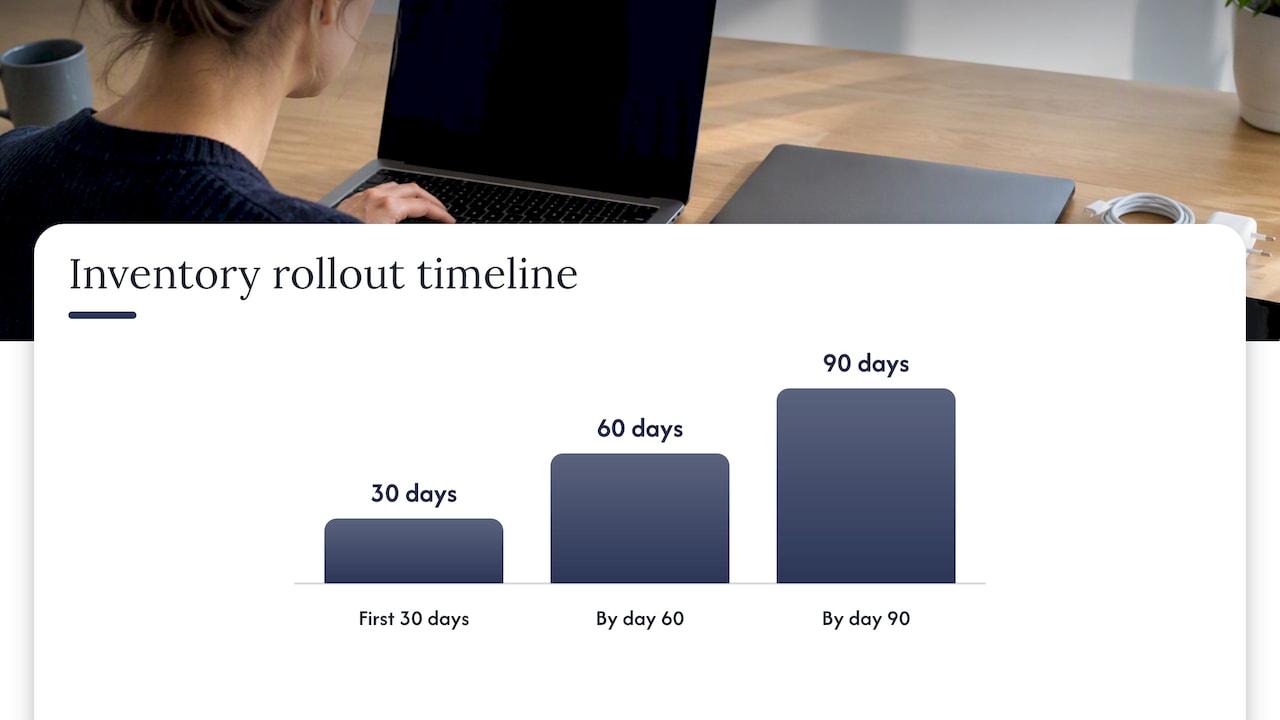
A rough 30/60/90 day plan works well for small teams: in the first 30 days, run discovery scans and list everything you find, including SaaS tools from billing records. By day 60, assign owners and criticality ratings to everything on the list. By day 90, automate at least patch status tracking and set a monthly reconciliation habit that actually sticks.
Pro Tip: Don’t wait for a “big bang” inventory project. A messy list you update monthly beats a perfect one you built once and never touched again.
For a structured version of this process tailored to smaller Queensland businesses, our IT asset management checklist breaks it down step by step. And if you want a view on prioritising what matters most, our cyber security risk assessment checklist is a useful companion piece.
What we see in the field, and what to fix first
We’ve walked into businesses with twenty staff and a device list that hasn’t been touched since the office moved buildings. One client genuinely believed their backups were fine because a previous provider had mentioned setting them up years earlier. Nobody had ever tried a restore. When a server died, the backup job had been silently failing for months.
Another common pattern: a business owner hands us a laptop list and says “that’s everything.” Then we find eleven SaaS subscriptions on the company credit card that nobody in IT knew existed, several with admin accounts still active from staff who left over a year ago.
If you fix nothing else this year, fix three things: assign an owner to every asset, turn on multi-factor authentication everywhere it’s available, and actually test a backup restore rather than trusting that it “probably works.” Those three moves close more risk than almost anything else we recommend, and they cost far less than the incident they prevent.
We approach this with small teams by starting narrow: get the top twenty critical assets owned and documented properly before worrying about the rest. Momentum beats perfection.
— Matt
FAQ
What is a technology asset?
A technology asset is any hardware, software, cloud service, or data resource that holds value for a business and supports its operations. This includes physical devices like laptops and servers as well as intangible items like software licences and SaaS subscriptions.
Is a PC considered an asset?
Yes, a PC is a tangible IT asset because it has value to the business and is typically required for day-to-day operations. It should be tracked with details like its owner, operating system, and patch status throughout its lifecycle.
What does asset mean in business terms?
In business terms, an asset is any resource with economic value that a business owns or controls and expects to benefit from. IT assets are a specific category covering hardware, software, cloud services, and data.
What is asset management in simple terms?
Asset management is the practice of tracking what you own, who’s responsible for it, and its condition throughout its life, from purchase to disposal. For IT specifically, that means knowing what devices, software and data exist, who owns them, and whether they’re secure and backed up.