
Tactics, techniques and procedures are the “how” of an attack, broken into three levels of detail: the goal (tactic), the method (technique), and the exact sequence of steps (procedure). The examples that matter most right now are phishing (MITRE ATT&CK T1566), exploitation of public-facing applications (T1190), credential theft (T1078 and T1003), and ransomware deployment (T1486). If you fix patching, turn on MFA everywhere, and get backups actually working, you’ve blocked most of what we see hit small business networks.
TL;DR:
- Prioritizing patching internet-facing services and enabling MFA on all accounts can block most common small business attack vectors, especially credential theft.
- Focusing on logging, detection, and testing backups is crucial, as many SMBs neglect these basics, leaving critical gaps in their defenses.
- Understanding and mapping tactics and techniques to ATT&CK IDs enables targeted detection and mitigation instead of vague, ineffective warnings.
- Effective defense requires implementing layered controls like patching, MFA, application control, EDR, and immutable backups, not relying on a single security tool.
- Regularly reviewing privileged access, removing unnecessary accounts, and enforcing MFA significantly reduce the risk of a compromised admin account affecting multiple clients.
Table of Contents
- What TTPs actually mean (and why ATT&CK mapping matters)
- Common tactics we see in the wild
- Techniques defenders can map straight to ATT&CK IDs
- How an attack actually unfolds, step by step
- Turning these examples into actual mitigations
- What we see in real SMB networks (and where it goes wrong)
- Your defence checklist for this week
- Where SMBs waste their security budget
- How IT Start helps close these gaps
- Sources
- FAQ
What TTPs actually mean (and why ATT&CK mapping matters)
Honestly, most people use “TTP” loosely, so let’s be precise. A tactic is the attacker’s goal, like gaining initial access or moving laterally. A technique is how they achieve it, say, phishing or exploiting a public-facing app. A procedure is the specific implementation an actual threat group used, down to the tool and the command line.
MITRE ATT&CK matters because it gives every technique an ID, which means your SOC can map what they observed directly to detection logic and mitigation controls instead of describing incidents in vague prose. A few examples of how that mapping works in practice:
- Phishing (T1566) maps to email security controls, DMARC enforcement, and user reporting training.
- Exploit public-facing application (T1190) maps to patch cadence, web application firewalls, and exposure scanning.
- Valid accounts (T1078) maps to MFA, conditional access policies, and privileged account reviews.
Once you’re speaking in ATT&CK IDs, it’s much easier to cross-reference an incident against controls you already have, or don’t.
Common tactics we see in the wild
We see the same handful of tactics again and again in SMB environments, usually in this order:
- Initial access. Phishing is still the biggest door in, but exploitation of public-facing services runs a close second. Vulnerabilities in products like Telerik UI, Microsoft Exchange, and Citrix have all been used as real-world entry points over the years, and CISA’s AA24-190A advisory notes that sophisticated actors can weaponise a public proof-of-concept exploit within hours or days of it being released. Valid accounts, usually stolen or reused credentials, are the quiet third option.
- Persistence. Once in, attackers plant web shells on compromised servers, create scheduled tasks that relaunch their tools, or install rogue services that survive a reboot.
- Lateral movement. RDP and SMB get abused constantly, often with the same credentials the attacker just stole. If one account has domain admin rights it shouldn’t, that account becomes the highway across the whole network.
- Exfiltration and impact. Data gets zipped into archives and pushed out over encrypted HTTPS channels that look like normal traffic. Then, if it’s a ransomware operation, encryption follows.
The ordering isn’t fixed; some crews skip straight from access to encryption in under 24 hours. But this is the shape of almost every incident we’ve reviewed after the fact.
Techniques defenders can map straight to ATT&CK IDs
Getting specific here actually helps, because vague warnings about “hackers” don’t give your team anything to detect against. These are the technique IDs worth building alerts around:
- Phishing variants, spearphishing link (T1566.002), spearphishing attachment (T1566.001), and OAuth token theft, where the attacker skips the password entirely and steals a session token instead. ACSC’s advisory on copy-paste compromises documents OAuth token theft and email-tracking reconnaissance as recurring techniques against Australian networks.
- Credential theft, OS credential dumping (T1003), keylogging, and token theft (T1528). Once an attacker has one set of working credentials, they usually have several.
- Exploit to web shell, exploiting a public-facing application (T1190) followed by dropping a web shell (T1505.003) for persistent command and control that blends into normal web traffic.
- Living off the land, PowerShell (T1059.001), the Windows command shell, and scheduled tasks, all legitimate tools that attackers abuse specifically because they don’t trigger old-style antivirus signatures.
That last point is the one most businesses underestimate. If your only defence is signature-based antivirus, none of this shows up until it’s too late.
How an attack actually unfolds, step by step
Seeing the individual techniques is one thing. Watching them chain together is what actually changes how you defend. Here’s a phishing-driven compromise, the way we’ve seen it play out more than once:
- Targeting and lure. The attacker sends a convincing email, often spoofing an invoice or a shared document notification. Watch for: unusual sender domains, mismatched reply-to addresses.
- Credential capture. The victim clicks through to a fake login page and hands over credentials or an MFA token. Watch for: failed then successful logins from a new location, impossible travel alerts.
- Account misuse. The attacker logs in as the victim, sets up a mail forwarding rule, and starts scoping the network. Watch for: new inbox rules, mailbox access from unfamiliar IPs.
- Lateral movement. Stolen credentials get tried against other systems, often via RDP. Watch for: repeated authentication attempts across multiple hosts in a short window.
- Payload deployment. Ransomware or a data exfiltration tool gets pushed out. Watch for: mass file renames, sudden spikes in outbound traffic.
Pro Tip: The exploit-to-webshell version of this chain follows a similar arc, discovery of a vulnerable public app, remote code execution, a dropped web shell for persistence, credential harvesting, then lateral movement. If you only monitor one thing on your public-facing servers, monitor new files being written to web directories.
Turning these examples into actual mitigations
Every technique above has a control that blunts it, and the Essential Eight maturity model from ASD is still the best free framework for prioritising which one to fix first. It substantially reduces risk from the most common TTPs we’ve covered, and it maps neatly onto what we actually deploy for clients.
- Patching internet-facing services kills T1190 before it starts. If you’re running Exchange or Citrix, patch it as soon as possible after a critical advisory, not next quarter.
- MFA everywhere breaks T1078 and T1003 cold. Stolen credentials without a second factor are mostly useless.
- Application control stops unapproved executables and scripts, including a lot of the PowerShell abuse under T1059.
- EDR with behavioural detection catches living-off-the-land techniques that signature antivirus simply misses.
- Immutable, tested backups are what actually stops T1486 ransomware from ending your business, not the encryption fight, the recovery fight.
Log authentication events, remote access sessions, and process execution on public-facing servers, and keep at least 90 days of retention if you can. You can’t investigate what you didn’t log.
What we see in real SMB networks (and where it goes wrong)
We reviewed a case that mirrors a documented pattern: a managed service provider’s administrator account was compromised and used to install PlugX malware across multiple customer networks. That’s the nightmare scenario for any business trusting an outsourced IT provider, and it’s exactly why we treat privileged access as the crown jewels, not an afterthought.
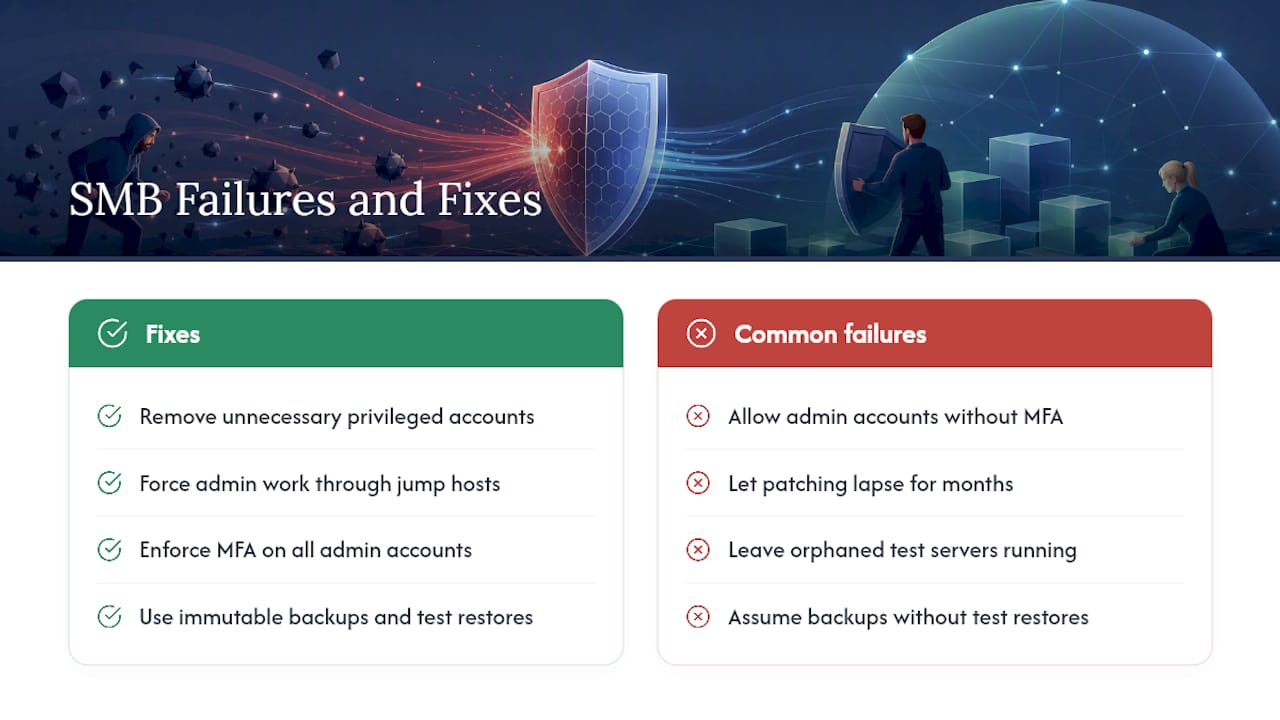
In practice, we walk into new client environments and find the same problems constantly: no MFA on the admin accounts that matter most, patching that’s “scheduled” but hasn’t actually run in months, orphaned test servers nobody remembers standing up, and backups that “should be working” but haven’t been test-restored in years. Many businesses genuinely believe they’re covered. They’re not, until we try to restore something.
The trust relationship between an SMB and its IT provider is exactly what attackers go after. One compromised admin account can become the keys to every client network that provider touches. That’s not a hypothetical, it’s a documented pattern.
What we actually do: review every privileged account and cut the ones that don’t need to exist, put admin work through dedicated jump hosts instead of direct RDP, roll out MFA across the board, deploy EDR, and get backups onto immutable storage that ransomware can’t touch.
Your defence checklist for this week
Don’t try to fix everything at once, that’s how projects stall. Prioritise like this:
- This week: Patch every internet-facing service, especially anything running Exchange, Citrix, or a VPN gateway. Enable MFA on every account, starting with anyone who has admin rights. Inventory your environment and kill any orphaned or forgotten test services.
- Next 30 days: Deploy or properly tune EDR so it’s actually catching behavioural anomalies, not just sitting there. Apply application control to stop unapproved scripts running. Test your backups with a real restore, not a status check.
- Ongoing monitoring: Increase logging on authentication and remote access, and build detection rules for web shell indicators, new files appearing in web directories, unexpected process spawns from IIS or Apache.
Pro Tip: If you can only do one thing this week, do the MFA rollout. It’s the single control that breaks the largest number of attack chains we’ve documented, credential theft, valid account abuse, and most phishing follow-through all rely on a password alone being enough.
Where SMBs waste their security budget
Small businesses tend to spend on the wrong things first, usually a shiny new firewall appliance, before fixing the boring stuff: patch cadence, MFA coverage, and backup testing. In our first 30 days with a new client we’re auditing exactly those three, not buying new hardware. Sixty days in, we’re rolling out EDR and tightening privileged access. Ninety days in, we’re running tabletop exercises so the team knows what to do when, not if, something gets through. The biggest mistake we see is businesses betting everything on one control, one firewall, one antivirus product, and assuming that’s coverage. It isn’t. Layered, boring, tested basics beat any single silver bullet every time.
— Matt
How IT Start helps close these gaps
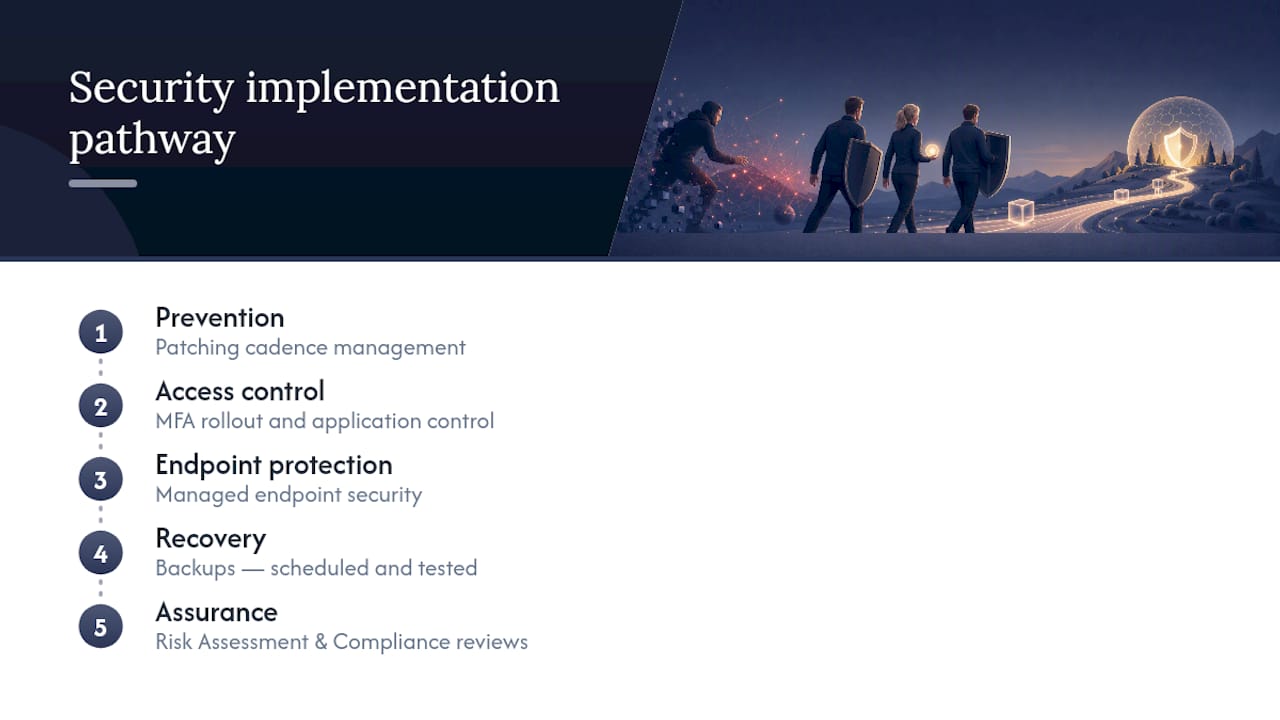
Reading a checklist is one thing, actually getting MFA rolled out across forty staff accounts without breaking anyone’s workflow is another. IT Start works with Brisbane businesses to do exactly that: Proactive Managed Security covering patching cadence, MFA rollout, application control, and endpoint protection, plus backup strategies that get tested, not just scheduled. We also handle Risk Assessment & Compliance reviews so you know exactly where your privileged accounts and public-facing services stand against the Essential Eight before an attacker finds out first.
If you’re not sure whether your current setup would survive a phishing campaign or a credential-stuffing attempt, that’s worth finding out now rather than after an incident. Get in touch through the cyber security page for a straightforward assessment of where your risk actually sits.
Sources
For deeper technical detail: MITRE ATT&CK for technique IDs, the Essential Eight maturity model, CISA’s AA24-190A advisory, and NIST for control frameworks. For strategy alignment beyond security controls alone, see how AML Guard’s compliance program guidance approaches control mapping over chasing threat actor labels, a principle that applies just as well to cybersecurity as it does to compliance.
FAQ
What is an example of a TTP?
A phishing email that links to a fake login page is a classic TTP example, mapped in MITRE ATT&CK as spearphishing link, T1566.002. The tactic is initial access, the technique is phishing, and the procedure is the exact lure and infrastructure a specific attacker used.
What does TTP stand for in cybersecurity?
TTP stands for tactics, techniques and procedures, the three levels of detail security teams use to describe how an attack actually happened. Tactics are the goal, techniques are the method, and procedures are the specific step-by-step execution.
What are some examples of online threats businesses should watch for?
The ones we see most in SMB environments are phishing, credential stuffing, exploited public-facing applications, ransomware, business email compromise, and web shells left on unpatched servers. Living-off-the-land techniques using PowerShell or scheduled tasks are increasingly common because they slip past signature-based antivirus.
Can you give examples of cyber terrorism or nation-state style attacks?
Nation-state and cyber terrorism incidents typically use the same underlying techniques as criminal groups, exploitation of unpatched public-facing systems, credential theft, and long-term persistence via web shells, just with more resourcing and patience. ACSC’s advisory on copy-paste compromises documents these techniques being used against multiple Australian networks.
How much does IT Start charge for a cybersecurity assessment?
Pricing isn’t published for IT Start’s cyber security services, since every business’s environment and risk profile is different. Current pricing is available directly through the cyber security page after a quick assessment of your setup.