
If you fix nothing else this quarter, fix these eight things: enforce phishing-resistant MFA everywhere, apply least privilege to every account, encrypt data in transit and at rest, centralise your logging, segment your network around zero trust, test your backups (not just take them), roll out a CSPM tool to catch drift, and patch on a schedule instead of a whim. Those eight practices stop the majority of the cloud incidents we get called into as an MSP.
Here is the rough order to tackle them in. First 30 days: MFA on every account, admin and service accounts included, plus a working backup you have actually restored from. Next 60 days: network segmentation, centralised logging, and a CSPM tool switched on and tuned. Days 60 to 90: patching cadence locked in, incident response plan drafted, and a vendor risk review of anyone touching your cloud environment.
If budget or people are tight, start with identity. Honestly, nine times out of ten, the breach we get called about traces back to one account with no MFA and too much access.
Key Takeaways
Cloud network security works when identity controls, tested backups, and centralised logging are in place before any tool is bought to sit on top of them.
| Point | Details |
|---|---|
| MFA is priority zero | Enforce phishing-resistant MFA on every account, including admins and service accounts, before anything else. |
| Backups need testing, not assumptions | Encrypted, off-platform backups only count if you have run a full test restore. |
| Segmentation limits the damage | Zero trust microsegmentation stops a single compromised account turning into a full breach. |
| Logging enables response | Centralised, time-synchronised logs make incident response possible instead of guesswork. |
| IT Start builds the 30/60/90 plan | IT Start runs security audits and managed services for Brisbane SMBs, turning this checklist into a written, sequenced plan. |
Table of Contents
- What is cloud network security best practice, really?
- Who is responsible for what in the shared responsibility model?
- How should you prioritise cloud security spending?
- What identity and access controls actually stop breaches?
- How does zero trust segmentation reduce cloud risk?
- Which connectivity method actually protects hybrid traffic?
- How do you protect public-facing cloud services?
- What encryption and key management practices matter most?
- Why does centralised logging matter more than most tools?
- When should you adopt CSPM or CNAPP tooling?
- How often should you patch cloud workloads?
- How do you stop configuration drift in Infrastructure as Code?
- What do containers and serverless functions need differently?
- What does a real cloud backup strategy look like?
- How do you build a cloud incident response plan?
- How do you manage third-party and MSP risk?
- What does a 30/60/90-day rollout actually look like?
- What most businesses get wrong (and how to fix it fast)
- Our perspective: straight talk from an MSP that manages SMB cloud estates
- How IT Start can help your business get this sorted
- Sources
- FAQ
What is cloud network security best practice, really?
Cloud network security covers the traffic, connectivity, and exposure controls that protect workloads running in someone else’s data centre rather than your own server room. That is the core difference from traditional network security: there is no physical perimeter to lock down. Your “network edge” is now an API, an identity token, or a misconfigured storage bucket sitting on the public internet.
Traditional network security assumed a hardened boundary with trusted internals. Cloud environments do not work that way. Workloads spin up and disappear in minutes, control planes are managed through web consoles and APIs, and a single leaked credential can expose more than a firewall breach ever could.
Not every control applies evenly across service models:
- IaaS (virtual machines, storage, networking): you own most of the network configuration, patching, and segmentation.
- PaaS (managed databases, app platforms): the provider handles infrastructure patching, you handle access control and data configuration.
- SaaS (Microsoft 365, hosted line-of-business apps): you are almost entirely dependent on identity and configuration controls, since you rarely touch the underlying network.
Know which model you are running before you decide what “secure” even means for your business.
Who is responsible for what in the shared responsibility model?
The shared responsibility model says the cloud provider secures the infrastructure underneath the service, and you secure everything you put on top of it: your data, your identities, your configurations. We see this misunderstood constantly. A client assumes Microsoft or AWS is “handling security” because they are paying for a premium tier. They are not handling your access controls. That is on you.
Roughly, responsibilities split like this:
- CSP-owned: physical data centres, hypervisor security, network hardware, and the resilience of the underlying platform.
- Customer-owned: identity and access management, data classification, encryption key choices, network configuration within your tenancy, and application-layer security.
- Shared: patching (OS patches are often yours, platform patches are theirs), logging configuration, and incident response coordination.
Before you sign anything, ask your provider or auditor these questions:
- Which controls are inherited automatically versus configured by us?
- Can we get IRAP or equivalent independent assessment evidence for this service?
- Is this service Secure by Default, or do we need to switch on the safe settings ourselves?
How should you prioritise cloud security spending?
Run every fix through a simple filter: risk multiplied by exposure multiplied by how easy it is to fix. A misconfigured public storage bucket holding customer data scores high on all three; fix it today. A theoretical supply chain risk from a vendor’s subcontractor scores lower on fixability right now; put it on the roadmap.
For a typical 20 to 30 staff business, the rule of thumb is: identity first, logging second, backups third. Everything else waits.
- If you have no MFA, that is priority zero. Full stop.
- If you cannot see what happened during an incident because logs were never centralised, that is priority one.
- If your “backup” has never been test restored, treat it as priority two, because you likely do not have a backup at all, you have a hope.
We had a logistics client whose entire cloud security budget for the year went on a fancy firewall appliance before anyone checked if MFA was even enabled. It was not. Fix the cheap, high impact stuff before the expensive, low impact stuff.
What identity and access controls actually stop breaches?
Phishing-resistant MFA and least-privilege access are the two controls that do the most work against account takeover, and it is not close. Microsoft’s own guidance on Essential Eight multi-factor authentication treats MFA as a foundational control precisely because credential theft remains the easiest way into a cloud environment.
Here is the practical rollout order:
- Enforce MFA on every account: users, admins, service accounts, everything. No exceptions for “the one legacy app that doesn’t support it” (find a workaround instead).
- Apply least privilege. Most SMB tenants we audit have three or four Global Admins when they need one, maybe two.
- Move to short-lived credentials or managed identities wherever the platform supports it, instead of static API keys sitting in a config file.
- Rotate any credential that cannot be made short-lived, on a schedule you actually follow.
- Set up a break-glass account with its own hardware key, stored somewhere physical, not in the same password manager as everything else.
Service principals and API keys are where this falls apart in practice. We regularly find API keys committed straight into code repositories, sometimes public ones. Scan your repos for exposed secrets before someone else finds them for you.
Pro Tip: Test your privilege boundaries the same way an attacker would. Create a low-privilege test account and try to access something it should not be able to touch. If it works, your least-privilege model has a hole in it.

How does zero trust segmentation reduce cloud risk?
Segmentation and zero trust stop an attacker who gets a foothold from wandering freely through your whole environment. Microsegmentation, specifically, is high priority for anything touching sensitive data, and CISA’s zero trust microsegmentation guidance lays out why lateral movement is one of the hardest things to detect once it starts.
In practice, this means splitting your VPC into subnets by function (web tier, application tier, database tier), applying service-to-service policies so workloads only talk to what they genuinely need to, and treating every internal connection as untrusted until proven otherwise, not just traffic crossing the outer boundary.
A sensible rollout order looks like this:
- Map what actually talks to what today (most businesses genuinely do not know).
- Segment the database tier from the web tier first; it is the highest value target.
- Apply application-level policies before you try to lock down individual virtual machines.
- Test that legitimate traffic still flows before you go home for the day.
Pro Tip: Start with application-level policy, not per-VM rules. Trying to microsegment every single instance in a 40 person business is a fast way to burn a week and break something in production.
Which connectivity method actually protects hybrid traffic?
For anything business-critical, private connectivity or encrypted tunnels with proper key management beat exposing traffic over the open internet, every time. The connectivity choice you make between your office and your cloud environment matters more than most SMBs realise.
- VPN: cheap, quick to set up, adequate for smaller workloads, but throughput and latency can suffer under load.
- Private link or dedicated connection: higher cost, but consistent performance and traffic never touches the public internet. Worth it once your cloud environment handles anything regulated or genuinely sensitive.
- VPC peering: good for connecting your own cloud networks together, but it is not a substitute for proper access control between them.
Whichever you choose, rotate encryption keys on a schedule, set performance thresholds that trigger alerts, and build in failover so a single link going down does not take the business offline.
How do you protect public-facing cloud services?
Treat every internet-facing endpoint as hostile by default. If it is reachable from the public internet, assume someone is already scanning it.
Front public services with a Web Application Firewall, a CDN, and DDoS mitigation before they go live, not after the first attack. A checklist worth running quarterly:
- Confirm WAF rulesets are current and actually blocking, not just logging.
- Enforce TLS 1.2 or higher everywhere; disable older protocol versions.
- Use CDN caching to absorb traffic spikes and reduce direct load on origin servers.
- Run staged attack simulations against your own endpoints before an attacker does it for real.
- Audit for unexpected open ports or forgotten test services still sitting exposed.
That last point catches more businesses than you would think. Forgotten staging environments are a genuinely common way in.
What encryption and key management practices matter most?
Encrypt data at rest and in transit, and manage your keys through a proper Key Management Service rather than leaving encryption switched off by default or keys sitting in a spreadsheet. For most SMBs, a managed KMS with regular key rotation is sufficient; Bring Your Own Key (BYOK) or a Hardware Security Module makes sense once you are handling regulated data or a client contractually demands it.
Cover these bases:
- Data in transit: TLS everywhere, no exceptions for internal traffic either.
- Data at rest: encryption enabled on every storage account and database, not just the obvious ones.
- Backups: encrypted copies, stored separately from your production keys.
- Inter-cloud transfers: encrypted tunnels, never plain HTTP between services.
Pro Tip: Check your Infrastructure as Code templates and backup scripts for hardcoded keys. We find them in old scripts more often than you would expect, sitting there for years after whoever wrote them left the business.
Why does centralised logging matter more than most tools?
Time-synchronised, central logging is the one thing that makes incident response possible instead of guesswork. Without it, you are trying to reconstruct what happened from fragments across a dozen disconnected systems, and that almost never ends well. AWS’s guidance on ACSC ISM compliance is blunt about this: get centralised logging sorted early, because retrofitting it after an incident is too late.
At minimum, capture:
- Control plane logs (who changed what, and when)
- VPC flow logs
- WAF and API gateway logs
- Workload and application logs
To make this usable rather than just a pile of data:
- Feed everything into a SIEM, even a lightweight one, rather than leaving logs scattered across native consoles.
- Integrate EDR alerts alongside network logs so you can correlate endpoint and network events.
- Build detection rules for the obvious stuff first: impossible travel logins, privilege escalation, mass file downloads.
- Set retention based on compliance obligations, not just whatever the default is.
- Watch ingestion costs closely. Logging bills creep up fast if nobody is tuning what actually gets kept.
When should you adopt CSPM or CNAPP tooling?
Cloud security posture management tools automate the detection of misconfigurations and configuration drift, and they earn their keep once your identity and logging basics are actually in place. CISA and NSA’s joint guidance is explicit that these tools work best layered on top of solid fundamentals, not as a substitute for them.
Start with a CSPM tool to catch open storage buckets, overly permissive security groups, and drift from your intended configuration. Add a CNAPP once you need workload-level protection as well as posture checks, typically once you are running containers or serverless functions at any meaningful scale.
Before switching either on, plan for:
- Alert tuning, so your team is not drowning in low-value noise within a week.
- IaC scanning integrated into your deployment pipeline, not bolted on after the fact.
- A clear remediation workflow: who fixes what, and by when.
How often should you patch cloud workloads?
Regular, prioritised patching combined with workload hardening closes off most of the exploit paths attackers actually use. This is not glamorous work, but it is the difference between a minor vulnerability and a full breach.
A workable cadence for most SMBs:
- Critical vulnerabilities on internet-facing systems: patch within 48 hours.
- High severity on internal systems: patch within two weeks.
- Everything else: monthly maintenance windows.
Hardening checklist:
- Disable unused services and default accounts on every VM image.
- Apply CIS benchmark configurations where your platform supports them.
- Scan container images before deployment, not after they are already running.
How do you stop configuration drift in Infrastructure as Code?
Treat your Infrastructure as Code templates as the single source of truth, and gate every deployment with a policy check before it goes live. Manual changes made directly in the console are how drift creeps in, and drift is how a secure configuration quietly becomes an insecure one over six months.
Watch for these unsafe defaults that show up constantly in real templates:
- Security groups left open to 0.0.0.0/0 “just for testing” and never closed.
- Storage buckets created without encryption enabled by default.
- IAM roles copied from an example online, permissions and all.
Run policy-as-code checks in your pull request pipeline, and run drift detection scans weekly so any manual change gets flagged before it becomes a habit.
What do containers and serverless functions need differently?
Treat containers and serverless functions as short-lived by nature: they come and go, so your controls need to travel with them rather than being bolted onto a fixed server.
For containers: verify image provenance, scan every image before deployment, enforce runtime policies, and apply network policies so pods only talk to what they need to.
For serverless: lock down function permissions to the bare minimum, restrict VPC access controls tightly, and never store secrets as plain environment variables. NIST’s trusted cloud architecture work shows workable patterns for retaining visibility over ephemeral workloads without sacrificing portability.
What does a real cloud backup strategy look like?
Encrypted, tested backups stored off-platform or in a second account are what actually save you in a ransomware or data loss event, not the backup you assume exists because a checkbox was ticked three years ago. ASD’s guidance for cloud tenants is direct on this: encrypted backups need to sit outside the platform being protected, with recovery tested annually at minimum.
Backup checklist:
- Scope: confirm every critical system is actually included, not just the obvious ones.
- Encryption: backups encrypted separately from production keys.
- Location: a second account or off-platform copy, never just a snapshot in the same environment.
- Immutability: snapshots that cannot be altered or deleted by a compromised admin account.
- Test a full restore quarterly, not just a file recovery.
- Document recovery time and compare it against what the business actually needs.
- Fix whatever breaks during the test, because something always does the first time.
We have lost count of the clients who told us confidently they were backed up, only to discover during onboarding that backups had been silently failing for months and nobody was checking.
How do you build a cloud incident response plan?
Test your cloud incident playbook annually, and again after any major platform change. A plan that has never been rehearsed is a document, not a plan.
Structure it around: detection, containment, eradication, recovery, and review, with clear coordination points for when you need to escalate to your cloud provider. CISA’s federal incident response playbooks recommend building automation interfaces so provider advisories feed directly into your own response process rather than sitting in an inbox unread.
- Run a tabletop exercise with a realistic scenario, like a compromised admin account, not a generic “server is down” drill.
- Confirm your logs are time-synchronised across every system involved, because forensics falls apart fast without it.
- Document chain of custody for cloud snapshots taken during an investigation.
Coordinate with your provider’s own incident response team before you need them, not during the incident itself.
How do you manage third-party and MSP risk?
Vendor risk is the blind spot we see most often. Businesses lock down their own environment tightly and then hand full access to a third-party app or contractor without asking a single question about how that vendor handles security.
Before signing with any vendor touching your cloud environment:
- Ask for assessment evidence, IRAP or equivalent, not just a marketing page claiming compliance.
- Get clarity on what logging access you retain versus what only the vendor can see.
- Ask about subcontractor visibility. Their supply chain is now part of your risk surface.
- Confirm staff vetting practices for anyone with admin access to your systems.
Contract terms worth insisting on: breach notification within a defined number of hours, not “as soon as reasonably practicable”; clear data location commitments; and a documented transition or outboarding process so you are not held hostage if the relationship ends. Partner advisory guidance for SME cybersecurity practices makes a similar point: outsourcing does not outsource accountability.
What does a 30/60/90-day rollout actually look like?
Here is a version you could hand straight to your IT team or your MSP:
Days 1 to 30 (owner: IT/security lead):
- Enforce MFA across every account, including admins and service accounts.
- Take a full backup and test restore it, at least once.
- Audit current admin access and cut anyone who does not need it.
- Turn on basic logging across your main cloud platform.
Days 31 to 60 (owner: IT team, with MSP support if outsourced):
5. Segment your network into functional tiers and apply baseline zero trust policies.
6. Centralise logs into a SIEM and set up your first detection rules.
7. Deploy a CSPM tool and clear the highest severity misconfigurations it finds.
8. Rotate any static credentials found in code or configuration files.
Days 61 to 90 (owner: security lead/MSP):
9. Lock in a patching cadence and confirm it is actually being followed.
10. Draft and tabletop-test your incident response plan.
11. Complete a vendor risk review of every third party with cloud access.
12. Set KPIs: MFA coverage percentage, number of log sources ingested, backup restore success rate.
Quick wins (MFA, backup testing) come first because they are cheap and high impact. Segmentation and CSPM rollout take longer and need more planning, so sequence them after the fast fixes are locked in, not before.
What most businesses get wrong (and how to fix it fast)
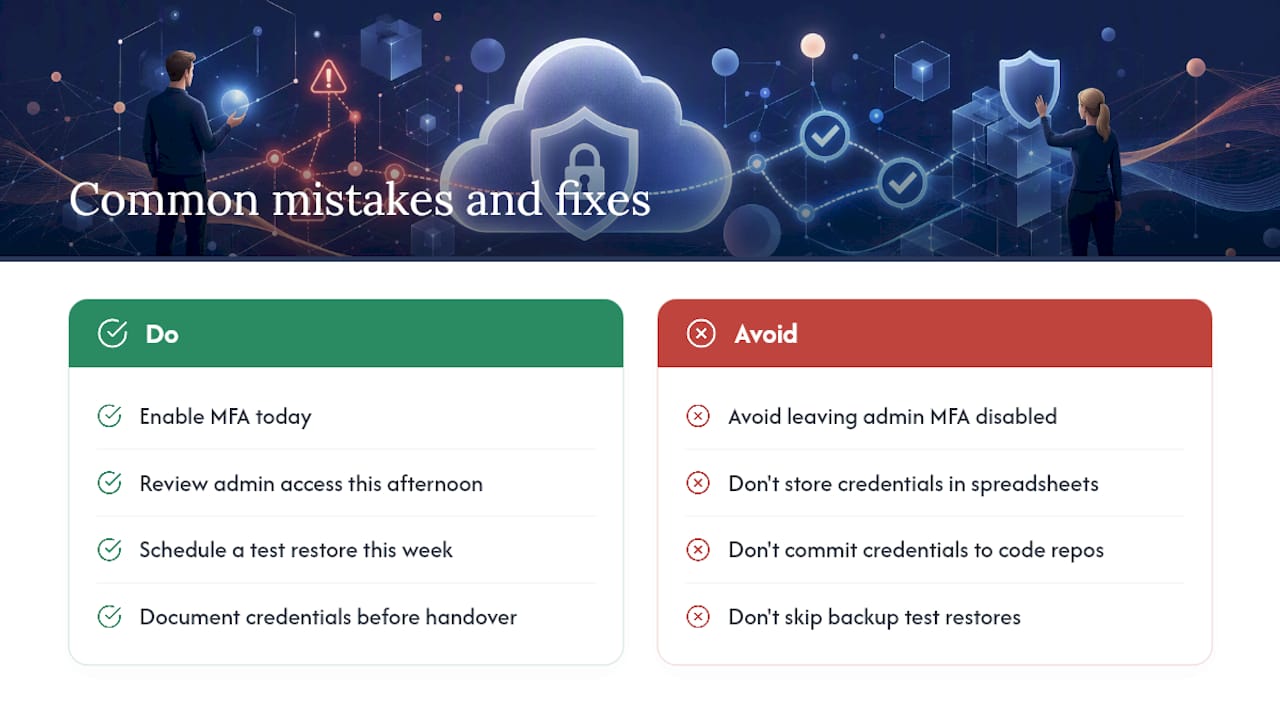
Honestly, the pattern repeats across almost every new client we onboard. No MFA on at least one admin account, “just in case IT needs quick access.” Credentials sitting in a spreadsheet or, worse, committed into a code repository years ago and forgotten. Backups that have never once been restored, so nobody actually knows if they work.
We audited a 30 person professional services firm last year that had four different Global Admin accounts in Microsoft 365, three of which belonged to staff who had left the business over a year earlier. Nobody had reviewed access in that entire time. That is not an unusual finding. It is close to the median.
The gap between what businesses assume and what is actually true is the recurring theme. A director will tell you confidently, “we’re backed up, we’re covered.” Nine times out of ten there has been no test restore, ever. Verizon’s Data Breach Investigations Report consistently shows credential-based attacks as one of the dominant breach paths year after year, and yet MFA gaps remain one of the most common findings in our own audits.
Quick fixes that take hours, not weeks: enable MFA today, review admin access this afternoon, schedule a test restore this week. Slower fixes: segmentation, CSPM rollout, formal incident response plans.
Pro Tip: If you are handing off a cloud environment to a new MSP or IT team, document every credential, every account, and every backup location before the handover, not after. Half the mess we inherit comes from incomplete handovers where nobody wrote anything down.
Our perspective: straight talk from an MSP that manages SMB cloud estates
Most of what gets sold as “cloud security” is more complicated than what a 20 to 50 person business actually needs. You do not need every tool on the market. You need MFA everywhere, backups that are actually tested, logs you can search when something goes wrong, and someone checking access levels every quarter instead of never.
A typical engagement we run looks like this: week one is an access and configuration audit, which usually turns up at least one glaring gap (no MFA on a service account, a public storage bucket, backups quietly failing). Weeks two to four fix the cheap, high impact stuff. Months two and three build out segmentation, logging, and a tested incident response plan. Most businesses see the biggest risk reduction in that first month, from the cheapest fixes, not the expensive tooling that comes later.
Call an MSP when you do not have someone internally who can own this full time. Expect a proper audit, a written 30/60/90 plan, and honesty about what is genuinely broken, not just a sales pitch dressed up as a security review.
How IT Start can help your business get this sorted
Working through this checklist alone with a small internal IT team is a lot to carry, especially when you are also fielding helpdesk tickets and keeping the lights on. IT Start runs exactly this kind of work for Brisbane businesses every day: managed security, Microsoft 365 configuration and hardening, backup and recovery that actually gets tested, and full network security audits that tell you what is genuinely broken rather than what looks fine on paper.
If you read through this checklist and are not confident you could tick off even the first 30 days with certainty, that is worth a proper look. Book a cyber security review with IT Start and get a written 30/60/90 plan built around your actual environment, not a generic template. If your priority right now is cloud configuration and migration support, IT Start’s cloud services team can take that off your plate directly.
Sources
- Essential Eight: multi-factor authentication guidance (Microsoft Learn)
- NIST SP 800-144 guidance on cloud security and shared responsibility (NIST)
- Cyber
FAQ
What are some best practices for cloud security?
Enforce MFA everywhere, apply least privilege, encrypt data in transit and at rest, centralise logging, segment your network, test backups regularly, and use CSPM tooling to catch misconfigurations.
What are the best practices for network security in a cloud environment?
Focus on zero trust microsegmentation, secure connectivity through private links or encrypted tunnels, WAF and DDoS protection on public endpoints, and continuous logging of network traffic.
What are the four Cs of cloud security?
Definitions vary across vendors and frameworks, but a common version refers to Cloud, Cluster, Container, and Code, representing layered security controls from the infrastructure down to the application.
What are the top cloud security risks?
Misconfigured access and identity controls, untested or missing backups, and lack of centralised visibility into logs and traffic consistently top the list of risks we see in real SMB audits.
How does IT Start help businesses with cloud network security?
IT Start runs network security audits, manages Microsoft 365 configuration, and builds tested backup and recovery processes for Brisbane SMBs, turning best practice checklists into a prioritised, written plan.